Auto engine stop Acura TLX 2018 User Guide
[x] Cancel search | Manufacturer: ACURA, Model Year: 2018, Model line: TLX, Model: Acura TLX 2018Pages: 589, PDF Size: 35.45 MB
Page 132 of 589
131
Controls
This chapter explains how to operate the various controls necessary for driving.
Clock.................................................. 132
Locking and Unlocking the Doors
Key Types and Functions .................. 133
Low Keyless Access Remote Signal Strength .. 135Locking/Unlocking the Doors from the Outside .......................................... 136
Locking/Unlocking the Doors from the Inside ............................................. 144
Childproof Door Locks ..................... 146
Auto Door Locking/Unlocking .......... 147
Opening and Closing the Trunk ....... 148
Security System ................................ 151
Immobilizer System .......................... 151
Security System Alarm ...................... 151
Opening and Closing the Windows .... 154Opening and Closing the Moonroof....... 156Operating the Switches Around the
Steering Wheel ENGINE START/STOP Button............. 157
Turn Signals ..................................... 160
Light Switches.................................. 161
Fog Lights
*...................................... 164
Daytime Running Lights ................... 164
Auto High-Beam .............................. 165
Wipers and Washers ........................ 168
Brightness Control ........................... 171
Rear Defogger/Heated Door Mirror Button........................................ 172
Driving Position Memory System ...... 173
Adjusting the Steering Wheel .......... 175
Adjusting the Mirrors ....................... 176
Interior Rearview Mirror ................... 176
Power Door Mirrors ......................... 177
Adjusting the Seats .......................... 179
Front Seats ...................................... 179
Interior Lights/Interior Convenience
Items ................................................ 188
Interior Lights .................................. 188
Interior Convenience Items .............. 191
Climate Control System ................... 204
Using Automatic Climate Control .... 204
Automatic Climate Control Sensors......211
* Not available on all models
18 ACURA TLX-31TZ36300.book 131 ページ 2017年2月21日 火曜日 午後2時32分
Page 159 of 589
158
uuOperating the Switches Around the Steering Wheel uENGINE START/STOP Button
Controls
If you leave the vehicle for 30 to 60 minutes with the transmission in (P and the
power mode in ACCESSORY, the vehicle automa tically goes into the mode similar to
VEHICLE OFF (LOCK) to avoid draining the battery.
When in this mode:
The steering wheel does not lock.
You cannot lock or unlock doors with th e remote transmitter or the keyless access
system.
Press the ENGINE START/STOP button twice to switch the mode to VEHICLE OFF
(LOCK).
If you open the driver’s doo r when the power mode is set to ACCESSORY, a warning
beep sounds.
■Automatic Power Off
■Power Mode Reminder
Canadian models
18 ACURA TLX-31TZ36300.book 158 ページ 2017年2月21日 火曜日 午後2時32分
Page 174 of 589
173
uuOperating the Switches Around the Steering Wheel uDriving Position Memory System
Continued
Controls
Driving Position Memory System
You can store two driver’s seat (exc ept for power lumbar and thigh support*) and
door mirror positions with the dr iving position memory system.
When you unlock and open the driver’s door with a remote transmitter, or keyless
access system, the seat and door mirrors adjust automatically to one of the two
preset positions.
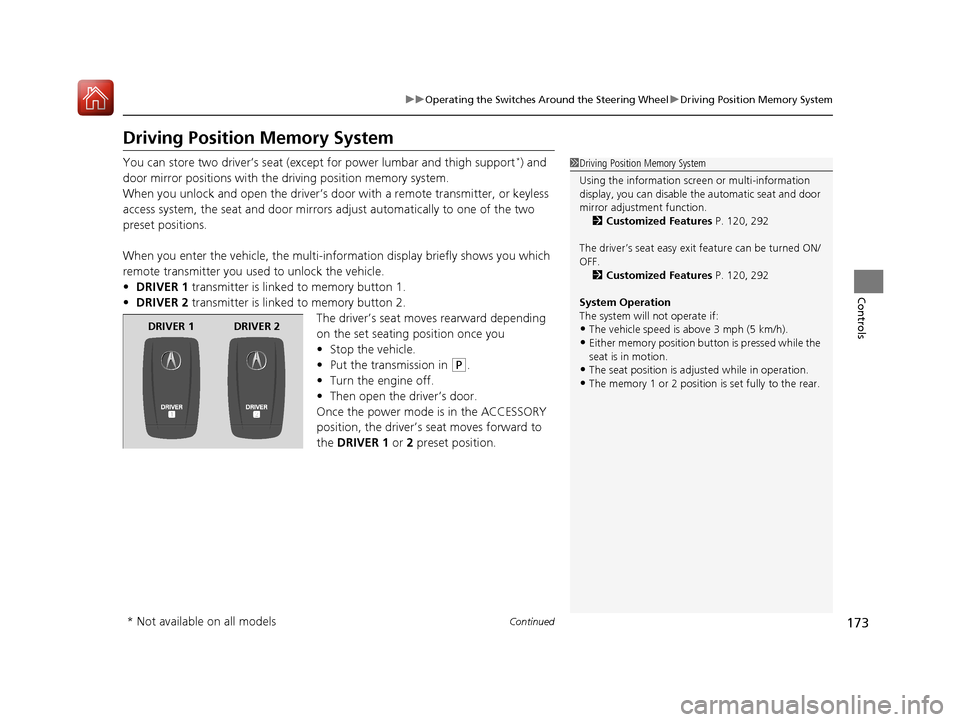
When you enter the vehicle, the multi-in formation display briefly shows you which
remote transmitter you used to unlock the vehicle.
• DRIVER 1 transmitter is linked to memory button 1.
• DRIVER 2 transmitter is linked to memory button 2.
The driver’s seat moves rearward depending
on the set seating position once you
•Stop the vehicle.
• Put the transmission in
(P.
• Turn the engine off.
• Then open the driver’s door.
Once the power mode is in the ACCESSORY
position, the driver’s seat moves forward to
the DRIVER 1 or 2 preset position.
1 Driving Position Memory System
Using the information scr een or multi-information
display, you can disable th e automatic seat and door
mirror adjust ment function.
2 Customized Features P. 120, 292
The driver’s seat easy exit feature can be turned ON/
OFF. 2 Customized Features P. 120, 292
System Operation
The system will not operate if:
•The vehicle speed is above 3 mph (5 km/h).
•Either memory position button is pressed while the
seat is in motion.
•The seat position is adju sted while in operation.
•The memory 1 or 2 position is set fully to the rear.
DRIVER 1 DRIVER 2
* Not available on all models
18 ACURA TLX-31TZ36300.book 173 ページ 2017年2月21日 火曜日 午後2時32分
Page 205 of 589
204
Controls
Climate Control System
Using Automatic Climate Control
The automatic climate control system maintains the interior temperature you select.
The system also selects the proper mix of heated or cooled air that raises or lowers
the interior temperature to your pr eference as quickly as possible.
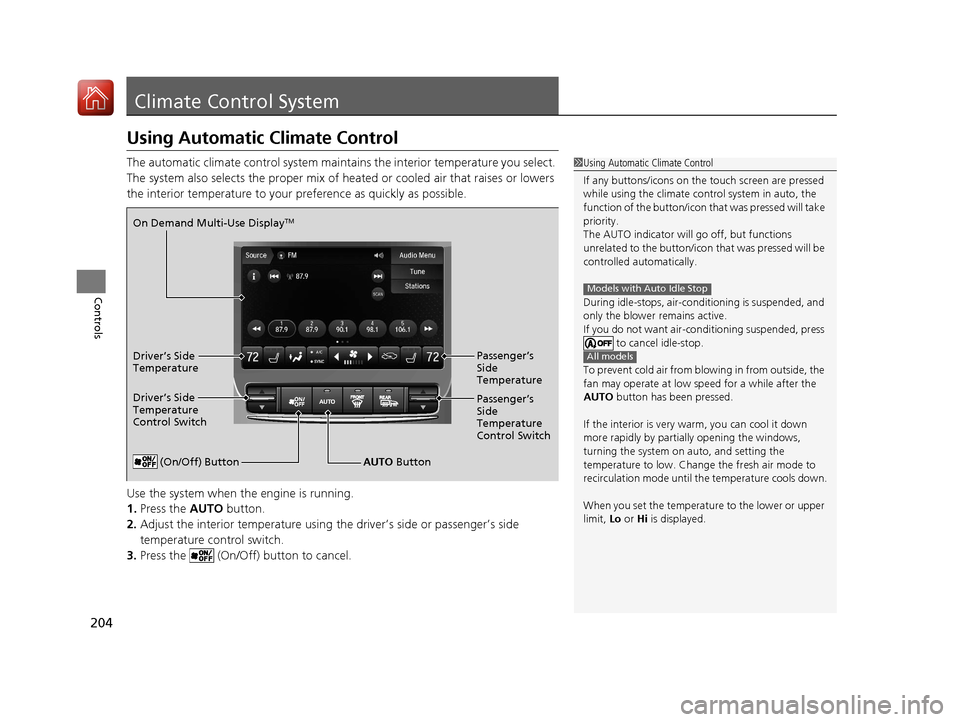
Use the system when the engine is running.
1. Press the AUTO button.
2. Adjust the interior temperature using the driver’s side or passenger’s side
temperature control switch.
3. Press the (On/Off) button to cancel.1Using Automatic Climate Control
If any buttons/icons on the touch screen are pressed
while using the climate control system in auto, the
function of the button/icon th at was pressed will take
priority.
The AUTO indicator will go off, but functions
unrelated to the button/icon that was pressed will be
controlled automatically.
During idle-stops, air-conditioning is suspended, and
only the blower remains active.
If you do not want air-cond itioning suspended, press
to cancel idle-stop.
To prevent cold air from bl owing in from outside, the
fan may operate at low speed for a while after the
AUTO button has been pressed.
If the interior is very warm, you can cool it down
more rapidly by partial ly opening the windows,
turning the system on auto, and setting the
temperature to low. Change the fresh air mode to
recirculation mode until the temperature cools down.
When you set the temperat ure to the lower or upper
limit, Lo or Hi is displayed.
Models with Auto Idle Stop
All models
(On/Off) ButtonAUTO Button
On Demand Multi-Use Display
TM
Driver’s Side
Temperature
Control Switch
Passenger’s
Side
Temperature
Control Switch Passenger’s
Side
Temperature
Driver’s Side
Temperature
18 ACURA TLX-31TZ36300.book 204 ページ 2017年2月21日 火曜日 午後2時32分
Page 207 of 589

uuClimate Control System uUsing Automatic Climate Control
206
Controls
1. Select the driver’s or passenger’s side
temperature control icon.
2. Change the temperature setting from the
following:
Temperature bar : Select a point where your
desired temperature setting is.
Farther to the left is for a lower, and to the
right for a higher setting.
(+/(-: To raise or lower the temperature
setting one degree at a time.
While you select and hold
(+/(-, the
temperature decreases or increases.
Max Cool : To rapidly cool down the interior.
u The AUTO indicator goes off. The setting
returns to the previo usly selected value
when you select it again.
Max Heat : To rapidly warm up the interior.
u The AUTO indicator goes off. The setting
returns to the previo usly selected value
when you select it again.
■Changing the Interior Temperature Setting1 Using Automatic Climate Control
If you select the Max Cool or Max Heat during Auto
Idle Stop, the engine restarts automatically.
Models with Auto Idle StopThe side you selected.
Temperature Bar
18 ACURA TLX-31TZ36300.book 206 ページ 2017年2月21日 火曜日 午後2時32分
Page 211 of 589
uuClimate Control System uUsing Automatic Climate Control
210
Controls
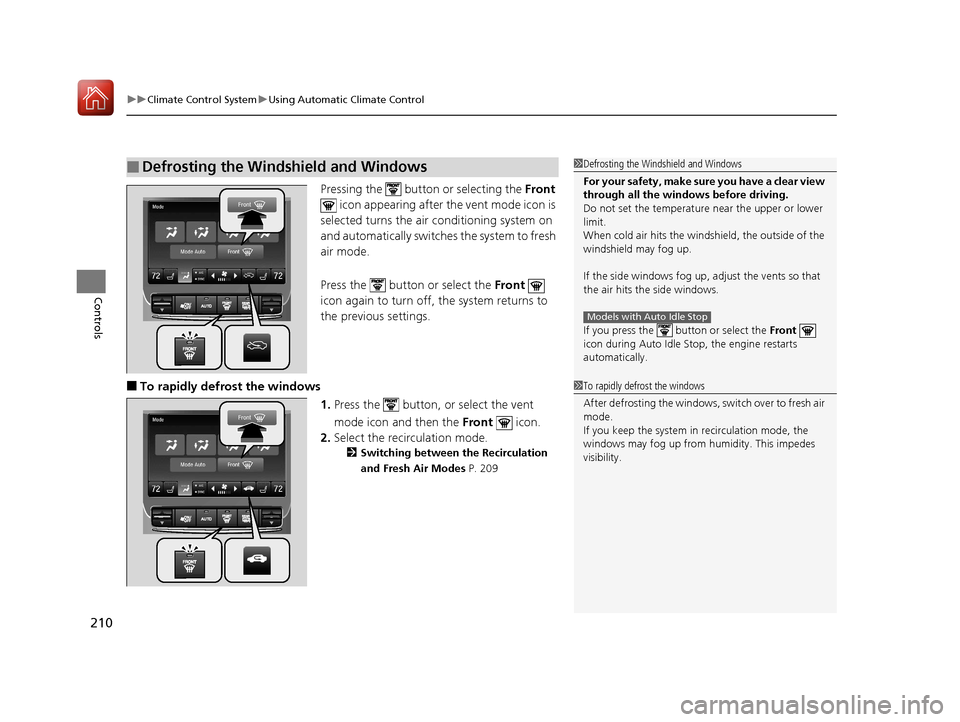
Pressing the button or selecting the Front
icon appearing after the vent mode icon is
selected turns the air conditioning system on
and automatically switches the system to fresh
air mode.
Press the button or select the Front
icon again to turn off, the system returns to
the previous settings.
■To rapidly defrost the windows
1.Press the button, or select the vent
mode icon and then the Front icon.
2. Select the recirculation mode.
2 Switching between the Recirculation
and Fresh Air Modes P. 209
■Defrosting the Windshield and Windows1Defrosting the Windshield and Windows
For your safety, make sure you have a clear view
through all the windows before driving.
Do not set the temperatur e near the upper or lower
limit.
When cold air hits the windshield, the outside of the
windshield may fog up.
If the side windows fog up, adjust the vents so that
the air hits th e side windows.
If you press the but ton or select the Front
icon during Auto Idle Stop, the engine restarts
automatically.
Models with Auto Idle Stop
1 To rapidly defrost the windows
After defrosting the windows, switch over to fresh air
mode.
If you keep the system in recirculation mode, the
windows may fog up from humidity. This impedes
visibility.
18 ACURA TLX-31TZ36300.book 210 ページ 2017年2月21日 火曜日 午後2時32分
Page 295 of 589
294
uuCustomized Features u
Features
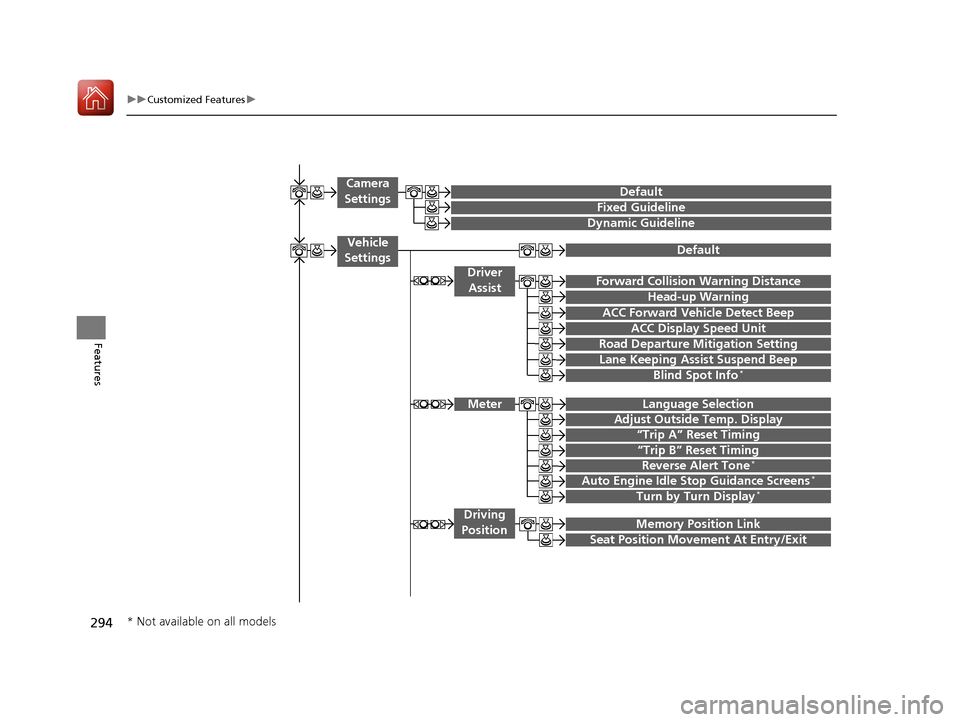
“Trip A” Reset Timing
“Trip B” Reset Timing
Language Selection
Adjust Outside Temp. Display
Forward Collision Warning Distance
ACC Forward Vehicle Detect Beep
Turn by Turn Display*
Default
Meter
Driver
Assist
Lane Keeping Assist Suspend Beep
Blind Spot Info*
Driving
Position
Road Departure Mi tigation Setting
ACC Display Speed Unit
Memory Position Link
Auto Engine Idle Stop Guidance Screens*
Seat Position Movement At Entry/Exit
Reverse Alert Tone*
Vehicle
Settings
Fixed Guideline
Dynamic Guideline
Camera
SettingsDefault
Head-up Warning
* Not available on all models
18 ACURA TLX-31TZ36300.book 294 ページ 2017年2月21日 火曜日 午後2時32分
Page 302 of 589
301
uuCustomized Features u
Continued
Features
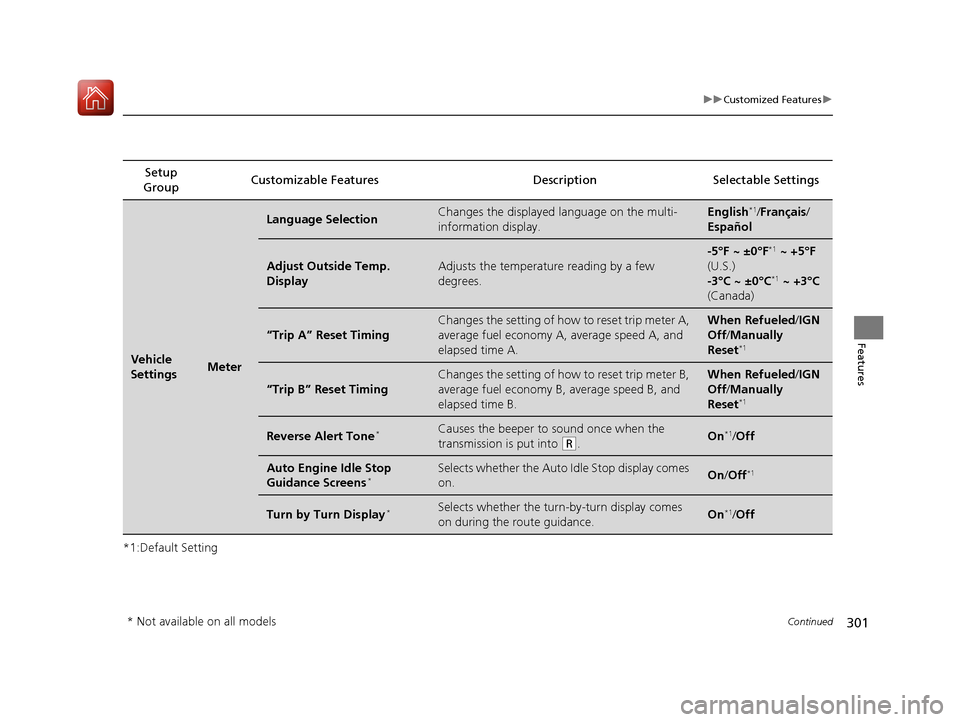
*1:Default SettingSetup
Group Customizable Features Description Selectable Settings
Vehicle
SettingsMeter
Language SelectionChanges the displayed language on the multi-
information display.English*1/
Français /
Español
Adjust Outside Temp.
DisplayAdjusts the temperature reading by a few
degrees.
-5°F ~ ±0°F*1 ~ +5°F
(U.S.)
-3°C ~ ±0°C
*1 ~ +3°C
(Canada)
“Trip A” Reset Timing
Changes the setting of how to reset trip meter A,
average fuel economy A, average speed A, and
elapsed time A.When Refueled /IGN
Off /Manually
Reset
*1
“Trip B” Reset Timing
Changes the setting of how to reset trip meter B,
average fuel economy B, average speed B, and
elapsed time B.When Refueled /IGN
Off /Manually
Reset
*1
Reverse Alert Tone*Causes the beeper to sound once when the
transmission is put into
(R.On*1/ Off
Auto Engine Idle Stop
Guidance Screens*Selects whether the Auto Idle Stop display comes
on.On /Off*1
Turn by Turn Display*Selects whether the turn-by-turn display comes
on during the route guidance.On*1/Off
* Not available on all models
18 ACURA TLX-31TZ36300.book 301 ページ 2017年2月21日 火曜日 午後2時32分
Page 356 of 589
355
Driving
This chapter discusses driving and refueling.
Before Driving................................... 356
Towing a Trailer ................................ 361
When Driving
Starting the Engine .......................... 362
Precautions While Driving................. 369
Automatic Transmission
*................. 370
Dual Clutch Transmission*............... 370
Shifting ............................................ 371
Shifting ............................................ 378
Auto Idle Stop
*................................ 382
Integrated Dynamics System............. 388
Models with electronic gear selector
Models with shift lever
Front Sensor Camera ....................... 389
Adaptive Cruise Control (ACC) with Low Speed Follow (LSF) ......................... 391
Road Departure Mitigation (RDM) System ... 405Lane Keeping Assist System (LKAS) .. 410Vehicle Stability Assist (VSA ®), aka Electronic
Stability Control (ESC), System ............. 418
Agile Handling Assist ....................... 420
Precision All-Wheel SteerTM (P-AWS ®)
System*......................................... 420
Blind spot inform ation (BSI) System*.... 421
Super Handling-All Wheel DriveTM (SH-
AWD® )*......................................... 424 Tire Pressure Monitoring System (TPMS)
with Tire Fill Assist.......................... 425
Tire Pressure Monitoring System (TPMS) -
Required Federal Explanation ......... 427
Braking .............................................. 429
Parking Your Vehicle ........................ 446
Multi-View Rear Camera
*................ 457
Surround View Camera System*..... 459
Refueling ........................................... 460
Fuel Economy and CO
2 Emissions .... 463
* Not available on all models
18 ACURA TLX-31TZ36300.book 355 ページ 2017年2月21日 火曜日 午後2時32分
Page 367 of 589
uuWhen Driving uStarting the Engine
366
Driving
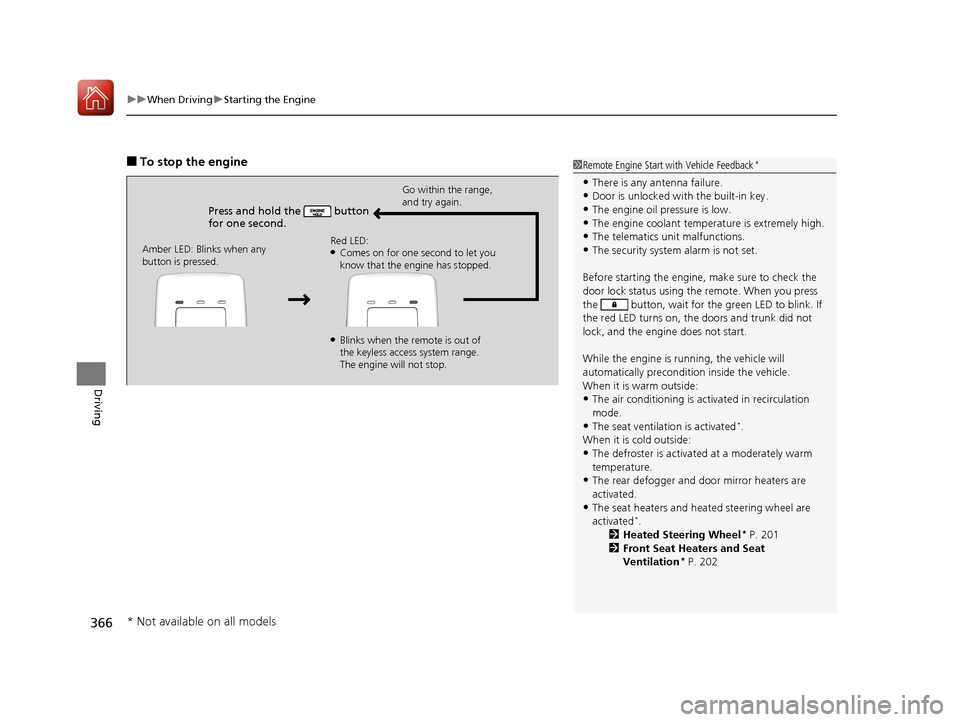
■To stop the engine
Press and hold the button
for one second.
Go within the range,
and try again.
Amber LED: Blinks when any
button is pressed. Red LED:
●Comes on for one second to let you
know that the engine has stopped.
●Blinks when the remote is out of
the keyless access system range.
The engine will not stop.
1
Remote Engine Start with Vehicle Feedback*
•There is any antenna failure.•Door is unlocked with the built-in key.
•The engine oil pressure is low.
•The engine coolant temper ature is extremely high.•The telematics unit malfunctions.
•The security system alarm is not set.
Before starting the engine, make sure to check the
door lock status using the remote. When you press
the button, wait for the green LED to blink. If
the red LED turns on, the doors and trunk did not
lock, and the engine does not start.
While the engine is running, the vehicle will
automatically preconditi on inside the vehicle.
When it is warm outside:
•The air conditioning is acti vated in recirculation
mode.
•The seat ventilation is activated*.
When it is cold outside:
•The defroster is activated at a moderately warm
temperature.
•The rear defogger and door mirror heaters are
activated.
•The seat heaters and heated steering wheel are
activated*.
2 Heated Steering Wheel* P. 201
2 Front Seat Heaters and Seat
Ventilation
* P. 202
* Not available on all models
18 ACURA TLX-31TZ36300.book 366 ページ 2017年2月21日 火曜日 午後2時32分