Brake light Acura TLX 2018 User Guide
[x] Cancel search | Manufacturer: ACURA, Model Year: 2018, Model line: TLX, Model: Acura TLX 2018Pages: 589, PDF Size: 35.45 MB
Page 358 of 589
Continued357
uuBefore Driving uDriving Preparation
Driving
• Store or secure all items on board properly.
u Carrying too much cargo, or improperly storing it, can affect your vehicle’s
handling, stability, sto pping distance, and tires, and make it unsafe.
2Maximum Load Limit P. 359
•Do not pile items higher than the seat height.
u They can block your view and may be thrown forward in the event of sudden
braking.
• Do not place anything in the front seat footwells. Make sure to secure the floor
mat.
u An object or unsecured floor mat can in terfere with your brake and accelerator
pedal operation while driving.
• If you have any animals on board, do not let them move around in the vehicle.
u They may interfere with driv ing and a crash could occur.
• Securely close and lock all doors and the trunk.
2 Locking/Unlocking the Doors from the Inside P. 144
•Adjust your seating position properly.
u Adjust the head restraint, too.
2Adjusting the Seats P. 179
2 Adjusting the Front and Rear Outer Head Restraint Positions P. 182
•Adjust the mirrors and steering wh eel properly for your driving.
u Adjust them while sitting in the proper driving position.
2 Adjusting the Mirrors P. 176
2 Adjusting the Steering Wheel P. 175
■Interior Checks1Interior Checks
The headlight aim is set by the factory, and does not
need to be adjusted. Howeve r, if you regularly carry
heavy items in the trunk ha ve the aiming readjusted
at a dealer or by a qualified technician.
18 ACURA TLX-31TZ36300.book 357 ページ 2017年2月21日 火曜日 午後2時32分
Page 363 of 589
362
Driving
When Driving
Starting the Engine
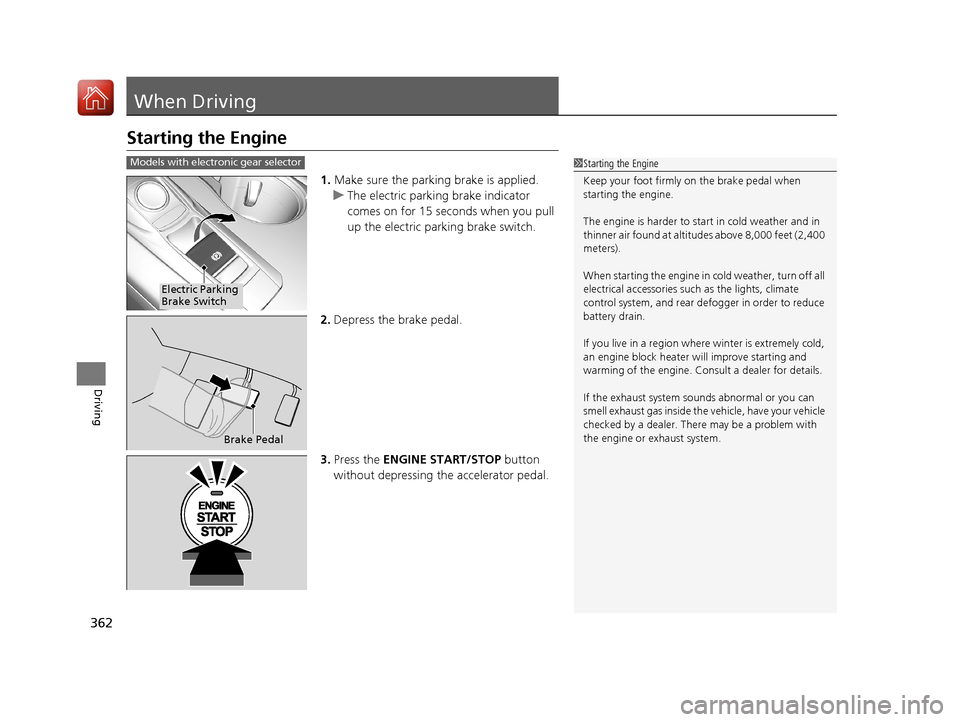
1.Make sure the parking brake is applied.
u The electric parking brake indicator
comes on for 15 seconds when you pull
up the electric parking brake switch.
2. Depress the brake pedal.
3. Press the ENGINE START/STOP button
without depressing the accelerator pedal.
1 Starting the Engine
Keep your foot firmly on the brake pedal when
starting the engine.
The engine is harder to st art in cold weather and in
thinner air found at altitudes above 8,000 feet (2,400
meters).
When starting the engine in cold weather, turn off all
electrical accessories such as the lights, climate
control system, and rear de fogger in order to reduce
battery drain.
If you live in a region where winter is extremely cold,
an engine block heater will improve starting and
warming of the engine. Cons ult a dealer for details.
If the exhaust system sounds abnormal or you can
smell exhaust gas inside the vehicle, have your vehicle
checked by a dealer. There may be a problem with
the engine or exhaust system.Models with electronic gear selector
Electric Parking
Brake Switch
Brake Pedal
18 ACURA TLX-31TZ36300.book 362 ページ 2017年2月21日 火曜日 午後2時32分
Page 373 of 589
uuWhen Driving uShifting
372
Driving
■Shift Operation1Shift Operation
NOTICE
When you change (D to (R and vice versa, come to
a complete stop and keep the brake pedal depressed.
Operating the shift button before the vehicle has
come to a complete standstill can damage the
transmission.
Use the gear position indicator and the shift button
indicator to check the gear position before selecting
a shift button.
If the indicator of the curren tly selected gear position,
or all the gear position indicators are blinking
simultaneously, there is a problem with the
transmission.
Avoid sudden acceleration and have the transmission
checked by a dealer as soon as possible.
The fuel supply may be cut of f if you drive at engine
speeds in or over the tachometer’s red zone (engine
speed limit). If this happe ns, you may experience a
slight jolt.
When the engine speed is increased while the
transmission is in
( N, (P or (R, the fuel supply may
be cut off even without the engine speed entering
the tachometer’s red zone.
The beeper sounds once when you change to
( R.
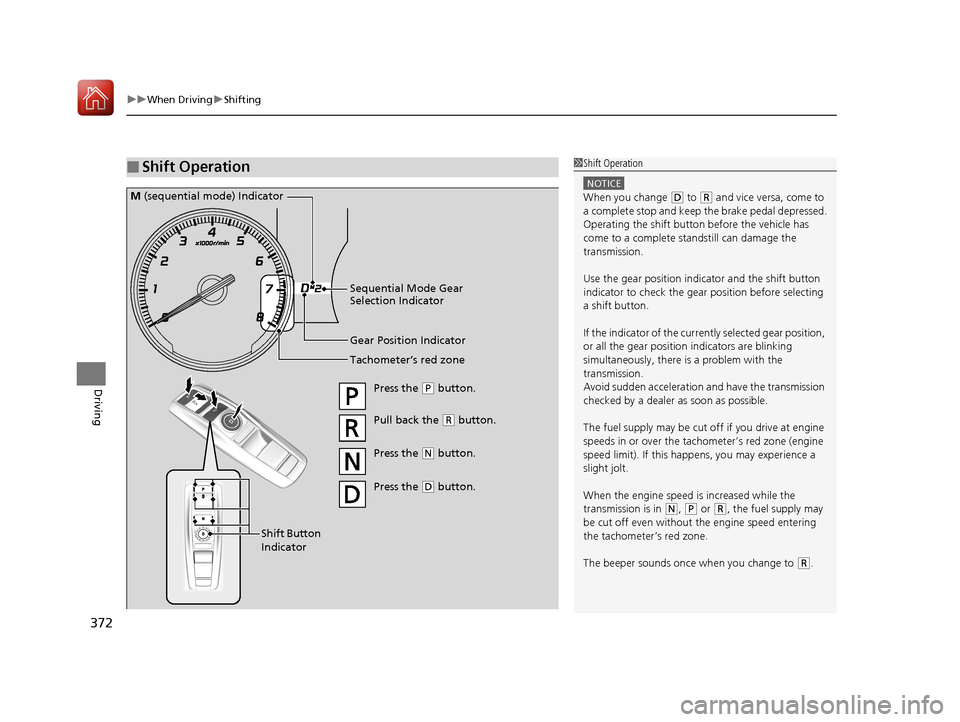
Gear Position Indicator
Tachometer’s red zone
Press the (P button.
Pull back the (R button.
Press the
( N button.
Press the
( D button.
Shift Button
Indicator
M (sequential mode) Indicator
Sequential Mode Gear
Selection Indicator
18 ACURA TLX-31TZ36300.book 372 ページ 2017年2月21日 火曜日 午後2時32分
Page 379 of 589
378
uuWhen Driving uShifting
Driving
Shifting
Change the shift position in accordance with your driving needs.
■Shift lever positions
Models with shift lever
1Shift lever positions
You cannot change the pow er mode from ON to
VEHICLE OFF (LOCK) unless the shift lever is in
( P.
The vehicle may move ve ry slightly even in
(N while
the engine is cold.
Depress the brake pe dal firmly and, when necessary,
apply the parking brake.
When shifting gears in extremely low temperatures
(-22°F/-30°C), there may be a short delay before the
shift is indicated in the di splay. Always confirm you
are in the correct gear before driving.
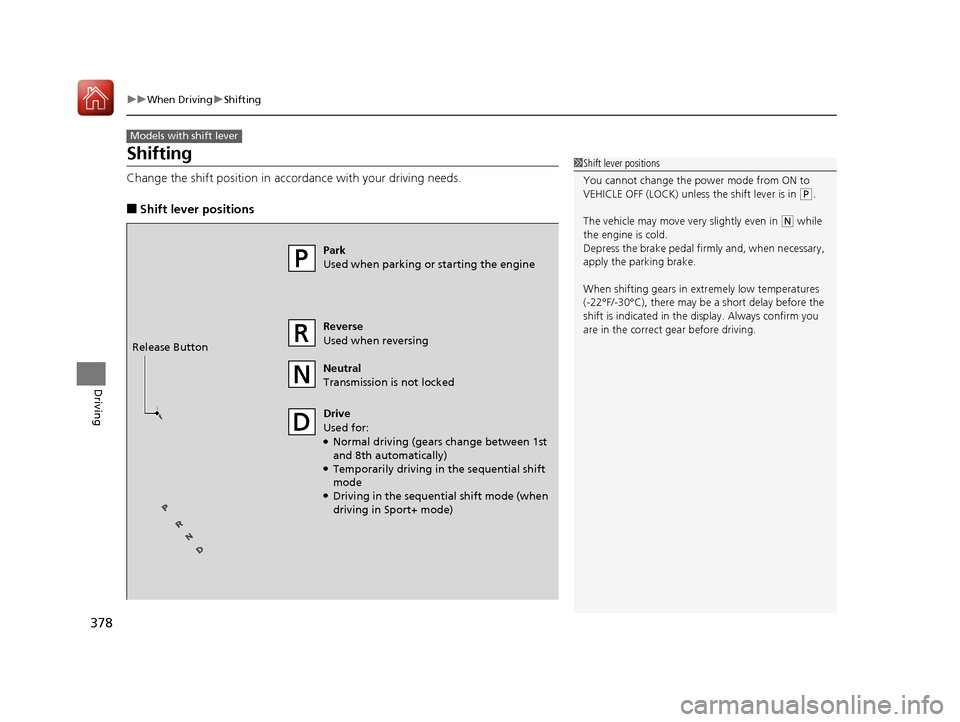
Park
Used when parking or starting the engine
Reverse
Used when reversing
Neutral
Transmission is not locked
Drive
Used for:
●Normal driving (gears change between 1st
and 8th automatically)
●Temporarily driving in the sequential shift
mode
●Driving in the sequential shift mode (when
driving in Sport+ mode)
Release Button
18 ACURA TLX-31TZ36300.book 378 ページ 2017年2月21日 火曜日 午後2時32分
Page 380 of 589
Continued379
uuWhen Driving uShifting
Driving
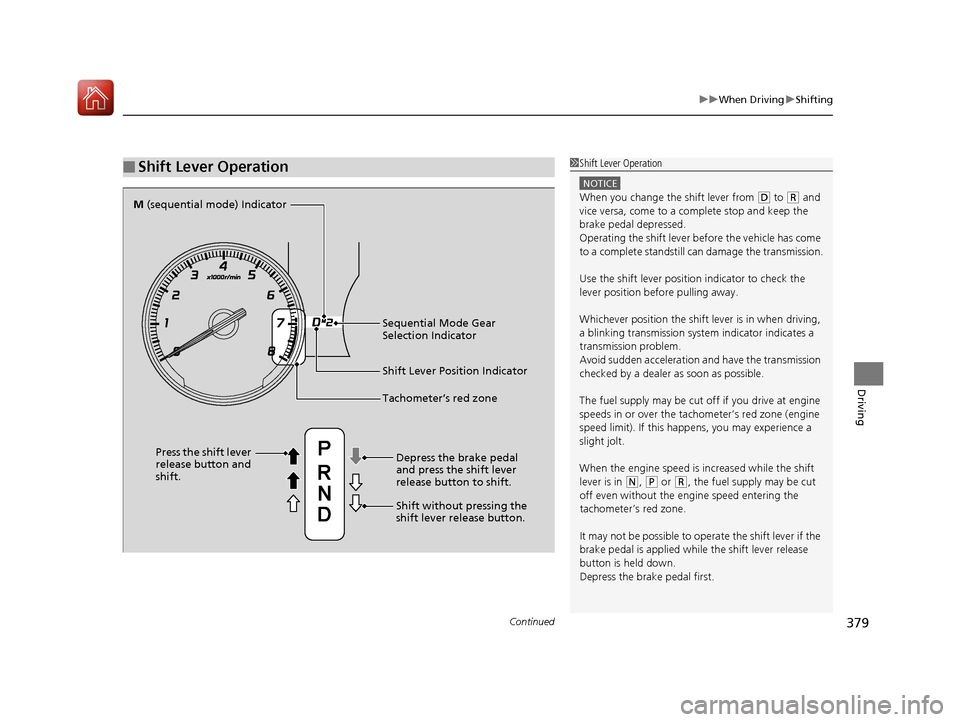
■Shift Lever Operation1Shift Lever Operation
NOTICE
When you change the shift lever from (D to ( R and
vice versa, come to a complete stop and keep the
brake pedal depressed.
Operating the shift lever be fore the vehicle has come
to a complete standstill can damage the transmission.
Use the shift lever position indicator to check the
lever position befo re pulling away.
Whichever position the shift lever is in when driving,
a blinking transmission syst em indicator indicates a
transmission problem.
Avoid sudden acceleration and have the transmission
checked by a dealer as soon as possible.
The fuel supply may be cut of f if you drive at engine
speeds in or over the tachometer’s red zone (engine
speed limit). If this happe ns, you may experience a
slight jolt.
When the engine speed is increased while the shift
lever is in
( N, (P or (R, the fuel supply may be cut
off even without the engine speed entering the
tachometer’s red zone.
It may not be possible to operate the shift lever if the
brake pedal is applied while the shift lever release
button is held down.
Depress the brake pedal first.
Shift Lever Position Indicator
Depress the brake pedal
and press the shift lever
release button to shift.
Shift without pressing the
shift lever release button.
Press the shift lever
release button and
shift.
Tachometer’s red zone
M
(sequential mode) Indicator
Sequential Mode Gear
Selection Indicator
18 ACURA TLX-31TZ36300.book 379 ページ 2017年2月21日 火曜日 午後2時32分
Page 387 of 589
uuWhen Driving uAuto Idle Stop*
386
Driving
• The brake pedal is released (without the automatic brake hold system activated).
• The accelerator pedal is depressed (with the automatic brake hold system
activated).
2 Automatic Brake Hold P. 433
■The engine restarts even if the brake pedal is depressed*1 when:
• The Auto Idle Stop OFF button is pressed.
• A steering wheel is operated.
• The transmission is in a position other than
(D or Sport+.
• The pressure on the brake pedal is redu ced and the vehicle starts moving while
stopped on an incline.
• The pressure on the brake pedal is repeated ly applied and released slightly during
a stop.
• The battery charge becomes low.
• The accelerator pedal is depressed.
• The driver’s seat belt is unlatched.
• is ON (indicator on).
• The climate control system is in us e, and the difference between the set
temperature and actual interior temperature becomes significant.
• The climate control system is bein g used to dehumidify the interior.
• The vehicle ahead of you starts again when your vehicle stops automatically with
ACC with LSF.
■The Engine Automatically Restarts When:1 The Engine Automatically Restarts When:
If you are using an electroni c device during Auto Idle
Stop, the device may tempor arily be turned off when
the engine restarts.
1 The engine restarts even if the brake pedal is depressed*1 when:
*1: With the automatic brake hold system activated,
you can release the brake pe dal during Auto Idle Stop
is in operation.
18 ACURA TLX-31TZ36300.book 386 ページ 2017年2月21日 火曜日 午後2時32分
Page 392 of 589
391
uuWhen Driving uAdaptive Cruise Control (ACC) with Low Speed Follow (LSF)
Continued
Driving
Adaptive Cruise Control (ACC) with Low Speed
Follow (LSF)
Helps maintain a constant vehicle speed an d a set following-interval behind a vehicle
detected ahead of yours and, if the detect ed vehicle comes to a stop, can decelerate
and stop your ve hicle, without yo u having to keep your foot on the brake or the
accelerator.
When ACC with LSF slows your vehicle by applying the brakes, your vehicle’s brake
lights will illuminate.
1 Adaptive Cruise Control (ACC) with Low Speed Follow (LSF)
Important Reminder
As with any system, there are limits to ACC with LSF.
Use the brake pedal whenever necessary, and always
keep a safe interval between your vehicle and other
vehicles.
3WARNING
Improper use of ACC wi th LSF can lead to a
crash.
Use ACC with LSF only when driving on
expressways or freeways and in good
weather conditions.
3WARNING
ACC with LSF has limited braking capability
and may not stop your vehicle in time to
avoid a collision with a vehicle that quickly
stops in front of you.
Always be prepared to apply the brake
pedal if the conditions require.
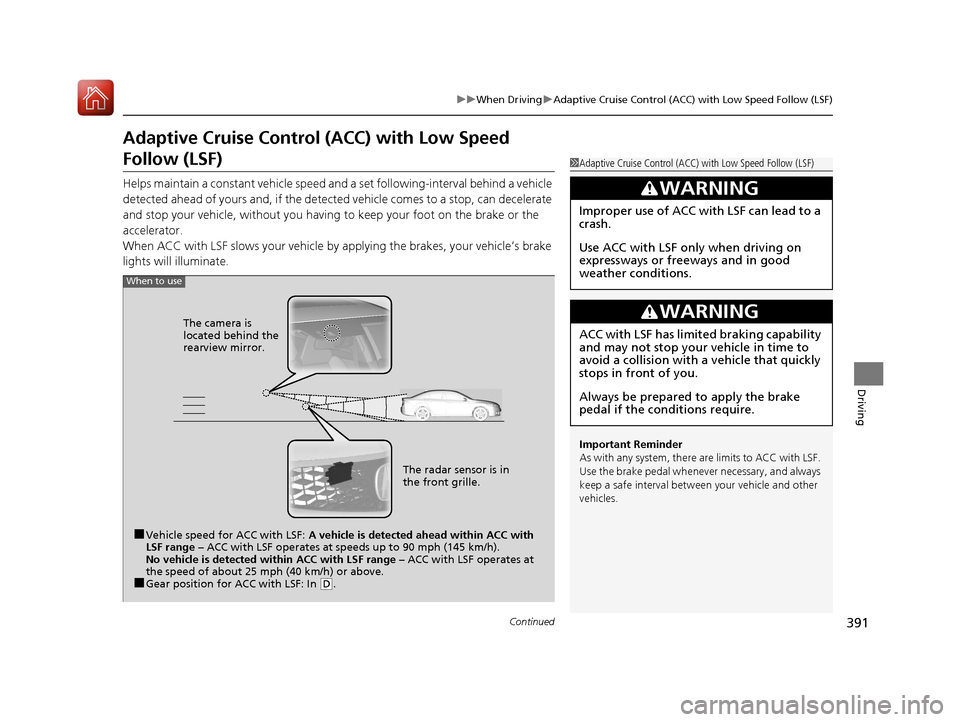
When to use
■Vehicle speed for ACC with LSF: A vehicle is detected ahead within ACC with
LSF range – ACC with LSF operates at speeds up to 90 mph (145 km/h).
No vehicle is detected within ACC with LSF range – ACC with LSF operates at
the speed of about 25 mph (40 km/h) or above.
■Gear position for ACC with LSF: In ( D. The radar sensor is in
the front grille.
The camera is
located behind the
rearview mirror.
18 ACURA TLX-31TZ36300.book 391 ページ 2017年2月21日 火曜日 午後2時32分
Page 395 of 589
uuWhen Driving uAdaptive Cruise Control (ACC) with Low Speed Follow (LSF)
394
Driving
■There is a vehicle ahead
ACC with LSF monitors if a vehicle ahead of you enters the ACC with LSF range. If a
vehicle is detected doing so, the ACC with LSF system maintains or decelerates your
vehicle’s set speed in order to keep the vehicle’s set following-interval from the
vehicle ahead.
2 To Set or Change Following-interval P. 399
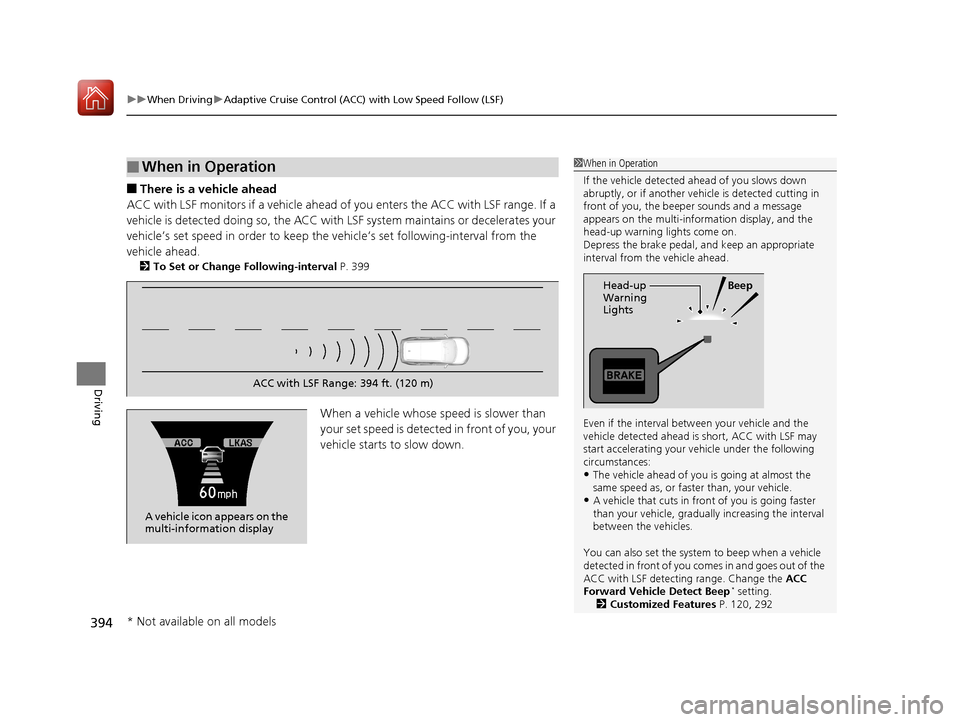
When a vehicle whose speed is slower than
your set speed is detected in front of you, your
vehicle starts to slow down.
■When in Operation1 When in Operation
If the vehicle detected ahead of you slows down
abruptly, or if a nother vehicle is de tected cutting in
front of you, the beep er sounds and a message
appears on the multi-inform ation display, and the
head-up warning lights come on.
Depress the brake pedal, and keep an appropriate
interval from the vehicle ahead.
Even if the interval betw een your vehicle and the
vehicle detected ahead is short, ACC with LSF may
start accelerating your vehicle under the following
circumstances:
•The vehicle ahead of you is going at almost the
same speed as, or faster than, your vehicle.
•A vehicle that cuts in front of you is going faster
than your vehicle, gradua lly increasing the interval
between the vehicles.
You can also set the system to beep when a vehicle
detected in front of you co mes in and goes out of the
ACC with LSF detecting range. Change the ACC
Forward Vehicle Detect Beep
* setting.
2 Customized Features P. 120, 292
BeepHead-up
Warning
Lights
ACC with LSF Range: 394 ft. (120 m)
A vehicle icon appears on the
multi-information display
* Not available on all models
18 ACURA TLX-31TZ36300.book 394 ページ 2017年2月21日 火曜日 午後2時32分
Page 396 of 589
Continued395
uuWhen Driving uAdaptive Cruise Control (ACC) with Low Speed Follow (LSF)
Driving
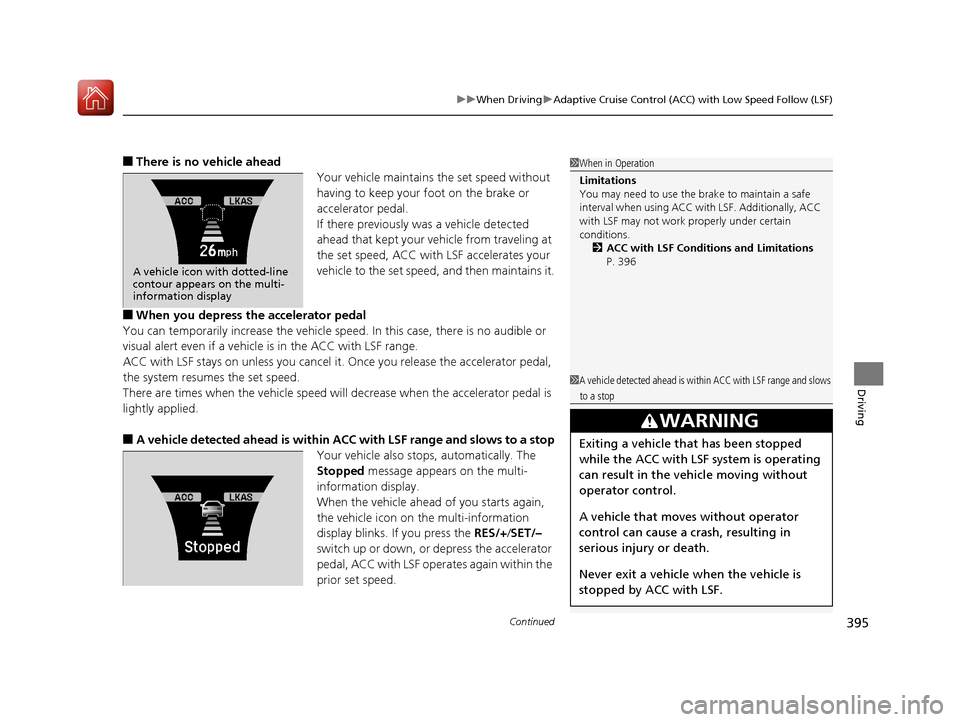
■There is no vehicle ahead
Your vehicle maintains the set speed without
having to keep your foot on the brake or
accelerator pedal.
If there previously was a vehicle detected
ahead that kept your vehicle from traveling at
the set speed, ACC with LSF accelerates your
vehicle to the set speed, and then maintains it.
■When you depress the accelerator pedal
You can temporarily increase the vehicle speed . In this case, there is no audible or
visual alert even if a vehicl e is in the ACC with LSF range.
ACC with LSF stays on unless you cancel it . Once you release the accelerator pedal,
the system resumes the set speed.
There are times when the vehicle speed will decrease when the accelerator pedal is
lightly applied.
■A vehicle detected ahead is within ACC with LSF range and slows to a stop
Your vehicle also stops, automatically. The
Stopped message appears on the multi-
information display.
When the vehicle ahead of you starts again,
the vehicle icon on the multi-information
display blinks. If you press the RES/+/SET/–
switch up or down, or depress the accelerator
pedal, ACC with LSF operates again within the
prior set speed.
A vehicle icon with dotted-line
contour appears on the multi-
information display
1 When in Operation
Limitations
You may need to use the brake to maintain a safe
interval when using ACC wi th LSF. Additionally, ACC
with LSF may not work properly under certain
conditions. 2 ACC with LSF Conditions and Limitations
P. 396
1 A vehicle detected ahead is with in ACC with LSF range and slows
to a stop
3WARNING
Exiting a vehicle that has been stopped
while the ACC with LSF system is operating
can result in the vehicle moving without
operator control.
A vehicle that moves without operator
control can cause a crash, resulting in
serious injury or death.
Never exit a vehicle when the vehicle is
stopped by ACC with LSF.
18 ACURA TLX-31TZ36300.book 395 ページ 2017年2月21日 火曜日 午後2時32分
Page 397 of 589
uuWhen Driving uAdaptive Cruise Control (ACC) with Low Speed Follow (LSF)
396
Driving
The system may automatically shut off and the ACC indicator will come on under
certain conditions. Some examples of th ese conditions are listed below. Other
conditions may reduce some of the ACC functions.
2 Front Sensor Camera P. 389
■Environmental conditions
Driving in bad weather (r ain, fog, snow, etc.).
■Roadway conditions
Driving on a snowy or wet roadway (obscure d lane marking, vehicle tracks, reflected
lights, road spray, high contrast).
■Vehicle conditions
• The outside of the windshie ld is blocked by dirt, mud, leaves, wet snow, etc.
• An abnormal tire or wheel condition (Wrong sized, varied size or construction,
improperly inflated, compact spare tire
*, etc.).
• The camera temperature gets too high.
• The parking brake is applied.
• When the front grille is dirty.
• The vehicle is tilted due to a heav y load or suspension modifications.
• When tire chains are installed.
■ACC with LSF Conditions and Limitations1ACC with LSF Conditions and Limitations
The radar sensor for ACC with LSF is shared with the
Collision Mitigati on Braking System
TM (CMBSTM).
2 Collision Mitigation Braking SystemTM
(CMBSTM) P. 437
You can read about handling information for the
camera equipped with this system. 2 Front Sensor Camera P. 389
Always keep the radar sensor cover clean.
Never use chemical solvents or polishing powder for
cleaning the sensor cover. Clean it with water or a
mild detergent.
Do not put a sticker on the radar sensor cover or
replace the radar sensor cover.
If you need the radar sensor to be repaired, or
removed, or the radar se nsor cover is strongly
impacted, turn off the system by pressing the MAIN
button and take your vehicle to a dealer.
Have your vehicle checked by a dealer if you find any
unusual behavior of the system (e.g., the warning
message appears too frequently).
* Not available on all models
18 ACURA TLX-31TZ36300.book 396 ページ 2017年2月21日 火曜日 午後2時32分