Speed Acura TLX 2018 Service Manual
[x] Cancel search | Manufacturer: ACURA, Model Year: 2018, Model line: TLX, Model: Acura TLX 2018Pages: 589, PDF Size: 35.45 MB
Page 305 of 589
304
uuCustomized Features u
Features
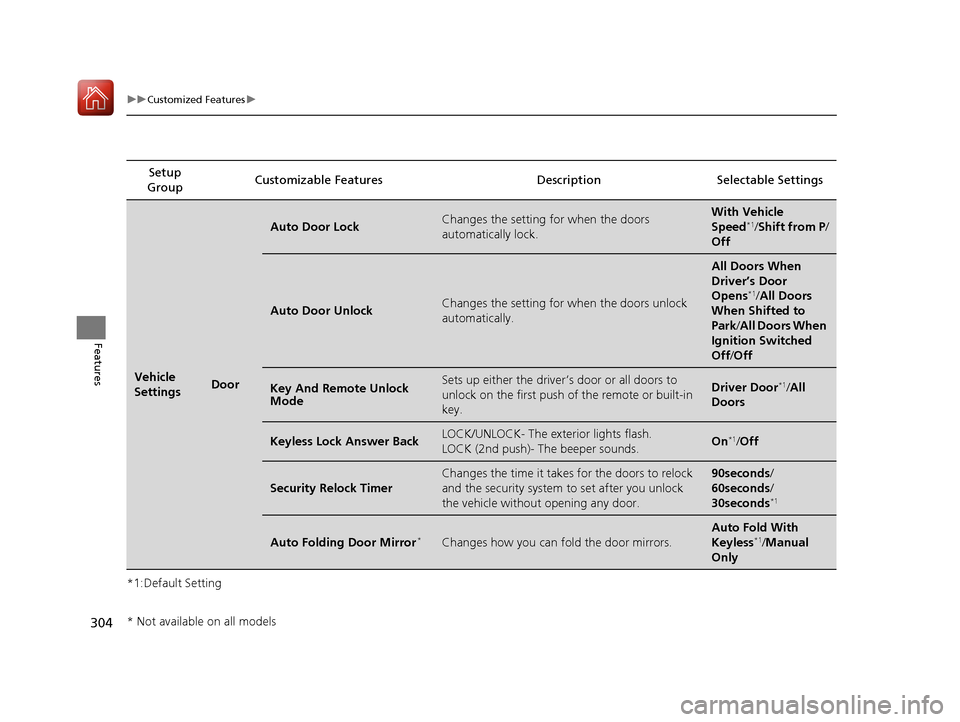
*1:Default SettingSetup
Group Customizable Features Descri
ption Selectable Settings
Vehicle
SettingsDoor
Auto Door LockChanges the setting for when the doors
automatically lock.With Vehicle
Speed*1/Shift from P/
Off
Auto Door UnlockChanges the setting for when the doors unlock
automatically.
All Doors When
Driver’s Door
Opens
*1/ All Doors
When Shifted to
Park /All Doors When
Ignition Switched
Off /Off
Key And Remote Unlock
ModeSets up either the driver ’s door or all doors to
unlock on the first push of the remote or built-in
key.Driver Door*1/ All
Doors
Keyless Lock Answer BackLOCK/UNLOCK- The exterior lights flash.
LOCK (2nd push)- The beeper sounds.On*1/ Off
Security Relock Timer
Changes the time it takes for the doors to relock
and the security system to set after you unlock
the vehicle without opening any door.90seconds/
60seconds/
30seconds
*1
Auto Folding Door Mirror*Changes how you can fold the door mirrors.
Auto Fold With
Keyless*1/Manual
Only
* Not available on all models
18 ACURA TLX-31TZ36300.book 304 ページ 2017年2月21日 火曜日 午後2時32分
Page 318 of 589

317Continued
Features
Bluetooth® HandsFreeLink ®
Bluetooth® HandsFreeLink ® (HFL) allows you to place and receive phone calls using
your vehicle’s audio system, without handling your cell phone.
Using HFL
(Pick-up) button: Press to go to the Speed Dial/Call History on the multi-
information display or to answer an incoming call.
(Hang-up/back) button: Press to end a call, to ca ncel a command or to clear
the phone information on the multi-information display.
(Talk) button: Press to give HFL voice commands.
PHONE button: Press to go directly to the phone menu screen.
Interface dial (E NTER/MENU button): Rotate to select an item on the screen,
then press . Move , , or to select secondary menu.
■HFL Buttons
1 Bluetooth ® HandsFreeLink ®
Place your phone where y ou can get good reception.
To use HFL, you need a Bluetooth-compatible cell
phone. For a list of compatible phones, pairing
procedures, and special feature capabilities:
•U.S.: Visit www.acura.com/handsfreelink , or call 1-
888-528-7876.
•Canada: Visit www.handsfreelink.ca , or call 1-888-
528-7876.
To use HFL, the Bluetooth setting must be On. If
there is an active connecti on to Apple CarPlay, HFL is
unavailable. 2 Customized Features P. 292
Voice control tips:
•Aim the vents away from the ceiling and close the
windows, as noise coming fr om them may interfere
with the microphone.
•Press and release the but ton when you want to
call a number using a stored voice tag, a
phonebook name, or a numbe r. Speak clearly and
naturally after a beep.
•If the microphone picks up vo ices other than yours,
the command may be misinterpreted.
•To change the volume level, use the audio system’s
volume knob or the remote audio controls on the
steering wheel.
State or local laws may pr ohibit the operation of
handheld electronic devi ces while operating a
vehicle.
Talk Button
Volume up
Microphone
Hang-up/Back Button
Pick-up
Button
Volume down
Interface
DialPHONE
Button
18 ACURA TLX-31TZ36300.book 317 ページ 2017年2月21日 火曜日 午後2時32分
Page 320 of 589
319
uuBluetooth ® HandsFreeLink ®u Using HFL
Features
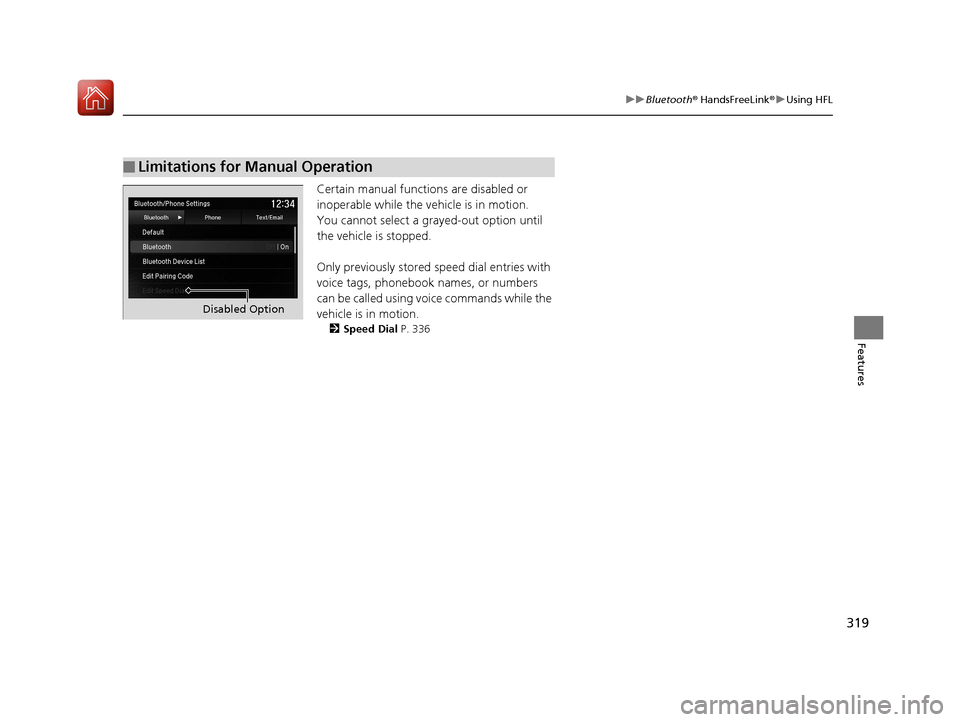
Certain manual functions are disabled or
inoperable while the ve hicle is in motion.
You cannot select a grayed-out option until
the vehicle is stopped.
Only previously stored speed dial entries with
voice tags, phonebook names, or numbers
can be called using voice commands while the
vehicle is in motion.
2 Speed Dial P. 336
■Limitations for Manual Operation
Disabled Option
18 ACURA TLX-31TZ36300.book 319 ページ 2017年2月21日 火曜日 午後2時32分
Page 322 of 589
321
uuBluetooth ® HandsFreeLink ®u HFL Menus
Continued
Features
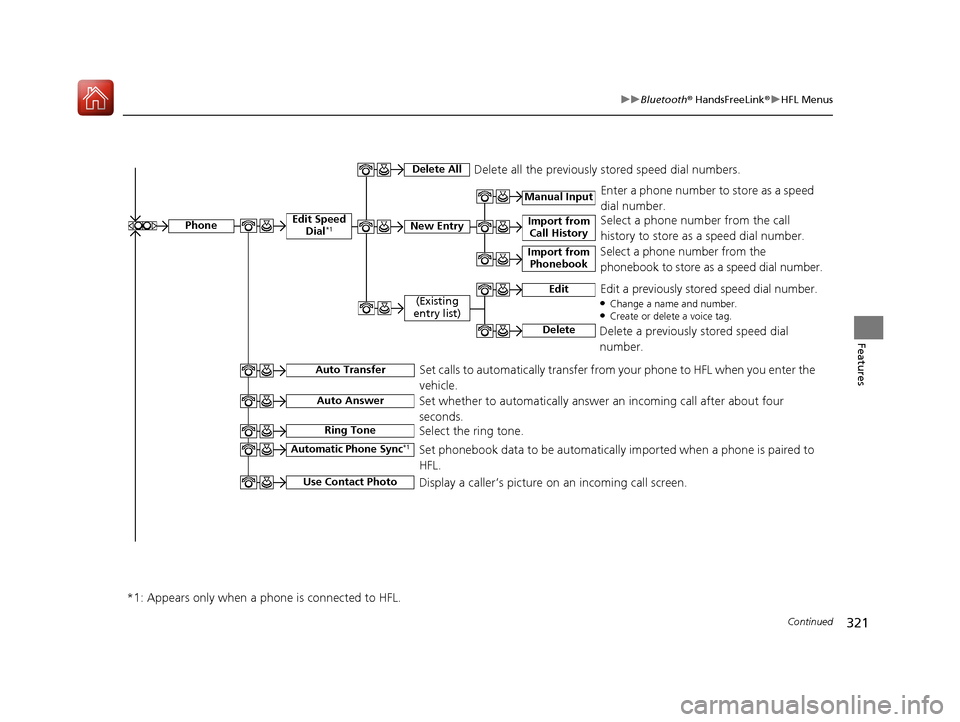
Manual Input
Edit Speed
Dial*1New Entry
Import from Call History
Import from Phonebook
Delete AllDelete all the previously stored speed dial numbers.
Select a phone number from the call
history to store as a speed dial number.
Select a phone number from the
phonebook to store as a speed dial number. Enter a phone number to store as a speed
dial number.
Edit
Delete
(Existing
entry list)Edit a previously stored speed dial number.●Change a name and number.●Create or delete a voice tag.
Delete a previously stored speed dial
number.
Set calls to automatically transfer from your phone to HFL when you enter the
vehicle.Auto Transfer
Auto Answer
Ring Tone
Set whether to automatically answer an incoming call after about four
seconds.
Select the ring tone.
Use Contact Photo
Set phonebook data to be automatically imported when a phone is paired to
HFL.
Display a caller’s picture on an incoming call screen.Automatic Phone Sync*1
*1: Appears only when a phone is connected to HFL.
Phone
18 ACURA TLX-31TZ36300.book 321 ページ 2017年2月21日 火曜日 午後2時32分
Page 324 of 589
323
uuBluetooth ® HandsFreeLink ®u HFL Menus
Continued
Features
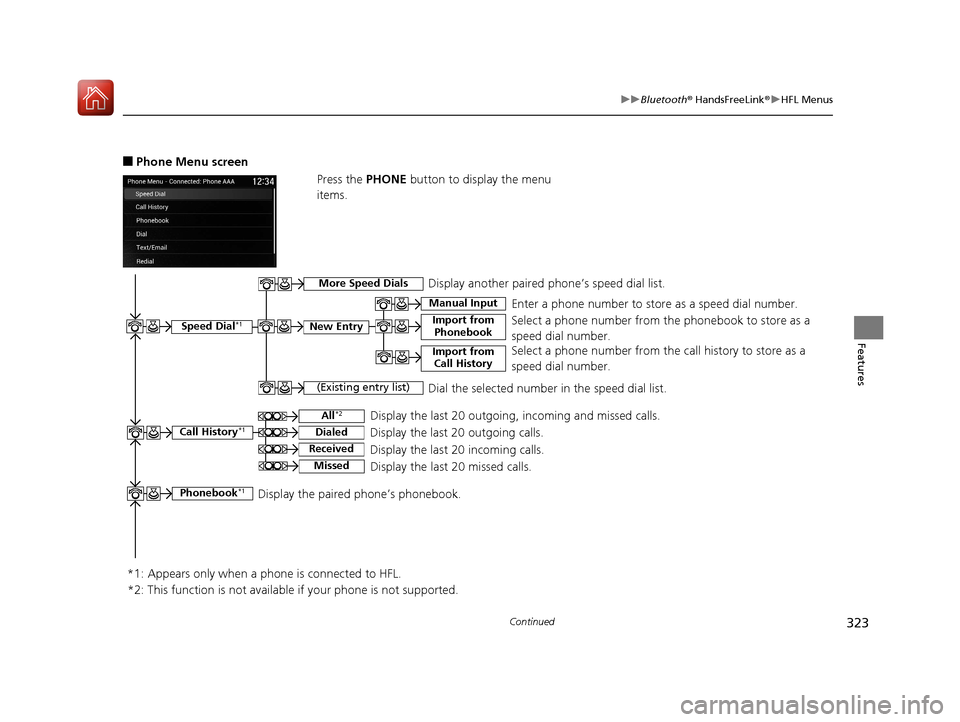
■Phone Menu screen
Press the PHONE button to display the menu
items.
Speed Dial*1
Manual Input
New Entry Import from PhonebookSelect a phone number from th e phonebook to store as a
speed dial number. Enter a phone number to store as a speed dial number.
*1: Appears only when a phone is connected to HFL.
(Existing entry list)Dial the selected number in the speed dial list.
Phonebook*1Display the paired phone’s phonebook.
Display the last 20 outgoing, incoming and missed calls.
Call History*1All*2
Dialed
Received
Display the last 20 outgoing calls.
Display the last 20 incoming calls.
MissedDisplay the last 20 missed calls.
More Speed DialsDisplay another paired phone’s speed dial list.
*2: This function is not available if your phone is not supported. Select a phone number from the
call history to store as a
speed dial number.
Import from Call History
18 ACURA TLX-31TZ36300.book 323 ページ 2017年2月21日 火曜日 午後2時32分
Page 329 of 589

uuBluetooth ® HandsFreeLink ®u HFL Menus
328
Features
■To replace an already-paired phone
with a new phone
1. Press the SETTINGS button.
2. Rotate to select Bluetooth/Phone
Settings , then press .
u Repeat the procedure to select
Bluetooth Device List.
3. Rotate to select a paired phone you
want to replace, then press .
4. Rotate to select Replace This Device,
then press .
5. HFL enters the pairing process and searches
a new phone.
u Follow the prompts to pair a new phone.
6. A notification appears on the screen if
pairing is successful.1To replace an already-pair ed phone with a new phone
The replaced phone will keep the same speed dial
entries, and security PIN information from the
previously paired phone.
18 ACURA TLX-31TZ36300.book 328 ページ 2017年2月21日 火曜日 午後2時32分
Page 337 of 589

uuBluetooth ® HandsFreeLink ®u HFL Menus
336
Features
Up to 20 speed dial numbers can be stored per phone.
To store a speed dial number:
1.Press the PHONE button.
2. Rotate to select Speed Dial, then press
.
u Repeat the procedure to select New
Entry.
3. Rotate to select a place to choose a
number from, then press .
From Import from Call History:
u Select a number from the call history.
From Manual Input :
u Input the number manually.
From Import from Phonebook :
u Select a number from the linked cell
phone’s imported phonebook.
4. When the speed dial is successfully stored
from Import from Call History or Import
from Phonebook , you are asked to create
a voice tag for the number. Rotate to
select Yes or No, then press .
5. Using the button, fo llow the prompts to
store a voice tag for the speed dial entry.
■Speed Dial1 Speed Dial
When a voice tag is stored, press the button to
call the number using the voice tag. Say “Call” and
the voice tag name.
18 ACURA TLX-31TZ36300.book 336 ページ 2017年2月21日 火曜日 午後2時32分
Page 338 of 589

Continued337
uuBluetooth ® HandsFreeLink ®u HFL Menus
Features
■To add a voice tag to a stored speed
dial number
1. Press the SETTINGS button.
2. Rotate to select Bluetooth/Phone
Settings , then press .
u Repeat the procedure to select Edit
Speed Dial .
3. Select an existing speed dial entry.
u From the pop-up menu, rotate to
select Edit , then press .
4. Rotate to select Voice Tag, then press
.
u From the pop-up menu, rotate to
select Record , then press .
5. Using the button, follow the prompts to
complete the voice tag.1Speed Dial
Avoid using duplicate voice tags.
Avoid using “home” as a voice tag.
It is easier for HFL to re cognize a longer name. For
example, use “John Smit h” instead of “John.”
18 ACURA TLX-31TZ36300.book 337 ページ 2017年2月21日 火曜日 午後2時32分
Page 339 of 589
338
uuBluetooth ® HandsFreeLink ®u HFL Menus
Features
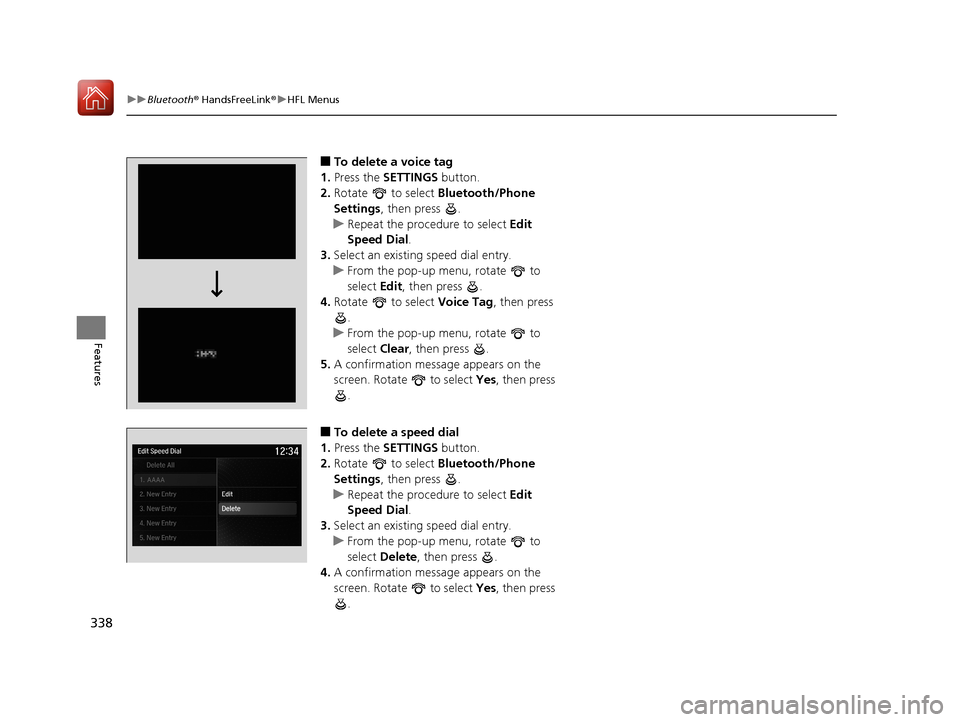
■To delete a voice tag
1. Press the SETTINGS button.
2. Rotate to select Bluetooth/Phone
Settings , then press .
u Repeat the procedure to select Edit
Speed Dial .
3. Select an existing speed dial entry.
u From the pop-up menu, rotate to
select Edit, then press .
4. Rotate to select Voice Tag, then press
.
u From the pop-up menu, rotate to
select Clear, then press .
5. A confirmation message appears on the
screen. Rotate to select Yes, then press
.
■To delete a speed dial
1. Press the SETTINGS button.
2. Rotate to select Bluetooth/Phone
Settings , then press .
u Repeat the procedure to select Edit
Speed Dial .
3. Select an existing speed dial entry.
u From the pop-up menu, rotate to
select Delete , then press .
4. A confirmation message appears on the
screen. Rotate to select Yes, then press
.
18 ACURA TLX-31TZ36300.book 338 ページ 2017年2月21日 火曜日 午後2時32分
Page 340 of 589
Continued339
uuBluetooth ® HandsFreeLink ®u HFL Menus
Features
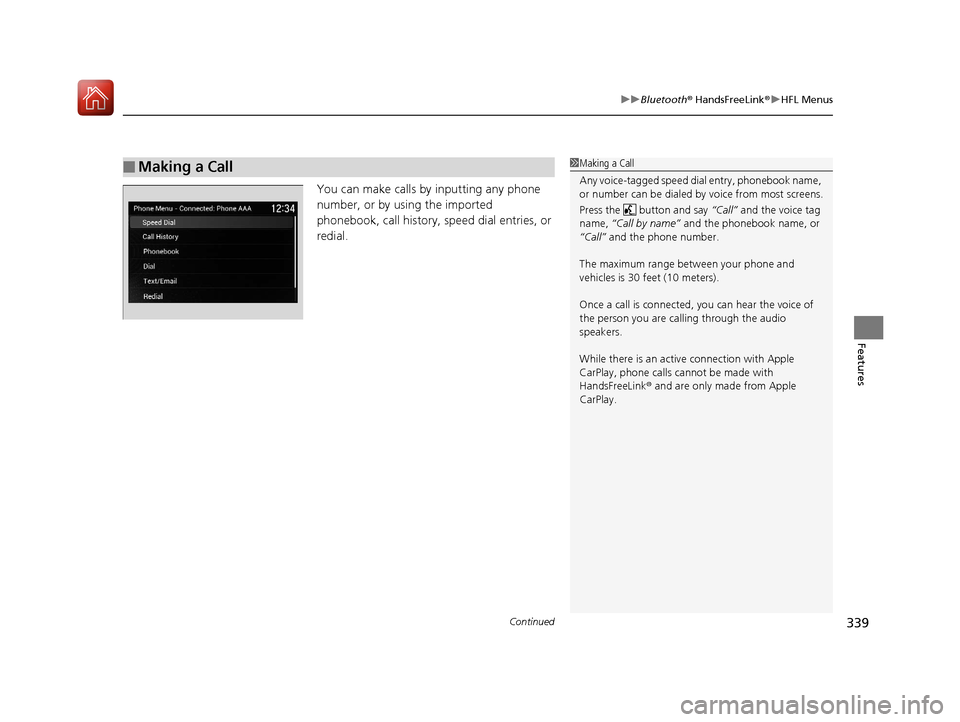
You can make calls by inputting any phone
number, or by using the imported
phonebook, call history, speed dial entries, or
redial.
■Making a Call1Making a Call
Any voice-tagged speed di al entry, phonebook name,
or number can be dialed by voice from most screens.
Press the button and say “Call” and the voice tag
name, “Call by name” and the phonebook name, or
“Call” and the phone number.
The maximum range be tween your phone and
vehicles is 30 fe et (10 meters).
Once a call is connected, you can hear the voice of
the person you are call ing through the audio
speakers.
While there is an active connection with Apple
CarPlay, phone calls ca nnot be made with
HandsFreeLink ® and are only made from Apple
CarPlay.
18 ACURA TLX-31TZ36300.book 339 ページ 2017年2月21日 火曜日 午後2時32分