key Acura TLX 2018 Workshop Manual
[x] Cancel search | Manufacturer: ACURA, Model Year: 2018, Model line: TLX, Model: Acura TLX 2018Pages: 589, PDF Size: 35.45 MB
Page 368 of 589

Continued367
uuWhen Driving uStarting the Engine
Driving
1. While depressing the brake pedal, press the ENGINE START/STOP button.
2. Keeping your right foot on the brake pedal, change the gear position to
(D
button. Select
(R when reversing.
3. With the parking brake applied, release the brake pedal and gently depress the
accelerator pedal.
u Make sure the electric parkin g brake indicator goes off.
2Parking Brake P. 429
2 If the Transmission System Indicator Blinks along with the Warning
Message P. 554
■Starting to Drive1Starting to Drive
You can also release the parking brake by pressing
the electric parking brake sw itch while depressing the
brake pedal.
When facing downhill, you can start your vehicle
more smoothly by manually releasing it with the
electric parking brake switch than by releasing it with
the accelerator pedal.
The engine stops when the gear position is changed
from
( P before the ENGINE START/STOP button is
pressed. Follow the step 1 when starting to drive.
When the engine was started using the two-way
keyless access remote*
When the engine was started using the two-way keyless access remote*
When the engine was started in any case
* Not available on all models
18 ACURA TLX-31TZ36300.book 367 ページ 2017年2月21日 火曜日 午後2時32分
Page 507 of 589
506
Maintenance
Remote Transmitter Care
Replacing the Button Battery
If the indicator does not come on when the button is pressed, replace the battery.
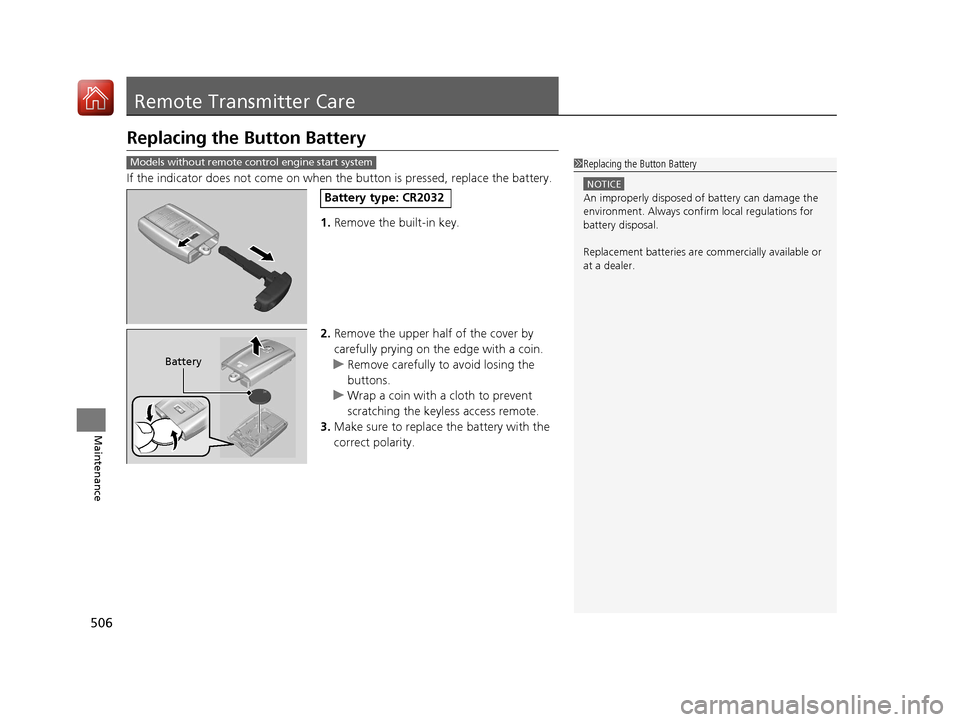
1. Remove the built-in key.
2. Remove the upper half of the cover by
carefully prying on the edge with a coin.
u Remove carefully to avoid losing the
buttons.
u Wrap a coin with a cloth to prevent
scratching the keyle ss access remote.
3. Make sure to replace the battery with the
correct polarity.
Models without remote control engine start system1 Replacing the Button Battery
NOTICE
An improperly disposed of battery can damage the
environment. Always conf irm local regulations for
battery disposal.
Replacement batteries are commercially available or
at a dealer.Battery type: CR2032
Battery
18 ACURA TLX-31TZ36300.book 506 ページ 2017年2月21日 火曜日 午後2時32分
Page 508 of 589
507
uuRemote Transmitter Care uReplacing the Button Battery
Maintenance
If the indicator does not come on when the button is pressed, replace the battery.
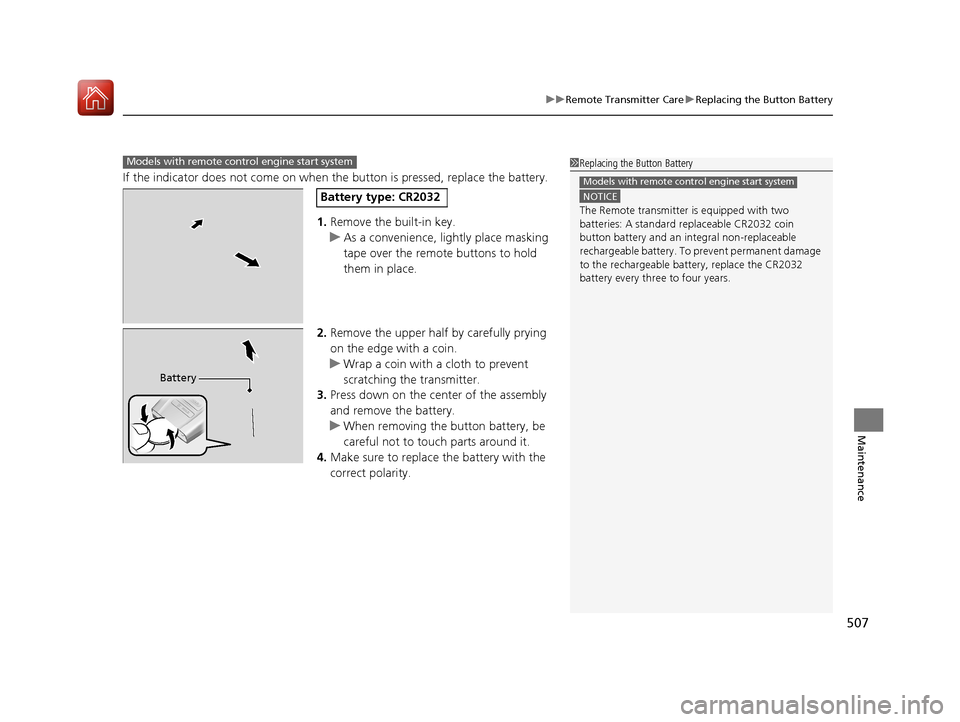
1. Remove the built-in key.
u As a convenience, lightly place masking
tape over the remote buttons to hold
them in place.
2. Remove the upper half by carefully prying
on the edge with a coin.
u Wrap a coin with a cloth to prevent
scratching the transmitter.
3. Press down on the center of the assembly
and remove the battery.
u When removing the button battery, be
careful not to touch parts around it.
4. Make sure to replace the battery with the
correct polarity.
Models with remote control engine start system1Replacing the Button Battery
NOTICE
The Remote transmitter is equipped with two
batteries: A standard replaceable CR2032 coin
button battery and an in tegral non-replaceable
rechargeable battery. To prevent permanent damage
to the rechargeable battery, replace the CR2032
battery every three to four years.
Models with remote control engine start system
Battery type: CR2032
Battery
18 ACURA TLX-31TZ36300.book 507 ページ 2017年2月21日 火曜日 午後2時32分
Page 518 of 589
517
Handling the Unexpected
This chapter explains how to handle unexpected troubles.
ToolsTypes of Tools .................................. 518
If a Tire Goes Flat Temporarily Repairi ng a Flat Tire....... 519
Changing a Flat Tire ......................... 532
Engine Does Not Start Checking the Engine ........................ 539
If the Keyless Access Remote Battery is Weak ............................................. 540
Emergency Engine Stop ................... 541
Jump Starting .................................... 542
Shift Lever Does Not Move .............. 546Overheating
How to Handle Overheating............. 547
Indicator, Coming On/Blinking
If the Low Oil Pressure Indicator Comes On .. 549If the Charging System Indicator Comes On ................................................. 549
If the Malfunction Indicator Lamp Comes On or Blinks ................................... 550
If the Brake System Indicator (Red) Comes On .. 550If the Electric Power Steering (EPS) System Indicator Comes On ........................... 551
If the Electric Parking Brake System Indicator Comes On ....................... 552 If the Low Tire Pressure/TPMS Indicator
Comes On or Blinks ....................... 553
If the Transmission System Indicator Blinks along with the Warning Message .... 554
Fuses Fuse Locations ................................. 555
Inspecting and Changing Fuses ........ 559
Emergency Towing ........................... 560
When You Cannot Unlock the Fuel Fill Door ................................................. 561When You Cannot Open the Trunk ..... 562RefuelingRefueling From a Portable Fuel Container ... 563
18 ACURA TLX-31TZ36300.book 517 ページ 2017年2月21日 火曜日 午後2時32分
Page 540 of 589
539
Handling the Unexpected
Engine Does Not Start
Checking the Engine
If the engine does not start, check the starter.
Starter conditionChecklist
Starter doesn’t turn or turns
over slowly.
The battery may be dead. Check
each of the items on the right and
respond accordingly.Check for a message on the multi-information display.
●If the To Start, Hold Remote Near Start Button message appears
2If the Keyless Access Remote Battery is Weak P. 540
uMake sure the keyless access remote is in its operating range.
2ENGINE START/STOP Button Operating Range P. 157
Check the brightness of the interior lights.
Turn on the interior lights and check the brightness.
●If the interior lights are dim or do not come on at all
2 Battery P. 504●If the interior lights come on normally 2 Fuses P. 555
The starter turns over normally
but the engine doesn’t start.
There may be a problem with the
fuse. Check each of the items on
the right and respond accordingly. Review the engine start procedure.
Follow its instructions, and try
to start the engine again.
2 Starting the Engine P. 362
Check the immobilizer system indicator.
When the immobilizer system indicator is blinking, the engine cannot be started.
2Immobilizer System P. 151
Check the fuel level.
There should be enough fuel in the tank.
2 Fuel Gauge P. 113
Check the fuse.
Check all fuses, or have the vehicle checked by a dealer.
2Inspecting and Changing Fuses P. 559
If the problem continues:
2Emergency Towing P. 560
1Checking the Engine
If you must start the vehi cle immediately, use an
assisting vehicle or booster battery to jump start it.
2 Jump Starting P. 542
18 ACURA TLX-31TZ36300.book 539 ページ 2017年2月21日 火曜日 午後2時32分
Page 541 of 589

540
uuEngine Does Not Start uIf the Keyless Access Remote Battery is Weak
Handling the Unexpected
If the Keyless Access Re mote Battery is Weak
If the beeper sounds, the To Start, Hold Remote Near Start Button message
appears on the multi-information display, and the indicator on the ENGINE START/
STOP button flashes, and the engine won’t start.
Start the engine as follows: 1.Touch the center of the ENGINE START/
STOP button with the A logo on the keyless
access remote while the indicator on the
ENGINE START/STOP button is flashing.
The buttons on the keyle ss access remote
should be facing you.
u The indicator flashes for about 30
seconds.
2. Depress the brake pedal and press the
ENGINE START/STOP button within 10
seconds after the beeper sounds while the
indicator stays on.
u If you don’t depress the pedal, the mode
will change to ACCESSORY.
18 ACURA TLX-31TZ36300.book 540 ページ 2017年2月21日 火曜日 午後2時32分
Page 547 of 589

546
Handling the Unexpected
Shift Lever Does Not Move
Follow the procedure below if you cannot move the shift lever out of the (P
position.
1.Set the parking brake.
2. Remove the built-in key from the keyless
access remote.
3. Pull up the bottom edge of the cover with
your finger, then remove it.
4. Insert the key into the sh ift lock release slot.
5. While pushing the key, press the shift lever
release button, and place the shift lever into
(N.
u The lock is now released. Have the shift
lever checked by a dealer as soon as
possible.
■Releasing the Lock
Models with shift lever
Cover
Release Button
Shift Lock Release Slot
18 ACURA TLX-31TZ36300.book 546 ページ 2017年2月21日 火曜日 午後2時32分
Page 558 of 589
557
uuFuses uFuse Locations
Continued
Handling the Unexpected
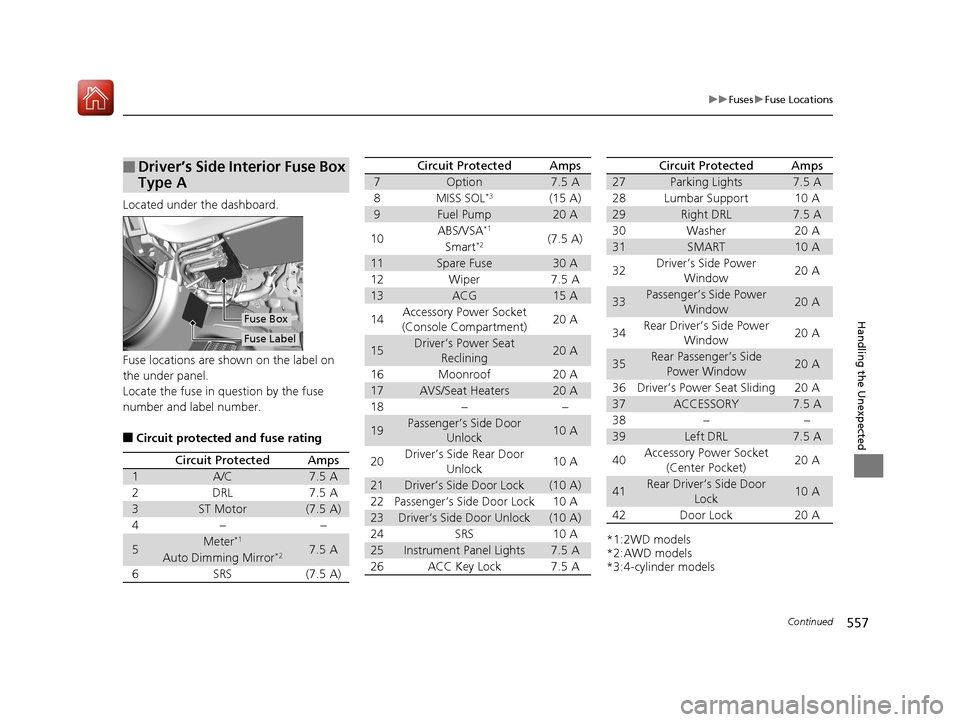
Located under the dashboard.
Fuse locations are shown on the label on
the under panel.
Locate the fuse in question by the fuse
number and label number.
■Circuit protected and fuse rating
■Driver’s Side Interior Fuse Box
Type A
Fuse Label
Fuse Box
Circuit ProtectedAmps
1A/C7.5 A
2DRL7.5 A
3ST Motor(7.5 A)
4−−
5Meter*17.5 AAuto Dimming Mirror*2
6SRS(7.5 A)
7Option7.5 A
8MISS SOL*3(15 A)
9Fuel Pump20 A
10ABS/VSA*1(7.5 A)Smart*2
11Spare Fuse30 A
12Wiper7.5 A
13ACG15 A
14Accessory Power Socket
(Console Compartment)20 A
15Driver’s Power Seat Reclining20 A
16Moonroof20 A
17AVS/Seat Heaters20 A
18−−
19Passenger’s Side Door Unlock10 A
20Driver’s Side Rear Door
Unlock10 A
21Driver’s Side Door Lock(10 A)
22Passenger’s Side Door Lock10 A
23Driver’s Side Door Unlock(10 A)
24SRS10 A
25Instrument Panel Lights7.5 A
26ACC Key Lock7.5 A
Circuit ProtectedAmps
*1:2WD models
*2:AWD models
*3:4-cylinder models
27Parking Lights7.5 A
28Lumbar Support10 A
29Right DRL7.5 A
30Washer20 A
31SMART10 A
32Driver’s Side Power Window20 A
33Passenger’s Side Power Window20 A
34Rear Driver’s Side Power Window20 A
35Rear Passenger’s Side
Power Window20 A
36Driver’s Power Seat Sliding20 A
37ACCESSORY7.5 A
38−−
39Left DRL7.5 A
40Accessory Power Socket (Center Pocket)20 A
41Rear Driver’s Side Door Lock10 A
42Door Lock20 A
Circuit ProtectedAmps
18 ACURA TLX-31TZ36300.book 557 ページ 2017年2月21日 火曜日 午後2時32分
Page 563 of 589
562
Handling the Unexpected
When You Cannot Open the Trunk
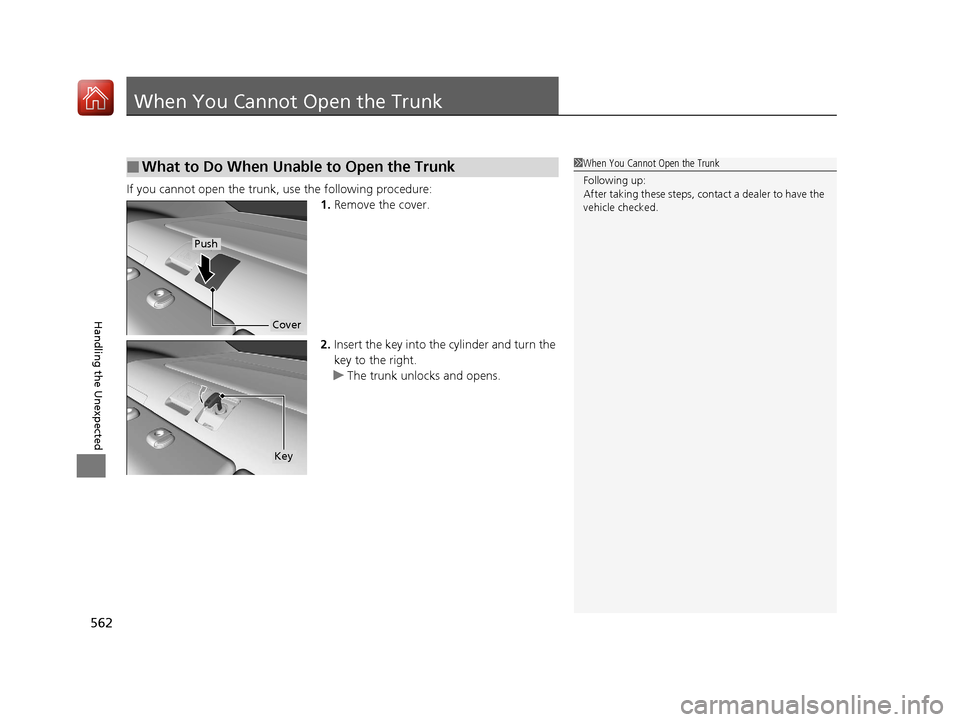
If you cannot open the trunk, use the following procedure:1.Remove the cover.
2. Insert the key into the cylinder and turn the
key to the right.
u The trunk unlocks and opens.
■What to Do When Unable to Open the Trunk1When You Cannot Open the Trunk
Following up:
After taking these steps, cont act a dealer to have the
vehicle checked.
Cover
Push
Key
18 ACURA TLX-31TZ36300.book 562 ページ 2017年2月21日 火曜日 午後2時32分
Page 570 of 589
569Continued
Information
Devices that Emit Radio Waves
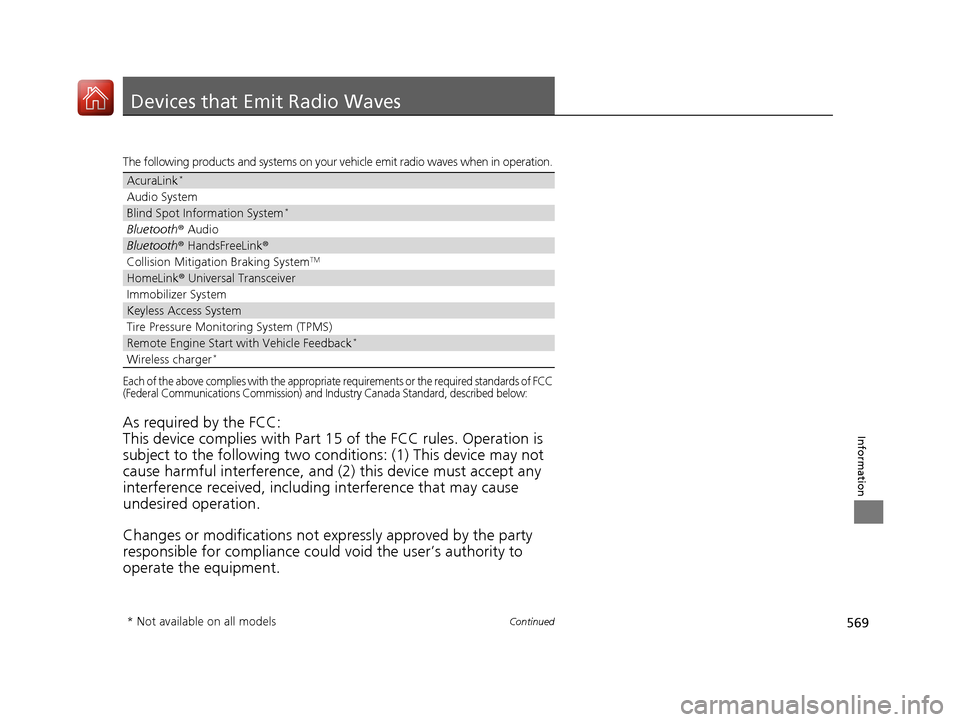
The following products and systems on your vehicle emit radio waves when in operation.
Each of the above complies with the appropriate requirements or the required standards of FCC
(Federal Communications Commission) and Industry Canada Standard, described below:
As required by the FCC:
This device complies with Part 15 of the FCC rules. Operation is
subject to the following two cond itions: (1) This device may not
cause harmful interferenc e, and (2) this device must accept any
interference received, including interference that may cause
undesired operation.
Changes or modifications not ex pressly approved by the party
responsible for compliance could void the user’s authority to
operate the equipment.
AcuraLink*
Audio System
Blind Spot Information System*
Bluetooth ® Audio
Bluetooth® HandsFreeLink ®
Collision Mitigati on Braking SystemTM
HomeLink® Universal Transceiver
Immobilizer System
Keyless Access System
Tire Pressure Monitoring System (TPMS)
Remote Engine Start with Vehicle Feedback*
Wireless charger*
* Not available on all models
18 ACURA TLX-31TZ36300.book 569 ページ 2017年2月21日 火曜日 午後2時32分