buttons Acura TLX 2019 User Guide
[x] Cancel search | Manufacturer: ACURA, Model Year: 2019, Model line: TLX, Model: Acura TLX 2019Pages: 591, PDF Size: 34.5 MB
Page 506 of 591
504
Maintenance
Remote Transmitter Care
Replacing the Button Battery
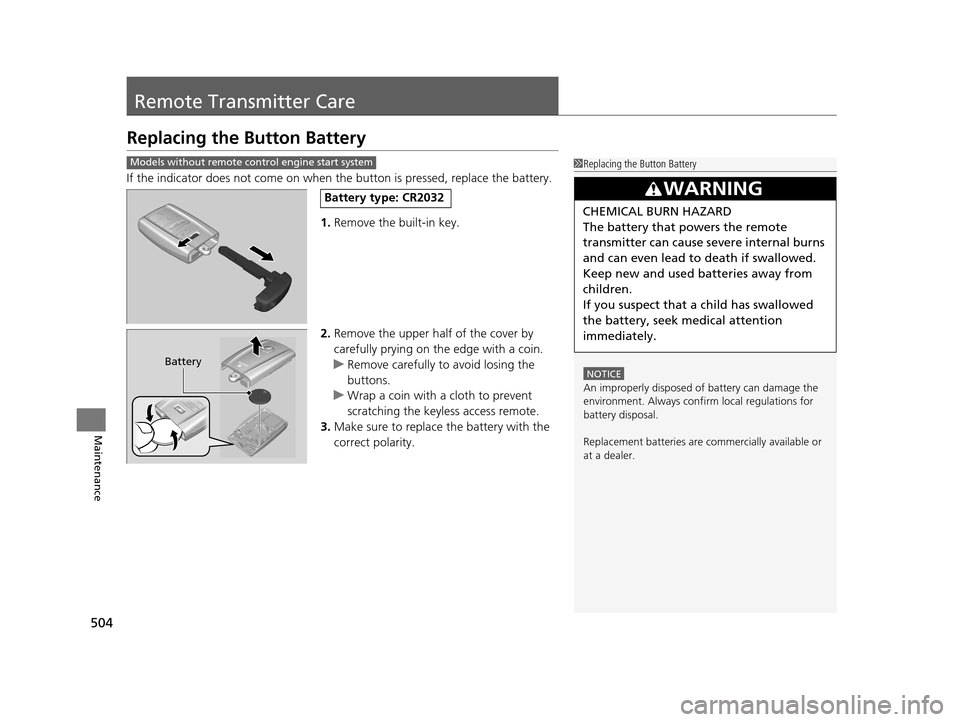
If the indicator does not come on when the button is pressed, replace the battery.
1.Remove the built-in key.
2. Remove the upper half of the cover by
carefully prying on the edge with a coin.
u Remove carefully to avoid losing the
buttons.
u Wrap a coin with a cloth to prevent
scratching the keyle ss access remote.
3. Make sure to replace the battery with the
correct polarity.
Models without remote control engine start system1 Replacing the Button Battery
NOTICE
An improperly disposed of battery can damage the
environment. Always conf irm local regulations for
battery disposal.
Replacement batteries are commercially available or
at a dealer.
3WARNING
CHEMICAL BURN HAZARD
The battery that powers the remote
transmitter can cause severe internal burns
and can even lead to death if swallowed.
Keep new and used batteries away from
children.
If you suspect that a child has swallowed
the battery, seek medical attention
immediately.
Battery type: CR2032
Battery
19 ACURA TLX-31TZ36400.book 504 ページ 2018年2月16日 金曜日 午後12時22分
Page 507 of 591
505
uuRemote Transmitter Care uReplacing the Button Battery
Maintenance
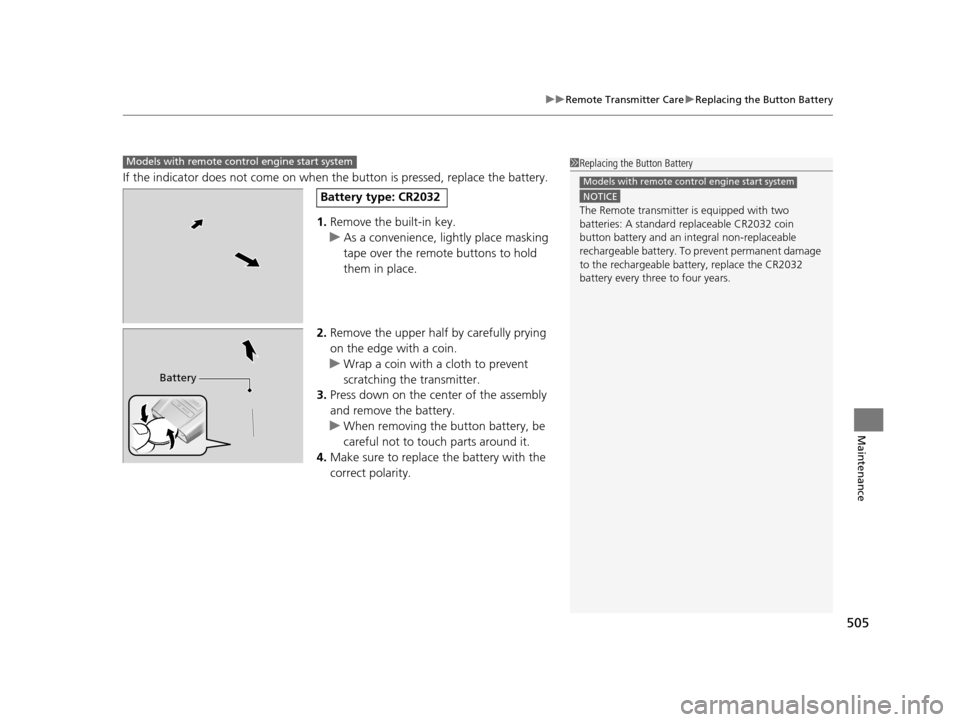
If the indicator does not come on when the button is pressed, replace the battery.
1. Remove the built-in key.
u As a convenience, lightly place masking
tape over the remote buttons to hold
them in place.
2. Remove the upper half by carefully prying
on the edge with a coin.
u Wrap a coin with a cloth to prevent
scratching the transmitter.
3. Press down on the center of the assembly
and remove the battery.
u When removing the button battery, be
careful not to touch parts around it.
4. Make sure to replace the battery with the
correct polarity.
Models with remote control engine start system1Replacing the Button Battery
NOTICE
The Remote transmitter is equipped with two
batteries: A standard replaceable CR2032 coin
button battery and an in tegral non-replaceable
rechargeable battery. To prevent permanent damage
to the rechargeable battery, replace the CR2032
battery every three to four years.
Models with remote control engine start system
Battery type: CR2032
Battery
19 ACURA TLX-31TZ36400.book 505 ページ 2018年2月16日 金曜日 午後12時22分
Page 540 of 591
538
uuEngine Does Not Start uIf the Keyless Access Remote Battery is Weak
Handling the Unexpected
If the Keyless Access Re mote Battery is Weak
If the beeper sounds, the To Start, Hold Remote Near Start Button message
appears on the multi-information disp lay, and the indicator on the ENGINE START/
STOP button flashes, and the engine won’t start.
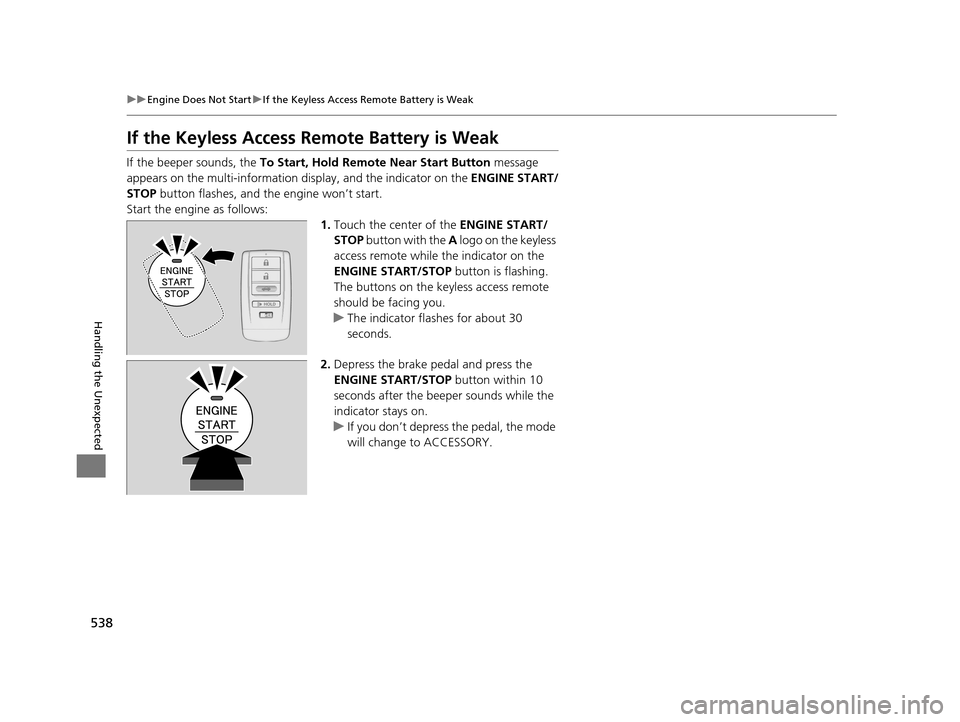
Start the engine as follows: 1.Touch the center of the ENGINE START/
STOP button with the A logo on the keyless
access remote while the indicator on the
ENGINE START/STOP button is flashing.
The buttons on the keyle ss access remote
should be facing you.
u The indicator flashes for about 30
seconds.
2. Depress the brake pedal and press the
ENGINE START/STOP button within 10
seconds after the beeper sounds while the
indicator stays on.
u If you don’t depress the pedal, the mode
will change to ACCESSORY.
19 ACURA TLX-31TZ36400.book 538 ページ 2018年2月16日 金曜日 午後12時22分
Page 582 of 591
580
Index
FluidsAutomatic Transmission ........................... 484
Brake ....................................................... 485
Dual Clutch Transmission ......................... 484
Engine Coolant ........................................ 482
Windshield Washer .................................. 485
Fog Lights .................................................. 165
Foot Brake ................................................. 431
Front Airbags (SRS) ..................................... 44
Front Seat Heaters and Ventilation ......... 203
Front Seats ................................................ 180
Adjusting ................................................. 180
Front Sensor Camera ................................ 388
Fuel ...................................................... 21, 459
Economy ................................................. 462
Gauge ..................................................... 113
Instant Fuel Economy ............................... 118
Low Fuel Indicator ..................................... 78
Range ...................................................... 118
Recommendation ............................ 459, 564
Refueling ................................................. 459
Fuel Economy ............................................ 462
Fuel Fill Door ....................................... 21, 460
Fuses .......................................................... 553
Inspecting and Changing ......................... 557
Locations ......................... 553, 554, 555, 556
G
Gasoline (Fuel)
Economy ................................................. 462 Gauge ..................................................... 113
Information ............................................. 459
Instant Fuel Economy .............................. 118
Low Fuel Indicator ..................................... 78
Refueling................................................. 459
Gauges ...................................................... 113
Gear Position Indicator ...................... 75, 372
Gear Shift Lever Positions
Dual Clutch Transmission ........................ 378
Gear Shift Positions Automatic Transmission .......................... 371
Glass (care) ........................................ 508, 510
Glove Box .................................................. 192
H
Handling the Unexpected ........................ 515
HandsFreeLink ® (HFL) ............................... 317
Auto Answer ........................................... 333
Automatic Import of Cellular Phonebook
and Call History ..................................... 335
Automatic Transferring............................ 333
Displaying Messages................................ 348
HFL Buttons............................................. 317
HFL Menus .............................................. 320
HFL Status Display ................................... 318
Limitations for Manual Operation ............ 319
Making a Call .......................................... 339
Options During a Call .............................. 345
Phone Setup............................................ 325
Receiving a Call ....................................... 344 Receiving a Text/E-mail Message ............. 346
Ring Tone ............................................... 334
Selecting a Mail Account......................... 347
Speed Dial .............................................. 336
To Create a Security PIN .......................... 332
To Set Up a Text/E-mail Message
Option .................................................. 330
Use Contact Photo .................................. 334
Hazard Warning Button .............................. 4
Head Restraints ........................................ 183
Headlight Washers ................................... 171
Headlights ................................................ 162
Aiming.................................................... 486
Auto High-Beam System ......................... 166
Automatic Operation .............................. 163
Dimming......................................... 162, 165
Operating ............................................... 162
Heated Steering Wheel ........................... 202
Heaters (Seat) ................................... 203, 204
HFL (HandsFreeLink ®) .............................. 317
High Beam Indicator .................................. 82
Hill Start Assist System ............................. 368
HomeLink ® Universal Transceiver ........... 314
Honda App License Agreement .............. 277
I
Identification Numbers............................ 566
Vehicle Identification Number (VIN), Engine Number and Transmission
Number .............................................. 566
19 ACURA TLX-31TZ36400.book 580 ページ 2018年2月16日 金曜日 午後12時22分