warning light Acura TLX 2019 User Guide
[x] Cancel search | Manufacturer: ACURA, Model Year: 2019, Model line: TLX, Model: Acura TLX 2019Pages: 591, PDF Size: 34.5 MB
Page 206 of 591
uuInterior Lights/Interior Convenience Items uInterior Convenience Items
204
Controls
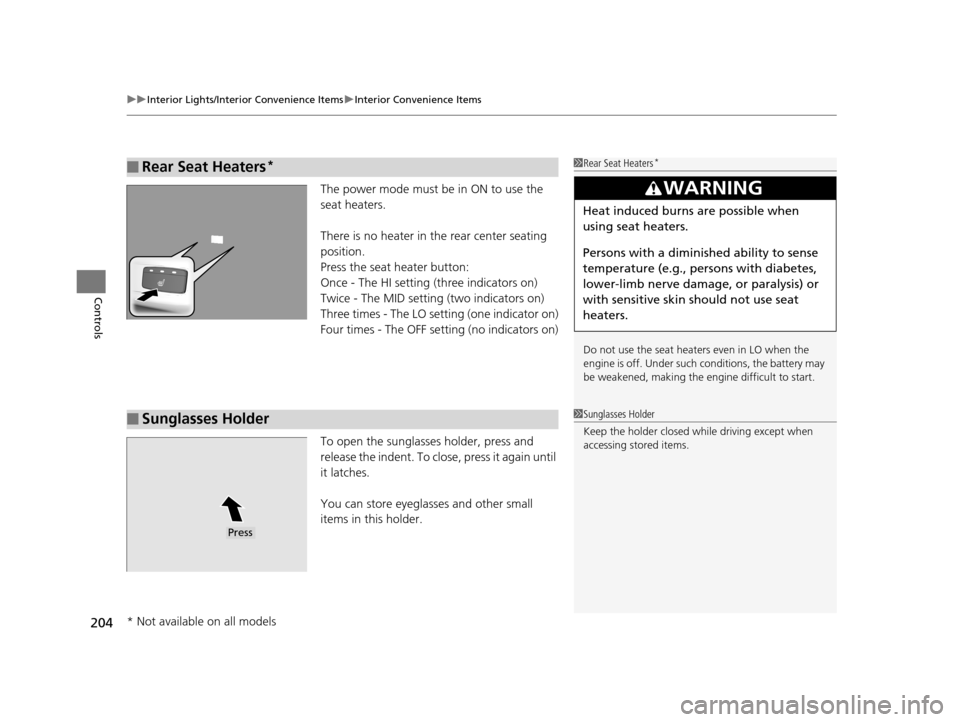
The power mode must be in ON to use the
seat heaters.
There is no heater in the rear center seating
position.
Press the seat heater button:
Once - The HI setting (three indicators on)
Twice - The MID setting (two indicators on)
Three times - The LO setting (one indicator on)
Four times - The OFF se tting (no indicators on)
To open the sunglasses holder, press and
release the indent. To close, press it again until
it latches.
You can store eyeglasses and other small
items in this holder.
■Rear Seat Heaters*1 Rear Seat Heaters*
Do not use the seat heaters even in LO when the
engine is off. Under such conditions, the battery may
be weakened, making the engine difficult to start.
3WARNING
Heat induced burns are possible when
using seat heaters.
Persons with a diminished ability to sense
temperature (e.g., persons with diabetes,
lower-limb nerve damage, or paralysis) or
with sensitive skin should not use seat
heaters.
■Sunglasses Holder1Sunglasses Holder
Keep the holder closed wh ile driving except when
accessing stored items.
Press
* Not available on all models
19 ACURA TLX-31TZ36400.book 204 ページ 2018年2月16日 金曜日 午後12時22分
Page 392 of 591
390
uuWhen Driving uAdaptive Cruise Control (ACC) with Low Speed Follow (LSF)
Driving
Adaptive Cruise Control (ACC) with Low Speed
Follow (LSF)
Helps maintain a constant vehicle speed an d a set following-interval behind a vehicle
detected ahead of yours and, if the detect ed vehicle comes to a stop, can decelerate
and stop your vehicle, without you having to keep your foot on the brake or the
accelerator.
When ACC with LSF slows your vehicle by applying the brakes, your vehicle’s brake
lights will illuminate.
1 Adaptive Cruise Control (ACC) with Low Speed Follow (LSF)
Important Reminder
As with any system, there are limits to ACC with LSF.
Use the brake pedal whenever necessary, and always
keep a safe interval betw een your vehicle and other
vehicles.
Be careful not to severely impact the radar sensor
cover.
3WARNING
Improper use of ACC wi th LSF can lead to a
crash.
Use ACC with LSF only when driving on
expressways or freeways and in good
weather conditions.
3WARNING
ACC with LSF has limite d braking capability
and may not stop your vehicle in time to
avoid a collision with a vehicle that quickly
stops in front of you.
Always be prepared to apply the brake
pedal if the conditions require.
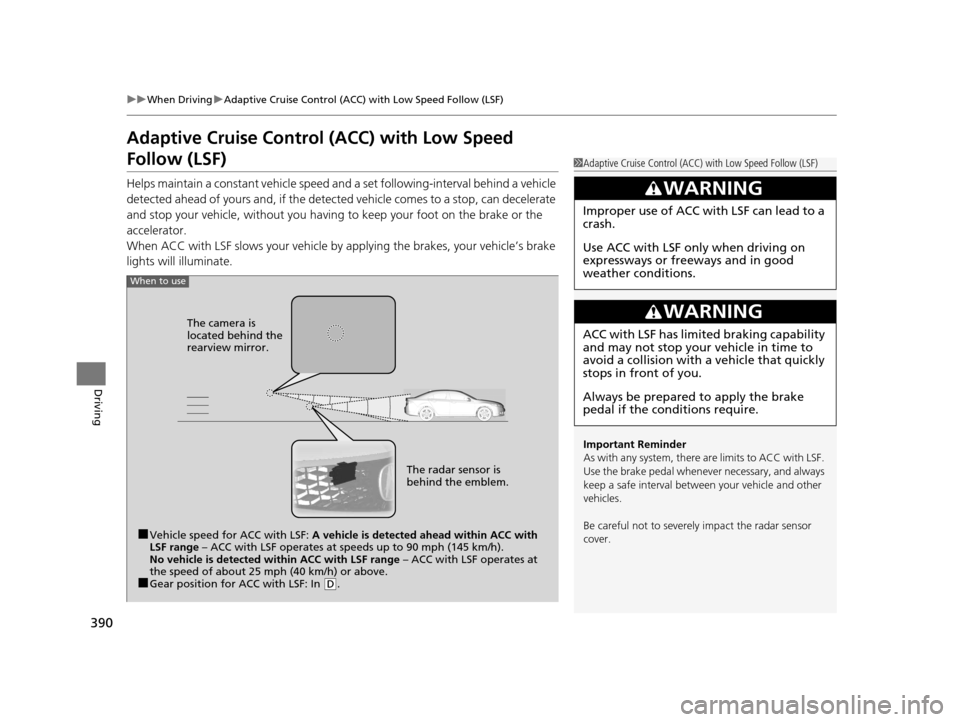
When to use
■Vehicle speed for ACC with LSF: A vehicle is detected ahead within ACC with
LSF range – ACC with LSF operates at speeds up to 90 mph (145 km/h).
No vehicle is detected within ACC with LSF range – ACC with LSF operates at
the speed of about 25 mph (40 km/h) or above.
■Gear position for ACC with LSF: In ( D. The radar sensor is
behind the emblem.
The camera is
located behind the
rearview mirror.
19 ACURA TLX-31TZ36400.book 390 ページ 2018年2月16日 金曜日 午後12時22分
Page 395 of 591
Continued393
uuWhen Driving uAdaptive Cruise Control (ACC) with Low Speed Follow (LSF)
Driving
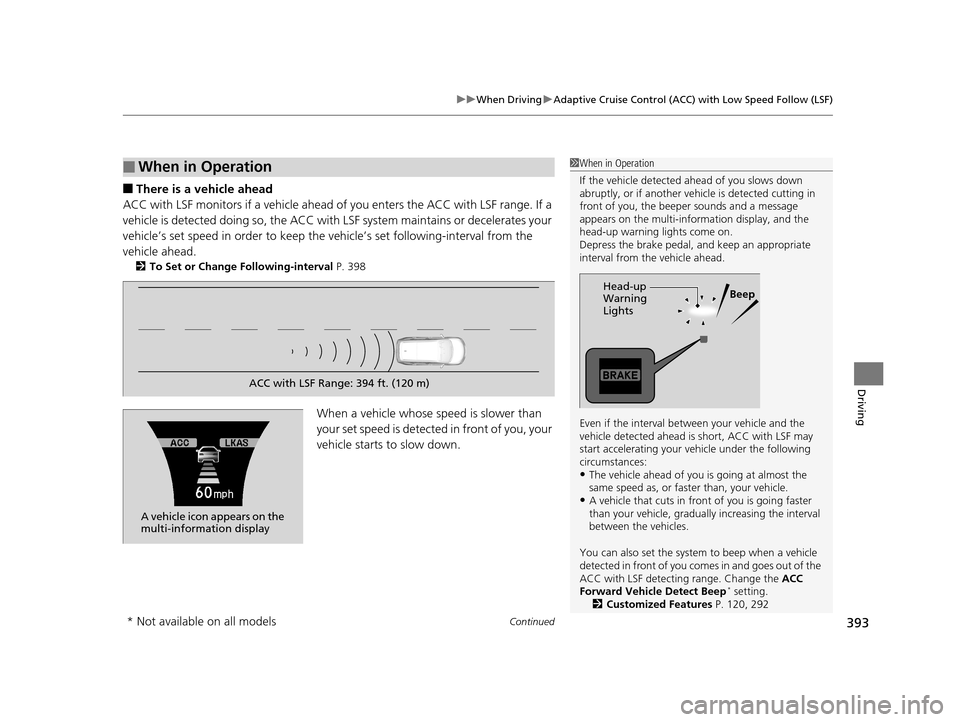
■There is a vehicle ahead
ACC with LSF monitors if a vehicle ahead of you enters the ACC with LSF range. If a
vehicle is detected doing so, the ACC with LSF system maintains or decelerates your
vehicle’s set speed in order to keep the ve hicle’s set following-interval from the
vehicle ahead.
2 To Set or Change Following-interval P. 398
When a vehicle whose speed is slower than
your set speed is detected in front of you, your
vehicle starts to slow down.
■When in Operation1When in Operation
If the vehicle detected ahead of you slows down
abruptly, or if a nother vehicle is de tected cutting in
front of you, the beep er sounds and a message
appears on the multi-inform ation display, and the
head-up warning lights come on.
Depress the brake pedal, and keep an appropriate
interval from the vehicle ahead.
Even if the interval betw een your vehicle and the
vehicle detected ahead is short, ACC with LSF may
start accelerating your ve hicle under the following
circumstances:
•The vehicle ahead of you is going at almost the
same speed as, or faster than, your vehicle.
•A vehicle that cuts in front of you is going faster
than your vehicle, gradua lly increasing the interval
between the vehicles.
You can also set the system to beep when a vehicle
detected in front of you co mes in and goes out of the
ACC with LSF detecting range. Change the ACC
Forward Vehicle Detect Beep
* setting.
2 Customized Features P. 120, 292
BeepHead-up
Warning
Lights
ACC with LSF Range: 394 ft. (120 m)
A vehicle icon appears on the
multi-information display
* Not available on all models
19 ACURA TLX-31TZ36400.book 393 ページ 2018年2月16日 金曜日 午後12時22分
Page 396 of 591
uuWhen Driving uAdaptive Cruise Control (ACC) with Low Speed Follow (LSF)
394
Driving
■There is no vehicle ahead
Your vehicle maintains the set speed without
having to keep your foot on the brake or
accelerator pedal.
If there previously was a vehicle detected
ahead that kept your vehicle from traveling at
the set speed, ACC with LSF accelerates your
vehicle to the set speed, and then maintains it.
■When you depress the accelerator pedal
You can temporarily increase th e vehicle speed. In this case, there is no audible or
visual alert even if a vehicle is in the ACC with LSF range.
ACC with LSF stays on unless you cancel it. Once you release the accelerator pedal,
the system resumes the set speed.
There are times when the vehicle speed will decrease when the accelerator pedal is
lightly applied.
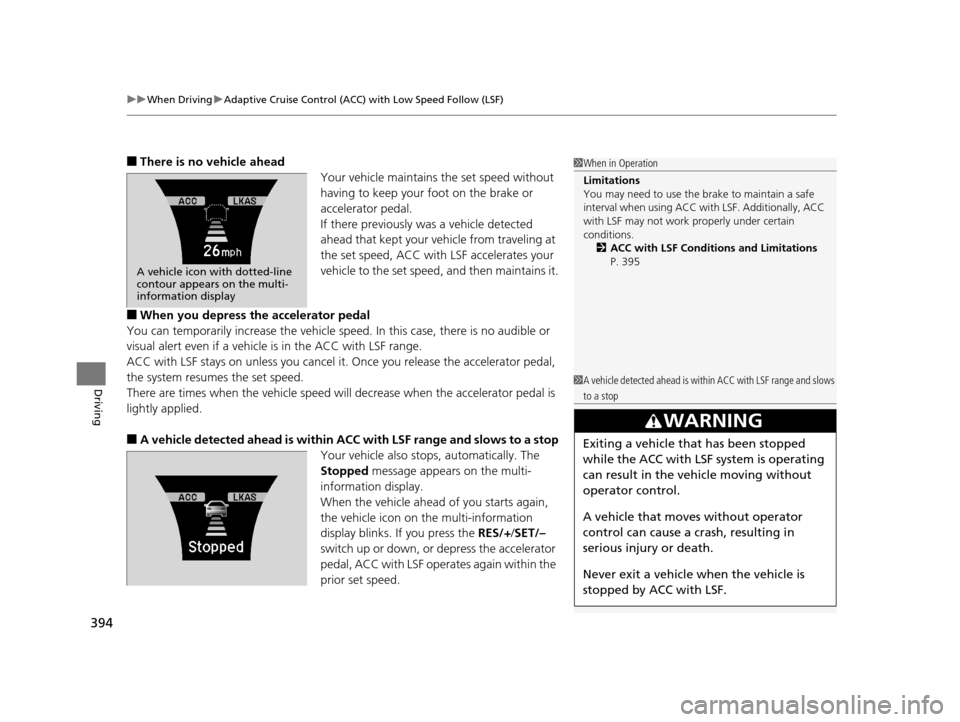
■A vehicle detected ahead is within AC C with LSF range and slows to a stop
Your vehicle also stop s, automatically. The
Stopped message appears on the multi-
information display.
When the vehicle ahead of you starts again,
the vehicle icon on th e multi-information
display blinks. If you press the RES/+/SET/–
switch up or down, or depress the accelerator
pedal, ACC with LSF operates again within the
prior set speed.
A vehicle icon with dotted-line
contour appears on the multi-
information display
1 When in Operation
Limitations
You may need to use the brake to maintain a safe
interval when using ACC wi th LSF. Additionally, ACC
with LSF may not work properly under certain
conditions.
2 ACC with LSF Conditions and Limitations
P. 395
1 A vehicle detected ahead is with in ACC with LSF range and slows
to a stop
3WARNING
Exiting a vehicle that has been stopped
while the ACC with LSF system is operating
can result in the ve hicle moving without
operator control.
A vehicle that moves without operator
control can cause a crash, resulting in
serious injury or death.
Never exit a vehicle when the vehicle is
stopped by ACC with LSF.
19 ACURA TLX-31TZ36400.book 394 ページ 2018年2月16日 金曜日 午後12時22分
Page 397 of 591
Continued395
uuWhen Driving uAdaptive Cruise Control (ACC) with Low Speed Follow (LSF)
Driving
The system may automatically shut off and the ACC indicator will come on under
certain conditions. Some examples of these conditions are listed below. Other
conditions may reduce some of the ACC functions.
2 Front Sensor Camera P. 388
■Environmental conditions
Driving in bad weather (r ain, fog, snow, etc.).
■Roadway conditions
Driving on a snowy or wet roadway (obscure d lane marking, vehicle tracks, reflected
lights, road spra y, high contrast).
■Vehicle conditions
• The outside of the windshield is blocked by dirt, mud, leaves, wet snow, etc.
• An abnormal tire or wheel condition (Wrong sized, varied size or construction,
improperly inflated, compact spare tire
*, etc.).
• The camera temperature gets too high.
• The parking brake is applied.
• When the front grille is dirty.
• The vehicle is tilted due to a heavy load or suspension modifications.
• When tire chains are installed.
■ACC with LSF Conditions and Limitations1ACC with LSF Conditions and Limitations
The radar sensor for ACC with LSF is shared with the
Collision Mitigati on Braking System
TM (CMBSTM).
2 Collision Mitigation Braking SystemTM
(CMBSTM) P. 436
You can read about handling information for the
camera equipped with this system. 2 Front Sensor Camera P. 388
Always keep the radar sensor cover clean.
Never use chemical solvents or polishing powder for
cleaning the sensor cover. Clean it with water or a
mild detergent.
Do not put a sticker on the radar sensor cover or
replace the radar sensor cover.
If you need the radar sensor to be repaired, or
removed, or the radar se nsor cover is strongly
impacted, turn off the system by pressing the MAIN
button and take your vehicle to a dealer.
Have your vehicle checked by a dealer if you find any
unusual behavior of the system (e.g., the warning
message appears too frequently).
* Not available on all models
19 ACURA TLX-31TZ36400.book 395 ページ 2018年2月16日 金曜日 午後12時22分
Page 412 of 591

uuWhen Driving uLane Keeping Assist System (LKAS)
410
Driving
Provides assistance to keep the vehicle in the center of the lane. When the vehicle
nears a white or yellow line, steering force of the electric power steering will become
stronger.
When the vehicle enters the warning area, the LKAS alerts you with slight steering
wheel vibration as well as a warning display.
■Lane Keep Support Function1 Lane Keeping Assist System (LKAS)
When it fails to detect lanes, the system will
temporarily be canceled. When a lane is detected, the
system will recover automatically.
■Lane Departure Warning Function
Warning Area
Warning Area
19 ACURA TLX-31TZ36400.book 410 ページ 2018年2月16日 金曜日 午後12時22分
Page 434 of 591
uuBraking uBrake System
432
Driving
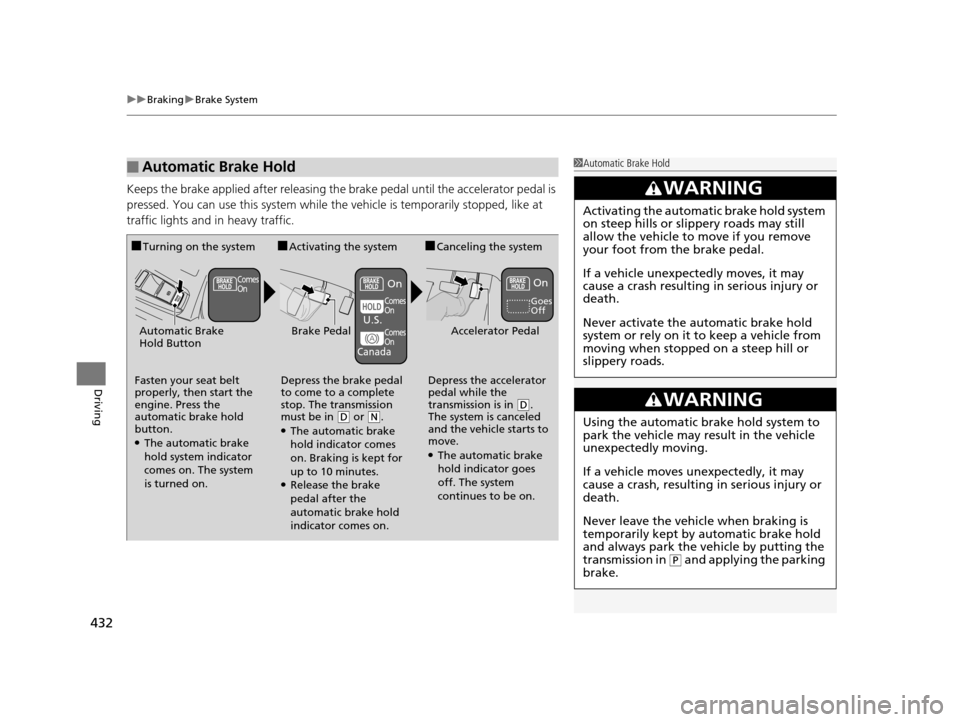
Keeps the brake applied after releasing the brake pedal until the accelerator pedal is
pressed. You can use this system while the vehicle is temporarily stopped, like at
traffic lights and in heavy traffic.
■Automatic Brake Hold1Automatic Brake Hold
3WARNING
Activating the automatic brake hold system
on steep hills or slippery roads may still
allow the vehicle to move if you remove
your foot from the brake pedal.
If a vehicle unexpectedly moves, it may
cause a crash resulting in serious injury or
death.
Never activate the automatic brake hold
system or rely on it to keep a vehicle from
moving when stopped on a steep hill or
slippery roads.
3WARNING
Using the automatic brake hold system to
park the vehicle may result in the vehicle
unexpectedly moving.
If a vehicle moves unexpectedly, it may
cause a crash, resulting in serious injury or
death.
Never leave the vehicle when braking is
temporarily kept by automatic brake hold
and always park the vehicle by putting the
transmission in
( P and applying the parking
brake.
■Turning on the system
Fasten your seat belt
properly, then start the
engine. Press the
automatic brake hold
button.
●The automatic brake
hold system indicator
comes on. The system
is turned on.
■Activating the system
Depress the brake pedal
to come to a complete
stop. The transmission
must be in
( D or (N.●The automatic brake
hold indicator comes
on. Braking is kept for
up to 10 minutes.
●Release the brake
pedal after the
automatic brake hold
indicator comes on.
■Canceling the system
Depress the accelerator
pedal while the
transmission is in
( D.
The system is canceled
and the vehicle starts to
move.
●The automatic brake
hold indicator goes
off. The system
continues to be on.
Accelerator PedalBrake PedalAutomatic Brake
Hold Button
Goes
Off
Comes
OnOn On
U.S.
Canada
Comes
On
Comes
On
19 ACURA TLX-31TZ36400.book 432 ページ 2018年2月16日 金曜日 午後12時22分
Page 439 of 591

Continued437
uuBraking uCollision Mitigation Braking SystemTM (CMBSTM)
Driving
■When the system activates
At system’s earliest collision alert st age, you can change the distance (Long/
Normal /Short ) between vehicles at which alerts will come on through multi-
information display setting options.
2 List of customizable options P. 123, 300
■Vibration alert on the steering wheel
When a potential collision to an oncoming detected vehicle is determined, the
system alerts you with rapid vibration on the steering wheel, in addition to visual and
audible alerts. u Take appropriate action to prevent a col lision (apply the brakes, operate the
steering wheel, etc.).
1 When the system activates
The camera in the CMBS
TM is also designed to detect
pedestrians.
However, this pedestrian detection feature may not
activate or may not detect a pedestrian in front of
your vehicle under certain conditions.
Refer to the ones indicating the pedestrian detection
limitations from the list. 2 CMBS
TM Conditions and Limitations P. 440
The head-up warning uses a lens located at the front
end of the dashboard.
Do not cover the lens or spill any liquid on it.
Lens
The system provides visual, audible and tactile alerts of a possible collision, and
stops if the collision is avoided.
u Take appropriate action to prevent a collision (apply the brakes, change
lanes, etc.)
Beep
Head-up
Warning
Lights
Visual Alerts
Audible Alert
Tactile Alert
1 Vibration alert on the steering wheel
Vibration alert function is disabled when the electric
power steering (EPS) system indicator comes on. 2 Electric Power Steering (EPS) System
Indicator P. 79
19 ACURA TLX-31TZ36400.book 437 ページ 2018年2月16日 金曜日 午後12時22分
Page 440 of 591
438
uuBraking uCollision Mitigation Braking SystemTM (CMBSTM)
Driving
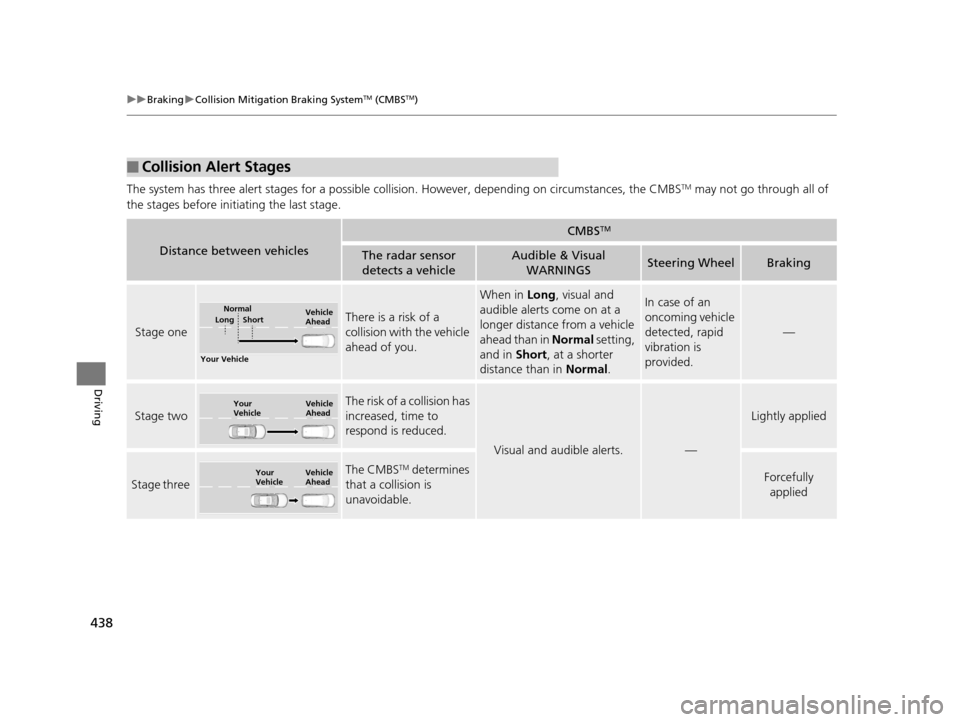
The system has three alert stages for a possible collis ion. However, depending on circumstances, the CMBSTM may not go through all of
the stages before initiating the last stage.
■Collision Alert Stages
Distance between vehicles
CMBSTM
The radar sensor detects a vehicleAudible & Visual WARNINGSSteering WheelBraking
Stage one
There is a risk of a
collision with the vehicle
ahead of you.
When in Long, visual and
audible alerts come on at a
longer distance from a vehicle
ahead than in Normal setting,
and in Short, at a shorter
distance than in Normal.In case of an
oncoming vehicle
detected, rapid
vibration is
provided.
—
Stage two
The risk of a collision has
increased, time to
respond is reduced.
Visual and audible alerts.—
Lightly applied
Stage three
The CMBSTM determines
that a collision is
unavoidable.Forcefully applied
Your Vehicle Vehicle
Ahead
Normal
Short
Long
Your
Vehicle Vehicle
Ahead
Your
VehicleVehicle
Ahead
19 ACURA TLX-31TZ36400.book 438 ページ 2018年2月16日 金曜日 午後12時22分
Page 442 of 591
uuBraking uCollision Mitigation Braking SystemTM (CMBSTM)
440
Driving
The system may automatically shut off and the CMBSTM indicator will come on under
certain conditions. Some examples of th ese conditions are listed below. Other
conditions may reduce some of the CMBS
TM functions.
2 Front Sensor Camera P. 388
■Environmental conditions
• Driving in bad weather (rain, fog, snow, etc.).
• Sudden changes between light and dark, such as an entrance or exit of a tunnel.
• There is little contrast between objects and the background.
• Driving into low sunlight (e.g., at dawn or dusk).
• Strong light is reflected onto the roadway.
• Driving in the shadows of trees, buildings, etc.
• Roadway objects or structures are misint erpreted as vehicles and pedestrians.
• Reflections on the interi or of the windshield.
• Driving at night or in a dark condition such as a tunnel.
■Roadway conditions
• Driving on a snowy or wet roadway (obs cured lane marking, vehicle tracks,
reflected lights, road spray, high contrast).
• Driving on curvy, winding, or undulating roads.
• The road is hilly or the vehicle is approaching the crest of a hill.
■CMBSTM Conditions and Limitations1CMBSTM Conditions and Limitations
Do not paint, or apply any coverings or paint to radar
sensor area. This can impact CMBS
TM operation.
Have your vehicle checked by a dealer if you find any
unusual behavior of the system (e.g., the warning
message appears too frequently).
If the front of the vehicle is impacted in any of the
following situations, the ra dar sensor may not work
properly. Have your vehi cle checked by a dealer:
•The vehicle mounted onto a bump, curb, chock,
embankment, etc.
•You drive the vehicle where the water is deep.•Your vehicle has a frontal collision.
If you need the radar sensor to be repaired, or
removed, or the radar se nsor cover is strongly
impacted, turn off the system by pressing the
CMBS
TM off button and take your vehicle to a dealer.
19 ACURA TLX-31TZ36400.book 440 ページ 2018年2月16日 金曜日 午後12時22分