Ais Acura TLX 2020 User Guide
[x] Cancel search | Manufacturer: ACURA, Model Year: 2020, Model line: TLX, Model: Acura TLX 2020Pages: 589, PDF Size: 32.88 MB
Page 302 of 589

301
uuCustomized Features u
Continued
Features
*1:Default SettingSetup
Group Customizable Features Description Selectable Settings
Vehicle
SettingsMeter
Language SelectionChanges the displayed language on the multi-
information display.English*1/
Français /
Español
Adjust Outside Temp.
DisplayAdjusts the temperature reading by a few
degrees.
-5°F ~ ±0°F*1 ~ +5°F
(U.S.)
-3°C ~ ±0°C
*1 ~ +3°C
(Canada)
“Trip A” Reset Timing
Changes the setting of how to reset trip meter A,
average fuel economy A, average speed A, and
elapsed time A.When Refueled /IGN
Off /Manually
Reset
*1
“Trip B” Reset Timing
Changes the setting of how to reset trip meter B,
average fuel economy B, average speed B, and
elapsed time B.When Refueled /IGN
Off /Manually
Reset
*1
Reverse Alert Tone*Causes the beeper to sound once when the
transmission is put into
(R.On*1/ Off
Auto Engine Idle Stop
Guidance Screens*Selects whether the Auto Idle Stop display comes
on.On /Off*1
Turn by Turn Display*Selects whether the turn-by-turn display comes
on during the route guidance.On*1/Off
* Not available on all models
20 ACURA TLX-31TZ36500.book 301 ページ 2019年2月7日 木曜日 午後2時2分
Page 309 of 589
308
uuCustomized Features u
Features
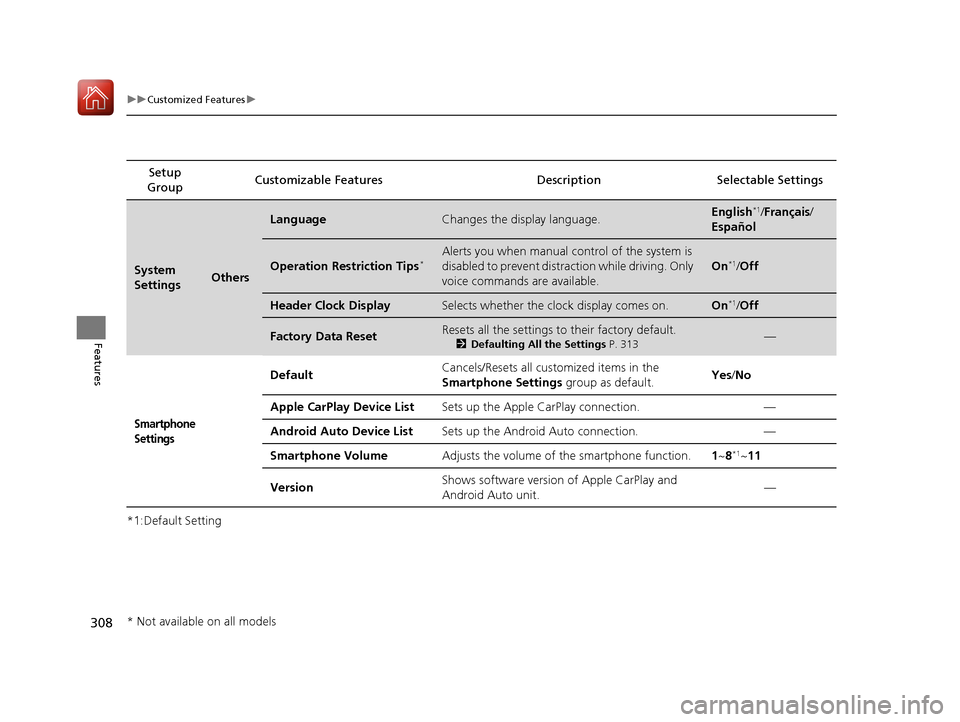
*1:Default SettingSetup
Group Customizable Features Descri
ption Selectable Settings
System
SettingsOthers
LanguageChanges the display language.English*1/Français /
Español
Operation Restriction Tips*Alerts you when manual control of the system is
disabled to prevent distraction while driving. Only
voice commands are available.
On*1/ Off
Header Clock DisplaySelects whether the clock display comes on.On*1/Off
Factory Data ResetResets all the settings to their factory default.
2 Defaulting All the Settings P. 313—
Smartphone
Settings
Default Cancels/Resets all cust
omized items in the
Smartphone Settings group as default. Yes
/No
Apple CarPlay Device List Sets up the Apple CarPlay connection. —
Android Auto Device List Sets up the Android Auto connection. —
Smartphone Volume Adjusts the volume of the smartphone function. 1~8
*1~11
Version Shows software version of Apple CarPlay and
Android Auto unit. —
* Not available on all models
20 ACURA TLX-31TZ36500.book 308 ページ 2019年2月7日 木曜日 午後2時2分
Page 445 of 589
444
uuBraking uCollision Mitigation Braking SystemTM (CMBSTM)
Driving
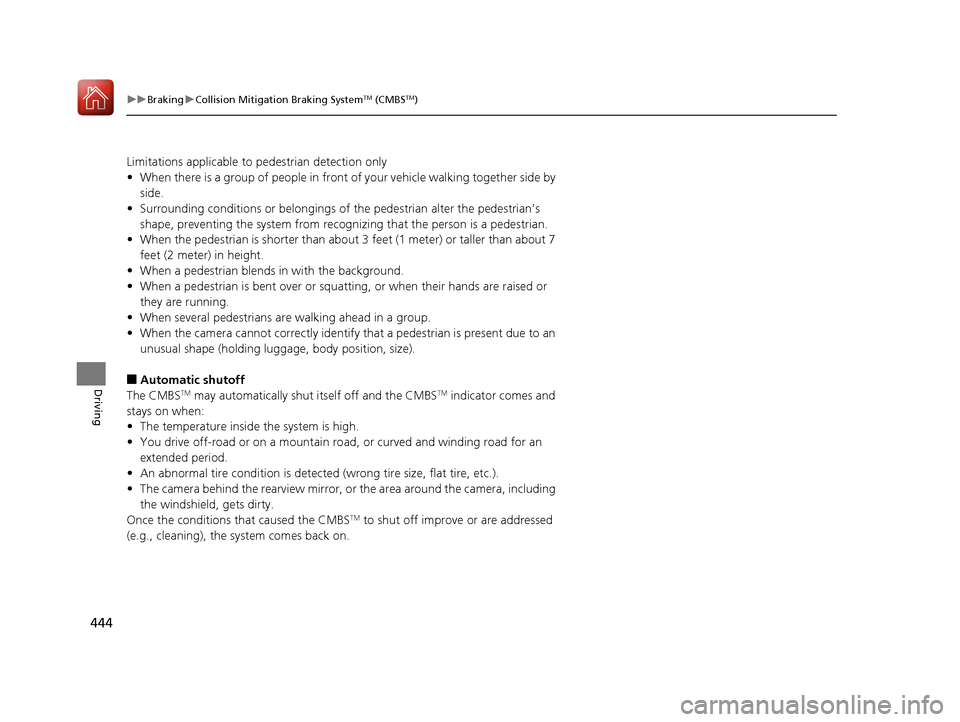
Limitations applicable to pedestrian detection only
• When there is a group of people in front of your vehicle walking together side by
side.
• Surrounding conditions or belongings of the pedestrian alter the pedestrian’s
shape, preventing the system from recogn izing that the person is a pedestrian.
• When the pedestrian is shorter than about 3 feet (1 meter) or taller than about 7
feet (2 meter) in height.
• When a pedestrian blends in with the background.
• When a pedestrian is bent over or squa tting, or when their hands are raised or
they are running.
• When several pedestrians are walking ahead in a group.
• When the camera cannot correctly identify that a pedestrian is present due to an
unusual shape (holding luggage, body position, size).
■Automatic shutoff
The CMBSTM may automatically shut itself off and the CMBSTM indicator comes and
stays on when:
• The temperature inside the system is high.
• You drive off-road or on a mountain ro ad, or curved and winding road for an
extended period.
• An abnormal tire condition is detected (wrong tire size, flat tire, etc.).
• The camera behind the rearview mirror, or the area around the camera, including
the windshield, gets dirty.
Once the conditions that caused the CMBS
TM to shut off improve or are addressed
(e.g., cleaning), the system comes back on.
20 ACURA TLX-31TZ36500.book 444 ページ 2019年2月7日 木曜日 午後2時2分
Page 477 of 589

476
uuMaintenance Under the Hood uOpening the Hood
Maintenance
Opening the Hood
1. Park the vehicle on a level surface, and set
the parking brake.
2. Pull the hood release handle under the
driver’s side lower corner of the dashboard.
u The hood will pop up slightly.
3. Pull up the hood latch lever (located under
the front edge of the hood to the center)
and raise the hood. Once you have raised
the hood slightly, you can release the lever.
4. Lift the hood up most of the way.
u The hydraulic support will lift it up the
rest of the way and hold it up.
When closing, lower it to approximately 12
inches (30 cm), then pr ess down firmly with
your hands.1 Opening the Hood
NOTICE
Do not open the hood when the wiper arms are
raised. The hood will strike the wipers, resulting in
possible damage to the hood and/or the wipers.
Do not press the engine cover forcibly. This may
damage the engine cover and component parts.
When closing the hood, check that the hood is
securely latched.
If the hood latch lever moves stiffly, or if you can
open the hood without lifti ng the lever, the latch
mechanism should be cleaned and lubricated.
Do not open the hood while the Auto Idle Stop
function is activated.
6-cylinder models
Models with Auto Idle Stop
Pull
Hood Release Handle
Lever
20 ACURA TLX-31TZ36500.book 476 ページ 2019年2月7日 木曜日 午後2時2分
Page 537 of 589

uuIf a Tire Goes Flat uChanging a Flat Tire
536
Handling the Unexpected
3. Raise the vehicle, using the jack handle bar
and the jack handle, until the tire is off the
ground.
1. Remove the wheel nuts and flat tire.
2. Wipe the mounting surfaces of the wheel
with a clean cloth.
3. Mount the compact spare tire.
4. Screw the wheel nuts until they touch the
lips around the mounting holes, then stop
rotating.
Jack
Handle
Bar Wheel Nut
Wrench as Jack Handle
■Replacing the Flat Tire1 Replacing the Flat Tire
Do not over tighten the wheel nuts by applying extra
torque using your foot or a pipe.
20 ACURA TLX-31TZ36500.book 536 ページ 2019年2月7日 木曜日 午後2時2分