light ACURA TLX 2022 Owners Manual
[x] Cancel search | Manufacturer: ACURA, Model Year: 2022, Model line: TLX, Model: ACURA TLX 2022Pages: 656, PDF Size: 26.43 MB
Page 553 of 656

551
uuReplacing Light Bulbs uBrake, Rear Turn Signal and Taillight/Rear Side Marker Lights
Maintenance
Brake, Rear Turn Signal and Taillight/Rear Side
Marker Lights
Brake, rear turn signal and taillight/rear si de marker lights are LED type. Have an
authorized Acura deal er inspect and replace the light assembly.
Taillights and Back-Up Lights
Taillights and back-up lights are LED type. Ha ve an authorized Acura dealer inspect
and replace the light assembly.
Rear License Plate Light
Rear license plate light is LED type. Have an authorized Acura dealer inspect and
replace the light assembly.
High-Mount Brake Light
High-mount brake light is LED type. Have an authorized Acura dealer inspect and
replace the light assembly.
Puddle Lights*
Puddle lights are LED type. Have an authorized Acura dealer inspect and replace the
light assembly.
* Not available on all models
22 ACURA TLX-31TGV6100.book 551 \b
Page 571 of 656

569
uuRemote Transmitter Care uReplacing the Remote Battery
Maintenance
If the indicator does not come on when the button is pressed, replace the battery.
1. Remove the built-in key.
u It may be helpful to lightly place masking
tape over the remote buttons to hold
them in place.
2. Remove the upper half of the cover by
carefully prying on the edge with a coin.
u Wrap a coin with a cloth to prevent
scratching the transmitter.
3. Press down on the center of the assembly
and remove the battery.
u When removing the button battery, be
careful not to touch parts around it.
4. Make sure to replace the battery with the
correct polarity.
Models with remote engine start system1Replacing the Remote Battery
NOTICE
The Remote transmitter is equipped with two
batteries: A standard replaceable CR2032 coin
button battery and an in tegral non-replaceable
rechargeable battery. To prevent permanent damage
to the rechargeable battery, replace the CR2032
battery every three to four years.
Models with remote engine start system
Battery type: CR2032
Battery
22 ACURA TLX-31TGV6100.book 569 \b
Page 574 of 656
uuCleaning uInterior Care
572
Maintenance
Wipe using a glass cleaner.
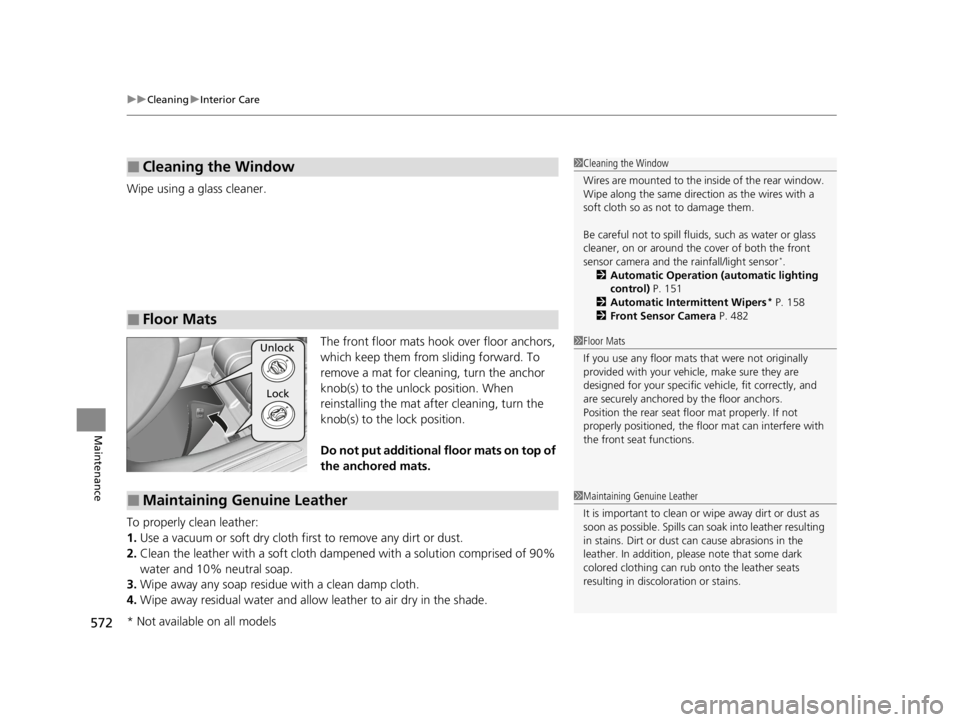
The front floor mats hook over floor anchors,
which keep them from sliding forward. To
remove a mat for cleaning, turn the anchor
knob(s) to the unlock position. When
reinstalling the mat after cleaning, turn the
knob(s) to the lock position.
Do not put additional floor mats on top of
the anchored mats.
To properly clean leather:
1. Use a vacuum or soft dry cloth first to remove any dirt or dust.
2. Clean the leather with a soft cloth dampen ed with a solution comprised of 90%
water and 10% neutral soap.
3. Wipe away any soap residu e with a clean damp cloth.
4. Wipe away residual water and allow leather to air dry in the shade.
■Cleaning the Window
■Floor Mats
1Cleaning the Window
Wires are mounted to the in side of the rear window.
Wipe along the same direct ion as the wires with a
soft cloth so as not to damage them.
Be careful not to spill fluids, such as water or glass
cleaner, on or around the co ver of both the front
sensor camera and the rainfall/light sensor
*.
2 Automatic Operation (automatic lighting
control) P. 151
2 Automatic Intermittent Wipers
* P. 158
2 Front Sensor Camera P. 482
1Floor Mats
If you use any floor mats that were not originally
provided with your vehicle, make sure they are
designed for your specific ve hicle, fit correctly, and
are securely anchored by the floor anchors.
Position the rear seat fl oor mat properly. If not
properly positioned, the fl oor mat can interfere with
the front seat functions.Unlock
Lock
■Maintaining Genuine Leather1 Maintaining Genuine Leather
It is important to clean or wipe away dirt or dust as
soon as possible. Spills can soak into leather resulting
in stains. Dirt or dust ca n cause abrasions in the
leather. In addition, pl ease note that some dark
colored clothing can rub onto the leather seats
resulting in discol oration or stains.
* Not available on all models
22 ACURA TLX-31TGV6100.book 572 \b
Page 577 of 656

575
uuCleaning uExterior Care
Maintenance
The inside lenses of exterior lights (headlig hts, brake lights, etc.) may fog temporarily
if you have driven in the rain, or after the vehicle has been run through a car wash.
Dew condensation also may build up inside the lenses when there is a significant
enough difference between the ambient and inside lens temperatures (similar to
vehicle windows fogging up in rainy conditions). These conditions are natural
processes, not structural design problems in the exterior lights.
Lens design characteristics ma y result in moisture developing on the light lens frame
surfaces. This also is not a malfunction.
However, if you see large amounts of wa ter accumulation, or large water drops
building up inside the lenses, have your vehicle inspected by a dealer.
■Fogged Exterior Light Lenses
22 ACURA TLX-31TGV6100.book 575 \b
Page 583 of 656

581Continued
Handling the Unexpected
If a Tire Goes Flat
Temporarily Repairing a Flat Tire
If the tire has a large cut or is otherwise severely damaged, you will need to have the
vehicle towed. If the tire only has a small puncture, from a nail for instance, you can
use the temporary tire repair kit so that you can drive to the nearest service station
for a more permanent repair.
If a tire goes flat while driving, grasp the steering wheel firmly, and brake gradually
to reduce speed. Then, stop in a safe place.
1. Park the vehicle on a firm, level, non-slippery surface and apply the parking brake.
2. Put the transmission into
(P.
3. Turn on the hazard warning lights an d set the power mode to VEHICLE OFF
(LOCK).
1 Temporarily Repairing a Flat Tire
The kit should not be used in the following situations.
Instead, contact a dealer or roadside assistance to
have the vehicle towed.
•The tire sealant has expired.
•More than one tire is punctured.•The puncture or cut is larger than 3/16 inch (4.8 mm).
•The tire side wall is damaged or the puncture is
outside the contact area.
•Damage has been caused by driving with the tire
extremely under inflated.
•The tire bead is no longer seated.
•The rim is damaged.
Do not remove a nail or screw that punctured the
tire. If you remove it from the tire, you may not be
able to repair the puncture using the kit.
NOTICE
Do not use a puncture-repairing agent other than the
one provided in the kit that came with your vehicle. If
a different agent is used, you may permanently
damage the tire pressure sensor.
When the puncture isYUse Kit
Smaller than 3/16 inch (4.8 mm)Yes
Larger than 3/16 inch (4.8 mm)No
Contact
Area
22 ACURA TLX-31TGV6100.book 581 \b
Page 598 of 656

596
uuIf a Tire Goes Flat uChanging a Flat Tire
Handling the Unexpected
Changing a Flat Tire
If a tire goes flat while driving, grasp the steering wheel firmly, and brake gradually
to reduce speed. Then, stop in a safe place. Replace the flat tire with a compact
spare tire. Go to a dealer as soon as possibl e to have the full-size tire repaired or
replaced.
1. Park the vehicle on a firm, level, non-slippery surface and apply the parking brake.
2. Put the transmission into
(P.
3. Turn on the hazard warning lights an d set the power mode to VEHICLE OFF
(LOCK).
Models with optional spare tire
1 Changing a Flat Tire
Follow compact spare precautions:
Periodically check the tire pressure of the compact
spare. It should be set to the specified pressure.
Specified Pressure: 60 psi (420 kPa, 4.2 kgf/cm
2)
When driving with the compact spare tire, keep the
vehicle speed under 50 mph (80 km/h). Replace with
a full-size tire as soon as possible.
The compact spare tire and wheel in your vehicle are
specifically for this model. Do not use them with
another vehicle. Do not us e another type of compact
spare tire or wheel with your vehicle.
Do not mount tire chains on a compact spare tire.
If a chain-mounted front tire goes flat, remove one of
the full-size rear tires and replace it with the compact
spare tire. Remove the flat front tire and replace it
with the full-size tire that was removed from the rear.
Mount the tire chains on the front tire.
Do not use a puncture-repairing agent other than the
Tire Repair Ki t provided with your vehicle, as some
tire repair agents can caus e damage to the pressure
sensors.
NOTICE
Do not use the jack if it doesn
Page 605 of 656

603
Handling the Unexpected
Engine Does Not Start
Checking the Engine
If the engine does not start, check the starter.
Starter conditionChecklist
Starter doesn’t turn or turns
over slowly.
The battery may be dead. Check
each of the items on the right and
respond accordingly.Check for a message on the multi-information display.
●If the To Start, Hold Remote Near Start Button message appears
2If the Keyless Remote Battery is Weak P. 604
uMake sure the keyless remote is in its operating range.
2ENGINE START/STOP Button Operating Range P. 146
Check the brightness of the interior lights.
Turn on the interior lights and check the brightness.
●If the interior lights do not come on at all
2Battery P. 564●If the interior lights come on normally 2 Fuses P. 620
The starter turns over normally
but the engine doesn’t start.
There may be a problem with a
fuse. Check each of the items on
the right and respond accordingly. Review the engine start procedure.
Follow its instructions, and try
to start the engine again.
2 Starting the Engine P. 374
Check the immobilize r system indicator.
When the immobilizer system indicator is blinking, the engine cannot be started.
2 Immobilizer System P. 139
Check the fuel level.
There should be enough fuel in the tank.
2 Fuel Gauge P. 97
Check the fuses.
Check all fuses, or have the vehicle checked by a dealer.
2 Inspecting and Changing Fuses P. 626
If the problem continues:
2Emergency Towing P. 627
1Checking the Engine
If you must start the vehi cle immediately, use an
assisting vehicle or booster battery to jump start it.
2 If the Battery Is Dead P. 606
22 ACURA TLX-31TGV6100.book 603 \b
Page 608 of 656

606
Handling the Unexpected
If the Battery Is Dead
Jump Starting Procedure
Turn off the power to electric devices, such as audio and lights. Turn off the engine,
then open the hood. 1.Open the cover of the Jump start box.1If the Battery Is Dead
Securely attach the jumper cables clips so that they
do not come off when the e ngine vibrates. Be careful
not to tangle the jumper cables or allow the cable
ends to touch each other while attaching or
detaching the jumper cables.
Battery performance degrades in cold conditions and
may prevent the engi ne from starting.
You cannot use the terminal s to jump start another
vehicle or to charge the 12-volt battery.
3WARNING
A battery can explode if you do not follow
the correct procedure, seriously injuring
anyone nearby.
Keep all sparks, open flames, and smoking
materials away from the battery.
Cover
2.0 L engine models
3.0 L engine models
Cover
22 ACURA TLX-31TGV6100.book 606 \b
Page 610 of 656

uuIf the Battery Is Dead uJump Starting Procedure
608
Handling the Unexpected
5. Connect the other end of the second
jumper cable to the GND terminal as
shown. Do not connect this jumper cable to
any other part.
6. If your vehicle is connected to another
vehicle, start the assisting vehicle’s engine
and increase its rpm slightly.
7. Attempt to start your vehicle’s engine. If it
turns over slowly, check that the jumper
cables have good metal-to-metal contact.
Once your vehicle’s engine has started, re move the jumper cables in the following
order.
1. Disconnect the jumper cable from your vehicle’s ground.
2. Disconnect the other end of the jumper cable from the booster battery -
terminal.
3. Disconnect the jumper cable from your vehicle’s jump start box + terminal.
4. Disconnect the other end of the jumper cable from the booster battery +
terminal.
Have your vehicle inspected by a n earby service station or a dealer.1If the Battery Is Dead
The vehicle stability assist
TM (VSA ®) system, vehicle
stability assistTM (VSA ®) OFF, adaptive cruise control
(ACC) with low speed follow, and safety support
indicators may come on in amber along with a
message in the multi-information display when you
set the power mode to ON after reconnecting a
battery.
Drive a short distance at more than 12 mph (20
km/h).
Each indicator should go off. If any do not, have your
vehicle checked by a dealer.
All models
■What to Do After the Engine Starts
22 ACURA TLX-31TGV6100.book 608 \b
Page 611 of 656

609Continued
Handling the Unexpected
Overheating
How to Handle Overheating
Overheating symptoms are as follows:
•The temperature gauge pointer is at th e mark or the engine suddenly loses
power.
• The Engine Temperature Too Hot. Do Not Drive. Allow Engine To Cool.
message appears on the multi-information display.
• Steam or spray comes out of the engine compartment.
■First thing to do
1. Immediately park the vehicle in a safe place.
2. Turn off all accessories and turn on the hazard warning lights.
u No steam or spray present : Keep the engine running and open the hood.
u Steam or spray is present : Turn off the engine and wait until it subsides.
Then, open the hood.
1 How to Handle Overheating
NOTICE
Continuing to drive with the temperature gauge
pointer at the mark may damage the engine.
Continuing to drive with the Engine Temperature
Too Hot. Do Not Drive. Allow Engine To Cool.
message on the multi-in formation display may
damage the engine.
3WARNING
Steam and spray from an overheated
engine can seri ously scald you.
Do not open the hood if steam is coming
out.
H
H
22 ACURA TLX-31TGV6100.book 609 \b