audio ACURA TLX 2022 Owners Manual
[x] Cancel search | Manufacturer: ACURA, Model Year: 2022, Model line: TLX, Model: ACURA TLX 2022Pages: 656, PDF Size: 26.43 MB
Page 361 of 656

Continued359
uuAcuraLink ®u
Features
■To link with AcuraLink
You may see the connection guide screen
after launching AcuraLink when there is no
phone connection available.
Continue Without Connecting: Displays
the AcuraLink menu screen without phone
connection.
Connect Phone: Displays the Bluetooth®
setup screen.
2 To change the currently paired phone
P. 337
1. Press the (home) button.
2. Select AcuraLink .
1To link with AcuraLink
We recommend that you install the AcuraLink app in
your smartphone to make AcuraLink more
functional. Contact an Acura dealer, or visit
owners.acura.com (U.S.) or www.acura.ca/owners/
acuralink (Canada).
If you do not connect a phone to AcuraLink, Last Mile
function of AcuraLink app is disabled.
■AcuraLink1 AcuraLink
You can also select AcuraLink from the All Apps
screen. 2 Audio/Information Screen P. 214
AcuraLink
22 ACURA TLX-31TGV6100.book 359 \b
Page 366 of 656

uuAcuraLink ®u
364
Features
Connect to the AcuraLink opera tor when trying to find a destination or for roadside
assistance. 1.Press the LINK button.
u Connection to the operator begins.
2. Talk to the operator.
u To disconnect, select End Call on the
audio/information screen or move to left
the left selector wheel.
■Operator Assistance1 Operator Assistance
Remain attentive to road conditions and driving
during operator assistance.
If you want to add or re new a subscription, call the
Operator Assistance.
1. Press the (home) button.
2. Select AcuraLink .
3. Select MENU.
4. Select AcuraLink Subscriptions .
5. Select Call AcuraLink Support .
Press the (back) button to return to the previous
screen, and then in call screen displayed on the
B-zone.
LINK Button
Audio/Information screen when
connected to the AcuraLink
operator
22 ACURA TLX-31TGV6100.book 364 \b
Page 378 of 656

uuWhen Driving uStarting the Engine
376
Driving
You can remotely start the engine using the two-way keyless remote from extended
distances.
■To start the engine
The engine runs for up to 10 minutes without you starting the vehicle.
To extend the run time for another 10 minutes during the first run, press the
button, then press and hold the button.
u The amber LED blinks, then the green LED comes back on if a 10-minute
extension request was transmitted successfully.
After pressing the button, wait for the gr een LED to blink. This indicates that
the all the doors and the trunk are locked.
■Remote Engine Start*1 Remote Engine Start*
The remote engine start may violate local laws.
Before using the remote e ngine start, check your
local laws.
If there are buildings an d obstacles between your
vehicle and the remote, th e range will be reduced.
This distance may vary by external electrical
interference.
The engine may not start by the remote engine start if:
•You have disabled a remote engine start setting
using the audio/information screen.
2Customized Features P. 302
•The power mode is not in VEHICLE OFF (LOCK).•The transmission is in a position other than (P.
•The hood is open, or any door or the trunk is
unlocked.
•You have already used the remote twice to start
the engine.
3WARNING
Carbon monoxide ga s is toxic and can
rapidly accumulate in closed or even partly
enclosed areas.
Breathing it can cause unconsciousness and
even kill you.
Never use the remote engine starter with
the vehicle parked in a garage or other
areas with limited ventilation.
Press the button, th en press and hold
the button.
Amber LED: Blinks when any button is pressed.
Continues to blink
during a vehicle
self check until the
engine starts. Go within the range,
and try again.
Green LED: Comes on while
the engine is running. Red LED: Blinks when the
remote is out of the keyless
access system range.
* Not available on all models
22 ACURA TLX-31TGV6100.book 376 \b
Page 393 of 656

391
uuWhen Driving uIntegrated Dynamics System
Continued
Driving
Integrated Dynamics System
Modifies the dynamic character of the vehicle. There are four or five modes to select
from: COMFORT , NORMAL , SPORT , SPORT+*, and INDIVIDUAL .
Turn the Dynamic Mode switch to select COMFORT, NORMAL , SPORT or
SPORT+
*. Press the button to select INDIVIDUAL. The mode you have selected
appears on the audio/information screen.
1 Integrated Dynamics System
The mode may not be able to be change when:
•The vehicle is turning
•The VSA ® system is activating
•There is a problem with the engine, transmission,
the brake system, the VSA ®, the EPS, the Active
Damper System
*, and the SH-AWD ®*
* Not available on all models
22 ACURA TLX-31TGV6100.book 391 \b
Page 394 of 656
392
uuWhen Driving uIntegrated Dynamics System
Driving
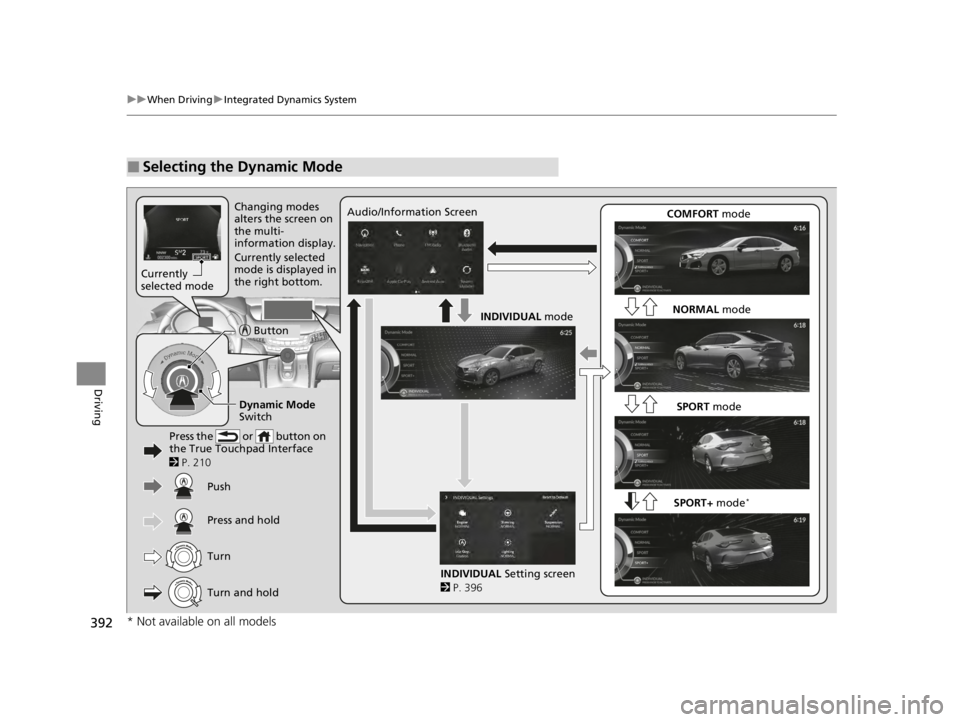
■Selecting the Dynamic Mode
INDIVIDUAL Setting screen
2 P. 396 COMFORT
mode
NORMAL mode
SPORT mode
Changing modes
alters the screen on
the multi-
information display.
Currently selected
mode is displayed in
the right bottom.
Audio/Information Screen
Button
INDIVIDUAL
mode
Turn
Currently
selected mode
Press and hold
Press the or button on
the True Touchpad Interface
2
P. 210
SPORT+ mode*
Dynamic Mode
Switch
Push
Turn and hold
* Not available on all models
22 ACURA TLX-31TGV6100.book 392 \b
Page 398 of 656

396
uuWhen Driving uIntegrated Dynamics System
Driving
You can customize the INDIVIDUAL settings linked to your current keyless remote . Each keyless remote has its own settings.
1. Push and hold the button to enter INDIVIDUAL mode and open the INDIVIDUAL settings.
2Selecting the Dynamic Mode P. 392
2.Drag to highlight the setting category icon and click the A-zone touchpad to display the setting screen.
3. Drag to highlight the desired setting and click the A-zone touchpad to change the setting.
u Press the button to return to INDIVIDUAL settings screen.
u Press the button to return to the audio/information screen.
2True Touchpad Interface P. 211
■Customizing the INDIVIDUAL Settings
Swipe to highlight the
setting category icon and
click the A-zone touchpad
INDIVIDUAL Setting screen When Engine is selected
Button
Current setting
22 ACURA TLX-31TGV6100.book 396 \b
Page 424 of 656

uuAcuraWatchTMuCollision Mitigation Braking SystemTM (CMBSTM)
422
Driving
■When the system activates
You can change the distance ( Long/Normal /Short ) between vehicles at which the
system’s earliest collision alert will co me on through audio/information screen
setting options.
2 Customized Features P. 302
1When the system activates
The camera in the CMBS
TM is also designed to detect
pedestrians.
However, this pedestrian detection feature may not
activate or may not detect a pedestrian in front of
your vehicle under certain conditions.
Refer to the ones indicating the pedestrian detection
limitations from the list. 2 CMBS
TM Conditions and Limitations P. 425
The head-up warning uses a lens located at the front
end of the dashboard.
Do not cover the lens or spill any liquid on it.
Models with Head-up display
Lens
The system provides visual and audible al erts of a possible collision, and stops if
the collision is avoided.
u Take appropriate action to prevent a collision (apply the brakes, change
lanes, etc.)
Beep
Head-up Warning Lights
*
Visual Alerts
Audible Alert
* Not available on all models
22 ACURA TLX-31TGV6100.book 422 \b
Page 435 of 656

Continued433
uuAcuraWatchTMuAdaptive Cruise Control (ACC) with Low Speed Follow
DrivingWhen driving at about 25 mph (40 km/h) or above: Take your foot off the
pedal and press down the RES/+/SET/– switch when you reach the desired speed.
The moment you release the switch, the set speed is fixed, and ACC with Low Speed
Follow begins.
When driving slower than about 25 mph (40 km/h): If the vehicle is moving
and the brake pedal is not depressed, pressing the switch fixes the set speed to
about 25 mph (40 km/h) regardless of current vehicle speed. If your vehicle is
stationary, you can set the vehicle speed even with the brake pedal depressed.
■To Set the Vehicle Speed1 To Set the Vehicle Speed
You can switch the displayed set speed
measurements on the multi- information display or
audio/information screen between mph and km/h. 2 Speed/Distance Units P. 104
2 Customized Features P. 302
The vehicle stability assist
TM (VSA ®) system, vehicle
stability assistTM (VSA ®) OFF, adaptive cruise control
(ACC) with low speed follow, and safety support
indicators may come on in amber along with a
message in the multi-information display when you
set the power mode to ON after reconnecting a
battery.
Drive a short distance at more than 12 mph (20
km/h).
Each indicator should go off. If any do not, have your
vehicle checked by a dealer.
On when ACC with Low
Speed Follow beginsPress down and release
RES/+ /SET/− Switch
(green) is on.
22 ACURA TLX-31TGV6100.book 433 \b
Page 443 of 656

Continued441
uuAcuraWatchTMuAdaptive Cruise Control (ACC) with Low Speed Follow
Driving
Increase or decrease the vehicle speed using the RES/+/SET/– switch on the steering
wheel.
• Each time you press the switch up or dow n, the vehicle speed is increased or
decreased by about 1 mph or 1 km/h accordingly.
• If you keep the switch pressed up or down, the vehicle speed increases or
decreases by about 5 mph or 5 km/h accordingly.
■To Adjust the Vehicle Speed1To Adjust the Vehicle Speed
If a vehicle detected ahead is going at a speed slower
than your increased set speed, ACC with Low Speed
Follow may not accelerate y our vehicle. This is to
maintain the set interval between your vehicle and
the vehicle ahead.
You can switch the displayed set speed
measurements on the audio/ information screen or
multi-information displa y between mph and km/h.
2 Speed/Distance Units P. 104
2 Customized Features P. 302
When you depress the accelerator pedal and then
push and release the SET/– switch, the current speed
of the vehicle is set.
To increase speed
To decrease speed
22 ACURA TLX-31TGV6100.book 441 \b
Page 448 of 656

uuAcuraWatchTMuAdaptive Cruise Control (ACC) with Low Speed Follow
446
Driving
Press and hold the interval button for one
second. Cruise Mode Selected appears on
the multi-information display for two seconds,
and then the mode switches to Cruise.
The comes on.
• Green: The system is on.
• White: The system is standby.
To switch back to ACC with Low Speed
Follow, press and hold the interval button
again for one second.
■When to use
Desired speed in a range above roughly 25 mph (40 km/h).
Take your foot off the pedal and press the RES/+ /SET/– switch down when you
reach the desired speed.
The moment you release the RES/+/SET/– switch, the set speed is fixed, and cruise
control begins. The indicator (green) comes on.
When you use cruise control, Straight Driving Assist (a feature of the Electric Power
Steering system) is activated.
By enabling the steering system to automa tically compensate for natural steering
pull, Straight Driving Assist makes it easier for you to keep your vehicle in a straight
line.
■To Switch ACC with Low Speed Follow to Cruise Control1 To Switch ACC with Low Speed Follow to Cruise Control
Always be aware which mode you are in. When you
are driving in Cruise mode, the system will not assist
you to maintain a following-interval from a vehicle
ahead of you.
You can switch the displayed set speed
measurements on the audio/ information screen or
multi-information displa y between mph and km/h.
2 Speed/Distance Units P. 104
2 Customized Features P. 302
ACC with
Low Speed
Follow ONCruise
Control ON
Press and hold the
interval button
(white) (white)
Interval Button
■To Set the Vehicle Speed
22 ACURA TLX-31TGV6100.book 446 \b