brake ACURA TLX 2022 User Guide
[x] Cancel search | Manufacturer: ACURA, Model Year: 2022, Model line: TLX, Model: ACURA TLX 2022Pages: 656, PDF Size: 26.43 MB
Page 81 of 656
79
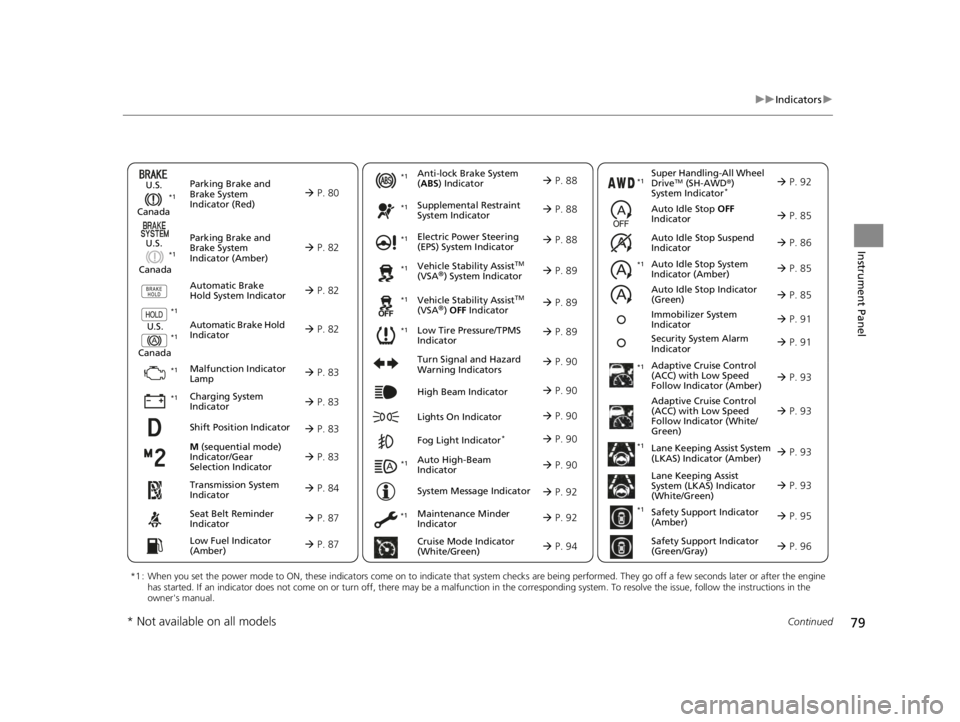
uuIndicators u
Continued
Instrument Panel
M (sequential mode)
Indicator/Gear
Selection Indicator P. 83
Parking Brake and
Brake System
Indicator (Red)
Parking Brake and
Brake System
Indicator (Amber)
U.S.
Canada
U.S.
Canada Automatic Brake
Hold System Indicator
Automatic Brake Hold
IndicatorU.S.
Canada
*1 : When you set the power mode to ON, these indicators come on to indicate that system checks are being performed. They go off a few seconds later or after the engine
has started. If an indicator does not come on or turn off, ther e may be a malfunction in the corresponding system. To resolve the issue, follow the instructions in the
owner's manual.
P. 80*1
Malfunction Indicator
Lamp
Charging System
Indicator
Anti-lock Brake System
(ABS ) Indicator
Seat Belt Reminder
Indicator
Low Fuel Indicator
(Amber)
Vehicle Stability AssistTM
(VSA®) System Indicator
Vehicle Stability Assist
TM
(VSA®) OFF Indicator
Supplemental Restraint
System Indicator
Auto High-Beam
Indicator
Low Tire Pressure/TPMS
Indicator Electric Power Steering
(EPS) System Indicator
Turn Signal and Hazard
Warning Indicators
Lights On Indicator High Beam Indicator
Fog Light Indicator*
Maintenance Minder
Indicator
System Message Indicator
Super Handling-All Wheel
DriveTM (SH-AWD
®)
System Indicator*
Adaptive Cruise Control
(ACC) with Low Speed
Follow Indicator (Amber)
Lane Keeping Assist System
(LKAS) Indicator (Amber)
Safety Support Indicator
(Green/Gray)
P. 82
P. 82
P. 82
P. 83
P. 83*1 *1
P. 89
*1
*1
Shift Position Indicator P. 83
Transmission System
Indicator P. 84
Auto Idle Stop System
Indicator (Amber)
P. 85
P. 87
P. 87
P. 88
P. 88
P. 90
P. 89
*1
*1
*1
P. 89
*1 P. 88
P. 90
P. 93
*1
P. 90
P. 90
P. 92
P. 90
Immobilizer System
Indicator P. 91
Security System Alarm
Indicator P. 91
P. 92
P. 92
P. 93
P. 96
*1
Adaptive Cruise Control
(ACC) with Low Speed
Follow Indicator (White/
Green) P. 93
*1
Lane Keeping Assist
System (LKAS) Indicator
(White/Green) P. 93
*1 *1
*1 *1
Safety Support Indicator
(Amber)
P. 95
*1
Cruise Mode Indicator
(White/Green) P. 94
Auto Idle Stop OFF
Indicator P. 85
Auto Idle Stop Suspend
Indicator P. 86
*1
*1
Auto Idle Stop Indicator
(Green)
P. 85
* Not available on all models
22 ACURA TLX-31TGV6100.book 79 \b
Page 82 of 656
80
uuIndicators u
Instrument Panel
IndicatorNameOn/BlinkingExplanation
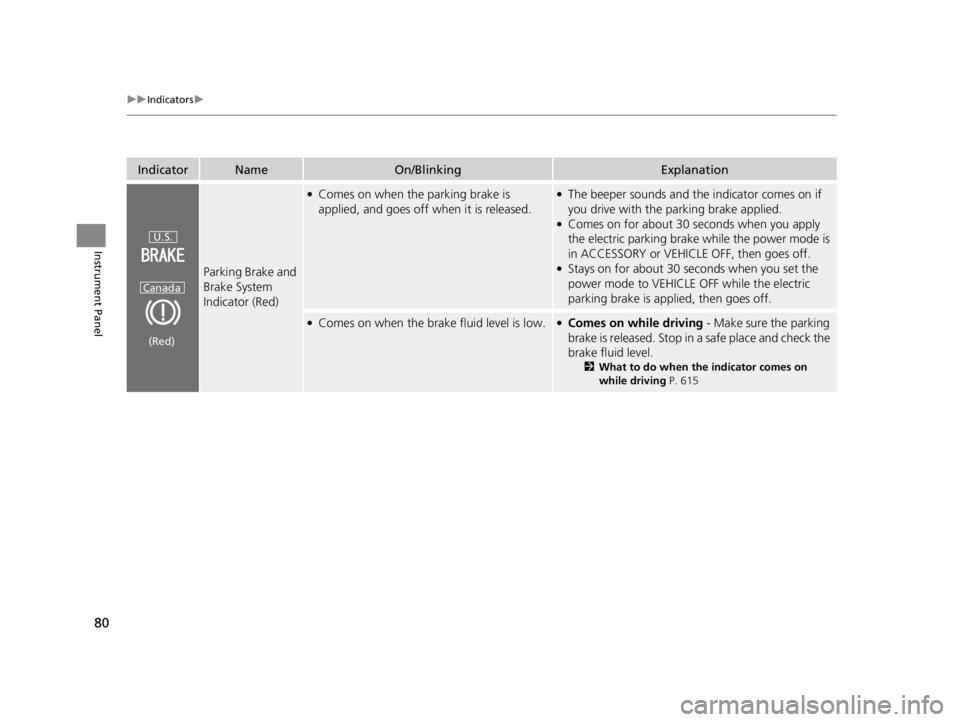
Parking Brake and
Brake System
Indicator (Red)
●Comes on when the parking brake is
applied, and goes off when it is released.●The beeper sounds and th e indicator comes on if
you drive with the parking brake applied.
●Comes on for about 30 seconds when you apply
the electric parking brake while the power mode is
in ACCESSORY or VEHICLE OFF, then goes off.
●Stays on for about 30 seconds when you set the
power mode to VEHICLE OFF while the electric
parking brake is applied, then goes off.
●Comes on when the brake fluid level is low.●Comes on while driving - Make sure the parking
brake is released. Stop in a safe place and check the
brake fluid level.
2 What to do when th e indicator comes on
while driving P. 615
U.S.
Canada
(Red)
22 ACURA TLX-31TGV6100.book 80 \b
Page 83 of 656

81
uuIndicators u
Continued
Instrument Panel
IndicatorNameOn/BlinkingExplanation
Parking Brake and
Brake System
Indicator (Red)
●Comes on if there is a problem with the
brake system.●Comes on along with the Parking Brake and
Brake System Indicator (amber) - Immediately
stop in a safe place. Contact a dealer for repair. The
brake pedal becomes harder to operate.
Depress the pedal further than you normally do.
2 If the Brake System Indicator (Red) Comes On
or Blinks at the Same Time When the Brake
System Indicator (Amber) Comes On P. 617
●Comes on along with the ABS indicator - Have
your vehicle checked by a dealer.
2 If the Brake System Indicator (Red) Comes On
or Blinks P. 615
●Blinks and the Parking Brake and Brake System
Indicator (amber) comes on at the same time -
There is a problem with the electric parking brake
system. The parking brake may not be set.
Avoid using the parki ng brake and have your
vehicle checked by a dealer immediately.
2 If the Brake System Indicator (Red) Comes On
or Blinks at the Same Time When the Brake
System Indicator (Amber) Comes On P. 617
U.S.
Canada
(Red)
22 ACURA TLX-31TGV6100.book 81 \b
Page 84 of 656

82
uuIndicators u
Instrument Panel
IndicatorNameOn/BlinkingExplanation
Parking Brake and
Brake System
Indicator (Amber)
●Comes on if there is a problem with a system
related to braking other than the
conventional brake system.●Comes on while driving - Avoid high speeds and
sudden braking. Take the vehicle to a dealer
immediately.
●Comes on if there is a problem with the
electric parking brake system and/or the
automatic brake hold system.●Stays on constantly - Avoid using the parking
brake and have your vehicl e checked by a dealer
immediately.
●Comes on if there is a problem with the
radar sensor.
●Indicator may come on temporarily when the
Maximum Load Limi t is exceeded.
●Make sure the total load is within the Maximum
Load Limit.
2 Maximum Load Limit P. 371●Stays on constantly - Have your vehicle checked
by a dealer.
Automatic Brake
Hold System
Indicator●Comes on when the automatic brake hold
system is on.
2 Automatic Brake Hold P. 490
Automatic Brake
Hold Indicator
●Comes on when the auto matic brake hold is
activated.
2 Automatic Brake Hold P. 490
U.S.
Canada
(Amber)
U.S.
Canada
22 ACURA TLX-31TGV6100.book 82 \b
Page 86 of 656
84
uuIndicators u
Instrument Panel
IndicatorNameOn/BlinkingExplanation
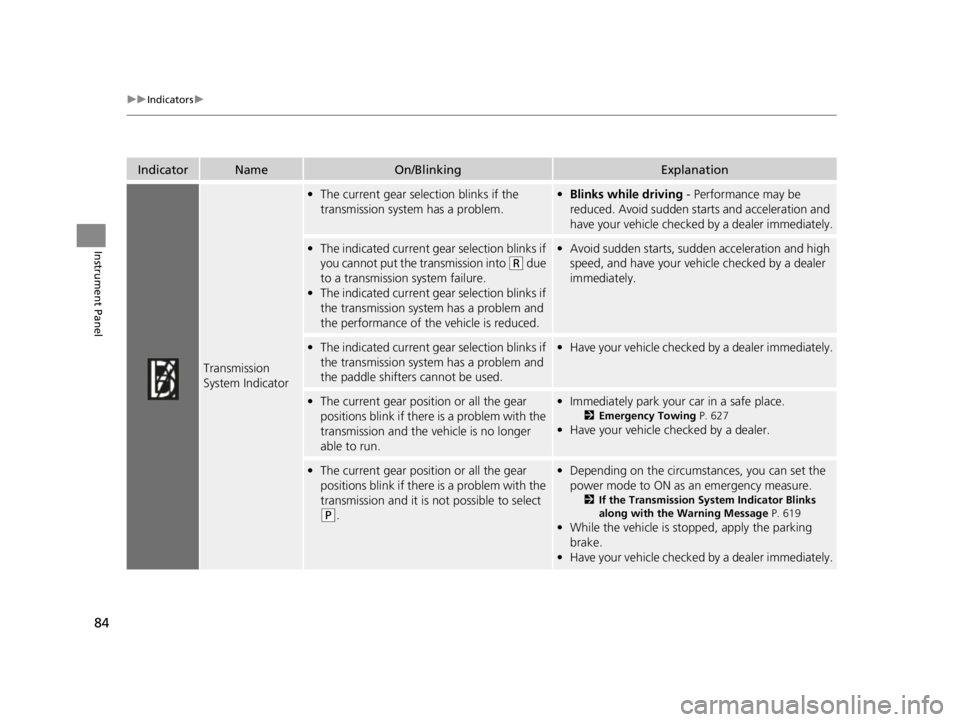
Transmission
System Indicator
•The current gear selection blinks if the
transmission system has a problem.•Blinks while driving - Performance may be
reduced. Avoid sudden starts and acceleration and
have your vehicle checked by a dealer immediately.
• The indicated current gear selection blinks if
you cannot put the transmission into
(R due
to a transmission system failure.
• The indicated current gear selection blinks if
the transmission system has a problem and
the performance of the vehicle is reduced.
•Avoid sudden starts, sudden acceleration and high
speed, and have your vehi cle checked by a dealer
immediately.
• The indicated current gear selection blinks if
the transmission system has a problem and
the paddle shifters cannot be used.•Have your vehicle checked by a dealer immediately.
•The current gear position or all the gear
positions blink if there is a problem with the
transmission and the vehicle is no longer
able to run.•Immediately park your car in a safe place.
2 Emergency Towing P. 627
•Have your vehicle checked by a dealer.
•The current gear position or all the gear
positions blink if there is a problem with the
transmission and it is not possible to select
(P.
•Depending on the circumstances, you can set the
power mode to ON as an emergency measure.
2 If the Transmission System Indicator Blinks
along with the Warning Message P. 619
•While the vehicle is stopped, apply the parking
brake.
• Have your vehicle checked by a dealer immediately.
22 ACURA TLX-31TGV6100.book 84 \b
Page 88 of 656
86
uuIndicators u
Instrument Panel
IndicatorNameOn/BlinkingExplanation
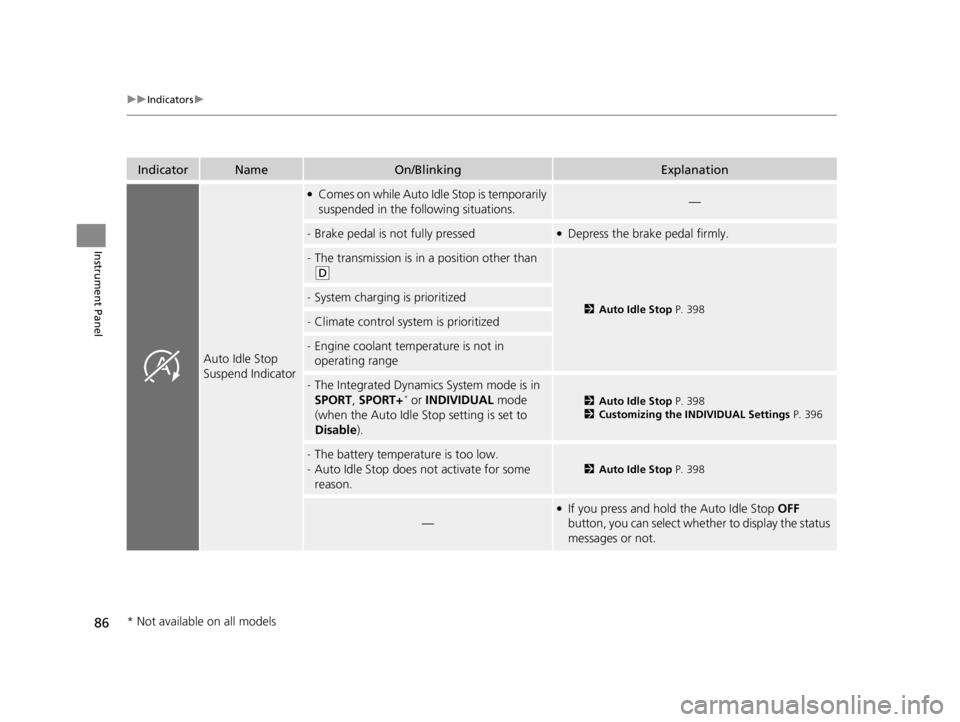
Auto Idle Stop
Suspend Indicator
●Comes on while Auto Idle Stop is temporarily
suspended in the following situations.—
-Brake pedal is not fully pressed●Depress the brake pedal firmly.
-The transmission is in a position other than
(D
2Auto Idle Stop P. 398-System charging is prioritized
-Climate control system is prioritized
-Engine coolant temperature is not in
operating range
-The Integrated Dynamics System mode is in
SPORT, SPORT+* or INDIVIDUAL mode
(when the Auto Idle Stop setting is set to
Disable ).2Auto Idle Stop P. 398
2 Customizing the INDIVIDUAL Settings P. 396
-The battery temperature is too low.
- Auto Idle Stop does not activate for some
reason.
2 Auto Idle Stop P. 398
—
●If you press and hold the Auto Idle Stop OFF
button, you can select whether to display the status
messages or not.
* Not available on all models
22 ACURA TLX-31TGV6100.book 86 \b
Page 90 of 656

88
uuIndicators u
Instrument Panel
IndicatorNameOn/BlinkingExplanation
Anti-lock Brake
System (ABS)
Indicator
• Comes on if there is a problem with the
ABS.•Stays on constantly - Have your vehicle checked
by a dealer. With this indicator on, your vehicle still
has normal braking ability but no anti-lock
function.
2 Anti-lock Brake System (ABS) P. 492
Supplemental
Restraint System
Indicator
•Comes on if a problem with any of the
following is detected:
- Supplemental restraint system
- Side airbag system
- Side curtain airbag system
- Seat belt tensioner• Stays on constantly - Have your vehicle checked
by a dealer.
Electric Power
Steering (EPS)
System Indicator• Comes on if there is a problem with the EPS
system.•Stays on constantly - Have your vehicle checked
by a dealer.
2 If the Electric Power Steering (EPS) System
Indicator Comes On P. 616
22 ACURA TLX-31TGV6100.book 88 \b
Page 91 of 656
89
uuIndicators u
Continued
Instrument Panel
IndicatorNameOn/BlinkingExplanation
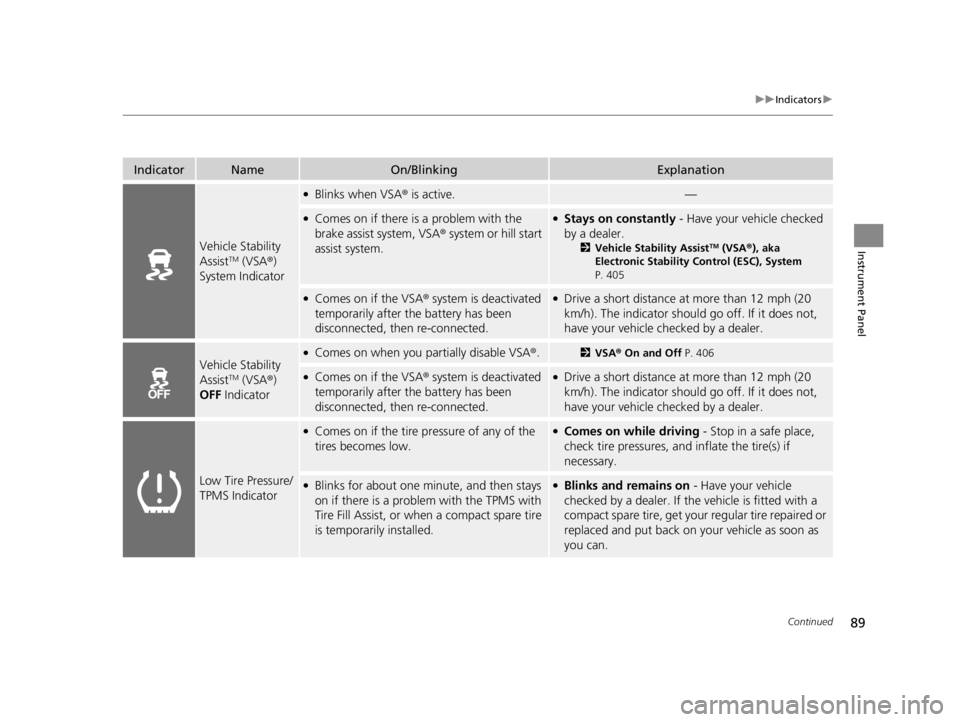
Vehicle Stability
AssistTM (VSA®)
System Indicator
●Blinks when VSA ® is active.—
●Comes on if there is a problem with the
brake assist system, VSA ® system or hill start
assist system.●Stays on constantly - Have your vehicle checked
by a dealer.
2 Vehicle Stability AssistTM (VSA ®), aka
Electronic Stability Control (ESC), System
P. 405
●Comes on if the VSA® system is deactivated
temporarily after the battery has been
disconnected, then re-connected.●Drive a short distance at more than 12 mph (20
km/h). The indicator should go off. If it does not,
have your vehicle checked by a dealer.
Vehicle Stability
AssistTM (VSA ®)
OFF Indicator
●Comes on when you partially disable VSA ®.2VSA ® On and Off P. 406
●Comes on if the VSA® system is deactivated
temporarily after the battery has been
disconnected, then re-connected.●Drive a short distance at more than 12 mph (20
km/h). The indicator should go off. If it does not,
have your vehicle checked by a dealer.
Low Tire Pressure/
TPMS Indicator
●Comes on if the tire pressure of any of the
tires becomes low.●Comes on while driving - Stop in a safe place,
check tire pressures, and inflate the tire(s) if
necessary.
●Blinks for about one minute, and then stays
on if there is a problem with the TPMS with
Tire Fill Assist, or when a compact spare tire
is temporarily installed.●Blinks and remains on - Have your vehicle
checked by a dealer. If th e vehicle is fitted with a
compact spare tire, get your regular tire repaired or
replaced and put back on your vehicle as soon as
you can.
22 ACURA TLX-31TGV6100.book 89 \b
Page 93 of 656

91
uuIndicators u
Continued
Instrument Panel
IndicatorNameOn/BlinkingExplanation
Immobilizer
System Indicator
●Blinks if the immobilizer system cannot
recognize the key information.•Blinks - You cannot start the engine. Set the
power mode to VEHICLE OFF, then select the ON
mode again.
Depress and hold the brake pedal before setting
the power mode to ON.
• Repeatedly blinks - The system may be
malfunctioning. Have your vehicle checked by a
dealer.
• Do not attempt to alter this system or add other
devices to it. Electrical problems can occur.
Security System
Alarm Indicator
●Blinks when the security system alarm has
been set.
2 Security System Alarm P. 139
IndicatorCanadian models
Indicator
22 ACURA TLX-31TGV6100.book 91 \b
Page 115 of 656
113
uuGauges and Multi-Information Display uHead-Up Display*
Continued
Instrument Panel
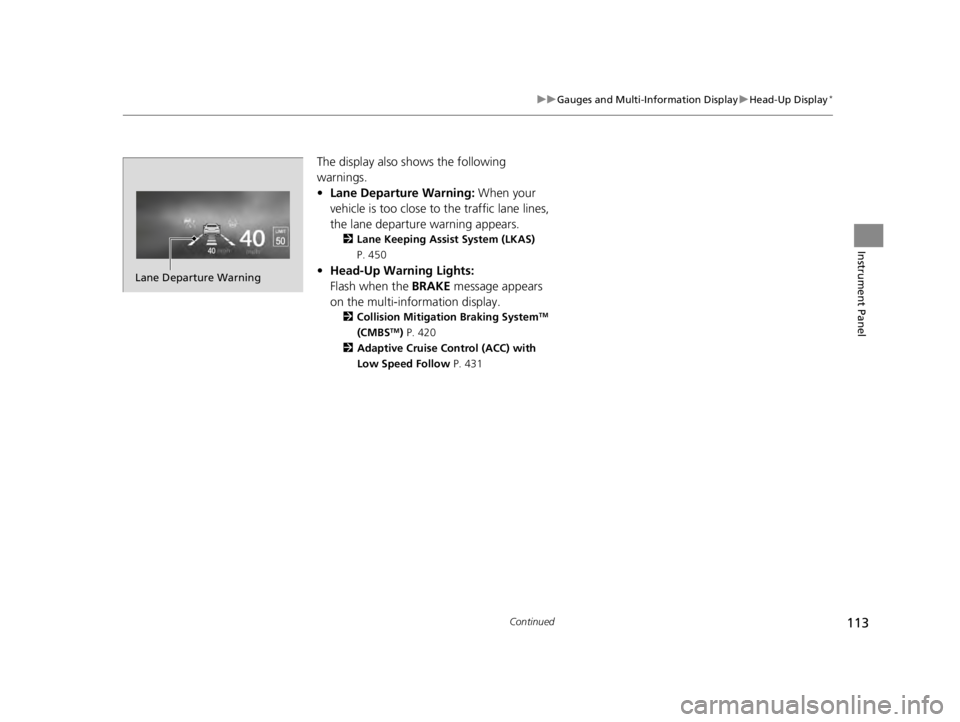
The display also shows the following
warnings.
• Lane Departure Warning: When your
vehicle is too close to the traffic lane lines,
the lane departure warning appears.
2 Lane Keeping Assist System (LKAS)
P. 450
• Head-Up Warning Lights:
Flash when the BRAKE message appears
on the multi-information display.
2 Collision Mitigation Braking SystemTM
(CMBSTM) P. 420
2 Adaptive Cruise Control (ACC) with
Low Speed Follow P. 431
Lane Departure Warning
22 ACURA TLX-31TGV6100.book 113 \b