transmission ACURA TLX 2022 Owner's Manual
[x] Cancel search | Manufacturer: ACURA, Model Year: 2022, Model line: TLX, Model: ACURA TLX 2022Pages: 656, PDF Size: 26.43 MB
Page 318 of 656

316
uuCustomized Features u
Features
*1:Default SettingSetup Group Customizable Features Description Selectable Settings
Vehicle Meter Setup Adjust Outside Temp Display
Adjusts the temperature reading by a
few degrees. −5°F ~
±0°F
*1 ~ 5°F
(U.S.)
−3°C ~ ±0°C
*1 ~ 3°C
(Canada)
“Trip A” Reset Timing Changes the setting of how to reset
trip meter A and average fuel economy
A. With Refuel
/IGN
Off /Manually
Reset
*1
“Trip B” Reset Timing Changes the setting of how to reset
trip meter B and average fuel economy
B. With Refuel
/IGN
Off /Manually
Reset*1
Reverse Shift Position Beep Causes the beeper to sound once
when the transmission is put into (R.On*1/
Off
Adjust Alarm Volume Changes the alarm volume, such as
buzzers, warnings, turn signal sound,
and so on. High
/Mid
*1/Low
Turn by Turn Display Selects whether the turn-by-turn
display comes on during the route
guidance. On
*1/
Off
22 ACURA TLX-31TGV6100.book 316 \b
Page 324 of 656

322
uuCustomized Features u
Features
*1:Default SettingSetup Group Customizable Features Description Selectable Settings
Camera
Rear Camera*
Guidelines
Selects whether the guidelines come
on the rear camera monitor.
2
Multi-View Rear Camera* P. 505
Dynamic /Fixed /
Both*1/ Off
Cross Traffic Monitor*Turns the cross traffic monitor feature
on and off.On*1/Off
Surround
View
Camera
*
Guidelines
Selects whether the guidelines come
on the rear camera monitor.
2 Surround View Camera System*
P. 507
Dynamic /Fixed /
Both*1/ Off
Cross Traffic MonitorTurns the cross traffic monitor feature
on and off.On*1/Off
Show after Shifting from
ReverseSets the rear view to be automatically
switched to the fr ont view when the
transmission is out of
(R.
On /Off*1
* Not available on all models
22 ACURA TLX-31TGV6100.book 322 \b
Page 352 of 656
uuBluetooth ® HandsFreeLink ®u Text Message
350
Features
HFL can display newly received text messa ges as well as the last 20 messages
received on a linked cell phone. Each received message can be read aloud and
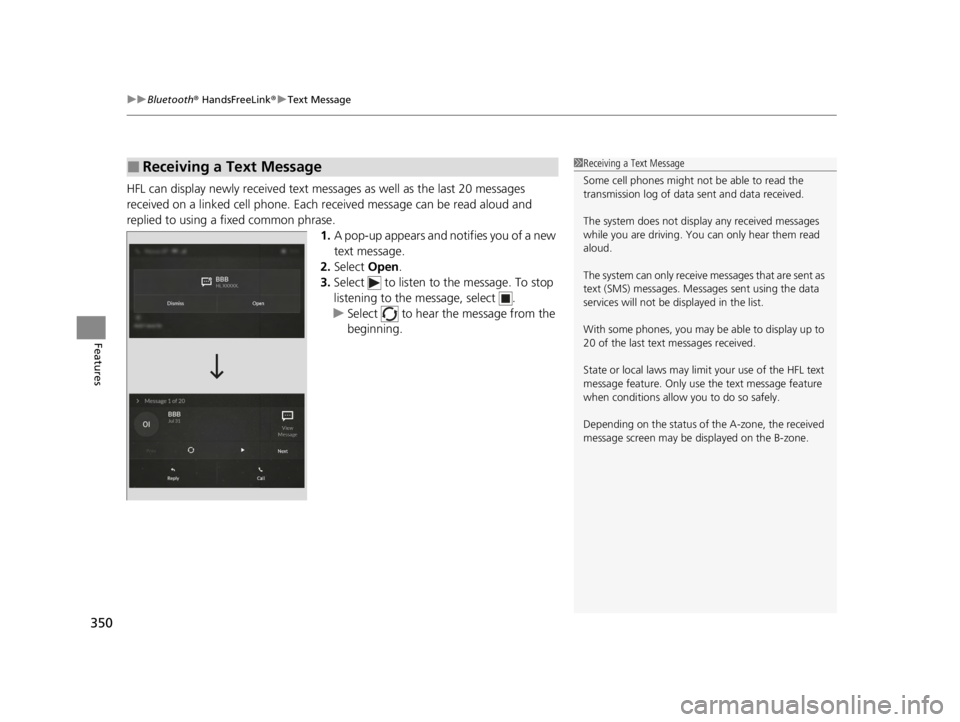
replied to using a fixed common phrase. 1.A pop-up appears and notifies you of a new
text message.
2. Select Open.
3. Select to listen to the message. To stop
listening to the message, select .
u Select to hear the message from the
beginning.
■Receiving a Text Message1Receiving a Text Message
Some cell phones might not be able to read the
transmission log of data sent and data received.
The system does not display any received messages
while you are driving. You can only hear them read
aloud.
The system can only receive messages that are sent as
text (SMS) messages. Messages sent using the data
services will not be displayed in the list.
With some phones, you may be able to display up to
20 of the last text messages received.
State or local laws may limit your use of the HFL text
message feature. Only use the text message feature
when conditions allow you to do so safely.
Depending on the status of the A-zone, the received
message screen may be displayed on the B-zone.
22 ACURA TLX-31TGV6100.book 350 \b
Page 360 of 656
358
Features
AcuraLink®
Is a subscription-based service that provid es convenient features such as voice
communication in case of emergency, online security, one-on-one operator
assistance, and the transmission of important messages regarding your vehicle’s
status.
Use the following procedure to connect to AcuraLink.
■To enable the AcuraLink
You need to allow the consent of the lo cation service to enable the AcuraLink.
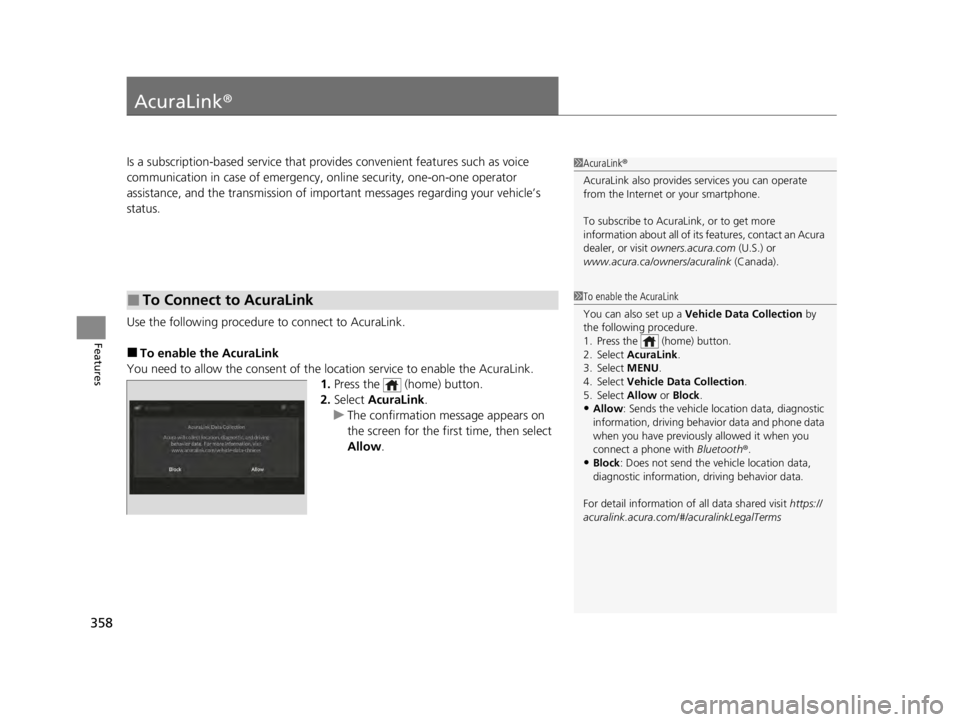
1. Press the (home) button.
2. Select AcuraLink .
u The confirmation message appears on
the screen for the first time, then select
Allow .
■To Connect to AcuraLink
1AcuraLink ®
AcuraLink also provides services you can operate
from the Internet or your smartphone.
To subscribe to AcuraLink, or to get more
information about all of its features, contact an Acura
dealer, or visit owners.acura.com (U.S.) or
www.acura.ca/owners/acuralink (Canada).
1To enable the AcuraLink
You can also set up a Vehicle Data Collection by
the following procedure.
1. Press the (home) button.
2. Select AcuraLink .
3. Select MENU.
4. Select Vehicle Data Collection .
5. Select Allow or Block.
•Allow: Sends the vehicle location data, diagnostic
information, driving behavior data and phone data
when you have previously allowed it when you
connect a phone with Bluetooth®.
•Block : Does not send the ve hicle location data,
diagnostic information, driving behavior data.
For detail information of all data shared visit https://
acuralink.acura.com/#/acuralinkLegalTerms
22 ACURA TLX-31TGV6100.book 358 \b
Page 369 of 656
367
Driving
This chapter discusses driving and refueling.
Before Driving................................... 368
Towing a Trailer ................................ 373
When Driving
Starting the Engine .......................... 374
Precautions While Driving................. 380
Automatic Transmission ................... 381
Shifting ............................................ 382
Integrated Dynamics System............. 391
Auto Idle Stop .................................. 398
Vehicle Stability AssistTM (VSA® ), aka
Electronic Stability Control (ESC),
System ........................................ 405
Agile Handling Assist ....................... 407 Super Handling-All Wheel Drive
TM (SH-
AWD® )*......................................... 408
Tire Pressure Monitoring System (TPMS)
with Tire Fill Assist .......................... 409
Tire Pressure Monitoring System (TPMS) - Required Federal Explanation ........... 411
Blind spot information System
*........ 413
AcuraWatchTM................................... 416
Collision Mitigati on Braking SystemTM
(CMBSTM) ....................................... 420
Adaptive Cruise Control (ACC) with Low Speed Follow ................................. 431
Lane Keeping Assist System (LKAS) .. 450 Traffic Jam Assist ............................. 459
Road Departure Mi
tigation (RDM)
System ........................................ 471
Traffic Sign Recognition System ....... 476
Front Sensor Camera ....................... 482
Radar Sensor ................................... 484
Braking .............................................. 485
Parking Your Vehicle ........................ 494
Multi-View Rear Camera
*................ 505
Surround View Camera System*..... 507
Refueling ........................................... 515
Fuel Economy and CO
2 Emissions .... 518
Turbo Engine Vehicle ....................... 519
* Not available on all models
22 ACURA TLX-31TGV6100.book 367 \b
Page 378 of 656

uuWhen Driving uStarting the Engine
376
Driving
You can remotely start the engine using the two-way keyless remote from extended
distances.
■To start the engine
The engine runs for up to 10 minutes without you starting the vehicle.
To extend the run time for another 10 minutes during the first run, press the
button, then press and hold the button.
u The amber LED blinks, then the green LED comes back on if a 10-minute
extension request was transmitted successfully.
After pressing the button, wait for the gr een LED to blink. This indicates that
the all the doors and the trunk are locked.
■Remote Engine Start*1 Remote Engine Start*
The remote engine start may violate local laws.
Before using the remote e ngine start, check your
local laws.
If there are buildings an d obstacles between your
vehicle and the remote, th e range will be reduced.
This distance may vary by external electrical
interference.
The engine may not start by the remote engine start if:
•You have disabled a remote engine start setting
using the audio/information screen.
2Customized Features P. 302
•The power mode is not in VEHICLE OFF (LOCK).•The transmission is in a position other than (P.
•The hood is open, or any door or the trunk is
unlocked.
•You have already used the remote twice to start
the engine.
3WARNING
Carbon monoxide ga s is toxic and can
rapidly accumulate in closed or even partly
enclosed areas.
Breathing it can cause unconsciousness and
even kill you.
Never use the remote engine starter with
the vehicle parked in a garage or other
areas with limited ventilation.
Press the button, th en press and hold
the button.
Amber LED: Blinks when any button is pressed.
Continues to blink
during a vehicle
self check until the
engine starts. Go within the range,
and try again.
Green LED: Comes on while
the engine is running. Red LED: Blinks when the
remote is out of the keyless
access system range.
* Not available on all models
22 ACURA TLX-31TGV6100.book 376 \b
Page 380 of 656

uuWhen Driving uStarting the Engine
378
Driving
1. Depress and hold the brake pedal, then press the ENGINE START/STOP button.
2. Keeping your right foot on the brake pedal, put the transmission into
(D. Select
(R when reversing.
3. With the parking brake applied, release the brake pedal and gently depress the
accelerator pedal.
u Make sure the parking brake and brake system indicator goes off.
2 Parking Brake P. 485
■Starting to Drive1Starting to Drive
You can also release the parking brake by pulling the
electric parking brake sw itch while depressing the
brake pedal.
When facing downhill, you can start your vehicle
more smoothly by manually releasing it with the
electric parking brake switch than by releasing it with
the accelerator pedal.
The engine stops when th e transmission is taken out
of
( P before the ENGINE START/STOP button is
pressed. Follow step 1 when starting to drive.
When the engine was started using the keyless remote*
When the engine was started using the keyless remote*
When the engine was started in any case
* Not available on all models
22 ACURA TLX-31TGV6100.book 378 \b
Page 381 of 656

379
uuWhen Driving uStarting the Engine
Driving
■Hill Start Assist System
Hill start assist keeps the brake engaged br iefly to help prevent the vehicle from
rolling on inclines as you move your foot from the brake pedal to the accelerator.
Put the transmission into
(D or (S when facing uphill, or (R when facing downhill,
then release the brake pedal.
You can turn the engine off when the vehicle is completely stopped.
1. Put the transmission into
(P.
2. Press the ENGINE START/STOP button.
■Stopping the Engine
1Hill Start Assist System
Hill start assist may not prevent the vehicle from
rolling downhill on a very st eep or slippery slope, and
will not operate on small inclines.
Hill start assist will operate even when VSA ® is
switched off.
Hill start assist is not a replacement for the parking
brake.
22 ACURA TLX-31TGV6100.book 379 \b
Page 382 of 656

380
uuWhen Driving uPrecautions While Driving
Driving
Precautions While Driving
Avoid driving in deep water and on flooded roads. This can damage the engine or
driveline, or cause electrical component failure.
■In Rain1Precautions While Driving
NOTICE
Do not select a shift button while pressing the
accelerator pedal. You could damage the
transmission.
NOTICE
If you repeatedly turn the steering wheel at an
extremely low speed, or hold the steering wheel in
the full left or right position for a while, the electric
power steering (EPS) system heats up. The system
goes into a protective mode, and limits its
performance. The steering wheel becomes harder
and harder to operate. Once the system cools down,
the EPS system is restored.
Repeated operation under these conditions can
eventually damage the system.
If the power mode is set to ACCESSORY while
driving, the engine will shut down and all steering
and brake power assist functi ons will stop, making it
difficult to control the vehicle.
Do not select
( N while driving as you will lose engine
braking (and accelera tion) performance.
During the first 600 miles (1,000 km) of operation,
avoid sudden acceleration or full throttle operation so
as not to damage the engine or powertrain.
22 ACURA TLX-31TGV6100.book 380 \b
Page 383 of 656

381
uuWhen Driving uAutomatic Transmission
Driving
If there is a strong impact with something under the vehicle, stop in a safe location.
Check the underside of the vehicle for damage or any fluid leaks.
Automatic Transmission
When the engine runs at higher idle speeds, the creeping force increases.
Keep the brake pedal firmly depressed when stopped.
Quickly depressing the accelerator peda l while driving uphill may cause the
transmission to drop to a lo wer gear, unexpectedly increa sing vehicle speed. Depress
the accelerator pedal carefully, especi ally on slippery roads and curves.
■Other Precautions
■Creeping
■Kickdown
1Precautions While Driving
Avoid hard braking for the first 200 miles (300 km)
after purchasing your new vehicle or replacing the
brake pads or rotors, to allow for proper break-in.
NOTICE
The following can damage the under spoiler:
•Parking the vehicle by a parking block•Parallel parking along the road shoulder
•Driving towards the bottom of a hill
•Driving up or down to a different surface level
(such as a road shoulder)
•Driving on a rutted or bumpy road
•Driving on a road with potholes
3.0 L engine models
22 ACURA TLX-31TGV6100.book 381 \b