battery ACURA TLX 2022 Owner's Guide
[x] Cancel search | Manufacturer: ACURA, Model Year: 2022, Model line: TLX, Model: ACURA TLX 2022Pages: 656, PDF Size: 26.43 MB
Page 338 of 656
uuBluetooth ® HandsFreeLink ®u HFL Menus
336
Features
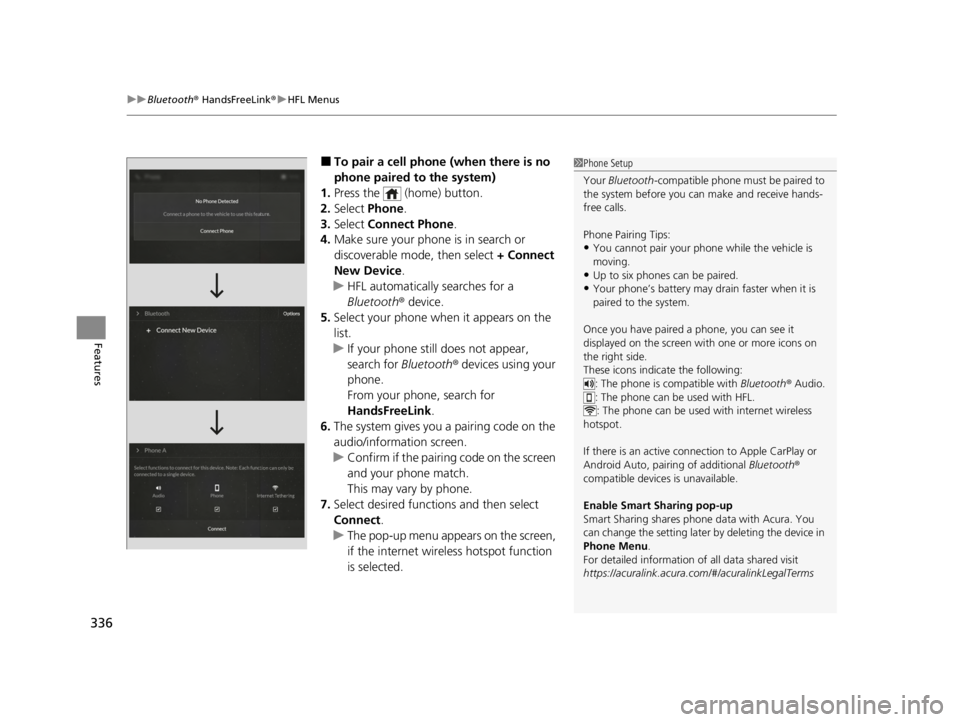
■To pair a cell phone (when there is no
phone paired to the system)
1. Press the (home) button.
2. Select Phone .
3. Select Connect Phone .
4. Make sure your phone is in search or
discoverable mode, then select + Connect
New Device .
u HFL automatically searches for a
Bluetooth® device.
5. Select your phone when it appears on the
list.
u If your phone still does not appear,
search for Bluetooth® devices using your
phone.
From your phone, search for
HandsFreeLink .
6. The system gives you a pairing code on the
audio/information screen.
u Confirm if the pairing code on the screen
and your phone match.
This may vary by phone.
7. Select desired functions and then select
Connect .
u The pop-up menu appears on the screen,
if the internet wireless hotspot function
is selected.1Phone Setup
Your Bluetooth -compatible phone must be paired to
the system before you ca n make and receive hands-
free calls.
Phone Pairing Tips:
•You cannot pair your phone while the vehicle is
moving.
•Up to six phones can be paired.
•Your phone’s battery may dr ain faster when it is
paired to the system.
Once you have paired a phone, you can see it
displayed on the screen with one or more icons on
the right side.
These icons indicate the following: : The phone is compatible with Bluetooth® Audio.
: The phone can be used with HFL.
: The phone can be used with internet wireless
hotspot.
If there is an active connection to Appl e CarPlay or
Android Auto, pairing of additional Bluetooth®
compatible devices is unavailable.
Enable Smart Sharing pop-up
Smart Sharing shares phone data with Acura. You
can change the setting later by deleting the device in
Phone Menu .
For detailed information of all data shared visit
https://acuralink.acura.com/#/acuralinkLegalTerms
22 ACURA TLX-31TGV6100.book 336 \b
Page 364 of 656

uuAcuraLink ®u
362
Features
■Automatic collision notification
If your vehicle’s airbags deploy or if the unit
detects that the vehicle is severely impacted,
your vehicle automatically will attempt to
connect to the AcuraLink operator. If
connected, information about your vehicle, its
location, and its condition can be sent to the
operator
*1; you also can speak to the operator
when connected.
IMPORTANT: In a crash, AcuraLink will attempt to notify emergency services but
NEITHER ACURA NOR ITS SERVICE PROVIDERS GUARANTEE THAT SUCH
NOTIFICATION WILL OCCUR.
Acura reserves the right to terminate Acur aLink services at any time or for any
reason, and in the future may not be able to provide services due to changes in, or
obsolescence of, technology integral to the service or changes in governmental
regulation.
*1: Depending on your phone and ad equate cellular coverage, your vehicle’s location may not
be sent to the operator.
■In Case of Emergency1 In Case of Emergency
Your vehicle may not be able to connect to the
operator if the battery level is low, the line is
disconnected, or you do not have adequate cellular
coverage.
You cannot use this emergency services when:
•You travel outside the AcuraLink service coverage
areas.
•There is a problem with the connecting devices,
such as the microphones, speakers, or the unit
itself.
You cannot operate othe r phone-related functions
using the screen while talking to the operator.
Only the operator can terminate the connection to
your vehicle.
1 Automatic collision notification
If the unit fails to connect to the operator, it
repeatedly tries until it succeeds.
22 ACURA TLX-31TGV6100.book 362 \b
Page 376 of 656
374
Driving
When Driving
Starting the Engine
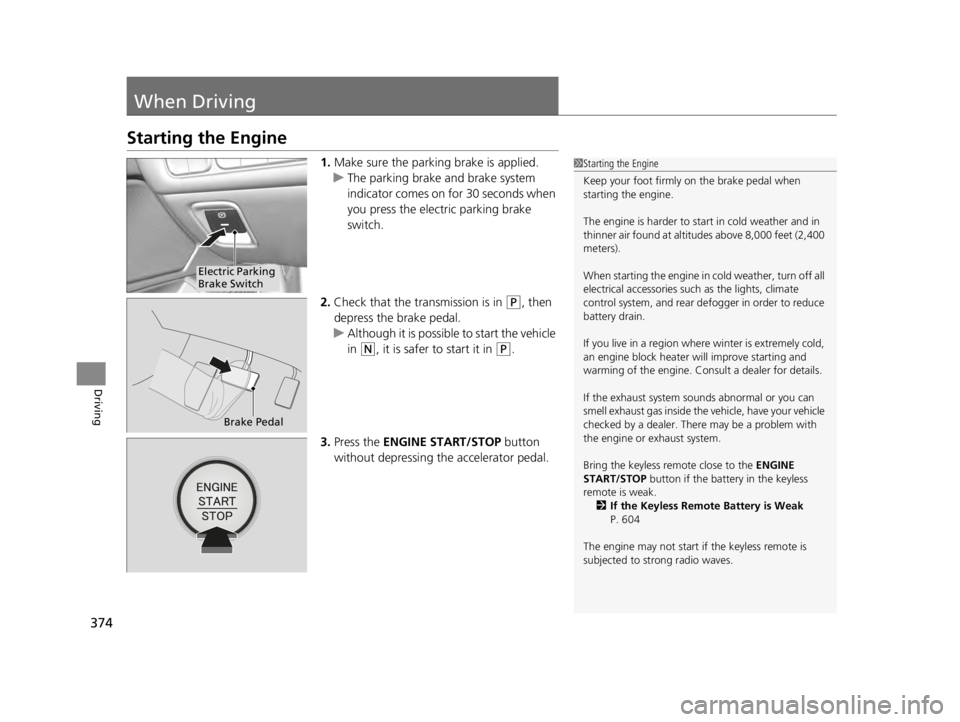
1.Make sure the parking brake is applied.
u The parking brake and brake system
indicator comes on for 30 seconds when
you press the electric parking brake
switch.
2. Check that the tr ansmission is in
(P, then
depress the brake pedal.
u Although it is possible to start the vehicle
in
(N, it is safer to start it in (P.
3. Press the ENGINE START/STOP button
without depressing the accelerator pedal.
1Starting the Engine
Keep your foot firmly on the brake pedal when
starting the engine.
The engine is harder to st art in cold weather and in
thinner air found at altit udes above 8,000 feet (2,400
meters).
When starting the engine in cold weather, turn off all
electrical accessories such as the lights, climate
control system, and rear de fogger in order to reduce
battery drain.
If you live in a region where winter is extremely cold,
an engine block heater will improve starting and
warming of the engine. Consult a dealer for details.
If the exhaust system sounds abnormal or you can
smell exhaust gas inside the vehicle, have your vehicle
checked by a dealer. There may be a problem with
the engine or exhaust system.
Bring the keyless remote close to the ENGINE
START/STOP button if the batte ry in the keyless
remote is weak. 2 If the Keyless Remote Battery is Weak
P. 604
The engine may not start if the keyless remote is
subjected to strong radio waves.
Electric Parking
Brake Switch
Brake Pedal
22 ACURA TLX-31TGV6100.book 374 \b
Page 389 of 656
![ACURA TLX 2022 Owners Guide Continued387
uuWhen Driving uShifting
Driving
■If you want to keep the transmission in (N position [car wash mode]
With the engine running:
1. Press and hold the brake pedal.
2. Select
(N, then rel](/img/32/58635/w960_58635-388.png "ACURA TLX 2022 Owners Guide Continued387
uuWhen Driving uShifting
Driving
■If you want to keep the transmission in (N position [car wash mode]
With the engine running:
1. Press and hold the brake pedal.
2. Select
(N, then rel")
Continued387
uuWhen Driving uShifting
Driving
■If you want to keep the transmission in (N position [car wash mode]
With the engine running:
1. Press and hold the brake pedal.
2. Select
(N, then release the button to display (N (Neutral) hold mode on the
multi-information display.
3. Press and hold
(N again for two seconds.
u This puts the vehicle in car wash mode which must be used when your vehicle
is pulled through a conveyor type automatic car wash where you or an
attendant do not remain in the vehicle.
If the ENGINE START/STOP button is pressed
after car wash mode has been activated, the
power mode will change to ACCESSORY and
a message will be displayed on the multi-
information display. u The gear position remains in
(N with the
power mode in ACCESSORY for 15
minutes, then, it automatically changes
to
(P and the power mode changes to
OFF.
u Manually press the ENGINE START/
STOP button cancels ACCESSORY
mode. The
(P indicator comes on and
the power mode changes to OFF. You
must always press the ENGINE START/
STOP button when car wash mode is no
longer needed.
1 If you want to keep the transmission in (N position [car wash
mode]
The transmission may not stay in
(N position while
the following indicators ar e on or when the message
below appears:
•Malfunction indicator lamp
•Transmission system indicator
•Charging system indicator•The 12 Volt Battery Charging System Problem.
Do Not Drive. message on the multi-information
display.
22 ACURA TLX-31TGV6100.book 387 \b
Page 400 of 656

398
uuWhen Driving uAuto Idle Stop
Driving
Auto Idle Stop
To help maximize fuel econ omy, the engine automatica lly stops when the vehicle
comes to a stop, depending on environmen tal and vehicle operating conditions. The
indicator (green) comes on at this time.
The environmental and vehicle conditions that
impact Auto Idle Stop system operation are
varied.
2Auto Idle Stop Activates When: P. 401, 402
The engine then restarts once the vehicle is
about to move again, and the indicator
(green) goes off.
2 The Engine Automatically Restarts When:
P. 403
1 Auto Idle Stop
The 12-volt battery insta lled in this vehicle is
specifically designed for a m odel with Auto Idle Stop.
Using a 12-volt battery other than this specified type
may shorten the 12-volt ba ttery life, and prevent
Auto Idle Stop from activati ng. If you need to replace
the 12-volt battery, make sure to select the specified
type. Ask a dealer for more details.
Auto Idle Stop
Indicator (Green)
22 ACURA TLX-31TGV6100.book 398 \b
Page 403 of 656
Continued401
uuWhen Driving uAuto Idle Stop
Driving
The vehicle stops with the gear position in (D and the brake pedal depressed.
When you put the transmission into
(P, the Auto Idle Stop continues to operate,
even if the brake pedal is released. u If you depress the brake pedal, the engine may automatically restart.
■Auto Idle Stop does not activate when:
• The Auto Idle Stop OFF button is pressed.
• The driver’s seat belt is not fastened.
• The engine is not adequately warmed up or coolant temperature is high.
• The transmission fluid temperature is low or high.
• The vehicle comes to a stop again befo re the vehicle speed reaches 3 mph (5
km/h) after the engine starts.
• The vehicle is stopped on a steep incline.
• The transmission is in a position other than
(D.
• The engine is started with the hood open.
u Turn off the engine. Close the hood before you restart the engine to activate
Auto Idle Stop.
• The battery charge is low.
• The internal temperature of the battery is 14°F (−10°C) or less.
• The climate control system is in use, and the outside temperature is below −4°F
(−20°C) or over 104°F (40°C).
• The climate control system is in use, and the temperature is set to Hi or Lo .
• is ON (indicator on).
• The Integrated Dynamics System mode is changed to SPORT or SPORT+
* mode.
• The Auto Idle Stop is set to off on INDIVIDUAL Setting screen.
2Customizing the INDIVIDUAL Settings P. 396
■Auto Idle Stop Activates When:1Auto Idle Stop Activates When:
Do not open the hood while the Auto Idle Stop
function is activated. If the hood is opened, the
engine will not re start automatically.
In this case, restart the engine with the ENGINE
START/STOP button.
2 Starting the Engine P. 374
Pressing the ENGINE START/STOP button causes
the engine to no longer rest art automatically. Follow
the standard procedure to start the engine.
2 Starting the Engine P. 374
When ACC with Low Speed Follow is in operation,
the vehicle stops without de pressing the brake pedal
and Auto Idle Stop may activate.
* Not available on all models
22 ACURA TLX-31TGV6100.book 401 \b
Page 406 of 656

uuWhen Driving uAuto Idle Stop
404
Driving
■The engine restarts even if the brake pedal is depressed*1 when:
• The Auto Idle Stop OFF button is pressed.
• The steering wheel is operated.
• The transmission is put into
(R or (S, or taken out of (N and put into (D.
u If you put the transmission into
(P after the Auto Idle Stop activates, the Auto
Idle Stop continues to operate. In this case, the engine restarts when you
depress the brake pedal.
• The battery charge becomes low.
• The accelerator pedal is depressed.
• The driver’s seat belt is unlatched.
• is ON (indicator on).
• The climate control system is in us e, and the difference between the set
temperature and actual interior temperature becomes significant.
• The climate control system is bein g used to dehumidify the interior.
• The Integrated Dynamics System mode is changed to SPORT or SPORT+
* mode.
• The Auto Idle Stop is set to off on INDIVIDUAL Setting screen.
2Customizing the INDIVIDUAL Settings P. 396
•The vehicle ahead of you starts again when your vehicle stops automatically with
ACC with Low Speed Follow.
Briefly keeps the brake applied after releasi ng the brake pedal to restart the engine.
This can keep your vehicle from unexpectedly moving while on an incline.
■Starting Assist Brake Function
1 The engine restarts even if the brake pedal is depressed*1 when:
*1: With the automatic brake hold system activated,
you can release the brake pedal while Auto Idle Stop
is in operation.
If the automatic brake hold system has been turned
off, or if there is a problem with the system, the
engine will restart automatically when you release
the brake pedal. 2 Automatic Brake Hold P. 490
* Not available on all models
22 ACURA TLX-31TGV6100.book 404 \b
Page 407 of 656

405
uuWhen Driving uVehicle Stability AssistTM (VSA ®), aka Electronic Stability Control (ESC), System
Continued
Driving
Vehicle Stability AssistTM (VSA ®), aka Electronic
Stability Control (ESC), System
VSA ® helps to stabilize the vehicle during corn ering if the vehicle turns more or less
than what was intended. It also assists in maintaining traction on slippery surfaces.
It does so by regulating engine ou tput and selectively applying the brakes.
When VSA ® activates, you may notice that the
engine does not respond to the accelerator.
You may also notice some noise from the
hydraulic brake system. You will also see the
indicator blink.
■VSA ® Operation
1 Vehicle Stability AssistTM (VSA® ), aka Electronic Stability Control
(ESC), System
The VSA ® may not function properl y if tire type and
size are mixed. Make sure to use the same size and
type of tire, and the air pressures as specified.
When the VSA ® system indicator comes on and stays
on while driving, there ma y be a problem with the
system. While this may not interfere with normal
driving, have your vehi cle checked by a dealer
immediately.
VSA ® cannot enhance stability in all driving situations
and does not control the entire braking system. You
still need to drive and corner at speeds appropriate
for the conditions and always leave a sufficient
margin of safety.
The main function of the VSA ® system is generally
known as Electronic Stability Control (ESC). The
system also includes a traction control function.
The vehicle stability assist
TM (VSA ®) system, vehicle
stability assistTM (VSA ®) OFF, adaptive cruise control
(ACC) with low speed follow, and safety support
indicators may come on in amber along with a
message in the multi-information display when you
set the power mode to ON after reconnecting a
battery.
Drive a short distance at more than 12 mph (20
km/h).
Each indicator should go off. If any do not, have your
vehicle checked by a dealer.
VSA ® System Indicator
22 ACURA TLX-31TGV6100.book 405 \b
Page 426 of 656

uuAcuraWatchTMuCollision Mitigation Braking SystemTM (CMBSTM)
424
Driving
When you turn the CMBSTM on and off, do the
following.
1. Press the safety support switch.
2. Roll the right selector wheel to the
symbol and push it.
u The message appears on the multi-
information display when the system
turns on or off.
u A check mark appears in the box and the
color of the symbol changes green
when the system is on. The check mark
disappears and the color of the
symbol changes gray when the system is
off.
The CMBS
TM is turned on every time you start
the engine, even if you turned it off the last
time you drove the vehicle.
■CMBSTM On and Off1 Collision Mitigation Braking SystemTM (CMBSTM)
The CMBS
TM may automatically shut off, and the
safety support indicator (amb er) will come and stay
on under certain conditions:
2 CMBS
TM Conditions and Limitations P. 425
When the CMBS
TM is activated, it will continue to
operate even if the accele rator pedal is partially
depressed.
However, it will be canceled if the accelerator pedal is
fully depressed.
The vehicle stability assist
TM (VSA ®) system, vehicle
stability assistTM (VSA ®) OFF, adaptive cruise control
(ACC) with low speed follow, and safety support
indicators may come on in amber along with a
message in the multi-information display when you
set the power mode to ON after reconnecting a
battery.
Drive a short distance at more than 12 mph (20
km/h).
Each indicator should go off. If any do not, have your
vehicle checked by a dealer.
Right Selector Wheel
Safety Support Switch
22 ACURA TLX-31TGV6100.book 424 \b
Page 435 of 656

Continued433
uuAcuraWatchTMuAdaptive Cruise Control (ACC) with Low Speed Follow
DrivingWhen driving at about 25 mph (40 km/h) or above: Take your foot off the
pedal and press down the RES/+/SET/– switch when you reach the desired speed.
The moment you release the switch, the set speed is fixed, and ACC with Low Speed
Follow begins.
When driving slower than about 25 mph (40 km/h): If the vehicle is moving
and the brake pedal is not depressed, pressing the switch fixes the set speed to
about 25 mph (40 km/h) regardless of current vehicle speed. If your vehicle is
stationary, you can set the vehicle speed even with the brake pedal depressed.
■To Set the Vehicle Speed1 To Set the Vehicle Speed
You can switch the displayed set speed
measurements on the multi- information display or
audio/information screen between mph and km/h. 2 Speed/Distance Units P. 104
2 Customized Features P. 302
The vehicle stability assist
TM (VSA ®) system, vehicle
stability assistTM (VSA ®) OFF, adaptive cruise control
(ACC) with low speed follow, and safety support
indicators may come on in amber along with a
message in the multi-information display when you
set the power mode to ON after reconnecting a
battery.
Drive a short distance at more than 12 mph (20
km/h).
Each indicator should go off. If any do not, have your
vehicle checked by a dealer.
On when ACC with Low
Speed Follow beginsPress down and release
RES/+ /SET/− Switch
(green) is on.
22 ACURA TLX-31TGV6100.book 433 \b