door lock ACURA TLX 2022 Service Manual
[x] Cancel search | Manufacturer: ACURA, Model Year: 2022, Model line: TLX, Model: ACURA TLX 2022Pages: 656, PDF Size: 26.43 MB
Page 153 of 656

Continued151
uuOperating the Switches Around the Steering Wheel uLight Switches
Controls
Automatic lighting control can be used when
the power mode is in ON.
When the light switch is in AUTO, the
headlights and other exterior lights will switch
on and off automatically depending on the
ambient brightness.
The headlights come on when you unlock a
door in dark areas with the headlight switch in
AUTO .
u Once you lock the door, the headlights
will go off.
■Automatic Operation (automatic lighting control)1Automatic Operation (aut omatic lighting control)
We recommend that you tu rn on the lights manually
when driving at night, in a de nse fog, or in dark areas
such as long tunnels or parking facilities.
The light sensor is in the location shown below.
Do not cover this light sensor with anything;
otherwise, the automatic lighting system may not
work properly.
Light Sensor
Models with automatic
intermittent wipers
Models without automatic
intermittent wipers
Light Sensor
22 ACURA TLX-31TGV6100.book 151 \b
Page 154 of 656

uuOperating the Switches Around the Steering Wheel uLight Switches
152
Controls
The headlights automatically come on when the wipers are used several times within
a certain number of intervals wi th the headlight switch in AUTO.
The headlights automatically go off a few minutes later if the wipers are stopped.
The headlights, all other exterior lights, an d the instrument panel lights turn off 15
seconds after you set the power mode to VE HICLE OFF (LOCK), take the remote with
you, and close the driver's door.
If you set the power mode to VEHICLE OFF (LOCK) with the headlight switch on, but
do not open the door, the li ghts turn off after 10 minutes (3 minutes, if the switch
is in the AUTO position).
The lights turn on again when you unlock or open the driver’s door. If you unlock
the door, but do not open it within 15 seconds, the lights go off. If you open the
driver’s door, you will hear a reminder chime alerting you that the lights are on.
■Headlight Integration with Wipers
■Automatic Lighting Off Feature
1Automatic Operation (aut omatic lighting control)
You can adjust the auto li ght sensitivity as follows:
2 Customized Features P. 302
SettingThe exterior lights come on
when the ambient light is at
Max
High
Mid
Low
Min
U.S. models
Bright
Dark
1 Headlight Integration with Wipers
This feature activates while the headlights are off in
AUTO .
The instrument panel br ightness does not change
when the headlights come on.
At dark ambient light leve ls, the automatic lighting
control feature turns on the headlights, regardless of
the number of wiper sweeps.
1 Automatic Lighting Off Feature
You can change the headli ght auto off timer setting.
2 Customized Features P. 302
22 ACURA TLX-31TGV6100.book 152 \b
Page 164 of 656

162
uuOperating the Switches Around the Steering Wheel uDriving Position Memory System
Controls
Driving Position Memory System
You can store two driver’s seat and outside mirrors position with the driving position
memory system.
When you unlock and open the driver’s door with a keyless remote, or keyless access
system, door mirrors adjust to one of the two preset positions and the seat adjusts
to retracted positions of one of the two preset positions automatically.
The seat will move to th e stored position when you set the power mode to
ACCESSORY.
• DRIVER 1 transmitter is linked to memory button 1.
• DRIVER 2 transmitter is linked to memory button 2.
The driver’s seat moves rearward depending
on the set seating position once you
•Stop the vehicle.
• Put the transmission in
(P.
• Turn the engine off.
• Open the driver’s door.
Once the power mode is in the ACCESSORY
position, the driver’s seat moves forward to
the DRIVER 1 or 2 preset position.
1 Driving Position Memory System
Using the audio/informati on screen, you can disable
the automatic seat adjustment function. 2 Customized Features P. 302
The driver’s seat easy exit feature can be turned ON/
OFF. 2 Customized Features P. 302
System Operation
The system will not operate if:
•Either memory button is pressed while the seat or
mirrors are in motion.
•The seat or mirrors positions are adjusted while in
operation.
•Either of the memorized positions is set fully to the
rear.
•The mode selector is pressed up or down while in
operation.
The system may not recognize a key if:
•The key is in close proximity to a cell phone or other
wireless device.
•Both keys are in the vehicle at the same time.
•The Driving Position Memory System is disabled in
customized features.
•Opening driver's door wi thout fully grabbing door
handle.
Models with mode selector
DRIVER 1 DRIVER 2
22 ACURA TLX-31TGV6100.book 162 \b
Page 169 of 656
167
uuMirrors uPower Door Mirrors
Controls
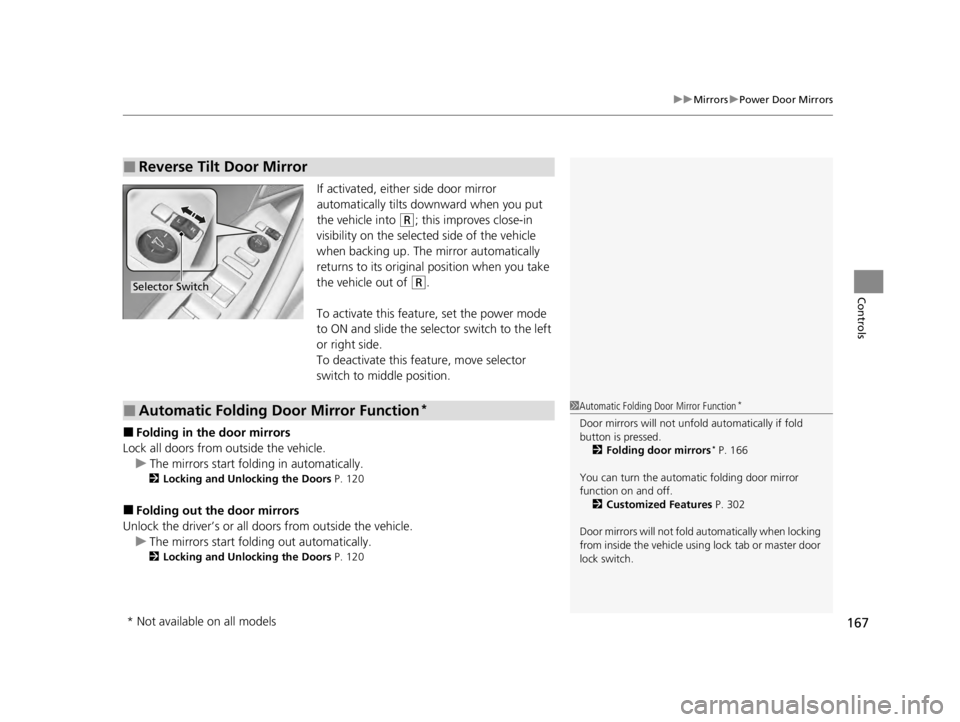
If activated, either side door mirror
automatically tilts do wnward when you put
the vehicle into
(R; this improves close-in
visibility on the selected side of the vehicle
when backing up. The mirror automatically
returns to its original position when you take
the vehicle out of
(R.
To activate this feature, set the power mode
to ON and slide the sele ctor switch to the left
or right side.
To deactivate this feature, move selector
switch to middle position.
■Folding in th e door mirrors
Lock all doors from outside the vehicle. u The mirrors start folding in automatically.
2 Locking and Unlocking the Doors P. 120
■Folding out the door mirrors
Unlock the driver’s or all doors from outside the vehicle.
u The mirrors start folding out automatically.
2 Locking and Unlocking the Doors P. 120
■Reverse Tilt Door Mirror
Selector Switch
■Automatic Folding Door Mirror Function*1Automatic Folding Door Mirror Function*
Door mirrors will not unfol d automatically if fold
button is pressed. 2 Folding door mirrors
* P. 166
You can turn the automa tic folding door mirror
function on and off. 2 Customized Features P. 302
Door mirrors will not fold automatically when locking
from inside the vehicle usi ng lock tab or master door
lock switch.
* Not available on all models
22 ACURA TLX-31TGV6100.book 167 \b
Page 182 of 656

180
Controls
Interior Convenience Items
Interior Lights
■ON
The interior lights come on regardless of
whether the doors are open or closed.
■Door activated
The interior lights come on in the following
situations:
• When any doors are opened.
• You unlock the driver’s door.
• When the power mode is set to VEHICLE
OFF (LOCK).
■OFF
The interior lights remain off regardless of
whether the doors are open or closed.
■Interior Light Switches1 Interior Light Switches
In the door activated position, the interior lights fade
out and go off about 30 seconds after the doors are
closed.
The lights go off after about 30 seconds in the
following situations:
•When you unlock the driver’s door but do not open
it.
•When you set the power mode to VEHICLE OFF
(LOCK) but do not open a door.
You can change the interi or lights dimming time.
2 Customized Features P. 302
The interior lights go off im mediately in the following
situations:
•When you lock the driver’s door.•When you close the driver’s door in ACCESSORY
mode.
•When you set the power mode to ON.
To avoid draining the ba ttery, do not leave the
interior light on for an extended length of time when
the engine is off.
If you leave any of the doors open in VEHICLE OFF
(LOCK) mode, the interior lights go off after about 15
minutes.
Off
On
Door Activated Position
22 ACURA TLX-31TGV6100.book 180 \b
Page 200 of 656

uuClimate Control System uUsing Automatic Climate Control
198
Controls
■Switching between the recirc ulation and fresh air modes
Press the (recirculation) button and switch the mode depending on
environmental conditions.
Recirculation mode (indicator on): Recirculates air from the vehicle’s interior through
the system.
Fresh air mode (indicator off): Maintains out side ventilation. Keep the system in
fresh air mode in normal situations.1 Using Automatic Climate Control
When you unlock the doors with your remote, the
driver’s ID (DRIVER 1 or DRIVER 2) is detected, and
the climate control settings are turned to the
respective mode automatically when you set the
power mode to ON.
22 ACURA TLX-31TGV6100.book 198 \b
Page 206 of 656
204
Features
Audio System
About Your Audio System
The audio system features AM/FM radio and SiriusXM® Radio service. It can also play
USB flash drives, and iPod, iPhone, iPad and Bluetooth® devices.
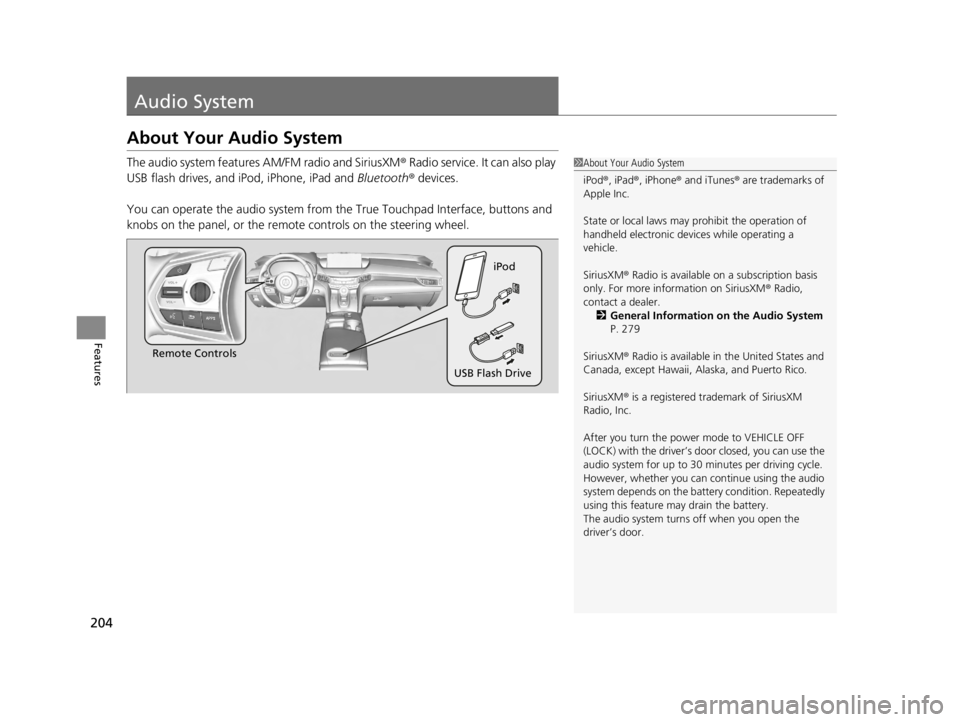
You can operate the audio system from the True Touchpad Interface, buttons and
knobs on the panel, or the remote controls on the steering wheel.1 About Your Audio System
iPod ®, iPad ®, iPhone ® and iTunes ® are trademarks of
Apple Inc.
State or local laws may pr ohibit the operation of
handheld electronic devices while operating a
vehicle.
SiriusXM ® Radio is available on a subscription basis
only. For more information on SiriusXM ® Radio,
contact a dealer. 2 General Information on the Audio System
P. 279
SiriusXM ® Radio is available in the United States and
Canada, except Ha waii, Alaska, and Puerto Rico.
SiriusXM ® is a registered trademark of SiriusXM
Radio, Inc.
After you turn the power mode to VEHICLE OFF
(LOCK) with the driver’s door closed, you can use the
audio system for up to 30 minutes per driving cycle.
However, whether you can continue using the audio
system depends on the batter y condition. Repeatedly
using this feature ma y drain the battery.
The audio system turns off when you open the
driver’s door.
Remote Controls iPod
USB Flash Drive
22 ACURA TLX-31TGV6100.book 204 \b
Page 212 of 656
210
Features
Audio System Basic Operation
You can use the audio system for 30 minutes when the power mode is set to
VEHICLE OFF (LOCK) with the driver’s door closed. The system will then turn off
automatically.
If you want to keep using it, we reco mmend that you turn the power mode to
ACCESSORY or ON.
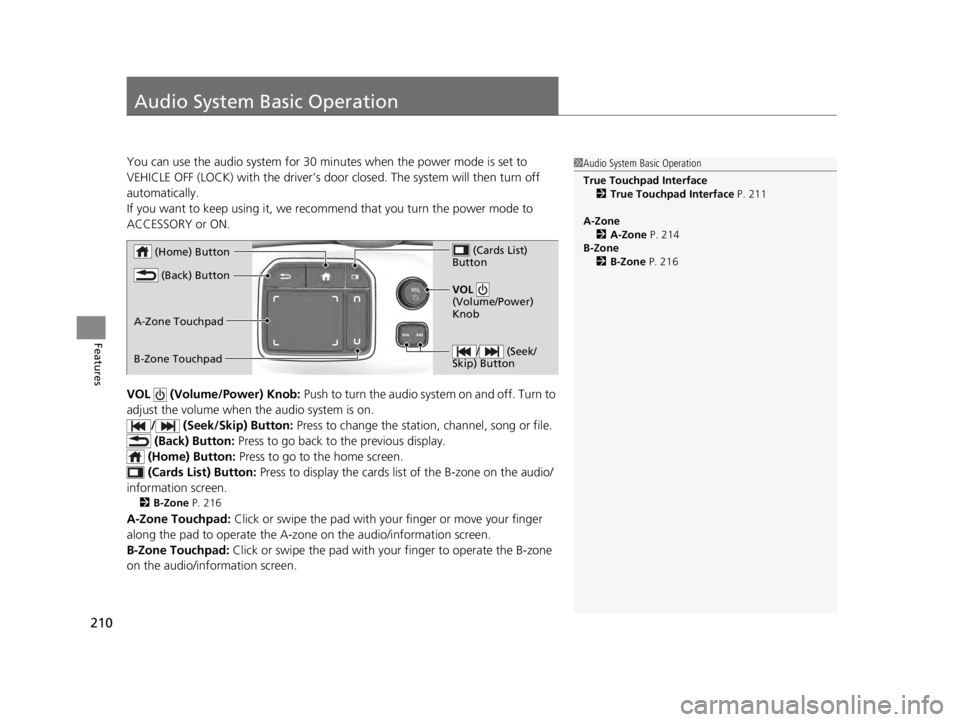
VOL (Volume/Power) Knob: Push to turn the audio system on and off. Turn to
adjust the volume when the audio system is on.
/ (Seek/Skip) Button: Press to change the station, channel, song or file.
(Back) Button: Press to go back to the previous display.
(Home) Button: Press to go to the home screen.
(Cards Li st) Button: Press to display the cards list of the B-zone on the audio/
information screen.
2 B-Zone P. 216
A-Zone Touchpad: Click or swipe the pad with your finger or move your finger
along the pad to operate the A-zone on the audio/information screen.
B-Zone Touchpad: Click or swipe the pad with your finger to operate the B-zone
on the audio/info rmation screen.
1Audio System Basic Operation
True Touchpad Interface
2 True Touchpad Interface P. 211
A-Zone 2 A-Zone P. 214
B-Zone 2 B-Zone P. 216
/ (Seek/
Skip) Button
VOL
(Volume/Power)
Knob
(Home) Button
(Back) Button
(Cards List)
Button
A-Zone Touchpad
B-Zone Touchpad
22 ACURA TLX-31TGV6100.book 210 \b
Page 308 of 656

306
uuCustomized Features u
Features
Key and Remote Unlock Mode
Auto Door Lock
Auto Door Unlock
Door Setup
Keyless Lock Answer Back
Security Relock Timer
Accent Light Brightness*
Accent Light Theme*
Interior Light Dimming Time
Headlight Auto Off Timer
Auto Interior Illu mination Sensitivity
Lighting Setup
Auto Folding Door Mirror*
Door Unlock Mode
Keyless Access Light Flash
Keyless Access Beep
Remote Start System On/Off*
Walk Away Auto Lock
Keyless Access Setup
Auto Headlight On with Wiper On
Auto Light Sensitivity*
* Not available on all models
22 ACURA TLX-31TGV6100.book 306 \b
Page 320 of 656

318
uuCustomized Features u
Features
*1:Default SettingSetup Group Customizable Features Description Selectable Settings
Vehicle Driving
Position
Setup
Memory Position Link
Turns the driving position memory
system on and off. On
*1/
Off
Seat Position Movement at
Entry/Exit Causes the driver’s seat to move back
to make it easier to enter or exit the
vehicle.
On
*1/
Off
Keyless
Access Setup Door Unlock Mode
Changes which doors unlock when
you grab the driver’s door handle. Driver Door
*1/
All
Doors
Keyless Access Light Flash Causes some exterior lights to flash
when you unlock/lock the doors. On
*1/
Off
Keyless Access Beep Causes the beeper to sound when you
unlock/lock the doors.
On
*1/
Off
Remote Start System On/
Off
*Turns the remote engine start feature
on and off. On*1/
Off
Walk Away Auto Lock Changes the settings for the auto lock
function when you walk away from
the vehicle. Enable
/Disable
*1
* Not available on all models
22 ACURA TLX-31TGV6100.book 318 \b