trunk ACURA TLX 2023 Owner's Guide
[x] Cancel search | Manufacturer: ACURA, Model Year: 2023, Model line: TLX, Model: ACURA TLX 2023Pages: 658, PDF Size: 21.27 MB
Page 195 of 658

Continued193
uuInterior Convenience Items uOther Interior Convenience Items
Controls
1Wireless Charger*
A device may not charge if the size or shape of its
chargeable side is not a ppropriate for use with the
charging area.
Not all devices are compatible with the system.
During the charging phase, it is normal for the
charging area and de vice to heat up.
If the device becomes too hot and its battery
protection function activates, it may charge
extremely slowly or no longer charge.
The temperature at which the battery protection
function activates de pends on the device.
Charging may be briefl y interrupted when:
•All the doors or the trunk are closed
- to avoid interference with the proper functioning
of the keyless access system.
•The position of the device is altered.
Do not charge more than one device at a time on a
charging area.
* Not available on all models
23 ACURA TLX-31TGV6200.book 193 ページ 2022年8月4日 木曜日 午後1時59分
Page 371 of 658

Continued369
uuBefore Driving uDriving Preparation
Driving
• Store or secure all items on board properly.
u Carrying too much cargo, or improperly storing it, can affect your vehicle’s
handling, stability, sto pping distance, and tires, and make it unsafe.
2Maximum Load Limit P. 371
•Do not pile items higher than the seat height.
u They can block your view and may be thrown forward in the event of sudden
braking.
• Do not place anything in the front seat footwells. Make sure to secure the floor
mat.
u An object or unsecured floor mat can in terfere with your brake and accelerator
pedal operation while driving.
• If you have any animals on board, do not let them move around in the vehicle.
u They may interfere with driv ing and a crash could occur.
• Securely close and lock all doors and the trunk.
2 Locking/Unlocking the Doors from the Inside P. 132
•Adjust your seating position properly.
u Adjust the head restraint, too.
2Seats P. 168
2 Adjusting the Head Restraint Positions P. 174
•Adjust the mirrors and steering wheel properly.
u Adjust them while sitting in the proper driving position.
2 Adjusting the Steering Wheel P. 164
2 Mirrors P. 165
■Interior Checks1Interior Checks
The headlight aim is set by the factory, and does not
need to be adjusted. Howeve r, if you regularly carry
heavy items in the trunk ha ve the aiming readjusted
at a dealer or by a qualified technician.
23 ACURA TLX-31TGV6200.book 369 ページ 2022年8月4日 木曜日 午後1時59分
Page 378 of 658

uuWhen Driving uStarting the Engine
376
Driving
You can remotely start the engine using the two-way keyless remote from extended
distances.
■To start the engine
The engine runs for up to 10 minu tes without you starting the vehicle.
To extend the run time for another 10 minutes during the first run, press the
button, then press and hold the button.
u The amber LED blinks, then the green LED comes back on if a 10-minute
extension request was tra nsmitted successfully.
After pressing the button, wait for the gr een LED to blink. This indicates that
the all the doors and the trunk are locked.
■Remote Engine Start*1 Remote Engine Start*
The remote engine start may violate local laws.
Before using the remote e ngine start, check your
local laws.
If there are buildings an d obstacles between your
vehicle and the remote, th e range will be reduced.
This distance may vary by external electrical
interference.
The engine may not start by the remote engine start if:
•You have disabled a remote engine start setting
using the audio/information screen.
2Customized Features P. 302
•The power mode is not in VEHICLE OFF.•The transmission is in a position other than (P.
•The hood is open, or any door or the trunk is
unlocked.
•The 12-volt battery temp is too low or the 12-volt
battery charge is too low.
3WARNING
Carbon monoxide ga s is toxic and can
rapidly accumulate in closed or even partly
enclosed areas.
Breathing it can cause unconsciousness and
even kill you.
Never use the remote engine starter with
the vehicle parked in a garage or other
areas with limited ventilation.
Press the button, th en press and hold
the button.
Amber LED: Blinks when any button is pressed.
Continues to blink
during a vehicle
self check until the
engine starts. Go within the range,
and try again.
Green LED: Comes on while
the engine is running. Red LED: Blinks when the
remote is out of the keyless
access system range.
* Not available on all models
23 ACURA TLX-31TGV6200.book 376 ページ 2022年8月4日 木曜日 午後1時59分
Page 379 of 658

Continued377
uuWhen Driving uStarting the Engine
Driving
■To stop the engine
Press and hold the button
for one second.
Go within the range,
and try again.
Amber LED: Blinks when any
button is pressed. Red LED:
●Comes on for one second to let you
know that the engine has stopped.
●Blinks when the remote is out of
the keyless access system range.
The engine will not stop.
1
Remote Engine Start*
•You have already used the remote twice to start
the engine.
•Another registered keyless remote is in the vehicle.•There is any antenna failure.
•The door is unlocked with the built-in key.
•The engine oil pressure is low.•The engine coolant temper ature is extremely high.
•The security system alarm is not set.
•The keyless remote is left in the vehicle when you
get out.
Before starting the engine, make sure to check the
door lock status using the remote. When you press
the button, wait for the green LED to blink. If
the red LED turns on, the doors and trunk did not
lock, and the engine does not start.
While the engine is running, the vehicle will
automatically preconditi on inside the vehicle.
When it is warm outside:
•The climate control system is activated.•The seat ventilation is activated*.
When it is cold outside:
•The defroster is activated at a moderately warm
temperature.
•The rear defogger and door mirror heaters are
activated.
•The seat heaters and heated steering wheel are
activated*.
2 Heated Steering Wheel* P. 196
2 Front Seat Heaters/Ventilators* P. 194
* Not available on all models
23 ACURA TLX-31TGV6200.book 377 ページ 2022年8月4日 木曜日 午後1時59分
Page 516 of 658

514
uuSurround View Camera System*uDisplaying an Image From the Surround View Cameras
Driving
■Surround view camera system limitations
The system may not work properly under the following conditions.
ConditionsSolutions
The images may not
appear clearly when:●You activate the system in bad weather (heavy rain,
snow, fog, etc.) or in the dark.
●Camera temperatures are high.●A sudden change between lig ht and dark such as an
entrance or exit of a tunnel.
●You drive into the sunlight (e.g., at dawn or dusk.)
Do not use the surround view camera system but rely
only on visual confirmation until the conditions allow
the system to work properly.
●A camera lens is covered with dirt, moisture, or
debris.
●A camera lens is scratched.
Clean rear camera lenses wi th a soft cloth moisturized
with water, mild detergent or glass cleaner.
The audio/information screen is dirty.Wipe off the screen using a soft dry cloth.
A camera angle is
altered.A camera or the area around the camera has been
severely impacted.Do not use the surround view camera system and
contact a dealer.
The parts are replaced such as the fro nt grille, trunk, doors, or door mirrors.
An error message is displayed while the surround view camera system is in use.
23 ACURA TLX-31TGV6200.book 514 ページ 2022年8月4日 木曜日 午後1時59分
Page 534 of 658
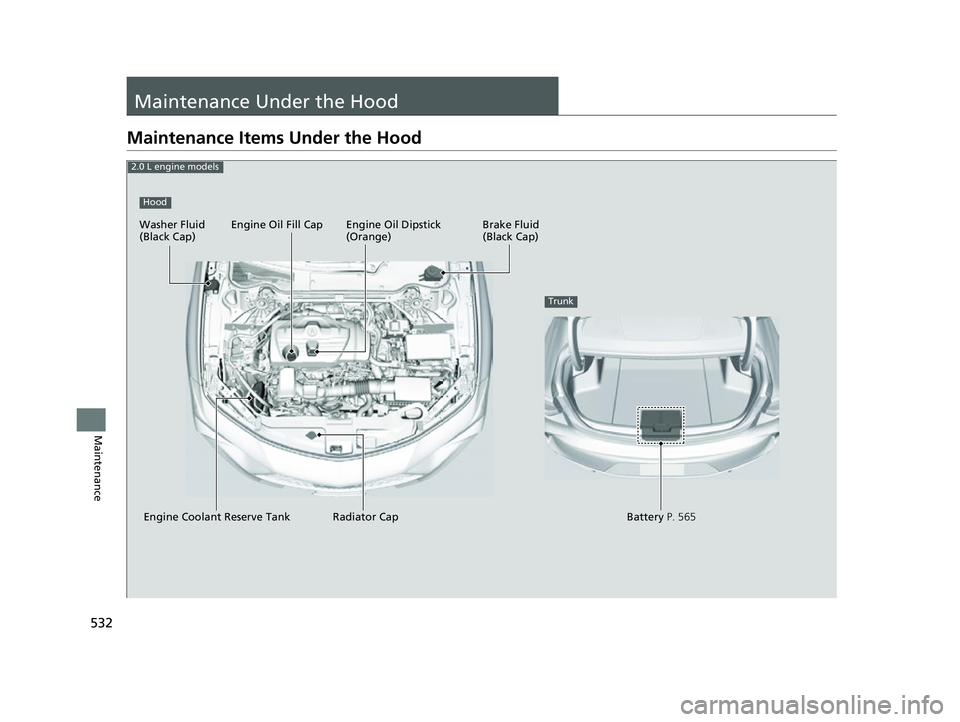
532
Maintenance
Maintenance Under the Hood
Maintenance Items Under the Hood
Brake Fluid
(Black Cap)
Washer Fluid
(Black Cap) Engine Oil Dipstick
(Orange)
Engine Oil Fill Cap
Engine Coolant Reserve Tank Radiator Cap
Battery P. 565
Trunk
Hood
2.0 L engine models
23 ACURA TLX-31TGV6200.book 532 ページ 2022年8月4日 木曜日 午後1時59分
Page 552 of 658

550
Maintenance
Replacing Light Bulbs
Headlights
Headlights are LED type. Have an authorized Acura dealer inspect and replace the
light assembly.
Fog Lights*
Fog lights are LED type. Have an authoriz ed Acura dealer inspect and replace the
light assembly.
Front Turn Signal, Parking/ChicaneTM Daytime
Running and Front Side Marker Lights
Front turn signal, parking/daytime running and front side marker lights are LED type.
Have an authorized Acura dealer in spect and replace the light assembly.
Side Turn Signal/Emergency Indicator Lights
Door mirror side turn lights are LED type. Have an authorized Acura dealer inspect
and replace the light assembly.
1 Headlights
The headlight aim is set by the factory, and does not
need to be adjusted. Howeve r, if you regularly carry
heavy items in the trunk, have the aiming readjusted
at a dealer or by a qualified technician.
* Not available on all models
23 ACURA TLX-31TGV6200.book 550 ページ 2022年8月4日 木曜日 午後1時59分
Page 567 of 658

Continued565
uuBattery uChecking the Battery
Maintenance
To access the battery terminals:
1. Pull up on the trunk floor lid strap until it is
completely open.
2. Remove the tool case.
2. Remove the tool case and spare tire.
2 Getting Ready to Replace the Flat Tire
P. 599
3. Remove the clips.
4. Flip the tab to unlock the cover.
5. Remove the battery cover.
1Battery
To remove the clip:
Insert a flat-tip screwdriver, lift and remove the center
pin to remove the clip.
To insert the clip:
Insert the clip with the center pin raised, and push
until it is flat.
Models with optional spare tire
Push until the pin
is flat.
Trunk Floor
Lid Strap
Models with temporary tire repair kit
Tool Case
Battery
Models with temporary tire repair kit
Models with optional spare tire
Tab
Battery Cover
BatteryClips
Models with optional spare tire
23 ACURA TLX-31TGV6200.book 565 ページ 2022年8月4日 木曜日 午後1時59分
Page 583 of 658

581
Handling the Unexpected
This chapter explains how to handle unexpected troubles.
Tools.................................................. 582
If a Tire Goes Flat
Temporarily Repairi ng a Flat Tire....... 583
Changing a Flat Tire ......................... 598
Engine Does Not Start
Checking the Engine ........................ 605
If the Keyless Remote Battery is Weak.. 606Emergency Engine Stop ................... 607
If the Battery Is Dead Jump Starting Procedure .................. 608
Overheating ...................................... 611
Indicator, Coming On/Blinking If the Engine Oil Pr essure Low Warning
Appears ......................................... 614 If the Charging System Indicator Comes
On ................................................. 615
If the Slow Down! Reduced Stopping Power Warning Appears ................ 615
If the Malfunction Indicator Lamp Comes
On or Blinks ..................................... 616
If the Brake System Indicator (Red) Comes On or Blinks ....................................... 617
If the Electric Power Steering (EPS) System Indicator Comes On ........................... 618
If the Brake System Indicator (Red) Comes On
or Blinks at the Same Time When the Brake
System Indicator (Amber) Comes On .. 619 If the Low Tire Pressure/TPMS Indicator
Comes On or Blinks ....................... 620
If the Transmission System Indicator Blinks along with the Warning Message ...... 621
Fuses .................................................. 622
Emergency Towing ........................... 629If You Cannot Unlock the Fuel Fill Door.. 630If You Cannot Open the Trunk ........ 631
Refueling
Refueling From a Portable Fuel Container ................................... 632
23 ACURA TLX-31TGV6200.book 581 ページ 2022年8月4日 木曜日 午後1時59分
Page 584 of 658

582
Handling the Unexpected
Tools
Types of Tools
1Types of Tools
The tools are stored in the trunk.Models with optional spare tire
Funnel
Models with temporary tire repair kit
Tool Case
Funnel
Wheel Nut Wrench/
Jack Handle
Jack Handle Bar
JackTool Case
Jack
23 ACURA TLX-31TGV6200.book 582 ページ 2022年8月4日 木曜日 午後1時59分