lights ACURA TLX 2023 Owners Manual
[x] Cancel search | Manufacturer: ACURA, Model Year: 2023, Model line: TLX, Model: ACURA TLX 2023Pages: 658, PDF Size: 21.27 MB
Page 9 of 658
7
Quick Reference Guide
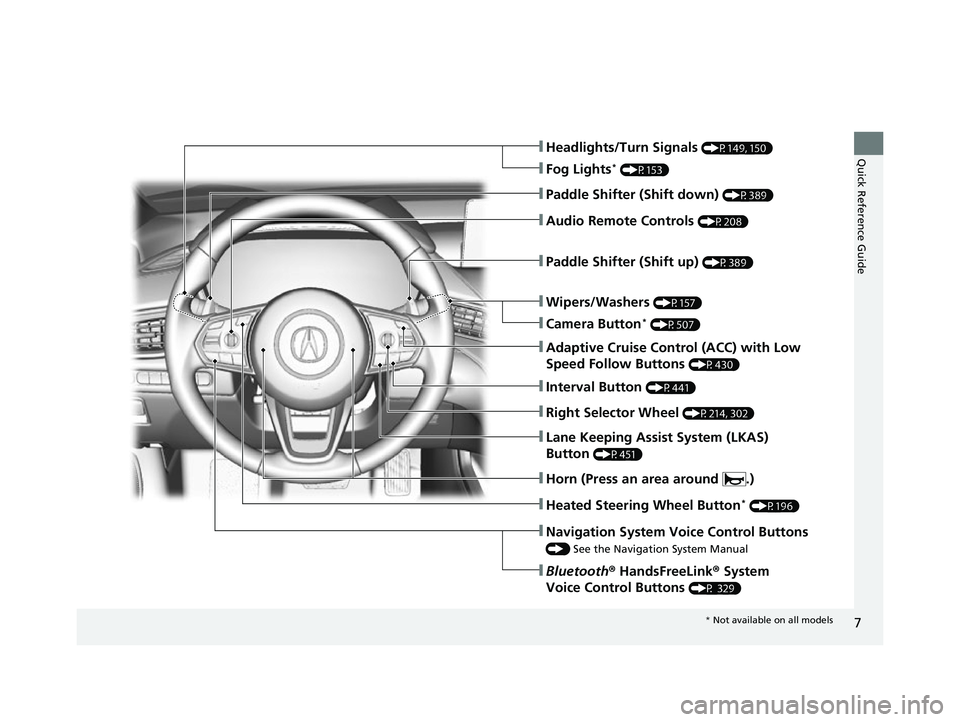
❚Wipers/Washers (P157)
❚Headlights/Turn Signals (P149, 150)
❚Paddle Shifter (Shift down) (P389)
❚Paddle Shifter (Shift up) (P389)
❚Navigation System Voice Control Buttons
() See the Navigation System Manual
❚Bluetooth ® HandsFreeLink ® System
Voice Control Buttons
(P 329)
❚Lane Keeping Assist System (LKAS)
Button
(P451)
❚Heated Steering Wheel Button* (P196)
❚Audio Remote Controls (P208)
❚Fog Lights* (P153)
❚Adaptive Cruise Control (ACC) with Low
Speed Follow Buttons
(P430)
❚Interval Button (P441)
❚Right Selector Wheel (P214, 302)
❚Horn (Press an area around .)
❚Camera Button* (P507)
* Not available on all models
23 ACURA TLX-31TGV6200.book 7 ページ 2022年8月4日 木曜日 午後1時59分
Page 11 of 658

9
Quick Reference Guide❚Map Lights (P181)
❚Side Curtain Airbags (P56)
❚Seat Belts (P36)
❚Front Seat (P168)
❚Moonroof Switch
(P145)
❚Map Lights (P181)
❚Sunglasses Holder
(P188)
❚Seat Belt (Installing a Child Seat) (P69)
❚Rear Seat (P178)
❚Rear Fuse Box (P626)
❚Seat Belt to Secure a Child Seat (P71)
❚LATCH to Secure a Child Seat (P66)
❚Accessory Power
Socket
(P189)
❚Sun Visors
❚Vanity Mirrors
❚Side Airbags (P54)
❚Grab Handle
❚Coat Hook (P186)
* Not available on all models
23 ACURA TLX-31TGV6200.book 9 ページ 2022年8月4日 木曜日 午後1時59分
Page 12 of 658
Visual Index
10
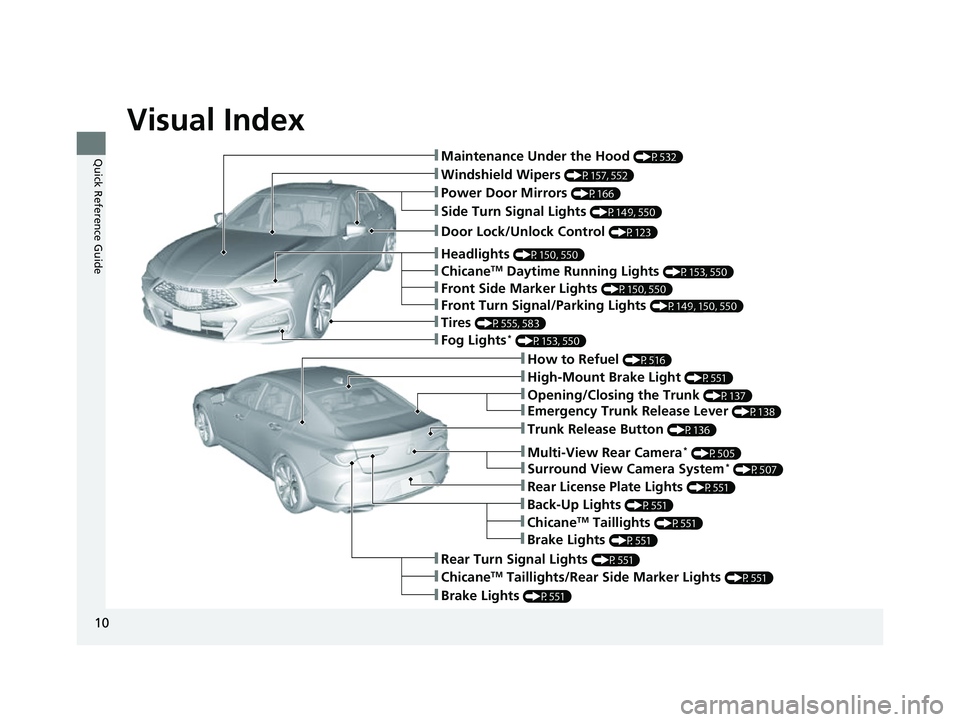
Quick Reference Guide❚Maintenance Under the Hood (P532)
❚Windshield Wipers (P157, 552)
❚Tires (P555, 583)
❚Door Lock/Unlock Control (P123)
❚Power Door Mirrors (P166)
❚Headlights (P150, 550)
❚How to Refuel (P516)
❚High-Mount Brake Light (P551)
❚Emergency Trunk Release Lever (P138)
❚Opening/Closing the Trunk (P137)
❚ChicaneTM Taillights/Rear Side Marker Lights (P551)
❚Brake Lights (P551)
❚Rear Turn Signal Lights (P551)
❚Back-Up Lights (P551)
❚Rear License Plate Lights (P551)
❚Fog Lights* (P153, 550)
❚Trunk Release Button (P136)
❚Front Turn Signal/Parking Lights (P149, 150, 550)
❚Side Turn Signal Lights (P149, 550)
❚ChicaneTM Daytime Running Lights (P153, 550)
❚Front Side Marker Lights (P150, 550)
❚ChicaneTM Taillights (P551)
❚Brake Lights (P551)
❚Multi-View Rear Camera* (P505)
❚Surround View Camera System* (P507)
23 ACURA TLX-31TGV6200.book 10 ページ 2022年8月4日 木曜日 午後1時59分
Page 16 of 658

14
Quick Reference Guide
Controls (P 117)
Clock (P118)
The clock is automatically updated through
the audio system.ENGINE START/STOP
Button
(P146)
Press the button to change the vehicle’s
power mode.
Turn Signals (P149)
Lights (P150)
Turn Signal Control Lever
Right
Left
Light Control Switches
Low Beam High Beam
Flashing
23 ACURA TLX-31TGV6200.book 14 ページ 2022年8月4日 木曜日 午後1時59分
Page 27 of 658
25
Quick Reference Guide
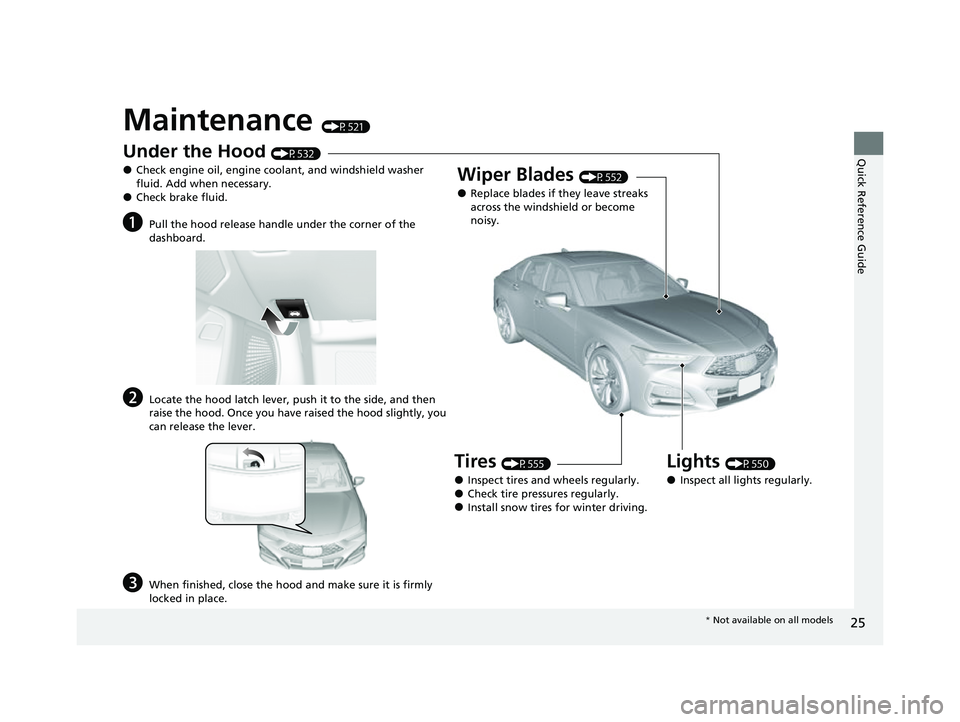
Maintenance (P521)
Under the Hood (P532)
●Check engine oil, engine coolant, and windshield washer
fluid. Add when necessary.
●Check brake fluid.
aPull the hood release handle under the corner of the
dashboard.
bLocate the hood latch lever, push it to the side, and then
raise the hood. Once you have raised the hood slightly, you
can release the lever.
cWhen finished, close the hood and make sure it is firmly
locked in place.
Lights (P550)
●Inspect all lights regularly.
Wiper Blades (P552)
●Replace blades if they leave streaks
across the windshield or become
noisy.
Tires (P555)
●Inspect tires and wheels regularly.●Check tire pressures regularly.●Install snow tires for winter driving.
* Not available on all models
23 ACURA TLX-31TGV6200.book 25 ページ 2022年8月4日 木曜日 午後1時59分
Page 29 of 658
27
Quick Reference Guide
What to Do If
Why does the brake pedal
pulsate slightly when
applying the brakes?This can occur when the ABS activates and does not indicate a
problem. Apply firm, steady pressure on the brake pedal. Never
pump the brake pedal.
2Anti-lock Brake System (ABS) (P492)
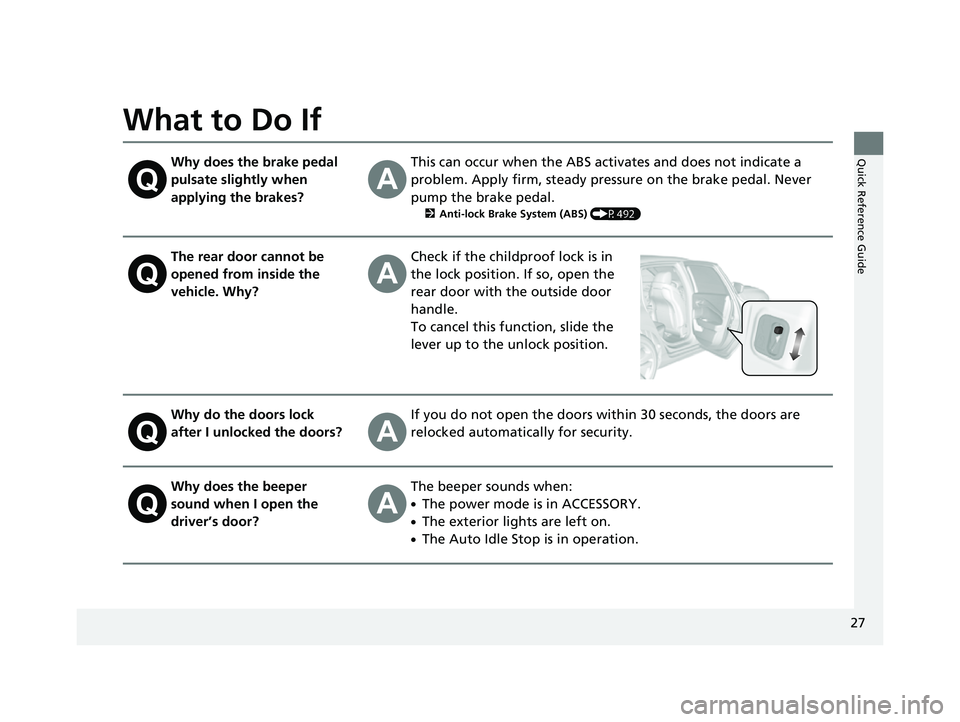
The rear door cannot be
opened from inside the
vehicle. Why?Check if the childproof lock is in
the lock position. If so, open the
rear door with the outside door
handle.
To cancel this function, slide the
lever up to the unlock position.
Why do the doors lock
after I unlocked the doors?If you do not open the doors within 30 seconds, the doors are
relocked automatically for security.
Why does the beeper
sound when I open the
driver’s door?The beeper sounds when:
●The power mode is in ACCESSORY.
●The exterior lights are left on.
●The Auto Idle Stop is in operation.
23 ACURA TLX-31TGV6200.book 27 ページ 2022年8月4日 木曜日 午後1時59分
Page 81 of 658

79
uuIndicators u
Continued
Instrument Panel
M (sequential mode)
Indicator/Gear
Selection Indicator P. 83
Parking Brake and
Brake System
Indicator (Red)
Parking Brake and
Brake System
Indicator (Amber)
U.S.
Canada
U.S.
Canada Automatic Brake
Hold System Indicator
Automatic Brake Hold
IndicatorU.S.
Canada
*1 : When you set the power mode to ON, these indicators come on to indicate that system checks are being perf ormed. They go off a few seconds later or after the engine
has started. If an indicator does not come on or turn off, th ere may be a malfunction in the corresponding system. To resolve the issue, follow the instructions in the
owner's manual.
P. 80*1
Malfunction Indicator
Lamp
Charging System
Indicator
Anti-lock Brake System
(ABS ) Indicator
Seat Belt Reminder
Indicator
Low Fuel Indicator
(Amber)
Vehicle Stability AssistTM
(VSA®) System Indicator
Vehicle Stability Assist
TM
(VSA®) OFF Indicator
Supplemental Restraint
System Indicator
Auto High-Beam
Indicator
Low Tire Pressure/TPMS
Indicator Electric Power Steering
(EPS) System Indicator
Turn Signal and Hazard
Warning Indicators
Lights On Indicator
Maintenance Minder
Indicator
System Message Indicator
Super Handling-All Wheel
DriveTM (SH-AWD
®)
System Indicator*
Adaptive Cruise Control
(ACC) with Low Speed
Follow Indicator (Amber)
Lane Keeping Assist System
(LKAS) Indicator (Amber)
Safety Support Indicator
(Green/Gray)
P. 82
P. 82
P. 82
P. 83
P. 83*1 *1
P. 89
*1
*1
Shift Position Indicator P. 83
Transmission System
Indicator P. 84
Auto Idle Stop System
Indicator (Amber)
P. 85
P. 87
P. 87
P. 88
P. 88
P. 90
P. 89
*1
*1
*1
P. 89
*1 P. 88
P. 93
*1
P. 90
P. 92
P. 90
Immobilizer System
Indicator P. 91
Security System Alarm
Indicator P. 91
P. 92
P. 92
P. 93
P. 96
*1
Adaptive Cruise Control
(ACC) with Low Speed
Follow Indicator (White/
Green) P. 93
*1
Lane Keeping Assist
System (LKAS) Indicator
(White/Green) P. 93
*1 *1
*1 *1
Safety Support Indicator
(Amber)
P. 95
*1
Cruise Mode Indicator
(White/Green) P. 94
Auto Idle Stop OFF
Indicator P. 85
Auto Idle Stop Suspend
Indicator P. 86
*1
*1
Auto Idle Stop Indicator
(Green)
P. 85
*1
*1
High Beam Indicator P. 90
Fog Light Indicator* P. 90
* Not available on all models
23 ACURA TLX-31TGV6200.book 79 ページ 2022年8月4日 木曜日 午後1時59分
Page 92 of 658

90
uuIndicators u
Instrument Panel
IndicatorNameOn/BlinkingExplanation
Turn Signal and
Hazard Warning
Indicators•Blinks when you oper ate the turn signal
lever.
• Blinks along with all turn signals when you
press the hazard warning button.• Does not blink or blinks rapidly - Have your
vehicle checked by a dealer.
Lights On
Indicator• Comes on when the parking, tail, and other
external lights are on.2 Light Switches P. 150
High Beam
Indicator•Comes on when the high beam headlights
are on.—
Auto High-Beam
Indicator• Comes on when all the operating conditions
of the auto high-beam are met.2 Auto High-Beam P. 154
Fog Light
Indicator*
•Comes on when the fog lights are on.2 Fog Lights* P. 153
* Not available on all models
23 ACURA TLX-31TGV6200.book 90 ページ 2022年8月4日 木曜日 午後1時59分
Page 95 of 658
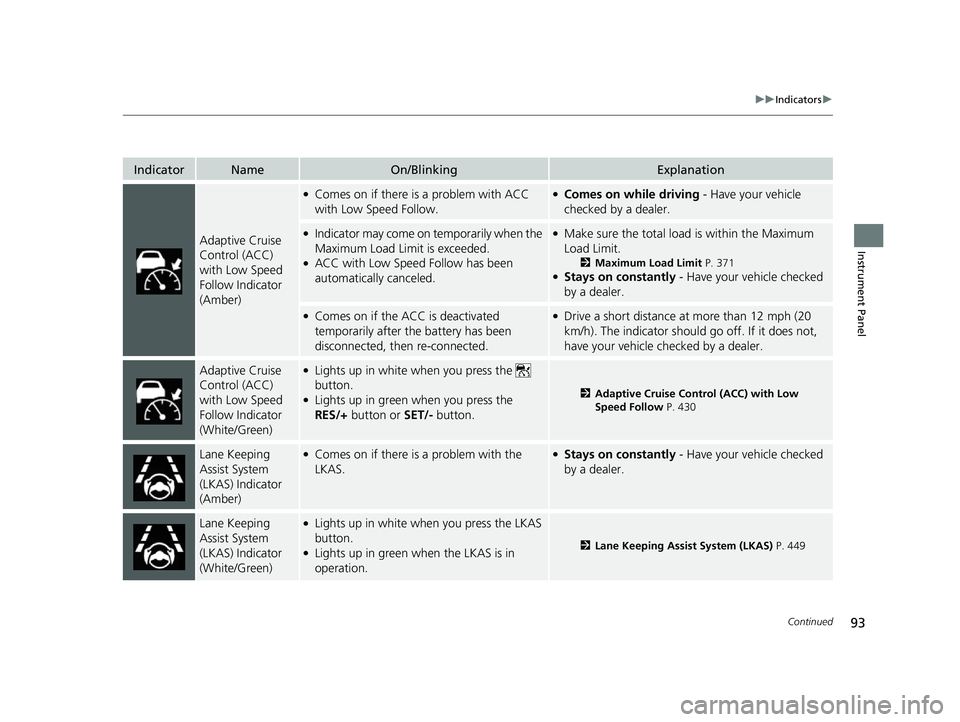
93
uuIndicators u
Continued
Instrument Panel
IndicatorNameOn/BlinkingExplanation
Adaptive Cruise
Control (ACC)
with Low Speed
Follow Indicator
(Amber)
●Comes on if there is a problem with ACC
with Low Speed Follow.●Comes on while driving - Have your vehicle
checked by a dealer.
●Indicator may come on temporarily when the
Maximum Load Limit is exceeded.
●ACC with Low Speed Follow has been
automatically canceled.
●Make sure the total load is within the Maximum
Load Limit.
2 Maximum Load Limit P. 371●Stays on constantly - Have your vehicle checked
by a dealer.
●Comes on if the ACC is deactivated
temporarily after the battery has been
disconnected, then re-connected.●Drive a short distance at more than 12 mph (20
km/h). The indicator should go off. If it does not,
have your vehicle checked by a dealer.
Adaptive Cruise
Control (ACC)
with Low Speed
Follow Indicator
(White/Green)●Lights up in white when you press the
button.
●Lights up in green when you press the
RES/+ button or SET/- button.2Adaptive Cruise Control (ACC) with Low
Speed Follow P. 430
Lane Keeping
Assist System
(LKAS) Indicator
(Amber)●Comes on if there is a problem with the
LKAS.●Stays on constantly - Have your vehicle checked
by a dealer.
Lane Keeping
Assist System
(LKAS) Indicator
(White/Green)●Lights up in white when you press the LKAS
button.
●Lights up in green when the LKAS is in
operation.2 Lane Keeping Assist System (LKAS) P. 449
23 ACURA TLX-31TGV6200.book 93 ページ 2022年8月4日 木曜日 午後1時59分
Page 96 of 658

94
uuIndicators u
Instrument Panel
IndicatorNameOn/BlinkingExplanation
Cruise Mode
Indicator (White/
Green)●Lights up in white when you change to
cruise mode.
●Lights up in green when you have set a
speed for cruise control.
2 To Switch ACC with Low Speed Follow to
Cruise Control P. 445
Safety Support
Indicator (Amber)
●Comes on if there is a problem with the
Road Departure Mitigation system, CMBSTM,
or blind spot information system*.
●Stays on constantly - Have your vehicle checked
by a dealer.
●Indicator may come on temporarily when the
Maximum Load Limi t is exceeded.●Make sure the total load is within the Maximum
Load Limit.
2 Maximum Load Limit P. 371●Stays on constantly - Have your vehicle checked
by a dealer.
●Comes on if the Road Departure Mitigation
system and CMBSTM are deactivated
temporarily after the battery has been
disconnected and then re-connected.
●Drive a short distance at more than 12 mph (20
km/h). The indicator should go off. If it does not,
have your vehicle checked by a dealer.
* Not available on all models
23 ACURA TLX-31TGV6200.book 94 ページ 2022年8月4日 木曜日 午後1時59分