oil pressure ACURA TLX 2023 Owners Manual
[x] Cancel search | Manufacturer: ACURA, Model Year: 2023, Model line: TLX, Model: ACURA TLX 2023Pages: 658, PDF Size: 21.27 MB
Page 27 of 658
25
Quick Reference Guide
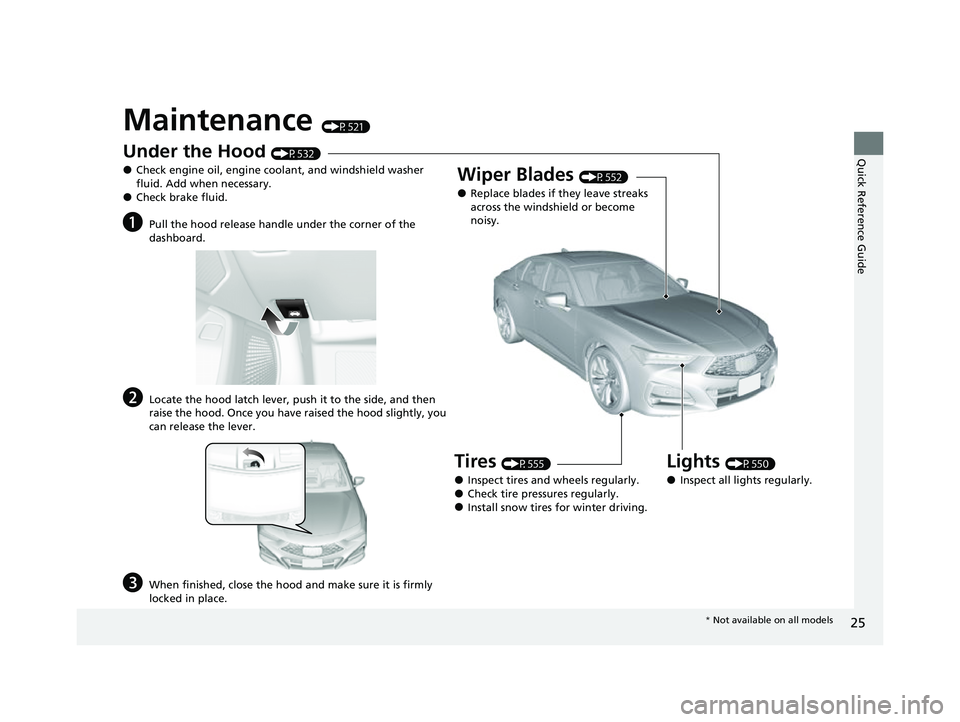
Maintenance (P521)
Under the Hood (P532)
●Check engine oil, engine coolant, and windshield washer
fluid. Add when necessary.
●Check brake fluid.
aPull the hood release handle under the corner of the
dashboard.
bLocate the hood latch lever, push it to the side, and then
raise the hood. Once you have raised the hood slightly, you
can release the lever.
cWhen finished, close the hood and make sure it is firmly
locked in place.
Lights (P550)
●Inspect all lights regularly.
Wiper Blades (P552)
●Replace blades if they leave streaks
across the windshield or become
noisy.
Tires (P555)
●Inspect tires and wheels regularly.●Check tire pressures regularly.●Install snow tires for winter driving.
* Not available on all models
23 ACURA TLX-31TGV6200.book 25 ページ 2022年8月4日 木曜日 午後1時59分
Page 100 of 658

98
uuGauges and Displays uMulti-Information Display
Instrument Panel
Multi-Information Display
The multi-information display shows inform ation such as the estimated travelable
distance and fuel economy of the vehicle. It also displays messages such as warnings
and other helpful information.
When a warning message displays, please check the message and contact a dealer
to have the vehicle inspected if necessary . Please refer to the pages below if the
Engine Oil Pressure Low , Engine Temperature Too Hot or Slow Down!
Reduced Stopping Power message is displayed.
2If the Engine Oil Pressure Low Warning Appears P. 614
2 Overheating P. 611
2 If the Slow Down! Reduced Stopping Power Warning Appears P. 615
Shows the total number of miles or kilometers that your vehicle has accumulated.
■Sub Display
■Odometer
OdometerOutside Temperature
Compass
*
Dynamic Mode
* Not available on all models
23 ACURA TLX-31TGV6200.book 98 ページ 2022年8月4日 木曜日 午後1時59分
Page 106 of 658

uuGauges and Displays uMulti-Information Display
104
Instrument Panel
You can check if there are any active warning messages.
Shows the remaining oil life and Maintenance Minder
TM.
2 Maintenance MinderTM P. 525
Shows each tire’s pressure.
2Tire Pressure Monitoring System (TPMS) with Tire Fill Assist P. 408
Enables you to show another unit on the
multi-information display, head-up display*
and audio/information screen and set the
displayed measurements to read in either
miles and mph or km and km/h.
Press the right selector wheel when you select
the Speed/Distance Units on the multi-
information display. Roll the right selector
wheel to select the unit and press it. After this,
a confirmation screen will appear for a few
seconds.
■Warning
■Maintenance
■Tire Pressure Monitor
■Speed/Distance Units
1 Warning
If there are multiple warnings, you can move the right
selector wheel to the right or left to see other
warnings.
1 Tire Pressure Monitor
The following colors indicate the state of tire
pressure:
•Green: Within tire pressure regulation.
•Amber: Above or Below ti re pressure regulation.•White: There is a problem with the system.
* Not available on all models
23 ACURA TLX-31TGV6200.book 104 ページ 2022年8月4日 木曜日 午後1時59分
Page 368 of 658

366
uuAcuraLink ®u
Features
■Vehicle Status
Get door and lock status as we ll as mileage, fuel, oil life, and tire pressure readings
on your phone.
■Emergency Call
A live agent will stay on the call with you an d request that help be sent in the event
of an emergency.
■Security Alarm Alert
Receive alerts if vehicle se curity alarm is triggered.
■Destination by Voice
Talk to a live assistant who will search and send turn by turn directions to your
vehicle’s navigation system
*. Requires In-vehicle Navigation System*.
■Last Mile
Receive walking directions to your final destination right when you get out of your
Acura. Requires In-vehicle Navigation System
*.
■Geofence Alert
Receive a notification anytime your vehicl e enters or leaves a region set by you.
■Speed Alert
Receive a notification when your vehicl e has exceeded a speed limit set by you.
* Not available on all models
23 ACURA TLX-31TGV6200.book 366 ページ 2022年8月4日 木曜日 午後1時59分
Page 379 of 658

Continued377
uuWhen Driving uStarting the Engine
Driving
■To stop the engine
Press and hold the button
for one second.
Go within the range,
and try again.
Amber LED: Blinks when any
button is pressed. Red LED:
●Comes on for one second to let you
know that the engine has stopped.
●Blinks when the remote is out of
the keyless access system range.
The engine will not stop.
1
Remote Engine Start*
•You have already used the remote twice to start
the engine.
•Another registered keyless remote is in the vehicle.•There is any antenna failure.
•The door is unlocked with the built-in key.
•The engine oil pressure is low.•The engine coolant temper ature is extremely high.
•The security system alarm is not set.
•The keyless remote is left in the vehicle when you
get out.
Before starting the engine, make sure to check the
door lock status using the remote. When you press
the button, wait for the green LED to blink. If
the red LED turns on, the doors and trunk did not
lock, and the engine does not start.
While the engine is running, the vehicle will
automatically preconditi on inside the vehicle.
When it is warm outside:
•The climate control system is activated.•The seat ventilation is activated*.
When it is cold outside:
•The defroster is activated at a moderately warm
temperature.
•The rear defogger and door mirror heaters are
activated.
•The seat heaters and heated steering wheel are
activated*.
2 Heated Steering Wheel* P. 196
2 Front Seat Heaters/Ventilators* P. 194
* Not available on all models
23 ACURA TLX-31TGV6200.book 377 ページ 2022年8月4日 木曜日 午後1時59分
Page 520 of 658

518
Driving
Fuel Economy and CO2 Emissions
Improving Fuel Economy and Reducing CO2
Emissions
Achieving fuel economy and reducing CO2 emissions is dependent on several
factors, including driving conditions, load weight, idling time, driving habits, and
vehicle condition. Depending on these and other factors, you may not achieve the
rated fuel economy of this vehicle.
You can optimize your fuel economy with proper maintenance of your vehicle.
Always maintain your vehicle in accordance with the messages displayed on the
multi-information display.
• Use engine oil with the viscosity recommended.
2 Recommended Engine Oil P. 536
•Maintain the specified tire pressure.
• Do not load the vehicl e with excess cargo.
• Keep your vehicle clean. A buildup of snow or mud on your vehicle’s underside
adds weight and increases wind resistance.
■Maintenance and Fuel Economy
1Improving Fuel Economy and Reducing CO2 Emissions
Direct calculation is the recommended method to
determine actual fuel consumed while driving.
In Canada, posted fuel economy numbers are
established following a simulated test. For more
information on how this test is performed, please visit
https://www.nrcan.gc.ca and search for “fuel
consumption testing” in the se arch field at the top of
the page.
Miles driven Gallons of
fuel Miles per
Gallon
100 L per 100 km
Liters of
fuel Kilometers
driven
23 ACURA TLX-31TGV6200.book 518 ページ 2022年8月4日 木曜日 午後1時59分
Page 521 of 658

519
Driving
Turbo Engine Vehicle
Handling Precautions
The turbocharger is a high-precision device to obtain greater horsepower by
delivering a large volume of compressed air in to the engine using a turbine driven by
the engine’s exhaust gas pressure.
• When the engine is cold just after sta rting, avoid revving the engine or sudden
acceleration.
• Always replace the engine oil and engine oil filter according to the Maintenance
Minder. The turbine rotates at very high speeds over 100,000 rpm and its
temperature reaches over 1,292°F (700°C). It is lubricated and cooled by engine
oil. If you fail to replace the engine oil and filter at the scheduled distance or
interval, deteriorated engine oil may cause failure such as st icking and abnormal
noise of the turbine bearing.1 Turbo Engine Vehicle
The scheduled maintenance intervals for replacing
the filter is indicated on the multi-information
display. Follow the information of when to replace
them. 2 Maintenance Minder
TM P. 525
The temperature gauge pointer is at the mark
when you restart the engi ne after driving under high
load conditions such as at high speed or in hilly
terrain. This is normal. The gauge goes down after
you idle or drive the vehi cle for about one minute.
H
23 ACURA TLX-31TGV6200.book 519 ページ 2022年8月4日 木曜日 午後1時59分
Page 524 of 658
522
Maintenance
Before Performing Maintenance
Inspection and Maintenance
For your safety, perform all listed inspections and maintenance to keep your vehicle
in good condition. If you become aware of an y abnormality (noise, smell, insufficient
brake fluid, oil residue on the ground, etc.), have your vehicle inspected by a dealer.
(Note, however, that service at a dealer is not mandatory to keep your warranties in
effect.) Refer to the separate maintena nce booklet for detailed maintenance and
inspection information.
■Routine inspections
Perform inspections before long distance trips, when washing the vehicle, or when
refueling.
2 Maintenance P. 25
■Periodic inspections
• Check the brake fluid level monthly.
2 Brake Fluid P. 549
•Check the tire pressure monthly. Examin e the tread for wear and foreign objects.
2Checking and Maintaining Tires P. 555
•Check the operation of the exterior lights monthly.
2 Replacing Light Bulbs P. 550
•Check the condition of the wiper bl ades at least every six months.
2Checking and Maintaining Wiper Blades P. 552
■Types of Inspection and Maintenance
1Inspection and Maintenance
Maintenance, replacement, or repair of
emissions control devices and systems may be
done by any automotive repair establishment or
individuals using parts that are “certified” to
EPA standards.
According to state and fede ral regulations, failure to
perform maintenance on the maintenance main
items marked with # will not void your emissions
warranties. However, all ma intenance services should
be performed in accordan ce with the intervals
indicated by the mult i-information display.
2 Maintenance Service Items P. 528
If you want to perform complex maintenance tasks
that require more skills a nd tools, you can purchase a
subscription to the Service Express website at
www.techinfo.acura.com .
2 Authorized Manuals P. 645
If you want to perform ma intenance yourself, make
sure that you have the necessary tools and skills first.
After performing maintenanc e, update the records in
the separate maintenance booklet.
U.S. models
23 ACURA TLX-31TGV6200.book 522 ページ 2022年8月4日 木曜日 午後1時59分
Page 542 of 658

540
uuMaintenance Under the Hood uChanging the Engine Oil and Oil Filter
Maintenance
Changing the Engine Oil and Oil Filter
You must change the engine oil and oil filter regularly in order to maintain the
engine’s lubrication. The engine may be damaged if they are not changed regularly.
Change the oil and filter in accordance with the maintenance message on the multi-
information display. 1.Run the engine until it reaches normal
operating temperature, and then turn the
engine off.
2. Open the hood and remove the engine oil
fill cap.
3. Remove the screws and bolt(s) on the
undercarriage by turning
counterclockwise and remove the under
cover.1Changing the Engine Oil and Oil Filter
NOTICE
You may damage the environment if you do not
dispose of the oil in a suitable way. If you are
changing the oil by yourself , appropriately dispose of
the used oil. Put the oil in a sealed container and take
it to a recycling center. Do not throw the oil away
into a garbage can or onto the ground.
You will need a special wrench to replace the oil
filter. You can buy this wrench from a dealerM
When installing the new oil filter, follow the
instructions supplied with the oil filter.
Reinstall the engine oil fill cap. Start the engine. If the
low oil pressure warning appears, turn off the
engine, and check your work.
Under Cover
Screws
Screws
Bolts
2.0 L engine models
3.0 L engine models
ScrewsBolt
ScrewsUnder Cover
23 ACURA TLX-31TGV6200.book 540 ページ 2022年8月4日 木曜日 午後1時59分
Page 583 of 658

581
Handling the Unexpected
This chapter explains how to handle unexpected troubles.
Tools.................................................. 582
If a Tire Goes Flat
Temporarily Repairi ng a Flat Tire....... 583
Changing a Flat Tire ......................... 598
Engine Does Not Start
Checking the Engine ........................ 605
If the Keyless Remote Battery is Weak.. 606Emergency Engine Stop ................... 607
If the Battery Is Dead Jump Starting Procedure .................. 608
Overheating ...................................... 611
Indicator, Coming On/Blinking If the Engine Oil Pr essure Low Warning
Appears ......................................... 614 If the Charging System Indicator Comes
On ................................................. 615
If the Slow Down! Reduced Stopping Power Warning Appears ................ 615
If the Malfunction Indicator Lamp Comes
On or Blinks ..................................... 616
If the Brake System Indicator (Red) Comes On or Blinks ....................................... 617
If the Electric Power Steering (EPS) System Indicator Comes On ........................... 618
If the Brake System Indicator (Red) Comes On
or Blinks at the Same Time When the Brake
System Indicator (Amber) Comes On .. 619 If the Low Tire Pressure/TPMS Indicator
Comes On or Blinks ....................... 620
If the Transmission System Indicator Blinks along with the Warning Message ...... 621
Fuses .................................................. 622
Emergency Towing ........................... 629If You Cannot Unlock the Fuel Fill Door.. 630If You Cannot Open the Trunk ........ 631
Refueling
Refueling From a Portable Fuel Container ................................... 632
23 ACURA TLX-31TGV6200.book 581 ページ 2022年8月4日 木曜日 午後1時59分