stop start Acura TSX 2014 User Guide
[x] Cancel search | Manufacturer: ACURA, Model Year: 2014, Model line: TSX, Model: Acura TSX 2014Pages: 329, PDF Size: 15.95 MB
Page 203 of 329

202
uu When Driving u Shifting
The manual transmission has a lockout mech anism that stops you from accidentally
shifting into
(R
from a forward gear while the vehi cle is moving at a certain speed.
If you cannot shift to
(R
when the vehicle is stopped, do the following:
1.Depress the clutch pedal, move the shift
lever all the way to the left, and shift to
(R
.
2. If you still cannot shift into
(R
, apply the
parking brake, and turn the ignition switch
to ACCESSORY
(q
or LOCK (0
.
3. Depress the clutch pedal and shift into
(R
.
4. Keep depressing the clutch pedal and start
the engine.
Have the vehicle checked by a dealer if you
have to go through this procedure repeatedly.
■Reverse Lockout
14 ACURA TSX 4D-31TL16500.book 202 ページ 2013年6月17日 月曜日 午前9時40分
QRG
Index
DrivingTOC
Page 208 of 329

207
uu When Driving u Vehicle Stability Assist (VSA ®), aka Electronic Stability Control (ESC), System
This button is on the driver side control panel.
To turn the VSA® system on and off, press and
hold it until you hear a beep.
VSA ® stops and the indicator comes on.
To turn it on again, press the (VSA® OFF )
button until you hear a beep.
VSA ® is turned on every time you start the
engine, even if you turned it off the last time
you drove the vehicle.
■VSA ® On and Off1 Vehicle Stability Assist (VSA ®), aka Electronic Stability Control
(ESC), System
Without VSA ®, your vehicle will have normal braking
and cornering ability, bu t it will not have VSA®
traction and stability enhancement.
In certain unusual conditions when your vehicle gets
stuck in shallow mud or fr esh snow, it may be easier
to free it with the VSA ® temporarily switched off.
When the VSA ® system is off, the traction control
system is also off. You should only atte mpt to free
your vehicle with VSA ® off if you are not able to free
it when the system is on.
Immediately after freeing your vehicle, be sure to
switch VSA ® on again. We do not recommend driving
your vehicle with the VSA ® and traction control
systems switched off.
If the low tire pressure/TPMS indicator comes on or
blinks, the VSA® system turns on automatically. In
this case, you cannot turn the system off by pressing
the button.
You may hear a motor sound coming from the
engine compartment while system checks are being
performed immediately after starting the engine or
while driving. This is normal.
VSA ® OFF
Indicator
14 ACURA TSX 4D-31TL16500.book 207 ページ 2013年6月17日 月曜日 午前9時40分
QRG
Index
DrivingTOC
Page 215 of 329

214
uu Braking u Anti-lock Brake System (ABS)
Anti-lock Brake System (ABS)
Helps prevent the wheels from locking up, an d helps you retain steering control by
pumping the brakes rapidly, much faster than you.
The electronic brake distribution (EBD) system, which is part of the ABS, also
balances the front-to-rear braking distri bution according to vehicle loading.
You should never pump the brake pedal. Let the ABS work for you by always
keeping firm, steady pressure on the brake pe dal. This is sometimes referred to as
“stomp and steer.”
■ABS operation
The brake pedal may pulsate slightly when the ABS is working. Keep holding the
pedal firmly down. On dry pavement, you will need to press on the brake pedal very
hard before the ABS activates. However, you may feel the ABS activate immediately
if you are trying to stop on snow or ice.
When the vehicle speed goes under 6 mph (10 km/h), the ABS stops.
■ABS1 Anti-lock Brake System (ABS)
NOTICE
The ABS may not function correctly if you use an
incorrect tire type and size.
When the ABS indicator comes on while driving,
there may be a problem with the system.
While normal braking is not affected, there is a
possibility of the ABS not operating. Have the vehicle
checked by a dealer immediately.
The ABS does not reduce the ti me or distance it takes
to stop the vehicle. It only helps with steering control
during hard braking.
In the following cases, yo ur vehicle may need more
stopping distance than a vehicle without the ABS:
•When driving on rough road surfaces, including
when driving on uneven surf aces, such as gravel or
snow.
•When tire chains are installed.
You may hear a motor sound coming from the
engine compartment while system checks are being
performed immediately after starting the engine or
while driving. This is normal.
14 ACURA TSX 4D-31TL16500.book 214 ページ 2013年6月17日 月曜日 午前9時40分
QRG
Index
DrivingTOC
Page 242 of 329
241
uu Maintenance Under the Hood u Changing the Engine Oil and Oil Filter
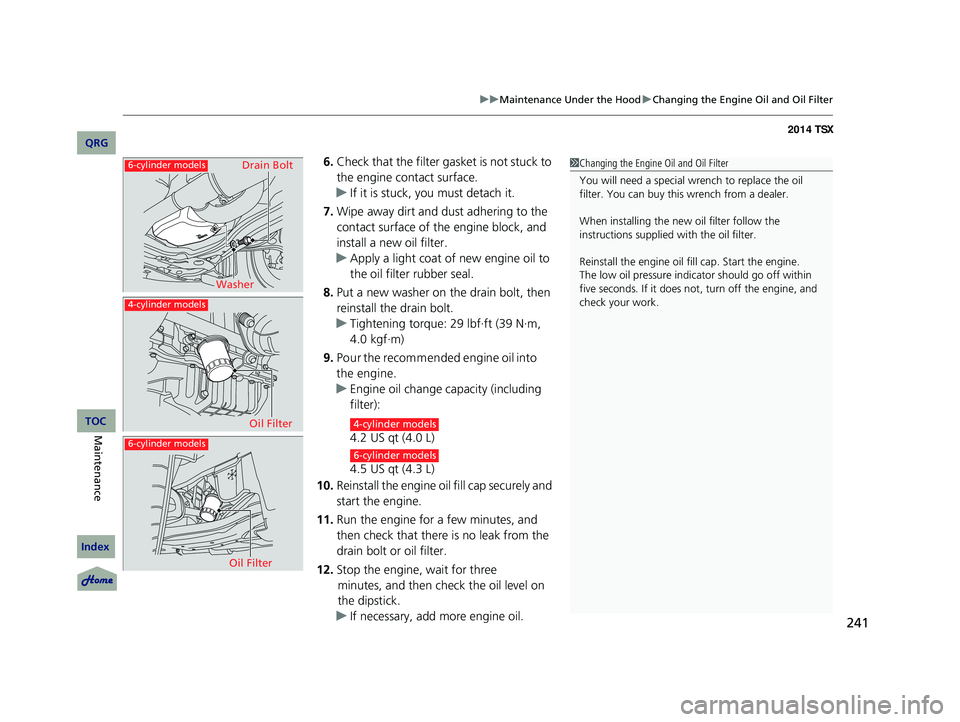
6. Check that the filter gasket is not stuck to
the engine contact surface.
u If it is stuck, you must detach it.
7. Wipe away dirt and dust adhering to the
contact surface of the engine block, and
install a new oil filter.
u Apply a light coat of new engine oil to
the oil filter rubber seal.
8. Put a new washer on the drain bolt, then
reinstall the drain bolt.
u Tightening torque: 29 lbf∙ft (39 N∙m,
4.0 kgf∙m)
9. Pour the recommended engine oil into
the engine.
u Engine oil change capacity (including
filter):
4.2 US qt (4.0 L)
4.5 US qt (4.3 L)
10. Reinstall the engine oil fill cap securely and
start the engine.
11. Run the engine for a few minutes, and
then check that there is no leak from the
drain bolt or oil filter.
12. Stop the engine, wait for three
minutes, and then check the oil level on
the dipstick.
u If necessary, add more engine oil.
1Changing the Engine Oil and Oil Filter
You will need a special wrench to replace the oil
filter. You can buy this wrench from a dealer.
When installing the new oil filter follow the
instructions supplied with the oil filter.
Reinstall the engine oil f ill cap. Start the engine.
The low oil pressure indi cator should go off within
five seconds. If it does not , turn off the engine, and
check your work.
6-cylinder models
6-cylinder models
4-cylinder models
Washer Drain Bolt
Oil Filter
Oil Filter4-cylinder models
6-cylinder models
14 ACURA TSX 4D-31TL16500.book 241 ページ 2013年6月17日 月曜日 午前9時40分
QRG
Index
MaintenanceTOC
Page 294 of 329

293
uu Overheating u How to Handle Overheating
■Next thing to do
1.Check that the cooling fan is operating and
stop the engine once the temperature
gauge needle comes down.
u If the cooling fan is not operating,
immediately stop the engine.
2. Once the engine has cooled down, inspect
the coolant level and check the cooling
system components for leaks.
u If the coolant level in the reserve tank is
low, add coolant until it reaches the
MAX mark.
u If there is no coolant in the reserve tank,
check that the radiator is cool. Cover the
radiator cap with a heavy cloth and open
the cap. If necessary, add coolant up to
the base of the filler neck, and put the
cap back on.
■Last thing to do
Once the engine has cooled sufficiently, restart it and check the temperature gauge.
If the temperature gauge needle has gone dow n, resume driving. If it has not gone
down, contact a dealer for repairs.
1 How to Handle Overheating
If the coolant is leaking, contact a dealer for repairs.
Use water as an emergency/temporary measure only.
Have a dealer flush the system with proper antifreeze
as soon as possible.
3 WARNING
Removing the radiator cap while the
engine is hot can cause the coolant to spray
out, seriously scalding you.
Always let the engine and radiator cool
down before removing the radiator cap.
MAXReserve Tank
MIN
14 ACURA TSX 4D-31TL16500.book 293 ページ 2013年6月17日 月曜日 午前9時40分
QRG
Index
Handling the Unexpected
TOC
Page 295 of 329

294
Indicator, Coming On/Blinking
If the Low Oil Pressure Indicator Comes On
■Reasons for the indicator to come on
Comes on when the engine oil pressure is low.
■What to do as soon as the indicator comes on
1. Immediately park the vehicle on level ground in a safe place.
2. If necessary, turn the ha zard warning lights on.
■What to do after parking the vehicle
1. Stop the engine and let it sit for about three minutes.
2. Open the hood and check the oil level.
2 Oil Check P. 237
3. Start the engine and check the low oil pressure indicator.
u The light goes out: Start driving again.
u The light does not go out within 10 seconds: Stop the engine and
contact a dealer for repairs immediately.
If the Charging System Indicator Comes On
■Reasons for the indicator to come on
Comes on when the battery is not being charged.
■What to do when the indicator comes on
Turn off the climate con trol system, rear defogger, and other electrical
systems, and immediately contact a dealer for repairs.
1 If the Low Oil Pressure Indicator Comes On
NOTICE
Running the engine with low oil pressure can cause
serious mechanical damage almost immediately.
1If the Charging System Indicator Comes On
If you need to stop temporarily, do not turn off the
engine. Restarting the engi ne may rapidly discharge
the battery.
14 ACURA TSX 4D-31TL16500.book 294 ページ 2013年6月17日 月曜日 午前9時40分
QRG
Index
Handling the Unexpected
TOC
Page 296 of 329

295
uu Indicator, Coming On/Blinking u If the Malfunction Indicator Lamp Comes On or Blinks
If the Malfunction Indicator
Lamp Comes On or Blinks
■Reasons for the indicator la mp to come on or blink
• Comes on when there is a problem with the engine emissions control
system, or the fuel fill cap is missing, or loose.
• Blinks when engine misfiring is detected.
■What to do when the indicator lamp comes on
Avoid high speeds and immediately get your vehicle inspected at
a dealer.
■What to do when the indicator lamp blinks
Park the vehicle in a safe place with no flammable items and wait at least
ten minutes or more with the engine stopped until it cools.
■The message appears on when:
An evaporative system leak is detected. This may be caused by the fuel fill cap being
loose or not being installed.
■What to do when the message appears:
1. Stop the engine.
2. Check that the fuel fill cap is fully installed.
u If not, loosen the cap, and then retight en it until it clicks at least once.
3. Drive for several days of normal driving.
u The message should go off.
■When the malfunction indicator lamp comes on:
Malfunction indicator lamp comes on if the system continues to detect a leak of
gasoline vapor. If this happens, check the fuel fill cap using the procedures
described above.
■Tighten Fuel Fill Cap Message
1 If the Malfunction Indicato r Lamp Comes On or Blinks
NOTICE
If you drive with the malf unction indicator lamp on,
the emissions control system and the engine could be
damaged.
If the malfunction indicator lamp blinks again when
restarting the engine, drive to the nearest dealer at
31 mph (50 km/h) or less. Have your vehicle
inspected.
14 ACURA TSX 4D-31TL16500.book 295 ページ 2013年6月17日 月曜日 午前9時40分
QRG
Index
Handling the Unexpected
TOC
Page 297 of 329
296
uu Indicator, Comin g On/Blinking u If the Brake System Indicator Comes On
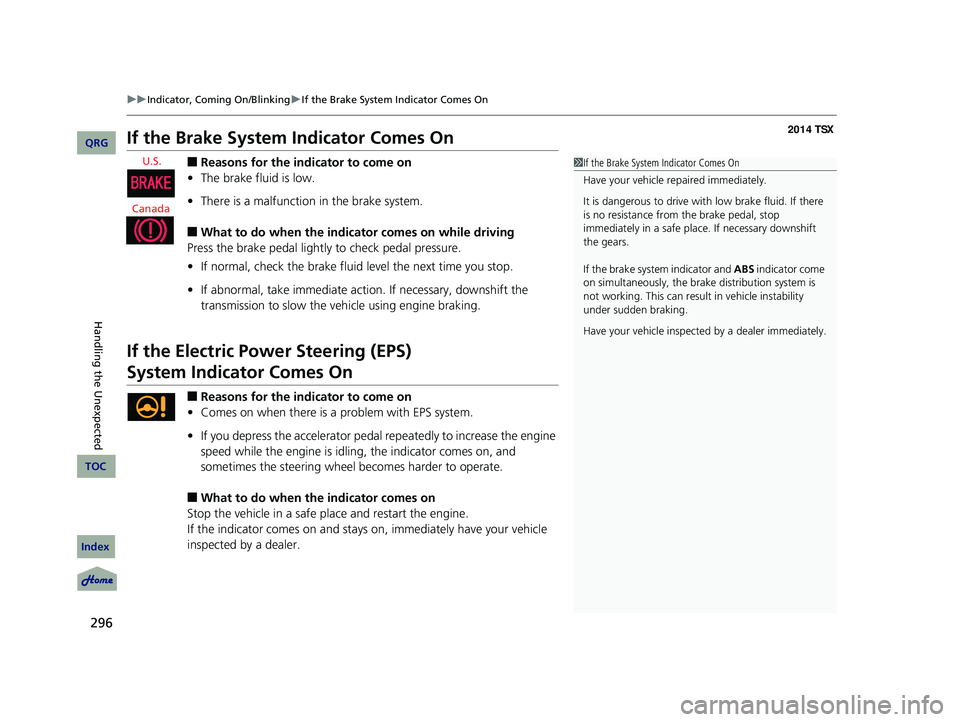
If the Brake System Indicator Comes On
■Reasons for the indicator to come on
• The brake fluid is low.
• There is a malfunction in the brake system.
■What to do when the indicator comes on while driving
Press the brake pedal lightly to check pedal pressure.
• If normal, check the brake fluid level the next time you stop.
• If abnormal, take immediate action . If necessary, downshift the
transmission to slow the vehicle using engine braking.
If the Electric Power Steering (EPS)
System Indicator
Comes On
■Reasons for the indicator to come on
• Comes on when there is a problem with EPS system.
• If you depress the accelerator pedal repeatedly to increase the engine
speed while the engine is idling, the indicator comes on, and
sometimes the steering wheel becomes harder to operate.
■What to do when the indicator comes on
Stop the vehicle in a safe place and restart the engine.
If the indicator comes on and stays on, immediately have your vehicle
inspected by a dealer.
1 If the Brake System Indicator Comes On
Have your vehicle re paired immediately.
It is dangerous to drive with low brake fluid. If there
is no resistance from the brake pedal, stop
immediately in a safe plac e. If necessary downshift
the gears.
If the brake system indicator and ABS indicator come
on simultaneously, the brake distribution system is
not working. This can result in vehicle instability
under sudden braking.
Have your vehicle inspecte d by a dealer immediately.
14 ACURA TSX 4D-31TL16500.book 296 ページ 2013年6月17日 月曜日 午前9時40分
QRG
Index
Handling the Unexpected
TOC
U.S.
Canada
Page 301 of 329

300
uu Fuses u Circuit Protected and Amps for Each Fuse
Circuit Protected and Amps for Each Fuse
The current rating in br ackets indicate that
you may find a fuse in the location even if
your particular model is not equipped with
the device the fuse is used for.
■Engine Compartment
Circuit ProtectedAmps
1Battery100 A*1
120 A*2
Passenger’s Side Fuse Box40 A
2
EPS70 A
Passenger’s Side Fuse Box
(40 A)
ABS/VSA FSR30 A
−
−
ABS/VSA Motor30 A
−
−
3
IG50 A
Driver’s Side Fuse Box(40 A)
Passenger’s Side Light Main30 A
Driver’s Side Fuse Box(60 A)
Driver’s Side Light Main30 A
Main Fan Motor30 A
−*1−
Wiper Motor*230 A
Wiper Motor*130 ASub Fan Motor*2
4 Rear Defogger 40 A
*1:4-cylinder models
*2:6-cylinder models
5Sub Fan Motor*120 A
−*2−
6 −
−
7−−
8 Heater Motor
40 A
9Hazard 15 A
10 Horn
10 A
11−−
12 Stop
15 A
13IG Coil15 A
14 FI Sub
15 A
15Backup10 A
16 Interior Lights
7.5 A
17FI Main15 A
18 DBW
15 A
19−*1−
Back Up FI ECU*27.5A
20 MG Clutch
7.5 A
21Engine Oil Level*17.5 AFan RLY*2
Circuit ProtectedAmps
*1:4-cylinder models
*2:6-cylinder models
■Driver Side
Circuit ProtectedAmps
1−−
2Seat Memory(7.5 A)
3Washer15 A
4Wiper10 A
5Meter7.5 A
6ABS/VSA7.5 A
7ACG15 A
8STS*1(7.5 A)Starter DIAG*2
9Fuel Pump20 A
10VB SOL *(10 A)
11SRS10 A
12ODS7.5 A
13−*1(7.5 A)STS*2
14−−
15Daytime Running Lights7.5 A
16A/C7.5 A
17Accessory, Key, Lock7.5 A
* Not available on all models
14 ACURA TSX 4D-31TL16500.book 300 ページ 2013年6月17日 月曜日 午前9時40分
QRG
Index
Handling the Unexpected
TOC
Page 328 of 329

327
Specified Fuel........................... 217 , 308, 310
Speedometer.............................................. 75
SRS Airbags (Airbags) ................................ 36
Starting the Engine .................................. 193
Does Not Start ........................................ 287
Engine Switch Buzzer .............................. 105
Jump Starting ......................................... 288
Steering Wheel ........................................ 114
Adjusting ................................................ 114
Stopping ................................................... 216
Sunglasses Holder .................................... 132
Supplemental Restraint System (SRS) ....... 36
Switches (Around the Steering
Wheel) ............................................ 2, 3, 105
SYNC Mode .............................................. 136
System Message Indicator ......................... 69
T
Tachometer................................................ 75
Temperature .............................................. 78
Gauge ........................................................ 8
Outside Temperature Display .................... 78
Temperature Sensor ................................ 137
Tie-down Anchor ..................................... 131
Time (Setting) ............................................. 88
Tire Pressure Monitoring System
(TPMS) ..................................................... 208
Indicator ........................................... 68, 297
Tires .......................................................... 261
Air Pressure............................. 262, 309, 311 Checking and Maintaining .......................
261
Inspection ................................................ 261
Labeling .................................................. 262
Puncture (Flat Tire) ................................... 281
Regulations ............................................. 264
Rotation .................................................. 268
Spare Tire ................................ 281, 309, 311
Tire Chains .............................................. 269
Wear Indicators ....................................... 266
Winter ..................................................... 269
Tools ................
.......................................... 280
Towing a Trailer ....................................... 189
Equipment and Accessories ..................... 190
Load Limits .............................................. 189
Towing Your Vehicle ................................ 192
Emergency .............................................. 303
TPMS (Tire Pressure Monitoring
System) .................................................... 208
Indicator ............................................ 68, 297
Transmission ..................................... 197 , 201
Automatic ............................................... 197
Fluid ................................................ 244, 245
Manual .................................................... 201
Number ................................................... 312
Sequential Shift Mode ............................. 199
Shift Position Indicator ....................... 13 , 198
Trip Meter .......
............................................ 77
Trip/Reset Switch ........................................ 77
Troubleshooting .......................................
279
Blown Fuse .............................................. 298
Brake Pedal Vibrates .................................. 17Buzzer Sounds When Opening Door.......... 18
Emergency Towing ..................................
303
Engine Won’t Start .................................. 287
Noise When Braking .................................. 18
Overheating ............................................ 292
Premium Gasoline ................... 217, 308, 310
Puncture/Flat Tire .................................... 281
Rear Door Won’t Open........................ 17, 95
Select Lever Won’t Move ......................... 291
Warning Indicators .................................... 64
Trunk ........................................................... 96
Lid............................................................. 96
Light Bulb........................................ 308, 310
Main Switch .............................................. 98
Unable to Open....................................... 305
Turn Signals .......
....................................... 106
Indicators (Instrument Panel) ..................... 69
U
Unlocking the Doors.................................. 91
Unlocking the Fron t Doors from the
Inside ......................................................... 10
USB Adapter Cable ........................... 140, 141
USB Flash Drives ....................................... 166
V
Valet Key..................................................... 90
Vanity Mirrors ............................................... 5
Vehicle Identification Number ................ 312
14 ACURA TSX 4D-31TL16500.book 327 ページ 2013年6月17日 月曜日 午前9時40分
QRG
Index
IndexA B C D E F G H I J K L M N O P Q R S T U V W X Y Z
T
U
V