brake light Acura TSX 2014 Owner's Manual
[x] Cancel search | Manufacturer: ACURA, Model Year: 2014, Model line: TSX, Model: Acura TSX 2014Pages: 329, PDF Size: 15.95 MB
Page 7 of 329
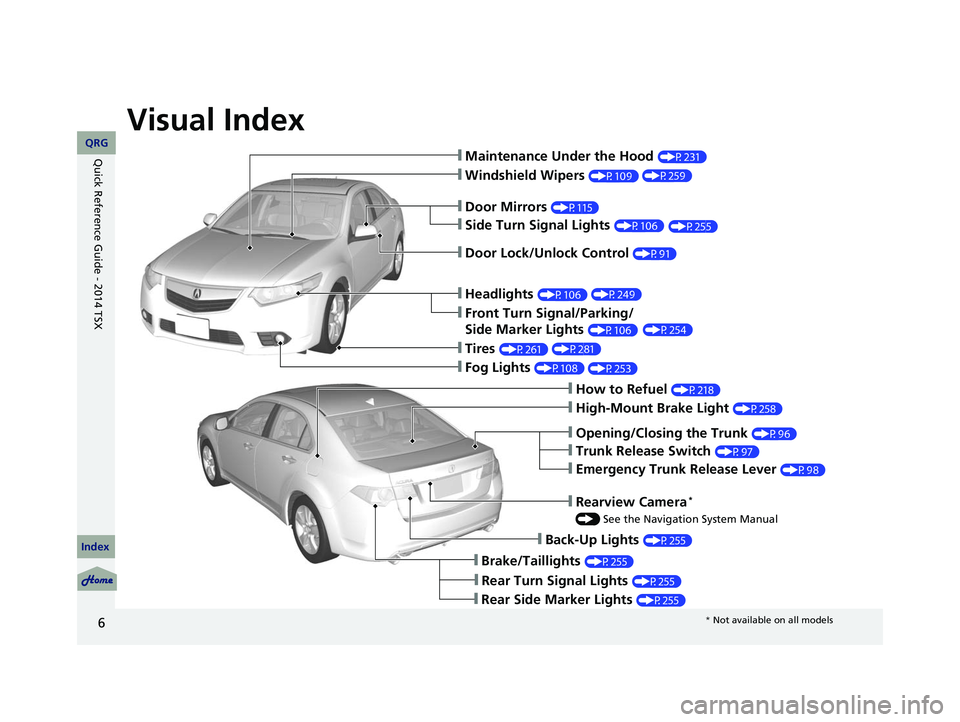
Visual Index
6
❙Maintenance Under the Hood (P231)
❙Windshield Wipers (P109)
❙Tires (P261)
❙Fog Lights (P108)
❙Door Lock/Unlock Control (P91)
❙Side Turn Signal Lights (P106)
❙Headlights (P106)
❙Front Turn Signal/Parking/
Side Marker Lights
(P106)
❙How to Refuel (P218)
❙High-Mount Brake Light (P258)
❙Emergency Trunk Release Lever (P98)
❙Opening/Closing the Trunk (P96)
❙Back-Up Lights (P255)
❙Brake/Taillights (P255)
❙Rear Side Marker Lights (P255)
❙Door Mirrors (P115)
❙Trunk Release Switch (P97)
❙Rear Turn Signal Lights (P255)
❙Rearview Camera *
() See the Navigation System Manual
14 ACURA TSX 4D-31TL16500.book 6 ページ 2013年6月17日 月曜日 午前9時40分
(P259)
(P255)
(P249) (P254)
(P281) (P253)
QRG
Index
Quick Reference Guide - 2014 TSX
* Not available on all models
Page 9 of 329
8
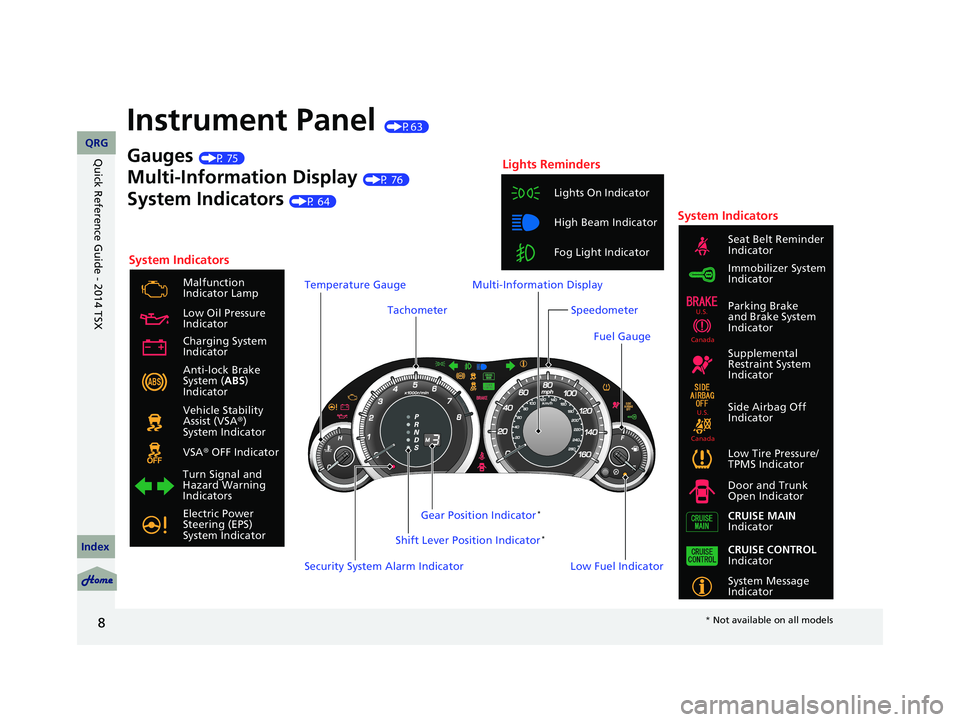
Instrument Panel (P63)
System Indicators
Malfunction
Indicator Lamp
Low Oil Pressure
Indicator
Anti-lock Brake
System ( ABS)
Indicator
Vehicle Stability
Assist (VSA ®)
System Indicator
VSA ® OFF Indicator
Low Tire Pressure/
TPMS Indicator
Electric Power
Steering (EPS)
System Indicator Lights On Indicator
High Beam Indicator
Fog Light Indicator
Immobilizer System
Indicator Seat Belt Reminder
Indicator
System Indicators
System Message
Indicator Parking Brake
and Brake System
Indicator
Supplemental
Restraint System
Indicator
Side Airbag Off
Indicator
Door and Trunk
Open Indicator
CRUISE MAIN
Indicator
Tachometer
Low Fuel Indicator
Security System Alarm Indicator Shift Lever Position Indicator
*
Gauges (P 75)
Multi-Information Display (P 76)
System Indicators (P 64)
Turn Signal and
Hazard Warning
Indicators Gear Position Indicator
*
Charging System
Indicator
CRUISE CONTROL
Indicator
Lights Reminders
Multi-Information Display
Speedometer
Fuel Gauge
Temperature Gauge
U.S.
Canada
U.S.
Canada
14 ACURA TSX 4D-31TL16500.book 8 ページ 2013年6月17日 月曜日 午前9時40分
QRG
Index
Quick Reference Guide - 2014 TSX
* Not available on all models
Page 16 of 329
15
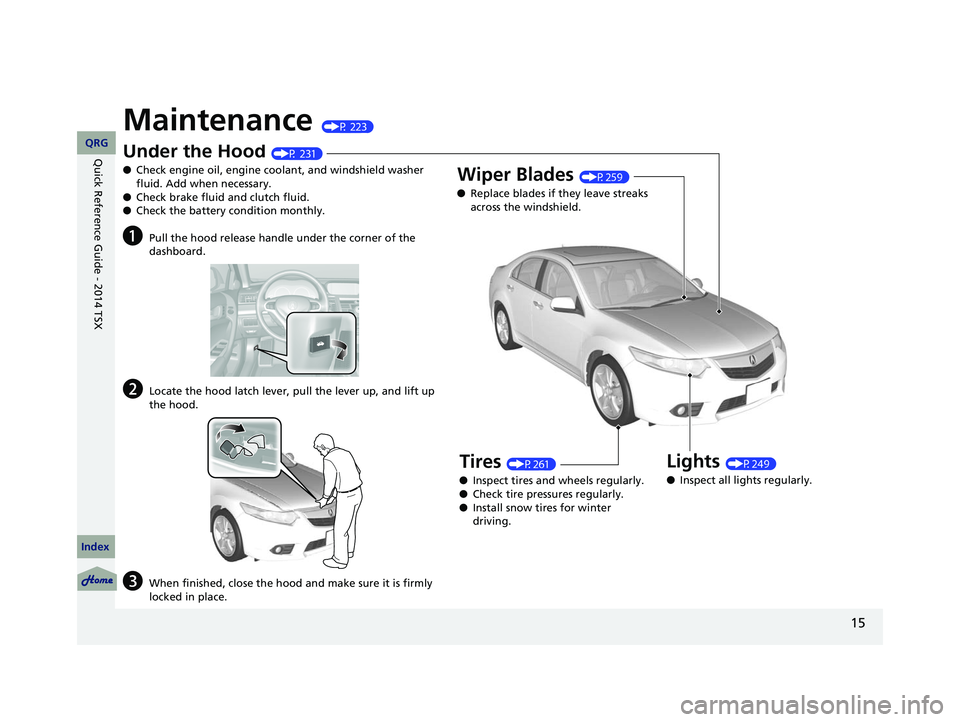
Maintenance (P 223)
Under the Hood (P 231)
● Check engine oil, engine coolant, and windshield washer
fluid. Add when necessary.
● Check brake fluid and clutch fluid.
● Check the battery condition monthly.
aPull the hood release handle under the corner of the
dashboard.
bLocate the hood latch lever, pull the lever up, and lift up
the hood.
cWhen finished, close the hood and make sure it is firmly
locked in place.
Lights (P249)
● Inspect all lights regularly.
Wiper Blades (P259)
● Replace blades if they leave streaks
across the windshield.
Tires (P261)
● Inspect tires and wheels regularly.
● Check tire pressures regularly.
● Install snow tires for winter
driving.
14 ACURA TSX 4D-31TL16500.book 15 ページ 2013年6月17日 月曜日 午前9時40分
QRG
Index
Quick Reference Guide - 2014 TSX
Page 18 of 329
17
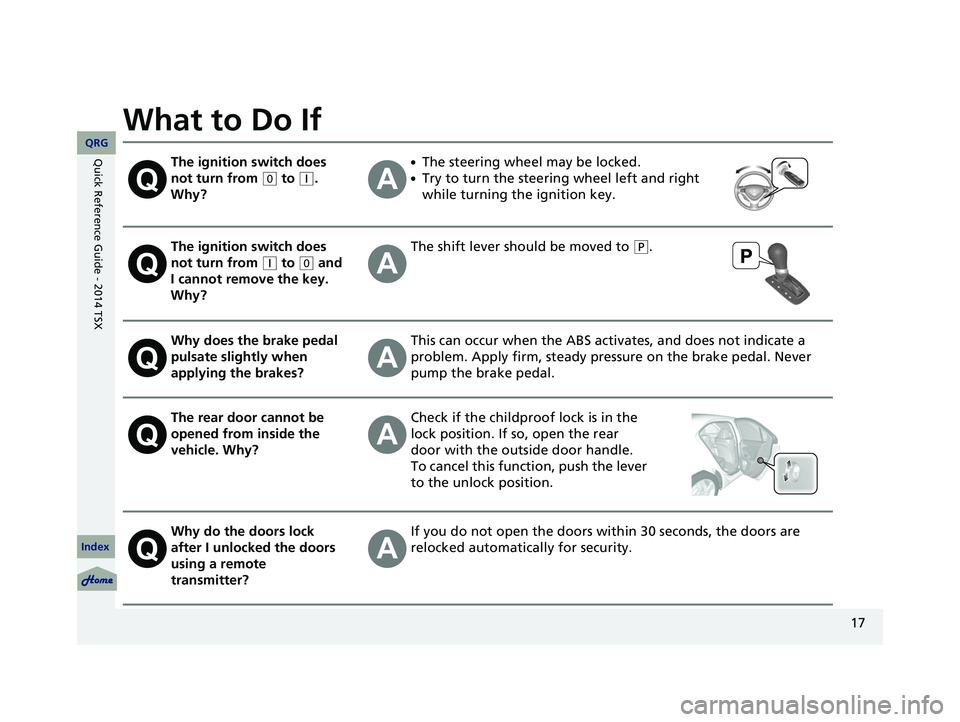
What to Do If
The ignition switch does
not turn from
(0
to (q
.
Why?
●The steering wheel may be locked.
●Try to turn the steering wheel left and right
while turning the ignition key.
The ignition switch does
not turn from
(q
to (0
and
I cannot remove the key.
Why?
The shift lever should be moved to (P
.
Why does the brake pedal
pulsate slightly when
applying the brakes?This can occur when the ABS activates, and does not indicate a
problem. Apply firm, steady pressure on the brake pedal. Never
pump the brake pedal.
The rear door cannot be
opened from inside the
vehicle. Why?Check if the childpro of lock is in the
lock position. If so, open the rear
door with the outside door handle.
To cancel this function, push the lever
to the unlock position.
Why do the doors lock
after I unlocked the doors
using a remote
transmitter?If you do not open the doors within 30 seconds, the doors are
relocked automatically for security.
14 ACURA TSX 4D-31TL16500.book 17 ページ 2013年6月17日 月曜日 午前9時40分
QRG
Index
Quick Reference Guide - 2014 TSX
Page 19 of 329
18
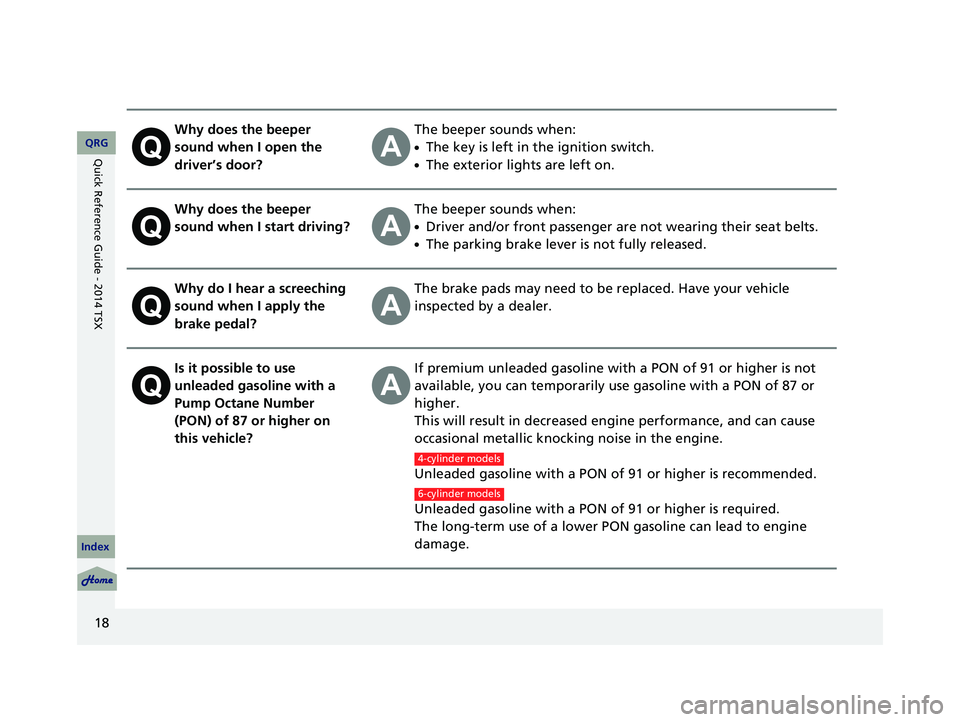
Why does the beeper
sound when I open the
driver’s door?The beeper sounds when:
●The key is left in the ignition switch.
●The exterior lights are left on.
Why does the beeper
sound when I start driving?The beeper sounds when:
●Driver and/or front passenger are not wearing their seat belts.
●The parking brake lever is not fully released.
Why do I hear a screeching
sound when I apply the
brake pedal?The brake pads may need to be replaced. Have your vehicle
inspected by a dealer.
Is it possible to use
unleaded gasoline with a
Pump Octane Number
(PON) of 87 or higher on
this vehicle?If premium unleaded gasoline with a PON of 91 or higher is not
available, you can temporarily use gasoline with a PON of 87 or
higher.
This will result in decreased engine performance, and can cause
occasional metallic knocking noise in the engine.
Unleaded gasoline with a PON of 91 or higher is recommended.
Unleaded gasoline with a PON of 91 or higher is required.
The long-term use of a lower PON gasoline can lead to engine
damage.
4-cylinder models
6-cylinder models
14 ACURA TSX 4D-31TL16500.book 18 ページ 2013年6月17日 月曜日 午前9時40分
QRG
Index
Quick Reference Guide - 2014 TSX
Page 109 of 329

108
uu Operating the Switches Around the Steering Wheel u Fog Lights
Fog Lights
When the low beam headlights are on, turn
the fog light switch on to use the fog lights.
Daytime Running Lights (DRL)
The high beam headlights come on slightly dimmer than normal when the following
conditions have been met:
• The ignition switch is in ON
(w
.
• The headlight switch is off, or in .
• The parking brake is released.
The lights remain on even if you set th e parking brake. Turning off the ignition
switch will turn off th e daytime running lights.
The high beam headlights re turn to the original brightness once the headlight
switch is turned on.
1 Fog Lights
When the fog lights are on, the indicator in the
instrument pane l will be on.
2 Indicators P. 64
Fog Light Switch
14 ACURA TSX 4D-31TL16500.book 108 ページ 2013年6月17日 月曜日 午前9時40分
QRG
Index
ControlsTOC
Page 114 of 329

113
uu Operating the Switches Around the Steering Wheel u Driving Position Memory System *
1. Adjust the driver’s seat to the desired
position, and turn the ignition sw itch to
ON
(
w
.
2. Press the SET button.
u You will hear the beeper, and the
memory button indicator light will blink.
3. Press memory button
(1
or (
2
within five
seconds of pressing the SET button.
u Once the seat position has been
memorized, the indicator light on the
button you pressed stays on.
1. Move the shift lever to
(P
.
2. Apply the parking brake.
3. Press a memory button (
(1
or (2
).
u You will hear the beeper, and the
indicator light will blink.
The seat will automatically move to the
memorized position. When it has finished
moving, you will hear the beeper, and the
indicator light stays on.
■Storing a Position in Memory1 Storing a Position in Memory
After you press the SET button, the storing operation
will be canceled when:
•You do not press the memory button within five
seconds.
•You readjust the seat position before the double-
beep.
•You turn the ignition switch to any position except
ON
(
w
.
Memory Button 1
Memory Button 2
Set Button
■Recalling the Stored Position1Recalling the Stored Position
The seat will st op moving if you:
•Press the SET button, or a memory button ( (
1
or
(
2
).•Adjust the seat position.
•Shift into any position except (
P
.
•Release the parking brake.
Automatic transmission models
Manual transmission models
Memory ButtonsAutomatic transmission models
All models
14 ACURA TSX 4D-31TL16500.book 113 ページ 2013年6月17日 月曜日 午前9時40分
QRG
Index
ControlsTOC
Page 186 of 329

Continued185
uu Before Driving u Driving Preparation
• Store or secure all items on board properly.
u Carrying too much cargo, or improperly storing it, can affect your vehicle’s
handling, stability, sto pping distance, and tires, and make it unsafe.
2Maximum Load Limit P. 187
• Do not pile items higher than the seat height.
u They can block your view and may be thrown forward in the event of sudden
braking.
• Do not place anything in the front seat footwells. Make sure to secure the floor
mat.
u An object or unsecured floor mat can in terfere with your brake and accelerator
pedal operation while driving.
• If you have any animals on board, do not let them move around in the vehicle.
u They may interfere with driv ing and a crash could occur.
• Securely close and lock all doors and the trunk.
2 Locking/Unlocking the Doors from the Inside P. 93
• Adjust your seating position properly.
u Adjust the head restraint, too.
2Adjusting the Seats P. 117
2 Adjusting the Head Restraints P. 119
•Adjust the mirrors and steering wh eel properly for your driving.
u Adjust them while sitting in the proper driving position.
2 Adjusting the Mirrors P. 115
2 Adjusting the Steering Wheel P. 114
■Interior Checks1Interior Checks
The headlight aim is set by the factory, and does not
need to be adjusted. Howeve r, if you regularly carry
heavy items in the trunk or tow a trailer, have the
aiming readjusted at a de aler or by a qualified
technician.
14 ACURA TSX 4D-31TL16500.book 185 ページ 2013年6月17日 月曜日 午前9時40分
QRG
Index
DrivingTOC
Page 191 of 329

uu Towing a Trailer u Towing Preparation
190
Towing equipment varies by the size of yo ur trailer, how much load you are towing,
and where you are towing.
■Hitches
The hitch must be of an approved type and properly bolted to the underbody.
■Safety chains
Always use safety chains when you tow a trailer. Leave enough slack to allow the
trailer to turn corners easily, but do not allow the chains to drag on the ground.
■Trailer brakes
There are two common types of trailer brake s: surge and electric. Surge brakes are
common for boat trailers, since the brakes will get wet. If you choose electric brakes,
be sure they are electronically actuated. Do not attempt to attach trailer brakes to
your vehicle’s hydraulic system, as it w ill lower braking effectiveness and create a
potential hazard.
■Additional towing equipment
Many states and provinces/territories requ ire special outside mirrors when towing a
trailer. Even if mirrors are not required in your locale, you should install special
mirrors if visibility is restricted in any way.
■Trailer light
Trailer lights and equipment must comply with federal, state, province/territory, and
local regulations. Check with your local trailer sales or rental agency for the
requirements in the area where you plan to tow.
■Towing Equipment and Accessories1 Towing Equipment and Accessories
Make sure that all equipment is properly installed and
maintained, and that it meets federal, state, province/
territory, and lo cal regulations.
Consult your traile r sales or rental agency if any other
items are recommended or required for your towing
situation.
The lighting and wiring of tra ilers can vary by type
and brand. If a connector is required, it should only
be installed by a qua lified technician.
14 ACURA TSX 4D-31TL16500.book 190 ページ 2013年6月17日 月曜日 午前9時40分
QRG
Index
DrivingTOC
Page 192 of 329

191
uu Towing a Trailer u Driving Safely with a Trailer
Continued
Driving Safely with a Trailer
• Have the trailer properly servic ed and keep it in good condition.
• Make sure that all the weights and load in the vehicle and trailer are within limits.
2Towing Load Limits P. 189
• Securely attach the hitch, safety chains, and other necessary parts to the trailer.
• Securely store all the items in and on the trailer so that they do not shift
while driving.
• Check if the lights and brakes on the trailer are working properly.
• Check the pressures of the traile r tires, including the spare.
• Drive slower than normal.
• Obey posted speed limits fo r vehicles with trailers.
• Use the
(D
position when towing a trailer on level roads.
• Turn more slowly and with a wider turning arc than normal.
• Allow more time and distance for braking.
• Do not brake or turn suddenly.
■Things You Need To Know Before Towing a Trailer
■Towing Speeds and Gears
■Turning and Braking
1Driving Safely with a Trailer
Operating speed when towing a trailer is restricted
up to 62 mph (100 km/h).
Parking
In addition to the normal precautions, place wheel
chocks at each of the trailer’s tires.
Automatic transmission models
14 ACURA TSX 4D-31TL16500.book 191 ページ 2013年6月17日 月曜日 午前9時40分
QRG
Index
DrivingTOC