interior lights Acura TSX 2014 Owner's Manual
[x] Cancel search | Manufacturer: ACURA, Model Year: 2014, Model line: TSX, Model: Acura TSX 2014Pages: 329, PDF Size: 15.95 MB
Page 2 of 329
Contents
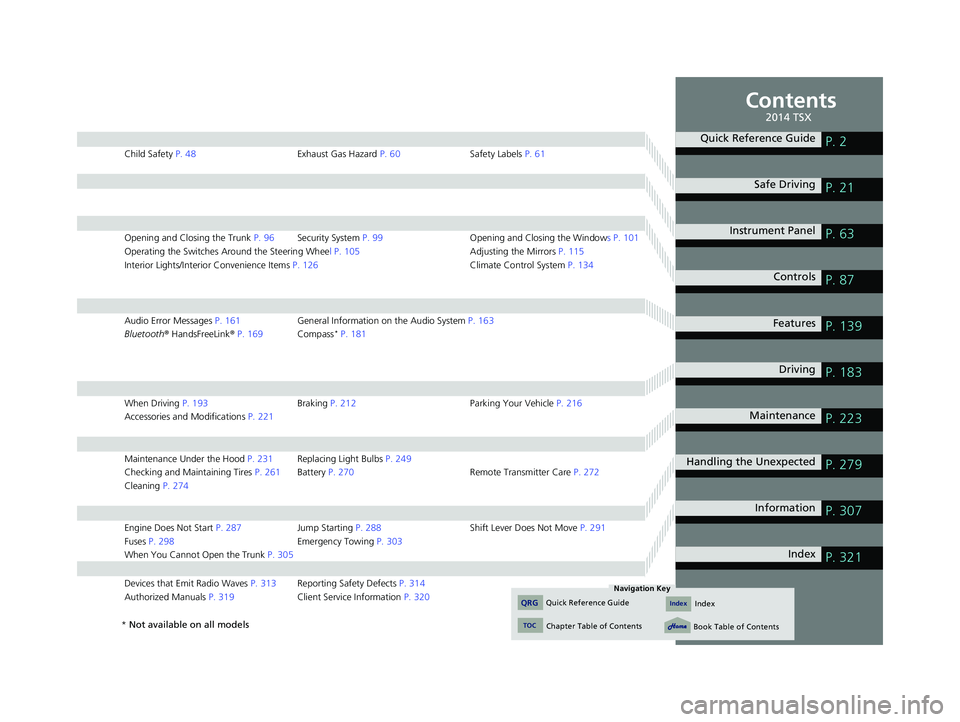
Child Safety P. 48 Exhaust Gas Hazard P. 60 Safety Labels P. 61
Opening and Closing the Trunk P. 96 Security System P. 99 Opening and Closing the Windows P. 101
Operating the Switches Around the Steering Wheel P. 105 Adjusting the Mirrors P. 115
Interior Lights/Interior Convenience Items P. 126 Climate Control System P. 134
Audio Error Messages P. 161 General Information on the Audio System P. 163
Bluetooth® HandsFreeLink ® P. 169 Compass * P. 181
When Driving P. 193 Braking P. 212 Parking Your Vehicle P. 216
Accessories and Modifications P. 221
Maintenance Under the Hood P. 231 Replacing Light Bulbs P. 249
Checking and Maintaining Tires P. 261 Battery P. 270 Remote Transmitter Care P. 272
Cleaning P. 274
Engine Does Not Start P. 287 Jump Starting P. 288 Shift Lever Does Not Move P. 291
Fuses P. 298 Emergency Towing P. 303
When You Cannot Open the Trunk P. 305
Devices that Emit Radio Waves P. 313 Reporting Safety Defects P. 314
Authorized Manuals P. 319 Client Service Information P. 320
Quick Reference GuideP. 2
Safe Driving P. 21
Instrument Panel P. 63
Controls P. 87
Features P. 139
Driving P. 183
Maintenance P. 223
Handling the Unexpected P. 279
Information P. 307
Index P. 321
14 ACURA TSX 4D-31TL16500.book 1 ページ 2013年6月17日 月曜日 午前9時40分
Quick Reference GuideIndex
TOC
Chapter Table of Contents
Navigation Key
QRGIndex
Book Table of Contents
2014 TSX
* Not available on all models
Page 83 of 329

82
uu Gauges and Multi-Information Display u Multi-Information Display
■List of customizable options
*1: Default Setting
Setup Group Customizable Features DescriptionSelectable settings
METER
SETUP
LANGUAGE SELECTIONChanges the displayed language.ENGLISH*1/FRENCH /SPANISH
ADJUST OUTSIDE TEMP.
DISPLAYAdjusts the temperature reading by a few degrees.-5°F ~ ±0°F*1 ~ +5°F (U.S.)
-3°C ~ ±0°C*1 ~ +3°C (Canada)
TRIP A RESET with
REFUELSets Trip A and the average fuel economy to reset
when you refuel.ON/OFF*1
ELAPSED TIME RESETChanges the resetting conditions of the elapsed
time.IGN OFF*1/TRIP A /TRIP B
POSITION
SETUPMEMORY POSITION
LINK *Changes the driver’s seat position to a stored
setting.ON*1/OFF
LIGHTING
SETUP
INTERIOR LIGHT
DIMMING TIMEChanges the length of time the interior lights stay
on after you close the doors.60sec /30sec*1/15sec
HEADLIGHT AUTO OFF
TIMER Changes the length of time the exterior lights stay
on after you close the driver’s door.
60sec
/30sec /15sec
*1/ 0sec
AUTO LIGHT
SENSITIVITY Changes the timing for the headlights to come on.
MAX/HIGH /MID
*1/LOW /MIN
* Not available on all models
14 ACURA TSX 4D-31TL16500.book 82 ページ 2013年6月17日 月曜日 午前9時40分
QRG
Index
Instrument PanelTOC
Page 88 of 329

87
Controls
This chapter explains how to operate the various controls necessary for driving.
Setting the Clock................................ 88
Locking and Unlocking the Doors
Key Types and Functions .................... 89
Locking/Unlocking the Doors from the Outside ............................................ 91
Locking/Unlocking the Doors from the Inside ............................................... 93
Childproof Door Locks ....................... 95
Auto Door Lock/Unlock ...................... 95
Opening and Closing the Trunk ......... 96
Security System .................................. 99
Immobilizer System ............................ 99
Security System Alarm ........................ 99
Opening and Closing the Windows ... 101 Opening and Closing the Moonroof
.. 104
Operating the Switches Around the
Steering Wheel Ignition Switch ................................. 105
Turn Signals ..................................... 106
Light Switches.................................. 106
Fog Lights ........................................ 108
Daytime Running Lights (DRL) .......... 108
Wipers and Washers ........................ 109
Brightness Control ........................... 110
Rear Defogger/Heated Door Mirror
Button........................................ 111
Driving Position Memory System *....112
Adjusting the Steering Wheel........... 114 Adjusting the Mirrors
....................... 115
Interior Rearview Mirror ................... 115
Power Door Mirrors ......................... 115
Adjusting the Seats .......................... 117
Adjusting the Seat Positions ............. 117
Interior Lights/Interior Convenience Items .............. .................................. 126
Interior Lights .................................. 126
Interior Convenience Items .............. 127
Climate Control System ................... 134
Using Automatic Climate Control .... 134
Automatic Climate Control Sensors ... 137
* Not available on all models
14 ACURA TSX 4D-31TL16500.book 87 ページ 2013年6月17日 月曜日 午前9時40分
QRG
Index 2014 TSX
Page 92 of 329

91
uu Locking and Unlocking the Doors u Locking/Unlocking the Doors from the Outside
Continued
Locking/Unlocking the Doors from the Outside
■Locking the doors
Press the lock button.
Once: u Some exterior lights flash, all the doors,
trunk, and fuel fill door lock, and the
security system sets.
Twice (within five seconds after the
first push): u A beeper sounds and verifies the security
system is set.
■Unlocking the doors
Press the unlock button.
Once: u Some exterior lights flash twice, and the
driver’s door and fuel fill door unlock.
Twice: u The rem aining doors and the
trunk unlock.
■Using the Remote Transmitter1 Using the Remote Transmitter
If you do not open a door within 30 seconds of
unlocking the vehicle with the remote transmitter,
the doors will auto matically relock.
If the interior light switch is in the door activated
position, the interior light s come on when you press
the unlock button.
No doors opened: The li ghts fade out after 30
seconds.
Doors relocked with the remote: The lights go off
immediately. 2 Interior Lights P. 126
The remote transmitter us es low-power signals, so
the operating range may vary depending on the
surroundings.
The remote transmitter will not work when the key is
in the ignition switch. The remote will not lock the
vehicle when a door is open.
If the distance at which the remote transmitter works
varies, the batter y is probably low.
If the LED does not come on when you press a
button, the battery is dead. 2 Replacing the Battery P. 272
LED
Lock
Button
Unlock
Button
14 ACURA TSX 4D-31TL16500.book 91 ページ 2013年6月17日 月曜日 午前9時40分
QRG
Index
ControlsTOC
Page 116 of 329

115Continued
Adjusting the Mirrors
Interior Rearview Mirror
Adjust the angle of the rearview mirror when you are sitting in the correct
driving position.When driving after dark, the automatic
dimming rearview mirror reduces the glare
from headlights behind you. Press the auto
button to turn this function on and off.
When activated, the au to indicator comes on.
Power Door Mirrors
You can adjust the door mirrors when the
ignition switch is in ON
(w
.
■Mirror position adjustment
L/R selector switch: Select the left or right
mirror. After adjusting the mirror, return the
switch to the center position.
Mirror positi on adjustment switch: Press
the switch left, right, up, or down to move
the mirror.
■Automatic Dimming Rearview Mirror
1 Adjusting the Mirrors
Keep the inside and out side mirrors clean and
adjusted for best visibility.
Adjust the mirrors befo re you start driving.
2 Adjusting the Seat Positions P. 117
1Automatic Dimming Rearview Mirror
The auto dimming function cancels when the shift
position is in
(
R
.
Indicator
Auto ButtonSensor
Selector Switch
Adjustment Switch
14 ACURA TSX 4D-31TL16500.book 115 ページ 2013年6月17日 月曜日 午前9時40分
QRG
Index
ControlsTOC
Page 127 of 329

126
Interior Lights/Interior Convenience Items
Interior Lights
■ON
The interior lights come on regardless of
whether the doors are open or closed.
■Door activated
The interior lights come on in the
following situations:
• When any of the doors are opened.
• You unlock the driver’s door.
• Y ou rem ove the key from the
ignition switch.
■OFF
The interior lights remain off regardless of
whether the doors are open or closed.
The map lights can be turned on and off by
pressing the lenses.
■Interior Light Switches1 Interior Light Switches
In the door activated position, the interior lights fade
out and go off about 30 se conds after the doors are
closed.
The lights go off after 30 seconds in the following
situations:
•When you unlock the driver’s door but do not open
it.
•When you remove the key from the ignition switch
but do not open a door.
You can change the interi or lights dimming time.
2 Customized Features P. 80
The interior lights go off i mmediately in the following
situations:
•When you lock the driver’s door.
•When you close the driver’s door with the key in
the ignition switch.
•When you turn the ignition switch to ON (
w
.
If you leave any of the doors open without the key in
the ignition switch, the interior lights go off after
about 15 minutes.
Door Activated Position
OffFront
Door Activated Position
On
Off
Rear
On
■Map Lights
1
Map Lights
When the ceiling light switch is in the door activated
position and any door is open, the map light will not
go off when you press the lens.
14 ACURA TSX 4D-31TL16500.book 126 ページ 2013年6月17日 月曜日 午前9時40分
QRG
Index
ControlsTOC
Page 128 of 329

127
uu Interior Lights/Interior Convenience Items u Interior Convenience Items
Continued
Interior Convenience Items
Pull the handle to open the glove box. You
can lock the glove box with the master key.
■Detachable shelf
The shelf in the glove box is detachable. To
remove it, disengage the tabs.
■Glove Box1 Glove Box
The glove box light comes on when the parking lights
are on.
3 WARNING
An open glove box can cause serious injury
to your passenger in a crash, even if the
passenger is wearing the seat belt.
Always keep the glove box closed while
driving.
Glove Box
To Lock
Shelf
14 ACURA TSX 4D-31TL16500.book 127 ページ 2013年6月17日 月曜日 午前9時40分
QRG
Index
ControlsTOC
Page 129 of 329

uu Interior Lights/Interior Convenience Items u Interior Convenience Items
128
Pull the handle to open the
console compartment.
To use the console lid as an armrest, slide it to
the desired position while pulling up the
release lever.
You can keep beverage bottles and cans cool
with the air condi tioning system.
1. Turn the dial counterc lockwise to open the
air vent in the console compartment.
2. Turn on the climate control system and
adjust the temperature to cool.
3. Set the mode control or .
u The cool air is dive rted through the air
vent.
■Console Compartment1 Console Compartment
Use only resealable cont ainers or keep unopened
cans in the console compartment.
Spilled liquids can dama ge the upholstery and
electrical components in the console compartment.
When the heater begins to divert warm air, the
airflow into the console compartment is shut off.
Close
Open
14 ACURA TSX 4D-31TL16500.book 128 ページ 2013年6月17日 月曜日 午前9時40分
QRG
Index
ControlsTOC
Page 130 of 329

Continued129
uu Interior Lights/Interior Convenience Items u Interior Convenience Items
■Front seat beverage holders
Press the raised detent to open the lid. To
close the lid, push it down until it latches.
■Rear seat beverage holders
Fold the armrest down to use the rear seat
beverage holders.
■Beverage Holders1 Beverage Holders
NOTICE
Spilled liquids ca n damage the upholstery, carpeting,
and electrical components in the interior.
Be careful when you are us ing the beverage holders.
Hot liquid can scald you.
Push
14 ACURA TSX 4D-31TL16500.book 129 ページ 2013年6月17日 月曜日 午前9時40分
QRG
Index
ControlsTOC
Page 131 of 329
uu Interior Lights/Interior Convenience Items u Interior Convenience Items
130
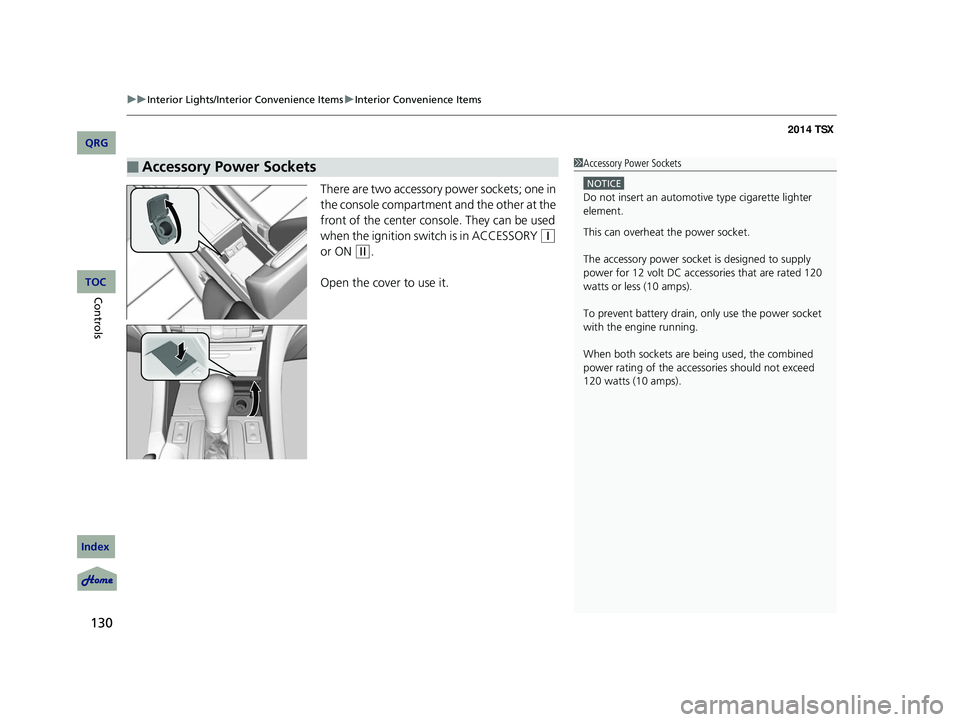
There are two accessory power sockets; one in
the console compartment and the other at the
front of the center cons ole. They can be used
when the ignition swit ch is in ACCESSORY
(q
or ON
(w
.
Open the cover to use it.
■Accessory Power Sockets1 Accessory Power Sockets
NOTICE
Do not insert an automotive type cigarette lighter
element.
This can overheat the power socket.
The accessory power socket is designed to supply
power for 12 volt DC access ories that are rated 120
watts or less (10 amps).
To prevent battery drain, only use the power socket
with the engine running.
When both sockets are being used, the combined
power rating of the accesso ries should not exceed
120 watts (10 amps).
14 ACURA TSX 4D-31TL16500.book 130 ページ 2013年6月17日 月曜日 午前9時40分
QRG
Index
ControlsTOC