lock ACURA ZDX 2010 Owners Manual
[x] Cancel search | Manufacturer: ACURA, Model Year: 2010, Model line: ZDX, Model: ACURA ZDX 2010Pages: 645, PDF Size: 17.13 MB
Page 383 of 645
The security system helps to protect
your vehicle and valuables from
theft. The horn sounds and a
combination of headlights, position
lights, side marker lights and
taillights flashes if someone attempts
to break into your vehicle or remove
the audio unit. This alarm continues
for 2 minutes, then the system
resets. To reset an activated system
before the 2 minutes have elapsed,
unlock the driver's door with the key
or the remote transmitter/keyless
access remote.
The security system automatically
sets 15 seconds after you lock the
doors, hood, and the tailgate. For the
system to activate, you must lock the
doors and the tailgate from the
outside with the key, driver's lock
tab, door lock master switch, or
remote transmitter/keyless access
remote. The security system
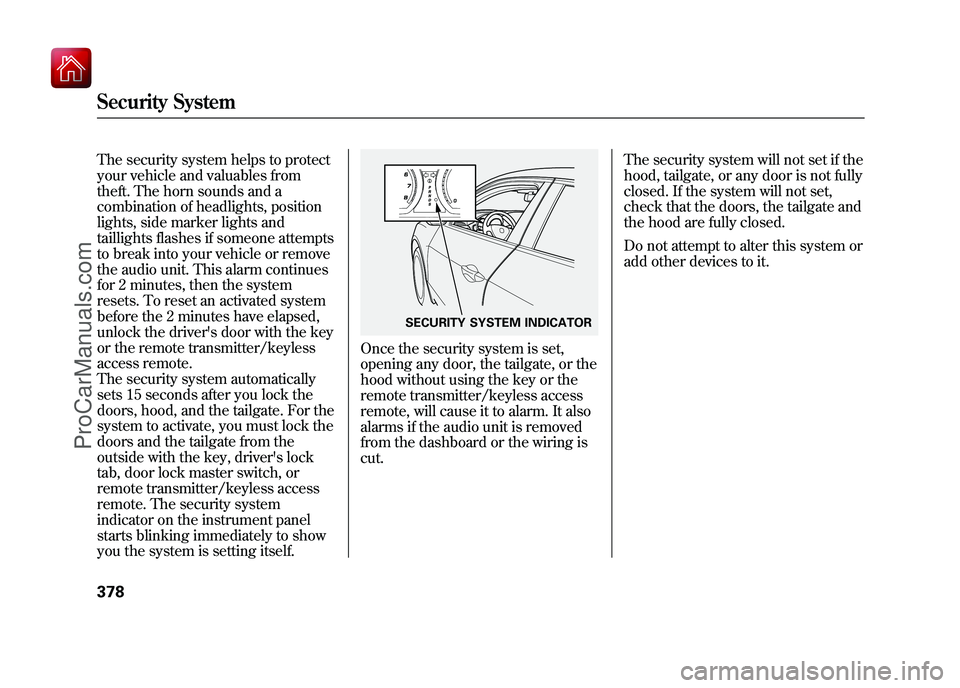
indicator on the instrument panel
starts blinking immediately to show
you the system is setting itself.
Once the security system is set,
opening any door, the tailgate, or the
hood without using the key or the
remote transmitter/keyless access
remote, will cause it to alarm. It also
alarms if the audio unit is removed
from the dashboard or the wiring is
cut.The security system will not set if the
hood, tailgate, or any door is not fully
closed. If the system will not set,
check that the doors, the tailgate and
the hood are fully closed.
Do not attempt to alter this system or
add other devices to it.
SECURITY SYSTEM INDICATOR
Security System37809/10/28 17:15:37 10 ACURA ZDX KA KC New North America Own 50 31SZN600 enu
ProCarManuals.com
Page 397 of 645
●When the ABS or VSA is activated.●When the VSA indicator comes on.
If ACC is canceled by any these
conditions, wait until the condition
improves, then press the RES/
ACCEL button to restore ACC.
When you do this, the vehicle will
resume its set cruising speed.
If you select the ACCESSORY or
VEHICLE OFF(LOCK) mode by
operating the engine start/stop
button (see page 194) after ACC
was automatically canceled, the set
speed is erased, and you must
enter it again (see page 386).ACC Indicator
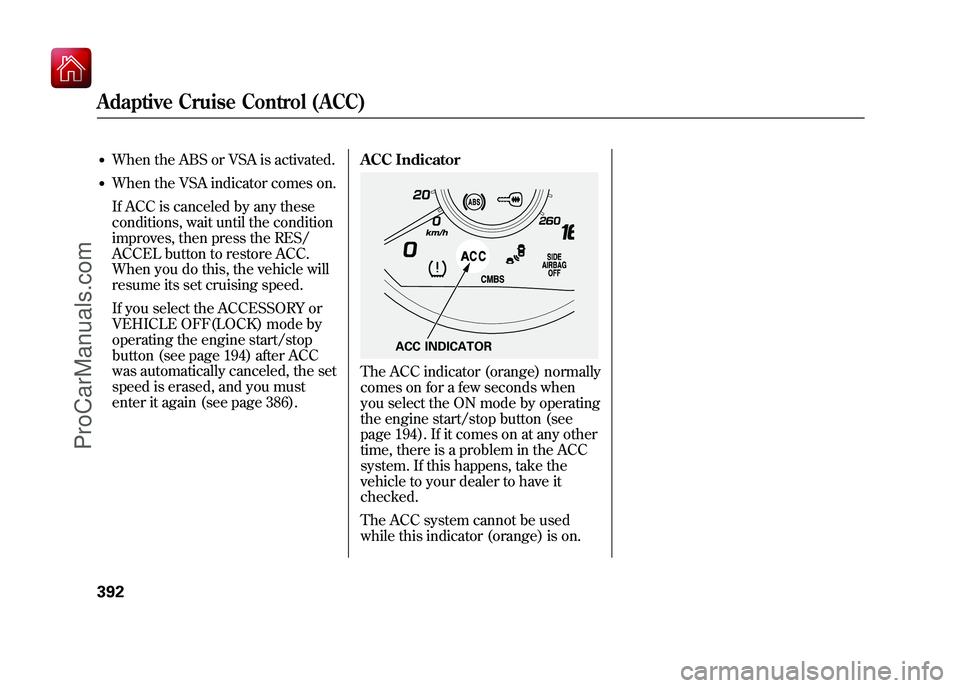
The ACC indicator (orange) normally
comes on for a few seconds when
you select the ON mode by operating
the engine start/stop button (see
page 194). If it comes on at any other
time, there is a problem in the ACC
system. If this happens, take the
vehicle to your dealer to have it
checked.
The ACC system cannot be used
while this indicator (orange) is on.
ACC INDICATOR
Adaptive Cruise Control (ACC)39209/10/28 17:15:37 10 ACURA ZDX KA KC New North America Own 50 31SZN600 enu
ProCarManuals.com
Page 417 of 645
To store a specific phone numberfrom your cell phone directly to the
HFL phonebook (available on somephones):Press and release the HFL Talk
button before a command.
1. Say ‘‘Phonebook. ’’
2. Say ‘‘Receive contact’’ after the
prompts.
3. Follow the HFL prompts, select a number from your cell phone, and
send it to HFL.
4. Follow the HFL prompts and name the number, or say ‘‘Discard ’’if it
is not the number you want to
store.
5. Follow the HFL prompts if you want to store another number. System Setup
This command group allows you to
change or customize HFL basic
settings.
To set a 4-digit passcode to lock the
HFL system for security purposes:Press and release the HFL Talk
button before a command.
1. Say ‘‘System setup. ’’
2. Say ‘‘Security ’’after the prompts.
3. Follow the HFL prompts and say the 4-digit passcode you want to
set.
4. Follow the HFL prompts to confirm the number.
NOTE: Once a passcode is set, you
will need to enter it to use HFL each
time you start the vehicle. If you
forget the code, your dealer will have
to reset it for you, or you will have to
clear the entire system (see page
414).
Bluetooth
®HandsFreeLink
®(Models without navigation system)
41209/10/28 17:15:37 10 ACURA ZDX KA KC New North America Own 50 31SZN600 enu
ProCarManuals.com
Page 460 of 645
For further important fuel-related
information for your vehicle, or on
information on gasoline that does not
contain MMT, visit My Acura atowners.acura.com
In Canada, visit
www.acura.ca
for additional
information on gasoline. Refueling
1. Park with the driver's side closest to
the service station pump and turn off
the engine.
2. Make sure that the driver's door is unlocked. The fuel fill door always
locks or unlocks in conjunction with
the driver's door. The vehicle doors and the fuel fill
door will automatically relock if the
remote transmitter unlock function
is used. In this instance, the security
relock function can be deactivated
by briefly opening then closing the
driver's door.
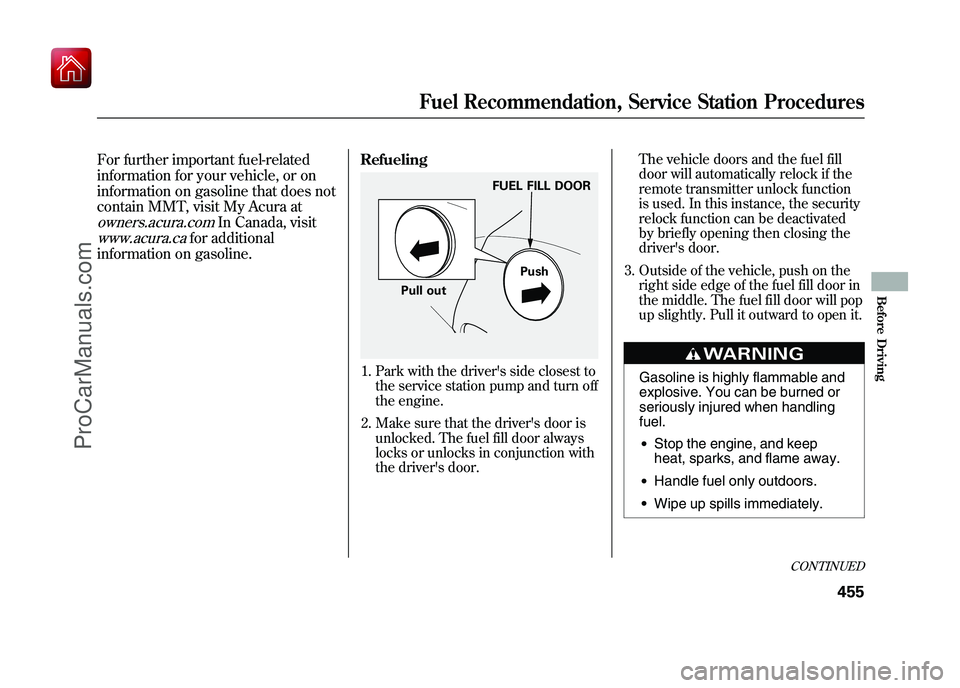
3. Outside of the vehicle, push on the right side edge of the fuel fill door in
the middle. The fuel fill door will pop
up slightly. Pull it outward to open it.
Gasoline is highly flammable and
explosive. You can be burned or
seriously injured when handling
fuel.●Stop the engine, and keep
heat, sparks, and flame away.●Handle fuel only outdoors.●Wipe up spills immediately.
FUEL FILL DOOR
Push
Pull out
CONTINUED
Fuel Recommendation, Service Station Procedures
455
Before Driving
09/10/28 17:15:37 10 ACURA ZDX KA KC New North America Own 50 31SZN600 enu
ProCarManuals.com
Page 468 of 645
Modifying your vehicle, or installing
some non-Acura accessories, can
make your vehicle unsafe. Before
you make any modifications or add
any accessories, be sure to read the
following information.
Accessories
Your dealer has Acura accessories
that allow you to personalize your
vehicle. These accessories have been
designed and approved for your
vehicle, and are covered by warranty.
Although non-Acura accessories may
fit on your vehicle, they may not
meet factory specifications, and could
adversely affect your vehicle's
handling, stability, and reliability.
Improper accessories or
modifications can affect your
vehicle's handling, stability, and
performance, and cause a
crash in which you can be hurt
or killed.
Follow all instructions in this
owner's manual regarding
accessories and modifications.
When properly installed, cellular
phones, alarms, two-way radios, and
low-powered audio systems should
not interfere with your vehicle's
computer controlled systems, such
as your airbags, anti-lock brakes, and
tire pressure monitoring system. Before installing any accessory:
●Make sure the accessory does not
obscure any lights, or interfere
with proper vehicle operation or
performance.●Be sure electronic accessories do
not overload electrical circuits (see
page 595) or interfere with proper
operation of your vehicle.●Do not install accessories on the
side pillars or across the rear
windows. Accessories installed in
these areas may interfere with
proper operation of the side
curtain airbags.●Before installing any electronic
accessory, have the installer
contact your dealer for assistance.
If possible, have your dealer
inspect the final installation.
CONTINUED
Accessories and Modifications
463
Before Driving
09/10/28 17:15:37 10 ACURA ZDX KA KC New North America Own 50 31SZN600 enu
ProCarManuals.com
Page 469 of 645

Modifying Your Vehicle
Removing parts from your vehicle, or
replacing components with
non-Acura components could
seriously affect your vehicle's
handling, stability, and reliability.
Some examples are:●Lowering your vehicle with a non-
Acura suspension kit that
significantly reduces ground
clearance can allow the
undercarriage to hit speed bumps
or other raised objects, which
could cause the airbags to deploy.●Raising your vehicle with a non-
Acura suspension kit can affect the
handling, stability, and reliability.●Non-Acura wheels, because they
are a universal design, can cause
excessive stress on suspension
components and will not be
compatible with the tire pressure
monitoring system (TPMS).
●Larger or smaller wheels and tires
can interfere with the operation of
your vehicle's anti-lock brakes and
other systems.
Modifying your steering wheel or
any other part of your vehicle's safety
features can make the systems
ineffective.
If you plan to modify your vehicle,
consult your dealer.
Accessories and Modifications46409/10/28 17:15:37 10 ACURA ZDX KA KC New North America Own 50 31SZN600 enu
ProCarManuals.com
Page 476 of 645

This section gives you tips on
starting the engine under various
conditions, and how to operate the
automatic transmission. It also
includes important information on
parking your vehicle, the braking
system, the Super Handling-All
Wheel Drive™(SH-AWD
®) system,
the vehicle stability assist (VSA
®),
aka electronic stability control (ESC)
system, active damper system (if
equipped), the tire pressure
monitoring system (TPMS), the
collision mitigation braking system ™
(CMBS ™) (if equipped), the blind
spot information system (BSI) (if
equipped), and facts you need if you
are planning to tow a trailer or drive
off-high way. Driving Guidelines
......................
472
Preparing to Drive
......................
472
Starting the Engine (Models without Keyless Access
System)
...........................
473
Check Starting System
Message
.............................
474
Starting the Engine (Models with Keyless Access System)
......
475
Check Starting System Message
.............................
476
Automatic Transmission
.............
477
Driving with the Paddle
Shifters
...................................
482
Super Handling-All Wheel
Drive ™(SH-AWD
®)
System
................................
487
Parking
.......................................
489
Tire Pressure Monitoring System (TPMS)
...................................
490
Braking System
..........................
495
Anti-lock Brakes (ABS)
...............
496
Collision Mitigation Braking System ™(CMBS ™)
...............
498Vehicle Stability Assist (VSA
®),
aka Electronic Stability Control
(ESC), System
.....................
508
Blind Spot Information System
(BSI)
.......................................
511
Integrated Dynamics System
(IDS)
.......................................
519
Towing a Trailer
..........................
522
Off-Highway Driving
Guidelines
...............................
528
Driving
471
Driving
09/10/28 17:15:37 10 ACURA ZDX KA KC New North America Own 50 31SZN600 enu
ProCarManuals.com
Page 478 of 645
6. Check the adjustment of the insideand outside mirrors (see page
177).
7. Check the steering wheel adjustment (see page 145).
8. Make sure the doors and tailgate are securely closed and locked.
9. Fasten your seat belt. Check that your passengers have fastened
their seat belts (see page 16).
10. When you start the engine, check the gauges and indicators in the
instrument panel, and the
messages on the multi-information
display (see pages 63, 76 and 90). Starting the Engine
Your vehicle's starting system has an
auto control mode. When you turn
the ignition switch to the START (III)
position, this feature keeps the
engine's starter motor running until
the engine starts. Follow these
instructions to start the engine:
1. Apply the parking brake.
2. In cold weather, turn off all
electrical accessories to reduce the
drain on the battery.
3. Make sure the shift lever is in Park. Press on the brake pedal.
4. Without touching the accelerator pedal, turn the ignition switch to
the START (III) position, then
release the ignition switch. You do
not need to hold the ignition
switch in the START (III) position
to start the engine. The starter
motor can run for up to 9 seconds
to guarantee starting when the
outside temperature is very low. If you hold the ignition switch in
the START (III) position for more
than 7 seconds, the starter motor,
depending on the outside
temperature, runs for up to 25
seconds until the engine starts.
If the engine does not start, wait at
least 10 seconds before trying
again.
The immobilizer system protects your
vehicle from theft. If an improperly-
coded key (or other device) is used, the
engine's fuel system is disabled. For
more information, see page 149.
CONTINUED
Preparing to Drive, Starting the Engine (Models without Keyless Access System)
473
Driving
09/10/28 17:15:37 10 ACURA ZDX KA KC New North America Own 50 31SZN600 enu
ProCarManuals.com
Page 483 of 645
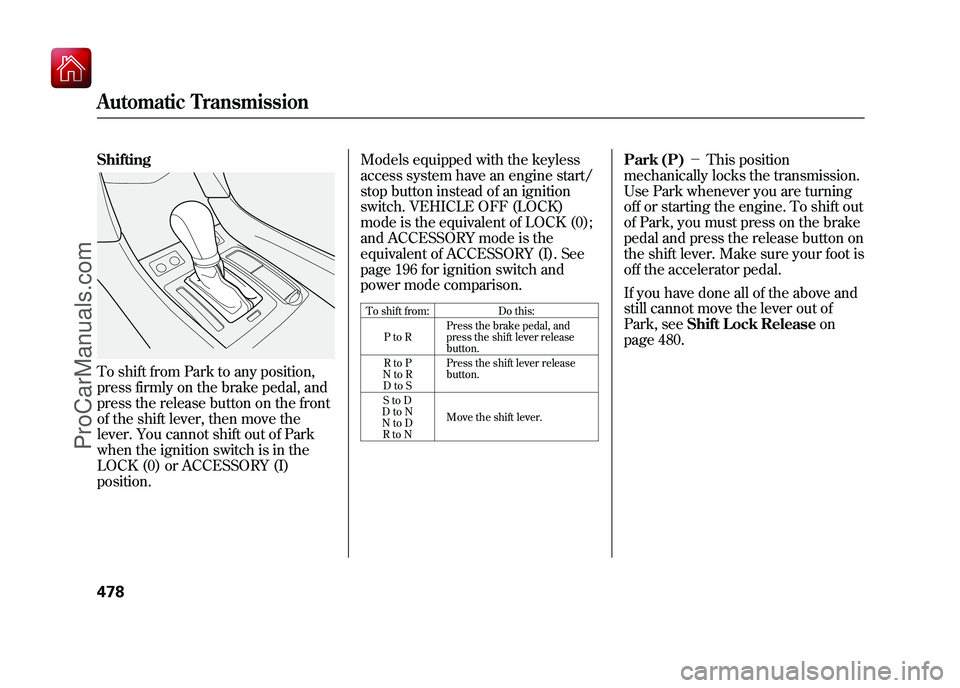
ShiftingTo shift from Park to any position,
press firmly on the brake pedal, and
press the release button on the front
of the shift lever, then move the
lever. You cannot shift out of Park
when the ignition switch is in the
LOCK (0) or ACCESSORY (I)
position.Models equipped with the keyless
access system have an engine start/
stop button instead of an ignition
switch. VEHICLE OFF (LOCK)
mode is the equivalent of LOCK (0);
and ACCESSORY mode is the
equivalent of ACCESSORY (I). See
page 196 for ignition switch and
power mode comparison.
To shift from:
Do this:
PtoR Press the brake pedal, and
press the shift lever release
button.
RtoP
NtoR DtoS Press the shift lever release
button.
StoD
DtoN
NtoD RtoN Move the shift lever.
Park (P)
-This position
mechanically locks the transmission.
Use Park whenever you are turning
off or starting the engine. To shift out
of Park, you must press on the brake
pedal and press the release button on
the shift lever. Make sure your foot is
off the accelerator pedal.
If you have done all of the above and
still cannot move the lever out of
Park, see Shift Lock Release on
page 480.
Automatic Transmission47809/10/28 17:15:37 10 ACURA ZDX KA KC New North America Own 50 31SZN600 enu
ProCarManuals.com
Page 484 of 645
You must also press the release
button to shift into Park. To avoid
transmission damage, come to a
complete stop before shifting into
Park.On models without keyless accesssystemThe shift lever must be in Park
before you can remove the key from
the ignition switch.On models with keyless access
systemThe shift lever must be in Park
before you change the power mode
from ON to VEHICLE OFF (LOCK). Reverse (R)
-Press the brake
pedal and press the release button on
the front of the shift lever to shift
from Park to reverse. To shift from
reverse to neutral, come to a
complete stop, and then shift. Press
the release button before shifting
into reverse from neutral.
Neutral (N) -Use neutral if you
need to restart a stalled engine, or if
it is necessary to stop briefly with the
engine idling. Shift to the Park
position if you need to leave your
vehicle for any reason. Press on the
brake pedal when you are moving
the shift lever from neutral to
another gear. Drive (D)
-Use this position for
your normal driving. The
transmission automatically selects a
suitable gear (1 through 6) for your
speed and acceleration. You may
notice the transmission shifting up at
higher engine speeds when the
engine is cold. This helps the engine
warm up faster.
CONTINUED
Automatic Transmission
479
Driving
09/10/28 17:15:37 10 ACURA ZDX KA KC New North America Own 50 31SZN600 enu
ProCarManuals.com