brake ACURA ZDX 2010 User Guide
[x] Cancel search | Manufacturer: ACURA, Model Year: 2010, Model line: ZDX, Model: ACURA ZDX 2010Pages: 645, PDF Size: 17.13 MB
Page 147 of 645

If you see a‘‘CHECK DRL SYSTEM ’’
message on the multi-information
display, there is a problem with the
daytime running light system. Take
your vehicle to a dealer to have it
checked.
When the multi-information display
shows a ‘‘DRL OFF ’’message, the
daytime running lights are off. DRL
will turn on when the parking brake
is released. Automatic Lighting Off Feature
This feature turns off the headlights,
all other exterior lights, and the
instrument panel lights within 15
seconds after you remove the key
and close the driver's door.
To change the
‘‘HEADLIGHT AUTO
OFF TIMER ’’setting, see page 125.
The automatic lighting off feature
activates if you remove the key (or
the vehicle is in VEHICLE OFF
mode on models with keyless access
system), and open or close driver's
door with the headlight switch in the
‘‘
’’ or ‘‘
’’position, or the
lights turned on in the ‘‘AUTO ’’
position. If you turn the ignition switch to the
LOCK (0) position with the headlight
switch on, but do not open the door,
the lights turn off after 10 minutes (3
minutes, if the switch is in the
‘‘
AUTO ’’position).
The lights turn on again when you
unlock or open the driver's door.
If you unlock the door, but do not
open it within 15 seconds, the lights
go off. With the driver's door open,
you will hear a lights-on reminder
chime.
Models equipped with the keyless
access system have an engine start/
stop button instead of an ignition
switch. VEHICLE OFF (LOCK)
mode is the equivalent of LOCK (0).
See page 196 for ignition switch and
power mode comparison.
Turn Signal and Headlights14209/10/28 17:15:37 10 ACURA ZDX KA KC New North America Own 50 31SZN600 enu
ProCarManuals.com
Page 172 of 645

Reverse this procedure to return the
seat-back to the upright position. Pull
on the seat-back to make sure it is
latched. If the seat-back is not
latched fully, the seat belt will not
work properly and you will see the
red indicator behind the handle as
shown.
Do not put any heavy items on the
seat-back when it is folded down.
Make sure that the folded seat-back
does not press against the front
passenger's seat, as this could cause
the weight sensors to work
improperly.
Make sure the seat-back and seat
cushion are locked securely and all
rear shoulder belts are positioned in
front of the rear seat-backs.
Make sure all items in the cargo area
are secured. Loose items can fly
forward and cause injury if you have
to brake hard (SeeCarrying Cargo
on page 465). Front Seat Heaters
On models without adaptive cruise
control (ACC)Both front seats are equipped with
seat heaters. Because of the sensors
for the side airbag cutoff system,
there is no heater in the passenger's
seat-back. The ignition switch must
be in the ON (II) position to use the
heaters. Models equipped with the keyless
access system have an engine start/
stop button instead of an ignition
switch. ON mode is the equivalent of
ON (II). For more information, see
pages 194 and 196.
Push the right side of the switch, HI,
to rapidly heat up the seat. After the
seat reaches a comfortable
temperature, select LO by pushing
the left side of the switch. This will
keep the seat warm.
Passenger's
Seat
HEATERS Driver's
Seat
Front seat
HI
LOW
CONTINUED
Seats, Front Seat Heaters
167
Instruments and Controls
09/10/28 17:15:37 10 ACURA ZDX KA KC New North America Own 50 31SZN600 enu
ProCarManuals.com
Page 181 of 645
You can open and close the
panoramic glass roof and sunshade
for up to 10 minutes after you turn off
the ignition switch , or on models
with keyless access system, set the
power mode to VEHICLE OFF
(LOCK). Opening either front door
cancels this function.If you try to open the panoramic glass
roof in below-freezing temperatures, or
when it is covered with snow or ice, you
can damage the panoramic glass roof
panel or its motor.
You can use the remote transmitter/
keyless access remote or the key/
built-in key to operate the panoramic
glass roof and sunshade from the
outside. Refer to page 172 for details.Parking Brake
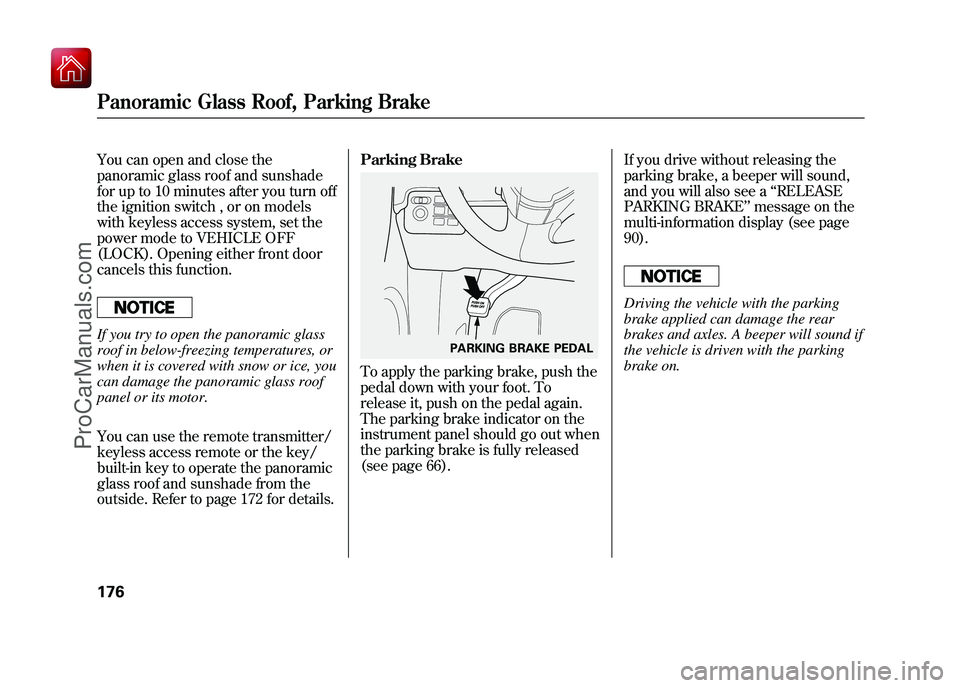
To apply the parking brake, push the
pedal down with your foot. To
release it, push on the pedal again.
The parking brake indicator on the
instrument panel should go out when
the parking brake is fully released
(see page 66).
If you drive without releasing the
parking brake, a beeper will sound,
and you will also see a
‘‘RELEASE
PARKING BRAKE ’’message on the
multi-information display (see page
90).
Driving the vehicle with the parking
brake applied can damage the rear
brakes and axles. A beeper will sound if
the vehicle is driven with the parking
brake on.
PARKING BRAKE PEDAL
Panoramic Glass Roof, Parking Brake17609/10/28 17:15:37 10 ACURA ZDX KA KC New North America Own 50 31SZN600 enu
ProCarManuals.com
Page 199 of 645
Engine Start/Stop Button
Operation
This system uses the engine start/
stop button instead of an ignition
switch to start and stop the engine. If
you are carrying the keyless access
remote, you can start the engine by
pressing the engine start/stop button
with the brake pedal depressed. You
can also stop the engine by pushing
this button when the vehicle is
stopped.
Switching the Power ModesThe keyless access system has four
power modes: VEHICLE OFF
(LOCK), ACCESSORY, ON, and
START.
Each time you press the engine
start/stop button while carrying the
keyless access remote, the power
mode switches between VEHICLE
OFF (LOCK), ACCESSORY, and
ON.
You can start the engine at any time
by pressing the engine start/stop
button, while pressing the brake
pedal, with the shift lever in Park or
neutral position.
Changing the Power Mode withoutStarting the EngineTo change the power mode without
turning on the engine, press the
engine start/stop button without
pressing the brake pedal. The power
mode will be changed as shown on
the next page.
Keyless Access System19409/10/28 17:15:37 10 ACURA ZDX KA KC New North America Own 50 31SZN600 enu
ProCarManuals.com
Page 200 of 645
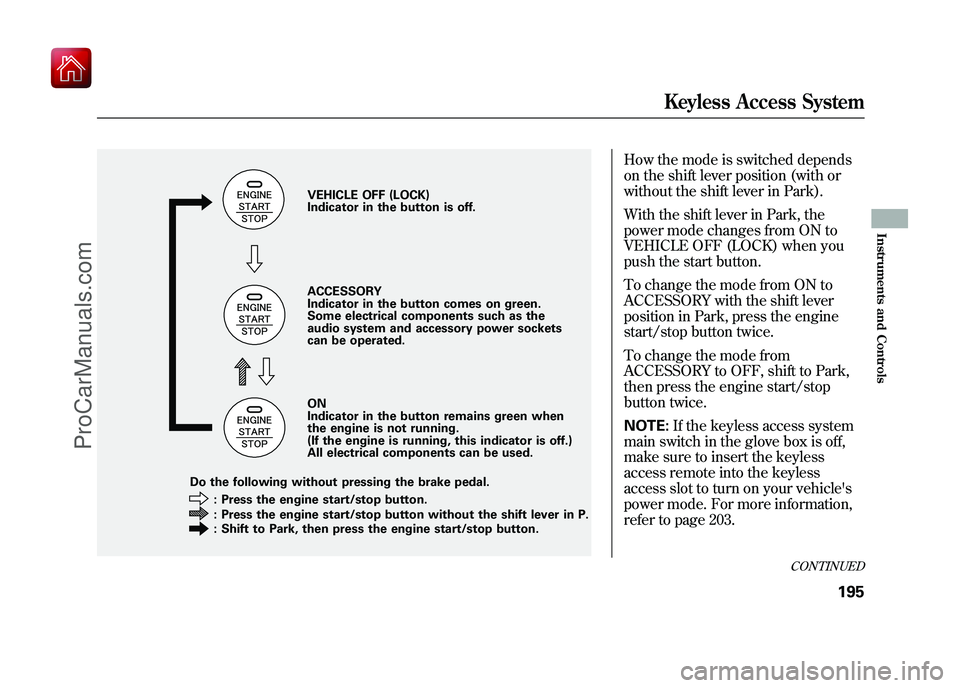
How the mode is switched depends
on the shift lever position (with or
without the shift lever in Park).
With the shift lever in Park, the
power mode changes from ON to
VEHICLE OFF (LOCK) when you
push the start button.
To change the mode from ON to
ACCESSORY with the shift lever
position in Park, press the engine
start/stop button twice.
To change the mode from
ACCESSORY to OFF, shift to Park,
then press the engine start/stop
button twice.
NOTE:If the keyless access system
main switch in the glove box is off,
make sure to insert the keyless
access remote into the keyless
access slot to turn on your vehicle's
power mode. For more information,
refer to page 203.
VEHICLE OFF (LOCK)
Indicator in the button is off.
ACCESSORY
Indicator in the button comes on green.
Some electrical components such as the
audio system and accessory power sockets
can be operated.
ON
Indicator in the button remains green when
the engine is not running.
(If the engine is running, this indicator is off.)
All electrical components can be used.
: Press the engine start/stop button.
: Press the engine start/stop button without the shift lever in P.
: Shift to Park, then press the engine start/stop button.
Do the following without pressing the brake pedal.
CONTINUED
Keyless Access System
195
Instruments and Controls
09/10/28 17:15:37 10 ACURA ZDX KA KC New North America Own 50 31SZN600 enu
ProCarManuals.com
Page 202 of 645
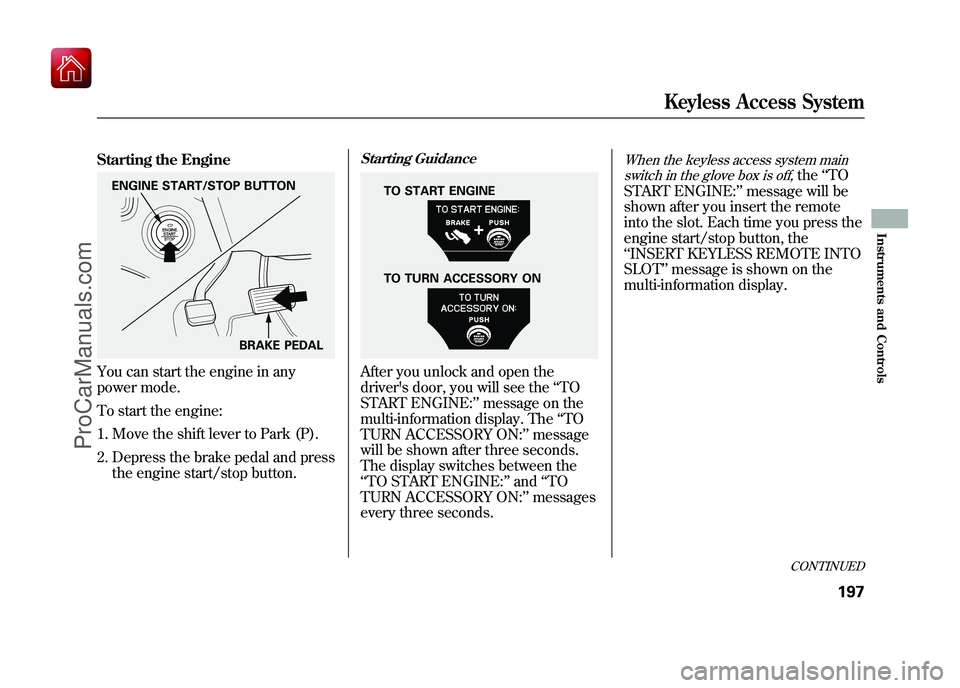
Starting the EngineYou can start the engine in any
power mode.
To start the engine:1. Move the shift lever to Park (P).
2. Depress the brake pedal and press the engine start/stop button.
Starting GuidanceAfter you unlock and open the
driver's door, you will see the ‘‘TO
START ENGINE: ’’message on the
multi-information display. The ‘‘TO
TURN ACCESSORY ON: ’’message
will be shown after three seconds.
The display switches between the
‘‘ TO START ENGINE: ’’and ‘‘TO
TURN ACCESSORY ON: ’’messages
every three seconds.
When the keyless access system main
switch in the glove box is off,
the ‘‘TO
START ENGINE: ’’message will be
shown after you insert the remote
into the slot. Each time you press the
engine start/stop button, the
‘‘ INSERT KEYLESS REMOTE INTO
SLOT ’’message is shown on the
multi-information display.
ENGINE START/STOP BUTTON
BRAKE PEDAL
TO TURN ACCESSORY ON TO START ENGINE
CONTINUED
Keyless Access System
197
Instruments and Controls
09/10/28 17:15:37 10 ACURA ZDX KA KC New North America Own 50 31SZN600 enu
ProCarManuals.com
Page 205 of 645
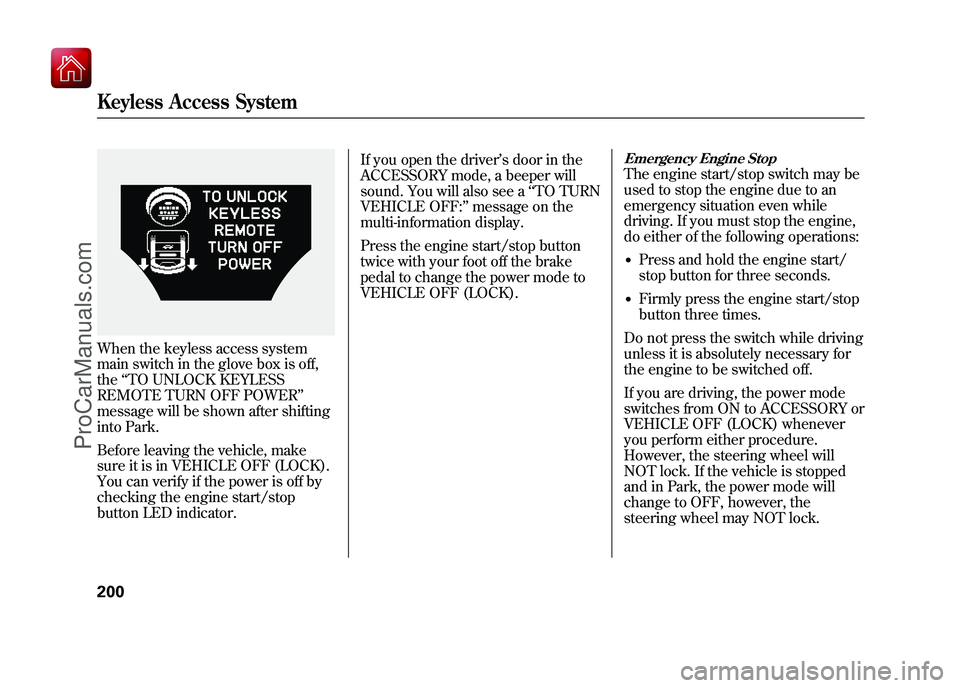
When the keyless access system
main switch in the glove box is off,
the‘‘TO UNLOCK KEYLESS
REMOTE TURN OFF POWER ’’
message will be shown after shifting
into Park.
Before leaving the vehicle, make
sure it is in VEHICLE OFF (LOCK).
You can verify if the power is off by
checking the engine start/stop
button LED indicator. If you open the driver’
s door in the
ACCESSORY mode, a beeper will
sound. You will also see a ‘‘TO TURN
VEHICLE OFF: ’’message on the
multi-information display.
Press the engine start/stop button
twice with your foot off the brake
pedal to change the power mode to
VEHICLE OFF (LOCK).
Emergency Engine StopThe engine start/stop switch may be
used to stop the engine due to an
emergency situation even while
driving. If you must stop the engine,
do either of the following operations:●Press and hold the engine start/
stop button for three seconds.●Firmly press the engine start/stop
button three times.
Do not press the switch while driving
unless it is absolutely necessary for
the engine to be switched off.
If you are driving, the power mode
switches from ON to ACCESSORY or
VEHICLE OFF (LOCK) whenever
you perform either procedure.
However, the steering wheel will
NOT lock. If the vehicle is stopped
and in Park, the power mode will
change to OFF, however, the
steering wheel may NOT lock.
Keyless Access System20009/10/28 17:15:37 10 ACURA ZDX KA KC New North America Own 50 31SZN600 enu
ProCarManuals.com
Page 385 of 645
Cruise control may not hold the set
speed when you are going up and
down hills. If your vehicle speed
increases going down a hill, use the
brakes to slow down. This will cancel
the cruise control. To resume the set
speed, press the RES/ACCEL
button. The CRUISE CONTROL
indicator on the instrument panel will
come back on.Changing the Set Speed
You can increase the set cruising
speed in any of these ways:
●Press and hold the RES/ACCEL
button. When you reach the
desired cruising speed, release the
button.●Push on the accelerator pedal.
Accelerate to the desired cruising
speed, then press the SET/
DECEL button.●To increase the speed in very
small amounts, tap the RES/
ACCEL button. Each time you do
this, your vehicle will speed up
about 1 mph (1.6 km/h).You can decrease the set cruising
speed in any of these ways:
●Press and hold the SET/DECEL
button. Release the button when
you reach the desired speed.●To slow down in very small
amounts, tap the SET/DECEL
button. Each time you do this,
your vehicle will slow down about
1 mph (1.6 km/h).●Tap the brake pedal lightly with
your foot. The CRUISE CONTROL
indicator on the instrument panel
will go out. When the vehicle
slows to the desired speed, press
the SET/DECEL button.
Cruise Control38009/10/28 17:15:37 10 ACURA ZDX KA KC New North America Own 50 31SZN600 enu
ProCarManuals.com
Page 386 of 645
Even with cruise control turned on,
you can still use the accelerator pedal
to speed up for passing. After
completing the pass, take your foot
off the accelerator pedal. The vehicle
will return to the set cruising speed.
Resting your foot on the brake pedal
causes cruise control to cancel.Canceling Cruise Control
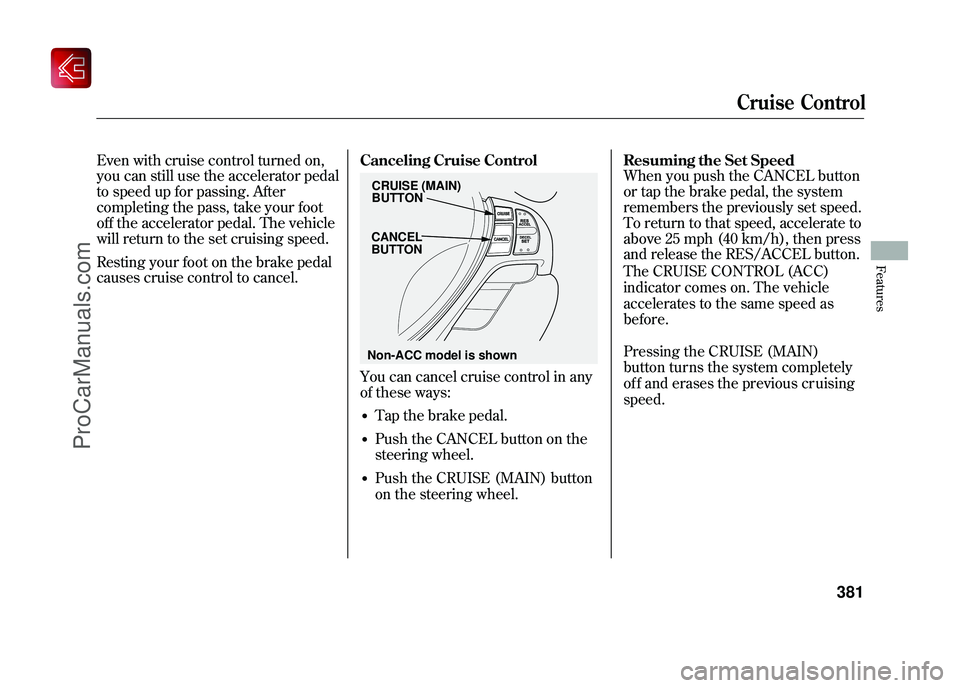
You can cancel cruise control in any
of these ways:
Tap the brake pedal.
Push the CANCEL button on the
steering wheel.
Resuming the Set Speed
When you push the CANCEL button
or tap the brake pedal, the system
remembers the previously set speed.
To return to that speed, accelerate to
above 25 mph (40 km/h), then press
and release the RES/ACCEL button.
CRUISE (MAIN)
BUTTON
CANCEL
BUTTON
Cruise Control
381
Features
09/10/28 17:15:37 10 ACURA ZDX KA KC New North America Own 50 31SZN600 enu
Non-ACC model is shown
Push the CRUISE (MAIN) button
on the steering wheel. The CRUISE CONTROL (ACC)
indicator comes on. The vehicle
accelerates to the same speed as
before.
Pressing the CRUISE (MAIN)
button turns the system completely
of f and erases the previous cr uising
speed.
ProCarManuals.com
Page 388 of 645
Overview
Adaptive cruise control (ACC) allows
you to maintain a set speed and keep
the vehicle ahead of you and your
vehicle at a safe distance without
having to use the accelerator pedal or
the brake pedal.
When the vehicle ahead of you slows
down or speeds up, ACC senses the
change in distance and compensates
by accelerating or braking your
vehicle to reach the cruising speed
you previously set. The distance
between vehicles is based on your
speed: the faster you go, the longer
the distance will be; the slower you
go, the shorter it will be.If the vehicle ahead of you slows
down suddenly or another vehicle
cuts in front of your vehicle, ACC
alerts you by sounding a beeper and
displaying a message on the multi-
information display.
The ACC radar sensor in the front
grille can detect and monitor the
distance of a vehicle up to 328 feet
(100 meters) ahead of your vehicle.
For more information on the radar
sensor, see page 499.
Important Safety Precautions
As with any system, there are limits
to ACC. Inappropriate use of ACC
can result in a serious accident. Use
the brake pedal whenever necessary,
and always keep a safe distance
between your vehicle and other
vehicles.Do not use ACC under these
conditions:
●In poor visibility.●In heavy traffic.●When you must slow down and
speed up repeatedly.●On winding roads.●When you enter a toll gate,
interchange, service area, parking
area, etc. In these areas, there is
no vehicle ahead of you, but ACC
would still try to accelerate to your
set speed.●In bad weather (rain, fog, snow,
etc.)●On a slippery road (for example a
road covered with ice or snow).
CONTINUED
Adaptive Cruise Control (ACC)
383
Features
09/10/28 17:15:37 10 ACURA ZDX KA KC New North America Own 50 31SZN600 enu
ProCarManuals.com