change wheel ACURA ZDX 2010 User Guide
[x] Cancel search | Manufacturer: ACURA, Model Year: 2010, Model line: ZDX, Model: ACURA ZDX 2010Pages: 645, PDF Size: 17.13 MB
Page 266 of 645
REPEAT OFF-This feature turns
off the repeat mode.
REPEAT ONE TRK -This feature
continuously plays a file. You will see
REPEAT ONE TRK icon in the
display. Select NORMAL PLAY or
REPEAT OFF to turn it off.
Pressing either side of the SKIP bar
or turning the selector knob changes
the file while keeping the repeat
feature.
Pressing either side of the SKIP bar
or turning the selector knob changes
a file while keeping the shuffle
function.
NOTE:
Available operating functions vary on
models or versions. Some functions
may not be available on the vehicle's
audio system. To Stop Playing Your iPod
To play the radio, press the AM/FM,
or
button. Press the DISC
button to switch to the disc mode.
Press the USB/AUX button to switch
the audio mode between the
Bluetooth
®audio and iPod.
You can also press the MODE button
on the steering wheel to change
modes.
Disconnecting an iPodYou can disconnect the iPod at any
time when you see the ‘‘OK to
disconnect ’’message
ꭧin the iPod
display. Always make sure you see
the ‘‘OK to disconnect ’’message in
the iPod display before you
disconnect it. Make sure to follow
the iPod's instructions on how to
disconnect the dock connector from
the USB adapter cable.
ꭧ : The displayed message may
vary on models or versions. On
some models, there is no
message to disconnect.
If you reconnect the same iPod, the
system may begin playing where it
left off, depending on what mode the
iPod is in when it is reconnected.
CONTINUED
Playing an iPod
®(Models without navigation system)
261
Features
09/10/28 17:15:37 10 ACURA ZDX KA KC New North America Own 50 31SZN600 enu
ProCarManuals.com
Page 275 of 645
SCAN FLD-This function samples
the first file in each folder in the
order they are stored. To activate the
folder scan feature, press and release
the SCAN side of the SCAN/A.SEL
bar repeatedly. You will see SCAN
FLD icon in the display. You will get
a 10 second sampling of the first file
in each folder. Press and hold the
SCAN side of the bar to get out of the
folder scan mode and play the last
file sampled.
You can also select the folder scan
feature from the menu items with the
selector knob (see page 268).
Select ‘‘NORMAL PLAY ’’to turn
either scan feature off. Pressing
either side of the CATEGORY or
SKIP bar also turns off the feature. To Stop Playing a USB Flash
Memory Device
To change modes, press the AM/FM
or
button. Press the DISC
button to switch to the disc mode.
Press the USB/AUX button to switch
the audio mode between the USB or
Bluetooth
®audio.
You can also press the MODE button
on the steering wheel to change
modes.
If you reconnect the same USB flash
memory device, the system will
begin playing where it left off.
Disconnecting a USB Flash Memory DeviceYou can disconnect the USB flash
memory device at any time even if
the USB mode is selected on the
audio system. Make sure to follow
the USB flash memory device ’s
instructions when you remove it. USB Flash Memory Device Error
Messages
If you see an error message in the
display, see page 271.
Playing a USB Flash Memory Device (Models without navigation system)27009/10/28 17:15:37 10 ACURA ZDX KA KC New North America Own 50 31SZN600 enu
ProCarManuals.com
Page 280 of 645
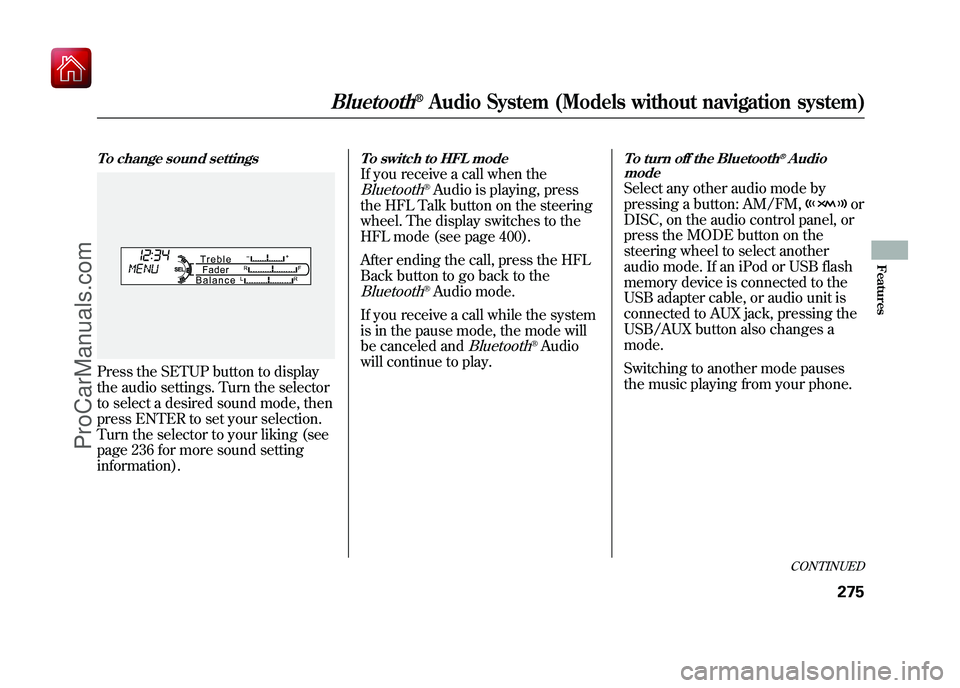
To change sound settingsPress the SETUP button to display
the audio settings. Turn the selector
to select a desired sound mode, then
press ENTER to set your selection.
Turn the selector to your liking (see
page 236 for more sound setting
information).
To switch to HFL modeIf you receive a call when theBluetooth
®Audio is playing, press
the HFL Talk button on the steering
wheel. The display switches to the
HFL mode (see page 400).
After ending the call, press the HFL
Back button to go back to the
Bluetooth
®Audio mode.
If you receive a call while the system
is in the pause mode, the mode will
be canceled and
Bluetooth
®Audio
will continue to play.
To turn off the Bluetooth
®Audio
mode
Select any other audio mode by
pressing a button: AM/FM,
or
DISC, on the audio control panel, or
press the MODE button on the
steering wheel to select another
audio mode. If an iPod or USB flash
memory device is connected to the
USB adapter cable, or audio unit is
connected to AUX jack, pressing the
USB/AUX button also changes a
mode.
Switching to another mode pauses
the music playing from your phone.
CONTINUED
Bluetooth
®Audio System (Models without navigation system)
275
Features
09/10/28 17:15:37 10 ACURA ZDX KA KC New North America Own 50 31SZN600 enu
ProCarManuals.com
Page 369 of 645
To switch to HFL modeIf you receive a call when theBluetooth
®Audio is playing, press
the PICK-UP button on the steering
wheel. The screen and the display
switch to the HFL mode (see page
417).
After ending the call, press the
HANG-UP button to go back to the
Bluetooth
®Audio mode.
To turn off the Bluetooth
®Audio
mode
Select any other audio mode by
pressing a button; AM/FM,
or
DISC on the audio control panel, or
press the MODE button on the
steering wheel to select another
audio mode.
Switching to another mode pauses
the music playing from your phone.
As required by the FCC:
This device complies with Part 15 of theFCC rules. Operation is subject to the
following two conditions: (1) This devicemay not cause harmful interference, and(2) this device must accept any
interference received, includinginterference that may cause undesiredoperation.
Changes or modifications not expresslyapproved by the party responsible for
compliance could void the user'sauthority to operate the equipment.
This device complies with IndustryCanada Standard RSS-210.
Operation is subject to the following twoconditions: (1) this device may not causeinterference, and (2) this device must
accept any interference that may causeundesired operation of the device.
Bluetooth
®Audio System (Models with navigation system)
36409/10/28 17:15:37 10 ACURA ZDX KA KC New North America Own 50 31SZN600 enu
ProCarManuals.com
Page 376 of 645
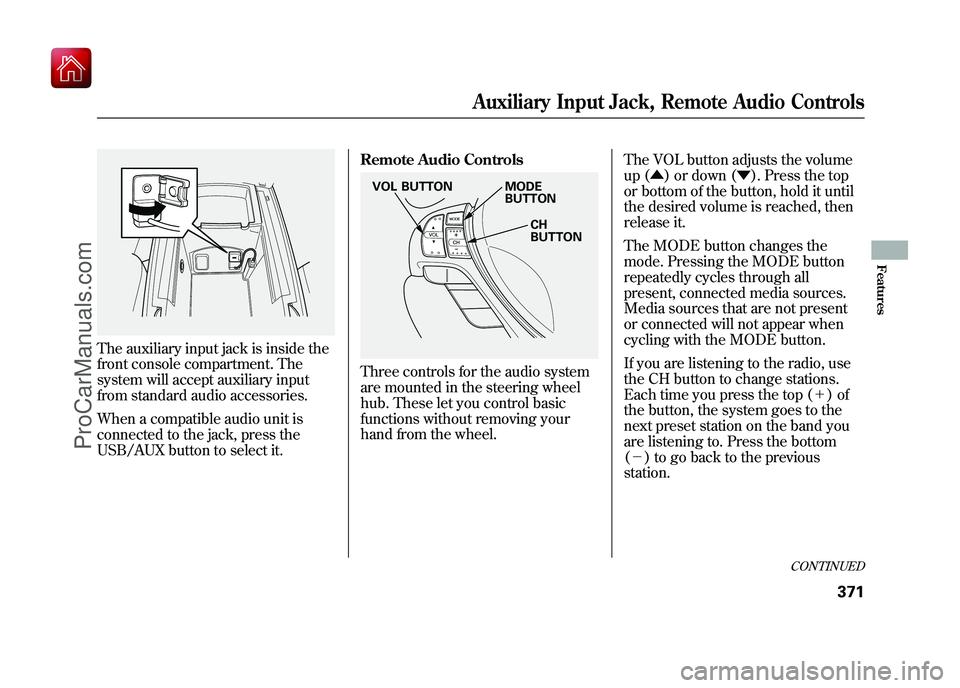
The auxiliary input jack is inside the
front console compartment. The
system will accept auxiliary input
from standard audio accessories.
When a compatible audio unit is
connected to the jack, press the
USB/AUX button to select it.Remote Audio Controls
Three controls for the audio system
are mounted in the steering wheel
hub. These let you control basic
functions without removing your
hand from the wheel.
The VOL button adjusts the volume
up (▲
) or down (▼ ). Press the top
or bottom of the button, hold it until
the desired volume is reached, then
release it.
The MODE button changes the
mode. Pressing the MODE button
repeatedly cycles through all
present, connected media sources.
Media sources that are not present
or connected will not appear when
cycling with the MODE button.
If you are listening to the radio, use
the CH button to change stations.
Each time you press the top (+ )of
the button, the system goes to the
next preset station on the band you
are listening to. Press the bottom
(- ) to go back to the previous
station.
MODE
BUTTON
CH
BUTTON
VOL BUTTON
CONTINUED
Auxiliary Input Jack, Remote Audio Controls
371
Features
09/10/28 17:15:37 10 ACURA ZDX KA KC New North America Own 50 31SZN600 enu
ProCarManuals.com
Page 405 of 645
●Try to reduce all background
noise. If the microphone picks up
voices other than yours,
commands may be misinterpreted.●Many commands can be spoken
together. For example, you can say
‘‘Call 123-456-7890 ’’or ‘‘Dial
Peter. ’’●To change the volume level of
HFL, use the audio system volume
knob or the steering wheel volume
controls.
Help Features●To hear general HFL information,
including help on pairing a phone
or setting up the system, say
‘‘Tutorial. ’’●For help at any time, including a
list of available commands, say
‘‘Hands free help. ’’
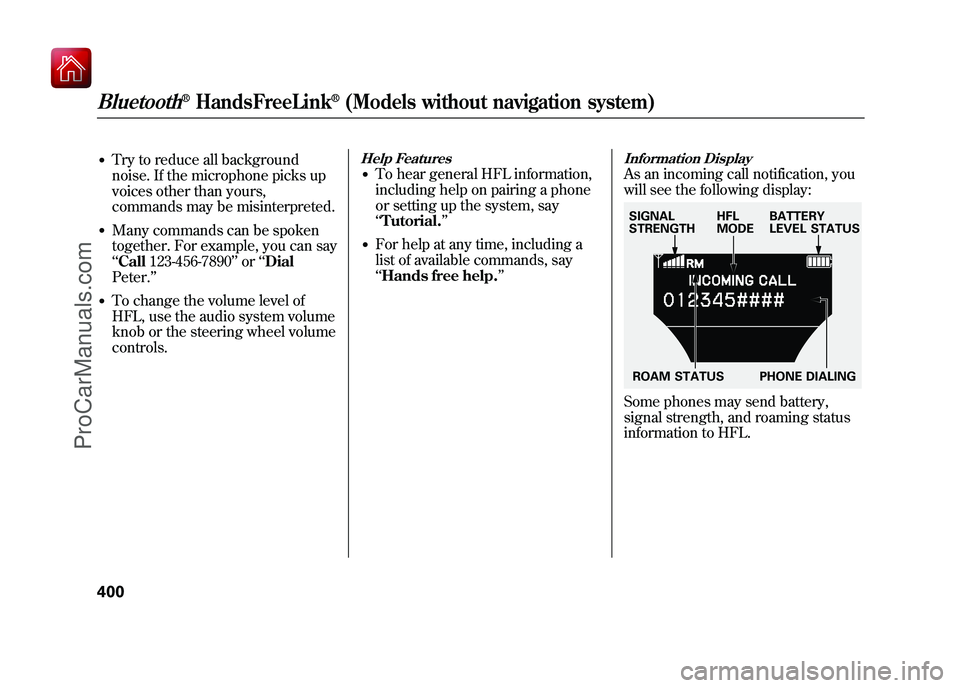
Information DisplayAs an incoming call notification, you
will see the following display:Some phones may send battery,
signal strength, and roaming status
information to HFL.SIGNAL
STRENGTHHFL
MODEBATTERY
LEVEL STATUS
ROAM STATUS PHONE DIALING
Bluetooth
®HandsFreeLink
®(Models without navigation system)
40009/10/28 17:15:37 10 ACURA ZDX KA KC New North America Own 50 31SZN600 enu
ProCarManuals.com
Page 422 of 645
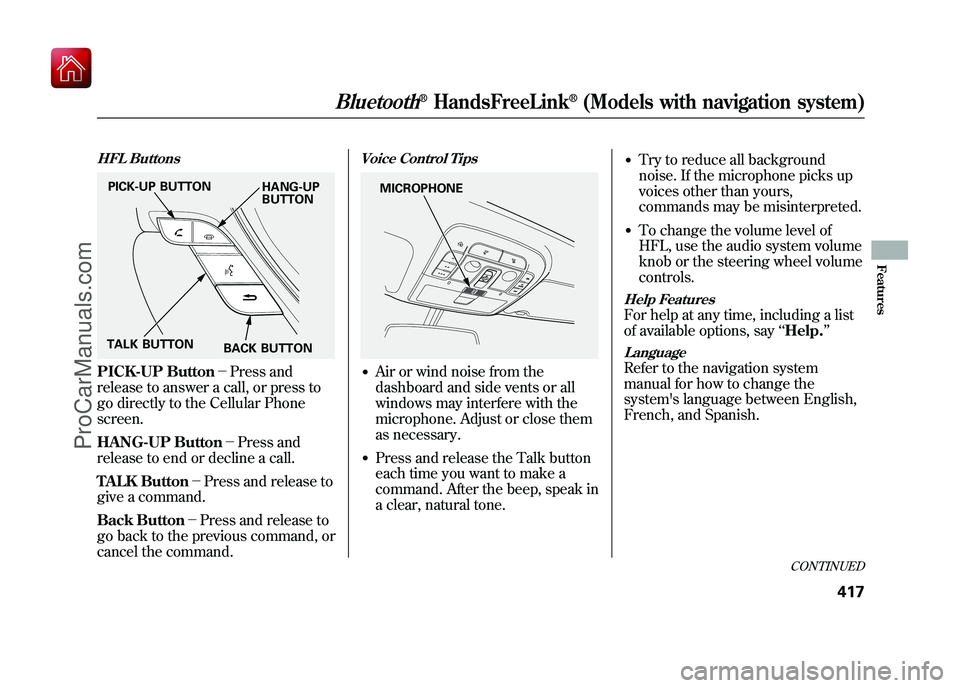
HFL ButtonsPICK-UP Button-Press and
release to answer a call, or press to
go directly to the Cellular Phone
screen.
HANG-UP Button -Press and
release to end or decline a call.
TALK Button -Press and release to
give a command.
Back Button -Press and release to
go back to the previous command, or
cancel the command.
Voice Control Tips●Air or wind noise from the
dashboard and side vents or all
windows may interfere with the
microphone. Adjust or close them
as necessary.●Press and release the Talk button
each time you want to make a
command. After the beep, speak in
a clear, natural tone.
●Try to reduce all background
noise. If the microphone picks up
voices other than yours,
commands may be misinterpreted.●To change the volume level of
HFL, use the audio system volume
knob or the steering wheel volume
controls.Help FeaturesFor help at any time, including a list
of available options, say ‘‘Help. ’’LanguageRefer to the navigation system
manual for how to change the
system's language between English,
French, and Spanish.
PICK-UP BUTTON
HANG-UP
BUTTON
TALK BUTTON BACK BUTTON
MICROPHONE
CONTINUED
Bluetooth
®HandsFreeLink
®(Models with navigation system)
417
Features
09/10/28 17:15:37 10 ACURA ZDX KA KC New North America Own 50 31SZN600 enu
ProCarManuals.com
Page 492 of 645
The super handling-all wheel drive
(SH-AWD) system is a full time all-
wheel-drive system that
automatically controls and transfers
varying amounts of engine torque to
all wheels independently, according
to the driving conditions.
While the SH-AWD system helps to
enhance the vehicle's driving
stability in all situations, it is still
your responsibility to drive and
corner at reasonable speeds and to
leave a sufficient margin of safety.SH-AWD Torque Distribution
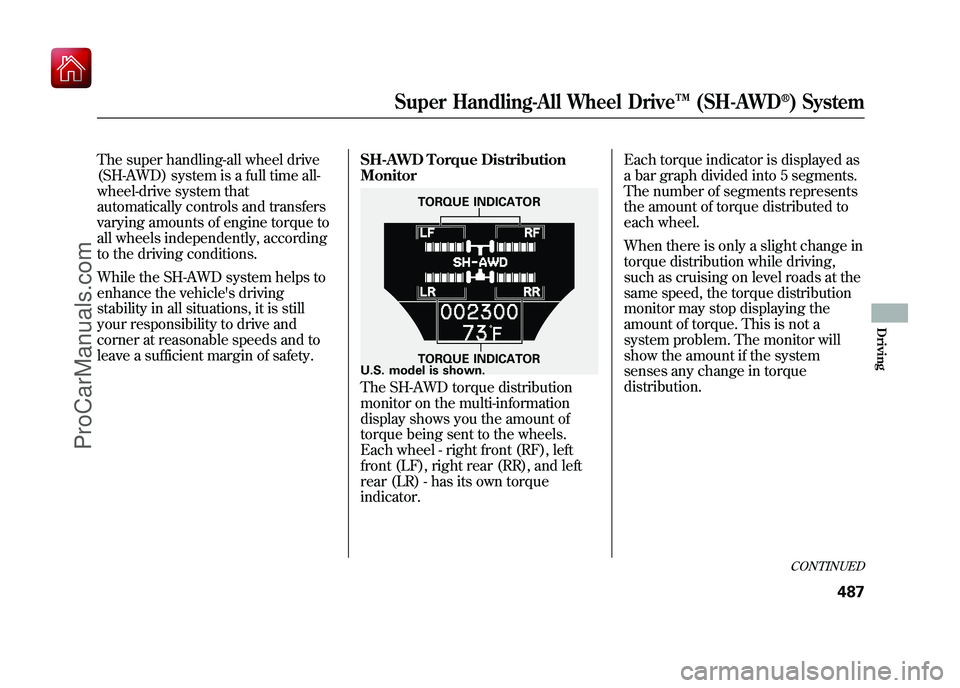
Monitor
The SH-AWD torque distribution
monitor on the multi-information
display shows you the amount of
torque being sent to the wheels.
Each wheel - right front (RF), left
front (LF), right rear (RR), and left
rear (LR) - has its own torque
indicator.Each torque indicator is displayed as
a bar graph divided into 5 segments.
The number of segments represents
the amount of torque distributed to
each wheel.
When there is only a slight change in
torque distribution while driving,
such as cruising on level roads at the
same speed, the torque distribution
monitor may stop displaying the
amount of torque. This is not a
system problem. The monitor will
show the amount if the system
senses any change in torque
distribution.
TORQUE INDICATOR
TORQUE INDICATOR
U.S. model is shown.
CONTINUED
Super Handling-All Wheel Drive ™(SH-AWD
®) System
487
Driving
09/10/28 17:15:37 10 ACURA ZDX KA KC New North America Own 50 31SZN600 enu
ProCarManuals.com
Page 499 of 645
Changing a Tire with TPMS
If you have a flat tire, the low tire
pressure/TPMS and tire monitor
indicators will come on. Replace the
indicated flat tire with the compact
spare tire (see page 579).
After the flat tire is replaced with the
spare tire, the low tire pressure/
TPMS indicator stays on while
driving. After several miles
(kilometers) driving, this indicator
begins to flash, then stays on again.
You will also see a‘‘CHECK TPMS
SYSTEM ’’message on the multi-
information display. This is normal;
the system cannot monitor the spare
tire pressure. Manually check the
spare tire pressure to be sure it is
correct. This indicator and the warning
message on the multi-information
display will go off, after several miles
(kilometers) driving, when the spare
tire is replaced with the specified
regular tire equipped with the tire
pressure monitor sensor.
Each wheel is equipped with a tire
pressure sensor. You must use
TPMS specific wheels. It is
recommended that you always have
your tires serviced by your dealer or
a qualified technician.
Never use a puncture-repairing agent
in a flat tire. If used, you will have to
replace the tire pressure sensor.
Have the flat tire repaired by your
dealer as soon as possible.
If the low tire pressure/TPMS
indicator and the low tire position on
the low tire pressure monitor do not
go out after inflating the tires to the
specified values, have your dealer
check the system as soon as
possible.
As required by the FCC:
This device complies with Part 15 of theFCC rules. Operation is subject to the
following two conditions: (1) This devicemay not cause harmful interference, and(2) this device must accept any
interference received, includinginterference that may cause undesiredoperation.
Changes or modifications not expresslyapproved by the party responsible for
compliance could void the user'sauthority to operate the equipment.
This device complies with IndustryCanada Standard RSS-210.
Operation is subject to the following twoconditions: (1) this device may not causeinterference, and (2) this device must
accept any interference that may causeundesired operation of the device.
Tire Pressure Monitoring System (TPMS)49409/10/28 17:15:37 10 ACURA ZDX KA KC New North America Own 50 31SZN600 enu
ProCarManuals.com
Page 502 of 645
If the ABS indicator and the brake
system indicator come on together,
and the parking brake is fully
released, the EBD system may also
be shut down.
Test your brakes as instructed on
page 594. If the brakes feel normal,
drive slowly and have your vehicle
repaired by your dealer as soon as
possible. Avoid sudden hard braking
which could cause the rear wheels to
lock up and possibly lead to a loss of
control.Important Safety Reminders
ABS does not reduce the time or
distance it takes to stop the
vehicle.
It only helps with steering
control during braking.
ABS will not prevent a skid that
results from changing direction
abruptly, such as trying to take a
corner too fast or making a sudden
lane change. Always drive at a safe
speed for the road and weather
conditions. ABS cannot prevent a loss of
stability.
Always steer moderately
when you are braking hard. Severe
or sharp steering wheel movement
can still cause your vehicle to veer
into oncoming traffic or off the road.
A vehicle with ABS may require a
longer distance to stop on loose or
uneven surfaces, such as gravel or
snow, than a vehicle without anti-
lock.
Anti-lock Brakes (ABS)
497
Driving
09/10/28 17:15:37 10 ACURA ZDX KA KC New North America Own 50 31SZN600 enu
ProCarManuals.com