clock Acura ZDX 2012 Owner's Manual
[x] Cancel search | Manufacturer: ACURA, Model Year: 2012, Model line: ZDX, Model: Acura ZDX 2012Pages: 370, PDF Size: 10.06 MB
Page 2 of 370
This owner’s manual should be considered a permanent part of the
vehicle and should remain with the vehicle when it is sold.
This owner’s manual covers all models of your vehicle. You may find
descriptions of equipment and features that are not on your
particular model.
Images throughout this owner’s manual (including the front cover)
represent features and equipment that are available on some, but
not all, models. Your particular mo del may not have some of these
features.
This owner’s manual is for vehicles sold in the United States and
Canada.
The information an d specifications included in this publication were
in effect at the time of approval for printing. Honda Motor Co., Ltd.
reserves the right, however, to di scontinue or change specifications
or design at any time without notice and without incurring any
obligation.2 Safe Driving P. 21For Safe Driving P. 22 Seat Belts P. 27 Airbags P. 35
2Instrument Panel P. 67Indicators P. 68 Gauges and Multi-Information Display P. 87
2Controls P. 101Setting the Clock P. 102 Locking and Unlocking the Doors P. 103
Opening and Closing the Panoramic Glass Roof P. 126
Adjusting the Seats P. 143
2Features P. 167Audio System P. 168 Audio System Basic Operation P. 171
General Information on the Audio System P. 191
Bluetooth ® HandsFreeLink ® P. 197
2 Driving P. 209Before Driving P. 210 Towing a Trailer P. 215
Rearview Camera P. 262 Refueling P. 263 Fuel Economy P. 266
2Maintenance P. 269Before Performing Maintenance P. 270 Maintenance MinderTM P. 273
Checking and Maintaining Wiper Blades P. 298
Climate Control System Maintenance P. 312
2 Handling the Unexpected P. 317Tools P. 318 If a Tire Goes Flat P. 319
Overheating P. 332 Indicator, Coming On/Blinking P. 334
When You Cannot Unlock the Fuel Fill Door P. 346
2 Information P. 349Specifications P. 350 Identification Numbers P. 351
Emissions Testing P. 354 Warranty Coverages P. 356
Page 13 of 370
11
Quick Reference Guide
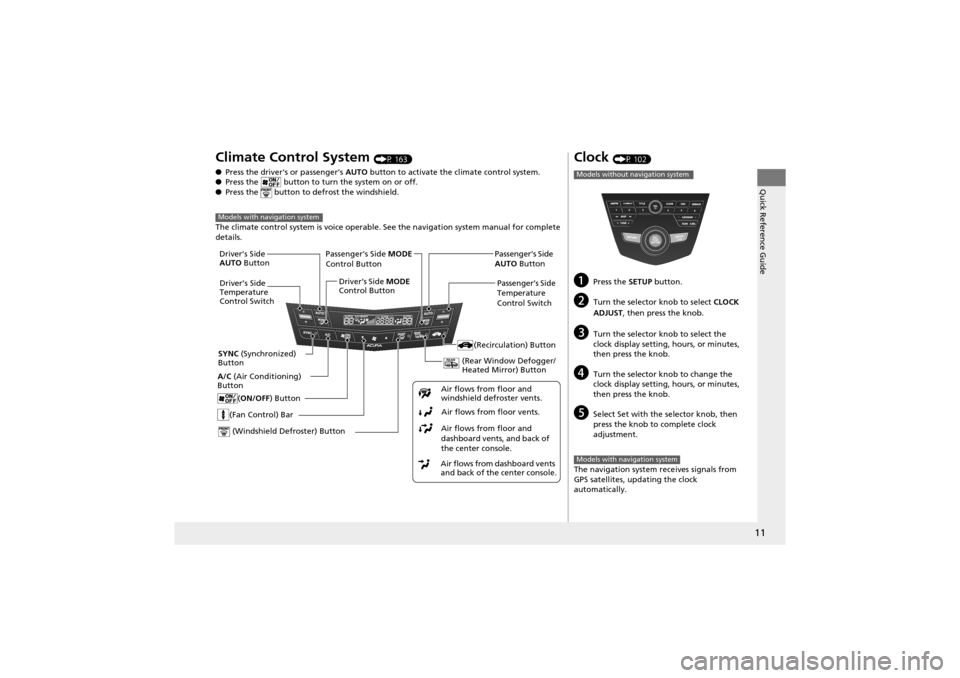
Climate Control System (P 163)
● Press the driver's or passenger’s AUTO button to activate the climate control system.
● Press the button to turn the system on or off.
● Press the button to defrost the windshield.
The climate control syst em is voice operable. See the navi gation system manual for complete
details.
Models with navigation system
(Fan Control) Bar
(Rear Window Defogger/
Heated Mirror) Button
(Windshield Defroster) Button
A/C (Air Conditioning)
Button
Air flows from dashboard vents
and back of the center console.Air flows from floor and
dashboard vents, and back of
the center console.
Air flows from floor vents.
Air flows from floor and
windshield defroster vents.
(ON/OFF
) Button
(Recirculation) Button
Passenger’s Side MODE
Control Button
Passenger’s Side
Temperature
Control Switch
SYNC (Synchronized)
Button Driver’s Side
AUTO
Button
Driver’s Side
Temperature
Control Switch Driver’s Side
MODE
Control Button Passenger’s Side
AUTO
Button
Clock (P 102)
aPress the SETUP button.
bTurn the selector knob to select CLOCK
ADJUST , then press the knob.
cTurn the selector knob to select the
clock display setting, hours, or minutes,
then press the knob.
dTurn the selector kn ob to change the
clock display setting, hours, or minutes,
then press the knob.
eSelect Set with the selector knob, then
press the knob to complete clock
adjustment.
The navigation system re ceives signals from
GPS satellites, updating the clock
automatically.
Models without navigation system
Models with navigation system
Page 103 of 370
101
Controls
This chapter explains how to operate the various controls necessary for driving.
Setting the Clock.............................. 102
Locking and Unlocking the Doors
Key Types and Function s .................. 103
Locking/Unlocking the Doors from the Outside .......................................... 106
Low Keyless Access Remote Signal Strength*...................................... 110Locking/Unlocking the Doors from the
Inside ............................................. 111
Childproof Door Locks ..................... 112
Auto Door Locking/Unlocking .......... 113
Opening and Closing the Tailgate ... 114
Security System ................................ 120
Opening and Closing the Windows ..... 123
Opening and Closing the Panoramic
Glass Roof ........................................ 126
Operating the Switches Around the Steering Wheel ............................... 127
Ignition Switch ................................. 127
ENGINE START/STOP Button
*........... 128
Turn Signals ..................................... 131
Light Switches.................................. 131
Fog Lights ........................................ 133
Daytime Running Lights ................... 133
Wipers and Washers ........................ 134
Brightness Control ........................... 136
Rear Defogger/Heated Door Mirror Button........................................ 137
Driving Position Memory System ...... 138
Adjusting the Steeri ng Wheel .......... 140
Adjusting the Mirrors ....................... 141
Adjusting the Seats .......................... 143
Interior Lights/Interior Convenience
Items ................................................ 151
Interior Lights .................................. 151
Interior Convenience Items .............. 153
Climate Con trol System................... 163
Using Automatic Climate Control .... 163
Synchronized Mode ......................... 165
Automatic Climate Control Sensors ...... 166
* Not available on all models
Page 104 of 370
102
Controls
Setting the Clock
Clock
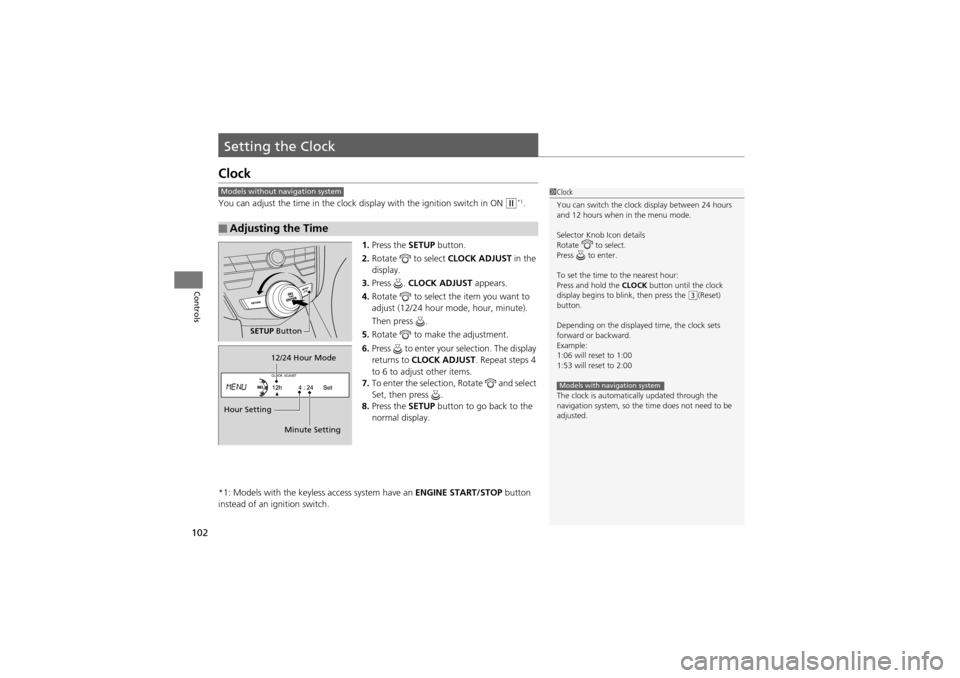
You can adjust the time in the clock display with the ignition switch in ON w*1.
1. Press the SETUP button.
2. Rotate to select CLOCK ADJUST in the
display.
3. Press . CLOCK ADJUST appears.
4. Rotate to select the item you want to
adjust (12/24 hour mode, hour, minute).
Then press .
5. Rotate to make the adjustment.
6. Press to enter your selection. The display
returns to CLOCK ADJUST . Repeat steps 4
to 6 to adjust other items.
7. To enter the selection, Rotate and select
Set, then press .
8. Press the SETUP button to go back to the
normal display.
*1: Models with the keyless access system have an ENGINE START/STOP button
instead of an ignition switch.
■Adjusting the Time
1 Clock
You can switch the clock display between 24 hours
and 12 hours when in the menu mode.
Selector Knob Icon details
Rotate to select.
Press to enter.
To set the time to the nearest hour:
Press and hold the CLOCK button until the clock
display begins to b link, then press the
(3(Reset)
button.
Depending on the displayed time, the clock sets
forward or backward.
Example:
1:06 will reset to 1:00
1:53 will reset to 2:00
The clock is automatically updated through the
navigation system, so the time does not need to be
adjusted.
Models with navigation system
Models without navigation system
SETUP Button
Hour Setting 12/24 Hour Mode
Minute Setting
Page 173 of 370

171
Features
Audio System Basic Operation
To use the audio system function, the ignition switch must be in ACCESSORY q or
ON
w*1. Use the selector knob or SETUP button to
access some audio functions.
Press to switch between the normal and
extended display for some functions.
The extended display has three segments to
display detailed information.
Selector knob: Rotate left or right to scroll
through the available choices. Press to set
your selection.
SETUP/ button: Press to select any
setting such as the clock or sound control.
RETURN button: Press to go back to the
previous display.
*1: Models with the keyless access system have an ENGINE START/STOP button
instead of an ig nition switch.1Audio System Basic Operation
These indications are used to show how to operate
the selector knob.
Rotate to select.
Press to ENTER.
Selector
Knob
SETUP
Button
RETURN
Button
Menu Display
Page 288 of 370
uuMaintenance Under the Hood uEngine Coolant
286
Maintenance
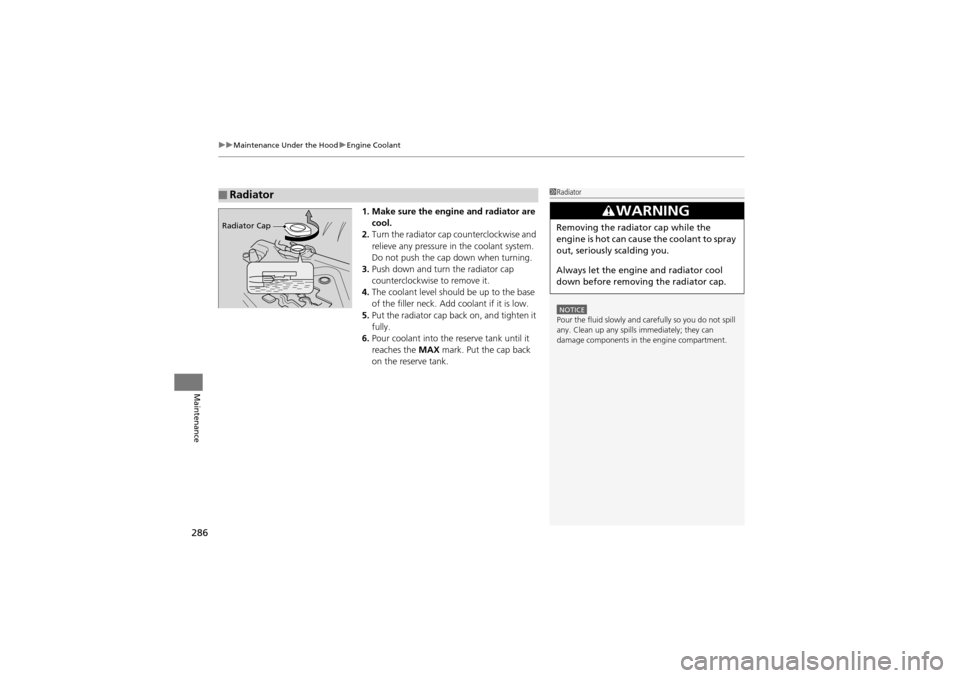
1. Make sure the engine and radiator are
cool.
2. Turn the radiator cap counterclockwise and
relieve any pressure in the coolant system.
Do not push the cap down when turning.
3. Push down and turn the radiator cap
counterclockwise to remove it.
4. The coolant level should be up to the base
of the filler neck. Add coolant if it is low.
5. Put the radiator cap back on, and tighten it
fully.
6. Pour coolant into the reserve tank until it
reaches the MAX mark. Put the cap back
on the reserve tank.
■Radiator1 Radiator
NOTICEPour the fluid slowly and carefully so you do not spill
any. Clean up any spills immediately; they can
damage components in the engine compartment.
3WARNING
Removing the radiator cap while the
engine is hot can cause the coolant to spray
out, seriously scalding you.
Always let the engine and radiator cool
down before removing the radiator cap.Radiator Cap
Page 311 of 370
309
Maintenance
Battery
Checking the Battery
Check the battery condition monthly. Look at the test indicator window and check
the terminals for corrosion.
If your vehicle’s battery is disconnected or goes dead:
•The audio system is disabled.
2 Entering the audio security code P. 170
•The clock resets.2 Setting the Clock P. 102
•The navigation system* is disabled. A PIN code will be required.2 Refer to the navigation system manual
Charging the Battery
Disconnect both battery cables to prevent damaging your vehicle’s electrical system.
Always disconnect the negative (–) cable first, and reconnect it last.
1Battery
WARNING: Battery post, terminals,
and related accessories contain lead
and lead compounds.
Wash your hands after handling.
When you find corrosion, cl ean the battery terminals
by applying a baking powder and water solution.
Rinse the terminals with wa ter. Cloth/towel dry the
battery. Coat the terminals with grease to help
prevent future corrosion.
3WARNING
The battery gives off explosive hydrogen
gas during normal operation.
A spark or flame can cause the battery to
explode with enough force to kill or
seriously hurt you.
When conductin g any battery
maintenance, wear protective clothing and
a face shield, or have a skilled technician do
it.
* Not available on all models
Page 325 of 370
Continued323
uuIf a Tire Goes Flat uChanging a Flat Tire
Handling the Unexpected
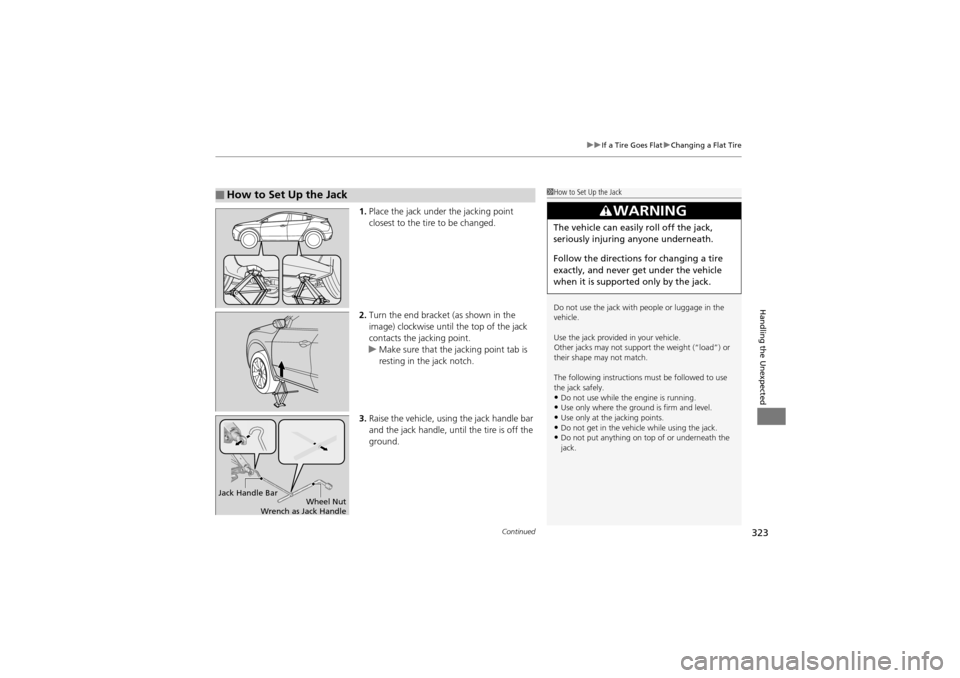
1. Place the jack under the jacking point
closest to the tire to be changed.
2. Turn the end bracket (as shown in the
image) clockwise until the top of the jack
contacts the jacking point.
u Make sure that the jacking point tab is
resting in the jack notch.
3. Raise the vehicle, using the jack handle bar
and the jack handle, until the tire is off the
ground.
■How to Set Up the Jack1How to Set Up the Jack
Do not use the jack with people or luggage in the
vehicle.
Use the jack provided in your vehicle.
Other jacks may not support the weight (“load”) or
their shape may not match.
The following instructions must be followed to use
the jack safely.
•Do not use while the engine is running.•Use only where the ground is firm and level.•Use only at the jacking points.•Do not get in the vehicle while using the jack.•Do not put anything on top of or underneath the
jack.
3WARNING
The vehicle can easily roll off the jack,
seriously injuring anyone underneath.
Follow the directions for changing a tire
exactly, and never get under the vehicle
when it is supported only by the jack.
Jack Handle Bar
Wheel Nut
Wrench as Jack Handle
Page 327 of 370
325
uuIf a Tire Goes Flat uChanging a Flat Tire
Handling the Unexpected
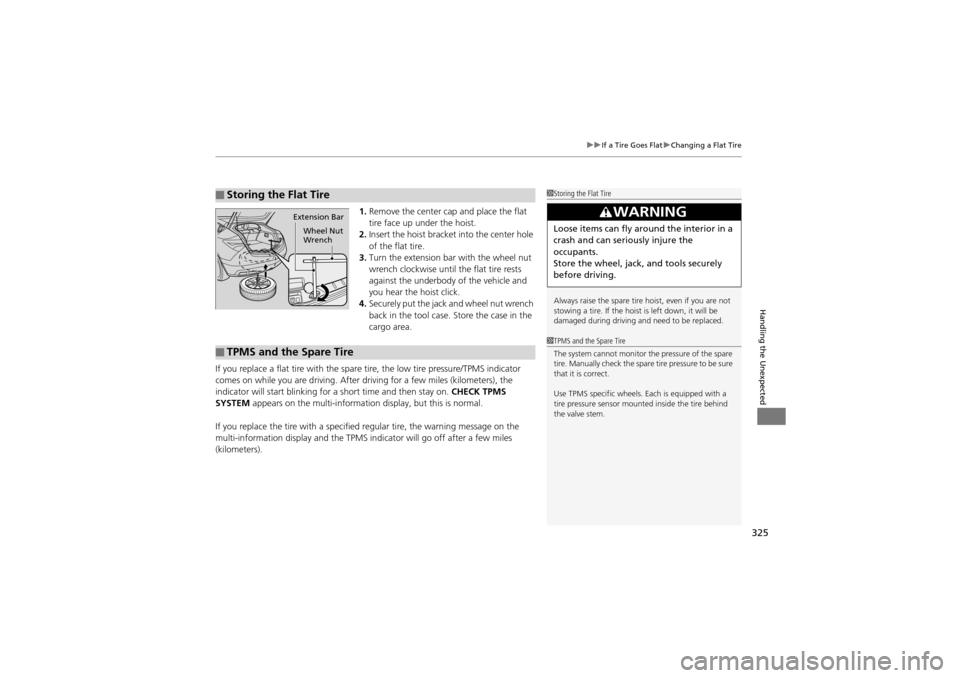
1. Remove the center cap and place the flat
tire face up under the hoist.
2. Insert the hoist bracket into the center hole
of the flat tire.
3. Turn the extension bar with the wheel nut
wrench clockwise until the flat tire rests
against the underbody of the vehicle and
you hear the hoist click.
4. Securely put the jack and wheel nut wrench
back in the tool case. Store the case in the
cargo area.
If you replace a flat tire with the spare tire, the low tire pressure/TPMS indicator
comes on while you are driving. After dr iving for a few miles (kilometers), the
indicator will start blinking for a short time and then stay on. CHECK TPMS
SYSTEM appears on the multi-information display, but this is normal.
If you replace the tire with a specified regular tire, the warning message on the
multi-information display and the TPMS indi cator will go off after a few miles
(kilometers).
■Storing the Flat Tire1 Storing the Flat Tire
Always raise the spare tire hoist, even if you are not
stowing a tire. If the hoist is left down, it will be
damaged during driving and need to be replaced.
3WARNING
Loose items can fly around the interior in a
crash and can seriously injure the
occupants.
Store the wheel, jack, and tools securely
before driving.
Extension Bar
Wheel Nut
Wrench
■TPMS and the Spare Tire
1TPMS and the Spare Tire
The system cannot monitor the pressure of the spare
tire. Manually check the spare tire pressure to be sure
that it is correct.
Use TPMS specific wheels. Each is equipped with a
tire pressure sensor mounted inside the tire behind
the valve stem.
Page 364 of 370
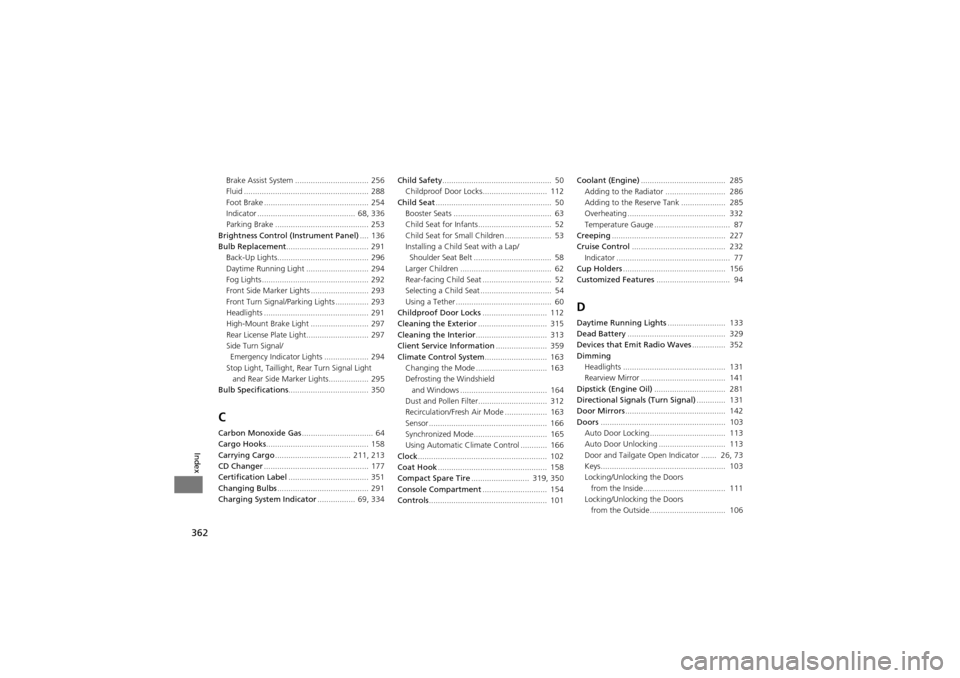
362
Index
Brake Assist System ................................. 256
Fluid ........................................................ 288
Foot Brake ............................................... 254
Indicator ............................................ 68, 336
Parking Brake .......................................... 253
Brightness Control (Instrument Panel) .... 136
Bulb Replacement ..................................... 291
Back-Up Lights......................................... 296
Daytime Running Light ....... ..................... 294
Fog Lights ................................................ 292
Front Side Marker Lights .......................... 293
Front Turn Signal/Parking Lights ............... 293
Headlights ............................................... 291
High-Mount Brake Light ..... ..................... 297
Rear License Plate Light............................ 297
Side Turn Signal/
Emergency Indicator Lights .................... 294
Stop Light, Taillight, Rear Turn Signal Light and Rear Side Marker Lights.................. 295
Bulb Specifications .................................... 350
C
Carbon Monoxide Gas ................................ 64
Cargo Hooks .............................................. 158
Carrying Cargo .................................. 211, 213
CD Changer ............................................... 177
Certification Label .................................... 351
Changing Bulbs ......................................... 291
Charging System Indicator ................. 69, 334Child Safety
................................................. 50
Childproof Door Locks............................. 112
Child Seat .................................................... 50
Booster Seats ............................................ 63
Child Seat for Infants................................. 52
Child Seat for Small Children ..................... 53
Installing a Child Seat with a Lap/
Shoulder Seat Belt ................................... 58
Larger Children ......................................... 62
Rear-facing Child Seat ......................... ...... 52
Selecting a Child Seat ................................ 54
Using a Tether ........................................... 60
Childproof Door Locks ............................. 112
Cleaning the Exterior ............................... 315
Cleaning the Interior ................................ 313
Client Service Information ....................... 359
Climate Control System ............................ 163
Changing the Mode ................................ 163
Defrosting the Windshield
and Windows ............... ........................ 164
Dust and Pollen Filter............................... 312
Recirculation/Fresh Air Mode ................... 163
Sensor ..................................................... 166
Synchronized Mode................................. 165
Using Automatic Climate Control ............ 166
Clock .......................................................... 102
Coat Hook ................................................. 158
Compact Spare Tire .......................... 319, 350
Console Compartment ............................. 154
Controls ..................................................... 101 Coolant (Engine)
...................................... 285
Adding to the Radiator ... ........................ 286
Adding to the Reserve Tank .................... 285
Overheating ............................................ 332
Temperature Gauge .................................. 87
Creeping ................................................... 227
Cruise Control .......................................... 232
Indicator ................................................... 77
Cup Holders .............................................. 156
Customized Features ................................. 94
D
Daytime Running Lights .......................... 133
Dead Battery ............................................ 329
Devices that Emit Radio Waves ............... 352
Dimming Headlights .............................................. 131
Rearview Mirror .............. ........................ 141
Dipstick (Engine Oil) ................................ 281
Directional Signals (Turn Signal) ............. 131
Door Mirrors ............................................. 142
Doors ........................................................ 103
Auto Door Locking.......... ........................ 113
Auto Door Unlocking ...... ........................ 113
Door and Tailgate Open Indicator ....... 26, 73
Keys........................................................ 103
Locking/Unlocking the Doors from the Inside..................................... 111
Locking/Unlocking the Doors
from the Outside.................................. 106