change time Acura ZDX 2012 User Guide
[x] Cancel search | Manufacturer: ACURA, Model Year: 2012, Model line: ZDX, Model: Acura ZDX 2012Pages: 370, PDF Size: 10.06 MB
Page 153 of 370
151Continued
Controls
Interior Lights/Interior Convenience Items
Interior Lights
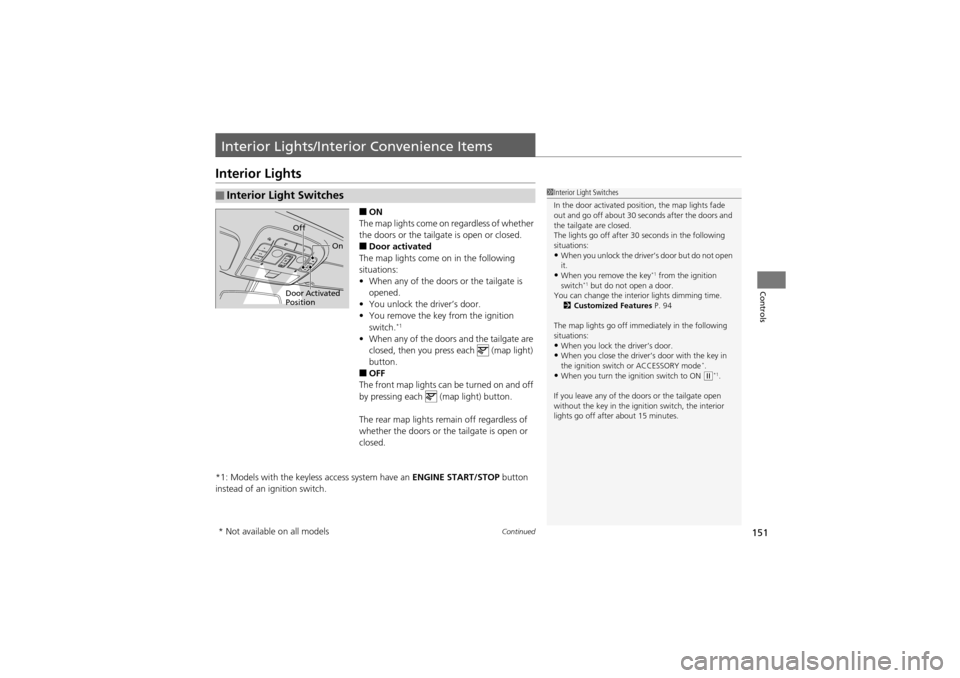
■ON
The map lights come on regardless of whether
the doors or the tailgate is open or closed.
■Door activated
The map lights come on in the following
situations:
• When any of the doors or the tailgate is
opened.
• You unlock the driver’s door.
• You remove the key from the ignition
switch.
*1
•When any of the door s and the tailgate are
closed, then you press each (map light)
button.
■OFF
The front map lights can be turned on and off
by pressing each (map light) button.
The rear map lights remain off regardless of
whether the doors or the tailgate is open or
closed.
*1: Models with the keyless access system have an ENGINE START/STOP button
instead of an ig nition switch.
■Interior Light Switches1Interior Light Switches
In the door activated position, the map lights fade
out and go off about 30 seconds after the doors and
the tailgate are closed.
The lights go off after 30 seconds in the following
situations:
•When you unlock the driver’s door but do not open
it.
•When you remove the key*1 from the ignition
switch*1 but do not open a door.
You can change the interior lights dimming time.
2 Customized Features P. 94
The map lights go off immediately in the following
situations:
•When you lock the driver’s door.•When you close the driver’s door with the key in
the ignition switch or ACCESSORY mode*.•When you turn the ignition switch to ON (w*1.
If you leave any of the do ors or the tailgate open
without the key in the ignition switch, the interior
lights go off after about 15 minutes.
Door Activated
Position Off
On
* Not available on all models
Page 179 of 370
177
uuAudio System Basic Operation uPlaying a CD
Continued
Features
Playing a CD
Your audio system supports audio CDs, CD-Rs, and CD-RWs in either MP3 or WMA
format. With the CD loaded, press the CD button.
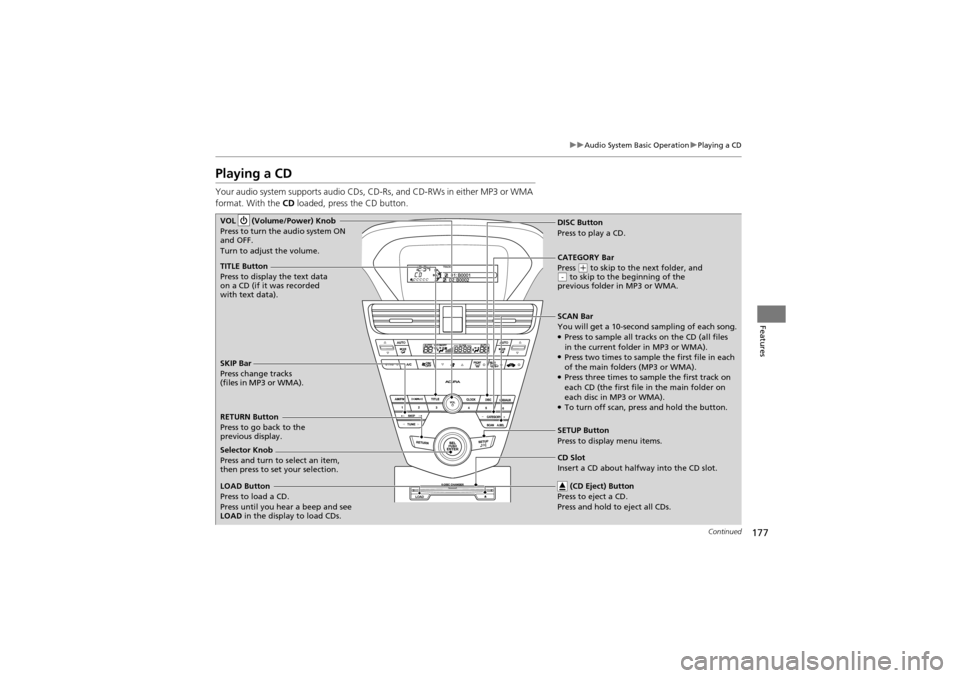
TITLE Button
Press to display the text data
on a CD (if it was recorded
with text data).
SCAN Bar
You will get a 10-second sampling of each song.
●Press to sample all tracks on the CD (all files
in the current folder in MP3 or WMA).
●Press two times to sample the first file in each
of the main folders (MP3 or WMA).
●Press three times to sample the first track on
each CD (the first file in the main folder on
each disc in MP3 or WMA).
●To turn off scan, press and hold the button.
VOL (Volume/Power) Knob
Press to turn the audio system ON
and OFF.
Turn to adjust the volume.
CD Slot
Insert a CD about halfway into the CD slot.
SKIP Bar
Press change tracks
(files in MP3 or WMA).
SETUP Button
Press to display menu items.
Selector Knob
Press and turn to select an item,
then press to set your selection. DISC Button
Press to pl
ay a CD.
(CD Eject) Button
Press to ej ect a CD.
Press and hold to eject all CDs.
RETURN Button
Press to go back to the
previous display.
LOAD Button
Press to load a CD.
Press until you hear a beep and see
LOAD in the display to load CDs. CATEGORY Bar
Press
(
+ to skip to the next folder, and
to skip to the beginning of the
previous folder in MP3 or WMA.-
Page 185 of 370
183
uuAudio System Basic Operation uPlaying a USB Flash Drive
Continued
Features
Playing a USB Flash Drive
Your audio system reads and plays sound files on a USB flash drive in either MP3,
WMA, or AAC*1 format.
Connect your USB flash dr ive to the USB adapter cable, then press the USB/AUX
button.
2 USB Adapter Cable P. 169
*1:Only AAC format files recorded with iTunes ® are playable on this unit.
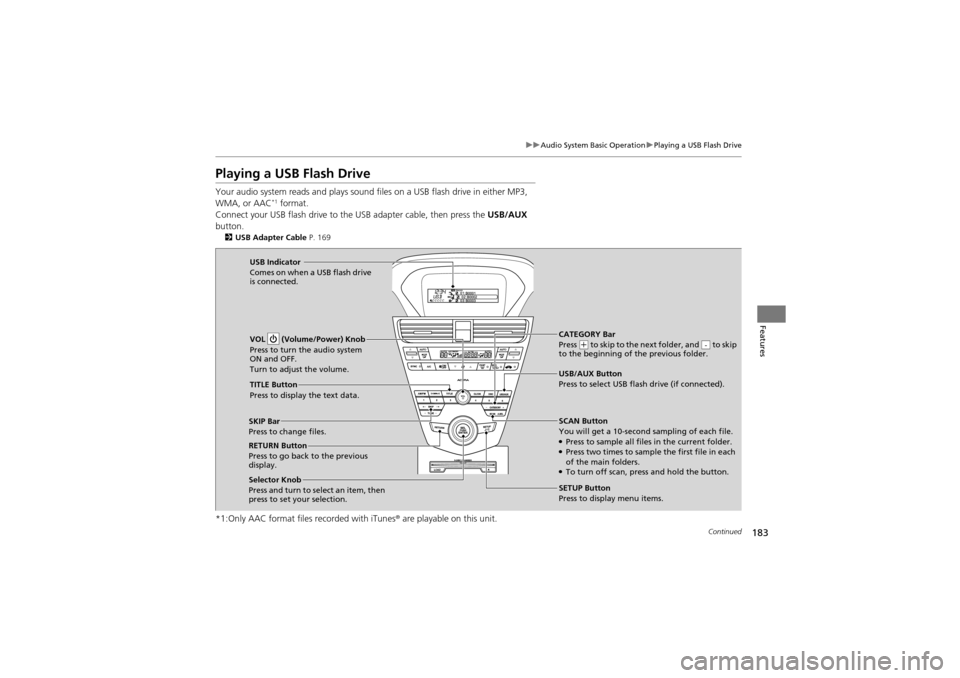
CATEGORY Bar
Press (+ to skip to the next folder, and to skip
to the beginning of the previous folder.-
SCAN Button
You will get a 10-second sampling of each file.
●Press to sample all files in the current folder.●Press two times to sample the first file in each
of the main folders.
●To turn off scan, press and hold the button.
VOL (Volume/Power) Knob
Press to turn the audio system
ON and OFF.
Turn to adjust the volume.
SKIP Bar
Press to change files.
SETUP Button
Press to display menu items.
Selector Knob
Press and turn to se
lect an item, then
press to set your selection. USB/AUX Button
Press to select USB flash drive (if connected).
USB Indicator
Comes on when a USB flash drive
is connected.
TITLE Button
Press to display the text data.
RETURN Button
Press to go back to the previous
display.
Page 203 of 370
Continued201
uuBluetooth ® HandsFreeLink ®u HFL Menus
Features
■To pair a cell phone
1. If no phone has been paired to the system before, HFL gives you information
about how to pair the first phone.
If a phone has already been paired: say “Phone Setup” and “Pair” after the HFL
prompts.
2. Follow the HFL prompts and put your phone in discovery or search mode.
u HFL gives you a four-digit code and begins searching for your phone.
3. When your phone finds a Bluetooth® device, select HFL from the options and
enter the four-digit code.
4. Follow the HFL prompts and name the newly paired phone.
■To rename a paired phone
1. Say “Phone Setup.”
2. Say “Edit” after the prompts.
3. Follow the HFL prompts and rename the phone.
u If there is more than one phone paired to the system, HFL will ask you which
phone’s name you want to change.
■To delete a paired phone
1. Say “Phone Setup.”
2. Say “Delete” after the prompts.
3. Follow the HFL prompts.
u HFL will ask you which phone you want to delete.
■Phone Setup1Phone Setup
Press the button and wa it for a beep before
giving a command.
Your Bluetooth -compatible phone must be paired to
HFL before you can make and receive hands-free
calls.
Phone Pairing Tips:
•You cannot pair your phone while the vehicle is
moving.
•Your phone must be in the discovery or search
mode when pairing the phone. Refer to your
phone’s manual.
•Up to six phones can be paired.•Your phone’s battery may drain faster when it is
paired to HFL.
•If your phone is not ready for pairing or not found
by the system within three minutes, the system will
time out and returns to idle.
Page 204 of 370
uuBluetooth® HandsFreeLink ®u HFL Menus
202
Features
■To hear the name of all paired phones
1. Say “Phone Setup.”
2. Say “List” after the prompts.
3. HFL reads out all the paired phones’ names.
■To hear which paired phone is currently linked
1. Say “Phone Setup.”
2. Say “Status” after the prompts.
3. HFL will tell you which phone is linked with the system.
■To change the currently linked phone
1. Say “Phone Setup.”
2. Say “Next Phone” after the prompts.
3. HFL disconnects the current phone, and searches for another paired phone.
4. Once another phone is found, it is connected to the system. HFL will inform you
which phone is now linked.
■To change the pairing code setting
1. Say “Phone Setup.”
2. Say “Set Pairing Code” after the prompts.
3. If you want HFL to create a random code each time you pair a phone, say
“Random.” If you want to create your own four-digit code, say “Fixed.”
4. Follow the HFL prompts.
1Phone Setup
If no other phones are found or paired when trying to
switch to another phone, HFL will inform you that the
original phone is linked again.
The “Status” and “Next Phone” commands use:
Only one paired phone at a time can be linked to HFL.
When there are two or mo re paired phones in the
vehicle, the first paired phone that the system finds is
linked.
Page 242 of 370
240
uuWhen Driving uACC (Adaptive Cruise Control)*
Driving
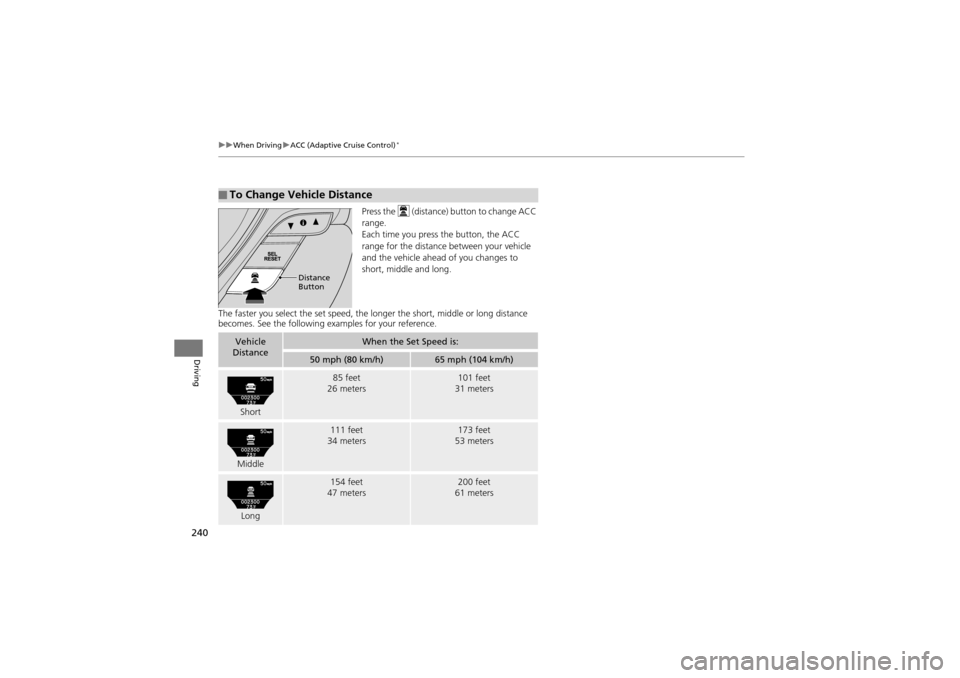
Press the (distance) button to change ACC
range.
Each time you press the button, the ACC
range for the distance between your vehicle
and the vehicle ahead of you changes to
short, middle and long.
The faster you select the set speed, the lo nger the short, middle or long distance
becomes. See the following ex amples for your reference.
■To Change Vehicle Distance
Distance
Button
Vehicle
DistanceWhen the Set Speed is:
50 mph (80 km/h)65 mph (104 km/h)
Short
85 feet
26 meters101 feet
31 meters
Middle
111 feet
34 meters173 feet
53 meters
Long
154 feet
47 meters200 feet
61 meters
Page 249 of 370
247
uuWhen Driving uBSI (Blind Spot Information)*
Driving
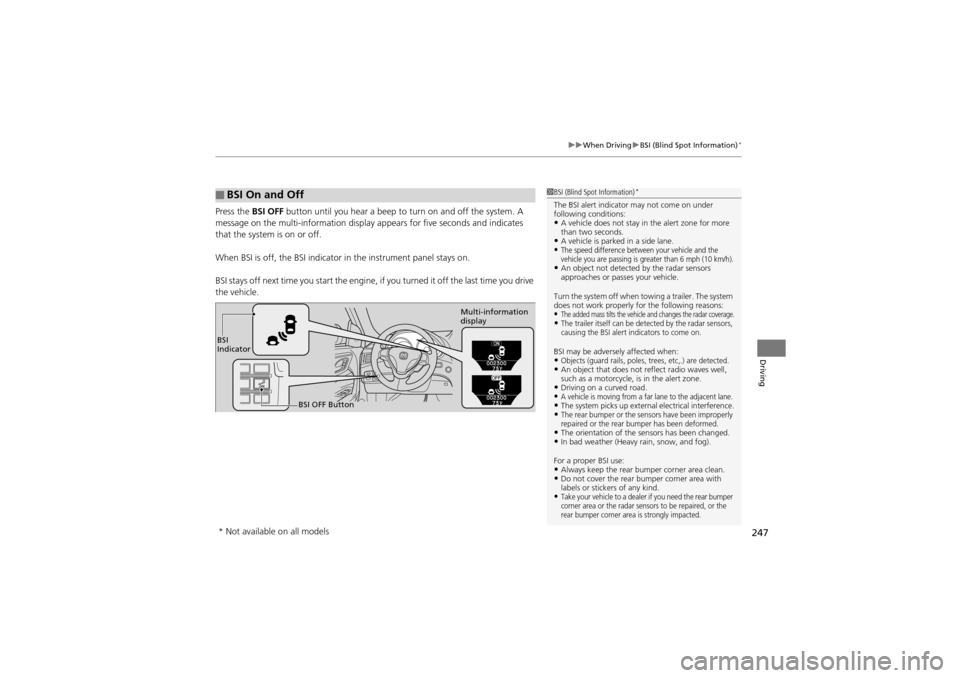
Press the BSI OFF button until you hear a beep to turn on and off the system. A
message on the multi-information display appears for five seconds and indicates
that the system is on or off.
When BSI is off, the BSI indicator in the in strument panel stays on.
BSI stays off next time you sta rt the engine, if you turned it off the last time you drive
the vehicle.
■BSI On and Off1 BSI (Blind Spot Information)*
The BSI alert indicator may not come on under
following conditions:
•A vehicle does not stay in the alert zone for more
than two seconds.
•A vehicle is parked in a side lane.•The speed difference between your vehicle and the
vehicle you are passing is greater than 6 mph (10 km/h).
•An object not detected by the radar sensors
approaches or passes your vehicle.
Turn the system off when towing a trailer. The system
does not work properly for the following reasons:
•The added mass tilts the vehicle and changes the radar coverage.•The trailer itself can be detected by the radar sensors,
causing the BSI alert indicators to come on.
BSI may be adversel y affected when:•Objects (guard rails, poles, trees, etc,.) are detected.•An object that does not reflect radio waves well,
such as a motorcycle, is in the alert zone.
•Driving on a curved road.•A vehicle is moving from a far lane to the adjacent lane.•The system picks up external electrical interference.•The rear bumper or the sensors have been improperly
repaired or the rear bumper has been deformed.
•The orientation of the sensors has been changed.•In bad weather (Heavy rain, snow, and fog).
For a proper BSI use:
•Always keep the rear bu mper corner area clean.•Do not cover the rear bumper corner area with
labels or stickers of any kind.
•Take your vehicle to a dealer if you need the rear bumper
corner area or the radar sensors to be repaired, or the
rear bumper corner area is strongly impacted.
BSI
Indicator
BSI OFF Button Multi-information
display
* Not available on all models
Page 275 of 370
273Continued
Maintenance
Maintenance MinderTM
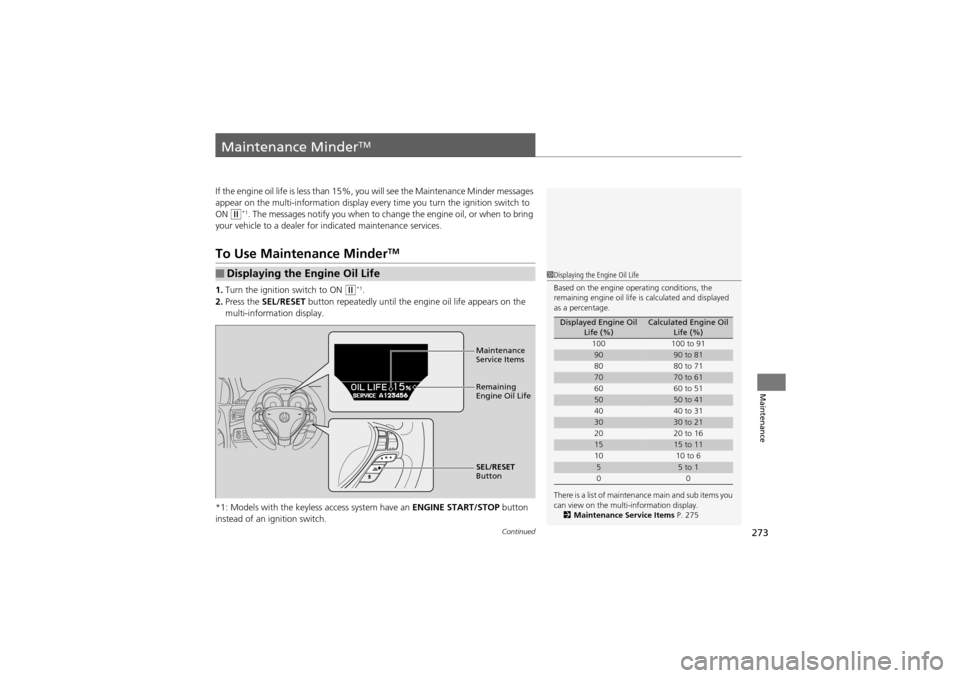
If the engine oil life is less than 15%, you will see the Maintenance Minder messages
appear on the multi-information display every time you turn the ignition switch to
ON
w*1. The messages notify you when to change the engine oil, or when to bring
your vehicle to a dealer for indicated maintenance services.
To Use Maintenance MinderTM
1.Turn the ignition switch to ON w*1.
2. Press the SEL/RESET button repeatedly until the engine oil life appears on the
multi-information display.
*1: Models with the keyless access system have an ENGINE START/STOP button
instead of an ig nition switch.
■Displaying the Engine Oil Life1Displaying the Engine Oil Life
Based on the engine operating conditions, the
remaining engine oil life is calculated and displayed
as a percentage.
There is a list of maintenance main and sub items you
can view on the multi-information display. 2 Maintenance Service Items P. 275
Displayed Engine Oil
Life (%)Calculated Engine Oil Life (%)
100 100 to 91
9090 to 81
80 80 to 71
7070 to 61
60 60 to 51
5050 to 41
40 40 to 31
3030 to 21
20 20 to 16
1515 to 11
10 10 to 6
55 to 1
00
Maintenance
Service Items
Remaining
Engine Oil Life
SEL/RESET
Button
Page 330 of 370
328
uuEngine Does Not Start uEmergency Engine Stop
Handling the Unexpected
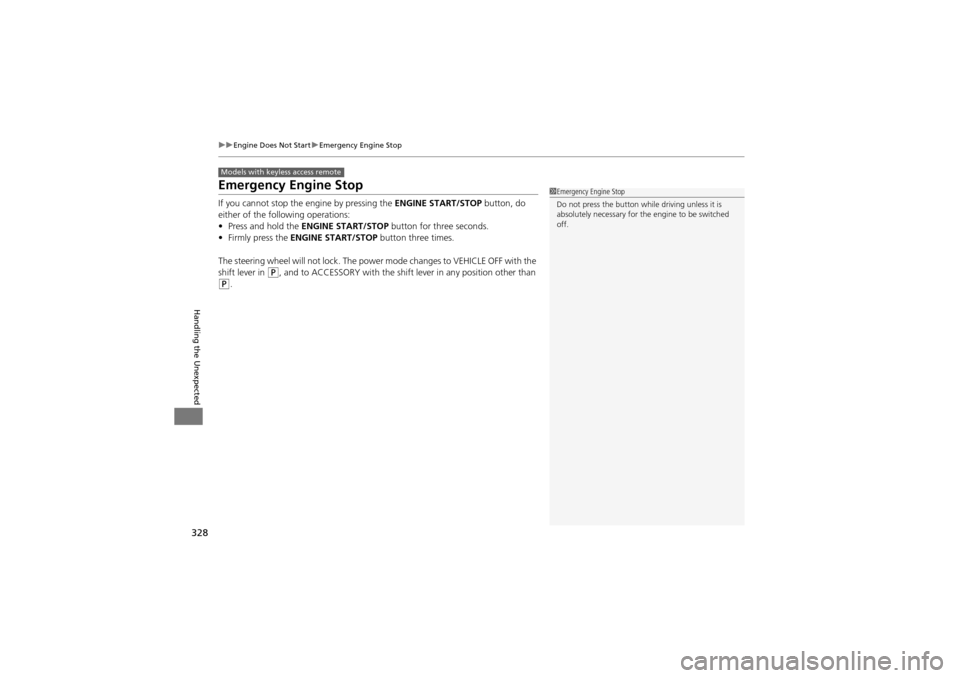
Emergency Engine Stop
If you cannot stop the engine by pressing the ENGINE START/STOP button, do
either of the following operations:
• Press and hold the ENGINE START/STOP button for three seconds.
• Firmly press the ENGINE START/STOP button three times.
The steering wheel will not lock. The power mode changes to VEHICLE OFF with the
shift lever in
P, and to ACCESSORY with the shift lever in any position other than
P.
Models with keyless access remote
1Emergency Engine Stop
Do not press the button while driving unless it is
absolutely necessary for th e engine to be switched
off.
Page 352 of 370
350
Information
Specifications
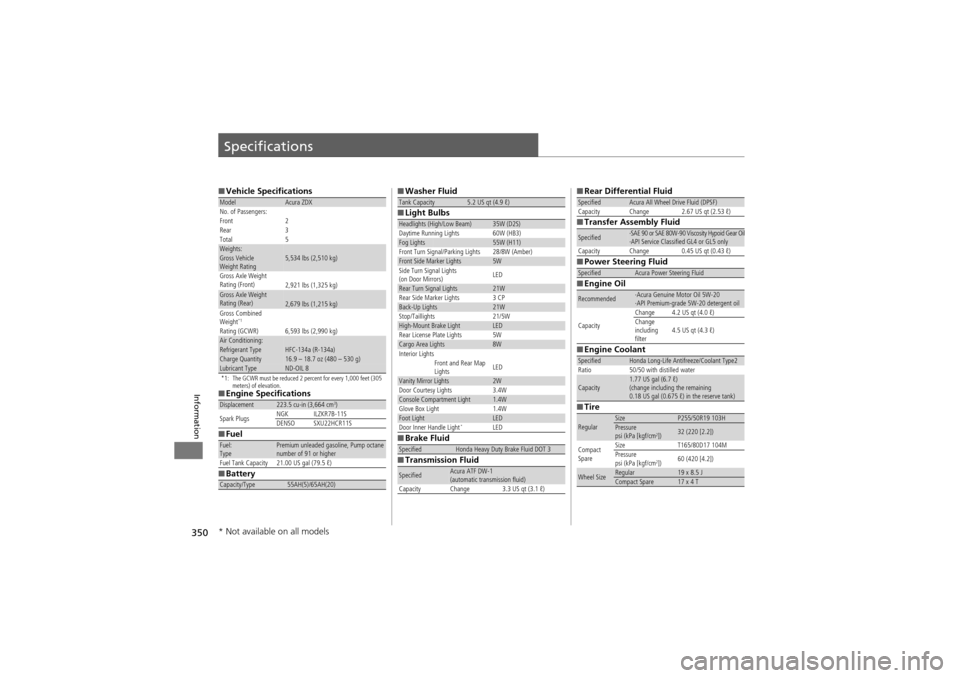
■Vehicle Specifications
*1: The GCWR must be reduced 2 percent for every 1,000 feet (305
meters) of elevation.
■Engine Specifications
■ Fuel
■ Battery
ModelAcura ZDX
No. of Passengers:
Front 2
Rear 3
Total 5
Weights:Gross Vehicle
Weight Rating 5,534 lbs (2,510 kg)
Gross Axle Weight
Rating (Front)2,921 lbs (1,325 kg)Gross Axle Weight
Rating (Rear)2,679 lbs (1,215 kg)
Gross Combined
Weight
*1
Rating (GCWR) 6,593 lbs (2,990 kg)
Air Conditioning:Refrigerant Type HFC-134a (R-134a)Charge Quantity16.9 – 18.7 oz (480 – 530 g)Lubricant TypeND-OIL 8
Displacement223.5 cu-in (3,664 cm3)
Spark Plugs NGK ILZKR7B-11S
DENSO SXU22HCR11S
Fuel:
TypePremium unleaded gasoline, Pump octane
number of 91 or higher
Fuel Tank Capacity 21.00 US gal (79.5 ℓ)
Capacity/Type55AH(5)/65AH(20)
■ Washer Fluid
■ Light Bulbs
■ Brake Fluid
■ Transmission FluidTank Capacity5.2 US qt (4.9 ℓ)
Headlights (High/Low Beam)35W (D2S)
Daytime Running Lights 60W (HB3)
Fog Lights55W (H11)
Front Turn Signal/Parking Lights 28/8W (Amber)
Front Side Marker Lights5W
Side Turn Signal Lights
(on Door Mirrors) LED
Rear Turn Signal Lights21W
Rear Side Marker Lights 3 CP
Back-Up Lights21W
Stop/Taillights 21/5W
High-Mount Brake LightLED
Rear License Plate Lights 5W
Cargo Area Lights8W
Interior Lights
Front and Rear Map
LightsLED
Vanity Mirror Lights2WDoor Courtesy Lights3.4WConsole Compartment Light1.4WGlove Box Light1.4WFoot LightLEDDoor Inner Handle Light*LED
SpecifiedHonda Heavy Duty Brake Fluid DOT 3
SpecifiedAcura ATF DW-1
(automatic transmission fluid)
Capacity Change 3.3 US qt (3.1 ℓ)
■ Rear Differential Fluid
■ Transfer Assembly Fluid
■ Power Steering Fluid
■ Engine Oil
■ Engine Coolant
■ TireSpecifiedAcura All Wheel Drive Fluid (DPSF)
Capacity Change 2.67 US qt (2.53 ℓ)
Specified·SAE 90 or SAE 80W-90 Viscosity Hypoid Gear Oil
·API Service Classified GL4 or GL5 only
Capacity Change 0.45 US qt (0.43 ℓ)
SpecifiedAcura Power Steering Fluid
Recommended·Acura Genuine Motor Oil 5W-20
·API Premium-grade 5W-20 detergent oil
Capacity Change 4.2 US qt (4.0 ℓ)
Change
including
filter
4.5 US qt (4.3 ℓ)
SpecifiedHonda Long-Life Antifreeze/Coolant Type2
Ratio 50/50 with distilled water
Capacity1.77 US gal (6.7 ℓ)
(change including the remaining
0.18 US gal (0.675 ℓ) in the reserve tank)
RegularSizeP255/50R19 103HPressure
psi (kPa [kgf/cm2])32 (220 [2.2])
Compact
Spare Size T165/80D17 104M
Pressure
psi (kPa [kgf/cm
2])
60 (420 [4.2])
Wheel SizeRegular19 x 8.5 JCompact Spare17 x 4 T
* Not available on all models