door lock Acura ZDX 2012 User Guide
[x] Cancel search | Manufacturer: ACURA, Model Year: 2012, Model line: ZDX, Model: Acura ZDX 2012Pages: 370, PDF Size: 10.06 MB
Page 53 of 370
51
uuChild Safety uProtecting Child Passengers
Safe Driving
• Any child who is too small to wear a seat belt correctly must be restrained in an
approved child seat that is properly secured to the vehicle using either the lap belt
portion of the lap/shoulder belt or th e lower anchors of the LATCH system.
• Never hold a child on your lap because it is impossible to protect them in the
event of a collision.
• Never put a seat belt over yourself and a child. During a crash, the belt would
likely press deep into the child and cause serious or fatal injuries.
• Never let two children use the same s eat belt. Both children could be very
seriously injured in a crash.
• Do not allow children to operate the doors, windows or seat adjustments.
• Do not leave children in the vehicle unat tended, especially in hot weather when
the inside of the vehicle can get hot enough to kill them. They could also activate
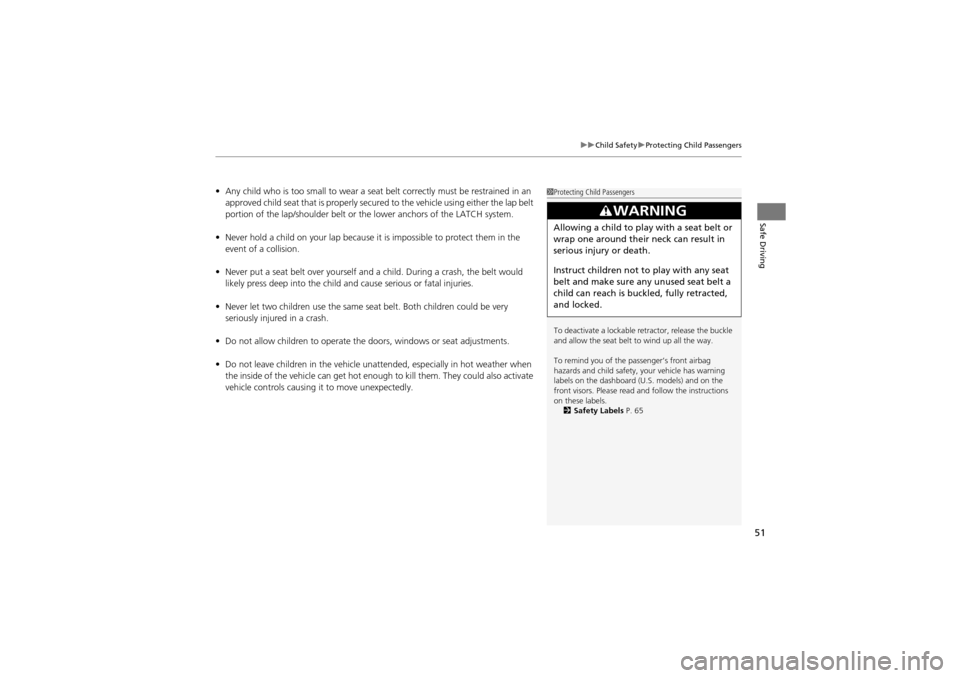
vehicle controls causing it to move unexpectedly.1 Protecting Child Passengers
To deactivate a lockable re tractor, release the buckle
and allow the seat belt to wind up all the way.
To remind you of the passenger’s front airbag
hazards and child safety, your vehicle has warning
labels on the dashboard (U.S. models) and on the
front visors. Please read an d follow the instructions
on these labels. 2 Safety Labels P. 65
3WARNING
Allowing a child to play with a seat belt or
wrap one around their neck can result in
serious injury or death.
Instruct children not to play with any seat
belt and make sure any unused seat belt a
child can reach is buckled, fully retracted,
and locked.
Page 83 of 370
81
uuIndicators uMulti-Information Display Warning and Information Messages
Continued
Instrument Panel
*1: Models with the keyless access system have an ENGINE START/STOP button instead of an ignition switch.
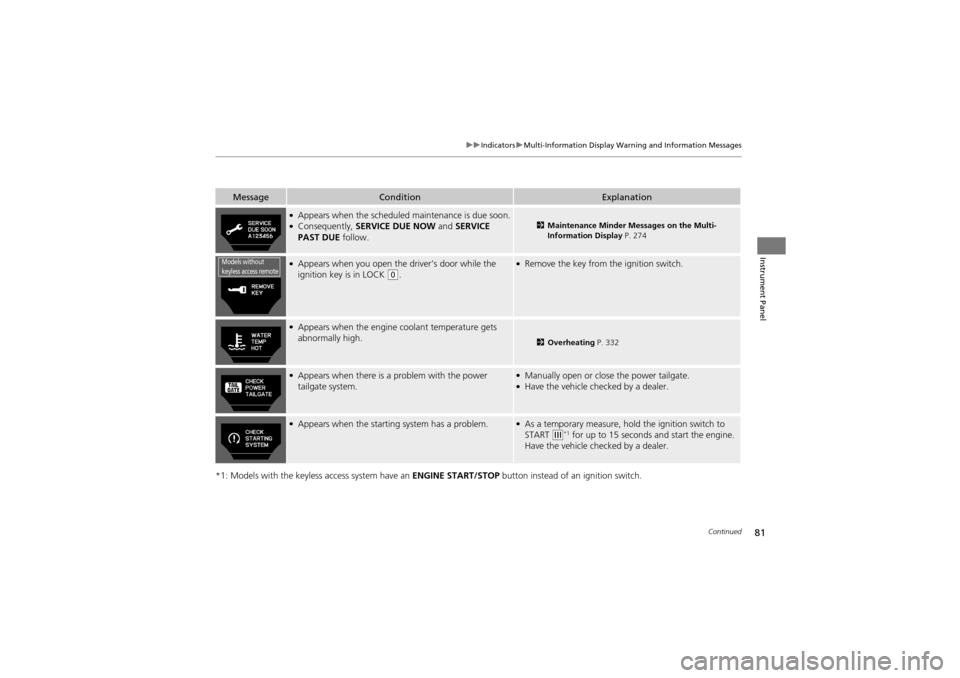
MessageConditionExplanation
●Appears when the scheduled maintenance is due soon.●Consequently, SERVICE DUE NOW and SERVICE
PAST DUE follow.2Maintenance Minder Messages on the Multi-
Information Display P. 274
●Appears when you open the driver’s door while the
ignition key is in LOCK (0.
●Remove the key from the ignition switch.
●Appears when the engine coolant temperature gets
abnormally high.
2 Overheating P. 332
●Appears when there is a problem with the power
tailgate system.●Manually open or close the power tailgate.●Have the vehicle ch ecked by a dealer.
●Appears when the starting system has a problem.●As a temporary measure, hold the ignition switch to
START (e*1 for up to 15 seconds and start the engine.
Have the vehicle ch ecked by a dealer.
Models without
keyless access remote
Page 86 of 370
84
uuIndicators uMulti-Information Display Warning and Information Messages
Instrument Panel
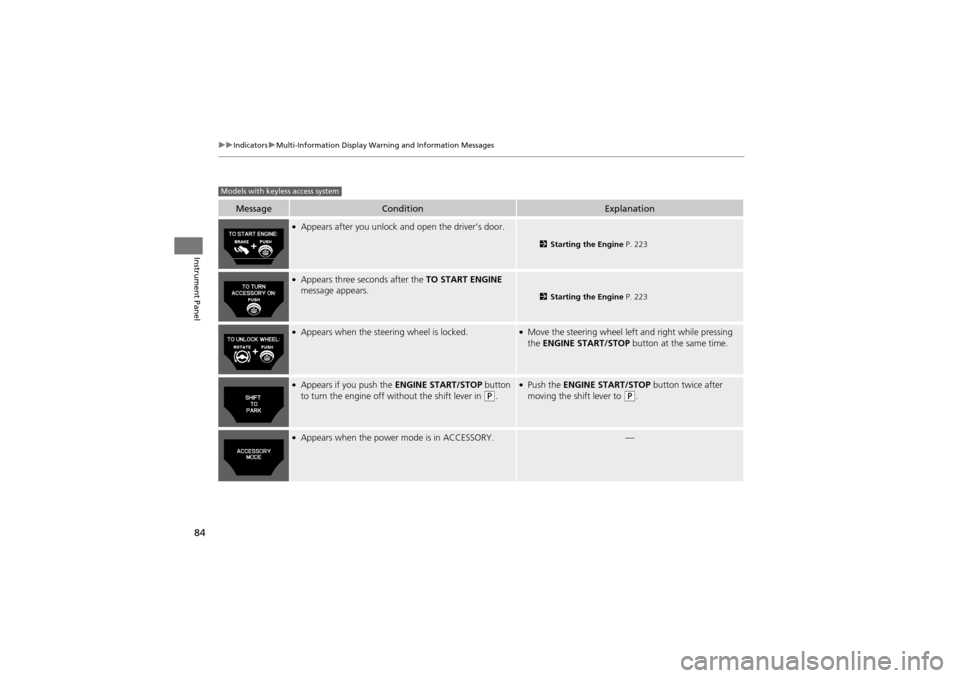
MessageConditionExplanation
●Appears after you unlock and open the driver’s door.
2 Starting the Engine P. 223
●Appears three seconds after the TO START ENGINE
message appears.
2 Starting the Engine P. 223
●Appears when the steering wheel is locked.●Move the steering wheel left and right while pressing
the ENGINE START/STOP button at the same time.
●Appears if you push the ENGINE START/STOP button
to turn the engine off without the shift lever in (P.
●Push the ENGINE START/STOP button twice after
moving the shift lever to (P.
●Appears when the power mode is in ACCESSORY.—
Models with keyless access system
Page 87 of 370
85
uuIndicators uMulti-Information Display Warning and Information Messages
Continued
Instrument Panel
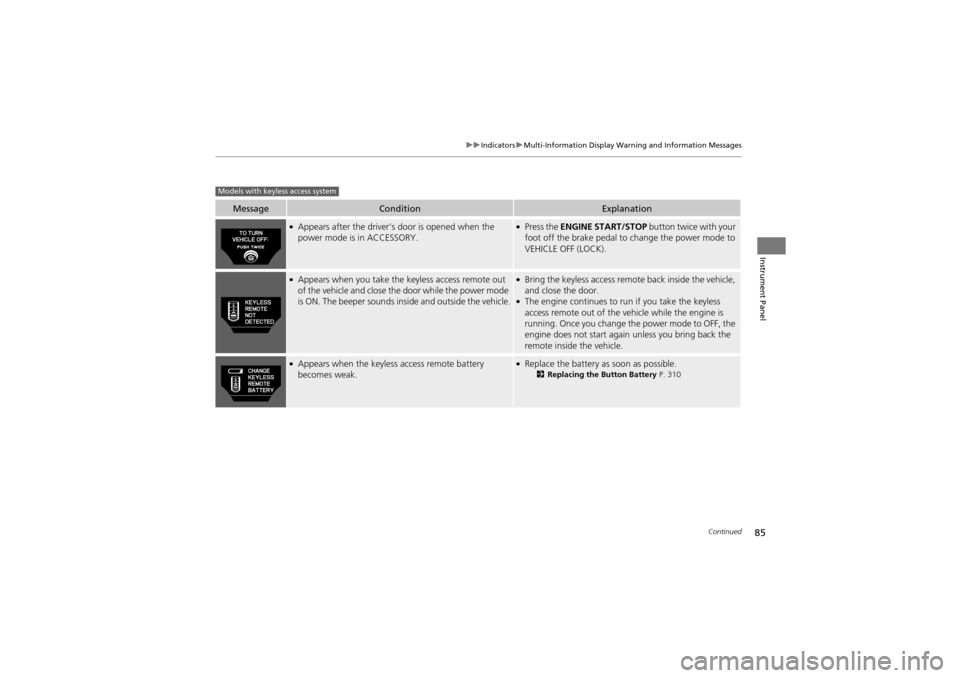
MessageConditionExplanation
●Appears after the driver’s door is opened when the
power mode is in ACCESSORY.●Press the ENGINE START/STOP button twice with your
foot off the brake pedal to change the power mode to
VEHICLE OFF (LOCK).
●Appears when you take the keyless access remote out
of the vehicle and close the door while the power mode
is ON. The beeper sounds inside and outside the vehicle.●Bring the keyless access remote back inside the vehicle,
and close the door.
●The engine continues to run if you take the keyless
access remote out of the vehicle while the engine is
running. Once you change the power mode to OFF, the
engine does not start again unless you bring back the
remote inside the vehicle.
●Appears when the keyless access remote battery
becomes weak.●Replace the battery as soon as possible.2Replacing the Button Battery P. 310
Models with keyless access system
Page 96 of 370
uuGauges and Multi-Information Display uMulti-Information Display
94
Instrument Panel
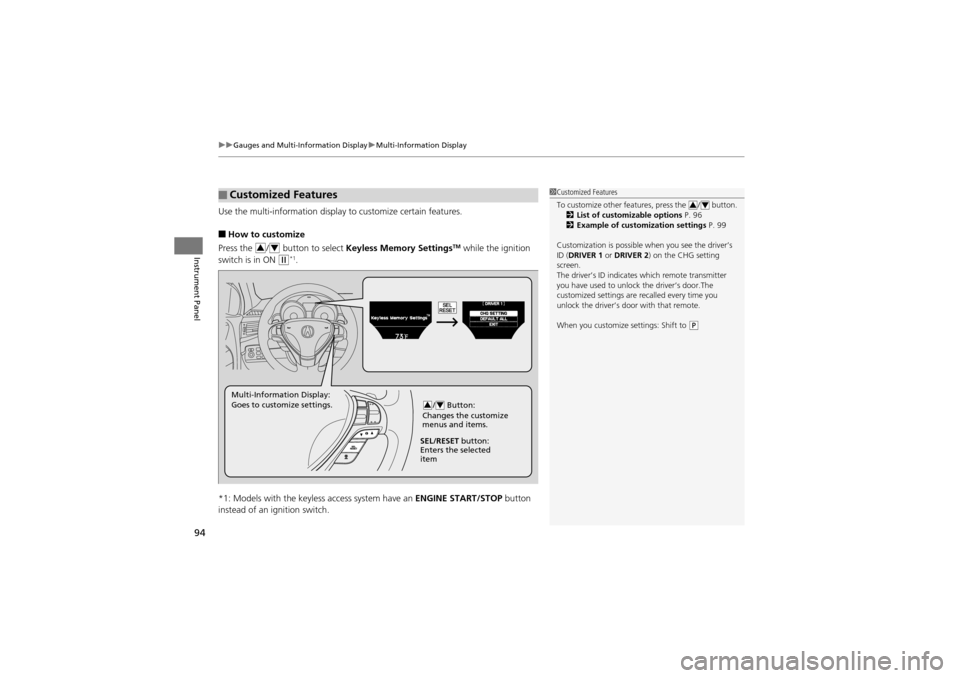
Use the multi-information display to customize certain features.
■How to customize
Press the / button to select Keyless Memory SettingsTM while the ignition
switch is in ON
w*1.
*1: Models with the keyless access system have an ENGINE START/STOP button
instead of an ignition switch.
■Customized Features1 Customized Features
To customize other features, press the / button.
2 List of customizable options P. 96
2 Example of customization settings P. 99
Customization is possible when you see the driver’s
ID (DRIVER 1 or DRIVER 2 ) on the CHG setting
screen.
The driver’s ID indicate s which remote transmitter
you have used to unlock the driver’s door.The
customized settings are recalled every time you
unlock the driver’s door with that remote.
When you customize settings: Shift to
(P
34
34
/ Button:
Changes the customize
menus and items.34Multi-Information Display:
Goes to customize settings.
SEL/RESET button:
Enters the selected
item
Page 97 of 370
95
uuGauges and Multi-Information Display uMulti-Information Display
Continued
Instrument Panel
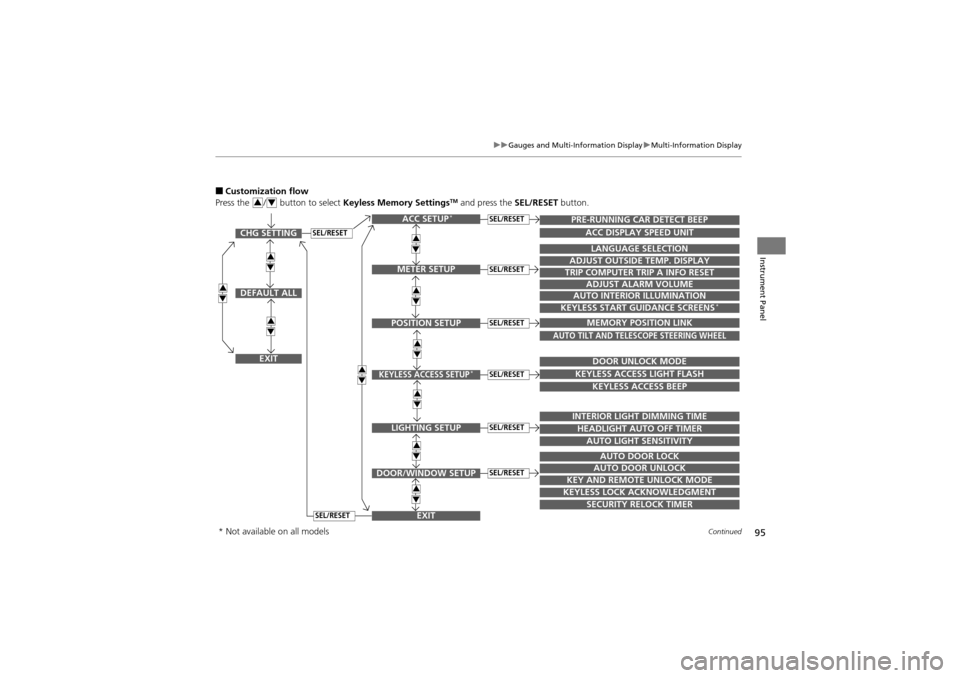
■Customization flow
Press the / button to select Keyless Memory SettingsTM and press the SEL/RESET button.34
SEL/RESETCHG SETTING
DEFAULT ALL
EXIT
ACC SETUP*
EXITSECURITY RELOCK TIMER
TRIP COMPUTER TRIP A INFO RESET
ADJUST ALARM VOLUME
AUTO INTERIOR ILLUMINATION
KEYLESS START GUIDANCE SCREENS*
LANGUAGE SELECTION
ADJUST OUTSIDE TEMP. DISPLAY
MEMORY POSITION LINK
AUTO TILT AND TELESCOPE STEERING WHEEL
DOOR UNLOCK MODE
KEYLESS ACCESS LIGHT FLASH
KEYLESS ACCESS BEEP
INTERIOR LIGHT DIMMING TIME
HEADLIGHT AUTO OFF TIMER
AUTO LIGHT SENSITIVITY
AUTO DOOR LOCK
AUTO DOOR UNLOCK
KEY AND REMOTE UNLOCK MODE
KEYLESS LOCK ACKNOWLEDGMENT
PRE-RUNNING CAR DETECT BEEP
ACC DISPLAY SPEED UNIT
34
34
34
34
34
34
34
34
34
34
METER SETUP
POSITION SETUP
KEYLESS ACCESS SETUP*
LIGHTING SETUP
DOOR/WINDOW SETUP
SEL/RESET
SEL/RESET
SEL/RESET
SEL/RESET
SEL/RESET
SEL/RESET
SEL/RESET
* Not available on all models
Page 99 of 370
97
uuGauges and Multi-Information Display uMulti-Information Display
Continued
Instrument Panel
*1: Not available on all models
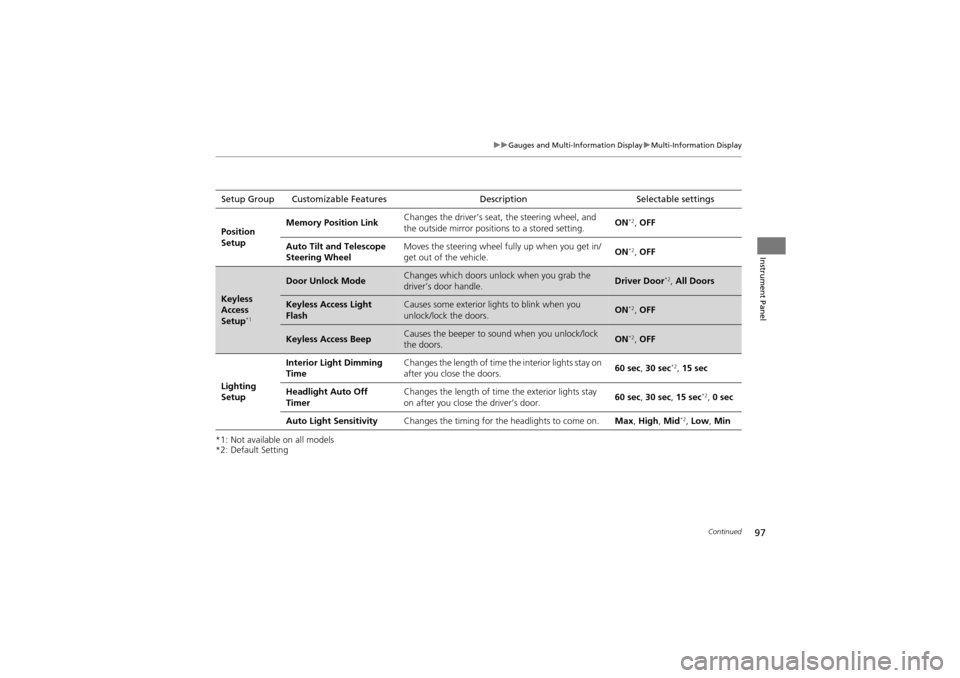
*2: Default SettingSetup Group Customizable Features
DescriptionSelectable settings
Position
Setup Memory Position Link
Changes the driver’s seat, the steering wheel, and
the outside mirror position
s to a stored setting. ON
*2,
OFF
Auto Tilt and Telescope
Steering Wheel Moves the steering wheel fu
lly up when you get in/
get out of the vehicle. ON
*2,
OFF
Keyless
Access
Setup
*1
Door Unlock ModeChanges which doors unlock when you grab the
driver’s door handle.Driver Door*2, All Doors
Keyless Access Light
FlashCauses some exterior li ghts to blink when you
unlock/lock the doors.ON*2, OFF
Keyless Access BeepCauses the beeper to s ound when you unlock/lock
the doors.ON*2, OFF
Lighting
Setup Interior Light Dimming
Time
Changes the length of time
the interior lights stay on
after you close the doors. 60 sec,
30 sec
*2, 15 sec
Headlight Auto Off
Timer Changes the length of time
the exterior lights stay
on after you close the driver’s door. 60 sec,
30 sec, 15 sec
*2, 0 sec
Auto Light Sensitivity Changes the timing for the headlights to come on. Max, High , Mid
*2, Low, Min
Page 100 of 370
98
uuGauges and Multi-Information Display uMulti-Information Display
Instrument Panel
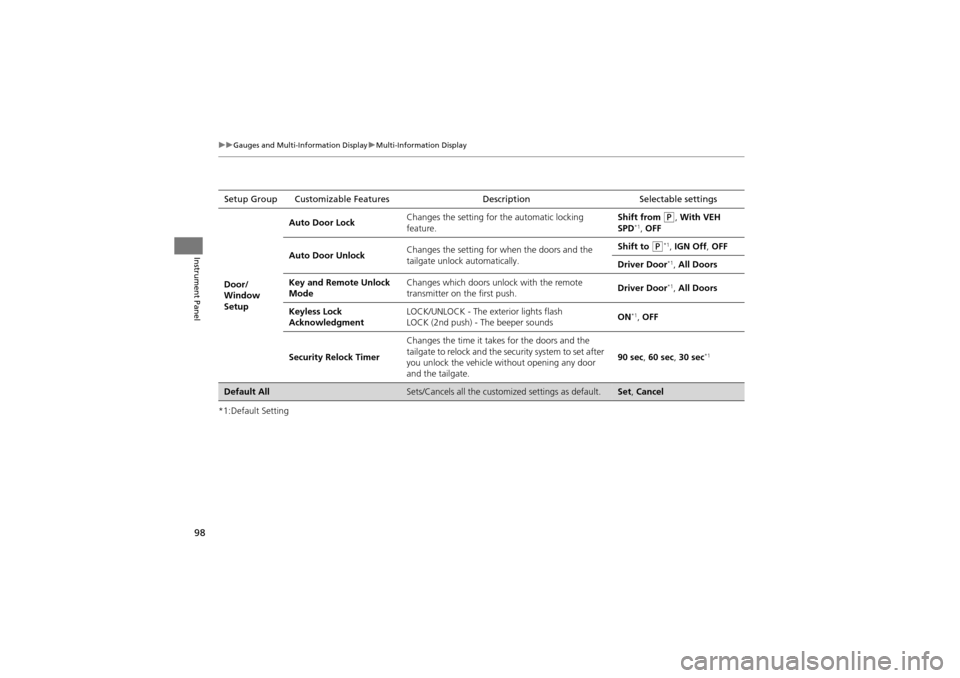
*1:Default SettingSetup Group Customizable Features
DescriptionSelectable settings
Door/
Window
Setup Auto Door Lock
Changes the setting for
the automatic locking
feature. Shift from
P, With VEH
SPD*1, OFF
Auto Door Unlock Changes the setting for wh
en the doors and the
tailgate unlock automatically. Shift to
P*1, IGN Off , OFF
Driver Door
*1, All Doors
Key and Remote Unlock
Mode Changes which doors unlock with the remote
transmitter on the first push.
Driver Door
*1,
All Doors
Keyless Lock
Acknowledgment LOCK/UNLOCK - The ex
terior lights flash
LOCK (2nd push) - The beeper sounds ON
*1,
OFF
Security Relock Timer Changes the time it takes for the doors and the
tailgate to relock and the security system to set after
you unlock the vehicle without opening any door
and the tailgate. 90 sec
, 60 sec , 30 sec
*1
Default AllSets/Cancels all the custom ized settings as default.Set, Cancel
Page 103 of 370
101
Controls
This chapter explains how to operate the various controls necessary for driving.
Setting the Clock.............................. 102
Locking and Unlocking the Doors
Key Types and Function s .................. 103
Locking/Unlocking the Doors from the Outside .......................................... 106
Low Keyless Access Remote Signal Strength*...................................... 110Locking/Unlocking the Doors from the
Inside ............................................. 111
Childproof Door Locks ..................... 112
Auto Door Locking/Unlocking .......... 113
Opening and Closing the Tailgate ... 114
Security System ................................ 120
Opening and Closing the Windows ..... 123
Opening and Closing the Panoramic
Glass Roof ........................................ 126
Operating the Switches Around the Steering Wheel ............................... 127
Ignition Switch ................................. 127
ENGINE START/STOP Button
*........... 128
Turn Signals ..................................... 131
Light Switches.................................. 131
Fog Lights ........................................ 133
Daytime Running Lights ................... 133
Wipers and Washers ........................ 134
Brightness Control ........................... 136
Rear Defogger/Heated Door Mirror Button........................................ 137
Driving Position Memory System ...... 138
Adjusting the Steeri ng Wheel .......... 140
Adjusting the Mirrors ....................... 141
Adjusting the Seats .......................... 143
Interior Lights/Interior Convenience
Items ................................................ 151
Interior Lights .................................. 151
Interior Convenience Items .............. 153
Climate Con trol System................... 163
Using Automatic Climate Control .... 163
Synchronized Mode ......................... 165
Automatic Climate Control Sensors ...... 166
* Not available on all models
Page 105 of 370
103Continued
Controls
Locking and Unlocking the Doors
Key Types and Functions
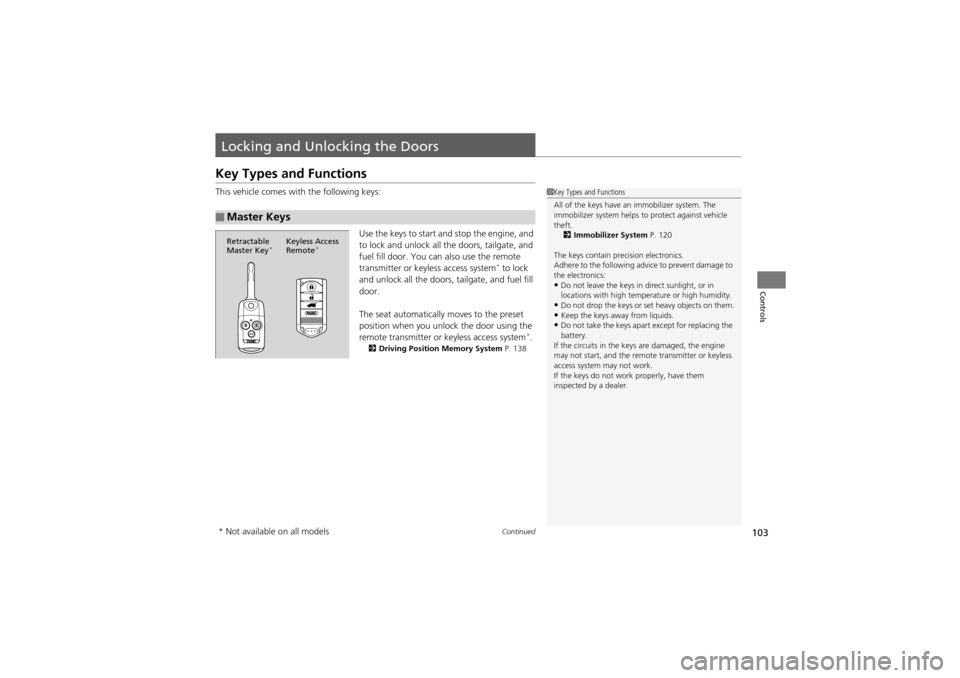
This vehicle comes with the following keys:Use the keys to start and stop the engine, and
to lock and unlock all the doors, tailgate, and
fuel fill door. You can also use the remote
transmitter or keyless access system
* to lock
and unlock all the doors, tailgate, and fuel fill
door.
The seat automatically moves to the preset
position when you unlock the door using the
remote transmitter or keyless access system
*.2 Driving Position Memory System P. 138
■Master Keys
1Key Types and Functions
All of the keys have an immobilizer system. The
immobilizer system helps to protect against vehicle
theft.
2 Immobilizer System P. 120
The keys contain precision electronics.
Adhere to the following advice to prevent damage to
the electronics:
•Do not leave the keys in direct sunlight, or in
locations with high temperature or high humidity.
•Do not drop the keys or set heavy objects on them.•Keep the keys away from liquids.•Do not take the keys apa rt except for replacing the
battery.
If the circuits in the keys are damaged, the engine
may not start, and the remo te transmitter or keyless
access system may not work.
If the keys do not work properly, have them
inspected by a dealer.
Retractable
Master Key*Keyless Access
Remote*
* Not available on all models