mirror Acura ZDX 2012 User Guide
[x] Cancel search | Manufacturer: ACURA, Model Year: 2012, Model line: ZDX, Model: Acura ZDX 2012Pages: 370, PDF Size: 10.06 MB
Page 139 of 370
137
uuOperating the Switches Around the Steering Wheel uRear Defogger/Heated Door Mirror Button
Controls
Rear Defogger/Heated Door Mirror Button
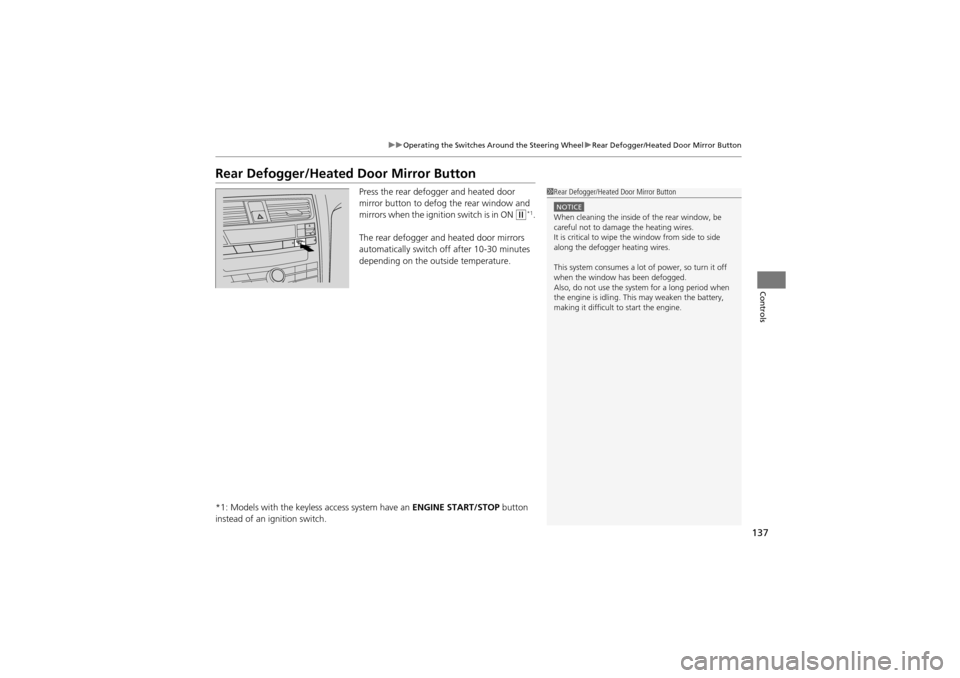
Press the rear defogger and heated door
mirror button to defog the rear window and
mirrors when the igniti on switch is in ON
w*1.
The rear defogger and heated door mirrors
automatically switch of f after 10-30 minutes
depending on the outside temperature.
*1: Models with the keyless access system have an ENGINE START/STOP button
instead of an ig nition switch.
1Rear Defogger/Heated Door Mirror Button
NOTICEWhen cleaning the inside of the rear window, be
careful not to damage the heating wires.
It is critical to wipe the window from side to side
along the defogger heating wires.
This system consumes a lot of power, so turn it off
when the window has been defogged.
Also, do not use the system for a long period when
the engine is idling. This may weaken the battery,
making it difficult to start the engine.
Page 140 of 370
138
uuOperating the Switches Around the Steering Wheel uDriving Position Memory System
Controls
Driving Position Memory System
You can store two driver’s seat (excep t for power lumbar), steering wheel and
outside mirror positions with the driving position memory system.
When you unlock and open the driver’s door with a remote transmitter, or keyless
access system
*, the seat and outside mirrors adjust automatically to one of the two
preset positions.
The steering wheel will move to the stored position when you insert the key into the
ignition switch.
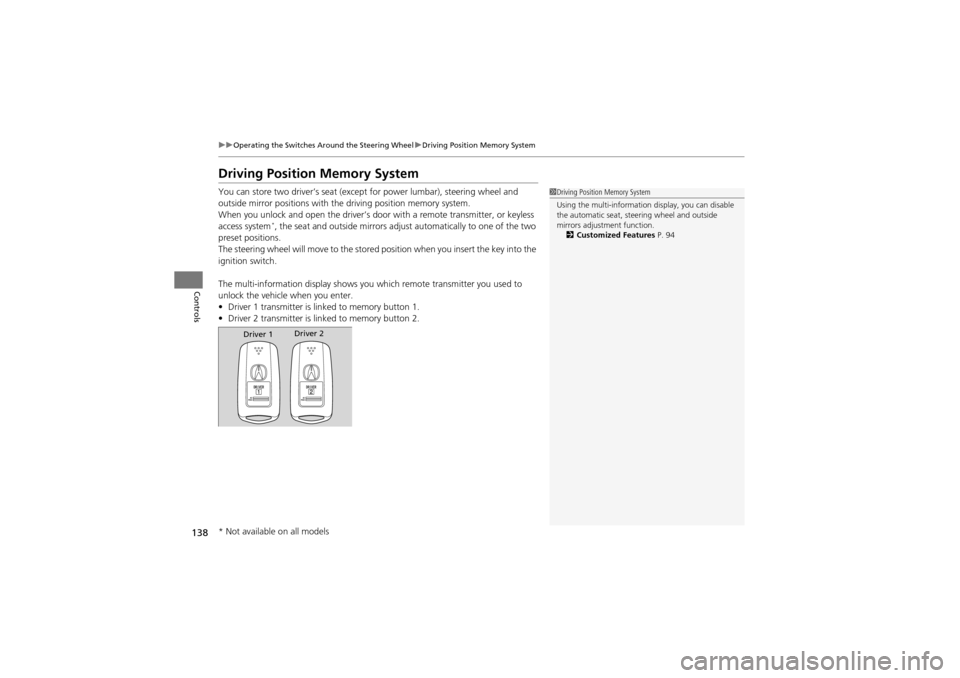
The multi-information disp lay shows you which remote transmitter you used to
unlock the vehicle when you enter.
• Driver 1 transmitter is lin ked to memory button 1.
• Driver 2 transmitter is lin ked to memory button 2.
1Driving Position Memory System
Using the multi-information display, you can disable
the automatic seat, steering wheel and outside
mirrors adjustment function.
2 Customized Features P. 94
Driver 1Driver 2
* Not available on all models
Page 141 of 370
139
uuOperating the Switches Around the Steering Wheel uDriving Position Memory System
Controls
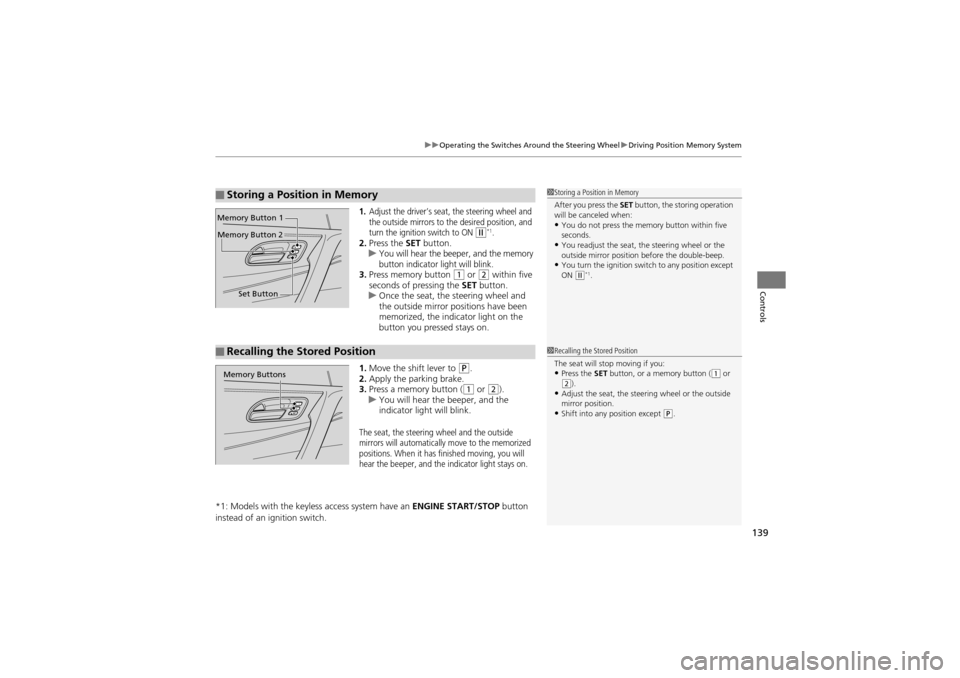
1.Adjust the driver’s seat, the steering wheel and
the outside mirrors to the desired position, and
turn the ignition switch to ON
w*1.2. Press the SET button.
uYou will hear the beeper, and the memory
button indicator light will blink.
3. Press memory button 1 or 2 within five
seconds of pressing the SET button.
u Once the seat, the steering wheel and
the outside mirror pos itions have been
memorized, the indi cator light on the
button you pressed stays on.
1. Move the shift lever to
P.
2. Apply the parking brake.
3. Press a memory button (
1 or 2).
u You will hear the beeper, and the
indicator light will blink.
The seat, the steering wheel and the outside
mirrors will automatically move to the memorized
positions. When it has finished moving, you will
hear the beeper, and the indicator light stays on.
*1: Models with the keyless access system have an ENGINE START/STOP button
instead of an ig nition switch.
■Storing a Position in Memory1Storing a Position in Memory
After you press the SET button, the storing operation
will be canceled when:
•You do not press the memory button within five
seconds.
•You readjust the seat, the steering wheel or the
outside mirror position before the double-beep.
•You turn the ignition switch to any position except
ON (w*1.
Set Button
Memory Button 1
Memory Button 2
■Recalling the Stored Position1
Recalling the Stored Position
The seat will stop moving if you:
•Press the SET button, or a memory button ((1 or (2).•Adjust the seat, the steer ing wheel or the outside
mirror position.
•Shift into any position except (P.
Memory Buttons
Page 143 of 370
141
Controls
Adjusting the Mirrors
Interior Rearview Mirror
Adjust the angle of the rearview mirror when you are sitting in the correct driving
position.
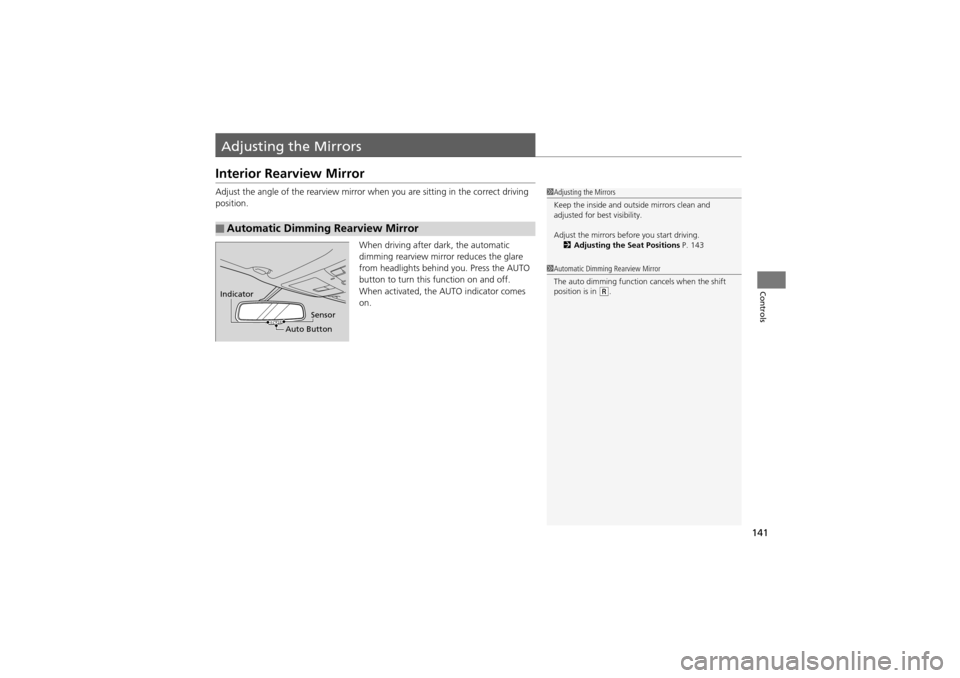
When driving after dark, the automatic
dimming rearview mirror reduces the glare
from headlights behind you. Press the AUTO
button to turn this function on and off.
When activated, the AUTO indicator comes
on.
■Automatic Dimming Rearview Mirror
1 Adjusting the Mirrors
Keep the inside and outside mirrors clean and
adjusted for best visibility.
Adjust the mirrors before you start driving.
2 Adjusting the Seat Positions P. 143
1Automatic Dimming Rearview Mirror
The auto dimming function cancels when the shift
position is in
(R.Indicator
Auto ButtonSensor
Page 144 of 370
142
uuAdjusting the Mirrors uPower Door Mirrors
Controls
Power Door Mirrors
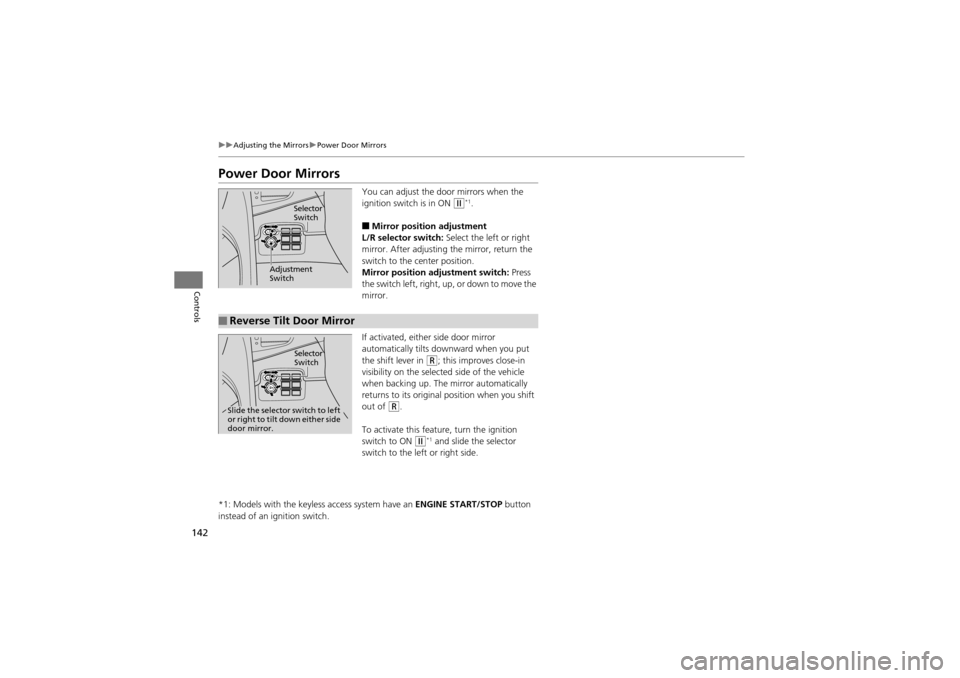
You can adjust the door mirrors when the
ignition switch is in ON
w*1.
■Mirror position adjustment
L/R selector switch: Select the left or right
mirror. After adjusting the mirror, return the
switch to the center position.
Mirror position adjustment switch: Press
the switch left, right, up , or down to move the
mirror.
If activated, either side door mirror
automatically tilts downward when you put
the shift lever in
R; this improves close-in
visibility on the selected side of the vehicle
when backing up. The mirror automatically
returns to its original position when you shift
out of
R.
To activate this feat ure, turn the ignition
switch to ON
w*1 and slide the selector
switch to the left or right side.
*1: Models with the keyless access system have an ENGINE START/STOP button
instead of an ignition switch.
Selector
Switch
Adjustment
Switch
■Reverse Tilt Door Mirror
Selector
Switch
Slide the selector switch to left
or right to tilt down either side
door mirror.
Page 212 of 370
210
Driving
Before Driving
Driving Preparation
Check the following items before you start driving.
•Make sure there are no obstructions on the windows, door mirrors, exterior
lights, or other parts of the vehicle.
u Remove any frost, snow, or ice.
u Remove any snow on the roof, as this can slip down and obstruct your field of
vision while driving. If frozen solid, remove ice once it has softened.
u When removing ice from around the wheels, be sure not to damage the wheel
or wheel components.
• Make sure the hood is securely closed.
u If the hood opens while driving, your front view will be blocked.
• Make sure the tires are in good condition.
u Check air pressures, and check for damage and excessive wear.
2Checking and Maintaining Tires P. 300
•Make sure there are no people or objects behind or around the vehicle.
u There are blind spots from the inside.
■Exterior Checks1Exterior Checks
NOTICEWhen doors are frozen shut, use warm water around
the door edges to melt any ice. Do not try to force
them open, as this ca n damage the rubber trim
around the doors. When done, wipe dry to avoid
further freezing.
Do not pour warm water into the key cylinder.
You will be unable to insert key if the water freezes in
the hole.
Page 213 of 370
Continued211
uuBefore Driving uDriving Preparation
Driving
• Store or secure all items on board properly.
u Carrying too much cargo, or improperly storing it, can affect your vehicle’s
handling, stability, stopping distan ce, and tires, and make it unsafe.
2Maximum Load Limit P. 213
•Do not pile items higher than the seat height.
u They can block your view and may be thrown forward in the event of sudden
braking.
• Do not place anything in th e front seat footwells. Make sure to secure the floor
mat.
u An object or unsecured floor mat can inte rfere with your brake and accelerator
pedal operation while driving.
• If you have any animals on board, do not let them move around in the vehicle.
u They may interfere with driv ing and a crash could occur.
• Securely close and lock a ll doors and the tailgate.
2Locking/Unlocking the Doors from the Inside P. 111
•Adjust your seating position properly.
u Adjust the head restraint, too.
2 Adjusting the Seats P. 143
2 Adjusting the Head Restraints P. 145
•Adjust the mirrors and steering wheel properly for your driving.
u Adjust them while sitting in the proper driving position.
2 Adjusting the Mirrors P. 141
2 Adjusting the Steering Wheel P. 140
■Interior Checks1Interior Checks
The headlight aim is set by the factory, and does not
need to be adjusted. However, if you regularly carry
heavy items in the cargo ar ea or tow a trailer, have
the aiming readjusted at a dealer or by a qualified
technician.
Page 219 of 370
217
uuTowing a Trailer uTowing Preparation
Driving
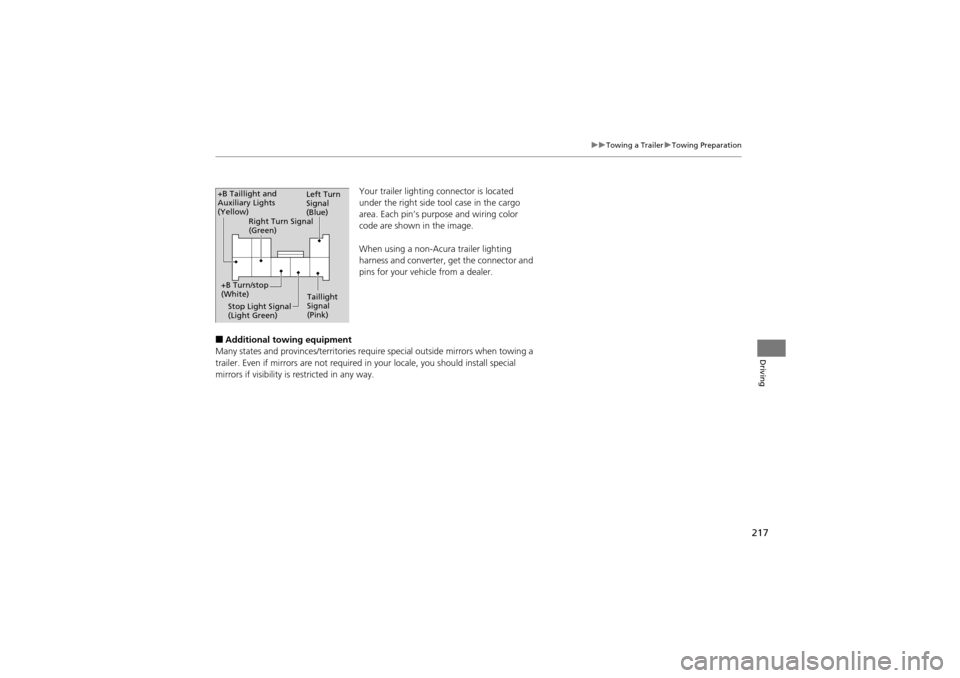
Your trailer lighting connector is located
under the right side tool case in the cargo
area. Each pin’s purpose and wiring color
code are shown in the image.
When using a non-Acura trailer lighting
harness and converter, get the connector and
pins for your vehicle from a dealer.
■Additional towing equipment
Many states and provinces/territories requ ire special outside mirrors when towing a
trailer. Even if mirrors ar e not required in your locale, you should install special
mirrors if visibility is restricted in any way.
Left Turn
Signal
(Blue)
Taillight
Signal
(Pink)
Stop Light Signal
(Light Green)
+B Turn/stop
(White) Right Turn Signal
(Green)
+B Taillight and
Auxiliary Lights
(Yellow)
Page 248 of 370
246
uuWhen Driving uBSI (Blind Spot Information)*
Driving
BSI (Blind Spot Information)*
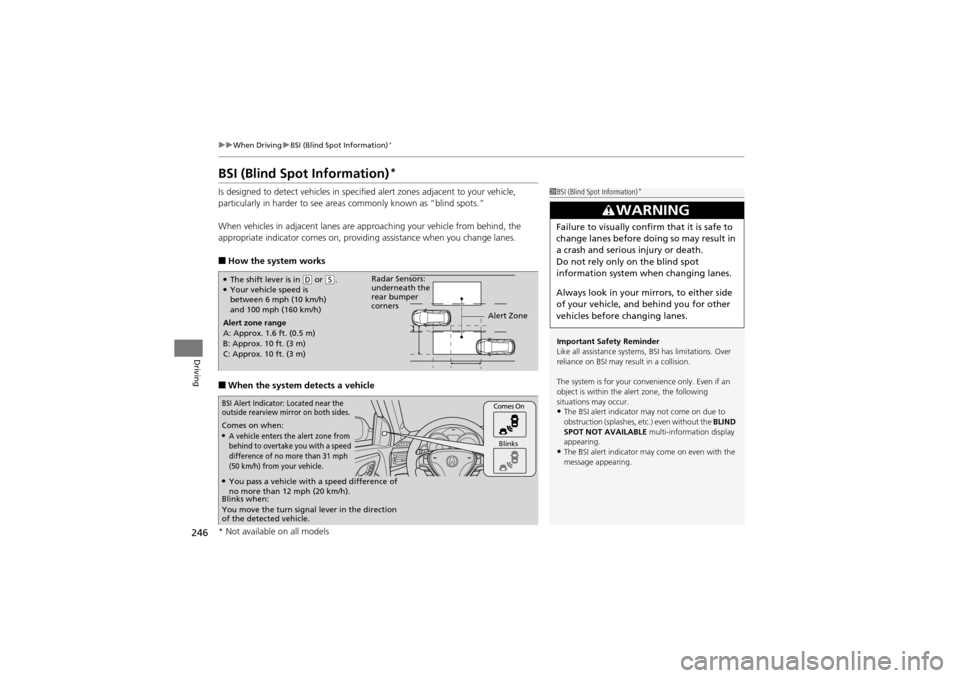
Is designed to detect vehicles in specified alert zones adjacent to your vehicle,
particularly in harder to see areas commonly known as “blind spots.”
When vehicles in adjacent lanes are approaching your vehicle from behind, the
appropriate indicator comes on, providing assistance when you change lanes.
■How the system works
■When the system detects a vehicle
1BSI (Blind Spot Information)*
Important Safety Reminder
Like all assistance systems, BSI has limitations. Over
reliance on BSI may result in a collision.
The system is for your convenience only. Even if an
object is within the alert zone, the following
situations may occur.
•The BSI alert indicator may not come on due to
obstruction (splashes, etc.) even without the BLIND
SPOT NOT AVAILABLE multi-information display
appearing.
•The BSI alert indicator may come on even with the
message appearing.
3WARNING
Failure to visually confirm that it is safe to
change lanes before doing so may result in
a crash and serious injury or death.
Do not rely only on the blind spot
information system when changing lanes.
Always look in your mirrors, to either side
of your vehicle, and behind you for other
vehicles before changing lanes.
●The shift lever is in ( D or (S.●Your vehicle speed is
between 6 mph (10 km/h)
and 100 mph (160 km/h)
Alert zone range
A: Approx. 1.6 ft. (0.5 m)
B: Approx. 10 ft. (3 m)
C: Approx. 10 ft. (3 m) Radar Sensors:
underneath the
rear bumper
corners
Alert Zone
Comes on when:●A vehicle enters the alert zone from
behind to overtake you with a speed
difference of no more than 31 mph
(50 km/h) from your vehicle.
Comes On
Blinks
BSI Alert Indicator: Located near the
outside rearview mirror on both sides.
Blinks when:
You move the turn signal lever in the direction
of the detected vehicle.
●You pass a vehicle with a speed difference of
no more than 12 mph (20 km/h).
* Not available on all models
Page 264 of 370
262
Driving
Rearview Camera
About Your Rearview Camera
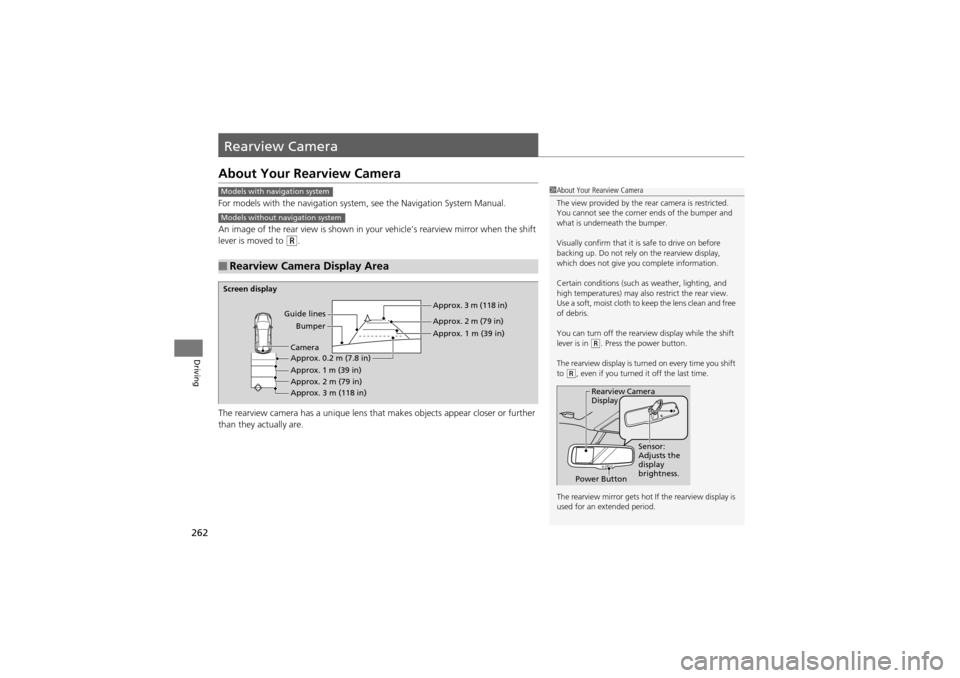
For models with the navigation system, see the Navigation System Manual.
An image of the rear view is shown in your vehicle’s rearview mirror when the shift
lever is moved to
R.
The rearview camera has a unique lens that makes objects appear closer or further
than they actually are.
■Rearview Camera Display Area
Models with navigation system
Models without navigation system
1 About Your Rearview Camera
The view provided by the re ar camera is restricted.
You cannot see the corner ends of the bumper and
what is underneath the bumper.
Visually confirm that it is safe to drive on before
backing up. Do not rely on the rearview display,
which does not give you complete information.
Certain conditions (such as weather, lighting, and
high temperatures) may also restrict the rear view.
Use a soft, moist cloth to ke ep the lens clean and free
of debris.
You can turn off the rearview display while the shift
lever is in
(R. Press the power button.
The rearview display is turned on every time you shift
to
(R, even if you turned it off the last time.
The rearview mirror gets hot If the rearview display is
used for an extended period.
Rearview Camera
Display
Power Button Sensor:
Adjusts the
display
brightness.
Screen display
Guide linesBumper Approx. 3 m (118 in)
Approx. 2 m (79 in)
Approx. 1 m (39 in)
Approx. 0.2 m (7.8 in)
Approx. 1 m (39 in)
Approx. 2 m (79 in)
Approx. 3 m (118 in) Camera