wheel Acura ZDX 2012 User Guide
[x] Cancel search | Manufacturer: ACURA, Model Year: 2012, Model line: ZDX, Model: Acura ZDX 2012Pages: 370, PDF Size: 10.06 MB
Page 86 of 370
84
uuIndicators uMulti-Information Display Warning and Information Messages
Instrument Panel
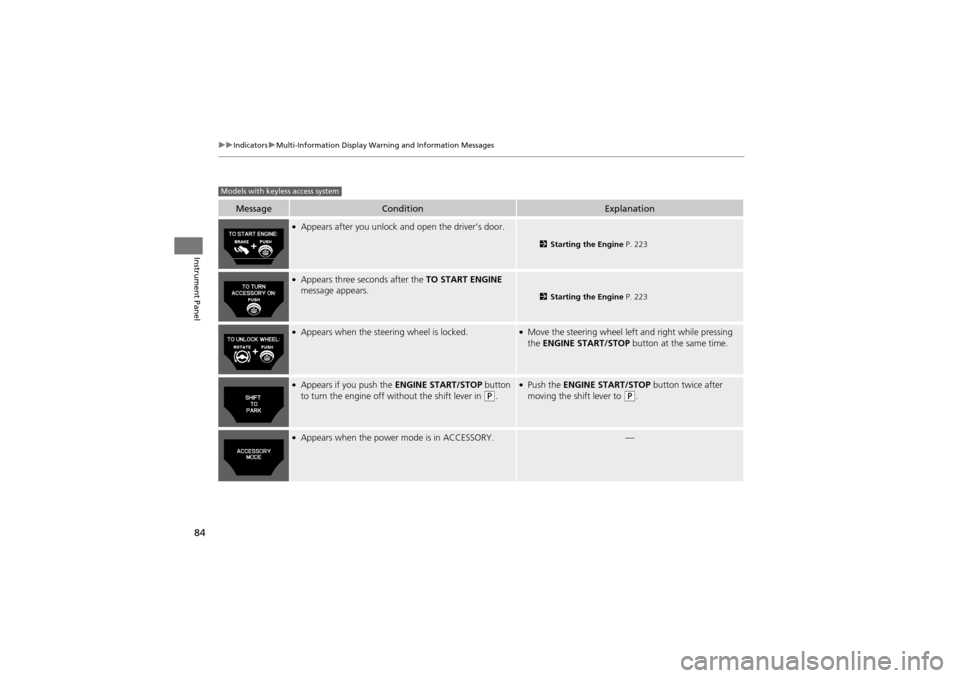
MessageConditionExplanation
●Appears after you unlock and open the driver’s door.
2 Starting the Engine P. 223
●Appears three seconds after the TO START ENGINE
message appears.
2 Starting the Engine P. 223
●Appears when the steering wheel is locked.●Move the steering wheel left and right while pressing
the ENGINE START/STOP button at the same time.
●Appears if you push the ENGINE START/STOP button
to turn the engine off without the shift lever in (P.
●Push the ENGINE START/STOP button twice after
moving the shift lever to (P.
●Appears when the power mode is in ACCESSORY.—
Models with keyless access system
Page 95 of 370
93
uuGauges and Multi-Information Display uMulti-Information Display
Continued
Instrument Panel
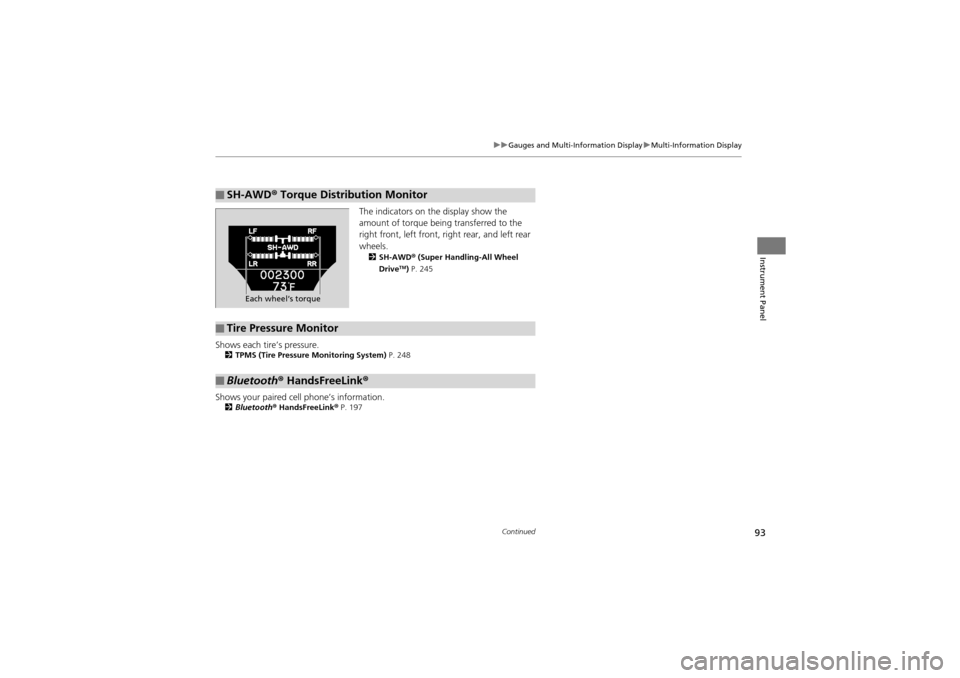
The indicators on the display show the
amount of torque being transferred to the
right front, left front, right rear, and left rear
wheels.
2 SH-AWD ® (Super Handling-All Wheel
DriveTM) P. 245
Shows each tire’s pressure.2 TPMS (Tire Pressure Monitoring System) P. 248
Shows your paired cell phone’s information.2Bluetooth® HandsFreeLink ® P. 197
■SH-AWD® Torque Distribution Monitor
Each wheel’s torque
■Tire Pressure Monitor
■Bluetooth ® HandsFreeLink ®
Page 97 of 370
95
uuGauges and Multi-Information Display uMulti-Information Display
Continued
Instrument Panel
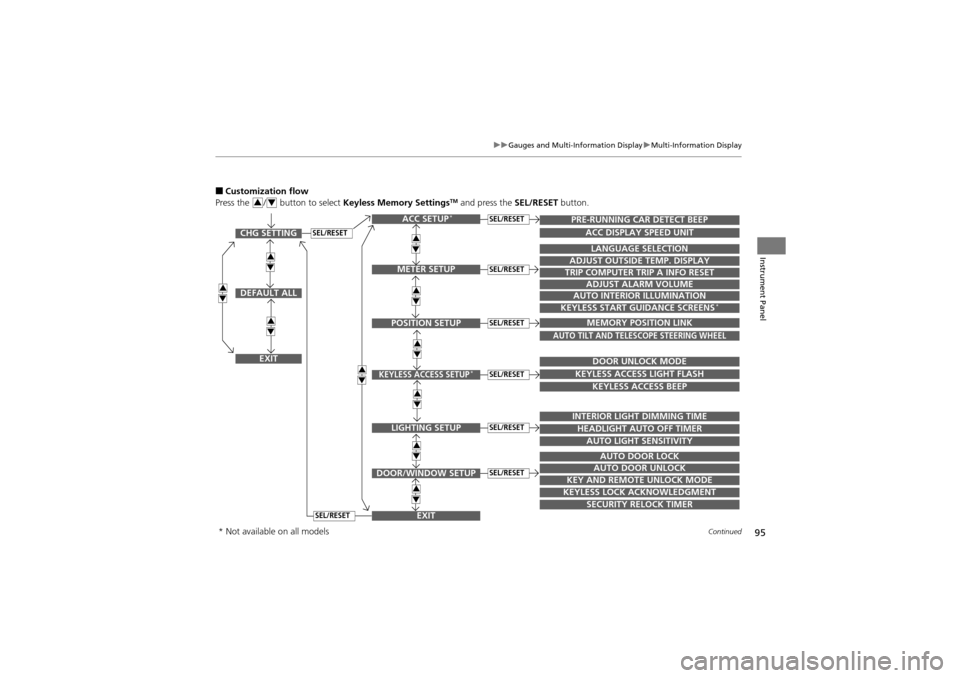
■Customization flow
Press the / button to select Keyless Memory SettingsTM and press the SEL/RESET button.34
SEL/RESETCHG SETTING
DEFAULT ALL
EXIT
ACC SETUP*
EXITSECURITY RELOCK TIMER
TRIP COMPUTER TRIP A INFO RESET
ADJUST ALARM VOLUME
AUTO INTERIOR ILLUMINATION
KEYLESS START GUIDANCE SCREENS*
LANGUAGE SELECTION
ADJUST OUTSIDE TEMP. DISPLAY
MEMORY POSITION LINK
AUTO TILT AND TELESCOPE STEERING WHEEL
DOOR UNLOCK MODE
KEYLESS ACCESS LIGHT FLASH
KEYLESS ACCESS BEEP
INTERIOR LIGHT DIMMING TIME
HEADLIGHT AUTO OFF TIMER
AUTO LIGHT SENSITIVITY
AUTO DOOR LOCK
AUTO DOOR UNLOCK
KEY AND REMOTE UNLOCK MODE
KEYLESS LOCK ACKNOWLEDGMENT
PRE-RUNNING CAR DETECT BEEP
ACC DISPLAY SPEED UNIT
34
34
34
34
34
34
34
34
34
34
METER SETUP
POSITION SETUP
KEYLESS ACCESS SETUP*
LIGHTING SETUP
DOOR/WINDOW SETUP
SEL/RESET
SEL/RESET
SEL/RESET
SEL/RESET
SEL/RESET
SEL/RESET
SEL/RESET
* Not available on all models
Page 99 of 370
97
uuGauges and Multi-Information Display uMulti-Information Display
Continued
Instrument Panel
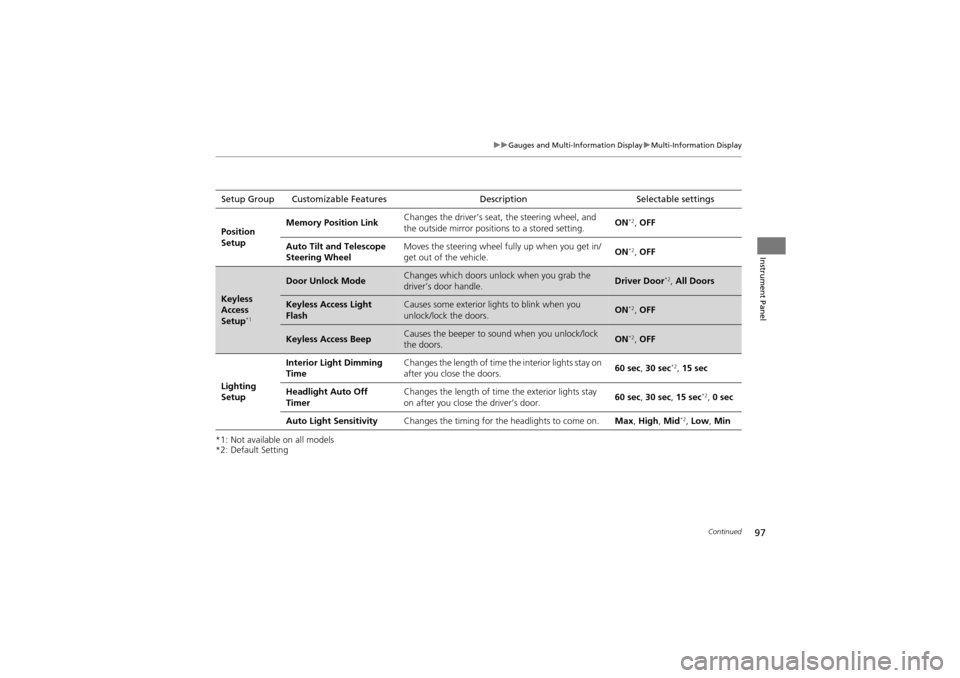
*1: Not available on all models
*2: Default SettingSetup Group Customizable Features
DescriptionSelectable settings
Position
Setup Memory Position Link
Changes the driver’s seat, the steering wheel, and
the outside mirror position
s to a stored setting. ON
*2,
OFF
Auto Tilt and Telescope
Steering Wheel Moves the steering wheel fu
lly up when you get in/
get out of the vehicle. ON
*2,
OFF
Keyless
Access
Setup
*1
Door Unlock ModeChanges which doors unlock when you grab the
driver’s door handle.Driver Door*2, All Doors
Keyless Access Light
FlashCauses some exterior li ghts to blink when you
unlock/lock the doors.ON*2, OFF
Keyless Access BeepCauses the beeper to s ound when you unlock/lock
the doors.ON*2, OFF
Lighting
Setup Interior Light Dimming
Time
Changes the length of time
the interior lights stay on
after you close the doors. 60 sec,
30 sec
*2, 15 sec
Headlight Auto Off
Timer Changes the length of time
the exterior lights stay
on after you close the driver’s door. 60 sec,
30 sec, 15 sec
*2, 0 sec
Auto Light Sensitivity Changes the timing for the headlights to come on. Max, High , Mid
*2, Low, Min
Page 103 of 370
101
Controls
This chapter explains how to operate the various controls necessary for driving.
Setting the Clock.............................. 102
Locking and Unlocking the Doors
Key Types and Function s .................. 103
Locking/Unlocking the Doors from the Outside .......................................... 106
Low Keyless Access Remote Signal Strength*...................................... 110Locking/Unlocking the Doors from the
Inside ............................................. 111
Childproof Door Locks ..................... 112
Auto Door Locking/Unlocking .......... 113
Opening and Closing the Tailgate ... 114
Security System ................................ 120
Opening and Closing the Windows ..... 123
Opening and Closing the Panoramic
Glass Roof ........................................ 126
Operating the Switches Around the Steering Wheel ............................... 127
Ignition Switch ................................. 127
ENGINE START/STOP Button
*........... 128
Turn Signals ..................................... 131
Light Switches.................................. 131
Fog Lights ........................................ 133
Daytime Running Lights ................... 133
Wipers and Washers ........................ 134
Brightness Control ........................... 136
Rear Defogger/Heated Door Mirror Button........................................ 137
Driving Position Memory System ...... 138
Adjusting the Steeri ng Wheel .......... 140
Adjusting the Mirrors ....................... 141
Adjusting the Seats .......................... 143
Interior Lights/Interior Convenience
Items ................................................ 151
Interior Lights .................................. 151
Interior Convenience Items .............. 153
Climate Con trol System................... 163
Using Automatic Climate Control .... 163
Synchronized Mode ......................... 165
Automatic Climate Control Sensors ...... 166
* Not available on all models
Page 129 of 370
127
Controls
Operating the Switches Around the Steering Wheel
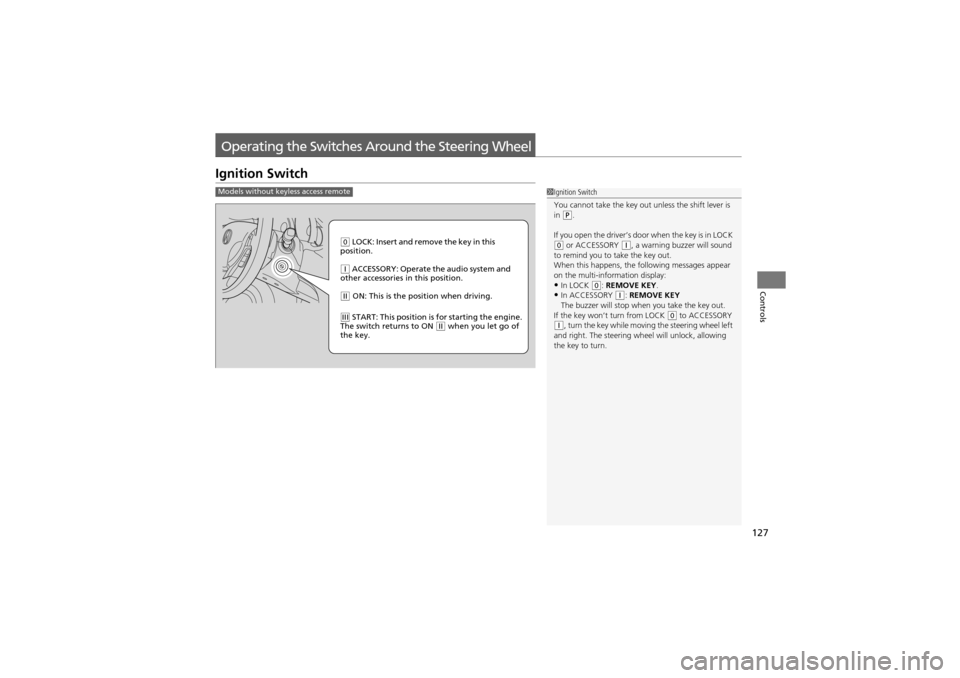
Ignition Switch
1Ignition Switch
You cannot take the key out unless the shift lever is
in
(P.
If you open the driver’s door when the key is in LOCK
(0 or ACCESSORY (q, a warning buzzer will sound
to remind you to take the key out.
When this happens, the following messages appear
on the multi-information display:
•In LOCK (0: REMOVE KEY.•In ACCESSORY (q: REMOVE KEY
The buzzer will stop when you take the key out.
If the key won’t turn from LOCK
(0 to ACCESSORY (q, turn the key while moving the steering wheel left
and right. The steering wheel will unlock, allowing
the key to turn.
Models without keyless access remote
0 LOCK: Insert and remove the key in this
position.
q ACCESSORY: Operate the audio system and
other accessories in this position.
w ON: This is the position when driving.
e START: This position is for starting the engine.
The switch returns to ON w when you let go of
the key.
Page 130 of 370
128
uuOperating the Switches Around the Steering Wheel uENGINE START/STOP Button*
Controls
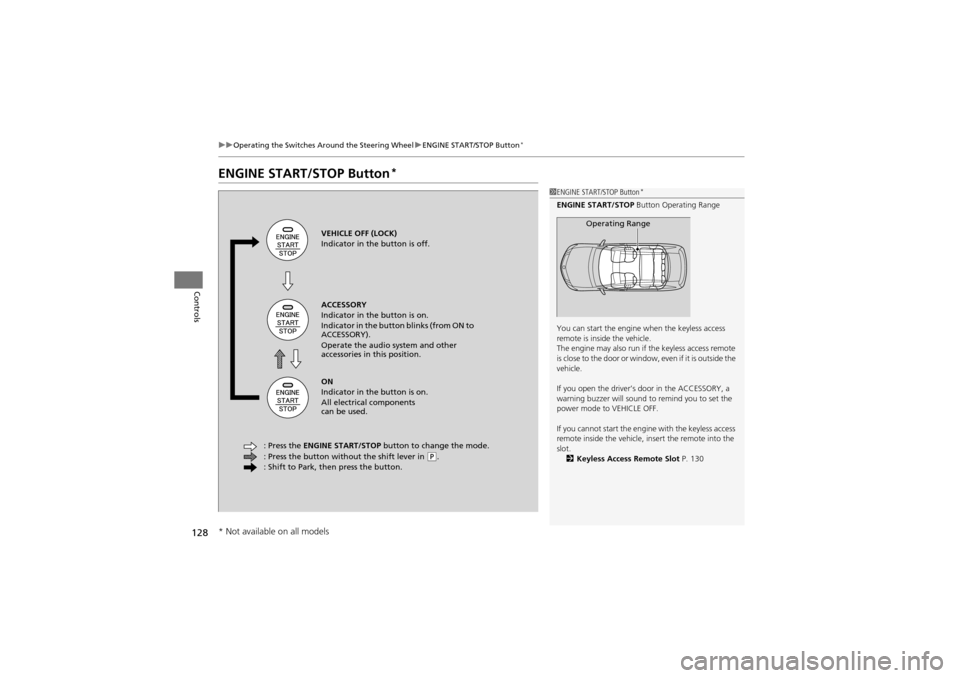
ENGINE START/STOP Button*
1ENGINE START/STOP Button*
ENGINE START/STOP Button Operating Range
You can start the engine when the keyless access
remote is inside the vehicle.
The engine may also run if the keyless access remote
is close to the door or window , even if it is outside the
vehicle.
If you open the driver’s door in the ACCESSORY, a
warning buzzer will sound to remind you to set the
power mode to VEHICLE OFF.
If you cannot start the engine with the keyless access
remote inside the vehicle, insert the remote into the
slot. 2 Keyless Access Remote Slot P. 130
Operating RangeVEHICLE OFF (LOCK)
Indicator in the button is off.
ACCESSORY
Indicator in the button is on.
Indicator in the button blinks (from ON to
ACCESSORY).
Operate the audio system and other
accessories in this position.
ON
Indicator in the button is on.
All electrical components
can be used.
: Press the ENGINE START/STOP button to change the mode.
: Press the button without the shift lever in
( P.
: Shift to Park, then press the button.
* Not available on all models
Page 131 of 370
129
uuOperating the Switches Around the Steering Wheel uENGINE START/STOP Button*
Continued
Controls
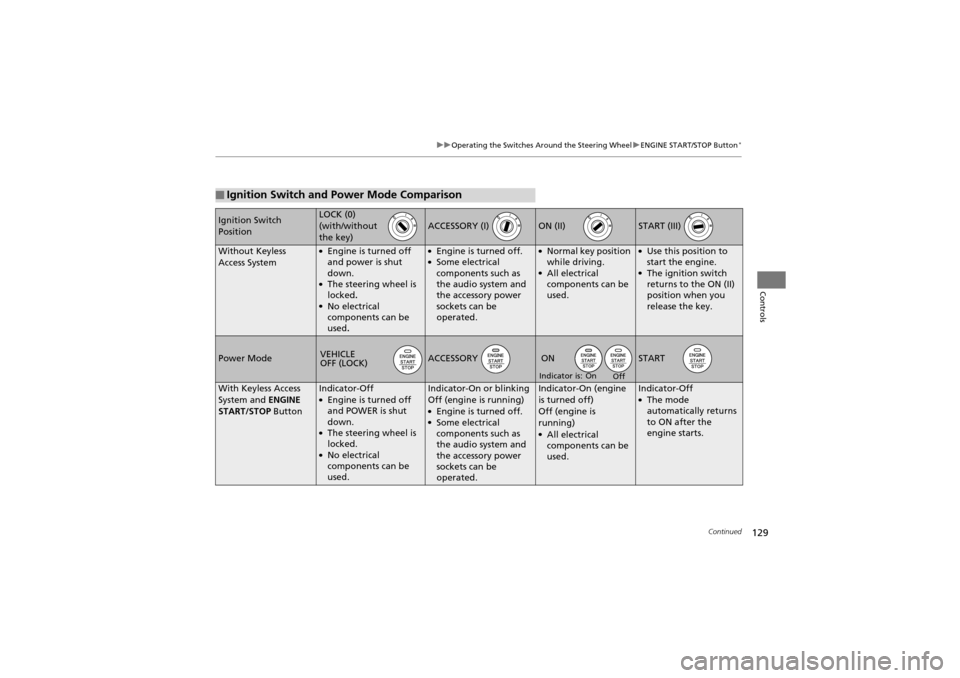
■Ignition Switch and Power Mode Comparison
Ignition Switch
PositionLOCK (0)
(with/without
the key)
ACCESSORY (I) ON (II) START (III)
Without Keyless
Access System●Engine is turned off
and power is shut
down.
●The steering wheel is
locked.
●No electrical
components can be
used.
●Engine is turned off.●Some electrical
components such as
the audio system and
the accessory power
sockets can be
operated.
●Normal key position
while driving.
●All electrical
components can be
used.
●Use this position to
start the engine.
●The ignition switch
returns to the ON (II)
position when you
release the key.
Power ModeACCESSORY START
With Keyless Access
System and ENGINE
START/STOP ButtonIndicator-Off●Engine is turned off
and POWER is shut
down.
●The steering wheel is
locked.
●No electrical
components can be
used.
Indicator-On or blinking
Off (engine is running)
●Engine is turned off.●Some electrical
components such as
the audio system and
the accessory power
sockets can be
operated.
Indicator-On (engine
is turned off)
Off (engine is
running)
●All electrical
components can be
used.
Indicator-Off●The mode
automatically returns
to ON after the
engine starts.
VEHICLE
OFF (LOCK)ON
On
Off
Indicator is:
Page 132 of 370
uuOperating the Switches Around the Steering Wheel uENGINE START/STOP Button*
130
Controls
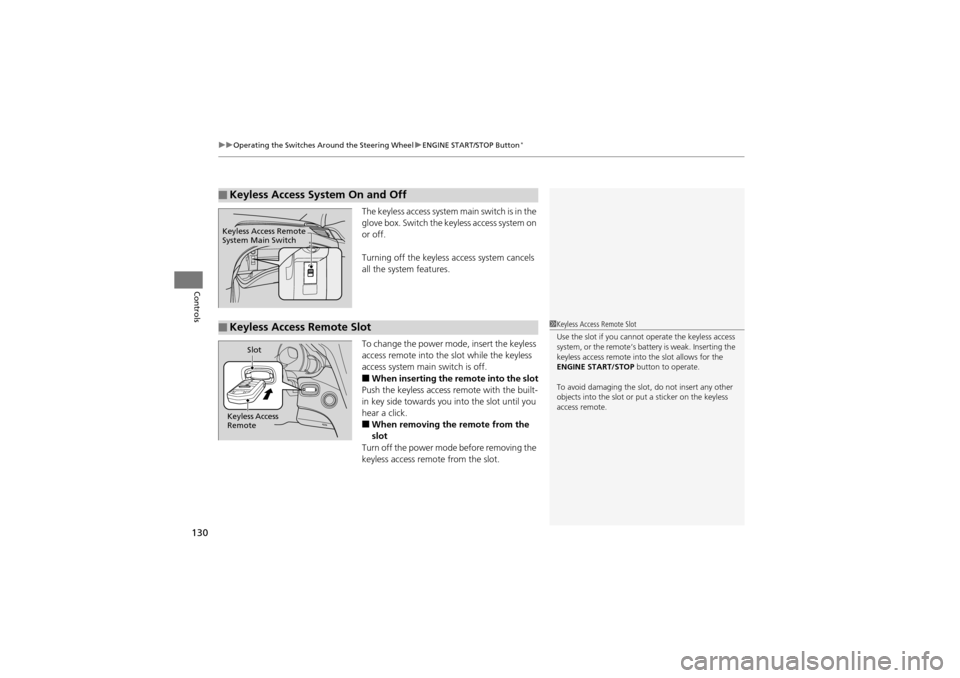
The keyless access system main switch is in the
glove box. Switch the key less access system on
or off.
Turning off the keyless ac cess system cancels
all the system features.
To change the power mode, insert the keyless
access remote into the slot while the keyless
access system main switch is off.
■When inserting the remote into the slot
Push the keyless access re mote with the built-
in key side towards you into the slot until you
hear a click.
■When removing the remote from the
slot
Turn off the power mode before removing the
keyless access remote from the slot.
■Keyless Access System On and Off
Keyless Access Remote
System Main Switch
■Keyless Access Remote Slot1 Keyless Access Remote Slot
Use the slot if you cannot operate the keyless access
system, or the remote’s batte ry is weak. Inserting the
keyless access remote into the slot allows for the
ENGINE START/STOP button to operate.
To avoid damaging the slot , do not insert any other
objects into the slot or pu t a sticker on the keyless
access remote.
Keyless Access
Remote Slot
Page 133 of 370
131
uuOperating the Switches Around the Steering Wheel uTurn Signals
Continued
Controls
Turn Signals
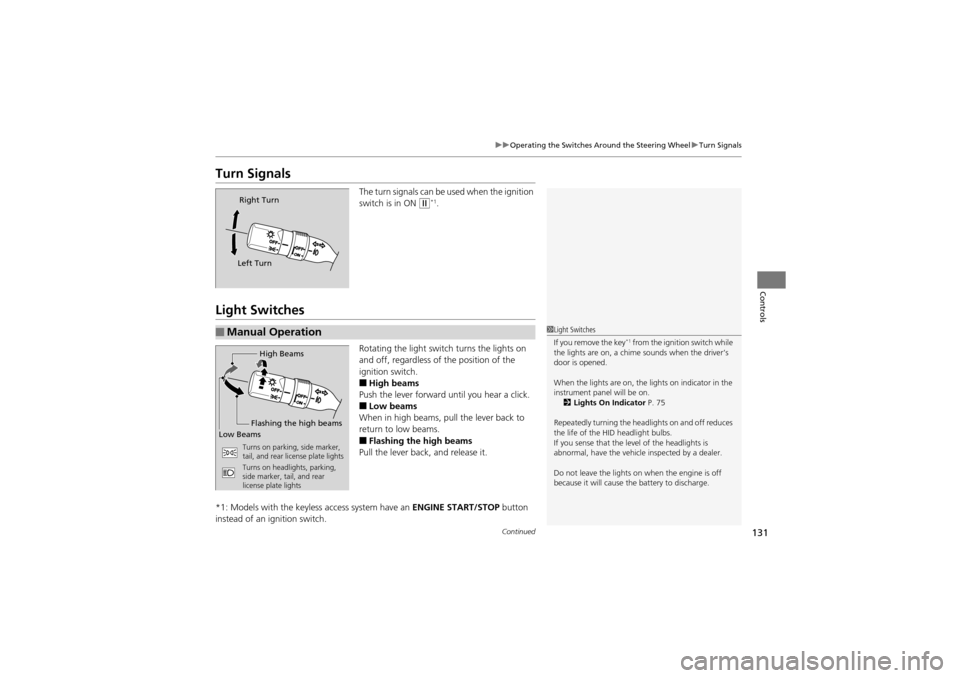
The turn signals can be used when the ignition
switch is in ON
w*1.
Light Switches
Rotating the light swit ch turns the lights on
and off, regardless of the position of the
ignition switch.
■High beams
Push the lever forward until you hear a click.
■Low beams
When in high beams, pull the lever back to
return to low beams.
■Flashing the high beams
Pull the lever back, and release it.
*1: Models with the keyless access system have an ENGINE START/STOP button
instead of an ig nition switch.
Right Turn
Left Turn
■Manual Operation1 Light Switches
If you remove the key*1 from the ignition switch while
the lights are on, a chime sounds when the driver’s
door is opened.
When the lights are on, the lights on indicator in the
instrument panel will be on. 2 Lights On Indicator P. 75
Repeatedly turning the headlights on and off reduces
the life of the HID headlight bulbs.
If you sense that the level of the headlights is
abnormal, have the vehicle inspected by a dealer.
Do not leave the lights on when the engine is off
because it will cause th e battery to discharge.High Beams
Flashing the high beams
Low Beams
Turns on parking, side marker,
tail, and rear license plate lights
Turns on headlights, parking,
side marker, tail, and rear
license plate lights