radio controls Acura ZDX 2012 Owner's Manual
[x] Cancel search | Manufacturer: ACURA, Model Year: 2012, Model line: ZDX, Model: Acura ZDX 2012Pages: 370, PDF Size: 10.06 MB
Page 3 of 370
Contents
Child Safety P. 50Exhaust Gas Hazard P. 64 Safety Labels P. 65
Opening and Closing the Tailgate P. 114 Security System P. 120 Opening and Closing the Windows P. 123
Operating the Switches Around the Steering Wheel P. 127 Adjusting the Mirrors P. 141
Interior Lights/Interior Convenience Items P. 151 Climate Control System P. 163
Audio Error Messages P. 188 Audio Remote Controls P. 190
HomeLink ® Universal Transceiver P. 195
When Driving P. 223 Braking P. 253 Parking Your Vehicle P. 261
Accessories and Modifications P. 267
Maintenance Under the Hood P. 277 Replacing Light Bulbs P. 291
Checking and Maintaining Tires P. 300 Battery P. 309 Remote Transmitter Care P. 310
Cleaning P. 313
Engine Does Not Start P. 326 Jump Starting P. 329 Shift Lever Does Not Move P. 331
Fuses P. 338 Emergency Towing P. 344
When You Cannot Open or Close the Tailgate P. 347
Devices that Emit Radio Waves P. 352 Reporting Safety Defects P. 353
Authorized Manuals P. 358 Client Service Information P. 359
Quick Reference GuideP. 2
Safe DrivingP. 21
Instrument PanelP. 67
ControlsP. 101
FeaturesP. 167
DrivingP. 209
MaintenanceP. 269
Handling the UnexpectedP. 317
InformationP. 349
IndexP. 361
Page 14 of 370
12
Quick Reference Guide
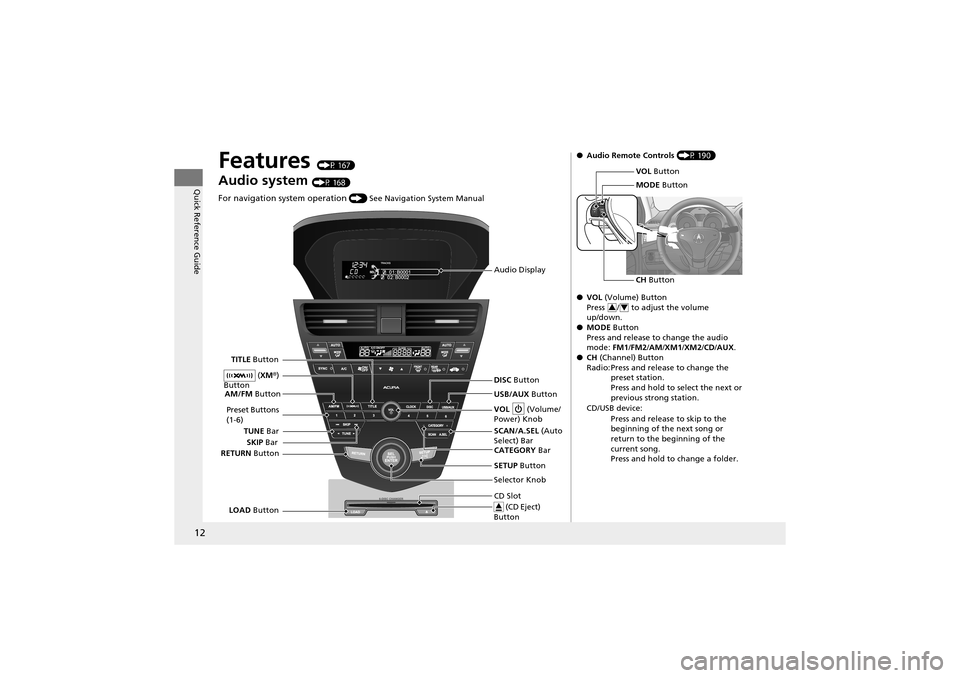
Features (P 167)
Audio system (P 168)
For navigation system operation () See Navigation System Manual
Audio Display
SCAN/A.SEL (Auto
Select) Bar
AM/FM
Button
RETURN Button
Selector Knob
TITLE
Button
TUNE Bar VOL
(Volume/
Power) Knob
DISC Button
USB/AUX Button
CD Slot (CD Eject)
Button
Preset Buttons
(1-6)
SETUP Button
SKIP
Bar
CATEGORY Bar
LOAD Button (
XM ®)
Button
● Audio Remote Controls (P 190)
● VOL (Volume) Button
Press / to adjust the volume
up/down.
● MODE Button
Press and release to change the audio
mode: FM1 /FM2 /AM /XM1 /XM2 /CD/ AUX .
● CH (Channel) Button
Radio: Press and release to change the preset station.
Press and hold to select the next or
previous strong station.
CD/USB device: Press and release to skip to the
beginning of the next song or
return to the beginning of the
current song.
Press and hold to change a folder.
VOL Button
MODE Button
CH Button
34
Page 112 of 370
110
uuLocking and Unlocking the Doors uLow Keyless Access Remote Signal Strength*
Controls
Low Keyless Access Remote Signal Strength*
The vehicle transmits radio waves to locate the keyless access remote when locking/
unlocking the doors, unlocking the tailgate, or to start the engine.
In the following cases, locking/unlocking the doors or unlocking the tailgate or
starting the engine may be inhibited or operation may be unstable:
• Strong radio waves are being trans mitted by nearby equipment.
• You are carrying the keyless access remote together with telecommunications
equipment, notebook computers, mob ile phones, or wireless machines.
• A metallic object is touching or covering the keyless access remote.1Low Keyless Access Remote Signal Strength*
Communication between the keyless access remote
and the vehicle consumes the keyless access remote’s
battery.
Battery life is about two years, but this varies
depending on regularity of use.
The battery is consumed whenever the keyless access
remote is receiving strong radio waves. Avoid placing
it near electrical appliances such as televisions and
personal computers.
* Not available on all models
Page 122 of 370
120
Controls
Security System
Immobilizer System
The immobilizer system prevents a key that has not been pre-registered from
starting the engine. Each key contains electronic transmitters that use electronic
signals to verify the key.
Pay attention to the following when inserti ng the key into the ignition switch or
selecting the ACCESSORY mode with an ENGINE START/STOP button
*:
• Do not allow objects that emit strong radio waves near the ignition switch.
• Make sure the key is not covered by or touching a metal object.
• Do not bring a key from another vehicle’s immobilizer system near the ignition
switch.
Security System Alarm
The security system alarm activates when the doors, tailgate, or hood are opened
without the key, remote transmitt er or keyless access remote*.
■When the security system alarm activates
The horn sounds intermittently and all of the exterior lights flash.
■To deactivate the security system alarm
Unlock the vehicle using the key, remo te transmitter or keyless access system*. The
system, along with the horn and flashing lights, is deactivated.
1 Immobilizer System
NOTICELeaving the ignition key in the vehicle can result in
theft or accidental movement of the vehicle.
Always take the ignition key with you whenever you
leave the vehicle unattended.
Do not alter the system or add other devices to it.
Doing so may damage the system and make your
vehicle inoperable.
1 Security System Alarm
The security alarm continues for a maximum of two
minutes until the security system deactivates.
* Not available on all models
Page 169 of 370
167
Features
This chapter describes how to operate technology features on models without the navigation system.
Audio System
About Your Audio System ................ 168
USB Adapter Cable .......................... 169
Auxiliary Input Jack .... ...................... 169
Audio System Theft Protection ......... 170
Audio System Basic Operation ........ 171
Adjusting the Sound .... .................... 172
Playing the AM/FM Radio ................. 173
Playing the XM ® Radio ..................... 175
Playing a CD .................................... 177
Playing an iPod ®............................... 180
Playing a USB Flash Drive ................. 183
Playing Bluetooth ® Audio................. 186 Audio Error Messages
CD Changer..................................... 188
iPod ®/USB Flash Drive....................... 189
Audio Remote Controls .................... 190
General Information on the Audio SystemXM ® Radio Service ........................... 191
Recommended CDs ......................... 192
Compatible iPod® and USB Flash Drives........ 194HomeLink ® Universal Transceiver
Training HomeLink ........................... 195 Bluetooth® HandsFreeLink
®
Using HFL ........................................ 197
HFL Menus ...................................... 199
Page 170 of 370
168
Features
Audio System
About Your Audio System
On models with the navigation system, see the Navigation System Manual for
operation of the audio system, AcuraLink*, Bluetooth ® HandsFreeLink ®, and voice
commands for these features.
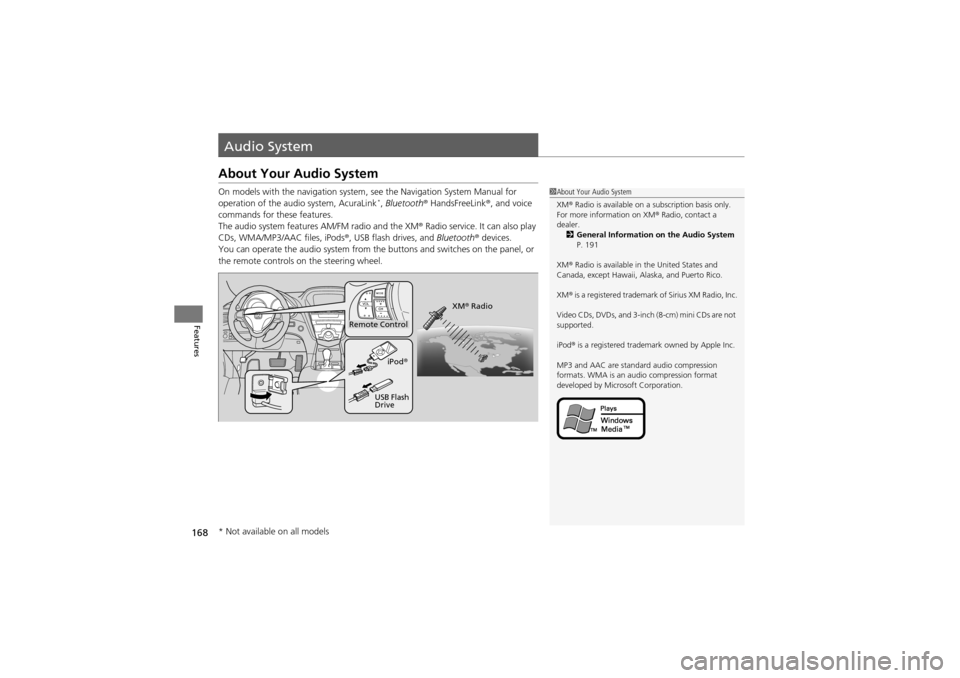
The audio system features AM/FM radio and the XM ® Radio service. It can also play
CDs, WMA/MP3/AAC files, iPods ®, USB flash drives, and Bluetooth® devices.
You can operate the audio system from the buttons and switches on the panel, or
the remote controls on the steering wheel.
1About Your Audio System
XM ® Radio is available on a subscription basis only.
For more information on XM ® Radio, contact a
dealer. 2 General Information on the Audio System
P. 191
XM ® Radio is available in the United States and
Canada, except Hawaii, Alaska, and Puerto Rico.
XM ® is a registered trademark of Sirius XM Radio, Inc.
Video CDs, DVDs, and 3-inch (8-cm) mini CDs are not
supported.
iPod ® is a registered trademark owned by Apple Inc.
MP3 and AAC are standard audio compression
formats. WMA is an au dio compression format
developed by Microsoft Corporation.
Remote Control
iPod®
USB Flash
Drive XM
® Radio
* Not available on all models
Page 176 of 370
uuAudio System Basic Operation uPlaying the AM/FM Radio
174
Features
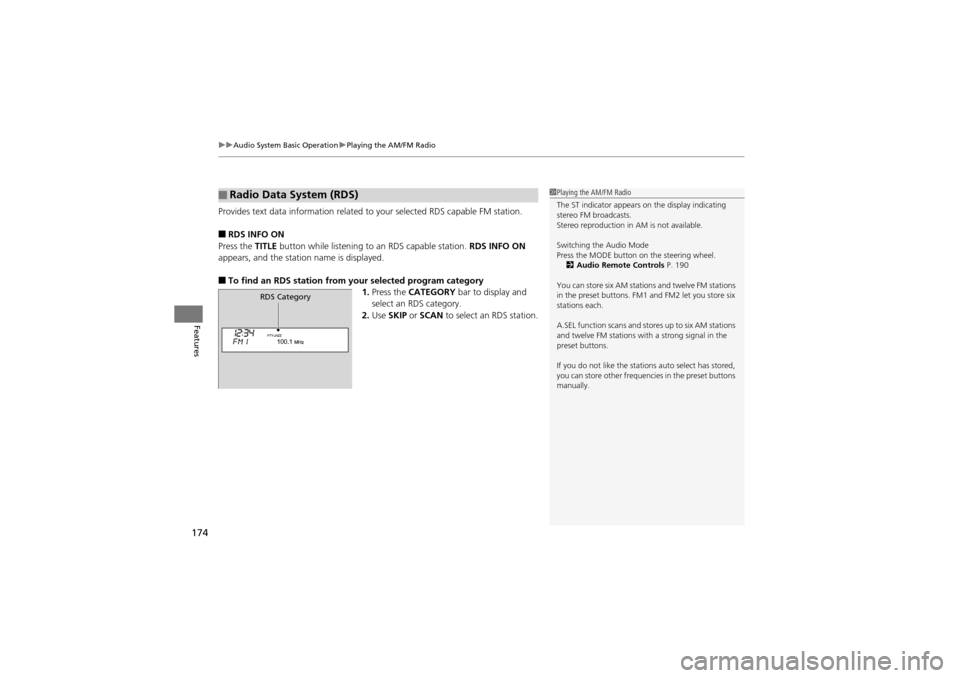
Provides text data information related to your selected RDS capable FM station.
■RDS INFO ON
Press the TITLE button while listening to an RDS capable station. RDS INFO ON
appears, and the station name is displayed.
■To find an RDS station from your selected program category 1.Press the CATEGORY bar to display and
select an RDS category.
2. Use SKIP or SCAN to select an RDS station.
■Radio Data System (RDS)1Playing the AM/FM Radio
The ST indicator appears on the display indicating
stereo FM broadcasts.
Stereo reproduction in AM is not available.
Switching the Audio Mode
Press the MODE button on the steering wheel.
2 Audio Remote Controls P. 190
You can store six AM stations and twelve FM stations
in the preset buttons. FM1 and FM2 let you store six
stations each.
A.SEL function scans and stores up to six AM stations
and twelve FM stations with a strong signal in the
preset buttons.
If you do not like the stations auto select has stored,
you can store other frequencies in the preset buttons
manually.
RDS Category
Page 192 of 370
190
Features
Audio Remote Controls
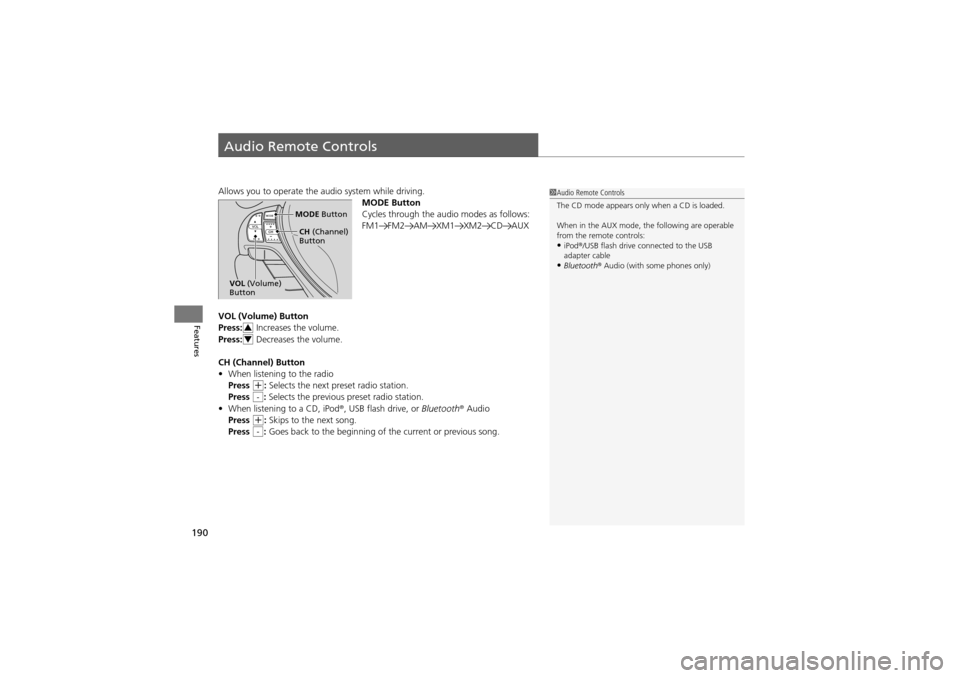
Allows you to operate the audio system while driving.
MODE Button
Cycles through the audio modes as follows:
FM1 FM2 AM XM1 XM2 CD AUX
VOL (Volume) Button
Press: Increases the volume.
Press: Decreases the volume.
CH (Channel) Button
• When listening to the radio
Press
+: Selects the next preset radio station.
Press : Selects the previous preset radio station.
• When listening to a CD, iPod ®, USB flash drive, or Bluetooth® Audio
Press
+: Skips to the next song.
Press : Goes back to the beginning of the current or previous song.
1Audio Remote Controls
The CD mode appears only when a CD is loaded.
When in the AUX mode, th e following are operable
from the remote controls:
•iPod ®/USB flash drive connected to the USB
adapter cable
•Bluetooth ® Audio (with some phones only)
MODE Button
CH (Channel)
Button
VOL (Volume)
Button
3
4
-
-
Page 363 of 370
Index
361
Index
A
ABS (Anti-lock Brake System).................. 255
Accessories and Modifications ................ 267
Accessory Power Sockets ......................... 157
Active Head Restraints ............................. 148
Adaptive Cruise Control (ACC) ................ 235
Additives
Coolant .................................................. 285
Engine Oil ............................................... 280
Washer ................................................... 290
Additives, Engine Oil ............................... 280
Adjusting Armrest .................................................. 150
Front Seats.............................................. 143
Head Restraints ....................................... 145
Mirrors.................................................... 141
Rear Seats ............................................... 149
Steering Wheel ....................................... 140
Temperature ............................................. 91
Air Conditioning System (Climate Control System) ...................... 163
Changing the Mode................................ 163
Defrosting the Windshield and Windows................ ....................... 164
Dust and Pollen Filter .............................. 312
Recirculation/Fresh Air Mo de................... 163
Sensor .................................................... 166
Synchronized Mode ................................ 165
Using Automatic Climate Control............ 163
Air Pressure ...................................... 301, 350 Airbags
........................................................ 35
Advanced Airbags ..................................... 41
After a Collision... ................................ 30, 39
Airbag Care ............................................... 49
Event Data Recorder .................................. 19
Front Airbags (SRS) .................................... 38
Indicator ........................................ 46, 72, 75
Passenger Airbag Off Indicator .................. 47
Sensors...................................................... 35
Side Airbag Cutoff System ......................... 44
Side Airbag Off Indicator ........................... 48
Side Airbags .............................................. 42
Side Curtain Airbags .................................. 45
AM/FM Radio ............................................ 173
Anti-lock Brak e System (ABS) .................. 255
Indicator .................................................... 71
Armrest ..................................................... 150
Audio Remote Controls ............................ 190
Audio System ............................................ 168
Adjusting the Sound ................................ 172
Auxiliary Input Jack ........ .......................... 169
Error Messages ........................................ 188
General Information ................................ 191
MP3/WMA/AAC ...................................... 183
Reactivating............................................. 170
Recommended CDs ................................. 192
Recommended Devices ............................ 194
Remote Controls ..................................... 190
Security Code .......................................... 170
Theft Protection....................................... 170
USB Adapter Cable .................................. 169 USB Flash Drives ...................................... 194
Authorized Manuals ................................ 358
Auto Door Locking/Unlocking ................. 113
Automatic Lighting .................................. 132
Automatic Transmission ........................... 227
Creeping ................................................. 227
Fluid ........................................................ 287
Kickdown ................................................ 227
Operating the Shift Lever........... 13, 229, 231
Sequential Shift Mode ............................. 230
Shift Lever Does Not Move ...................... 331
Shifting ................................................... 228
Auxiliary Input Jack .................................. 169
Average Fuel Economy .............................. 91
Average Speed ........................................... 92
B
Battery...................................................... 309
Charging System Indicato r................. 69, 334
Jump Starting .......................................... 329
Maintenance (Checking th e Battery) ........ 309
Maintenance (Replacing) ......................... 310
Belts (Seat) .................................................. 27
Beverage Holders ..................................... 156
Blind Spot Information (BSI) .................... 246
Bluetooth ® HandsFreeLink ®..................... 197
Bluetooth ®Audio ...................................... 186
Booster Seats (For Children) ...................... 63
Brake System ............................................ 253
Anti-lock Brake System (A BS)................... 255
Page 364 of 370
362
Index
Brake Assist System ................................. 256
Fluid ........................................................ 288
Foot Brake ............................................... 254
Indicator ............................................ 68, 336
Parking Brake .......................................... 253
Brightness Control (Instrument Panel) .... 136
Bulb Replacement ..................................... 291
Back-Up Lights......................................... 296
Daytime Running Light ....... ..................... 294
Fog Lights ................................................ 292
Front Side Marker Lights .......................... 293
Front Turn Signal/Parking Lights ............... 293
Headlights ............................................... 291
High-Mount Brake Light ..... ..................... 297
Rear License Plate Light............................ 297
Side Turn Signal/
Emergency Indicator Lights .................... 294
Stop Light, Taillight, Rear Turn Signal Light and Rear Side Marker Lights.................. 295
Bulb Specifications .................................... 350
C
Carbon Monoxide Gas ................................ 64
Cargo Hooks .............................................. 158
Carrying Cargo .................................. 211, 213
CD Changer ............................................... 177
Certification Label .................................... 351
Changing Bulbs ......................................... 291
Charging System Indicator ................. 69, 334Child Safety
................................................. 50
Childproof Door Locks............................. 112
Child Seat .................................................... 50
Booster Seats ............................................ 63
Child Seat for Infants................................. 52
Child Seat for Small Children ..................... 53
Installing a Child Seat with a Lap/
Shoulder Seat Belt ................................... 58
Larger Children ......................................... 62
Rear-facing Child Seat ......................... ...... 52
Selecting a Child Seat ................................ 54
Using a Tether ........................................... 60
Childproof Door Locks ............................. 112
Cleaning the Exterior ............................... 315
Cleaning the Interior ................................ 313
Client Service Information ....................... 359
Climate Control System ............................ 163
Changing the Mode ................................ 163
Defrosting the Windshield
and Windows ............... ........................ 164
Dust and Pollen Filter............................... 312
Recirculation/Fresh Air Mode ................... 163
Sensor ..................................................... 166
Synchronized Mode................................. 165
Using Automatic Climate Control ............ 166
Clock .......................................................... 102
Coat Hook ................................................. 158
Compact Spare Tire .......................... 319, 350
Console Compartment ............................. 154
Controls ..................................................... 101 Coolant (Engine)
...................................... 285
Adding to the Radiator ... ........................ 286
Adding to the Reserve Tank .................... 285
Overheating ............................................ 332
Temperature Gauge .................................. 87
Creeping ................................................... 227
Cruise Control .......................................... 232
Indicator ................................................... 77
Cup Holders .............................................. 156
Customized Features ................................. 94
D
Daytime Running Lights .......................... 133
Dead Battery ............................................ 329
Devices that Emit Radio Waves ............... 352
Dimming Headlights .............................................. 131
Rearview Mirror .............. ........................ 141
Dipstick (Engine Oil) ................................ 281
Directional Signals (Turn Signal) ............. 131
Door Mirrors ............................................. 142
Doors ........................................................ 103
Auto Door Locking.......... ........................ 113
Auto Door Unlocking ...... ........................ 113
Door and Tailgate Open Indicator ....... 26, 73
Keys........................................................ 103
Locking/Unlocking the Doors from the Inside..................................... 111
Locking/Unlocking the Doors
from the Outside.................................. 106