audio Acura ZDX 2013 User Guide
[x] Cancel search | Manufacturer: ACURA, Model Year: 2013, Model line: ZDX, Model: Acura ZDX 2013Pages: 324, PDF Size: 8.58 MB
Page 271 of 324
270Maintenance
CleaningInterior CareUse a damp cloth with a mixture of mild detergent and warm water to remove dirt.
Use a clean cloth to remove detergent residue.
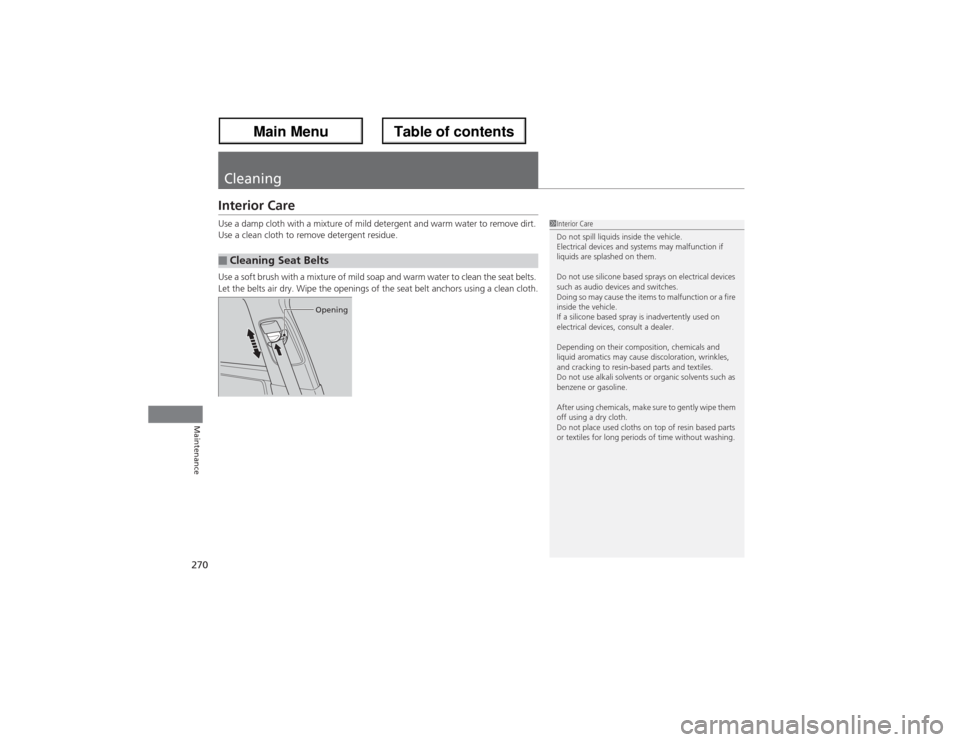
Use a soft brush with a mixture of mild soap and warm water to clean the seat belts.
Let the belts air dry. Wipe the openings of the seat belt anchors using a clean cloth.■Cleaning Seat Belts
1Interior Care
Do not spill liquids inside the vehicle.
Electrical devices and systems may malfunction if
liquids are splashed on them.
Do not use silicone based sprays on electrical devices
such as audio devices and switches.
Doing so may cause the items to malfunction or a fire
inside the vehicle.
If a silicone based spray is inadvertently used on
electrical devices, consult a dealer.
Depending on their composition, chemicals and
liquid aromatics may cause discoloration, wrinkles,
and cracking to resin-based parts and textiles.
Do not use alkali solvents or organic solvents such as
benzene or gasoline.
After using chemicals, make sure to gently wipe them
off using a dry cloth.
Do not place used cloths on top of resin based parts
or textiles for long periods of time without washing.
Opening
Page 279 of 324
uuIf a Tire Goes FlatuChanging a Flat Tire
278Handling the Unexpected
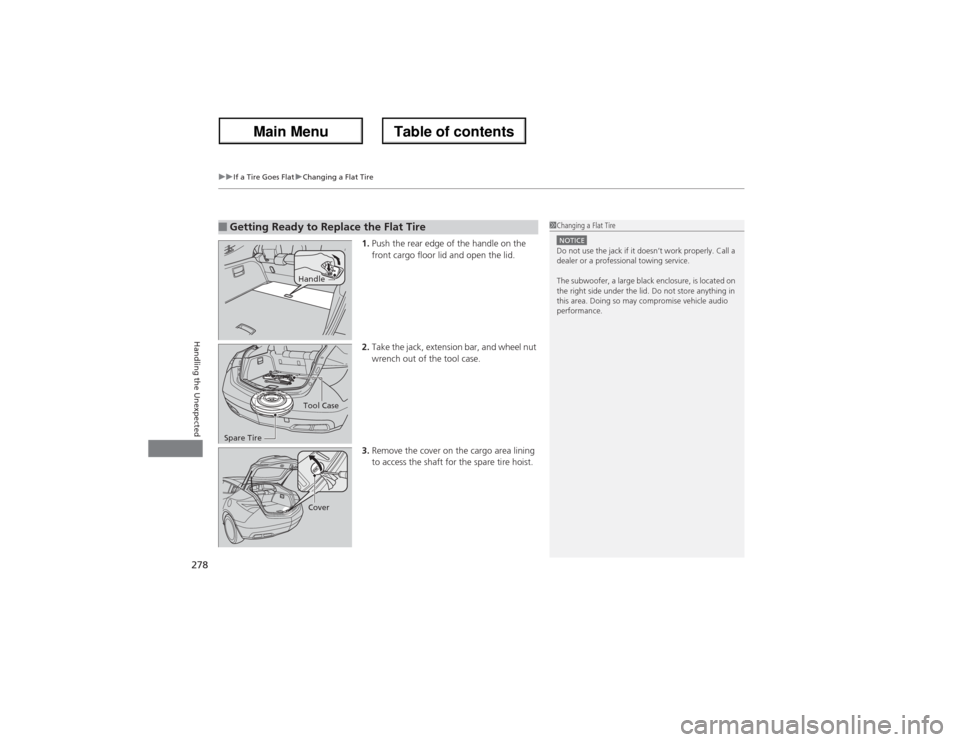
1.Push the rear edge of the handle on the
front cargo floor lid and open the lid.
2.Take the jack, extension bar, and wheel nut
wrench out of the tool case.
3.Remove the cover on the cargo area lining
to access the shaft for the spare tire hoist.
■Getting Ready to Replace the Flat Tire
1Changing a Flat TireNOTICEDo not use the jack if it doesn’t work properly. Call a
dealer or a professional towing service.
The subwoofer, a large black enclosure, is located on
the right side under the lid. Do not store anything in
this area. Doing so may compromise vehicle audio
performance.
HandleTool Case
Spare TireCover
Page 288 of 324
287
Continued
Handling the Unexpected
Jump StartingTurn off the power to electric devices, such as audio and lights. Turn off the engine,
then open the hood.
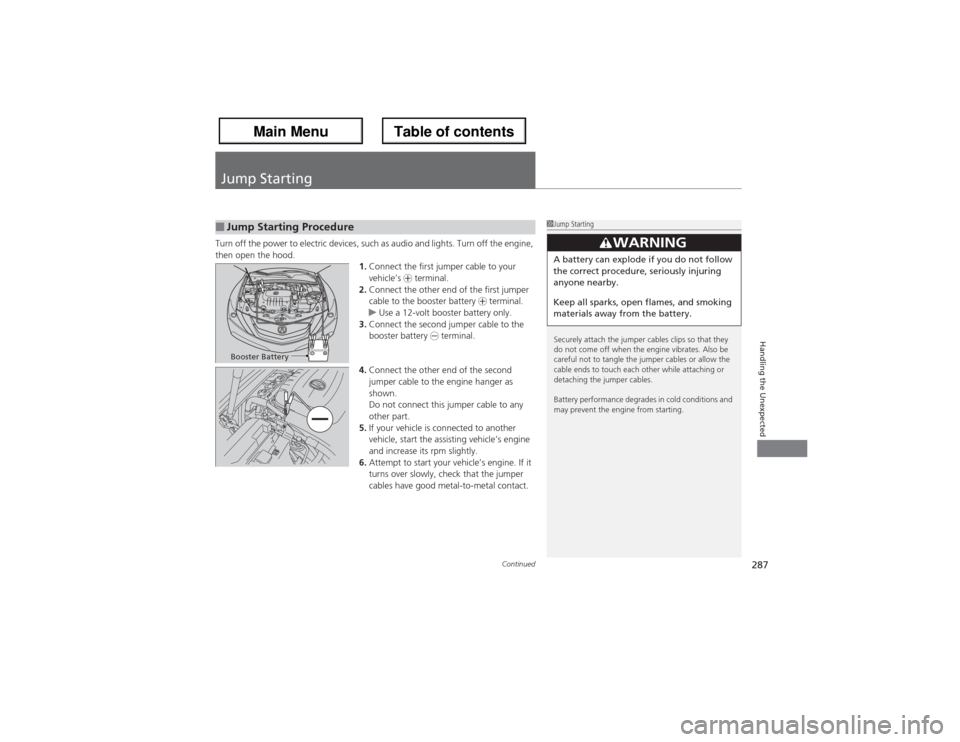
1.Connect the first jumper cable to your
vehicle’s + terminal.
2.Connect the other end of the first jumper
cable to the booster battery + terminal.
uUse a 12-volt booster battery only.
3.Connect the second jumper cable to the
booster battery - terminal.
4.Connect the other end of the second
jumper cable to the engine hanger as
shown.
Do not connect this jumper cable to any
other part.
5.If your vehicle is connected to another
vehicle, start the assisting vehicle’s engine
and increase its rpm slightly.
6.Attempt to start your vehicle’s engine. If it
turns over slowly, check that the jumper
cables have good metal-to-metal contact.■Jump Starting Procedure
1Jump Starting
Securely attach the jumper cables clips so that they
do not come off when the engine vibrates. Also be
careful not to tangle the jumper cables or allow the
cable ends to touch each other while attaching or
detaching the jumper cables.
Battery performance degrades in cold conditions and
may prevent the engine from starting.
3
WARNING
A battery can explode if you do not follow
the correct procedure, seriously injuring
anyone nearby.
Keep all sparks, open flames, and smoking
materials away from the battery.
Booster Battery
Page 300 of 324
299
uuFusesuCircuit Protected and Amps for Each Fuse
Handling the Unexpected
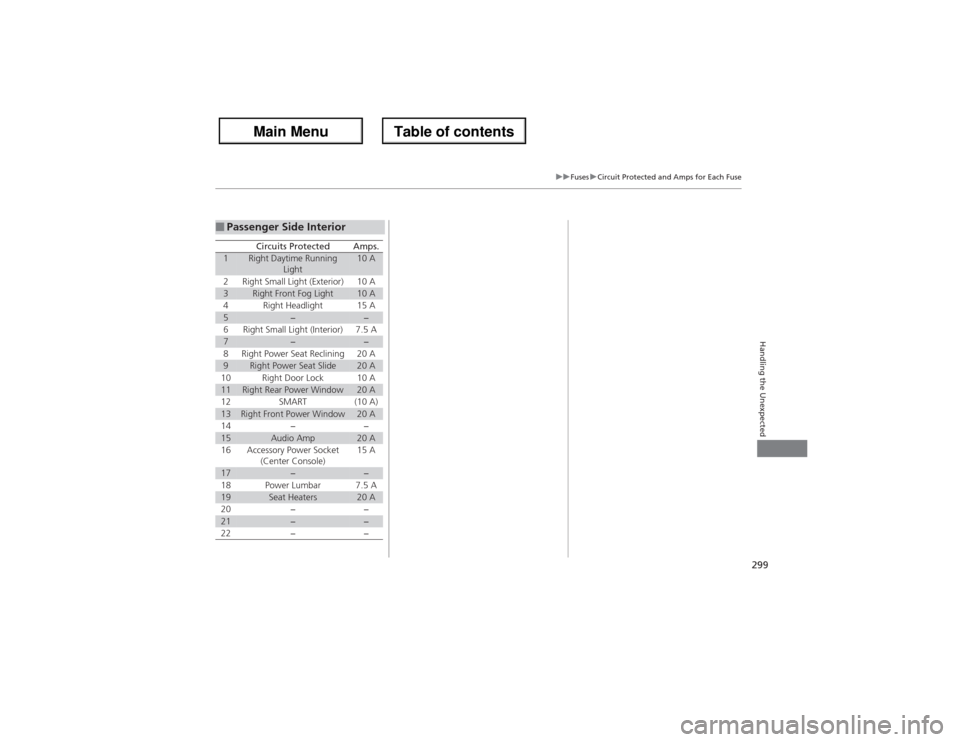
■Passenger Side Interior
Circuits Protected
Amps.
1
Right Daytime Running
Light
10 A
2
Right Small Light (Exterior)
10 A
3
Right Front Fog Light
10 A
4
Right Headlight
15 A
5
−
−
6
Right Small Light (Interior)
7.5 A
7
−
−
8
Right Power Seat Reclining
20 A
9
Right Power Seat Slide
20 A
10
Right Door Lock
10 A
11
Right Rear Power Window
20 A
12
SMART
(10 A)
13
Right Front Power Window
20 A
14
−
−
15
Audio Amp
20 A
16
Accessory Power Socket
(Center Console)
15 A
17
−
−
18
Power Lumbar
7.5 A
19
Seat Heaters
20 A
20
−
−
21
−
−
22
−
−
Page 317 of 324
Index
316Index
Index
AABS (Anti-lock Brake System)................... 214
Accessories and Modifications................. 225
Accessory Power Sockets.......................... 158
Active Head Restraints............................. 149
Additives
Coolant ................................................... 243
Engine Oil ................................................ 238
Washer .................................................... 248
Additives, Engine Oil................................ 238
Adjusting
Armrest ................................................... 151
Front Seats .............................................. 144
Head Restraints........................................ 146
Mirrors .................................................... 142
Rear Seats................................................ 150
Steering Wheel ........................................ 141
Temperature .............................................. 89
Air Conditioning System (Climate Control
System).................................................... 163
Changing the Mode ................................ 163
Defrosting the Windshield and
Windows ............................................... 164
Dust and Pollen Filter ............................... 269
Recirculation/Fresh Air Mode ................... 163
Sensor ..................................................... 166
Synchronized Mode ................................. 165
Using Automatic Climate Control ............ 163
Air Pressure....................................... 259, 306Airbags........................................................ 34
Advanced Airbags ..................................... 40
After a Collision ........................................ 38
Airbag Care............................................... 48
Event Data Recorder .................................. 18
Front Airbags (SRS) .................................... 37
Indicator........................................ 45, 70, 74
Passenger Airbag Off Indicator .................. 46
Sensors ..................................................... 34
Side Airbag Cutoff System......................... 43
Side Airbag Off Indicator ........................... 47
Side Airbags .............................................. 41
Side Curtain Airbags.................................. 44
Anti-lock Brake System (ABS).................. 214
Indicator.................................................... 70
Armrest..................................................... 151
Audio System............................................ 168
Authorized Manuals................................ 314
Auto Door Locking/Unlocking................. 115
Automatic Lighting.................................. 133
Automatic Transmission........................... 188
Creeping ................................................. 188
Fluid ........................................................ 245
Kickdown ................................................ 188
Operating the Shift Lever........... 12, 190, 192
Sequential Shift Mode ............................. 191
Shift Lever Does Not Move ...................... 289
Shifting ................................................... 189
Average Fuel Economy.............................. 89
Average Speed........................................... 90
BBattery...................................................... 267
Charging System Indicator ................ 67, 292
Jump Starting ......................................... 287
Maintenance (Checking the Battery) ....... 267
Maintenance (Replacing) ......................... 268
Belts (Seat).................................................. 27
Beverage Holders..................................... 157
Blind Spot Information (BSI)................... 205
Booster Seats (For Children)...................... 62
Brake System............................................ 212
Anti-lock Brake System (ABS) .................. 214
Brake Assist System................................. 215
Fluid ....................................................... 246
Foot Brake .............................................. 213
Indicator ........................................... 66, 294
Parking Brake.......................................... 212
Brightness Control (Instrument Panel)... 137
Bulb Replacement.................................... 249
Back-Up Lights ........................................ 254
Daytime Running Light............................ 252
Fog Lights ............................................... 250
Front Side Marker Lights ......................... 251
Front Turn Signal/Parking Lights .............. 251
Headlights .............................................. 249
High-Mount Brake Light.......................... 255
Rear License Plate Light ........................... 255
Side Turn Signal/
Emergency Indicator Lights.................... 252
Stop Light, Taillight, Rear Turn Signal Light and
Rear Side Marker Lights......................... 253