light Acura ZDX 2013 User Guide
[x] Cancel search | Manufacturer: ACURA, Model Year: 2013, Model line: ZDX, Model: Acura ZDX 2013Pages: 324, PDF Size: 8.58 MB
Page 18 of 324
17Quick Reference Guide
Why do the doors lock
after I unlocked the doors
using a remote
transmitter?
If you do not open the doors within 30 seconds, the doors are
relocked automatically for security.
Why does the beeper
sound when I open the
driver’s door?
The beeper sounds when:●The exterior lights are left on.●The power mode is in ACCESSORY.
Why does the beeper
sound when I start driving?
The beeper sounds when:●Driver and/or front passenger are not wearing their seat belts.●The parking brake lever is not fully released.
Why do I hear a screeching
sound when I apply the
brake pedal?
The brake pads may need to be replaced. Have your vehicle
inspected by a dealer.
Is it possible to use
unleaded gasoline with a
Pump Octane Number
(PON) of 87 or higher on
this vehicle?
Unleaded gasoline with a pump octane number of 91 or higher
is recommended.
Use of lower octane gasoline can cause occasional metallic
knocking noise in the engine and will result in decreased engine
performance.
Use of gasoline with a pump octane less than 87 can lead to
engine damage.
Page 45 of 324
44
uuAirbagsuSide Curtain Airbags
Safe Driving
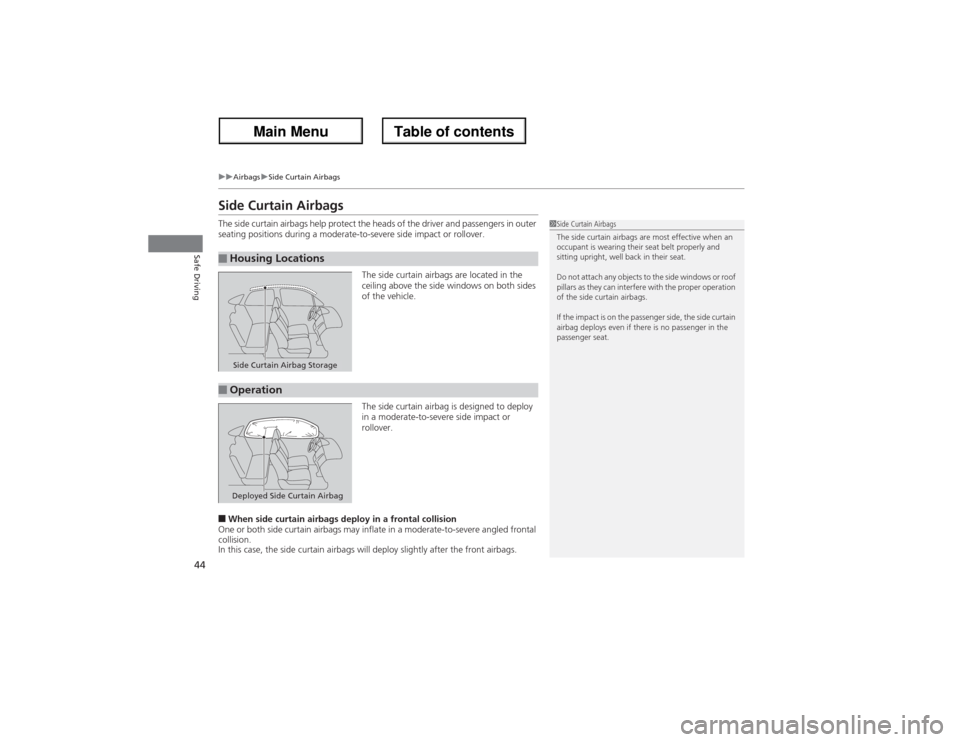
Side Curtain AirbagsThe side curtain airbags help protect the heads of the driver and passengers in outer
seating positions during a moderate-to-severe side impact or rollover.
The side curtain airbags are located in the
ceiling above the side windows on both sides
of the vehicle.
The side curtain airbag is designed to deploy
in a moderate-to-severe side impact or
rollover.■When side curtain airbags deploy in a frontal collision
One or both side curtain airbags may inflate in a moderate-to-severe angled frontal
collision.
In this case, the side curtain airbags will deploy slightly after the front airbags.■Housing Locations
1Side Curtain Airbags
The side curtain airbags are most effective when an
occupant is wearing their seat belt properly and
sitting upright, well back in their seat.
Do not attach any objects to the side windows or roof
pillars as they can interfere with the proper operation
of the side curtain airbags.
If the impact is on the passenger side, the side curtain
airbag deploys even if there is no passenger in the
passenger seat.
Side Curtain Airbag Storage
■OperationDeployed Side Curtain Airbag
Page 74 of 324
73
uuIndicatorsu
Continued
Instrument Panel
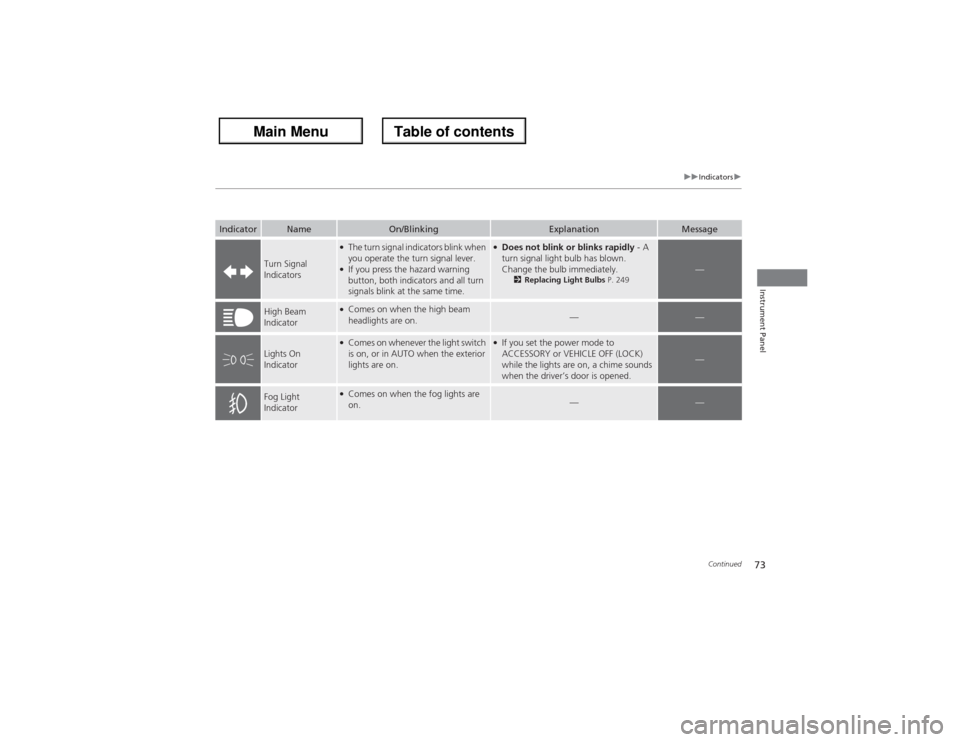
Indicator
Name
On/Blinking
Explanation
Message
Turn Signal
Indicators
●The turn signal indicators blink when
you operate the turn signal lever.●If you press the hazard warning
button, both indicators and all turn
signals blink at the same time.
●Does not blink or blinks rapidly - A
turn signal light bulb has blown.
Change the bulb immediately.
2Replacing Light Bulbs P. 249
—
High Beam
Indicator
●Comes on when the high beam
headlights are on.
—
—
Lights On
Indicator
●Comes on whenever the light switch
is on, or in AUTO when the exterior
lights are on.
●If you set the power mode to
ACCESSORY or VEHICLE OFF (LOCK)
while the lights are on, a chime sounds
when the driver’s door is opened.
—
Fog Light
Indicator
●Comes on when the fog lights are
on.
—
—
Page 80 of 324
79
uuIndicatorsuMulti-Information Display Warning and Information Messages
Continued
Instrument Panel
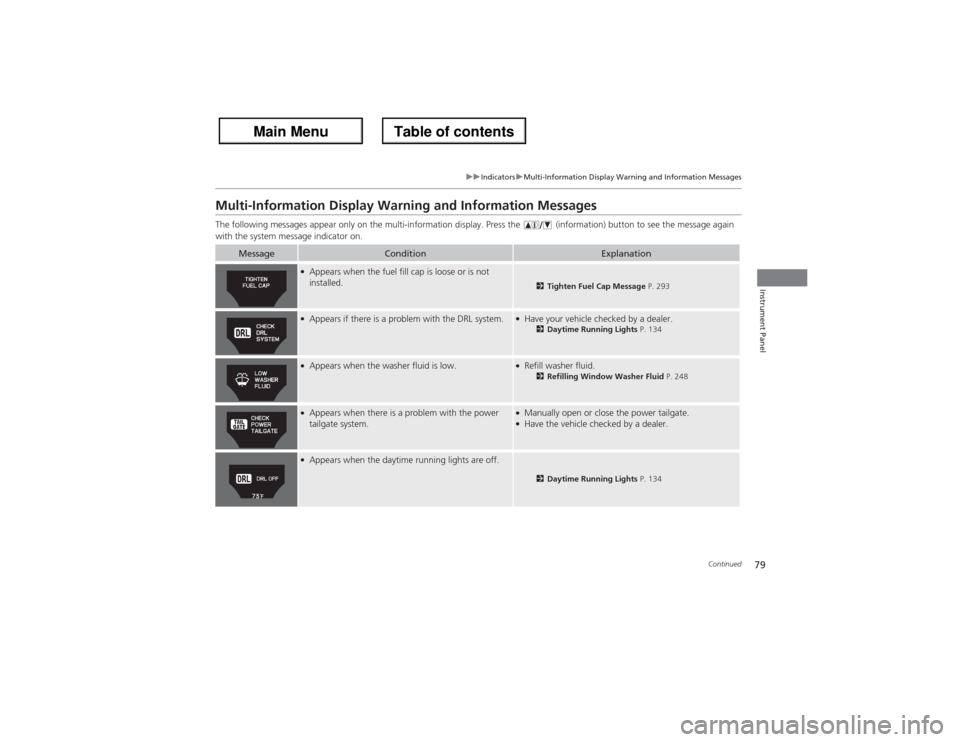
Multi-Information Display Warning and Information MessagesThe following messages appear only on the multi-information display. Press the (information) button to see the message again
with the system message indicator on.
Message
Condition
Explanation
●Appears when the fuel fill cap is loose or is not
installed.
2Tighten Fuel Cap Message P. 293
●Appears if there is a problem with the DRL system.
●Have your vehicle checked by a dealer.
2Daytime Running Lights P. 134
●Appears when the washer fluid is low.
●Refill washer fluid.
2Refilling Window Washer Fluid P. 248
●Appears when there is a problem with the power
tailgate system.
●Manually open or close the power tailgate.●Have the vehicle checked by a dealer.
●Appears when the daytime running lights are off.
2Daytime Running Lights P. 134
Page 83 of 324
82
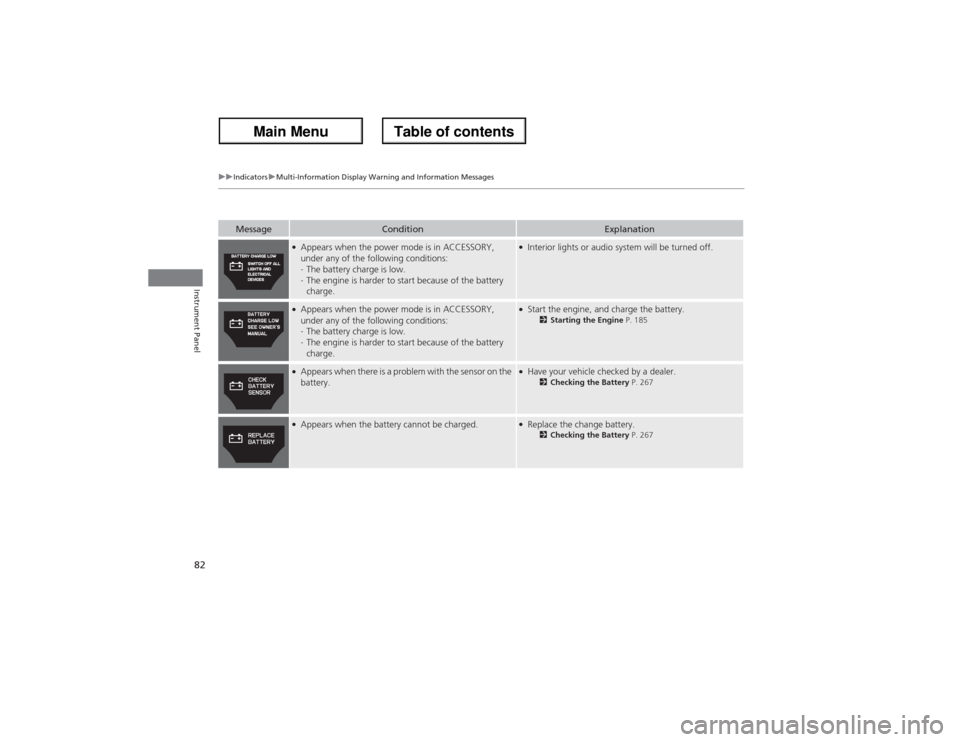
uuIndicatorsuMulti-Information Display Warning and Information Messages
Instrument Panel
Message
Condition
Explanation
●Appears when the power mode is in ACCESSORY,
under any of the following conditions:
-The battery charge is low.
-The engine is harder to start because of the battery
charge.
●Interior lights or audio system will be turned off.
●Appears when the power mode is in ACCESSORY,
under any of the following conditions:
-The battery charge is low.
-The engine is harder to start because of the battery
charge.
●Start the engine, and charge the battery.
2Starting the Engine P. 185
●Appears when there is a problem with the sensor on the
battery.
●Have your vehicle checked by a dealer.
2Checking the Battery P. 267
●Appears when the battery cannot be charged.
●Replace the change battery.
2Checking the Battery P. 267
Page 96 of 324
95
uuGauges and Multi-Information DisplayuMulti-Information Display
Continued
Instrument Panel
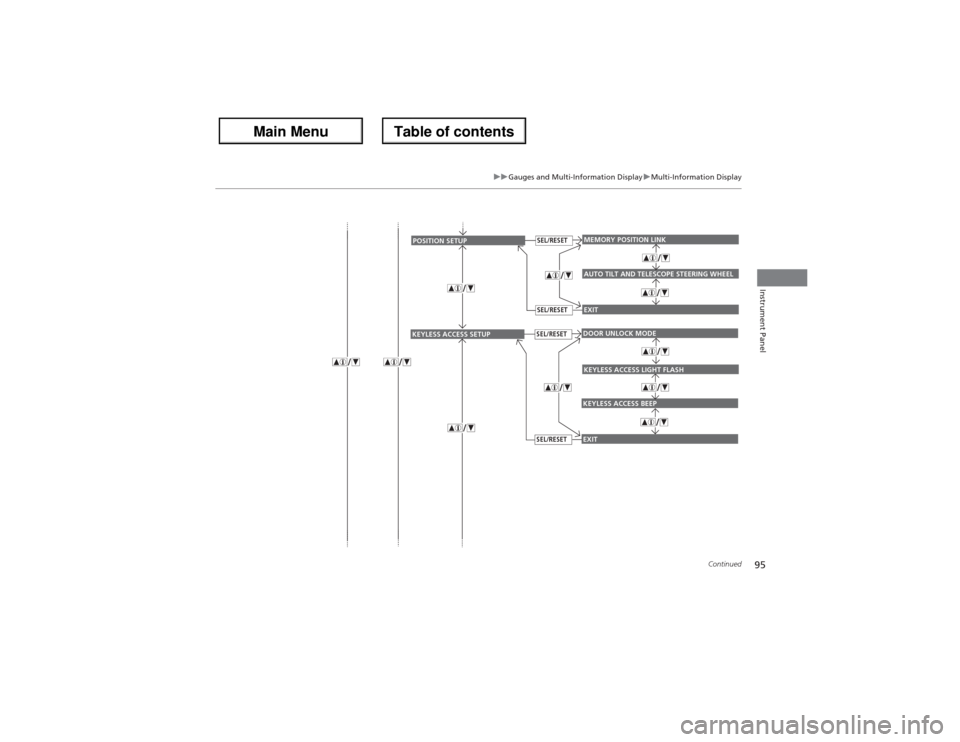
EXITMEMORY POSITION LINKAUTO TILT AND TELESCOPE STEERING WHEEL
POSITION SETUP
SEL/RESETSEL/RESET
EXITDOOR UNLOCK MODEKEYLESS ACCESS BEEP
KEYLESS ACCESS SETUP
SEL/RESETSEL/RESET
KEYLESS ACCESS LIGHT FLASH
Page 97 of 324
96
uuGauges and Multi-Information DisplayuMulti-Information Display
Instrument Panel
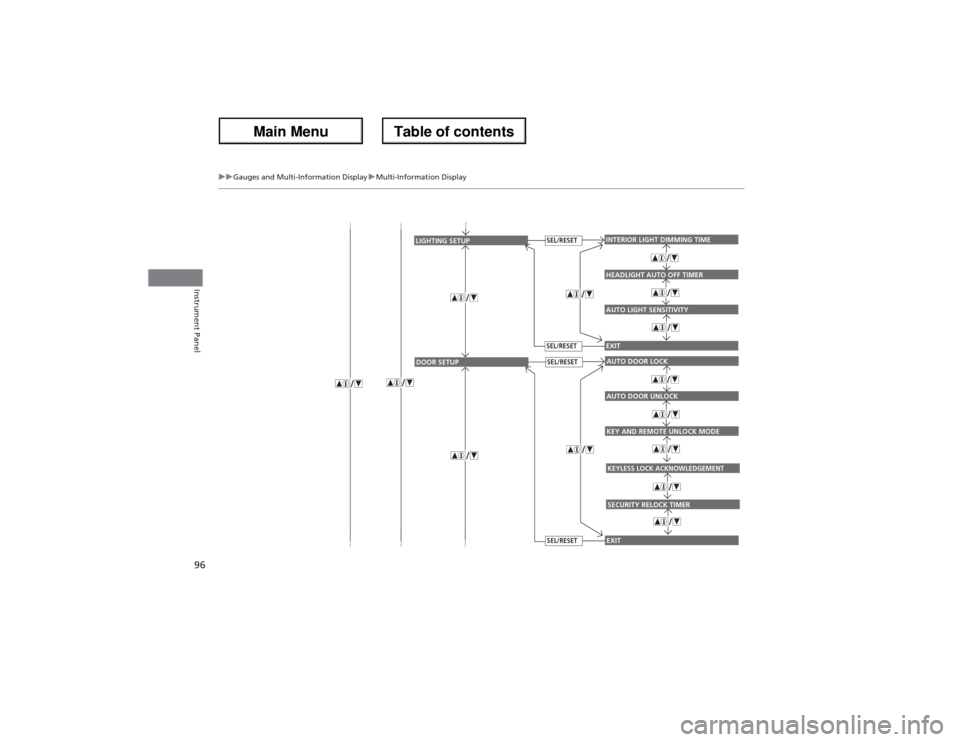
AUTO LIGHT SENSITIVITYINTERIOR LIGHT DIMMING TIMEHEADLIGHT AUTO OFF TIMEREXIT
LIGHTING SETUP
SEL/RESETSEL/RESET
KEY AND REMOTE UNLOCK MODEAUTO DOOR LOCKAUTO DOOR UNLOCKEXIT
DOOR SETUP
SEL/RESETSEL/RESET
KEYLESS LOCK ACKNOWLEDGEMENTSECURITY RELOCK TIMER
Page 99 of 324
98
uuGauges and Multi-Information DisplayuMulti-Information Display
Instrument Panel
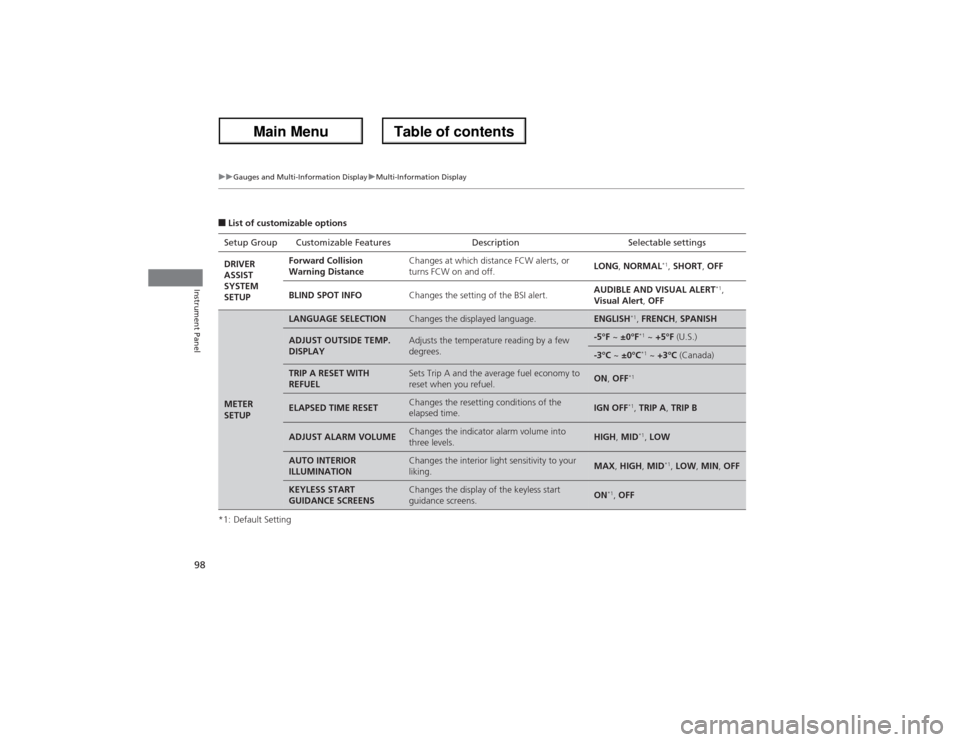
■List of customizable options
*1: Default SettingSetup Group Customizable Features Description Selectable settings
DRIVER
ASSIST
SYSTEM
SETUPForward Collision
Warning DistanceChanges at which distance FCW alerts, or
turns FCW on and off.LONG, NORMAL
*1, SHORT, OFF
BLIND SPOT INFOChanges the setting of the BSI alert.AUDIBLE AND VISUAL ALERT
*1,
Visual Alert, OFF
METER
SETUP
LANGUAGE SELECTION
Changes the displayed language.
ENGLISH
*1, FRENCH, SPANISH
ADJUST OUTSIDE TEMP.
DISPLAY
Adjusts the temperature reading by a few
degrees.
-5°F ~ ±0°F
*1 ~ +5°F (U.S.)
-3°C ~ ±0°C
*1 ~ +3°C (Canada)
TRIP A RESET WITH
REFUEL
Sets Trip A and the average fuel economy to
reset when you refuel.
ON, OFF
*1
ELAPSED TIME RESET
Changes the resetting conditions of the
elapsed time.
IGN OFF
*1, TRIP A, TRIP B
ADJUST ALARM VOLUME
Changes the indicator alarm volume into
three levels.
HIGH, MID
*1, LOW
AUTO INTERIOR
ILLUMINATION
Changes the interior light sensitivity to your
liking.
MAX, HIGH, MID
*1, LOW, MIN, OFF
KEYLESS START
GUIDANCE SCREENS
Changes the display of the keyless start
guidance screens.
ON
*1, OFF
Page 100 of 324
99
uuGauges and Multi-Information DisplayuMulti-Information Display
Continued
Instrument Panel
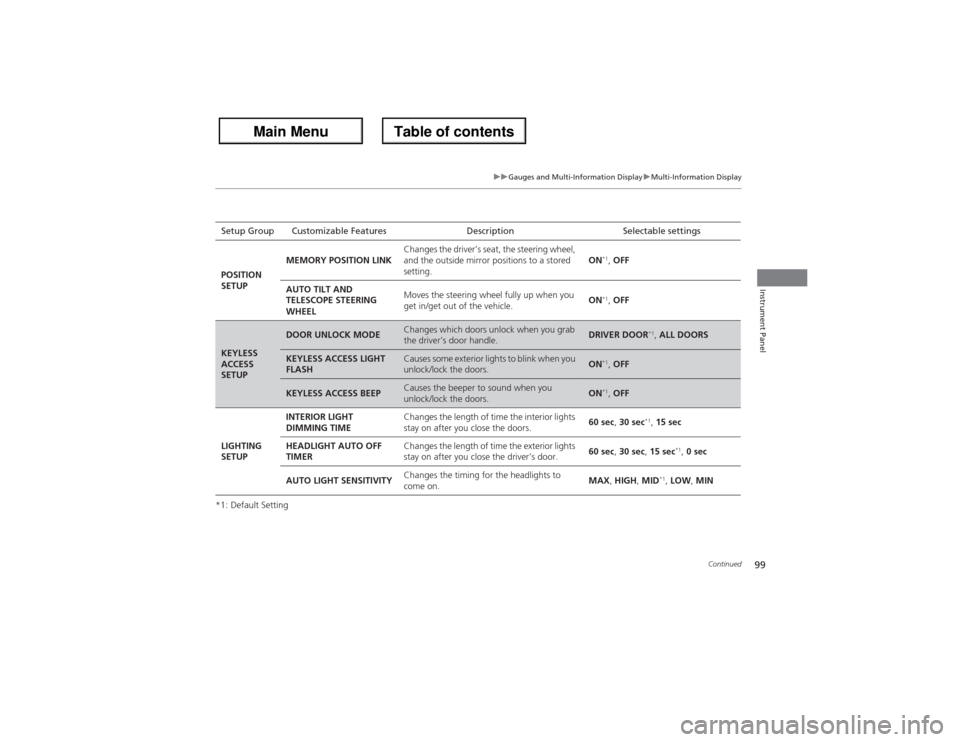
*1: Default SettingSetup Group Customizable Features Description Selectable settings
POSITION
SETUPMEMORY POSITION LINKChanges the driver’s seat, the steering wheel,
and the outside mirror positions to a stored
setting.ON
*1, OFF
AUTO TILT AND
TELESCOPE STEERING
WHEELMoves the steering wheel fully up when you
get in/get out of the vehicle.ON*1, OFF
KEYLESS
ACCESS
SETUP
DOOR UNLOCK MODE
Changes which doors unlock when you grab
the driver’s door handle.
DRIVER DOOR
*1, ALL DOORS
KEYLESS ACCESS LIGHT
FLASH
Causes some exterior lights to blink when you
unlock/lock the doors.
ON
*1, OFF
KEYLESS ACCESS BEEP
Causes the beeper to sound when you
unlock/lock the doors.
ON
*1, OFF
LIGHTING
SETUPINTERIOR LIGHT
DIMMING TIMEChanges the length of time the interior lights
stay on after you close the doors.60 sec, 30 sec
*1, 15 sec
HEADLIGHT AUTO OFF
TIMERChanges the length of time the exterior lights
stay on after you close the driver’s door.60 sec, 30 sec, 15 sec
*1, 0 sec
AUTO LIGHT SENSITIVITYChanges the timing for the headlights to
come on.MAX, HIGH, MID
*1, LOW, MIN
Page 101 of 324
100
uuGauges and Multi-Information DisplayuMulti-Information Display
Instrument Panel
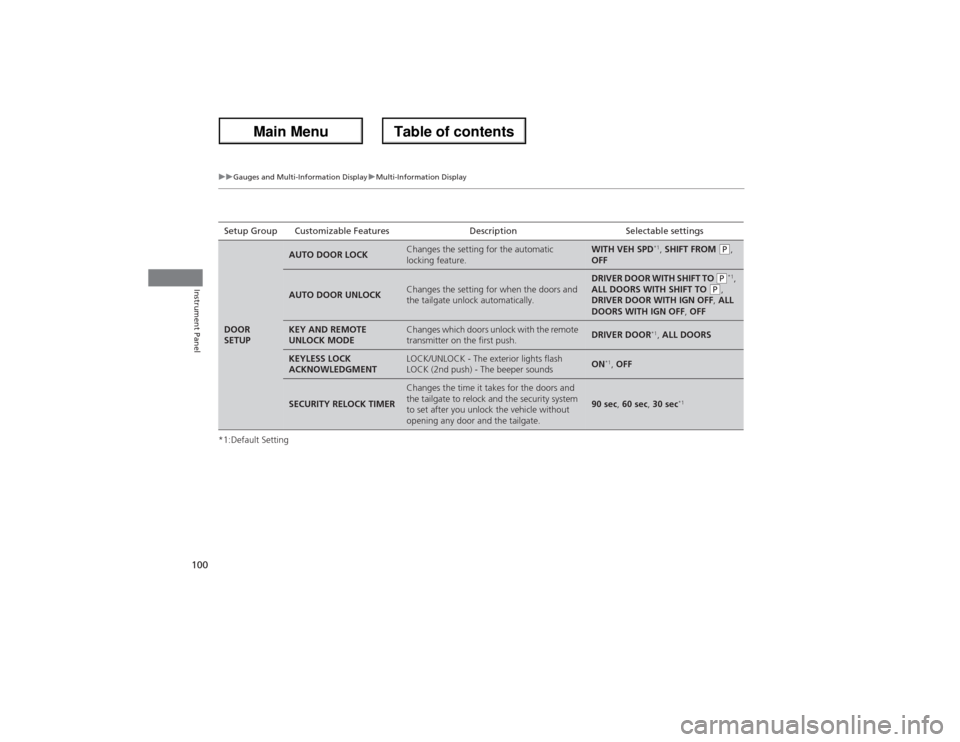
*1:Default SettingSetup Group Customizable Features Description Selectable settingsDOOR
SETUP
AUTO DOOR LOCK
Changes the setting for the automatic
locking feature.
WITH VEH SPD
*1, SHIFT FROM
(P,
OFF
AUTO DOOR UNLOCK
Changes the setting for when the doors and
the tailgate unlock automatically.
DRIVER DOOR WITH SHIFT TO
(P*1,
ALL DOORS WITH SHIFT TO
(P,
DRIVER DOOR WITH IGN OFF, ALL
DOORS WITH IGN OFF, OFF
KEY AND REMOTE
UNLOCK MODE
Changes which doors unlock with the remote
transmitter on the first push.
DRIVER DOOR
*1, ALL DOORS
KEYLESS LOCK
ACKNOWLEDGMENT
LOCK/UNLOCK - The exterior lights flash
LOCK (2nd push) - The beeper sounds
ON
*1, OFF
SECURITY RELOCK TIMER
Changes the time it takes for the doors and
the tailgate to relock and the security system
to set after you unlock the vehicle without
opening any door and the tailgate.
90 sec, 60 sec, 30 sec
*1