steering Acura ZDX 2013 User Guide
[x] Cancel search | Manufacturer: ACURA, Model Year: 2013, Model line: ZDX, Model: Acura ZDX 2013Pages: 324, PDF Size: 8.58 MB
Page 96 of 324
95
uuGauges and Multi-Information DisplayuMulti-Information Display
Continued
Instrument Panel
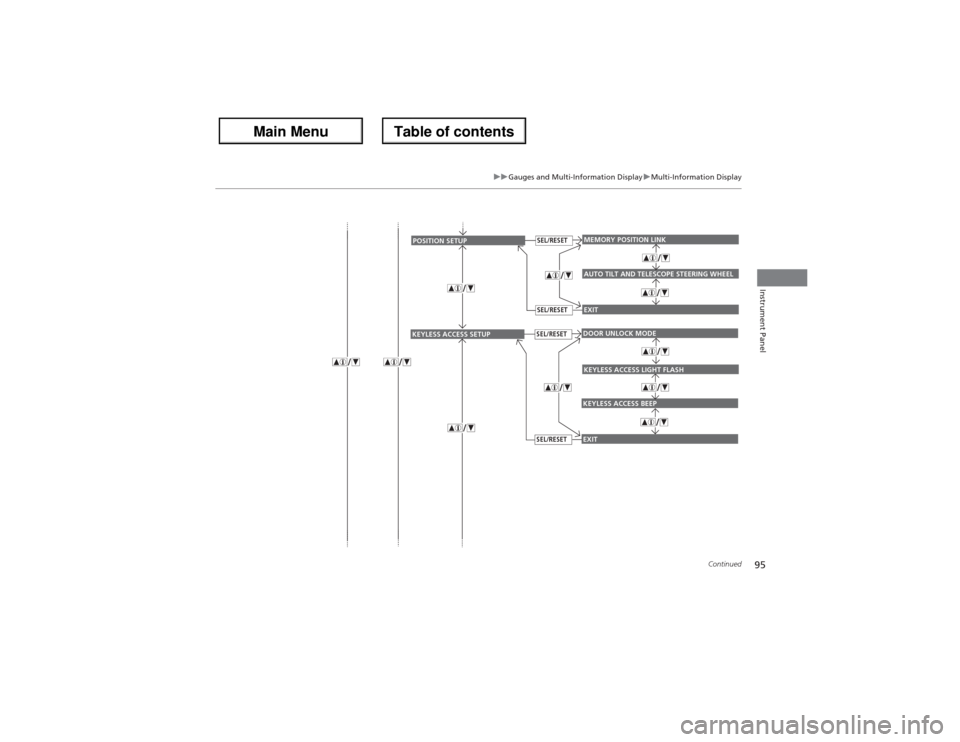
EXITMEMORY POSITION LINKAUTO TILT AND TELESCOPE STEERING WHEEL
POSITION SETUP
SEL/RESETSEL/RESET
EXITDOOR UNLOCK MODEKEYLESS ACCESS BEEP
KEYLESS ACCESS SETUP
SEL/RESETSEL/RESET
KEYLESS ACCESS LIGHT FLASH
Page 100 of 324
99
uuGauges and Multi-Information DisplayuMulti-Information Display
Continued
Instrument Panel
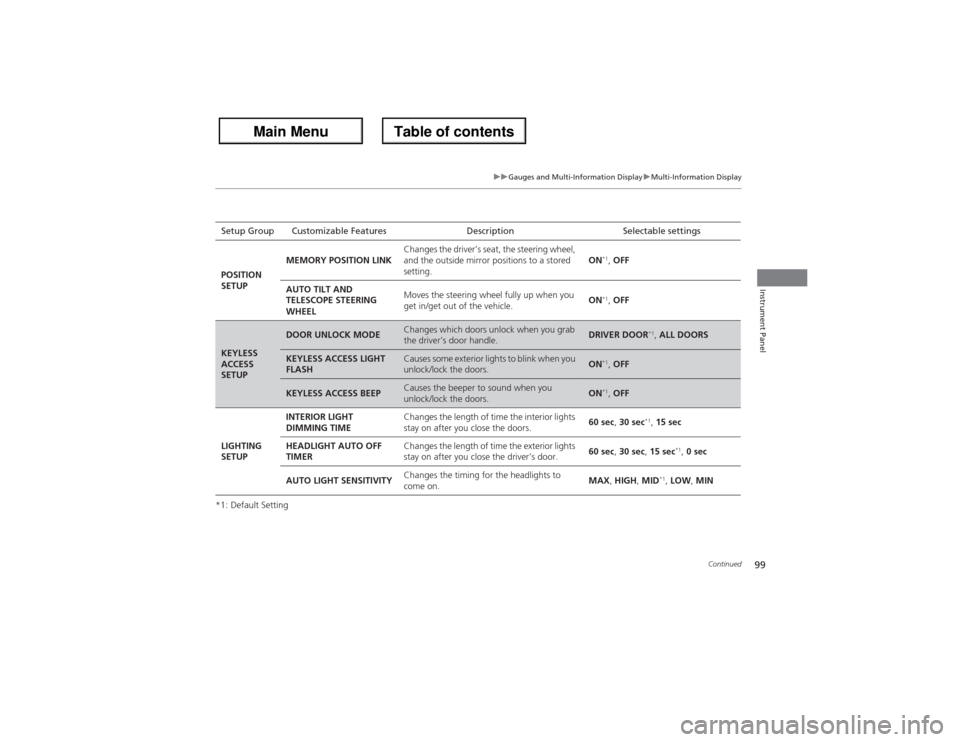
*1: Default SettingSetup Group Customizable Features Description Selectable settings
POSITION
SETUPMEMORY POSITION LINKChanges the driver’s seat, the steering wheel,
and the outside mirror positions to a stored
setting.ON
*1, OFF
AUTO TILT AND
TELESCOPE STEERING
WHEELMoves the steering wheel fully up when you
get in/get out of the vehicle.ON*1, OFF
KEYLESS
ACCESS
SETUP
DOOR UNLOCK MODE
Changes which doors unlock when you grab
the driver’s door handle.
DRIVER DOOR
*1, ALL DOORS
KEYLESS ACCESS LIGHT
FLASH
Causes some exterior lights to blink when you
unlock/lock the doors.
ON
*1, OFF
KEYLESS ACCESS BEEP
Causes the beeper to sound when you
unlock/lock the doors.
ON
*1, OFF
LIGHTING
SETUPINTERIOR LIGHT
DIMMING TIMEChanges the length of time the interior lights
stay on after you close the doors.60 sec, 30 sec
*1, 15 sec
HEADLIGHT AUTO OFF
TIMERChanges the length of time the exterior lights
stay on after you close the driver’s door.60 sec, 30 sec, 15 sec
*1, 0 sec
AUTO LIGHT SENSITIVITYChanges the timing for the headlights to
come on.MAX, HIGH, MID
*1, LOW, MIN
Page 106 of 324
105
Controls
This chapter explains how to operate the various controls necessary for driving.
Locking and Unlocking the Doors
Key Types and Functions .................. 106
Locking/Unlocking the Doors from the
Outside .......................................... 108Low Keyless Access Remote Signal
Strength ........................................ 112Locking/Unlocking the Doors from the
Inside ............................................. 113
Childproof Door Locks ..................... 114
Auto Door Locking/Unlocking .......... 115
Opening and Closing the Tailgate... 116
Security System................................ 122Opening and Closing the Windows..... 125
Opening and Closing the Panoramic
Glass Roof........................................ 128
Operating the Switches Around the
Steering Wheel
ENGINE START/STOP Button............. 129
Turn Signals ..................................... 132
Light Switches.................................. 132
Fog Lights ........................................ 134
Daytime Running Lights ................... 134
Wipers and Washers ........................ 135
Brightness Control ........................... 137Rear Defogger/Heated Door Mirror
Button........................................ 138Driving Position Memory System ...... 139Adjusting the Steering Wheel .......... 141
Adjusting the Mirrors....................... 142
Adjusting the Seats.......................... 144
Interior Lights/Interior Convenience
Items
Interior Lights .................................. 152
Interior Convenience Items .............. 154
Climate Control System
Using Automatic Climate Control .... 163
Synchronized Mode ......................... 165
Automatic Climate Control Sensors ...... 166
Page 130 of 324
129
Continued
Controls
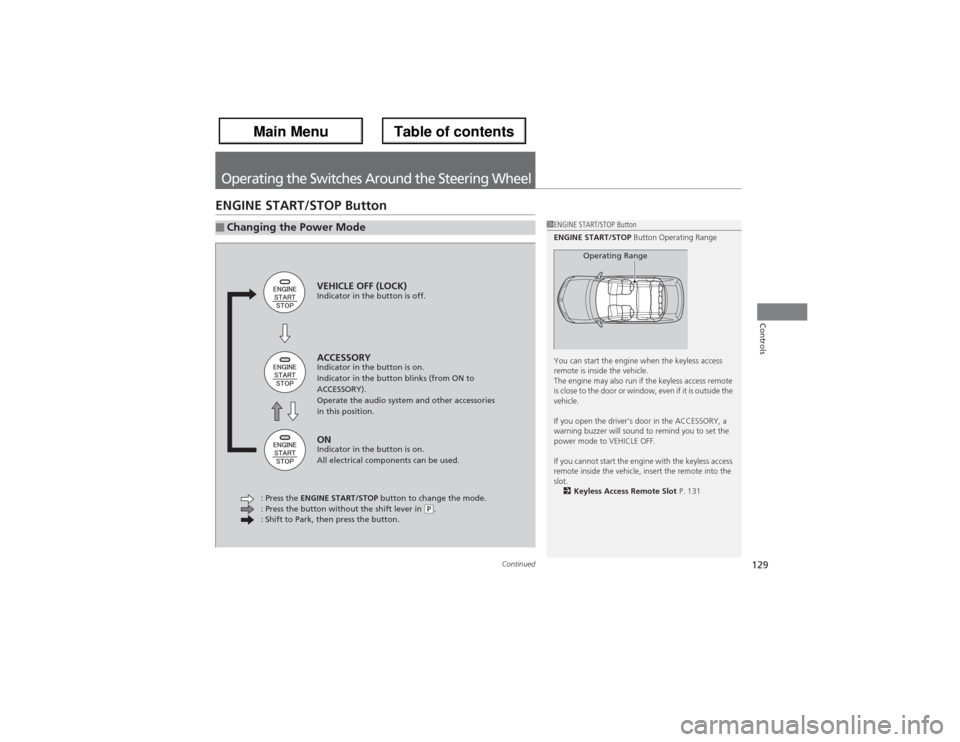
Operating the Switches Around the Steering WheelENGINE START/STOP Button■Changing the Power Mode
1ENGINE START/STOP Button
ENGINE START/STOP Button Operating Range
You can start the engine when the keyless access
remote is inside the vehicle.
The engine may also run if the keyless access remote
is close to the door or window, even if it is outside the
vehicle.
If you open the driver’s door in the ACCESSORY, a
warning buzzer will sound to remind you to set the
power mode to VEHICLE OFF.
If you cannot start the engine with the keyless access
remote inside the vehicle, insert the remote into the
slot.
2Keyless Access Remote Slot P. 131
Operating Range
VEHICLE OFF (LOCK)Indicator in the button is off.ACCESSORYIndicator in the button is on.
Indicator in the button blinks (from ON to
ACCESSORY).
Operate the audio system and other accessories
in this position.ONIndicator in the button is on.
All electrical components can be used.
: Press the ENGINE START/STOP button to change the mode.
: Press the button without the shift lever in
(P.
: Shift to Park, then press the button.
Page 131 of 324
uuOperating the Switches Around the Steering WheeluENGINE START/STOP Button
130Controls
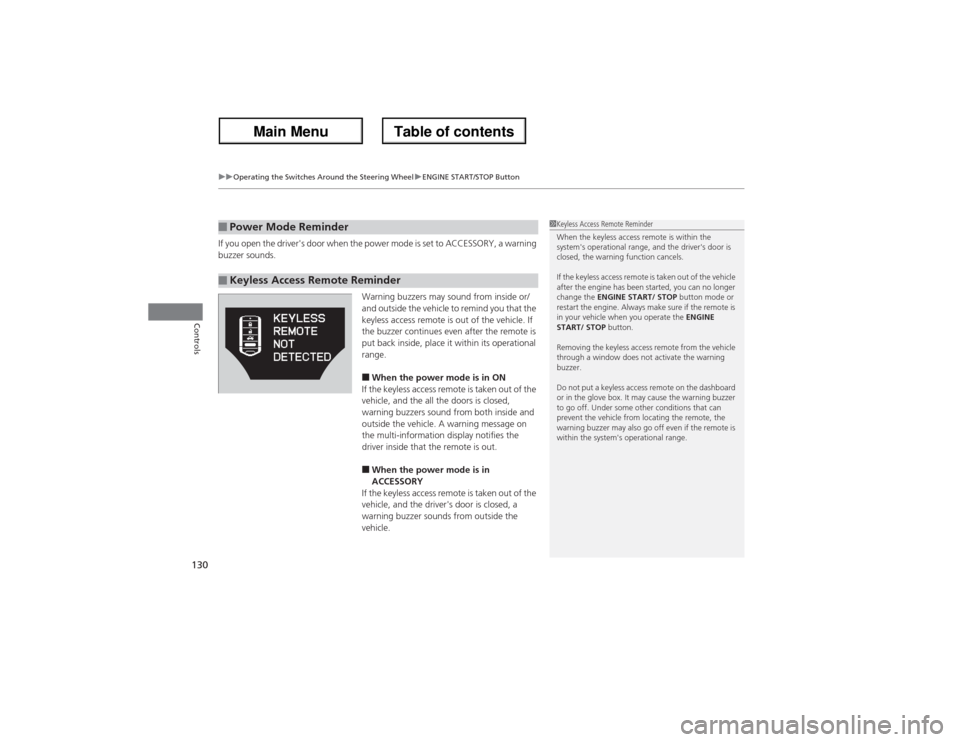
If you open the driver's door when the power mode is set to ACCESSORY, a warning
buzzer sounds.
Warning buzzers may sound from inside or/
and outside the vehicle to remind you that the
keyless access remote is out of the vehicle. If
the buzzer continues even after the remote is
put back inside, place it within its operational
range.
■When the power mode is in ON
If the keyless access remote is taken out of the
vehicle, and the all the doors is closed,
warning buzzers sound from both inside and
outside the vehicle. A warning message on
the multi-information display notifies the
driver inside that the remote is out.■When the power mode is in
ACCESSORY
If the keyless access remote is taken out of the
vehicle, and the driver's door is closed, a
warning buzzer sounds from outside the
vehicle.
■Power Mode Reminder■Keyless Access Remote Reminder
1Keyless Access Remote Reminder
When the keyless access remote is within the
system's operational range, and the driver's door is
closed, the warning function cancels.
If the keyless access remote is taken out of the vehicle
after the engine has been started, you can no longer
change the ENGINE START/ STOP button mode or
restart the engine. Always make sure if the remote is
in your vehicle when you operate the ENGINE
START/ STOP button.
Removing the keyless access remote from the vehicle
through a window does not activate the warning
buzzer.
Do not put a keyless access remote on the dashboard
or in the glove box. It may cause the warning buzzer
to go off. Under some other conditions that can
prevent the vehicle from locating the remote, the
warning buzzer may also go off even if the remote is
within the system's operational range.
Page 132 of 324
131
uuOperating the Switches Around the Steering WheeluENGINE START/STOP Button
Controls
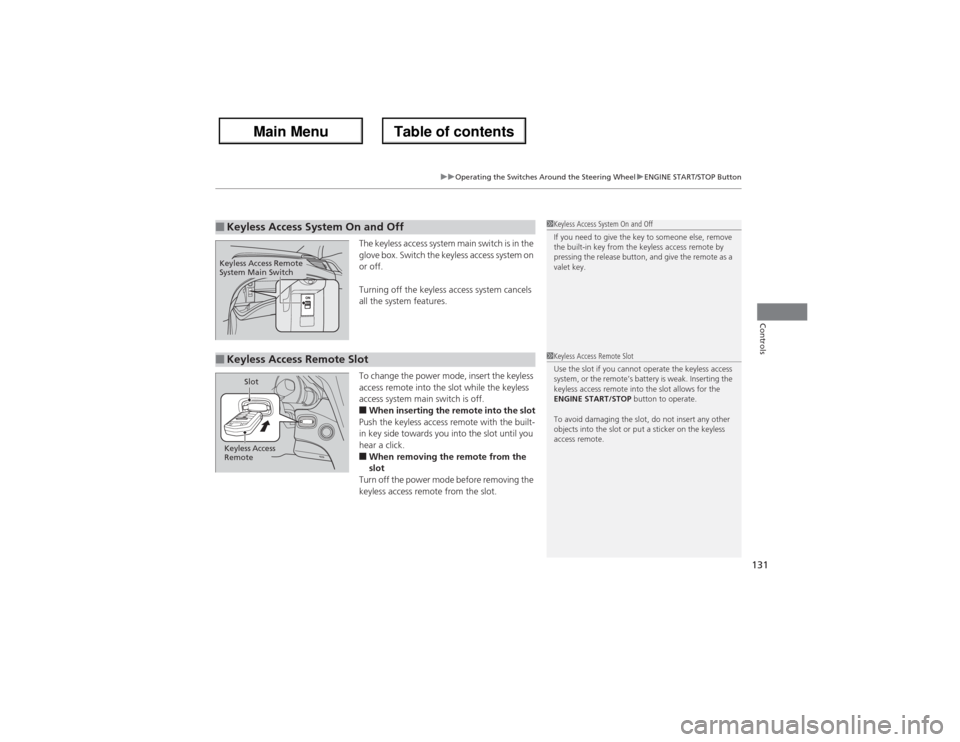
The keyless access system main switch is in the
glove box. Switch the keyless access system on
or off.
Turning off the keyless access system cancels
all the system features.
To change the power mode, insert the keyless
access remote into the slot while the keyless
access system main switch is off.■When inserting the remote into the slot
Push the keyless access remote with the built-
in key side towards you into the slot until you
hear a click.■When removing the remote from the
slot
Turn off the power mode before removing the
keyless access remote from the slot.
■Keyless Access System On and Off
1Keyless Access System On and Off
If you need to give the key to someone else, remove
the built-in key from the keyless access remote by
pressing the release button, and give the remote as a
valet key.
Keyless Access Remote
System Main Switch■Keyless Access Remote Slot
1Keyless Access Remote Slot
Use the slot if you cannot operate the keyless access
system, or the remote’s battery is weak. Inserting the
keyless access remote into the slot allows for the
ENGINE START/STOP button to operate.
To avoid damaging the slot, do not insert any other
objects into the slot or put a sticker on the keyless
access remote.
Keyless Access
RemoteSlot
Page 133 of 324
132
uuOperating the Switches Around the Steering WheeluTurn Signals
Controls
Turn Signals
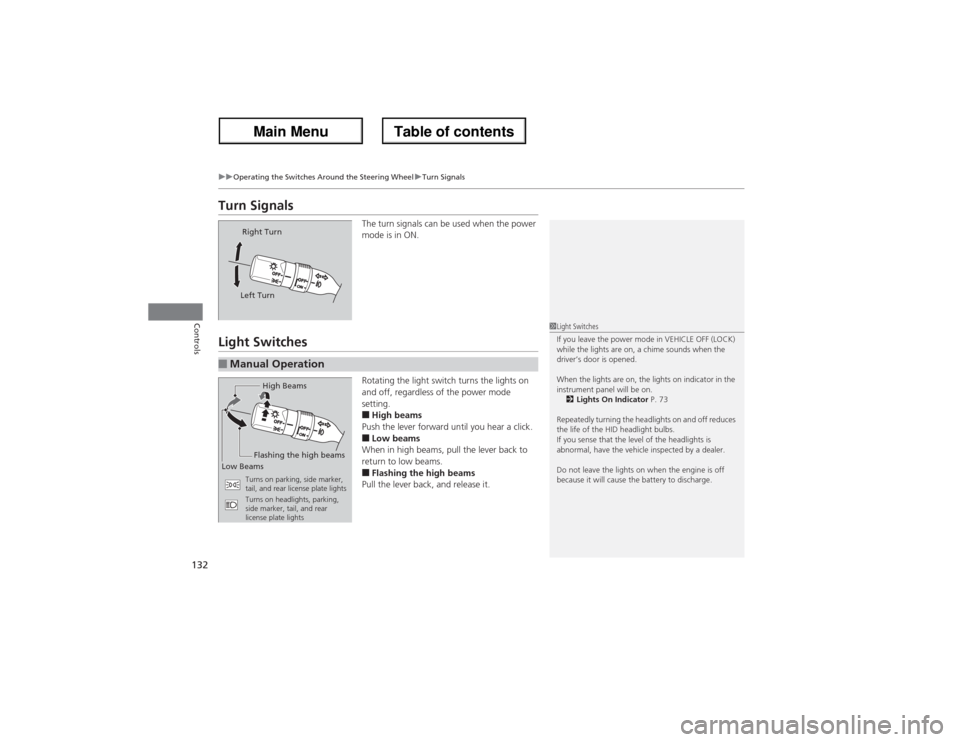
The turn signals can be used when the power
mode is in ON.
Light Switches
Rotating the light switch turns the lights on
and off, regardless of the power mode
setting.■High beams
Push the lever forward until you hear a click.■Low beams
When in high beams, pull the lever back to
return to low beams.■Flashing the high beams
Pull the lever back, and release it.
Right Turn
Left Turn
■Manual Operation
1Light Switches
If you leave the power mode in VEHICLE OFF (LOCK)
while the lights are on, a chime sounds when the
driver’s door is opened.
When the lights are on, the lights on indicator in the
instrument panel will be on.
2Lights On Indicator P. 73
Repeatedly turning the headlights on and off reduces
the life of the HID headlight bulbs.
If you sense that the level of the headlights is
abnormal, have the vehicle inspected by a dealer.
Do not leave the lights on when the engine is off
because it will cause the battery to discharge.
High Beams
Flashing the high beams
Low Beams
Turns on parking, side marker,
tail, and rear license plate lights
Turns on headlights, parking,
side marker, tail, and rear
license plate lights
Page 134 of 324
133
uuOperating the Switches Around the Steering WheeluLight Switches
Controls
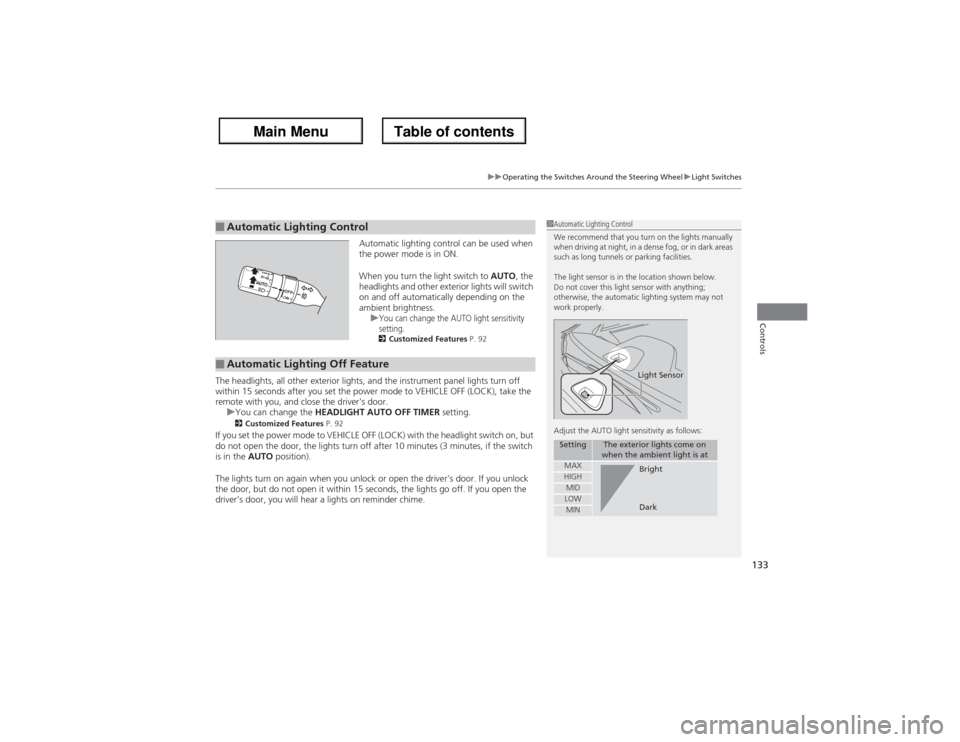
Automatic lighting control can be used when
the power mode is in ON.
When you turn the light switch to AUTO, the
headlights and other exterior lights will switch
on and off automatically depending on the
ambient brightness.
u
You can change the AUTO light sensitivity
setting.2Customized Features P. 92
The headlights, all other exterior lights, and the instrument panel lights turn off
within 15 seconds after you set the power mode to VEHICLE OFF (LOCK), take the
remote with you, and close the driver's door.
uYou can change the HEADLIGHT AUTO OFF TIMER setting.
2Customized Features P. 92
If you set the power mode to VEHICLE OFF (LOCK) with the headlight switch on, but
do not open the door, the lights turn off after 10 minutes (3 minutes, if the switch
is in the AUTO position).
The lights turn on again when you unlock or open the driver’s door. If you unlock
the door, but do not open it within 15 seconds, the lights go off. If you open the
driver’s door, you will hear a lights on reminder chime.■Automatic Lighting Control
1Automatic Lighting Control
We recommend that you turn on the lights manually
when driving at night, in a dense fog, or in dark areas
such as long tunnels or parking facilities.
The light sensor is in the location shown below.
Do not cover this light sensor with anything;
otherwise, the automatic lighting system may not
work properly.
Adjust the AUTO light sensitivity as follows:
Setting
The exterior lights come on
when the ambient light is at
MAXHIGHMIDLOWMIN
Light SensorBright
Dark
■Automatic Lighting Off Feature
Page 135 of 324
134
uuOperating the Switches Around the Steering WheeluFog Lights
Controls
Fog Lights
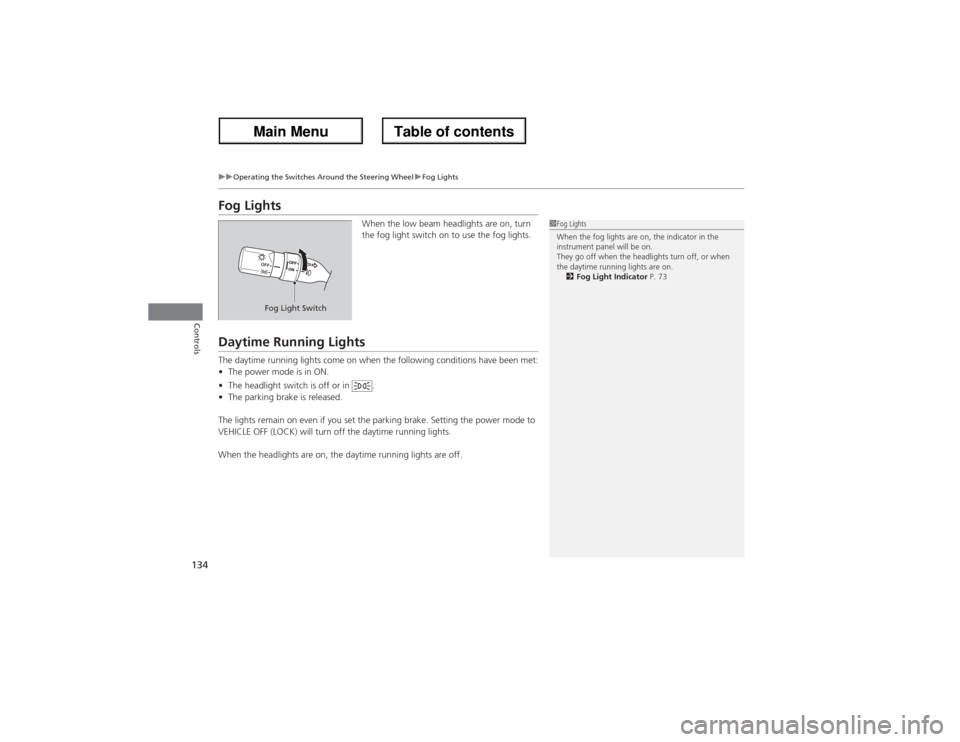
When the low beam headlights are on, turn
the fog light switch on to use the fog lights.
Daytime Running LightsThe daytime running lights come on when the following conditions have been met:
•The power mode is in ON.
•The headlight switch is off or in .
•The parking brake is released.
The lights remain on even if you set the parking brake. Setting the power mode to
VEHICLE OFF (LOCK) will turn off the daytime running lights.
When the headlights are on, the daytime running lights are off.
1Fog Lights
When the fog lights are on, the indicator in the
instrument panel will be on.
They go off when the headlights turn off, or when
the daytime running lights are on.
2Fog Light Indicator P. 73
Fog Light Switch
Page 136 of 324
135
uuOperating the Switches Around the Steering WheeluWipers and Washers
Continued
Controls
Wipers and Washers
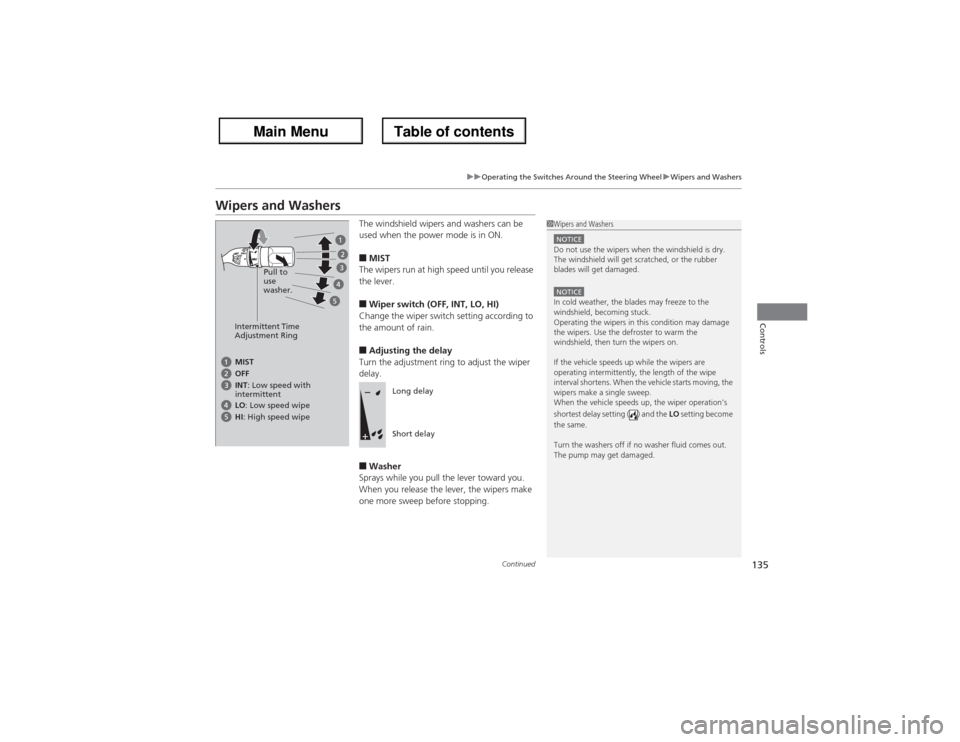
The windshield wipers and washers can be
used when the power mode is in ON.■MIST
The wipers run at high speed until you release
the lever.■Wiper switch (OFF, INT, LO, HI)
Change the wiper switch setting according to
the amount of rain.■Adjusting the delay
Turn the adjustment ring to adjust the wiper
delay.■Washer
Sprays while you pull the lever toward you.
When you release the lever, the wipers make
one more sweep before stopping.
1Wipers and WashersNOTICEDo not use the wipers when the windshield is dry.
The windshield will get scratched, or the rubber
blades will get damaged.NOTICEIn cold weather, the blades may freeze to the
windshield, becoming stuck.
Operating the wipers in this condition may damage
the wipers. Use the defroster to warm the
windshield, then turn the wipers on.
If the vehicle speeds up while the wipers are
operating intermittently, the length of the wipe
interval shortens. When the vehicle starts moving, the
wipers make a single sweep.
When the vehicle speeds up, the wiper operation’s
shortest delay setting ( ) and the LO setting become
the same.
Turn the washers off if no washer fluid comes out.
The pump may get damaged.
Intermittent Time
Adjustment RingPull to
use
washer.MIST
INT: Low speed with
intermittent OFF
LO: Low speed wipe
HI: High speed wipe
Long delay
Short delay