tow Acura ZDX 2013 Owner's Guide
[x] Cancel search | Manufacturer: ACURA, Model Year: 2013, Model line: ZDX, Model: Acura ZDX 2013Pages: 324, PDF Size: 8.58 MB
Page 207 of 324
uuWhen DrivinguBSI (Blind Spot Information)
206Driving
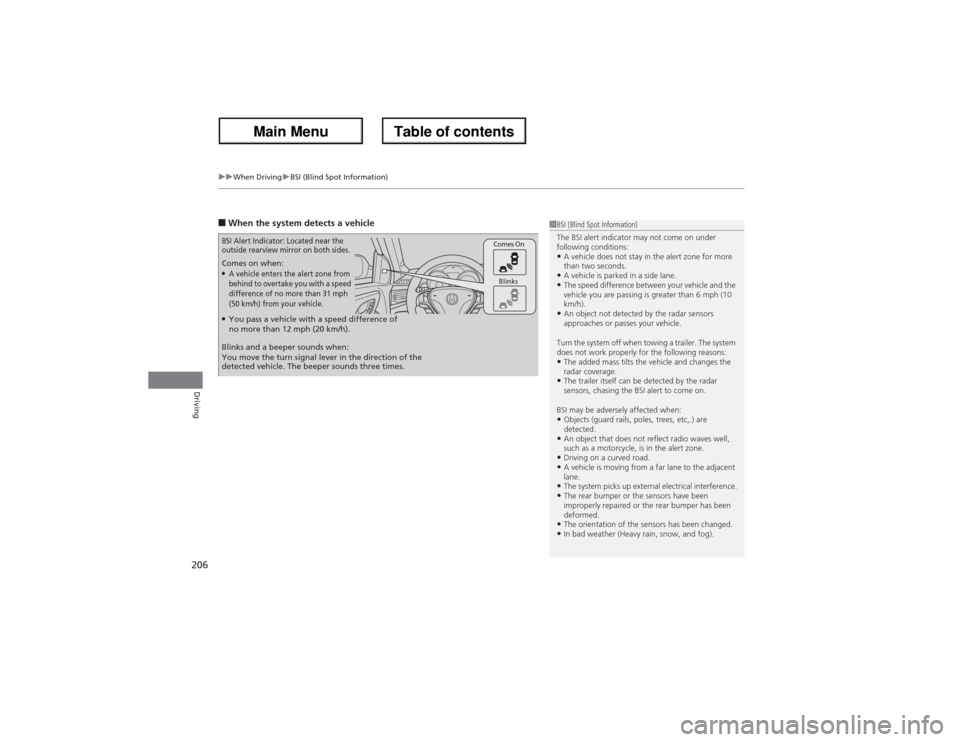
■When the system detects a vehicle Comes on when:●A vehicle enters the alert zone from
behind to overtake you with a speed
difference of no more than 31 mph
(50 km/h) from your vehicle.
Comes On
Blinks
BSI Alert Indicator: Located near the
outside rearview mirror on both sides.Blinks and a beeper sounds when:
You move the turn signal lever in the direction of the
detected vehicle. The beeper sounds three times.●You pass a vehicle with a speed difference of
no more than 12 mph (20 km/h).
1BSI (Blind Spot Information)
The BSI alert indicator may not come on under
following conditions:•A vehicle does not stay in the alert zone for more
than two seconds.•A vehicle is parked in a side lane.•The speed difference between your vehicle and the
vehicle you are passing is greater than 6 mph (10
km/h).•An object not detected by the radar sensors
approaches or passes your vehicle.
Turn the system off when towing a trailer. The system
does not work properly for the following reasons:•The added mass tilts the vehicle and changes the
radar coverage.•The trailer itself can be detected by the radar
sensors, chasing the BSI alert to come on.
BSI may be adversely affected when:•Objects (guard rails, poles, trees, etc,.) are
detected.•An object that does not reflect radio waves well,
such as a motorcycle, is in the alert zone.•Driving on a curved road.•A vehicle is moving from a far lane to the adjacent
lane.•The system picks up external electrical interference.•The rear bumper or the sensors have been
improperly repaired or the rear bumper has been
deformed.•The orientation of the sensors has been changed.•In bad weather (Heavy rain, snow, and fog).
Page 230 of 324
229
uuBefore Performing MaintenanceuSafety When Performing Maintenance
Maintenance
Safety When Performing MaintenanceSome of the most important safety precautions are given here.
However, we cannot warn you of every conceivable hazard that can arise in
performing maintenance. Only you can decide whether or not you should perform
a given task.
•To reduce the possibility of fire or explosion, keep cigarettes, sparks, and flames
away from the battery and all fuel related parts.
•Never leave rags, towels, or other flammable objects under the hood.
uHeat from the engine and exhaust can ignite them causing a fire.
•To clean parts, use a commercially available degreaser or parts cleaner, not
gasoline.
•Wear eye protection and protective clothing when working with the battery or
compressed air.
•Engine exhaust contains carbon monoxide, which is poisonous and can kill you.
uOnly operate the engine if there is sufficient ventilation.
•The vehicle must be in a stationary condition.
uMake sure your vehicle is parked on level ground, the parking brake is set, and
the engine is off.
•Be aware that hot parts can burn you.
uMake sure to let the engine and exhaust system cool thoroughly before
touching vehicle parts.
•Be aware that moving parts can injure you.
uDo not start the engine unless instructed, and keep your hands and limbs away
from moving parts.■Maintenance Safety■Vehicle Safety
1Safety When Performing Maintenance
3
WARNING
Improperly maintaining this vehicle or
failing to correct a problem before driving
can cause a crash in which you can be
seriously hurt or killed.
Always follow the inspection and
maintenance recommendations according
to the schedules in this owner’s manual.
3
WARNING
Failure to properly follow maintenance
instructions and precautions can cause you
to be seriously hurt or killed.
Always follow the procedures and
precautions in this owner’s manual.
Page 234 of 324
233
uuMaintenance Minder
TMuTo Use Maintenance Minder
TM
Continued
Maintenance
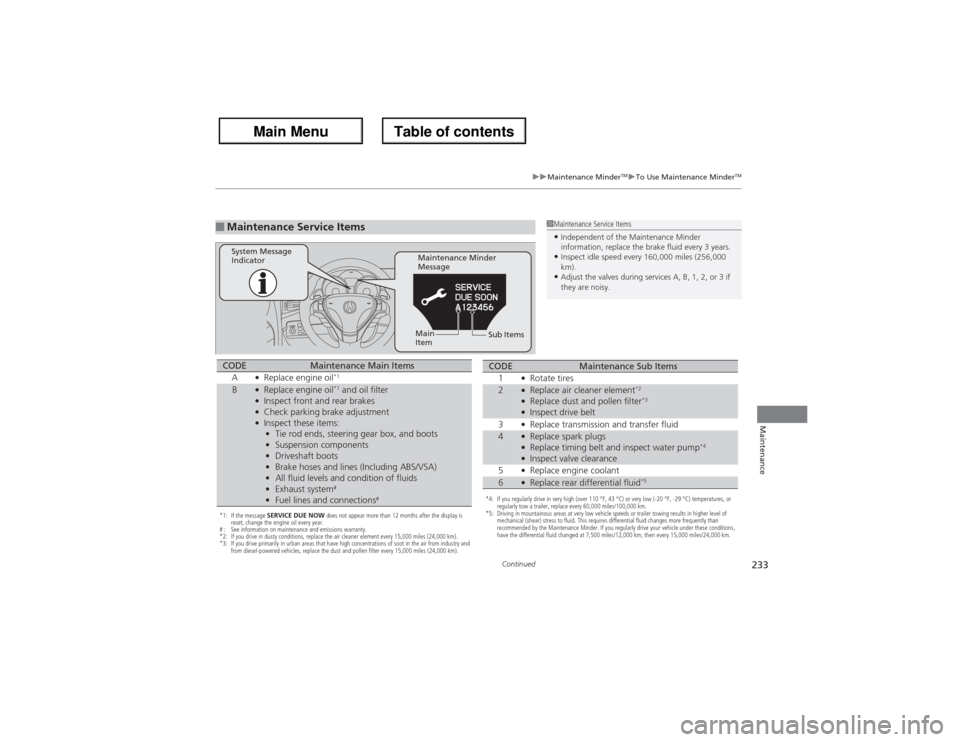
■Maintenance Service Items
1Maintenance Service Items•Independent of the Maintenance Minder
information, replace the brake fluid every 3 years.•Inspect idle speed every 160,000 miles (256,000
km).•Adjust the valves during services A, B, 1, 2, or 3 if
they are noisy.
Maintenance Minder
Message System Message
Indicator
Sub Items Main
Item
*1: If the message SERVICE DUE NOW does not appear more than 12 months after the display is
reset, change the engine oil every year.
# : See information on maintenance and emissions warranty.
*2: If you drive in dusty conditions, replace the air cleaner element every 15,000 miles (24,000 km).
*3: If you drive primarily in urban areas that have high concentrations of soot in the air from industry and
from diesel-powered vehicles, replace the dust and pollen filter every 15,000 miles (24,000 km).CODE
Maintenance Main Items
A
●Replace engine oil
*1
B
●Replace engine oil
*1 and oil filter
●Inspect front and rear brakes●Check parking brake adjustment●Inspect these items:
•Tie rod ends, steering gear box, and boots
•Suspension components
•Driveshaft boots
•Brake hoses and lines (Including ABS/VSA)
•All fluid levels and condition of fluids
•Exhaust system
#
•Fuel lines and connections
#
*4: If you regularly drive in very high (over 110 °F, 43 °C) or very low (-20 °F, -29 °C) temperatures, or
regularly tow a trailer, replace every 60,000 miles/100,000 km.
*5: Driving in mountainous areas at very low vehicle speeds or trailer towing results in higher level of
mechanical (shear) stress to fluid. This requires differential fluid changes more frequently than
recommended by the Maintenance Minder. If you regularly drive your vehicle under these conditions,
have the differential fluid changed at 7,500 miles/12,000 km, then every 15,000 miles/24,000 km.CODE
Maintenance Sub Items
1
●Rotate tires
2
●Replace air cleaner element
*2
●Replace dust and pollen filter
*3
●Inspect drive belt
3●Replace transmission and transfer fluid
4
●Replace spark plugs●Replace timing belt and inspect water pump
*4
●Inspect valve clearance
5●Replace engine coolant
6
●Replace rear differential fluid
*5
Page 240 of 324
239
uuMaintenance Under the HooduOil Check
Maintenance
Oil CheckWe recommend that you check the engine oil level every time you refuel.
Park the vehicle on level ground.
Wait approximately three minutes after turning the engine off before you check the
oil.
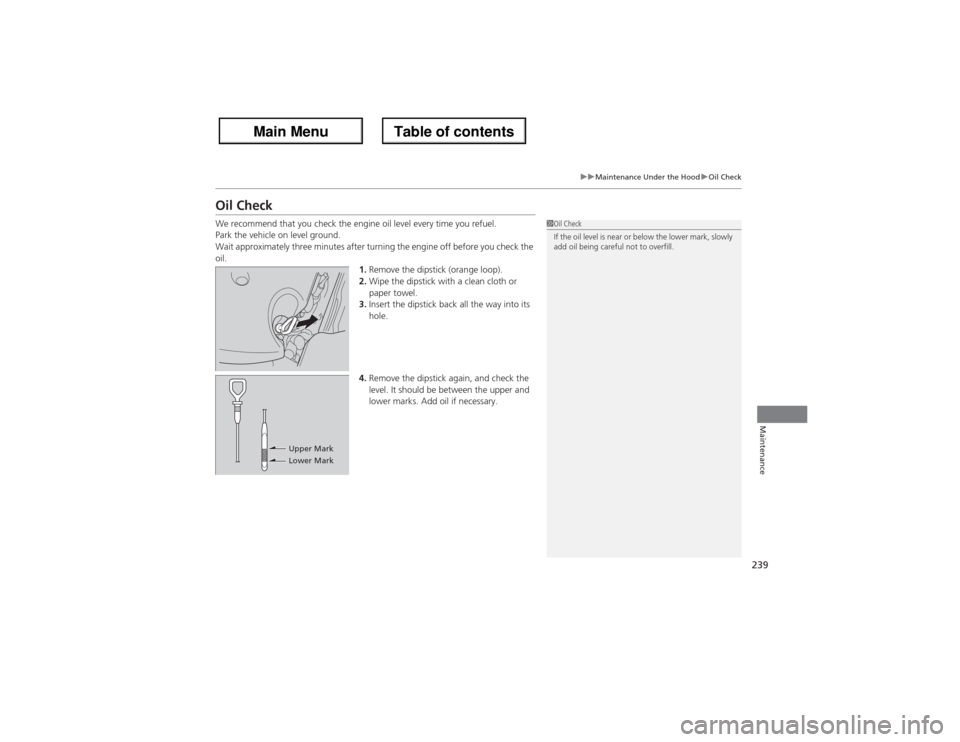
1.Remove the dipstick (orange loop).
2.Wipe the dipstick with a clean cloth or
paper towel.
3.Insert the dipstick back all the way into its
hole.
4.Remove the dipstick again, and check the
level. It should be between the upper and
lower marks. Add oil if necessary.
1Oil Check
If the oil level is near or below the lower mark, slowly
add oil being careful not to overfill.
Upper Mark
Lower Mark
Page 250 of 324
249Maintenance
Replacing Light BulbsHeadlight BulbsWhen replacing, use the following bulbs.
High voltage can remain in the circuit for a long period of time after the light is
switched off. Do not attempt to inspect or replace the high voltage discharge type
bulbs yourself. Ask a dealer to inspect and replace high/low beam headlights.High/Low beam headlight:
35W (D2S for high voltage discharge type)
■High/Low Beam Headlights
1Headlight BulbsNOTICEThe headlight aim is set by the factory, and does not
need to be adjusted. However, if you regularly carry
heavy items in the cargo area or tow a trailer, have
the aiming readjusted at a dealer or by a qualified
technician.
The exterior lights’ inside lenses (headlights, brake
lamps, etc.) may fog temporarily after a car wash or
while driving in the rain. This does not impact the
exterior light function.
However, if you see a large amount of water or ice
accumulated inside the lenses, have your vehicle
inspected by a dealer.
Page 268 of 324
267Maintenance
BatteryChecking the BatteryCheck the battery condition monthly. Look at the test indicator window and check
the terminals for corrosion.
If your vehicle’s battery is disconnected or goes dead:
•The audio system is disabled.
2Refer to the Navigation Manual
•The clock resets.
2Refer to the Navigation Manual
•The navigation system is disabled. A PIN code will be required.
2Refer to the Navigation Manual
Charging the BatteryDisconnect both battery cables to prevent damaging your vehicle’s electrical system.
Always disconnect the negative (–) cable first, and reconnect it last.
1BatteryWARNING: Battery post, terminals,
and related accessories contain lead
and lead compounds.
Wash your hands after handling.When you find corrosion, clean the battery terminals
by applying a baking powder and water solution.
Clean terminals with a damp towel. Cloth/towel dry
the battery. Coat the terminals with grease to help
prevent future corrosion.
3
WARNING
The battery gives off explosive hydrogen
gas during normal operation.
A spark or flame can cause the battery to
explode with enough force to kill or
seriously hurt you.
When conducting any battery
maintenance, wear protective clothing and
a face shield, or have a skilled technician do
it.
Page 276 of 324
275
Handling the Unexpected
This chapter explains how to handle unexpected troubles.
Tools
Types of Tools .................................. 276
If a Tire Goes Flat
Changing a Flat Tire ......................... 277
Engine Does Not Start
Checking the Engine ........................ 284If the Keyless Access Remote Battery is
Weak ..........................................285Emergency Engine Stop ................... 286
Jump Starting.................................... 287
Shift Lever Does Not Move.............. 289Overheating
How to Handle Overheating............. 290
Indicator, Coming On/Blinking
If the Low Oil Pressure Indicator Comes
On ............................................. 292If the Charging System Indicator Comes
On ................................................. 292
If the Malfunction Indicator Lamp Comes
On or Blinks ................................... 293If the Brake System Indicator (Red)
Comes On .................................. 294
If the Low Tire Pressure/TPMS Indicator
Comes On or Blinks ....................... 294
Fuses
Fuse Locations ................................. 295Circuit Protected and Amps for Each
Fuse............................................ 297Inspecting and Changing Fuses ........ 300
Emergency Towing........................... 301
When You Cannot Unlock the Fuel Fill
Door................................................. 302
When You Cannot Open or Close the
Tailgate............................................ 303
Page 279 of 324
uuIf a Tire Goes FlatuChanging a Flat Tire
278Handling the Unexpected
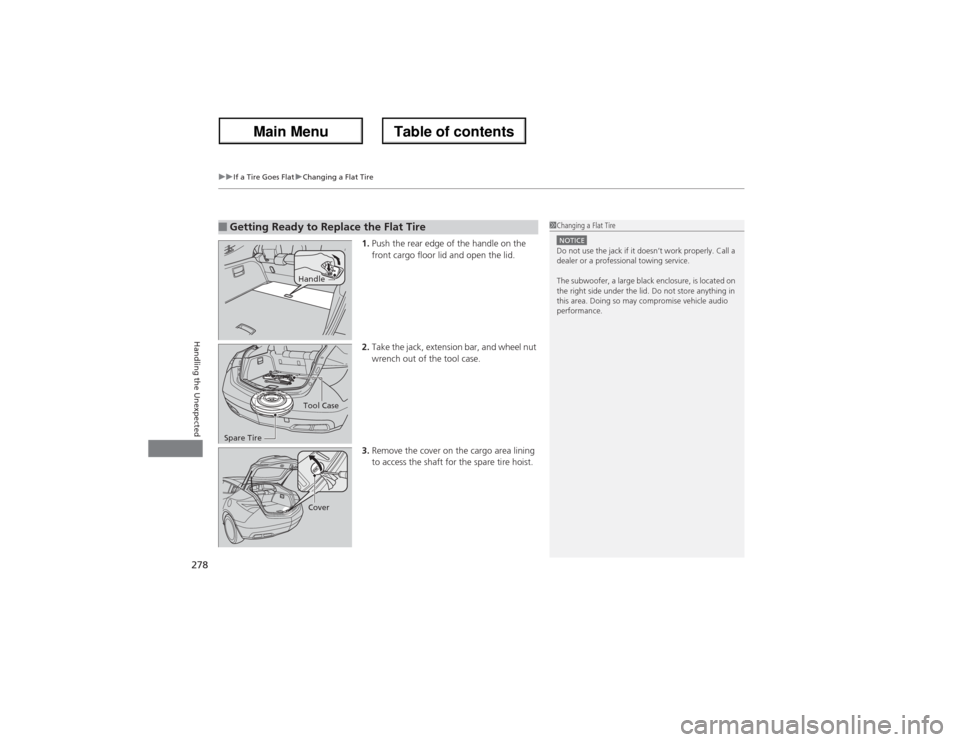
1.Push the rear edge of the handle on the
front cargo floor lid and open the lid.
2.Take the jack, extension bar, and wheel nut
wrench out of the tool case.
3.Remove the cover on the cargo area lining
to access the shaft for the spare tire hoist.
■Getting Ready to Replace the Flat Tire
1Changing a Flat TireNOTICEDo not use the jack if it doesn’t work properly. Call a
dealer or a professional towing service.
The subwoofer, a large black enclosure, is located on
the right side under the lid. Do not store anything in
this area. Doing so may compromise vehicle audio
performance.
HandleTool Case
Spare TireCover
Page 284 of 324
283
uuIf a Tire Goes FlatuChanging a Flat Tire
Handling the Unexpected
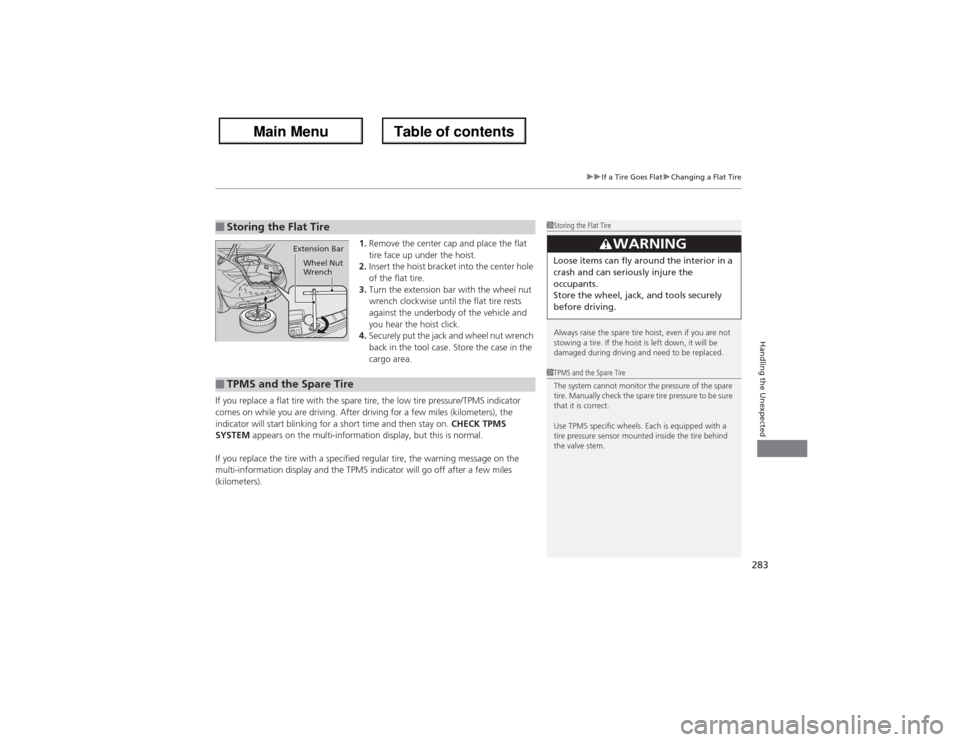
1.Remove the center cap and place the flat
tire face up under the hoist.
2.Insert the hoist bracket into the center hole
of the flat tire.
3.Turn the extension bar with the wheel nut
wrench clockwise until the flat tire rests
against the underbody of the vehicle and
you hear the hoist click.
4.Securely put the jack and wheel nut wrench
back in the tool case. Store the case in the
cargo area.
If you replace a flat tire with the spare tire, the low tire pressure/TPMS indicator
comes on while you are driving. After driving for a few miles (kilometers), the
indicator will start blinking for a short time and then stay on. CHECK TPMS
SYSTEM appears on the multi-information display, but this is normal.
If you replace the tire with a specified regular tire, the warning message on the
multi-information display and the TPMS indicator will go off after a few miles
(kilometers).
■Storing the Flat Tire
1Storing the Flat Tire
Always raise the spare tire hoist, even if you are not
stowing a tire. If the hoist is left down, it will be
damaged during driving and need to be replaced.
3
WARNING
Loose items can fly around the interior in a
crash and can seriously injure the
occupants.
Store the wheel, jack, and tools securely
before driving.
Extension Bar
Wheel Nut
Wrench
■TPMS and the Spare Tire
1TPMS and the Spare Tire
The system cannot monitor the pressure of the spare
tire. Manually check the spare tire pressure to be sure
that it is correct.
Use TPMS specific wheels. Each is equipped with a
tire pressure sensor mounted inside the tire behind
the valve stem.
Page 285 of 324
284Handling the Unexpected
Engine Does Not StartChecking the EngineIf the engine does not start, check the starter.
Starter condition
Checklist
Starter doesn’t turn or turns
over slowly.
The battery may be dead. Check
each of the items on the right and
respond accordingly.
Check for a message on the multi-information display.●If the CHANGE KEYLESS REMOTE BATTERY message appears
2If the Keyless Access Remote Battery is Weak P. 285
Check brightness of the interior light.
Turn on interior lights and check brightness.●If the interior lights are dim or do not come on at all
2Checking the Battery P. 267
●If the interior lights come on normally
2 Fuses P. 295
The starter turns over normally
but the engine doesn’t start.
There may be a problem with the
fuse. Check each of the items on
the right and respond accordingly.Review the engine start procedure.
Follow its instructions, and try to start the engine again.
2 Starting the Engine P. 185
Check the immobilizer system indicator.
When the immobilizer system indicator is blinking, the engine cannot be started.2Immobilizer System P. 122Check the fuel level.
There should be enough fuel in the tank.
2 Fuel Gauge P. 86
Check the fuse.
Check all fuses, or have the vehicle checked by a dealer.2Inspecting and Changing Fuses P. 300If the problem continues:2Emergency Towing P. 301
1Checking the Engine
If you must start the vehicle immediately, use an
assisting vehicle to jump start it.
2Jump Starting P. 287