warning Acura ZDX 2013 Owner's Guide
[x] Cancel search | Manufacturer: ACURA, Model Year: 2013, Model line: ZDX, Model: Acura ZDX 2013Pages: 324, PDF Size: 8.58 MB
Page 80 of 324
79
uuIndicatorsuMulti-Information Display Warning and Information Messages
Continued
Instrument Panel
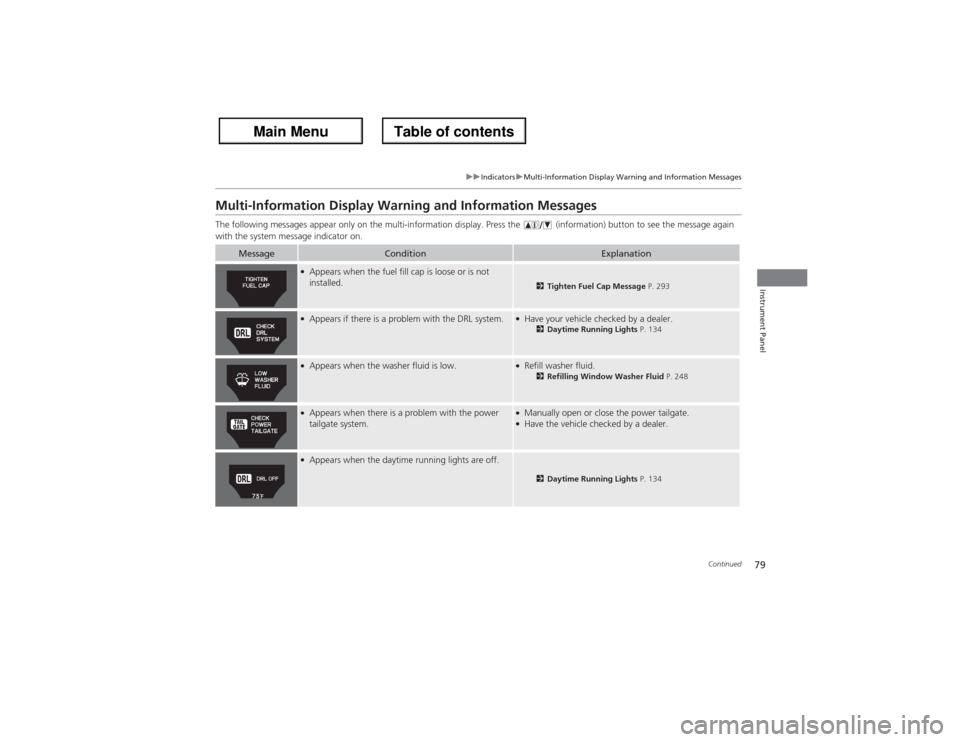
Multi-Information Display Warning and Information MessagesThe following messages appear only on the multi-information display. Press the (information) button to see the message again
with the system message indicator on.
Message
Condition
Explanation
●Appears when the fuel fill cap is loose or is not
installed.
2Tighten Fuel Cap Message P. 293
●Appears if there is a problem with the DRL system.
●Have your vehicle checked by a dealer.
2Daytime Running Lights P. 134
●Appears when the washer fluid is low.
●Refill washer fluid.
2Refilling Window Washer Fluid P. 248
●Appears when there is a problem with the power
tailgate system.
●Manually open or close the power tailgate.●Have the vehicle checked by a dealer.
●Appears when the daytime running lights are off.
2Daytime Running Lights P. 134
Page 81 of 324
80
uuIndicatorsuMulti-Information Display Warning and Information Messages
Instrument Panel
Message
Condition
Explanation
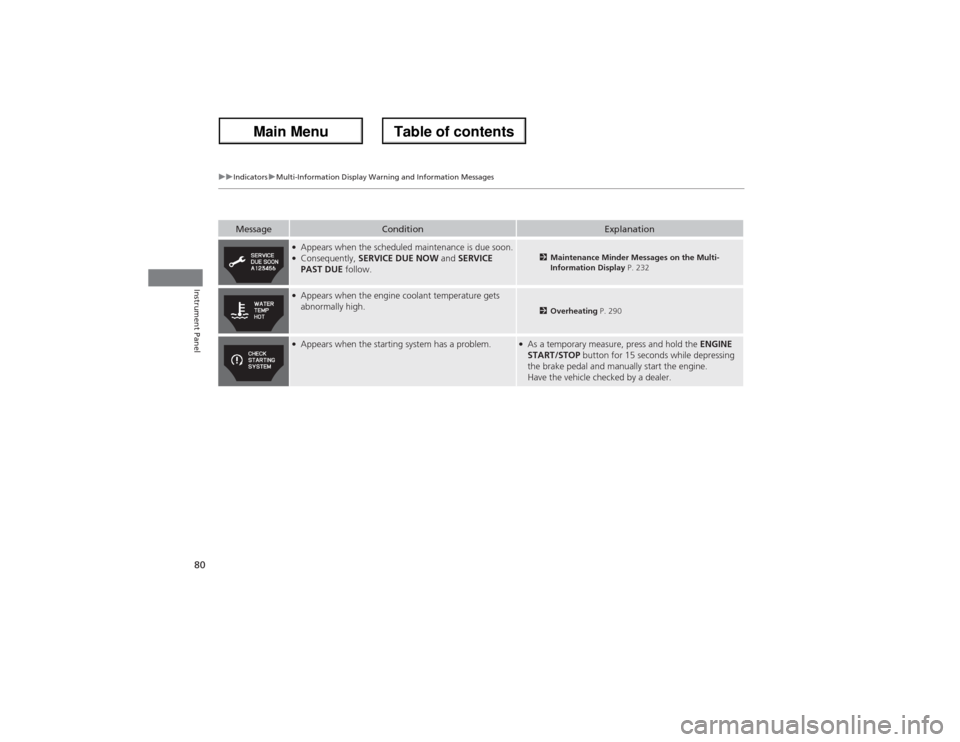
●Appears when the scheduled maintenance is due soon.●Consequently, SERVICE DUE NOW and SERVICE
PAST DUE follow.
2Maintenance Minder Messages on the Multi-
Information Display P. 232
●Appears when the engine coolant temperature gets
abnormally high.
2Overheating P. 290
●Appears when the starting system has a problem.
●As a temporary measure, press and hold the ENGINE
START/STOP button for 15 seconds while depressing
the brake pedal and manually start the engine.
Have the vehicle checked by a dealer.
Page 82 of 324
81
uuIndicatorsuMulti-Information Display Warning and Information Messages
Continued
Instrument Panel
Message
Condition
Explanation
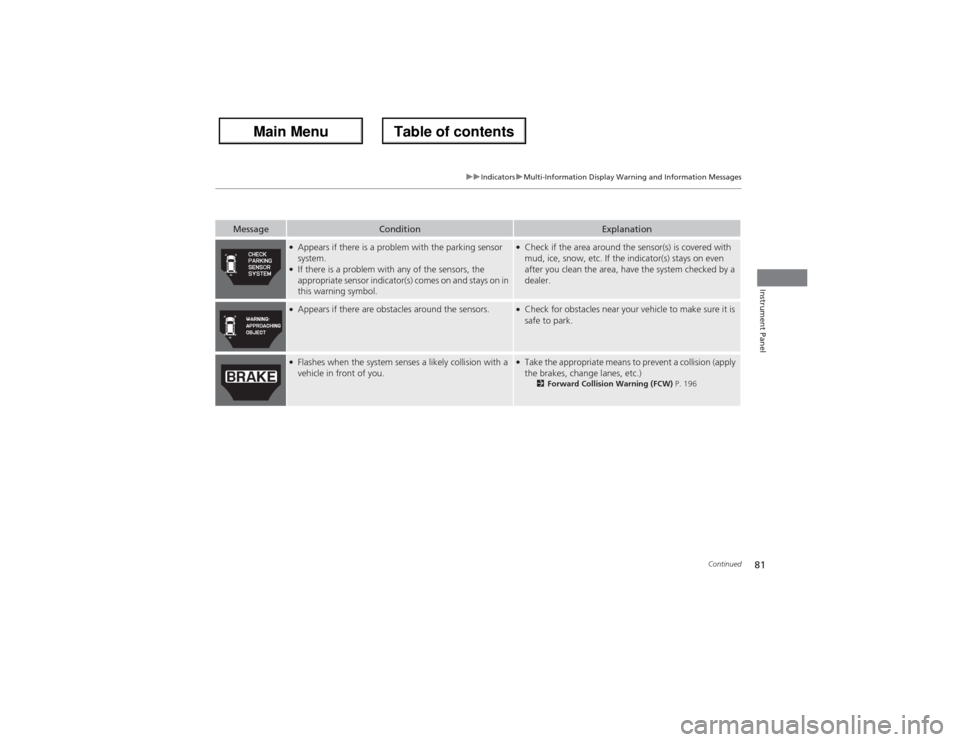
●Appears if there is a problem with the parking sensor
system.●If there is a problem with any of the sensors, the
appropriate sensor indicator(s) comes on and stays on in
this warning symbol.
●Check if the area around the sensor(s) is covered with
mud, ice, snow, etc. If the indicator(s) stays on even
after you clean the area, have the system checked by a
dealer.
●Appears if there are obstacles around the sensors.
●Check for obstacles near your vehicle to make sure it is
safe to park.
●Flashes when the system senses a likely collision with a
vehicle in front of you.
●Take the appropriate means to prevent a collision (apply
the brakes, change lanes, etc.)
2Forward Collision Warning (FCW) P. 196
Page 83 of 324
82
uuIndicatorsuMulti-Information Display Warning and Information Messages
Instrument Panel
Message
Condition
Explanation
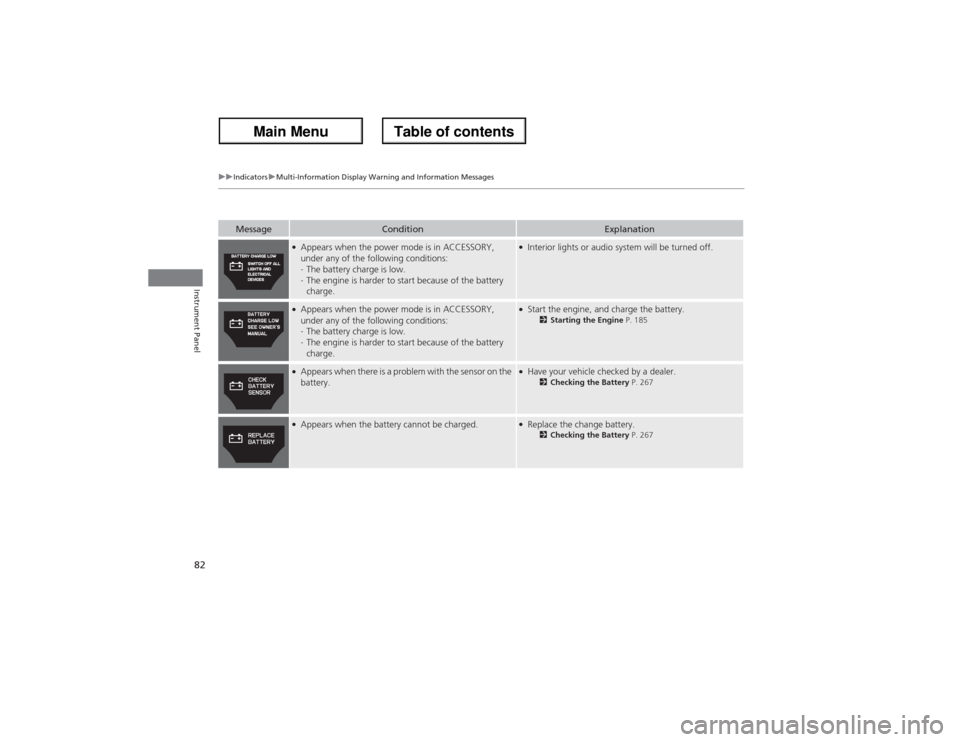
●Appears when the power mode is in ACCESSORY,
under any of the following conditions:
-The battery charge is low.
-The engine is harder to start because of the battery
charge.
●Interior lights or audio system will be turned off.
●Appears when the power mode is in ACCESSORY,
under any of the following conditions:
-The battery charge is low.
-The engine is harder to start because of the battery
charge.
●Start the engine, and charge the battery.
2Starting the Engine P. 185
●Appears when there is a problem with the sensor on the
battery.
●Have your vehicle checked by a dealer.
2Checking the Battery P. 267
●Appears when the battery cannot be charged.
●Replace the change battery.
2Checking the Battery P. 267
Page 84 of 324
83
uuIndicatorsuMulti-Information Display Warning and Information Messages
Continued
Instrument Panel
Message
Condition
Explanation
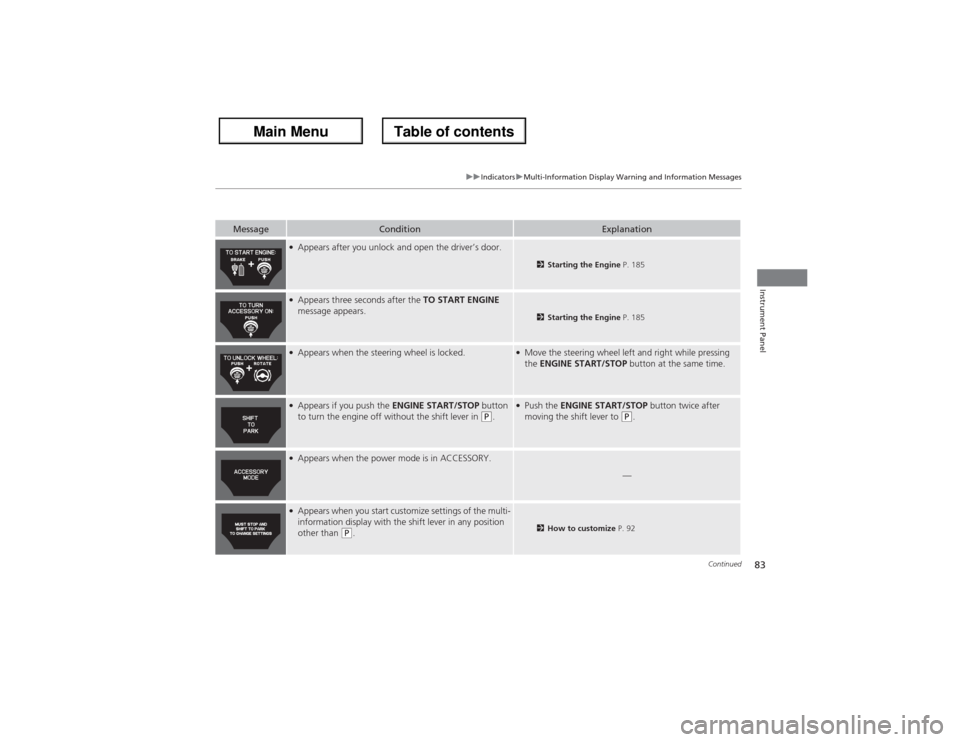
●Appears after you unlock and open the driver’s door.
2Starting the Engine P. 185
●Appears three seconds after the TO START ENGINE
message appears.
2Starting the Engine P. 185
●Appears when the steering wheel is locked.
●Move the steering wheel left and right while pressing
the ENGINE START/STOP button at the same time.
●Appears if you push the ENGINE START/STOP button
to turn the engine off without the shift lever in
(P.
●Push the ENGINE START/STOP button twice after
moving the shift lever to
(P.
●Appears when the power mode is in ACCESSORY.
—
●Appears when you start customize settings of the multi-
information display with the shift lever in any position
other than
(P.
2How to customize P. 92
Page 85 of 324
84
uuIndicatorsuMulti-Information Display Warning and Information Messages
Instrument Panel
Message
Condition
Explanation
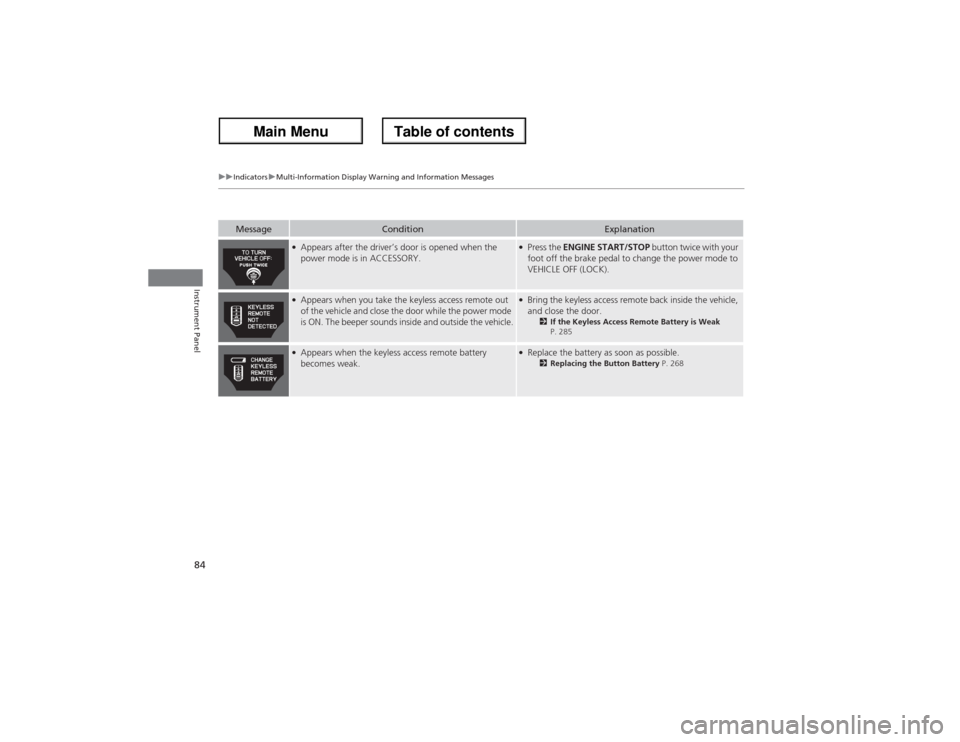
●Appears after the driver’s door is opened when the
power mode is in ACCESSORY.
●Press the ENGINE START/STOP button twice with your
foot off the brake pedal to change the power mode to
VEHICLE OFF (LOCK).
●Appears when you take the keyless access remote out
of the vehicle and close the door while the power mode
is ON. The beeper sounds inside and outside the vehicle.
●Bring the keyless access remote back inside the vehicle,
and close the door.
2If the Keyless Access Remote Battery is Weak
P. 285
●Appears when the keyless access remote battery
becomes weak.
●Replace the battery as soon as possible.
2Replacing the Button Battery P. 268
Page 86 of 324
85
uuIndicatorsuMulti-Information Display Warning and Information Messages
Instrument Panel
Message
Condition
Explanation
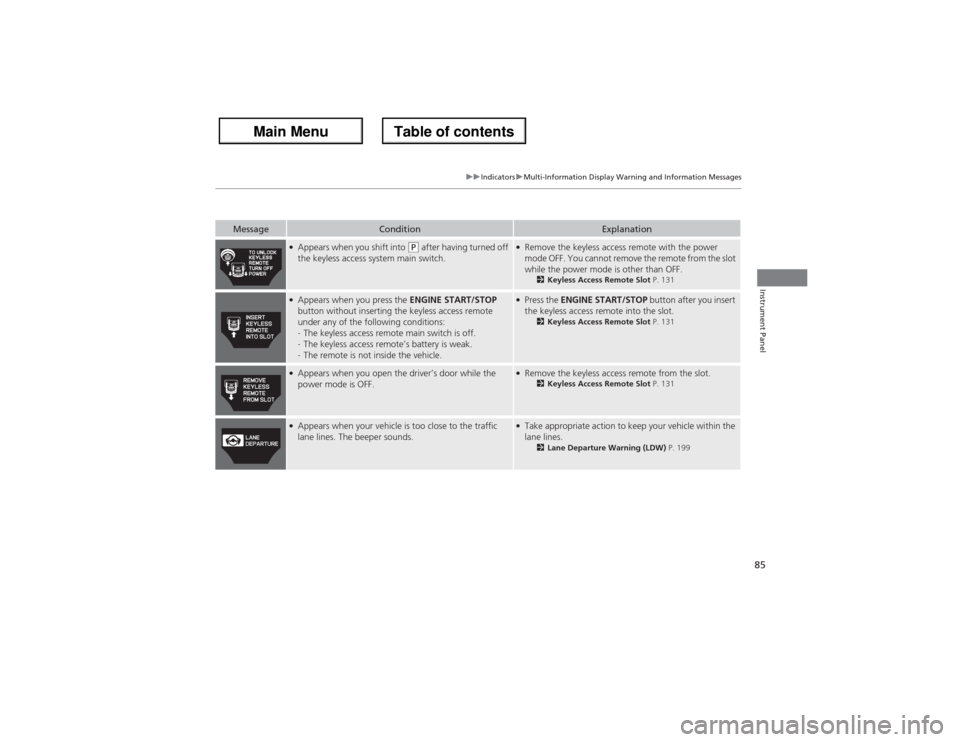
●Appears when you shift into
(P after having turned off
the keyless access system main switch.
●Remove the keyless access remote with the power
mode OFF. You cannot remove the remote from the slot
while the power mode is other than OFF.
2Keyless Access Remote Slot P. 131
●Appears when you press the ENGINE START/STOP
button without inserting the keyless access remote
under any of the following conditions:
-The keyless access remote main switch is off.
-The keyless access remote’s battery is weak.
-The remote is not inside the vehicle.
●Press the ENGINE START/STOP button after you insert
the keyless access remote into the slot.
2Keyless Access Remote Slot P. 131
●Appears when you open the driver’s door while the
power mode is OFF.
●Remove the keyless access remote from the slot.
2Keyless Access Remote Slot P. 131
●Appears when your vehicle is too close to the traffic
lane lines. The beeper sounds.
●Take appropriate action to keep your vehicle within the
lane lines.
2Lane Departure Warning (LDW) P. 199
Page 88 of 324
87
uuGauges and Multi-Information DisplayuMulti-Information Display
Continued
Instrument Panel
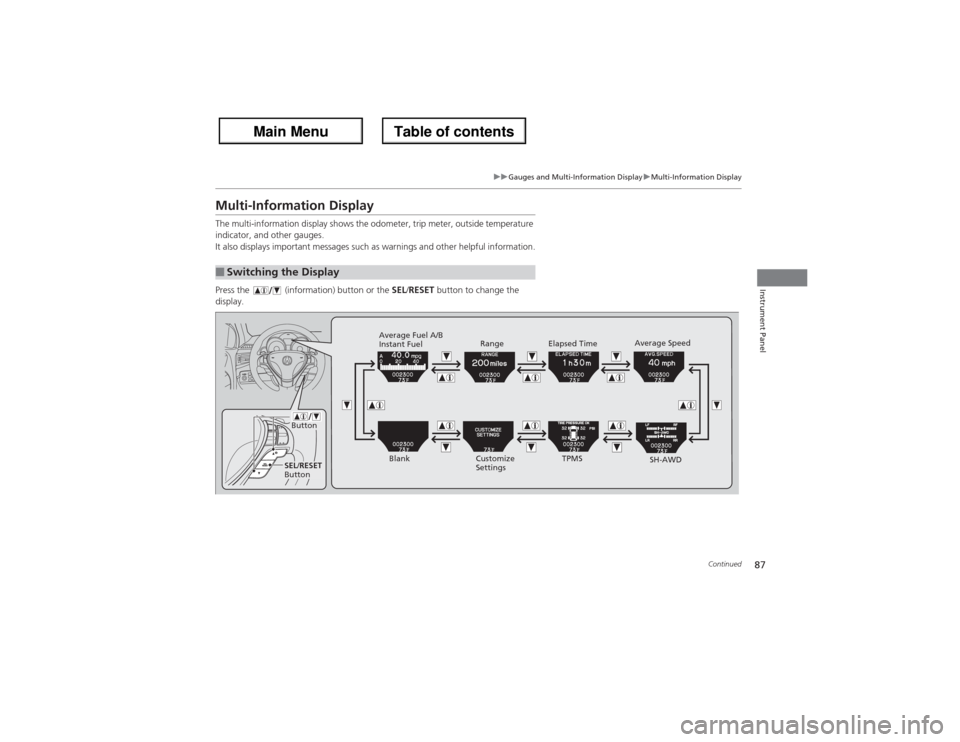
Multi-Information DisplayThe multi-information display shows the odometer, trip meter, outside temperature
indicator, and other gauges.
It also displays important messages such as warnings and other helpful information.
Press the (information) button or the SEL/RESET button to change the
display.■Switching the Display
SEL/RESET
Button
Button
Blank Average Fuel A/B
Instant Fuel
Customize
SettingsSH-AWD TPMS Range Elapsed TimeAverage Speed
Page 94 of 324
93
uuGauges and Multi-Information DisplayuMulti-Information Display
Continued
Instrument Panel
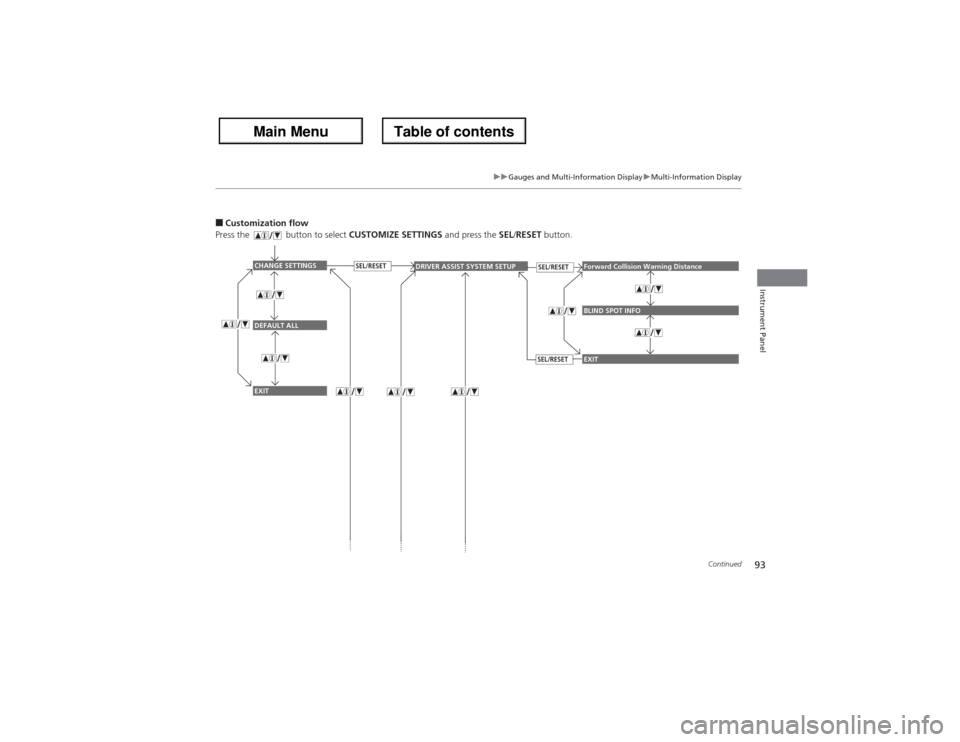
■Customization flow
Press the button to select CUSTOMIZE SETTINGS and press the SEL/RESET button.
CHANGE SETTINGSDEFAULT ALLEXIT
DRIVER ASSIST SYSTEM SETUP
Forward Collision Warning DistanceBLIND SPOT INFO
SEL/RESET
EXIT
SEL/RESET
SEL/RESET
Page 99 of 324
98
uuGauges and Multi-Information DisplayuMulti-Information Display
Instrument Panel
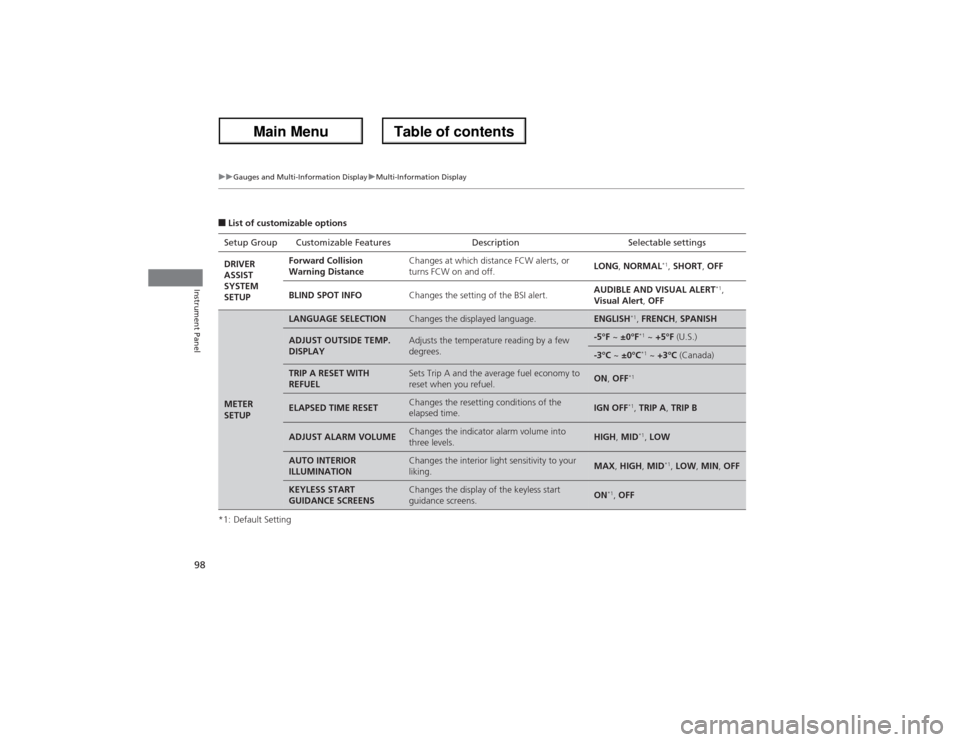
■List of customizable options
*1: Default SettingSetup Group Customizable Features Description Selectable settings
DRIVER
ASSIST
SYSTEM
SETUPForward Collision
Warning DistanceChanges at which distance FCW alerts, or
turns FCW on and off.LONG, NORMAL
*1, SHORT, OFF
BLIND SPOT INFOChanges the setting of the BSI alert.AUDIBLE AND VISUAL ALERT
*1,
Visual Alert, OFF
METER
SETUP
LANGUAGE SELECTION
Changes the displayed language.
ENGLISH
*1, FRENCH, SPANISH
ADJUST OUTSIDE TEMP.
DISPLAY
Adjusts the temperature reading by a few
degrees.
-5°F ~ ±0°F
*1 ~ +5°F (U.S.)
-3°C ~ ±0°C
*1 ~ +3°C (Canada)
TRIP A RESET WITH
REFUEL
Sets Trip A and the average fuel economy to
reset when you refuel.
ON, OFF
*1
ELAPSED TIME RESET
Changes the resetting conditions of the
elapsed time.
IGN OFF
*1, TRIP A, TRIP B
ADJUST ALARM VOLUME
Changes the indicator alarm volume into
three levels.
HIGH, MID
*1, LOW
AUTO INTERIOR
ILLUMINATION
Changes the interior light sensitivity to your
liking.
MAX, HIGH, MID
*1, LOW, MIN, OFF
KEYLESS START
GUIDANCE SCREENS
Changes the display of the keyless start
guidance screens.
ON
*1, OFF