change wheel Acura ZDX 2013 Owner's Manual
[x] Cancel search | Manufacturer: ACURA, Model Year: 2013, Model line: ZDX, Model: Acura ZDX 2013Pages: 324, PDF Size: 8.58 MB
Page 17 of 324
16Quick Reference Guide
What to Do If
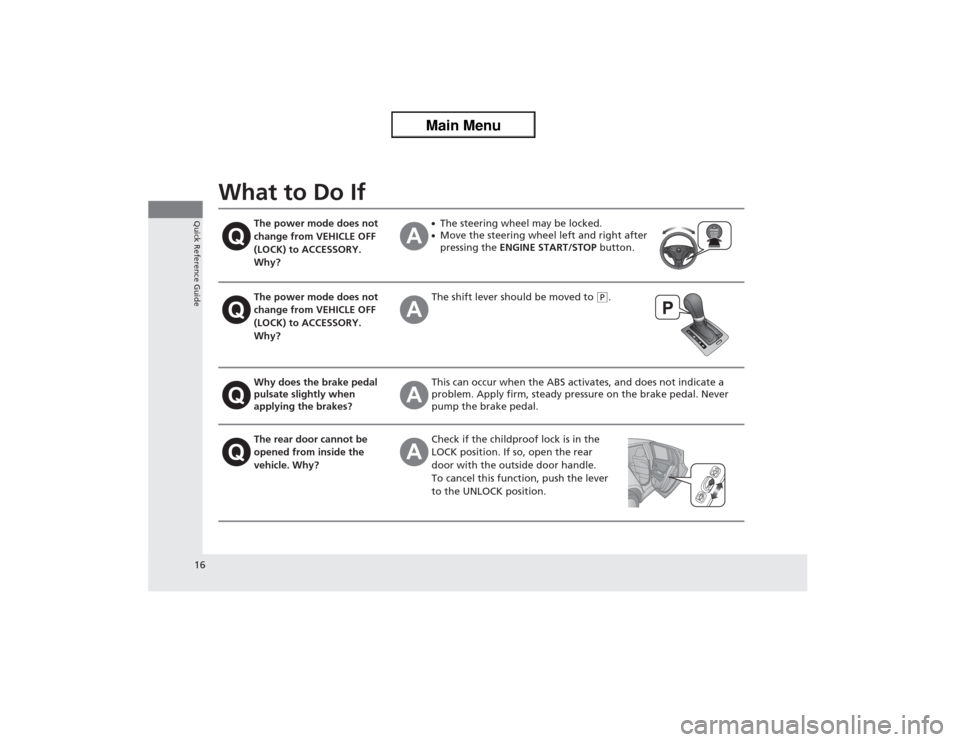
The power mode does not
change from VEHICLE OFF
(LOCK) to ACCESSORY.
Why?
●The steering wheel may be locked.●Move the steering wheel left and right after
pressing the ENGINE START/STOP button.
The power mode does not
change from VEHICLE OFF
(LOCK) to ACCESSORY.
Why?
The shift lever should be moved to
(P.
Why does the brake pedal
pulsate slightly when
applying the brakes?
This can occur when the ABS activates, and does not indicate a
problem. Apply firm, steady pressure on the brake pedal. Never
pump the brake pedal.
The rear door cannot be
opened from inside the
vehicle. Why?
Check if the childproof lock is in the
LOCK position. If so, open the rear
door with the outside door handle.
To cancel this function, push the lever
to the UNLOCK position.
Page 77 of 324
76
uuIndicatorsu
Instrument Panel
Indicator
Name
On/Blinking
Explanation
Message
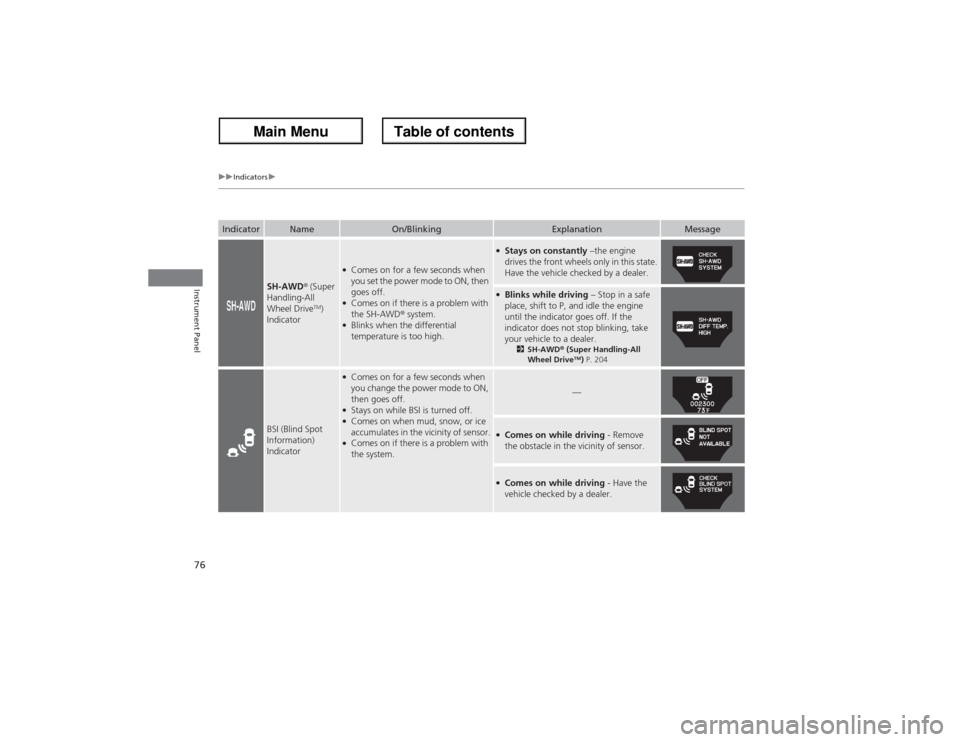
SH-AWD® (Super
Handling-All
Wheel Drive
TM)
Indicator
●Comes on for a few seconds when
you set the power mode to ON, then
goes off.●Comes on if there is a problem with
the SH-AWD® system.●Blinks when the differential
temperature is too high.
●Stays on constantly –the engine
drives the front wheels only in this state.
Have the vehicle checked by a dealer.●Blinks while driving – Stop in a safe
place, shift to P, and idle the engine
until the indicator goes off. If the
indicator does not stop blinking, take
your vehicle to a dealer.
2SH-AWD® (Super Handling-All
Wheel Drive
TM) P. 204
BSI (Blind Spot
Information)
Indicator
●Comes on for a few seconds when
you change the power mode to ON,
then goes off.●Stays on while BSI is turned off.●Comes on when mud, snow, or ice
accumulates in the vicinity of sensor.●Comes on if there is a problem with
the system.
—
●Comes on while driving - Remove
the obstacle in the vicinity of sensor.●Comes on while driving - Have the
vehicle checked by a dealer.
Page 100 of 324
99
uuGauges and Multi-Information DisplayuMulti-Information Display
Continued
Instrument Panel
*1: Default SettingSetup Group Customizable Features Description Selectable settings
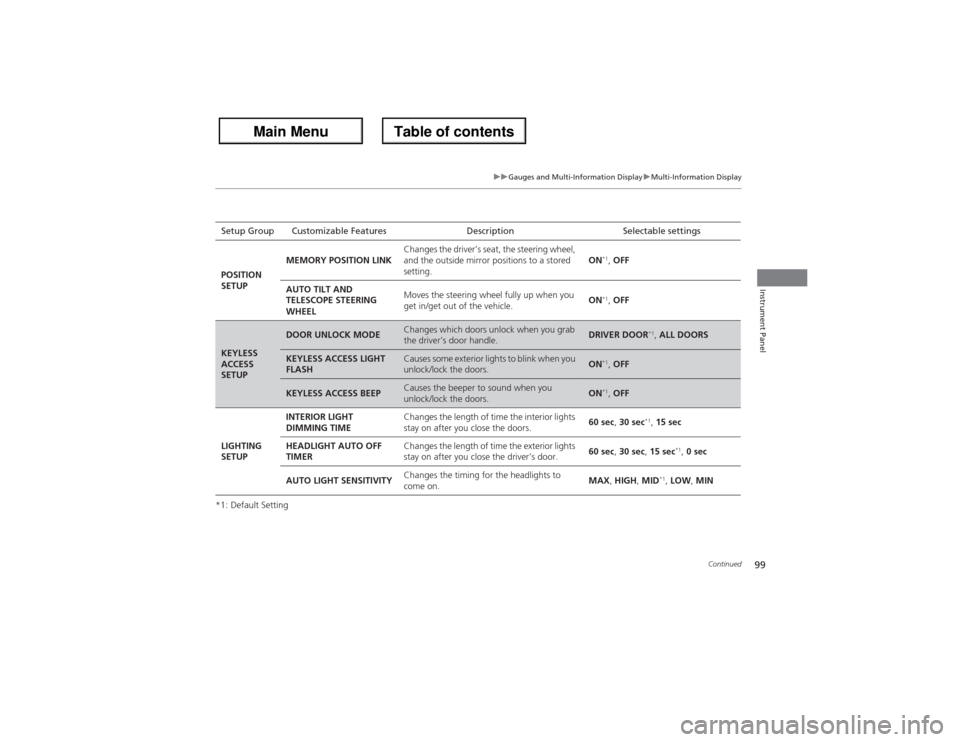
POSITION
SETUPMEMORY POSITION LINKChanges the driver’s seat, the steering wheel,
and the outside mirror positions to a stored
setting.ON
*1, OFF
AUTO TILT AND
TELESCOPE STEERING
WHEELMoves the steering wheel fully up when you
get in/get out of the vehicle.ON*1, OFF
KEYLESS
ACCESS
SETUP
DOOR UNLOCK MODE
Changes which doors unlock when you grab
the driver’s door handle.
DRIVER DOOR
*1, ALL DOORS
KEYLESS ACCESS LIGHT
FLASH
Causes some exterior lights to blink when you
unlock/lock the doors.
ON
*1, OFF
KEYLESS ACCESS BEEP
Causes the beeper to sound when you
unlock/lock the doors.
ON
*1, OFF
LIGHTING
SETUPINTERIOR LIGHT
DIMMING TIMEChanges the length of time the interior lights
stay on after you close the doors.60 sec, 30 sec
*1, 15 sec
HEADLIGHT AUTO OFF
TIMERChanges the length of time the exterior lights
stay on after you close the driver’s door.60 sec, 30 sec, 15 sec
*1, 0 sec
AUTO LIGHT SENSITIVITYChanges the timing for the headlights to
come on.MAX, HIGH, MID
*1, LOW, MIN
Page 130 of 324
129
Continued
Controls
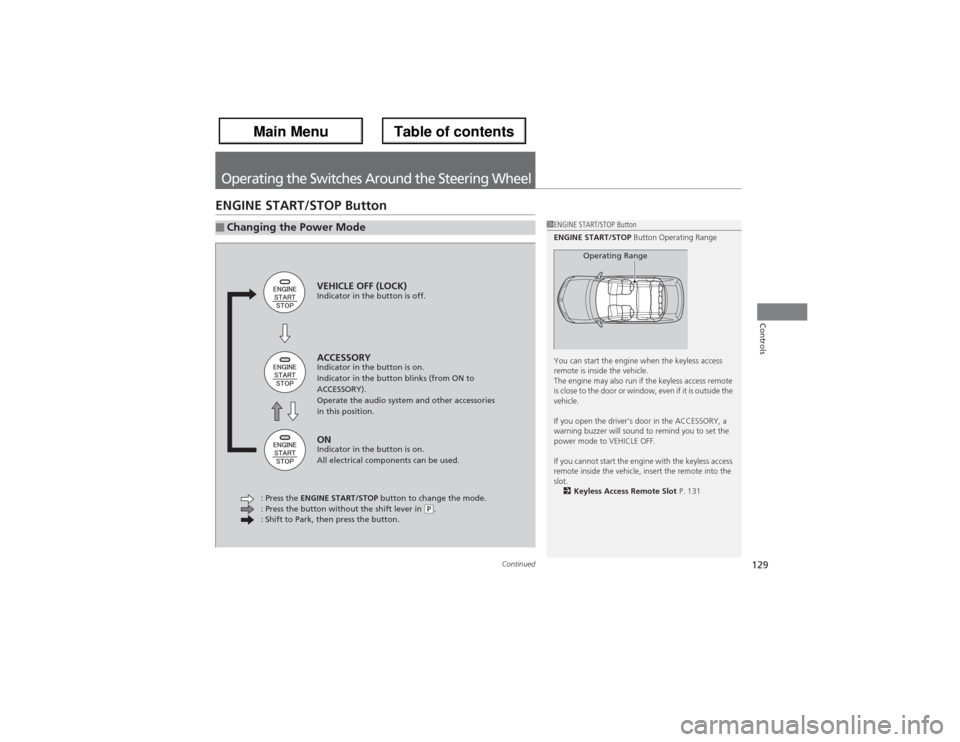
Operating the Switches Around the Steering WheelENGINE START/STOP Button■Changing the Power Mode
1ENGINE START/STOP Button
ENGINE START/STOP Button Operating Range
You can start the engine when the keyless access
remote is inside the vehicle.
The engine may also run if the keyless access remote
is close to the door or window, even if it is outside the
vehicle.
If you open the driver’s door in the ACCESSORY, a
warning buzzer will sound to remind you to set the
power mode to VEHICLE OFF.
If you cannot start the engine with the keyless access
remote inside the vehicle, insert the remote into the
slot.
2Keyless Access Remote Slot P. 131
Operating Range
VEHICLE OFF (LOCK)Indicator in the button is off.ACCESSORYIndicator in the button is on.
Indicator in the button blinks (from ON to
ACCESSORY).
Operate the audio system and other accessories
in this position.ONIndicator in the button is on.
All electrical components can be used.
: Press the ENGINE START/STOP button to change the mode.
: Press the button without the shift lever in
(P.
: Shift to Park, then press the button.
Page 131 of 324
uuOperating the Switches Around the Steering WheeluENGINE START/STOP Button
130Controls
If you open the driver's door when the power mode is set to ACCESSORY, a warning
buzzer sounds.
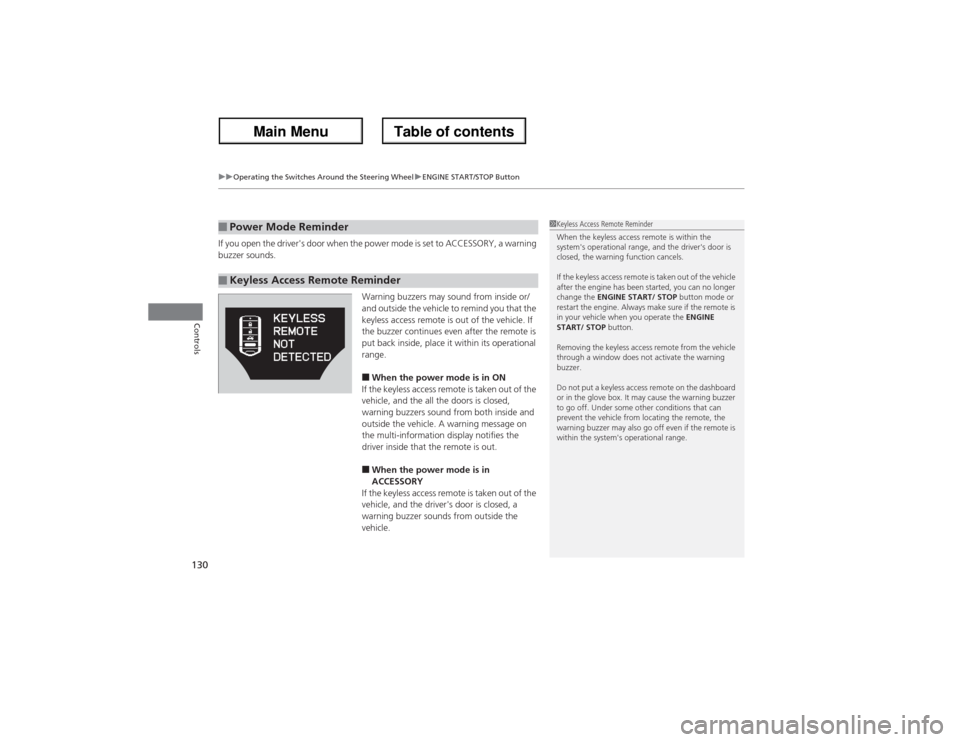
Warning buzzers may sound from inside or/
and outside the vehicle to remind you that the
keyless access remote is out of the vehicle. If
the buzzer continues even after the remote is
put back inside, place it within its operational
range.
■When the power mode is in ON
If the keyless access remote is taken out of the
vehicle, and the all the doors is closed,
warning buzzers sound from both inside and
outside the vehicle. A warning message on
the multi-information display notifies the
driver inside that the remote is out.■When the power mode is in
ACCESSORY
If the keyless access remote is taken out of the
vehicle, and the driver's door is closed, a
warning buzzer sounds from outside the
vehicle.
■Power Mode Reminder■Keyless Access Remote Reminder
1Keyless Access Remote Reminder
When the keyless access remote is within the
system's operational range, and the driver's door is
closed, the warning function cancels.
If the keyless access remote is taken out of the vehicle
after the engine has been started, you can no longer
change the ENGINE START/ STOP button mode or
restart the engine. Always make sure if the remote is
in your vehicle when you operate the ENGINE
START/ STOP button.
Removing the keyless access remote from the vehicle
through a window does not activate the warning
buzzer.
Do not put a keyless access remote on the dashboard
or in the glove box. It may cause the warning buzzer
to go off. Under some other conditions that can
prevent the vehicle from locating the remote, the
warning buzzer may also go off even if the remote is
within the system's operational range.
Page 132 of 324
131
uuOperating the Switches Around the Steering WheeluENGINE START/STOP Button
Controls
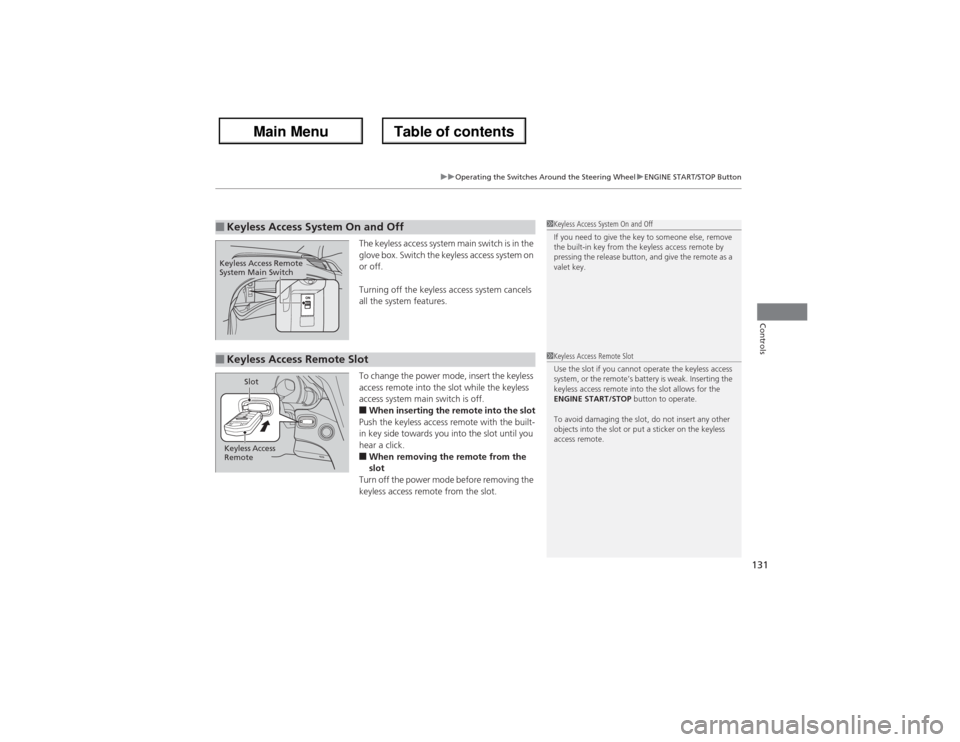
The keyless access system main switch is in the
glove box. Switch the keyless access system on
or off.
Turning off the keyless access system cancels
all the system features.
To change the power mode, insert the keyless
access remote into the slot while the keyless
access system main switch is off.■When inserting the remote into the slot
Push the keyless access remote with the built-
in key side towards you into the slot until you
hear a click.■When removing the remote from the
slot
Turn off the power mode before removing the
keyless access remote from the slot.
■Keyless Access System On and Off
1Keyless Access System On and Off
If you need to give the key to someone else, remove
the built-in key from the keyless access remote by
pressing the release button, and give the remote as a
valet key.
Keyless Access Remote
System Main Switch■Keyless Access Remote Slot
1Keyless Access Remote Slot
Use the slot if you cannot operate the keyless access
system, or the remote’s battery is weak. Inserting the
keyless access remote into the slot allows for the
ENGINE START/STOP button to operate.
To avoid damaging the slot, do not insert any other
objects into the slot or put a sticker on the keyless
access remote.
Keyless Access
RemoteSlot
Page 134 of 324
133
uuOperating the Switches Around the Steering WheeluLight Switches
Controls
Automatic lighting control can be used when
the power mode is in ON.
When you turn the light switch to AUTO, the
headlights and other exterior lights will switch
on and off automatically depending on the
ambient brightness.
u
You can change the AUTO light sensitivity
setting.2Customized Features P. 92
The headlights, all other exterior lights, and the instrument panel lights turn off
within 15 seconds after you set the power mode to VEHICLE OFF (LOCK), take the
remote with you, and close the driver's door.
uYou can change the HEADLIGHT AUTO OFF TIMER setting.
2Customized Features P. 92
If you set the power mode to VEHICLE OFF (LOCK) with the headlight switch on, but
do not open the door, the lights turn off after 10 minutes (3 minutes, if the switch
is in the AUTO position).
The lights turn on again when you unlock or open the driver’s door. If you unlock
the door, but do not open it within 15 seconds, the lights go off. If you open the
driver’s door, you will hear a lights on reminder chime.■Automatic Lighting Control
1Automatic Lighting Control
We recommend that you turn on the lights manually
when driving at night, in a dense fog, or in dark areas
such as long tunnels or parking facilities.
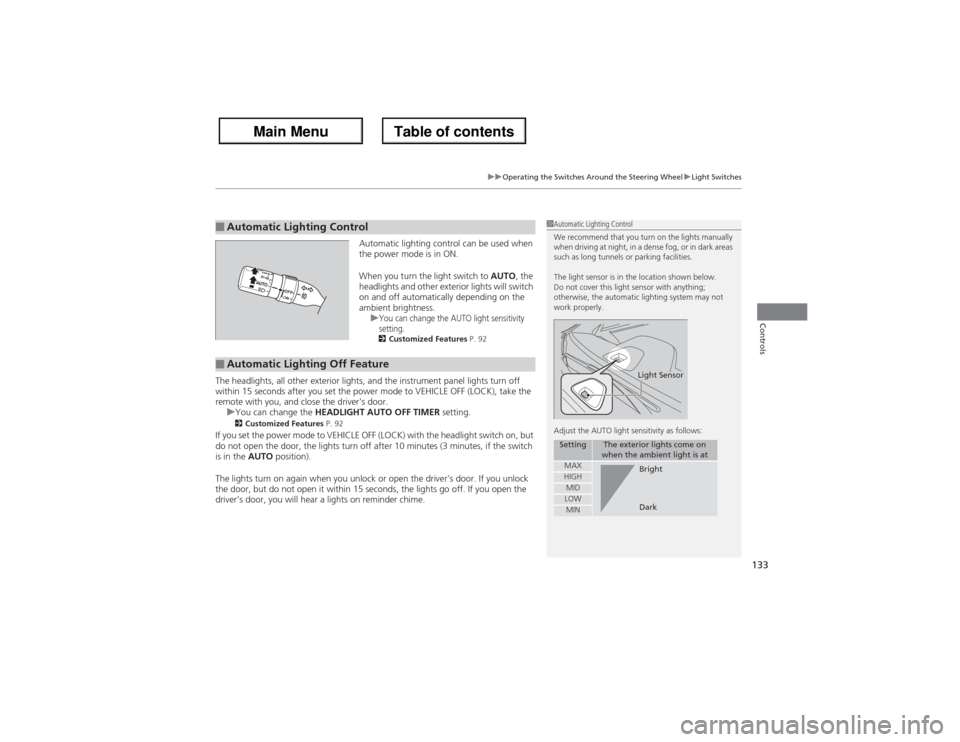
The light sensor is in the location shown below.
Do not cover this light sensor with anything;
otherwise, the automatic lighting system may not
work properly.
Adjust the AUTO light sensitivity as follows:
Setting
The exterior lights come on
when the ambient light is at
MAXHIGHMIDLOWMIN
Light SensorBright
Dark
■Automatic Lighting Off Feature
Page 136 of 324
135
uuOperating the Switches Around the Steering WheeluWipers and Washers
Continued
Controls
Wipers and Washers
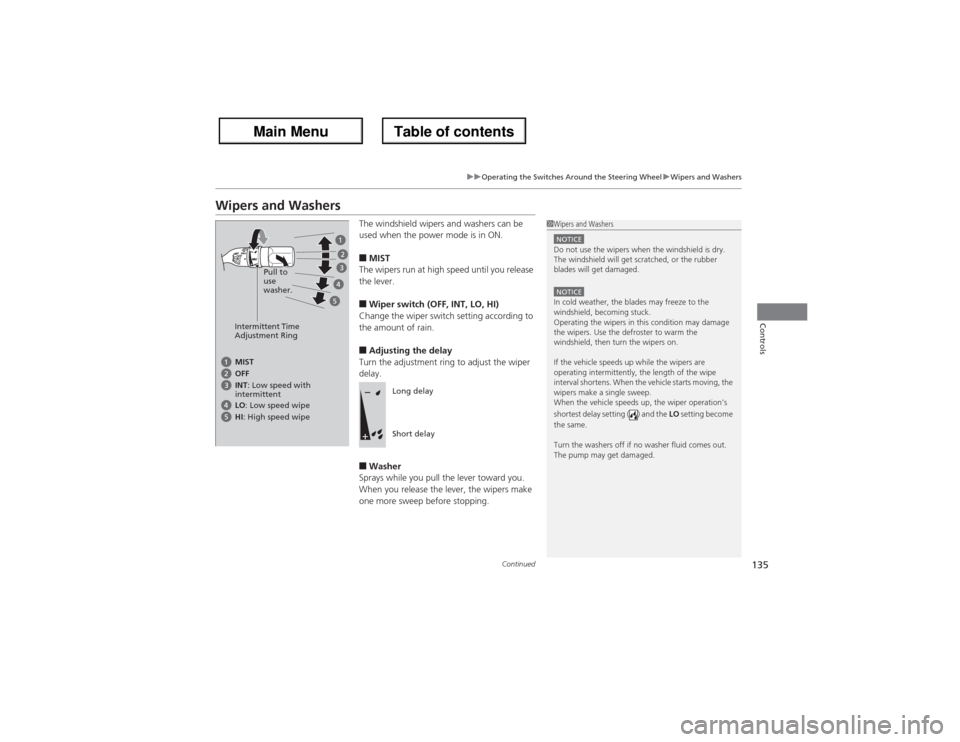
The windshield wipers and washers can be
used when the power mode is in ON.■MIST
The wipers run at high speed until you release
the lever.■Wiper switch (OFF, INT, LO, HI)
Change the wiper switch setting according to
the amount of rain.■Adjusting the delay
Turn the adjustment ring to adjust the wiper
delay.■Washer
Sprays while you pull the lever toward you.
When you release the lever, the wipers make
one more sweep before stopping.
1Wipers and WashersNOTICEDo not use the wipers when the windshield is dry.
The windshield will get scratched, or the rubber
blades will get damaged.NOTICEIn cold weather, the blades may freeze to the
windshield, becoming stuck.
Operating the wipers in this condition may damage
the wipers. Use the defroster to warm the
windshield, then turn the wipers on.
If the vehicle speeds up while the wipers are
operating intermittently, the length of the wipe
interval shortens. When the vehicle starts moving, the
wipers make a single sweep.
When the vehicle speeds up, the wiper operation’s
shortest delay setting ( ) and the LO setting become
the same.
Turn the washers off if no washer fluid comes out.
The pump may get damaged.
Intermittent Time
Adjustment RingPull to
use
washer.MIST
INT: Low speed with
intermittent OFF
LO: Low speed wipe
HI: High speed wipe
Long delay
Short delay
Page 192 of 324
191
uuWhen DrivinguShifting
Continued
Driving
Use the paddle shifters to change between 1st and 6th gears without removing your
hands from the steering wheel. The transmission will switch to the sequential shift
mode.■When the shift lever is in
(D:
The vehicle will go into the sequential shift mode momentarily, and the gear position
indicator will come on.
Once you start traveling at a constant speed, the sequential shift mode will
automatically switch off, and the gear position indicator will go off.
Hold the
(+ paddle shifter for two seconds to return to normal drive.
■When the shift lever is in
(S:
The vehicle will go into the sequential shift mode, and the M (sequential shift mode)
indicator and gear position indicator will come on. At speeds of 6 mph (10 km/h) or
less, the vehicle automatically shifts down into 1st gear. When you accelerate from
a stop, the transmission starts in first gear, and shifts from first to second
automatically.
You can only pull away in 1st or 2nd gear.
When switching out of the sequential shift mode, move the shift lever from
(S to
(D. When the sequential shift mode is canceled, the M indicator and gear position
indicator go off.■Sequential Shift Mode
Page 202 of 324
201
uuWhen DrivinguLane Departure Warning (LDW)
Driving
LDW may not activate or may not recognize lanes, and may activate even when
keeping in the middle of a lane under the following conditions.■LDW Limitations
Condition
●When you drive in bad weather (rain, fog, etc.).●A heavy load in the rear or modifications to the suspension tilts your vehicle.●An abnormal tire condition is detected (wrong tire size, flat tire, etc.).●When the windshield is blocked by dirt, mud, leaves, wet snow, etc.●When the temperature inside the system is high.●A sudden change between light and dark such as an entrance or exit of a tunnel.●You drive into the sunlight (e.g. at dawn or dusk).●When the windshield is dirty or cloudy.●When you drive in the shadows of trees, buildings, etc.●When your vehicle is towing a trailer.●When you drive on a wet road surface following another vehicle.uThe camera may perceive the tire tracks in the water as lane lines.
●When there is snow or wheel tracks on the side of the road.●When the road has many repaired area or an erased lane line.●When the vehicle is running over painted signs or crosswalk markings.●When you drive in a lane with specific lane markups (e.g., bots-dots).