warning lights Alfa Romeo 156 2006 Owner handbook (in English)
[x] Cancel search | Manufacturer: ALFA ROMEO, Model Year: 2006, Model line: 156, Model: Alfa Romeo 156 2006Pages: 357, PDF Size: 5.04 MB
Page 61 of 357
GETTING TO KNOW YOUR CAR59
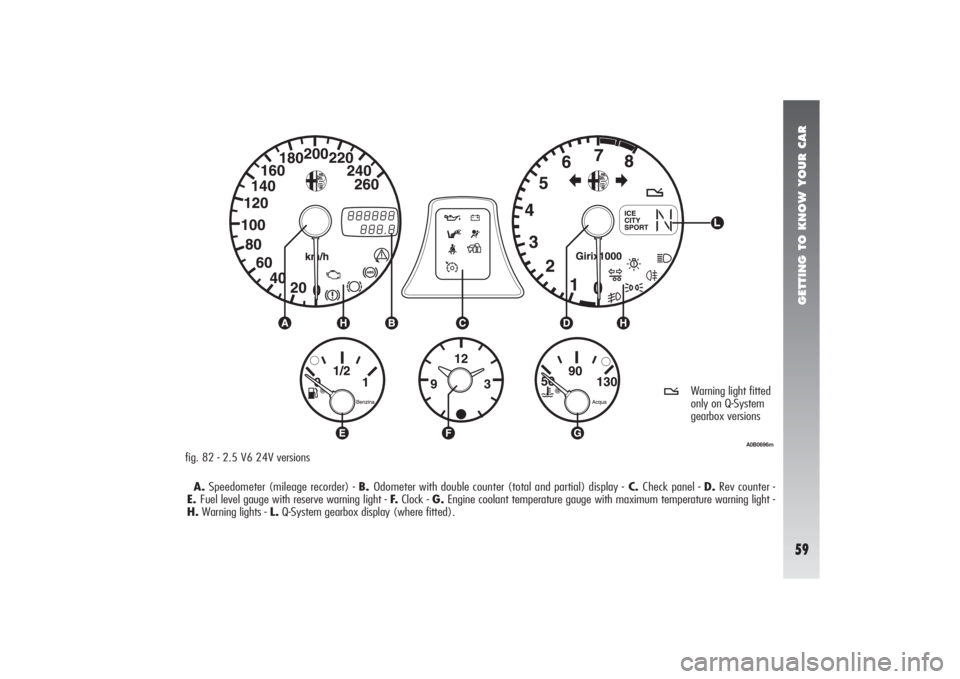
A.Speedometer (mileage recorder) - B. Odometer with double counter (total and partial) display -C. Check panel - D.Rev counter -
E.Fuel level gauge with reserve warning light - F.Clock - G.Engine coolant temperature gauge with maximum temperature warning light -
H.Warning lights - L.Q-System gearbox display (where fitted).fig. 82 - 2.5 V6 24V versions
A0B0696m
t
Warning light fitted
only on Q-System
gearbox versions
Page 62 of 357
GETTING TO KNOW YOUR CAR60
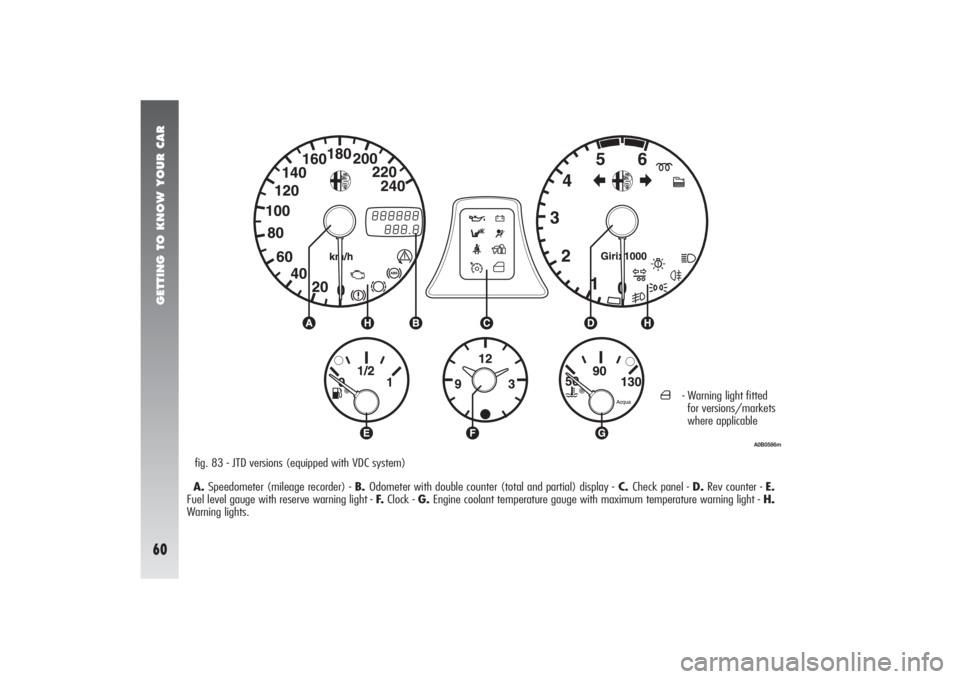
A.Speedometer (mileage recorder) - B. Odometer with double counter (total and partial) display -C. Check panel - D.Rev counter - E.
Fuel level gauge with reserve warning light - F.Clock - G.Engine coolant temperature gauge with maximum temperature warning light - H.
Warning lights.fig. 83 - JTD versions (equipped with VDC system)
A0B0586m
´
- Warning light fitted
for versions/markets
where applicable
Page 63 of 357
GETTING TO KNOW YOUR CAR61
A0B0597m
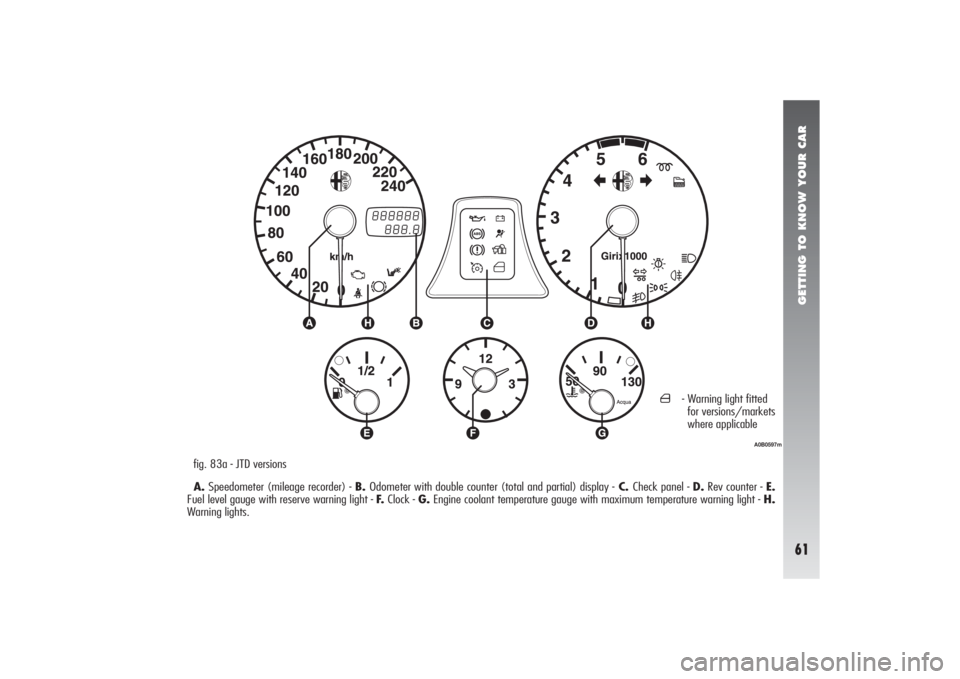
fig. 83a - JTD versions
A.Speedometer (mileage recorder) - B. Odometer with double counter (total and partial) display -C. Check panel - D.Rev counter - E.
Fuel level gauge with reserve warning light - F.Clock - G.Engine coolant temperature gauge with maximum temperature warning light - H.
Warning lights.
´
- Warning light fitted
for versions/markets
where applicable
Page 65 of 357

GETTING TO KNOW YOUR CAR63
MILEAGE DISPLAY
(with double meter display)The display shows:
– the mileage on the first line (6 figures)
– the trip meter on the second line (4 fig-
ures)
To reset the trip meter, keep button (A-
fig. 84) pressed for a few seconds.fig. 84
A0B0489m
INFOCENTER DISPLAY
RHEOSTAT LIGHTS
ADJUSTMENT (where
required)This function makes it possible to adjust
the brightness (dimming/brightening) of
the Infocenter display during night and day.
To perform the desired brightness adjust-
ment (night or day), use buttons
â
or ã
,
bearing in mind that:
– if the outside lights are on, the message
BRIGHTN. ADJUST. NIGHT will appear on the
display (fig. 85)
– if the outside lights are OFF, the mes-
sage BRIGHTN. ADJUST. DAY will appear on
the display (fig. 86).Pressing button
â
, or after about 5 sec-
onds from last operation performed, returns
to previous screen.
WARNING During failure indication dis-
playing, brightness cannot be adjusted since
under these conditions the display gets au-
tomatically to max. brightness.
fig. 85
A0B2124g
fig. 86
A0B2125g
Page 66 of 357
GETTING TO KNOW YOUR CAR64
INFOCENTER DISPLAY(where required)The Infocenter display is able to display all
the useful and necessary information during
driving, in particular:
INFORMATION AVAILABLE ON STANDARD
SCREEN
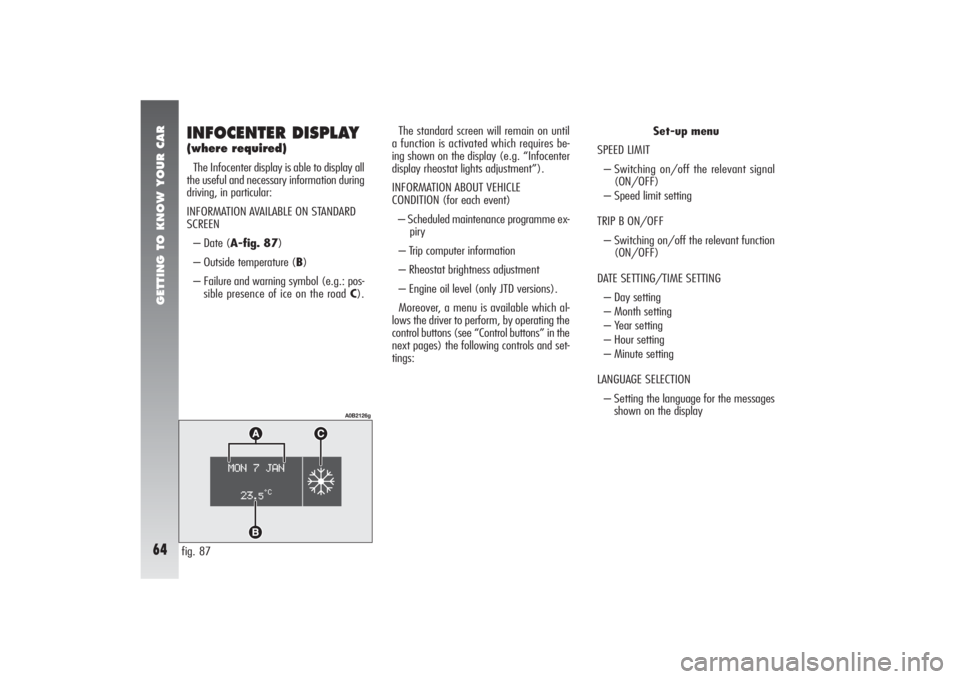
– Date (A-fig. 87)
– Outside temperature (B)
– Failure and warning symbol (e.g.: pos-
sible presence of ice on the road C).The standard screen will remain on until
a function is activated which requires be-
ing shown on the display (e.g. “Infocenter
display rheostat lights adjustment”).
INFORMATION ABOUT VEHICLE
CONDITION (for each event)
– Scheduled maintenance programme ex-
piry
– Trip computer information
– Rheostat brightness adjustment
– Engine oil level (only JTD versions).
Moreover, a menu is available which al-
lows the driver to perform, by operating the
control buttons (see “Control buttons” in the
next pages) the following controls and set-
tings:Set-up menu
SPEED LIMIT
– Switching on/off the relevant signal
(ON/OFF)
– Speed limit setting
TRIP B ON/OFF
– Switching on/off the relevant function
(ON/OFF)
DATE SETTING/TIME SETTING
– Day setting
– Month setting
– Year setting
– Hour setting
– Minute setting
LANGUAGE SELECTION
– Setting the language for the messages
shown on the displayfig. 87
A0B2126g
Page 70 of 357
GETTING TO KNOW YOUR CAR68
If the display shows an anomaly message, see paragraph
“Warning lights and indications” in this chapter.
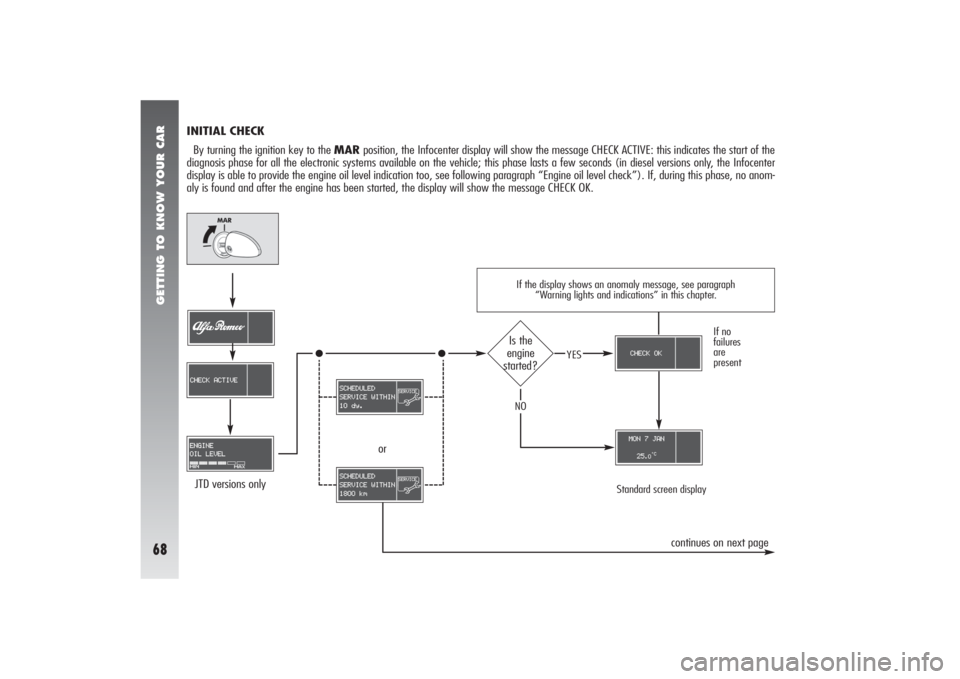
INITIAL CHECK
By turning the ignition key to the MARposition, the Infocenter display will show the message CHECK ACTIVE: this indicates the start of the
diagnosis phase for all the electronic systems available on the vehicle; this phase lasts a few seconds (in diesel versions only, the Infocenter
display is able to provide the engine oil level indication too, see following paragraph “Engine oil level check”). If, during this phase, no anom-
aly is found and after the engine has been started, the display will show the message CHECK OK.
Standard screen display
JTD versions only
If no
failures
are
present
Is the
engine
started?
YES
NO
or
continues on next page
Page 94 of 357

GETTING TO KNOW YOUR CAR92
WARNING LIGHTS AND INDICATIONSGENERAL WARNING
The failure indicationsshown on the Infocenter display, together with the buzzer (adjustable) and the turning on of the relevant warn-
ing light (if available), are accompanied by specific warning messages(e.g. “Go to dealer”, “Switch off eng., do not proceed”, etc…).
These warnings are concise and precautionaryand are intended to suggest the prompt actionthat the driver should take when a
failure occurs. However, these warnings are not to be considered exhaustive and/or alternative to the prescriptions of this Owner’s Manual,
which must always be read over carefully. When an anomaly occurs always refer to the contents of this chapter.
WARNINGWhen an anomaly occurs, the Infocenter display reaches its maximum brightness. By pressing button
â
the warning messages
disappear and the symbol referring to the failure warning is reduced to an icon in the right bottom area of the display.
WARNINGThe anomaly warnings that appear on the Infocenter display are divided into two categories: very serious and serious anomalies.
Very serious anomalies are displayed indefinitely, by interrupting any message previously shown on the display, and are proposed again every
time the ignition key is turned to MAR, until the malfunction is eliminated. Moreover, the “cycle” can be interrupted by pressing button
â
: in
this case, the symbol referring to the anomaly will be shown in the right bottom area of the display until the malfunction is eliminated.
Serious anomalies are displayed for about 20 seconds and then disappear, but they are proposed again every time the ignition key in turned
to MAR. At the end of the display cycle, equal to about 20 seconds, or when button
â
is pressed, the symbol referring to the anomaly will
be shown in the right bottom area of the display until the malfunction is eliminated.
Page 101 of 357

GETTING TO KNOW YOUR CAR99
Warning light Message
on displayY
ALFA ROMEO CODE SYSTEMWhen the ignition key is turned to MAR, the warning light on the check panel should flash only
once and then go out. If the warning light stays on with the key at MAR, this indicates a possible
failure: see “Alfa Romeo CODE System”.
WARNINGThe turning on at the same time of
U
and
Y
warning lights indicates a failure of
the Alfa Romeo CODE System.
If with the engine running, the
Y
warning light flashes, this means that the car is not protected
by the engine inhibitor device (see “Alfa Romeo CODE system” in this chapter). Contact Alfa Romeo
Authorized Services to have all the keys memorised.
POSSIBLE PRESENCE OF ICE ON THE ROADWhen the outside temperature is below or equal to 3° C, in order to warn the driver on the pres-
ence of ice on the road, message + symbol are displayed accompanied by the related buzz.
The buzz lasts about 2 seconds while the message is displayed for about 10 seconds. After this
period, only the symbol is displayed until the temperature does not go over 6° C or until the en-
gine stops.
If during travelling, after the presence of ice on the road has been signalled, should temperature
rise over 6° C the symbol will go off and should temperature fall again to 3° C, a new message +
symbol will be displayed accompanied by the buzz.
Page 104 of 357
GETTING TO KNOW YOUR CAR
102
Warning light Message
on display>
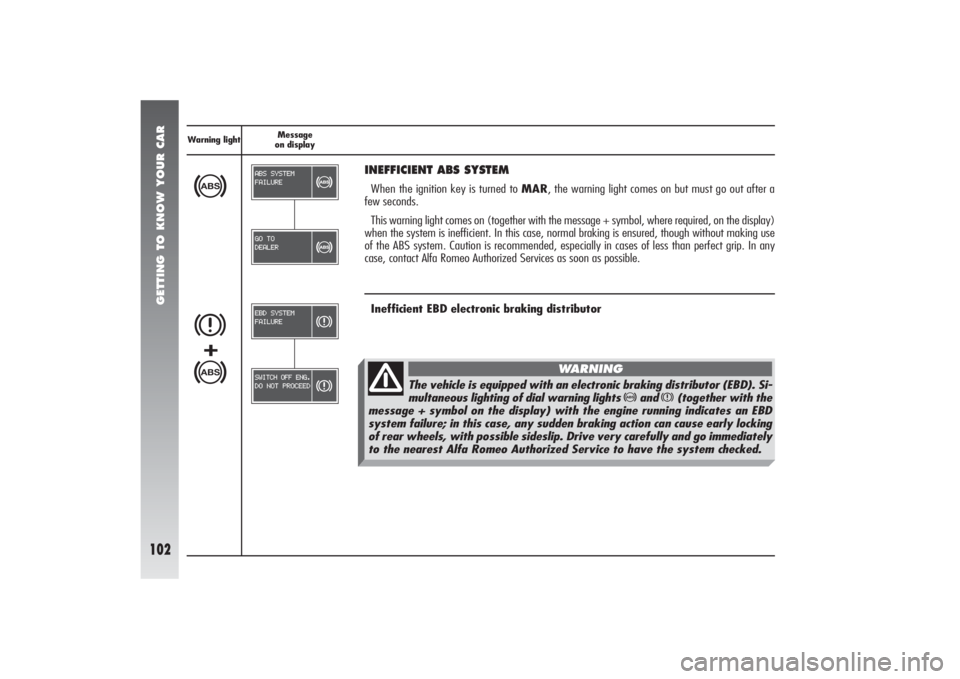
INEFFICIENT ABS SYSTEMWhen the ignition key is turned to MAR, the warning light comes on but must go out after a
few seconds.
This warning light comes on (together with the message + symbol, where required, on the display)
when the system is inefficient. In this case, normal braking is ensured, though without making use
of the ABS system. Caution is recommended, especially in cases of less than perfect grip. In any
case, contact Alfa Romeo Authorized Services as soon as possible.Inefficient EBD electronic braking distributor
x>+
The vehicle is equipped with an electronic braking distributor (EBD). Si-
multaneous lighting of dial warning lights
>
and
x
(together with the
message + symbol on the display) with the engine running indicates an EBD
system failure; in this case, any sudden braking action can cause early locking
of rear wheels, with possible sideslip. Drive very carefully and go immediately
to the nearest Alfa Romeo Authorized Service to have the system checked.
WARNING
Page 105 of 357
GETTING TO KNOW YOUR CAR
103
Warning light Message
on displayá
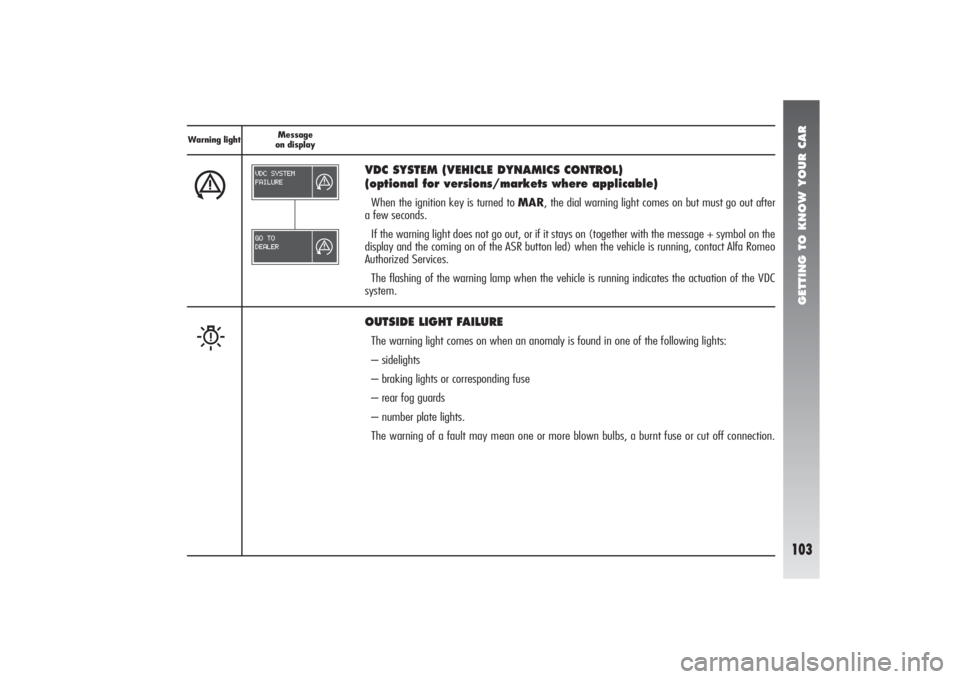
VDC SYSTEM (VEHICLE DYNAMICS CONTROL)
(optional for versions/markets where applicable)When the ignition key is turned to MAR, the dial warning light comes on but must go out after
a few seconds.
If the warning light does not go out, or if it stays on (together with the message + symbol on the
display and the coming on of the ASR button led) when the vehicle is running, contact Alfa Romeo
Authorized Services.
The flashing of the warning lamp when the vehicle is running indicates the actuation of the VDC
system.
W
OUTSIDE LIGHT FAILUREThe warning light comes on when an anomaly is found in one of the following lights:
– sidelights
– braking lights or corresponding fuse
– rear fog guards
– number plate lights.
The warning of a fault may mean one or more blown bulbs, a burnt fuse or cut off connection.