ignition Alfa Romeo Brera/Spider 2007 Owner handbook (in English)
[x] Cancel search | Manufacturer: ALFA ROMEO, Model Year: 2007, Model line: Brera/Spider, Model: Alfa Romeo Brera/Spider 2007Pages: 271, PDF Size: 6.04 MB
Page 20 of 271
18
SAFETY
DEVICES
WARNING
LIGHTS AND
MESSAGES
IN AN
EMERGENCY
CAR
MAINTENANCE
TECHNICAL
SPECIFICATIONS
INDEX
DASHBOARD
AND
CONTROLS
CORRECT USE
OF THE CAR
HOW TO DEACTIVATE
THE ALARM
Press button Ë. The system will react as
follows (with the exception of certain
markets):
❒two brief flashes of the direction in-
dicators;
❒two brief “beeps”;
❒door unlocking.
The alarm can be deactivated by fitting
the electronic key into the ignition
switch.
IMPORTANTOn certain versions any
attempt to break in detected by the sys-
tem will be indicated by a warning mes-
sage on the instrument panel display
when fitting the electronic key into the
ignition switch.VOLUMETRIC PROTECTION/
ANTI-RAISING SENSORS
To make sure that the protection sensors
are working properly, check that win-
dows are shut.
This function can be cut out (for exam-
ple if you leave animals on the car) by
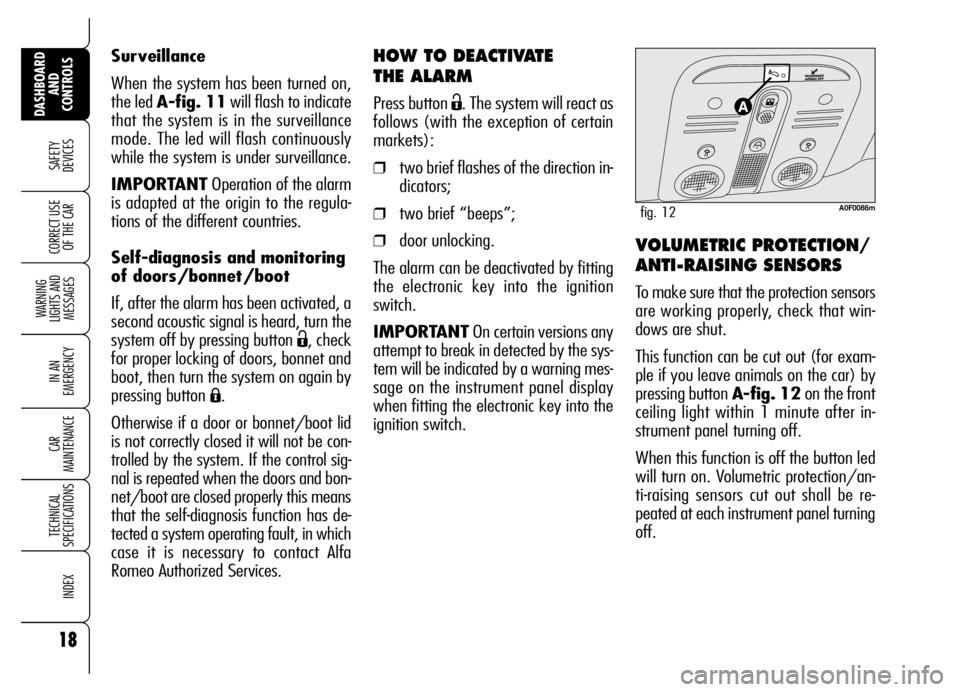
pressing button A-fig. 12on the front
ceiling light within 1 minute after in-
strument panel turning off.
When this function is off the button led
will turn on. Volumetric protection/an-
ti-raising sensors cut out shall be re-
peated at each instrument panel turning
off. Surveillance
When the system has been turned on,
the led A-fig. 11will flash to indicate
that the system is in the surveillance
mode. The led will flash continuously
while the system is under surveillance.
IMPORTANTOperation of the alarm
is adapted at the origin to the regula-
tions of the different countries.
Self-diagnosis and monitoring
of doors/bonnet/boot
If, after the alarm has been activated, a
second acoustic signal is heard, turn the
system off by pressing button
Ë, check
for proper locking of doors, bonnet and
boot, then turn the system on again by
pressing button
Á.
Otherwise if a door or bonnet/boot lid
is not correctly closed it will not be con-
trolled by the system. If the control sig-
nal is repeated when the doors and bon-
net/boot are closed properly this means
that the self-diagnosis function has de-
tected a system operating fault, in which
case it is necessary to contact Alfa
Romeo Authorized Services.
A0F0086mfig. 12
Page 21 of 271
19
SAFETY
DEVICES
WARNING
LIGHTS AND
MESSAGES
IN AN
EMERGENCY
CAR
MAINTENANCE
TECHNICAL
SPECIFICATIONS
INDEX
DASHBOARD
AND
CONTROLS
CORRECT USE
OF THE CAR
IGNITION
DEVICE
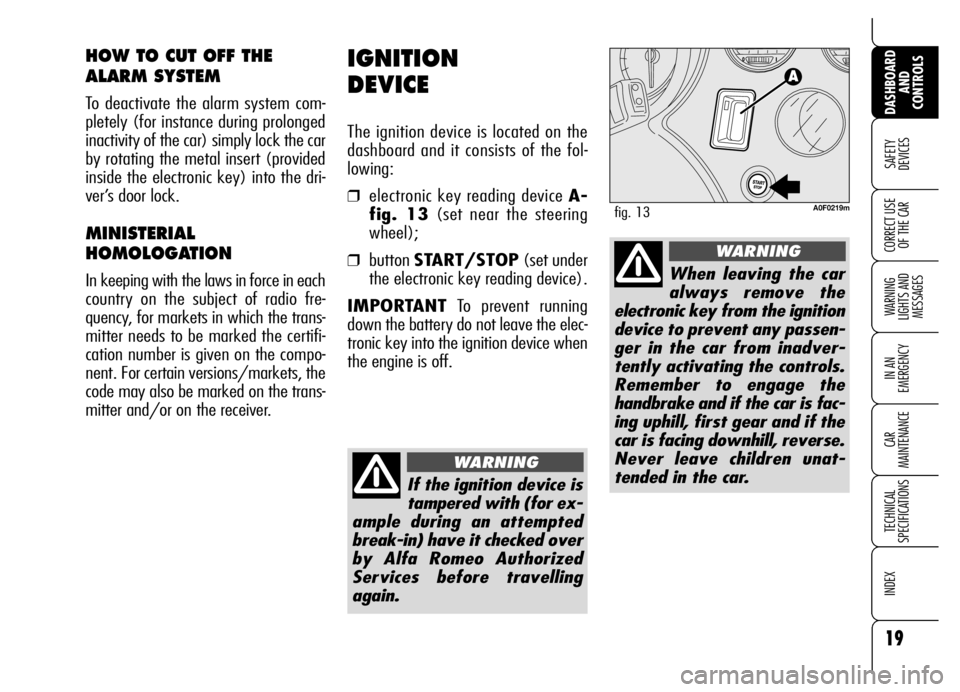
The ignition device is located on the
dashboard and it consists of the fol-
lowing:
❒electronic key reading device A-
fig. 13(set near the steering
wheel);
❒button START/STOP(set under
the electronic key reading device).
IMPORTANTTo prevent running
down the battery do not leave the elec-
tronic key into the ignition device when
the engine is off.
HOW TO CUT OFF THE
ALARM SYSTEM
To deactivate the alarm system com-
pletely (for instance during prolonged
inactivity of the car) simply lock the car
by rotating the metal insert (provided
inside the electronic key) into the dri-
ver’s door lock.
MINISTERIAL
HOMOLOGATION
In keeping with the laws in force in each
country on the subject of radio fre-
quency, for markets in which the trans-
mitter needs to be marked the certifi-
cation number is given on the compo-
nent. For certain versions/markets, the
code may also be marked on the trans-
mitter and/or on the receiver.
A0F0219mfig. 13
If the ignition device is
tampered with (for ex-
ample during an attempted
break-in) have it checked over
by Alfa Romeo Authorized
Services before travelling
again.
WARNING
When leaving the car
always remove the
electronic key from the ignition
device to prevent any passen-
ger in the car from inadver-
tently activating the controls.
Remember to engage the
handbrake and if the car is fac-
ing uphill, first gear and if the
car is facing downhill, reverse.
Never leave children unat-
tended in the car.
WARNING
Page 22 of 271
20
SAFETY
DEVICES
WARNING
LIGHTS AND
MESSAGES
IN AN
EMERGENCY
CAR
MAINTENANCE
TECHNICAL
SPECIFICATIONS
INDEX
DASHBOARD
AND
CONTROLS
CORRECT USE
OF THE CAR
IMPORTANTIf when fitting the elec-
tronic key into the ignition device, sym-
bol
Yis displayed (on certain versions
together with a message) check
whether the electronic key is the prop-
er one and then try to refit it into the
ignition device. If the problem persists
contact Alfa Romeo Authorized Services.
TURNING THE INSTRUMENT
PANEL OFF
With the engine off and brake and clutch
pedal released, press button
START/STOPor take the electronic
key out of the ignition device.
Few seconds after the instrument pan-
el will gradually turn off.
IMPORTANTIf when removing the
electronic key from the ignition device
the instrument panel stays on, contact
Alfa Romeo Authorized Services.
TURNING THE INSTRUMENT
PANEL ON
Proceed as follows:
❒fit the electronic key into the ignition
device;
❒if the electronic key is fitted yet,
press button START/STOP with-
out pressing the clutch or brake ped-
al.
To safeguard the battery, when leaving
the car with the instrument panel on,
electric and electronic devices will be de-
activated after approx. 1 hour.
IMPORTANT Fit the electronic key in-
to the ignition device completely until
it locks into place.
IMPORTANTIf when fitting the elec-
tronic key into the ignition device the in-
strument panel stays off, contact Alfa
Romeo Authorized Services.
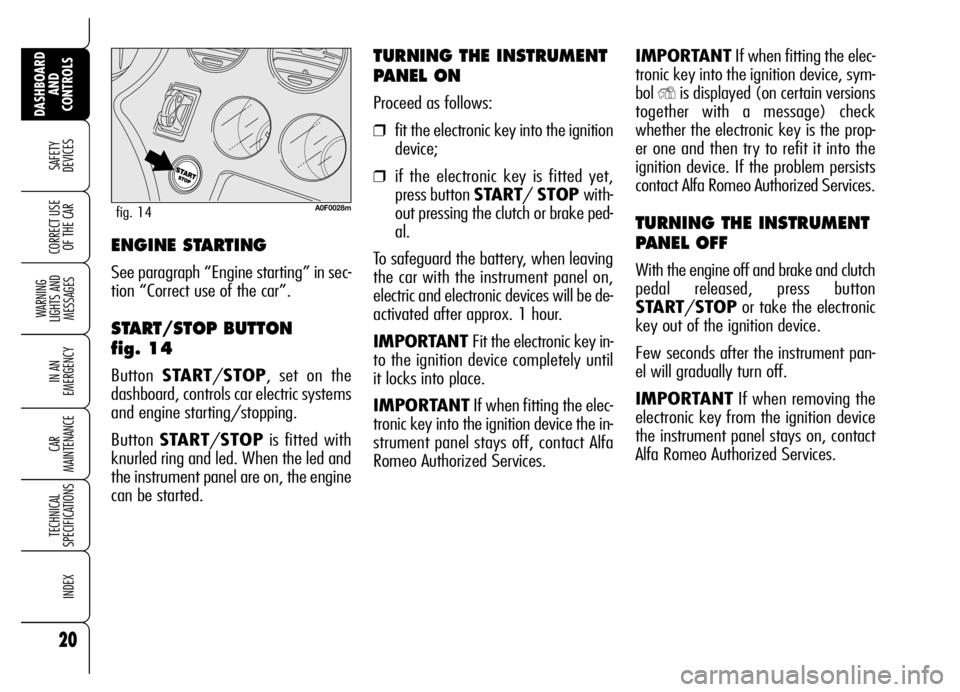
A0F0028mfig. 14
ENGINE STARTING
See paragraph “Engine starting” in sec-
tion “Correct use of the car”.
START/STOP BUTTON
fig. 14
Button START/STOP, set on the
dashboard, controls car electric systems
and engine starting/stopping.
Button START/STOPis fitted with
knurled ring and led. When the led and
the instrument panel are on, the engine
can be started.
Page 23 of 271
21
SAFETY
DEVICES
WARNING
LIGHTS AND
MESSAGES
IN AN
EMERGENCY
CAR
MAINTENANCE
TECHNICAL
SPECIFICATIONS
INDEX
DASHBOARD
AND
CONTROLS
CORRECT USE
OF THE CAR
It is absolutely forbidden
to carry out whatever
after-market operation involv-
ing steering system or steering
column modifications (e.g.: in-
stallation of anti-theft device)
that could badly affect perfor-
mance and safety, cause the
lapse of warranty and also re-
sult in non-compliance of the car
with homologation require-
ments.
WARNING
Disengaging
The steering column lock will disengage
after fitting the electronic key into the
ignition device.
IMPORTANTSwitching the engine off
when the car is running will not engage
the steering column lock till next switch-
ing off of the engine with car stopped. In
this event a dedicated message will be dis-
played.
IMPORTANTSteering column lock fail-
ure is indicated by symbol + message on
the display. In this event contact Alfa
Romeo Authorized Services.STEERING COLUMN LOCK
Engaging
The steering column lock will engage
5 seconds after removing the electron-
ic key from the ignition device and if the
following conditions are present:
❒engine off;
❒ instrument panel off with car at a
standstill;
❒electronic key removed from ignition
device.IMPORTANTIf after turning the in-
strument panel on and/or starting the en-
gine, the display shows the message “Car
protection system not available”, repeat
the operation using the moving the steer-
ing wheel to facilitate steering column un-
locking. Displaying of the warning mes-
sage will not impair steering column lock
regular operation.
Page 27 of 271
25
SAFETY
DEVICES
WARNING
LIGHTS AND
MESSAGES
IN AN
EMERGENCY
CAR
MAINTENANCE
TECHNICAL
SPECIFICATIONS
INDEX
DASHBOARD
AND
CONTROLS
CORRECT USE
OF THE CAR
AUTOMATIC INSTRUMENT
PANEL LIGHT DIMMER
To give max. visibility and comfort un-
der whatever driving conditions (e.g.:
lights on in daylight, tunnels, etc…), the
speedometer is fitted with a sensor for
adjusting automatically, after fitting the
electronic key into the ignition device and
pressing button START/STOP, the
light intensity of the instrument panel dis-
play, sound system display, climate con-
trol system display, radionavigation sys-
tem display (where provided), and in-
struments (i.e.: fuel level gauge, engine
oil temperature gauge for petrol versions
or turbocharger pressure gauge for diesel
versions, and engine coolant temperature
gauge).
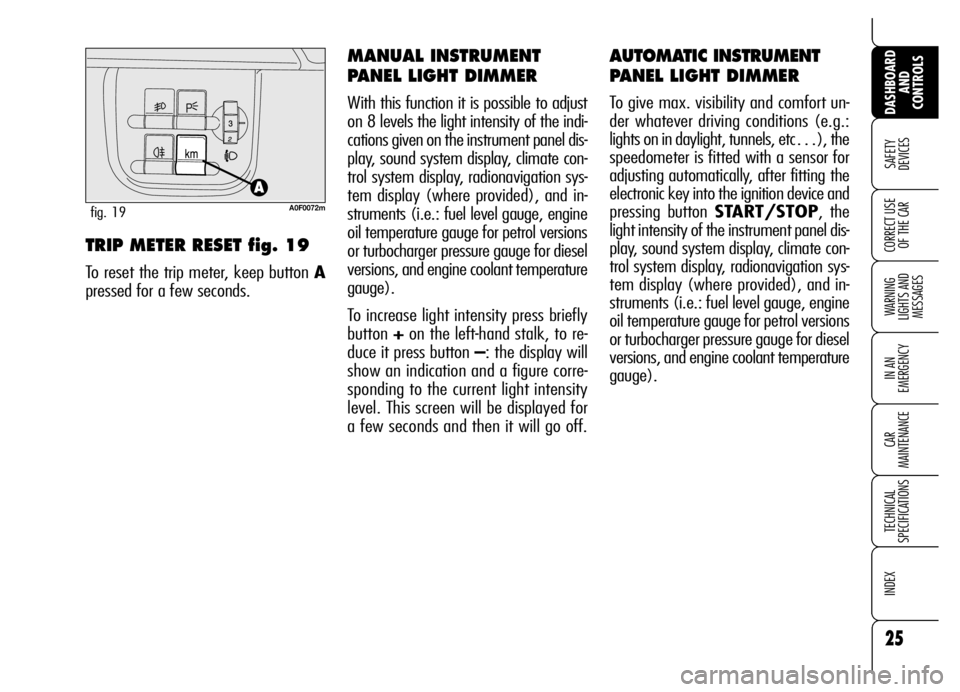
TRIP METER RESET fig. 19
To reset the trip meter, keep button A
pressed for a few seconds.
MANUAL INSTRUMENT
PANEL LIGHT DIMMER
With this function it is possible to adjust
on 8 levels the light intensity of the indi-
cations given on the instrument panel dis-
play, sound system display, climate con-
trol system display, radionavigation sys-
tem display (where provided), and in-
struments (i.e.: fuel level gauge, engine
oil temperature gauge for petrol versions
or turbocharger pressure gauge for diesel
versions, and engine coolant temperature
gauge).
To increase light intensity press briefly
button +on the left-hand stalk, to re-
duce it press button –: the display will
show an indication and a figure corre-
sponding to the current light intensity
level. This screen will be displayed for
a few seconds and then it will go off.
A0F0072mfig. 19
Page 28 of 271
26
SAFETY
DEVICES
WARNING
LIGHTS AND
MESSAGES
IN AN
EMERGENCY
CAR
MAINTENANCE
TECHNICAL
SPECIFICATIONS
INDEX
DASHBOARD
AND
CONTROLS
CORRECT USE
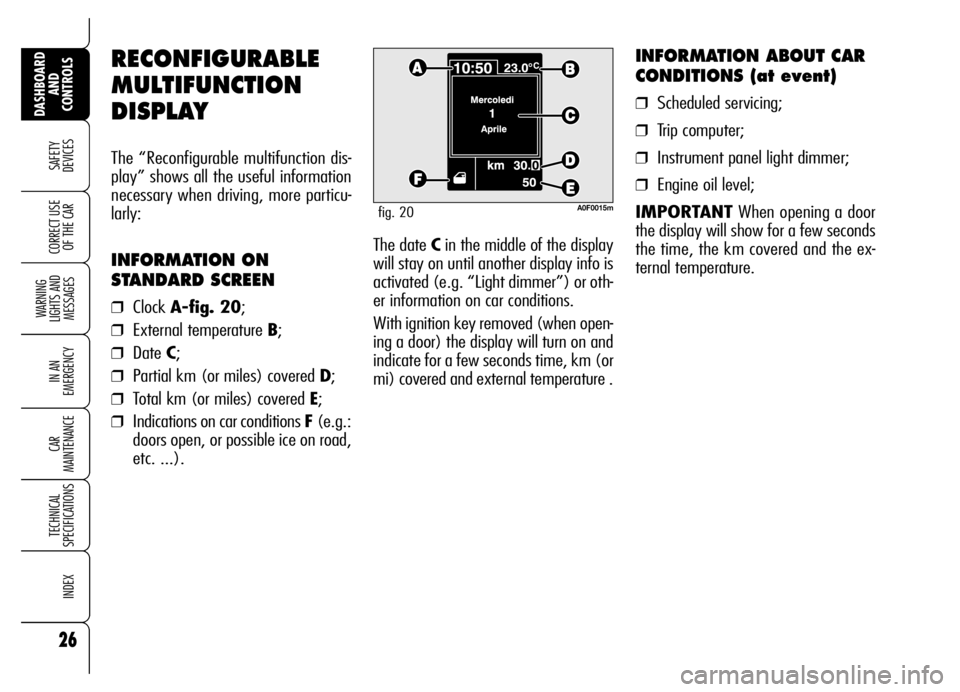
OF THE CARThe date Cin the middle of the display
will stay on until another display info is
activated (e.g. “Light dimmer”) or oth-
er information on car conditions.
With ignition key removed (when open-
ing a door) the display will turn on and
indicate for a few seconds time, km (or
mi) covered and external temperature .
INFORMATION ABOUT CAR
CONDITIONS (at event)
❒Scheduled servicing;
❒Trip computer;
❒Instrument panel light dimmer;
❒Engine oil level;
IMPORTANTWhen opening a door
the display will show for a few seconds
the time, the km covered and the ex-
ternal temperature.
RECONFIGURABLE
MULTIFUNCTION
DISPLAY
The “Reconfigurable multifunction dis-
play” shows all the useful information
necessary when driving, more particu-
larly:
INFORMATION ON
STANDARD SCREEN
❒Clock A-fig. 20;
❒External temperature B;
❒Date C;
❒Partial km (or miles) covered D;
❒Total km (or miles) covered E;
❒Indications on car conditions F (e.g.:
doors open, or possible ice on road,
etc. ...).
A0F0015mfig. 20
Page 38 of 271
36
SAFETY
DEVICES
WARNING
LIGHTS AND
MESSAGES
IN AN
EMERGENCY
CAR
MAINTENANCE
TECHNICAL
SPECIFICATIONS
INDEX
DASHBOARD
AND
CONTROLS
CORRECT USE
OF THE CAR
Reactivating the S.B.R.
(Seat Belt Reminder)
buzzer (Beep Seatb.)
This function is displayed only after the
system has been deactivated by Alfa
Romeo Authorized Services.
Exit Menu (Quit setup)
Selecting this option will bring back to
standard screen.ILLUMINATION OF REV
COUNTER/INSTRUMENTS
(NIGHT PANEL)
This function enables to turn on/off
(ON/OFF) the lights of the rev counter
and instruments. This function can be ac-
tivated (only with electronic key fitted in-
to ignition device, external lights on, and
speedometer built-in sensor at poor out-
side light setting), by pressing for long but-
ton –. When this function is on, the dis-
play will show a warning message.
Once on, the NIGHT PANELfunction
can be deactivated as follows:
❒by long press on button +(also with
external lights off);
❒removing the electronic key from the
ignition device.
When function is off the display will show
a warning message.
Messages stay on the display for a few
seconds, then they will go off. To stop
displaying before time, briefly press but-
ton MENU. Scheduled Servicing (Service)
Through this function it is possible to dis-
play information connected to proper car
servicing.
Proceed as follows:
❒briefly press button MENU: service
in km or mi, according to previous
setting, will be displayed (see para-
graph “Units”);
❒briefly press buttonMENUto go
back to the menu screen or press the
button for long to go back to the
standard screen.
IMPORTANTThe Service schedule in-
cludes car maintenance every 30,000 km
(or 18,000 mi); this is shown automat-
ically, with the electronic key into the ig-
nition device starting from 2,000 km (or
1,240 mi) from this deadline and it will
be displayed in km or miles according to
the unit set. When a scheduled service in-
terval (“coupon”) is near to come, fitting
the electronic key into the ignition device
will display a message followed by the
number of km/mi to go before car ser-
vicing. Contact Alfa Romeo Authorized Ser-
vices to carry out any service operation
provided by the Service schedule or by the
Annual inspection plan, and to reset the
display.
Page 39 of 271
37
SAFETY
DEVICES
WARNING
LIGHTS AND
MESSAGES
IN AN
EMERGENCY
CAR
MAINTENANCE
TECHNICAL
SPECIFICATIONS
INDEX
DASHBOARD
AND
CONTROLS
CORRECT USE
OF THE CAR
Reset TRIP B
End of partial mission
Start of new partial mission End of partial mission
Start of new
partial mission
Reset TRIP B
End of partial mission
Start of new
partial mission Reset GENERAL TRIP
End of complete mission
Start of new missionReset GENERAL TRIP
End of complete mission
Start of new mission
End of partial mission
Start of new
partial mission Reset TRIP B
Reset TRIP B TRIP B
TRIP B
TRIP B GENERAL TRIP
˙
˙
˙
˙˙
˙
˙ ˙
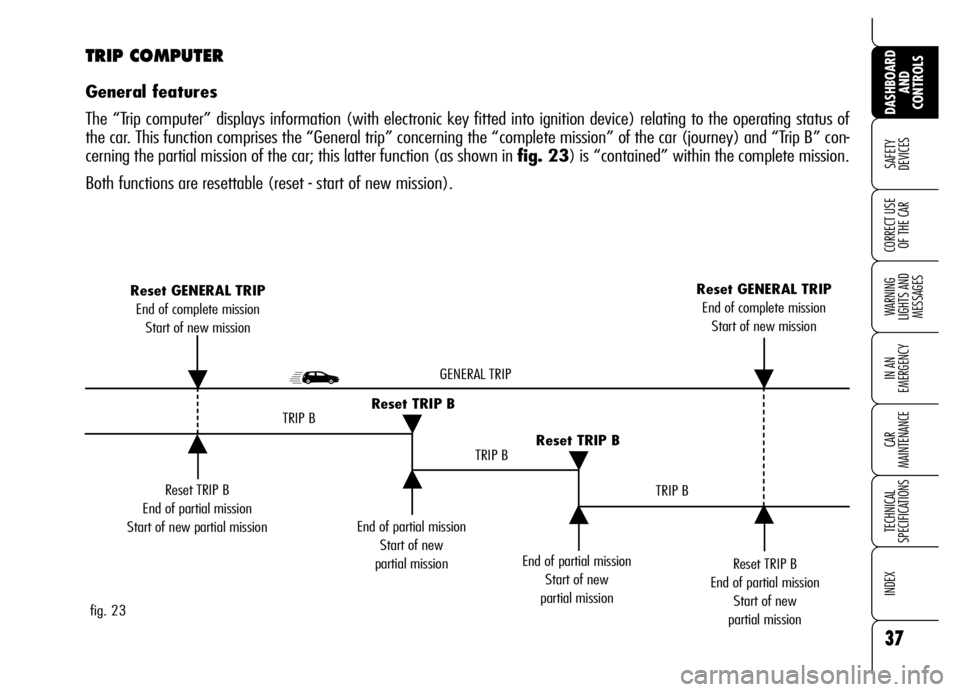
fig. 23
TRIP COMPUTER
General features
The “Trip computer” displays information (with electronic key fitted into ignition device) relating to the operating status of
the car. This function comprises the “General trip” concerning the “complete mission” of the car (journey) and “Trip B” con-
cerning the partial mission of the car; this latter function (as shown in fig. 23) is “contained” within the complete mission.
Both functions are resettable (reset - start of new mission).
Page 41 of 271

39
SAFETY
DEVICES
WARNING
LIGHTS AND
MESSAGES
IN AN
EMERGENCY
CAR
MAINTENANCE
TECHNICAL
SPECIFICATIONS
INDEX
DASHBOARD
AND
CONTROLS
CORRECT USE
OF THE CARTRIP BUTTON
Button TRIP fig. 24, set on the right
steering column stalk shall be used (with
electronic key into ignition device) to en-
ter the “General Trip” and “Trip B” func-
tion. To scroll the values of each option
use buttons set aside the stalk.Button TRIPshall also be used to reset
the “General Trip” and “Trip B” functions
to start a new mission:
❒ short push: to display the differ-
ent values;
❒ long push: to reset and then start
a new mission.
To scroll the Trip Computer options,
briefly press buttons
-and .. New mission (reset)
Reset can be:
❒“manual”, reset is performed by the
driver by pressing button TRIP;
❒“automatic”, reset is performed
when the trip distance reaches
9999.9 km (or mi), when travel
time reaches 99.59 (99 hours and
59 minutes) or after disconnecting
and then reconnecting the battery.
A0F0076mfig. 24
Page 42 of 271

40
SAFETY
DEVICES
WARNING
LIGHTS AND
MESSAGES
IN AN
EMERGENCY
CAR
MAINTENANCE
TECHNICAL
SPECIFICATIONS
INDEX
DASHBOARD
AND
CONTROLS
CORRECT USE
OF THE CARIMPORTANT“General Trip” reset will
also reset the “Trip B” function, where-
as “Trip B” reset will only reset the in-
formation associated with this function.
Every Trip computer screen displays two
options of the active Trip (Trip A or Trip
B); one option is displayed at the top of
the screen, the other one at the bottom
(see fig. 25).In the same screen it is not possible to
have displayed at the same time the
same option at the top and at the bot-
tom of the screen.
Briefly press button TRIPto select the
two Trip computer modes; use button
-to scroll the options at the top of the
display, use button
.to scroll the op-
tions at the bottom of the display.
Press briefly button TRIPto go from
Trip A to Trip B.Start of journey procedure
(reset)
Trip A and Trip B reset are independent.
Reset General Trip
With electronic key into ignition device,
to reset the “General Trip” press and
keep pressed button TRIP for over 2
seconds.
IMPORTANTReset can be automat-
ic only in the following cases:
❒when the “Travel Distance” reach-
es 9999.9 km or the “Travel Time”
reaches 99.59 (99 hours and 59
minutes);
❒after disconnecting/reconnecting
the battery.
At General Trip reset a warning message
will be displayed.
A0F0052mfig. 25