key Alfa Romeo Giulia 2016 User Guide
[x] Cancel search | Manufacturer: ALFA ROMEO, Model Year: 2016, Model line: Giulia, Model: Alfa Romeo Giulia 2016Pages: 204, PDF Size: 4.95 MB
Page 36 of 204
ANTI-PINCH SAFETY DEVICE
The sun roof has an anti-pinch safety
system capable of detecting the
presence of an obstacle during the
closing movement: if this happens, the
system intervenes and the movement of
the roof is immediately reversed into
opening.
INITIALISATION PROCEDURE
Automatic operation of the sunroof must
be initialised again in case of faulty
sunroof operation.
Proceed as follows:
press button 1 next to thesymbol
to bring the roof into completely closed
position;
bring the ignition device to STOP and
wait at least 10 seconds;
set the ignition device to AVV;
hold button 1 down for at least
10 seconds, then you should hear the
mechanical stop of the roof motor;
within 5 seconds hold button 1 down:
the roof will perform a complete
automatic opening and closing cycle (to
indicate that the initialisation procedure
has been successful). If this does not
occur, the procedure must be restarted
from the beginning.
WARNING
21)When leaving the vehicle, make sure to
take the key with you to avoid the risk of
injury to those still inside the car due to
accidental operation of the sunroof.
Improper use of the roof can be dangerous.
Before and during operation, always check
that no-one is exposed to the risk of being
injured by the moving sunroof or by objects
getting caught or hit by it.
IMPORTANT
11)Do not open the sun roof if a roof rack or
crossbars are fitted. Do not open the sun
roof if there is snow or ice on it: you may
damage it.
BONNET
OPENING
22) 23)
Proceed as follows:
inside the passenger compartment
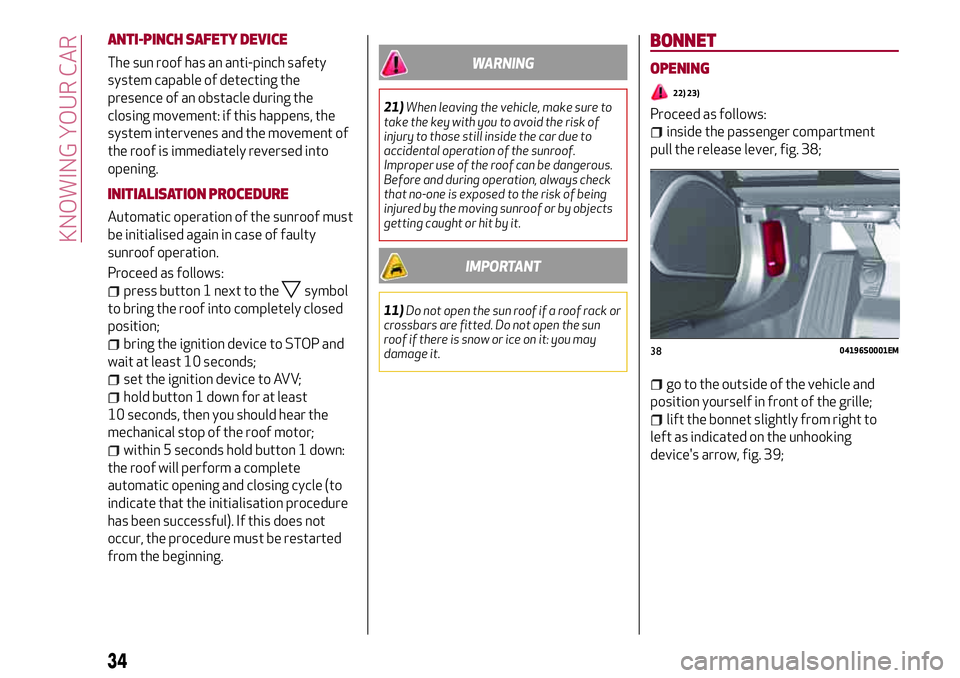
pull the release lever, fig. 38;
go to the outside of the vehicle and
position yourself in front of the grille;
lift the bonnet slightly from right to
left as indicated on the unhooking
device's arrow, fig. 39;
3804196S0001EM
34
KNOWING YOUR CAR
Page 38 of 204
CLOSING
12)
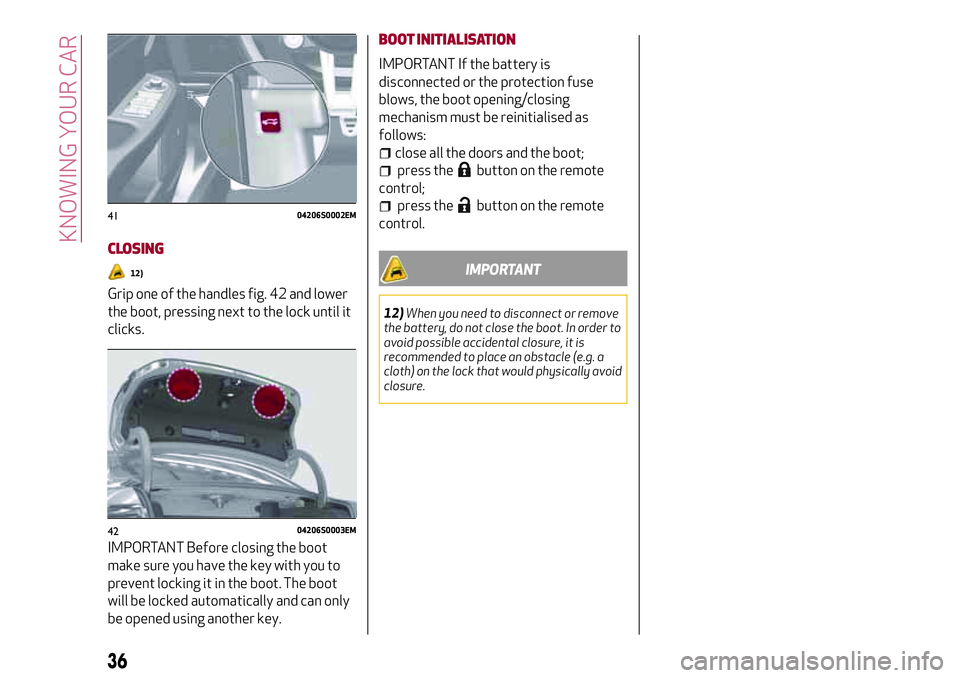
Grip one of the handles fig. 42 and lower
the boot, pressing next to the lock until it
clicks.
IMPORTANT Before closing the boot
make sure you have the key with you to
prevent locking it in the boot. The boot
will be locked automatically and can only
be opened using another key.BOOT INITIALISATION
IMPORTANT If the battery is
disconnected or the protection fuse
blows, the boot opening/closing
mechanism must be reinitialised as
follows:
close all the doors and the boot;
press thebutton on the remote
control;
press thebutton on the remote
control.
IMPORTANT
12)When you need to disconnect or remove
the battery, do not close the boot. In order to
avoid possible accidental closure, it is
recommended to place an obstacle (e.g. a
cloth) on the lock that would physically avoid
closure.
4104206S0002EM
4204206S0003EM
36
KNOWING YOUR CAR
Page 58 of 204
Symbol What it means
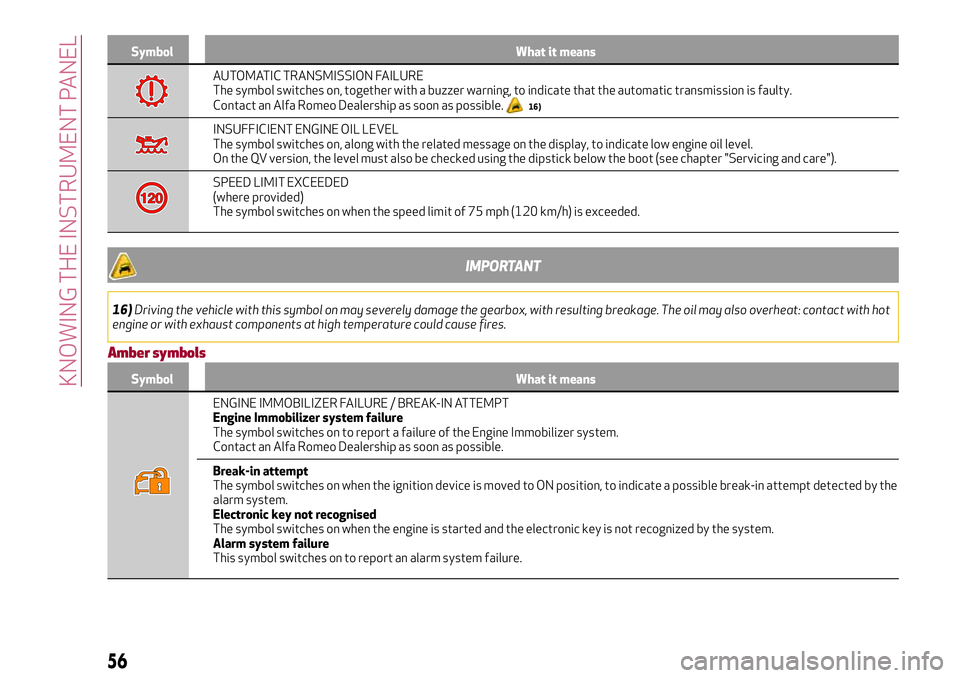
AUTOMATIC TRANSMISSION FAILURE
The symbol switches on, together with a buzzer warning, to indicate that the automatic transmission is faulty.
Contact an Alfa Romeo Dealership as soon as possible.
16)
INSUFFICIENT ENGINE OIL LEVEL
The symbol switches on, along with the related message on the display, to indicate low engine oil level.
On the QV version, the level must also be checked using the dipstick below the boot (see chapter "Servicing and care").
SPEED LIMIT EXCEEDED
(where provided)
The symbol switches on when the speed limit of 75 mph (120 km/h) is exceeded.
IMPORTANT
16)Driving the vehicle with this symbol on may severely damage the gearbox, with resulting breakage. The oil may also overheat: contact with hot
engine or with exhaust components at high temperature could cause fires.
Amber symbols
Symbol What it means
ENGINE IMMOBILIZER FAILURE / BREAK-IN ATTEMPT
Engine Immobilizer system failure
The symbol switches on to report a failure of the Engine Immobilizer system.
Contact an Alfa Romeo Dealership as soon as possible.
Break-in attempt
The symbol switches on when the ignition device is moved to ON position, to indicate a possible break-in attempt detected by the
alarm system.
Electronic key not recognised
The symbol switches on when the engine is started and the electronic key is not recognized by the system.
Alarm system failure
This symbol switches on to report an alarm system failure.
56
KNOWING THE INSTRUMENT PANEL
Page 61 of 204
Symbol What it means
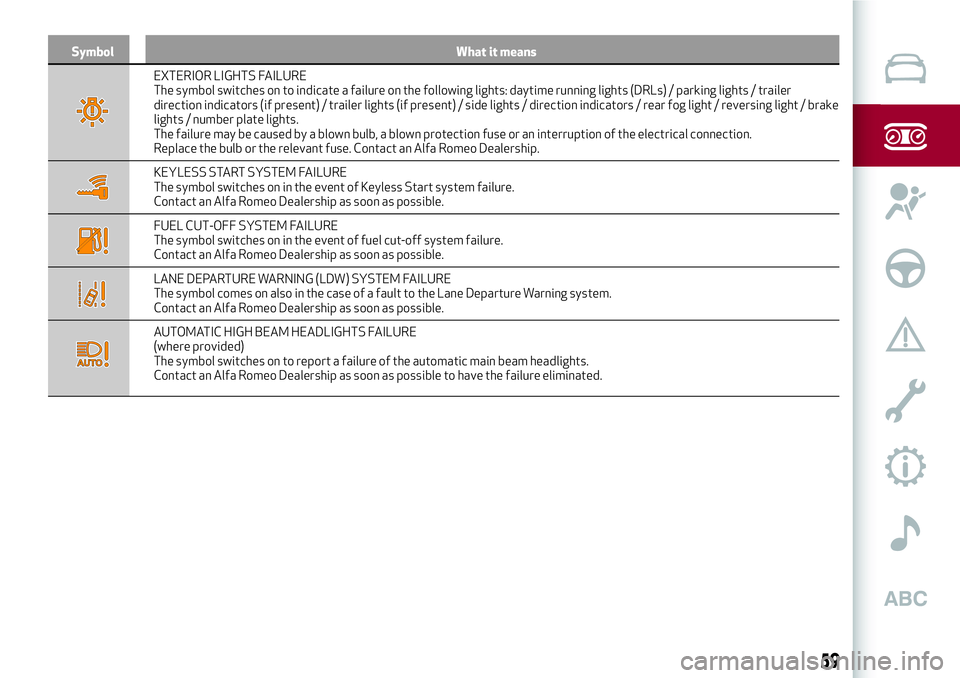
EXTERIOR LIGHTS FAILURE
The symbol switches on to indicate a failure on the following lights: daytime running lights (DRLs) / parking lights / trailer
direction indicators (if present) / trailer lights (if present) / side lights / direction indicators / rear fog light / reversing light / brake
lights / number plate lights.
The failure may be caused by a blown bulb, a blown protection fuse or an interruption of the electrical connection.
Replace the bulb or the relevant fuse. Contact an Alfa Romeo Dealership.
KEYLESS START SYSTEM FAILURE
The symbol switches on in the event of Keyless Start system failure.
Contact an Alfa Romeo Dealership as soon as possible.
FUEL CUT-OFF SYSTEM FAILURE
The symbol switches on in the event of fuel cut-off system failure.
Contact an Alfa Romeo Dealership as soon as possible.
LANE DEPARTURE WARNING (LDW) SYSTEM FAILURE
The symbol comes on also in the case of a fault to the Lane Departure Warning system.
Contact an Alfa Romeo Dealership as soon as possible.
AUTOMATIC HIGH BEAM HEADLIGHTS FAILURE
(where provided)
The symbol switches on to report a failure of the automatic main beam headlights.
Contact an Alfa Romeo Dealership as soon as possible to have the failure eliminated.
59
Page 82 of 204
SBA (Seat Belt Alert)SYSTEM
The SBA system warns the passengers of
the front and rear (where provided) seats
if their seat belt is not fastened.
The system signals unfastened seat belts
with visual warnings (warning lights on in
the instrument panel and icons on the
display) and an acoustic signal (see the
following paragraphs).
NOTE Contact an Alfa Romeo Dealership
to deactivate the acoustic warning. The
acoustic warning can be reactivated at
any time through the Connect system.
FRONT SEAT BELT WARNING LIGHT
BEHAVIOUR
When the ignition key is turned to ON, the
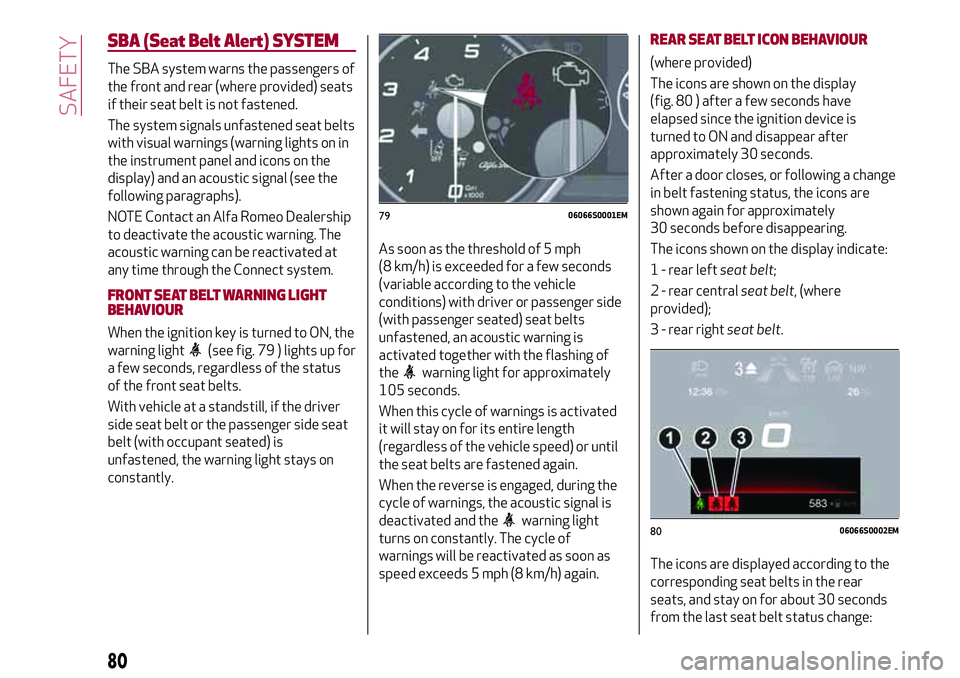
warning light
(see fig. 79 ) lights up for
a few seconds, regardless of the status
of the front seat belts.
With vehicle at a standstill, if the driver
side seat belt or the passenger side seat
belt (with occupant seated) is
unfastened, the warning light stays on
constantly.As soon as the threshold of 5 mph
(8 km/h) is exceeded for a few seconds
(variable according to the vehicle
conditions) with driver or passenger side
(with passenger seated) seat belts
unfastened, an acoustic warning is
activated together with the flashing of
the
warning light for approximately
105 seconds.
When this cycle of warnings is activated
it will stay on for its entire length
(regardless of the vehicle speed) or until
the seat belts are fastened again.
When the reverse is engaged, during the
cycle of warnings, the acoustic signal is
deactivated and the
warning light
turns on constantly. The cycle of
warnings will be reactivated as soon as
speed exceeds 5 mph (8 km/h) again.
REAR SEAT BELT ICON BEHAVIOUR
(where provided)
The icons are shown on the display
(fig. 80 ) after a few seconds have
elapsed since the ignition device is
turned to ON and disappear after
approximately 30 seconds.
After a door closes, or following a change
in belt fastening status, the icons are
shown again for approximately
30 seconds before disappearing.
The icons shown on the display indicate:
1 - rear leftseat belt;
2 - rear centralseat belt, (where
provided);
3 - rear rightseat belt.
The icons are displayed according to the
corresponding seat belts in the rear
seats, and stay on for about 30 seconds
from the last seat belt status change:
7906066S0001EM
8006066S0002EM
80
SAFETY
Page 104 of 204
STARTING THE ENGINE
STARTING THE ENGINE
Before starting the engine, adjust the
seat, the interior rear view mirrors, the
door mirrors and fasten the seat belt
correctly.
Never press the accelerator pedal for
starting the engine.
If necessary, messages indicating the
starting procedure can be shown on the
display.
100) 101) 102)
30) 31) 32)
Versions with manual gearbox
Proceed as follows:
engage the parking brake and set the
gear in neutral, on diesel versions turn the
ignition switch to ON, the
symbol will
appear on the instrument panel: wait until
it goes off;
fully depress the clutch pedal, without
touching the accelerator;
briefly press the ignition button;
if the engine doesn't start within a few
seconds, you need to repeat the procedure.
if the problem persists, contact an Alfa
Romeo Dealership.Versions with automatic transmission
Proceed as follows:
engage the electric parking brake and
set the gear lever to P (Park) or N
(Neutral),
fully depress the brake pedal without
touching the accelerator;
briefly press the ignition button;
if the engine doesn't start within a few
seconds, you need to repeat the procedure.
if the problem persists, contact an Alfa
Romeo Dealership.
ENGINE STARTING FAILURE
Starting the engine with electronic key
battery (Keyless Start) run down or flat
If the ignition device does not respond
when the relevant button is pressed the
electronic key battery might be run down
or flat. Therefore, the system does not
detect the presence of the electronic key
on board the vehicle and displays a
dedicated message.
STOPPING THE ENGINE
33)
To stop the engine, proceed as follows:
park the vehicle in a position that is not
dangerous for oncoming traffic;
engage a gear (versions with manual
gearbox) or select P (Park) mode
(versions with automatic transmission);
with engine idling, press the start
button.Vehicles with electronic key (Keyless
Start)
If the vehicle speed is above 5 mph
(8 km/h), it is still possible to switch off
the engine by selecting an operating
mode other than P (Park). To switch off
the engine in this situation, hold down the
ignition device button for a while or press
it 3 times in a row within a few seconds.
WARNING
100)It is dangerous to run the engine in
enclosed areas. The engine takes in oxygen
and releases carbon dioxide, carbon
monoxide and other toxic gases.
101)The electro-hydraulic braking system
is not active until the engine starts running.
So, the brake pedal travel will be longer than
normal. This does not indicate a fault.
102)Do not start the engine by pushing,
towing or driving downhill. These
manoeuvres may damage the catalytic
converter.
IMPORTANT
30)We recommend that during the initial
period, or during the first 1600 km
(1000 miles), you do not drive to full car
performance (e.g. excessive acceleration,
long journeys at top speed, sharp braking,
etc.).
102
STARTING AND DRIVING
Page 107 of 204
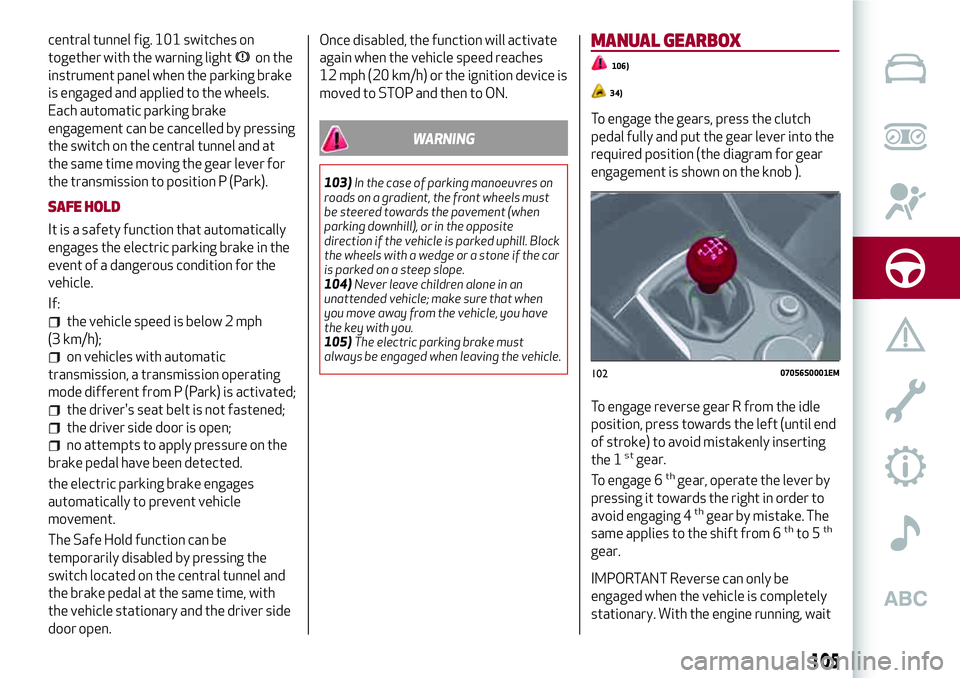
central tunnel fig. 101 switches on
together with the warning light
on the
instrument panel when the parking brake
is engaged and applied to the wheels.
Each automatic parking brake
engagement can be cancelled by pressing
the switch on the central tunnel and at
the same time moving the gear lever for
the transmission to position P (Park).
SAFE HOLD
It is a safety function that automatically
engages the electric parking brake in the
event of a dangerous condition for the
vehicle.
If:
the vehicle speed is below 2 mph
(3 km/h);
on vehicles with automatic
transmission, a transmission operating
mode different from P (Park) is activated;
the driver's seat belt is not fastened;
the driver side door is open;
no attempts to apply pressure on the
brake pedal have been detected.
the electric parking brake engages
automatically to prevent vehicle
movement.
The Safe Hold function can be
temporarily disabled by pressing the
switch located on the central tunnel and
the brake pedal at the same time, with
the vehicle stationary and the driver side
door open.Once disabled, the function will activate
again when the vehicle speed reaches
12 mph (20 km/h) or the ignition device is
moved to STOP and then to ON.
WARNING
103)In the case of parking manoeuvres on
roads on a gradient, the front wheels must
be steered towards the pavement (when
parking downhill), or in the opposite
direction if the vehicle is parked uphill. Block
the wheels with a wedge or a stone if the car
is parked on a steep slope.
104)Never leave children alone in an
unattended vehicle; make sure that when
you move away from the vehicle, you have
the key with you.
105)The electric parking brake must
always be engaged when leaving the vehicle.
MANUAL GEARBOX
106)
34)
To engage the gears, press the clutch
pedal fully and put the gear lever into the
required position (the diagram for gear
engagement is shown on the knob ).
To engage reverse gear R from the idle
position, press towards the left (until end
of stroke) to avoid mistakenly inserting
the 1
stgear.
To engage 6thgear, operate the lever by
pressing it towards the right in order to
avoid engaging 4
thgear by mistake. The
same applies to the shift from 6thto 5th
gear.
IMPORTANT Reverse can only be
engaged when the vehicle is completely
stationary. With the engine running, wait
10207056S0001EM
105
Page 177 of 204
ANTITHEFT PROTECTION
The system is equipped with an anti-theft
protection system based on the
exchange of information with the
electronic control unit (Body Computer)
on the vehicle.
This guarantees maximum safety and
prevents the secret code from being
entered after the power supply has been
disconnected.
If the check has a positive outcome, the
system will start to operate, whereas if
the comparison codes are not the same
or if the electronic control unit (Body
Computer) is replaced, the system will
ask the user to enter the secret code
according to the procedure described in
the paragraph below.
Entering the secret code
When the system is switched on, if the
code is requested, the display will show
"Please enter Anti-Theft Code" followed
by the screen showing a keypad to enter
the secret code.
The secret code is made up of four digits,
from 0 to 9: to insert the first digit of the
code, turn the Rotary Pad and press to
confirm.
After inserting the fourth digit, move the
cursor to "OK" and press the Rotary Pad:
the system will start to operate.
If an incorrect code is entered, thesystem displays "Incorrect Code" to
notify the user of the need to enter the
correct code.
After the 3 available attempts to enter
the code, the system displays "Incorrect
Code. Radio locked. Wait for 30 min.".
After the text has disappeared it is
possible to start the code entering
procedure again.
Vehicle radio passport
This document certifies ownership of the
system. The vehicle radio passport shows
the system model, serial number and
secret code.
In the event that the radio passport is
lost, contact an Alfa Romeo Dealership,
taking an ID document and the car
ownership documents.
IMPORTANT Keep the vehicle radio
passport in a safe place so that you can
give the information to the relevant
authorities if the system is stolen.
IMPORTANT NOTES
Look at the screen only and when it is
necessary and safe. If you need to look at
the screen for a long time, pull over to a
safe place so as not to be distracted
while driving.
Immediately stop using the system in the
event of a fault. Otherwise the system
might be damaged. Contact an Alfa
Romeo Dealership as soon as possible to
have the system repaired.
175
Page 187 of 204
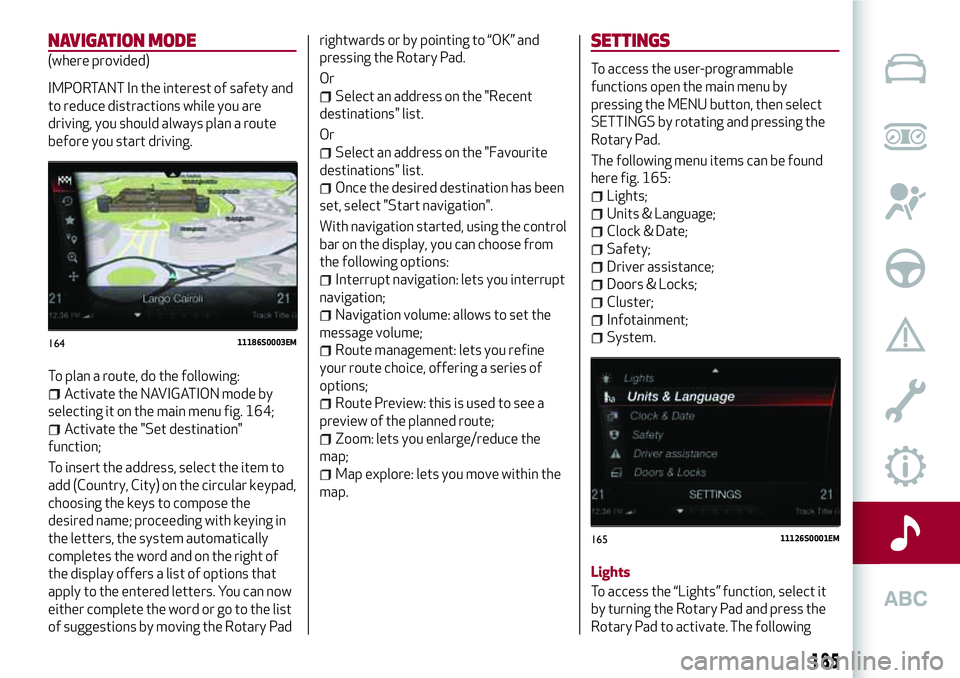
NAVIGATION MODE
(where provided)
IMPORTANT In the interest of safety and
to reduce distractions while you are
driving, you should always plan a route
before you start driving.
To plan a route, do the following:
Activate the NAVIGATION mode by
selecting it on the main menu fig. 164;
Activate the "Set destination"
function;
To insert the address, select the item to
add (Country, City) on the circular keypad,
choosing the keys to compose the
desired name; proceeding with keying in
the letters, the system automatically
completes the word and on the right of
the display offers a list of options that
apply to the entered letters. You can now
either complete the word or go to the list
of suggestions by moving the Rotary Padrightwards or by pointing to “OK” and
pressing the Rotary Pad.
Or
Select an address on the "Recent
destinations" list.
Or
Select an address on the "Favourite
destinations" list.
Once the desired destination has been
set, select "Start navigation".
With navigation started, using the control
bar on the display, you can choose from
the following options:
Interrupt navigation: lets you interrupt
navigation;
Navigation volume: allows to set the
message volume;
Route management: lets you refine
your route choice, offering a series of
options;
Route Preview: this is used to see a
preview of the planned route;
Zoom: lets you enlarge/reduce the
map;
Map explore: lets you move within the
map.
SETTINGS
To access the user-programmable
functions open the main menu by
pressing the MENU button, then select
SETTINGS by rotating and pressing the
Rotary Pad.
The following menu items can be found
here fig. 165:
Lights;
Units & Language;
Clock & Date;
Safety;
Driver assistance;
Doors & Locks;
Cluster;
Infotainment;
System.
Lights
To access the “Lights” function, select it
by turning the Rotary Pad and press the
Rotary Pad to activate. The following16411186S0003EM
16511126S0001EM
185
Page 200 of 204
Emergency braking..........122
Headlight alignment adjustment....27
Headlight alignment corrector......27
Headrests..................21
HSA (Hill Start Assist) system......67
i-Size child restraint systems......89
Identification data............158
Ignition device...............12
Important information and
recommendations..........190
Interior lights................28
ISOFIX child restraint system
(installation)...............87
Jump starting...............135
Keys
electronic key..............11
Lane Change................27
Lane Departure Warning System . . .116
Lifting the vehicle............153
Light bulbs
types of bulbs.............123
Light switch.................24
Luggage compartment..........35
Main beam headlights..........26
Automatic main beam headlights . .26
Main beam headlights (changing a
bulb)...................125
Manual gearbox..............105
Occupant protection systems......78
Paintwork (cleaning and
maintenance).............154
Park Sensors system..........113
Parking lights................26
Passive Entry (system)..........15
PBA (Panic Brake Assist) system....67
Performance (top speed)........169
Power Lock (device)............16
Prescriptions for handling the
vehicle at the end of its life.....172
Pretensioners................81
Load limiters..............82
Rain sensor.................29
RCP system.................70
Rear Back-up Camera / Dynamic
Gridlines................117
Rear seats..................19
Rear view mirrors.............23
Reconfigurable TFT display.......40
Refuelling.................165
Refuelling procedure..........118
Refuelling the vehicle..........118
Replacing a bulb.............122
Replacing an external bulb.......125
Rims and tyres...........153 ,160
Rims and tyres provided........160
SBA (Seat Belt Alert)...........80
SBA (Seat Belt Alert) System......80
SBL function................27Scheduled servicing...........142
Scheduled servicing plan (2.2 JTD
diesel engine versions)........143
Screen wiper/washer...........28
Smart washing function........29
Seat belts..................78
Seats.....................18
Servicing procedures..........151
Side bag . . .................99
Side lights..................25
Snow chains................153
Speed Limiter...............111
Split folding rear seat...........19
SRS (supplementary restraint
system)..................95
Start & Stop Evo.............110
Starting the engine............102
Starting with flat key battery......12
Steering lock . . ..............12
Steering wheel...............22
Symbols....................4
TC (Traction Control) system......67
TFT Display (3.5”) . ............38
TFT Display (7”)...............39
The keys...................11
Tire Repair Kit...............132
Towing the vehicle . ...........138
TPMS (Tyre Pressure Monitoring
System)..................75
INDEX