warning light Alfa Romeo Giulia 2016 Service Manual
[x] Cancel search | Manufacturer: ALFA ROMEO, Model Year: 2016, Model line: Giulia, Model: Alfa Romeo Giulia 2016Pages: 204, PDF Size: 4.95 MB
Page 102 of 204
89)Do not affix rigid objects to the garment
hooks or support handles.
90)Do not rest your head, arms or elbows on
the door, windows or the area in which the
Window bag is located to avoid possible
injury during airbag inflation.
91)Never lean your head, arms or elbows
out of the window.
92)If, when the ignition device is turned to
ON, the
warning light does not switch on
or stays on whilst driving, a fault may have
occurred in the restraint systems. In this
case the airbags or pretensioners may not
be deployed in an impact or, in a lower
number of cases, they may be deployed
accidentally. Before continuing, contact an
Alfa Romeo Dealership immediately to have
the system checked.
93)In case of a LED
OFFfailure (located
on the front courtesy light), thewarning
light appears on the instrument panel.
94)On cars with side bags, do not cover the
front seat backrests with extra covers.
95)Do not travel carrying objects in your
lap, in front of your chest or between your
lips (pipe, pencils, etc.): they could cause
severe injury if the airbag is deployed.
96)If the car has been subject to theft,
attempted theft, vandalism, or flooding,
have the airbag system inspected at an Alfa
Romeo Dealership.
97)Malfunction of the airbag failure
warning light is indicated by the activation
of an airbag failure icon and a dedicated
message on the instrument panel display.
The pyrotechnic charges are not disabled.
Before continuing, contact an Alfa Romeo
Dealership immediately to have the system
checked.98)The airbag deployment threshold is
higher than that of the pretensioners. For
collisions in the range between the two
thresholds, it is normal for only the
pretensioners to be activated.
99)The airbag does not replace seat belts
but increases their efficiency. Because front
airbags are not deployed for low-speed
crashes, side collisions, rear-end shunts or
rollovers, occupants are protected, in
addition to any side bags, only by their seat
belts, which must therefore always be
fastened.
100
SAFETY
Page 105 of 204
31)When the engine stopped never leave
the ignition device in the ON position to
prevent useless current draw from draining
the battery.
32)Warning light
will flash after starting
or during prolonged cranking to indicate a
fault with the glow plug heating system. If
the engine starts, the vehicle can be regularly
used, but an Alfa Romeo Dealership must be
contacted as soon as possible.
33)A quick burst on the accelerator before
turning off the engine serves absolutely no
practical purpose; it wastes fuel and is
damaging for the engine.
ELECTRIC PARKING BRAKE
The vehicle is equipped with electric
parking brake to guarantee better use
and optimal performance compared to a
manually operated parking brake.
The electric parking brake features a
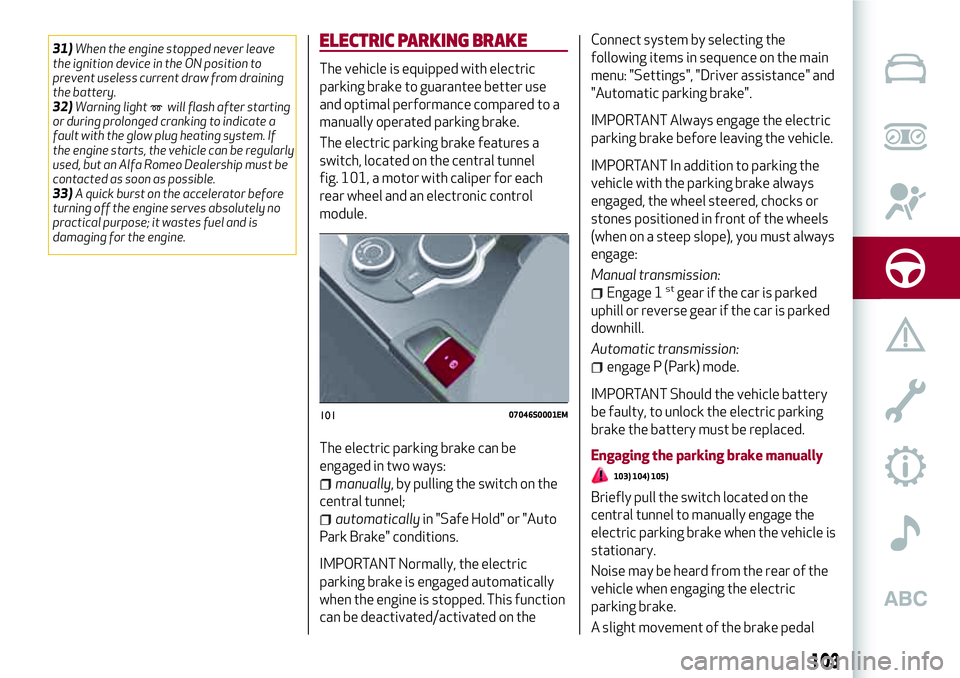
switch, located on the central tunnel
fig. 101, a motor with caliper for each
rear wheel and an electronic control
module.
The electric parking brake can be
engaged in two ways:
manually, by pulling the switch on the
central tunnel;
automaticallyin "Safe Hold" or "Auto
Park Brake" conditions.
IMPORTANT Normally, the electric
parking brake is engaged automatically
when the engine is stopped. This function
can be deactivated/activated on theConnect system by selecting the
following items in sequence on the main
menu: "Settings", "Driver assistance" and
"Automatic parking brake".
IMPORTANT Always engage the electric
parking brake before leaving the vehicle.
IMPORTANT In addition to parking the
vehicle with the parking brake always
engaged, the wheel steered, chocks or
stones positioned in front of the wheels
(when on a steep slope), you must always
engage:
Manual transmission:
Engage 1stgear if the car is parked
uphill or reverse gear if the car is parked
downhill.
Automatic transmission:
engage P (Park) mode.
IMPORTANT Should the vehicle battery
be faulty, to unlock the electric parking
brake the battery must be replaced.
Engaging the parking brake manually
103) 104) 105)
Briefly pull the switch located on the
central tunnel to manually engage the
electric parking brake when the vehicle is
stationary.
Noise may be heard from the rear of the
vehicle when engaging the electric
parking brake.
A slight movement of the brake pedal
10107046S0001EM
103
Page 106 of 204
may be detected when engaging the
electric parking brake with the brake
pedal pressed.
With the electric parking brake engaged,
the warning light
on the instrument
panel and the LED on the switch
fig. 101 turn on.
IMPORTANTWith the Electronic Parking
Brake failure warning light on, some
functions of the electric parking brake are
deactivated. In this case the driver is
responsible for brake activation and vehicle
parking in complete safety conditions.
If, under exceptional circumstances, the
use of the brake is required with the
vehicle in motion, keep the switch on the
central tunnel pulled as long as the brake
action is necessary.
The
warning light may switch on with
the hydraulic system temporarily
unavailable; in this case braking is
controlled by the motors.
The brake lights (stop) will also
automatically switch on in the same way
as for normal braking with the use of the
brake pedal.
Release the switch on the central tunnel
to stop the braking action with the
vehicle in motion.
If, through this procedure, the vehicle is
braked until a speed below 2 mph (3 km/h)is reached and the switch is kept pulled, the
parking brake will definitively engage.
IMPORTANTDriving the vehicle with the
electric parking brake engaged, or using it
several times to slow down the vehicle, may
cause severe damage to the braking system.
Disengaging the electric parking brake
manually
In order to manually release the parking
brake, the ignition device should be at ON
position. Moreover, you need to press the
brake pedal, then press the switch on the
central tunnel briefly.
Noise may be heard from the rear of the
vehicle and a slight movement of the
brake pedal may be detected during
disengagement.
After disengaging the electric parking
brake, the
warning light on the
instrument panel and the LED on the
fig. 101 switch turn off.
If the
warning light on the instrument
panel remains on with the electric parking
brake disengaged, this indicates a fault:
in this case contact an Alfa Romeo
Dealership.
IMPORTANT Never use gear position P
(Park) instead of the electric parking
brake. Always engage the electric
parking brake when parking the vehicle to
prevent injury or damage caused by the
unexpected movement of the vehicle.ELECTRIC PARKING BRAKE OPERATING
MODES
The electric parking brake may operate
as follows:
"Dynamic operating mode": this mode
is activated by pulling the switch
repeatedly whilst driving;
"Static engagement and release
mode": with the vehicle stationary, the
electric parking brake can be activated
by pulling the switch on the central tunnel
once. On the other hand, press the switch
and the brake pedal at the same time to
disengage the brake;
"Drive Away Release": (where
provided) the electric parking brake will
automatically disengage with the driver
side seat belt fastened and the detection
of an action performed by the driver to
move the vehicle (forward gear or
reverse gear);
"Safe Hold": if the vehicle speed is
lower than 2 mph (3 km/h), on vehicles
with automatic transmission, the gear
lever is not in P (Park) position and the
driver's intention of leaving the vehicle is
detected, the electric parking brake will
automatically engage to hold the vehicle
in safety conditions;
"Auto Park Brake": if the vehicle speed
is below 2 mph (3 km/h), the electric
parking break will automatically engage
when the gear lever is in P (Park) position.
The LED on the switch located on the
104
STARTING AND DRIVING
Page 107 of 204
central tunnel fig. 101 switches on
together with the warning light
on the
instrument panel when the parking brake
is engaged and applied to the wheels.
Each automatic parking brake
engagement can be cancelled by pressing
the switch on the central tunnel and at
the same time moving the gear lever for
the transmission to position P (Park).
SAFE HOLD
It is a safety function that automatically
engages the electric parking brake in the
event of a dangerous condition for the
vehicle.
If:
the vehicle speed is below 2 mph
(3 km/h);
on vehicles with automatic
transmission, a transmission operating
mode different from P (Park) is activated;
the driver's seat belt is not fastened;
the driver side door is open;
no attempts to apply pressure on the
brake pedal have been detected.
the electric parking brake engages
automatically to prevent vehicle
movement.
The Safe Hold function can be
temporarily disabled by pressing the
switch located on the central tunnel and
the brake pedal at the same time, with
the vehicle stationary and the driver side
door open.Once disabled, the function will activate
again when the vehicle speed reaches
12 mph (20 km/h) or the ignition device is
moved to STOP and then to ON.
WARNING
103)In the case of parking manoeuvres on
roads on a gradient, the front wheels must
be steered towards the pavement (when
parking downhill), or in the opposite
direction if the vehicle is parked uphill. Block
the wheels with a wedge or a stone if the car
is parked on a steep slope.
104)Never leave children alone in an
unattended vehicle; make sure that when
you move away from the vehicle, you have
the key with you.
105)The electric parking brake must
always be engaged when leaving the vehicle.
MANUAL GEARBOX
106)
34)
To engage the gears, press the clutch
pedal fully and put the gear lever into the
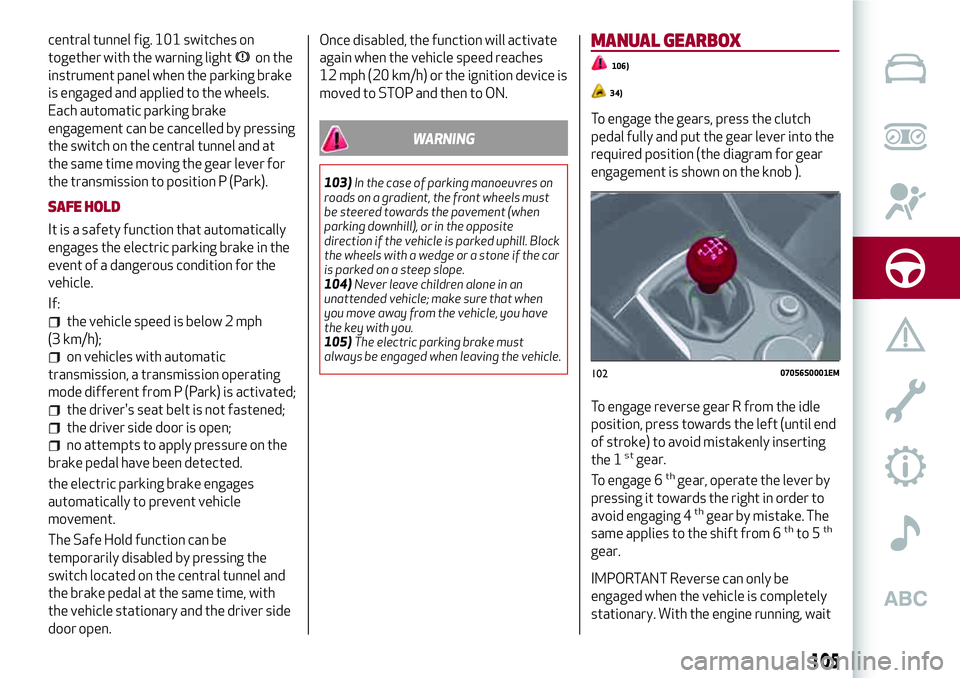
required position (the diagram for gear
engagement is shown on the knob ).
To engage reverse gear R from the idle
position, press towards the left (until end
of stroke) to avoid mistakenly inserting
the 1
stgear.
To engage 6thgear, operate the lever by
pressing it towards the right in order to
avoid engaging 4
thgear by mistake. The
same applies to the shift from 6thto 5th
gear.
IMPORTANT Reverse can only be
engaged when the vehicle is completely
stationary. With the engine running, wait
10207056S0001EM
105
Page 108 of 204
for at least 2 seconds with the clutch
pedal fully pressed before engaging
reverse to prevent damage to the gears
and grating.
IMPORTANT The clutch pedal should be
used only for gear changes. Do not drive
with your foot resting on the clutch pedal,
however lightly. In some circumstances,
the electronic clutch control could cut in
by interpreting the incorrect driving style
as a fault.
WARNING
106)Depress the clutch pedal fully to
change gear correctly. It is therefore
essential that there is nothing under the
pedals: make sure the mats are lying flat and
do not get in the way of the pedals.
IMPORTANT
34)Do not drive with your hand resting on
the gear lever as the force exerted, even if
slight, could lead over time to premature
wear of the gearbox internal components.
AUTOMATIC TRANSMISSION
The vehicle can be equipped with a
8-speed automatic transmission.
The gearbox/transmission can function in
two operating modes: "Automatic" or
"Sequential".
GEAR LEVER
107) 108) 109)
35) 36)
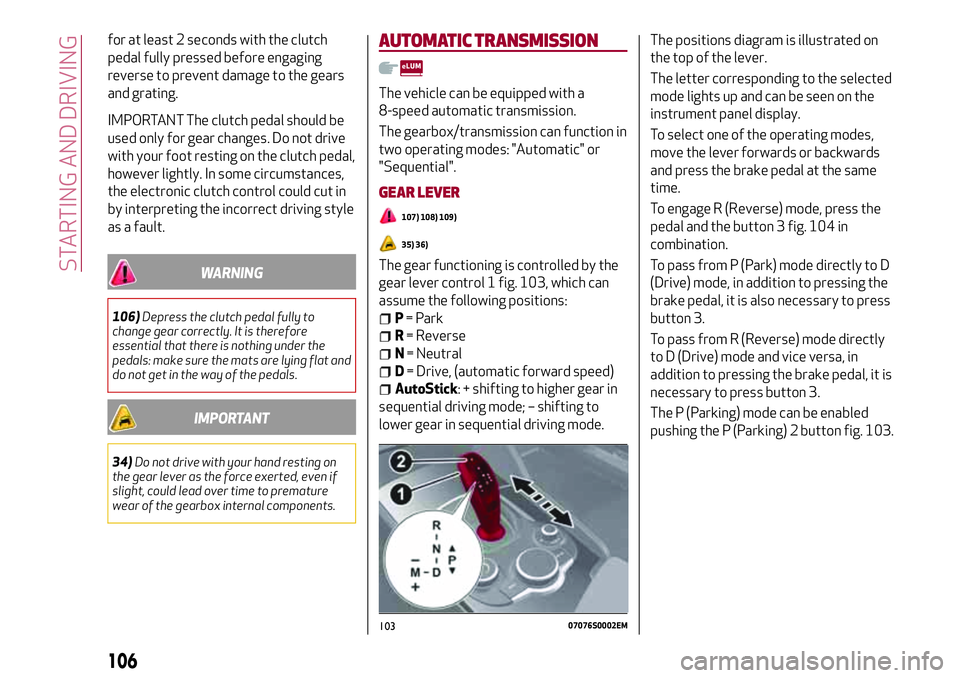
The gear functioning is controlled by the
gear lever control 1 fig. 103, which can
assume the following positions:
P= Park
R= Reverse
N= Neutral
D= Drive, (automatic forward speed)
AutoStick: + shifting to higher gear in
sequential driving mode; – shifting to
lower gear in sequential driving mode.The positions diagram is illustrated on
the top of the lever.
The letter corresponding to the selected
mode lights up and can be seen on the
instrument panel display.
To select one of the operating modes,
move the lever forwards or backwards
and press the brake pedal at the same
time.
To engage R (Reverse) mode, press the
pedal and the button 3 fig. 104 in
combination.
To pass from P (Park) mode directly to D
(Drive) mode, in addition to pressing the
brake pedal, it is also necessary to press
button 3.
To pass from R (Reverse) mode directly
to D (Drive) mode and vice versa, in
addition to pressing the brake pedal, it is
necessary to press button 3.
The P (Parking) mode can be enabled
pushing the P (Parking) 2 button fig. 103.
10307076S0002EM
106
STARTING AND DRIVING
Page 110 of 204
Deactivation
To deactivate the sequential driving
mode, bring the gear lever back in
position D (Drive) ("automatic" driving
mode).
TRANSMISSION EMERGENCY
FUNCTION
(where provided)
Transmission operation is constantly
monitored to detect any fault. If a
condition that might damage the
transmission is detected, the
"transmission emergency" function is
activated.
In this condition, the transmission stays
in 4
thgear, regardless of the selected
gear. Positions P (Parking), R (Reverse)
and N (Neutral) still work.
The
symbol might light up in the
display.
In the event of a "transmission
emergency" immediately contact the
nearest Alfa Romeo Dealership.
Temporary failure
If the warning light goes on, you can
confirm if the failure is temporary and
restore the gear's proper functioning by
proceeding as follows:
stop the vehicle;
engage P (Park);
bring the ignition device to STOP;
wait for about 10 seconds, then
restart the engine;
select the desired gear: if the problem
is not detected anymore the
transmission correct operation is
restored.
IMPORTANT In the event of a temporary
failure it is in any case recommended to
contact an Alfa Romeo Dealership as
soon as possible.
GEAR ENGAGEMENT DISABLING
SYSTEM WITHOUT BRAKE PEDAL
PRESSED
This system prevents you from moving
the gear lever from position P (Park) if
the brake pedal has not been previously
depressed.
To bring the gear lever to a position other
than P (Park), the ignition device must be
in position AVV (engine on or off) and the
brake pedal must be pressed.
WARNING
107)Never use position P (Park) instead of
the electric parking brake. Always engage
the electric parking brake when parking the
vehicle to avoid the accidental movement of
the vehicle.
108)If the P (Park) position is not engaged,
the vehicle could move and injure people.
Before leaving the vehicle, make sure that
the gear lever is in position P and that the
electric parking brake is engaged.109)Do not shift the gear lever to N
(Neutral) and do not stop the engine when
driving on a downhill road. This type of
driving is dangerous and reduces the
possibility of intervening in the case of
variation of the road traffic or surface. You
risk losing control of your vehicle and
causing accidents.
IMPORTANT
35)Before selecting P (Park) mode, bring the
ignition device to position ON and press the
brake pedal. Otherwise, the gear lever may
get damaged.
36)Engage reverse only with the car
stationary, engine at idling speed and
accelerator fully released.
108
STARTING AND DRIVING
Page 114 of 204
CRUISE CONTROL
This is an electronically controlled driving
assistance device that allows the desired
vehicle speed to be maintained, without
having to press the accelerator pedal.
This device can be used at a speed above
25 mph (40 km/h) on long stretches of
dry, straight roads with few variations
(e.g. motorways).
It is therefore not recommended to use
this device on extra-urban roads with
traffic. Do not use it in town.
Going downhill, the system could brake
the car to keep the pre-set speed limit.
ACTIVATING THE DEVICE
111) 112) 113)
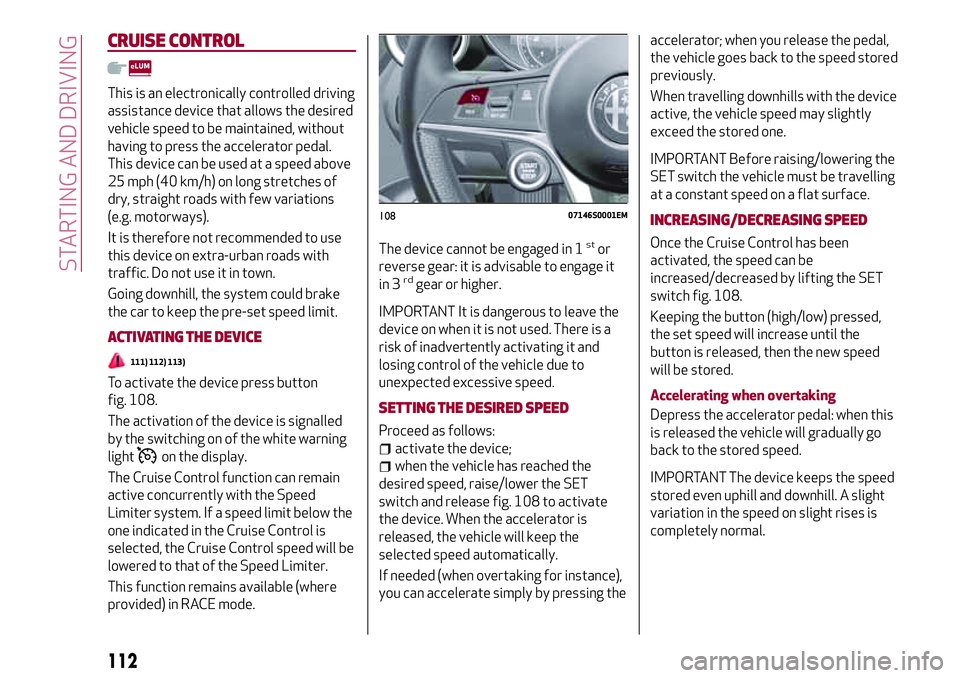
To activate the device press button
fig. 108.
The activation of the device is signalled
by the switching on of the white warning
light
on the display.
The Cruise Control function can remain
active concurrently with the Speed
Limiter system. If a speed limit below the
one indicated in the Cruise Control is
selected, the Cruise Control speed will be
lowered to that of the Speed Limiter.
This function remains available (where
provided) in RACE mode.The device cannot be engaged in 1
stor
reverse gear: it is advisable to engage it
in 3
rdgear or higher.
IMPORTANT It is dangerous to leave the
device on when it is not used. There is a
risk of inadvertently activating it and
losing control of the vehicle due to
unexpected excessive speed.
SETTING THE DESIRED SPEED
Proceed as follows:
activate the device;
when the vehicle has reached the
desired speed, raise/lower the SET
switch and release fig. 108 to activate
the device. When the accelerator is
released, the vehicle will keep the
selected speed automatically.
If needed (when overtaking for instance),
you can accelerate simply by pressing theaccelerator; when you release the pedal,
the vehicle goes back to the speed stored
previously.
When travelling downhills with the device
active, the vehicle speed may slightly
exceed the stored one.
IMPORTANT Before raising/lowering the
SET switch the vehicle must be travelling
at a constant speed on a flat surface.
INCREASING/DECREASING SPEED
Once the Cruise Control has been
activated, the speed can be
increased/decreased by lifting the SET
switch fig. 108.
Keeping the button (high/low) pressed,
the set speed will increase until the
button is released, then the new speed
will be stored.
Accelerating when overtaking
Depress the accelerator pedal: when this
is released the vehicle will gradually go
back to the stored speed.
IMPORTANT The device keeps the speed
stored even uphill and downhill. A slight
variation in the speed on slight rises is
completely normal.
10807146S0001EM
112
STARTING AND DRIVING
Page 115 of 204
RECALLING THE SPEED
For versions with automatic transmission
operating in D mode (Drive - automatic),
press and release the RES
fig. 108 button to recall the previously
set speed.
For versions with manual gearbox or
automatic transmission in Autostick
(sequential) mode, before recalling the
previously set speed you should
accelerate until getting close to it, then
press and release the RES button.
DEACTIVATING THE DEVICE
Lightly pressing the brake pedal
deactivates the Cruise Control without
deleting the stored speed.
The Cruise Control may be deactivated
also by applying the electric parking
brake or when the braking system is
operated (e.g. operation of the ESC
system).
The stored speed is deleted in the
following cases:
pressing the on/off button or
switching off the engine;
if there is a malfunction in the Cruise
Control.
DEACTIVATING THE DEVICE
The Cruise Control is deactivated by
pressing the activation/deactivation
button or bringing the ignition device to
the STOP position.
WARNING
111)When travelling with the device active,
never move the gear lever to neutral.
112)In case of a malfunction or failure of
the device, contact an Alfa Romeo
Dealership.
113)The Cruise Control can be dangerous if
the system cannot keep a constant speed. In
specific conditions speed may be excessive,
resulting in the risk of losing control of the
vehicle and causing accidents. Do not use the
device in heavy traffic or on winding, icy,
snowy or slippery roads.
PARK SENSORSSYSTEM
(where provided)
114)
38) 39) 40)
VERSIONS WITH 4 SENSORS
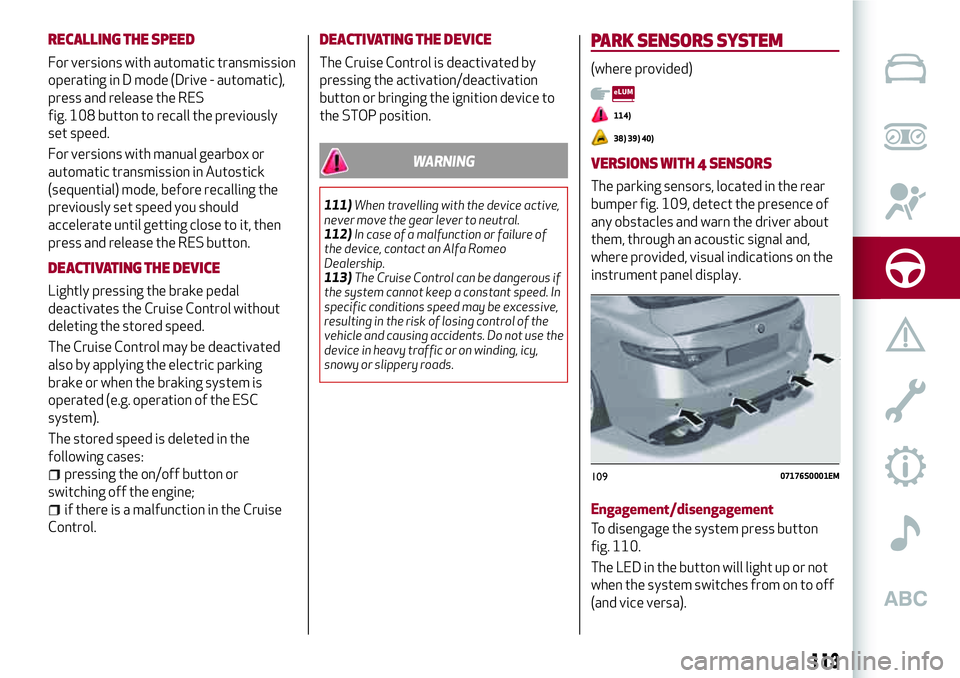
The parking sensors, located in the rear
bumper fig. 109, detect the presence of
any obstacles and warn the driver about
them, through an acoustic signal and,
where provided, visual indications on the
instrument panel display.
Engagement/disengagement
To disengage the system press button
fig. 110.
The LED in the button will light up or not
when the system switches from on to off
(and vice versa).
10907176S0001EM
113
Page 116 of 204
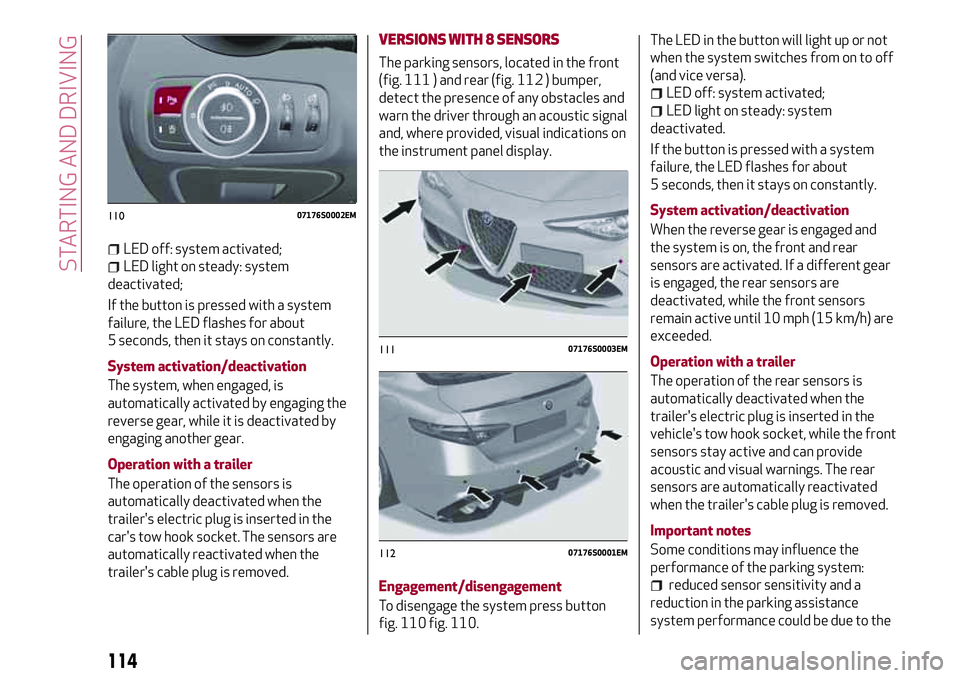
LED off: system activated;
LED light on steady: system
deactivated;
If the button is pressed with a system
failure, the LED flashes for about
5 seconds, then it stays on constantly.
System activation/deactivation
The system, when engaged, is
automatically activated by engaging the
reverse gear, while it is deactivated by
engaging another gear.
Operation with a trailer
The operation of the sensors is
automatically deactivated when the
trailer's electric plug is inserted in the
car's tow hook socket. The sensors are
automatically reactivated when the
trailer's cable plug is removed.
VERSIONS WITH 8 SENSORS
The parking sensors, located in the front
(fig. 111 ) and rear (fig. 112 ) bumper,
detect the presence of any obstacles and
warn the driver through an acoustic signal
and, where provided, visual indications on
the instrument panel display.
Engagement/disengagement
To disengage the system press button
fig. 110 fig. 110.The LED in the button will light up or not
when the system switches from on to off
(and vice versa).
LED off: system activated;
LED light on steady: system
deactivated.
If the button is pressed with a system
failure, the LED flashes for about
5 seconds, then it stays on constantly.
System activation/deactivation
When the reverse gear is engaged and
the system is on, the front and rear
sensors are activated. If a different gear
is engaged, the rear sensors are
deactivated, while the front sensors
remain active until 10 mph (15 km/h) are
exceeded.
Operation with a trailer
The operation of the rear sensors is
automatically deactivated when the
trailer's electric plug is inserted in the
vehicle's tow hook socket, while the front
sensors stay active and can provide
acoustic and visual warnings. The rear
sensors are automatically reactivated
when the trailer's cable plug is removed.
Important notes
Some conditions may influence the
performance of the parking system:
reduced sensor sensitivity and a
reduction in the parking assistance
system performance could be due to the
11007176S0002EM
11107176S0003EM
11207176S0001EM
114
STARTING AND DRIVING
Page 118 of 204
LANE DEPARTURE WARNING
(LDW) SYSTEM
DESCRIPTION
41) 42) 43) 44) 45) 46)
The Lane Departure Warning system
makes use of a camera located on the
windscreen to detect the lane limits and
calculate the position of the vehicle
within such limits, in order to make sure
that it remains inside the lane.
When one or both lane limits are
detected and the vehicle passes over one
without the driver's say-so (direction
indicator not turned on), the system
emits an acoustic signal.
If the vehicle continues to go beyond the
line of the lane without any intervention
from the driver, the surpassed line will
light up on the display (left or right) to
urge the driver to bring the vehicle back
into the limits of the lane.
SYSTEM ACTIVATION/DEACTIVATION
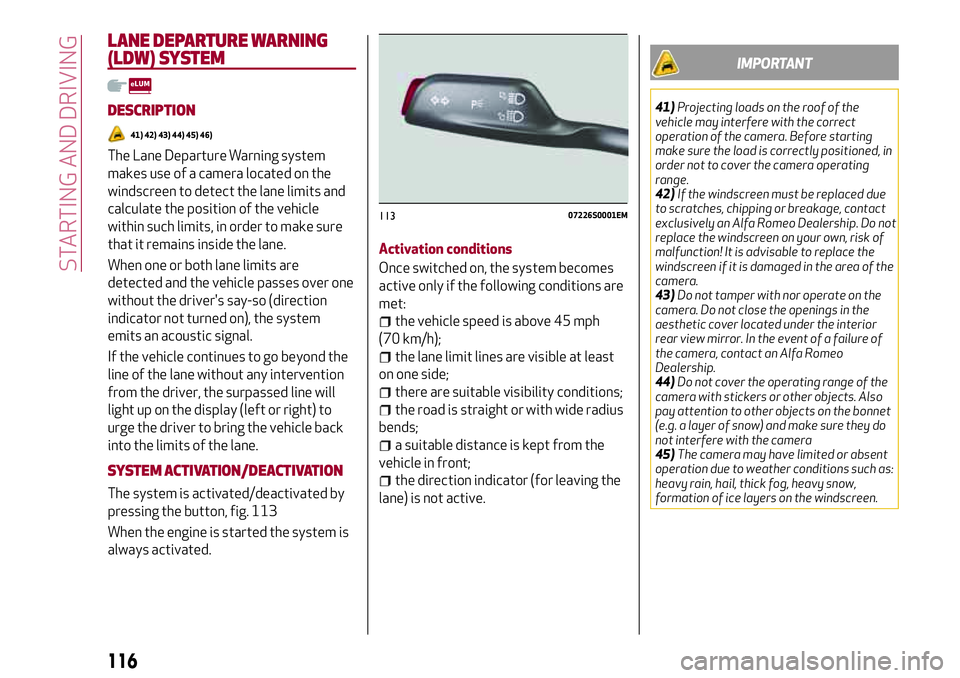
The system is activated/deactivated by
pressing the button, fig. 113
When the engine is started the system is
always activated.Activation conditions
Once switched on, the system becomes
active only if the following conditions are
met:
the vehicle speed is above 45 mph
(70 km/h);
the lane limit lines are visible at least
on one side;
there are suitable visibility conditions;
the road is straight or with wide radius
bends;
a suitable distance is kept from the
vehicle in front;
the direction indicator (for leaving the
lane) is not active.
IMPORTANT
41)Projecting loads on the roof of the
vehicle may interfere with the correct
operation of the camera. Before starting
make sure the load is correctly positioned, in
order not to cover the camera operating
range.
42)If the windscreen must be replaced due
to scratches, chipping or breakage, contact
exclusively an Alfa Romeo Dealership. Do not
replace the windscreen on your own, risk of
malfunction! It is advisable to replace the
windscreen if it is damaged in the area of the
camera.
43)Do not tamper with nor operate on the
camera. Do not close the openings in the
aesthetic cover located under the interior
rear view mirror. In the event of a failure of
the camera, contact an Alfa Romeo
Dealership.
44)Do not cover the operating range of the
camera with stickers or other objects. Also
pay attention to other objects on the bonnet
(e.g. a layer of snow) and make sure they do
not interfere with the camera
45)The camera may have limited or absent
operation due to weather conditions such as:
heavy rain, hail, thick fog, heavy snow,
formation of ice layers on the windscreen.
11307226S0001EM
116
STARTING AND DRIVING