lock Alfa Romeo Giulia 2017 Owner's Guide
[x] Cancel search | Manufacturer: ALFA ROMEO, Model Year: 2017, Model line: Giulia, Model: Alfa Romeo Giulia 2017Pages: 268, PDF Size: 18.64 MB
Page 99 of 268

and environmental conditions are such
that they wouldn't cause the tires to
slip. When the road and environmental
conditions require better traction, the
vehicle automatically goes to AWD
mode.
The driving mode, RWD or AWD, is
shown on the instrument cluster
display.
Note:If the system failure symbol
switches on, after starting the engine or
while driving, it means that the AWD
system is not working properly. If the
warning message activates frequently, it
is recommended to carry out the
maintenance operations.
Electronic Stability
Control (ESC) System
The ESC system improves the
directional control and stability of the
car in various driving conditions.
The ESC system corrects the car’s
understeer and oversteer, distributing
the brake force on the appropriate
wheels. The torque supplied by the
engine can also be reduced in order to
maintain control of the vehicle.
The ESC system uses sensors installed
on the car to determine the path that
the driver intends to follow and
compares it with the car’s effective
path. When the real path deviates from
the desired path, the ESC system
intervenes to counter the vehicle’s
understeer or oversteer.
Oversteer occurs when the car is
turning more than it should according
to the angle of the steering wheel.
Understeer occurs when the vehicle
is turning less than it should according
to the angle of the steering wheel.
System Intervention
The intervention of the system is
indicated by the flashing of the ESC
warning light on the instrument panel,
to inform the driver that the vehicle
stability and grip are critical.
Warning!
Electronic Stability Control (ESC) cannot
prevent the natural laws of physics from
acting on the vehicle, nor can it increase
the traction afforded by prevailing road
conditions. ESC cannot prevent accidents,
including those resulting from excessive
speed in turns, driving on very slippery
surfaces, or hydroplaning. ESC also cannot
prevent accidents resulting from loss of
vehicle control due to inappropriate driver
input for the conditions. Only a safe,
attentive, and skillful driver can prevent
accidents. The capabilities of an ESC
equipped vehicle must never be exploited
in a reckless or dangerous manner which
could jeopardize the user’s safety or the
safety of others.
Vehicle modifications, or failure to
properly maintain your vehicle, may change
the handling characteristics of your vehicle,
and may negatively affect the performance
of the ESC system. Changes to the
steering system, suspension, braking
system, tire type and size or wheel size
may adversely affect ESC performance.
Improperly inflated and unevenly worn tires
may also degrade ESC performance. Any
vehicle modification or poor vehicle
maintenance that reduces the effectiveness
of the ESC system can increase the risk of
loss of vehicle control, vehicle rollover,
personal injury and death.
Traction Control System
(TCS)
The system automatically operates in
the event of slipping, loss of grip on wet
roads (hydroplaning), and acceleration
on one or both drive wheels on roads
that are slippery, snowy, icy, etc.
Depending on the slipping conditions,
two different control systems are
activated:
If the slipping involves both drive
wheels, the system intervenes, reducing
the power transmitted by the engine.
If the slipping only involves one of the
drive wheels, the Brake Limited
Differential (BLD) function is activated,
automatically braking the wheel which
is slipping (the behavior of a self-locking
differential is simulated). This will
increase the engine torque transferred
to the wheel which isn't slipping.
97
Page 104 of 268
Forward Collision
Warning (FCW) System
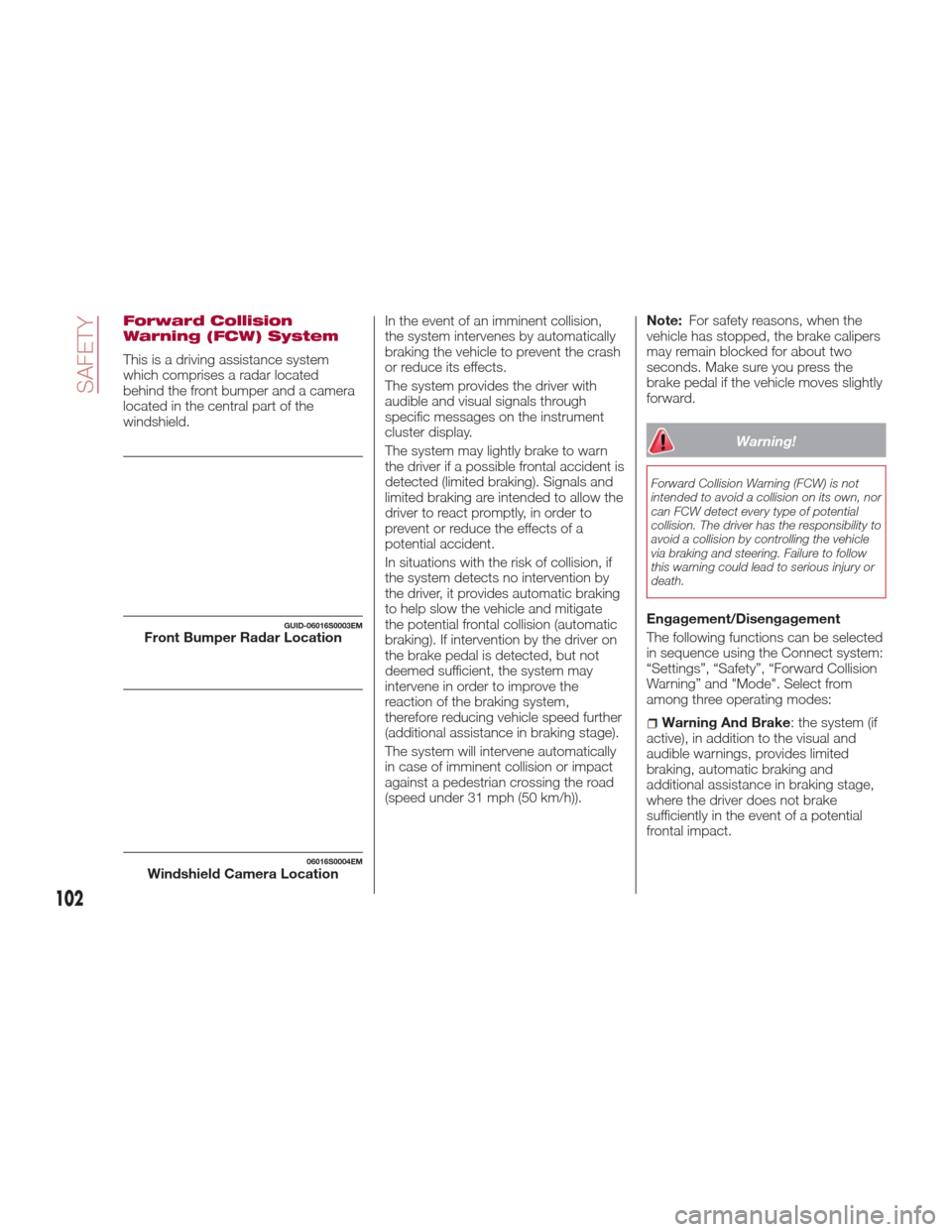
This is a driving assistance system
which comprises a radar located
behind the front bumper and a camera
located in the central part of the
windshield.In the event of an imminent collision,
the system intervenes by automatically
braking the vehicle to prevent the crash
or reduce its effects.
The system provides the driver with
audible and visual signals through
specific messages on the instrument
cluster display.
The system may lightly brake to warn
the driver if a possible frontal accident is
detected (limited braking). Signals and
limited braking are intended to allow the
driver to react promptly, in order to
prevent or reduce the effects of a
potential accident.
In situations with the risk of collision, if
the system detects no intervention by
the driver, it provides automatic braking
to help slow the vehicle and mitigate
the potential frontal collision (automatic
braking). If intervention by the driver on
the brake pedal is detected, but not
deemed sufficient, the system may
intervene in order to improve the
reaction of the braking system,
therefore reducing vehicle speed further
(additional assistance in braking stage).
The system will intervene automatically
in case of imminent collision or impact
against a pedestrian crossing the road
(speed under 31 mph (50 km/h)).Note:
For safety reasons, when the
vehicle has stopped, the brake calipers
may remain blocked for about two
seconds. Make sure you press the
brake pedal if the vehicle moves slightly
forward.
Warning!
Forward Collision Warning (FCW) is not
intended to avoid a collision on its own, nor
can FCW detect every type of potential
collision. The driver has the responsibility to
avoid a collision by controlling the vehicle
via braking and steering. Failure to follow
this warning could lead to serious injury or
death.
Engagement/Disengagement
The following functions can be selected
in sequence using the Connect system:
“Settings”, “Safety”, “Forward Collision
Warning” and "Mode". Select from
among three operating modes:
Warning And Brake : the system (if
active), in addition to the visual and
audible warnings, provides limited
braking, automatic braking and
additional assistance in braking stage,
where the driver does not brake
sufficiently in the event of a potential
frontal impact.
GUID-06016S0003EMFront Bumper Radar Location
06016S0004EMWindshield Camera Location
102
SAFETY
Page 105 of 268
Only Warning: the system, if active,
does not provide limited braking, but
guarantees automatic braking or
additional assistance in braking stage,
where the driver does not brake at all or
not sufficiently in the event of a potential
frontal impact. The visual and audible
warnings are deactivated, and will not
be provided.
Disable: the system does not
provide visual and audible warnings,
limited braking, automatic braking or
additional assistance in braking stage.
The system will therefore provide no
indication of a possible accident.
Activation/Deactivation
The Forward Collision Warning system
is activated whenever the engine is
started regardless of what is shown on
the Connect system.
Following a deactivation, the system will
not warn the driver about the possible
collision with the preceding vehicle,
regardless of the setting selected with
the Connect system.
Note: Each time the engine is started,
the system is activated regardless of
what setting was selected when it was
previously switched off.
This function is not active at a speed
lower than 4 mph (7 km/h) or higher
than 124 mph (200 km/h). The system is active when:
The engine is started.
Is active (on) in the Connect system.
The ignition is in the ON position.
The vehicle speed is between 4 mph
(7 km/h) and 124 mph (200 km/h).
The front seat belts are fastened.
The "Alfa DNA Pro" selector is not in
RACE position (where present).
Changing The System Sensitivity
The sensitivity of the system can be
changed through the Connect system
menu, choosing from one of the
following three options: "Near", "Med"
or "Far". Refer to the description in the
“Connect System Supplement” for how
to change the settings.
The pre-set option is "Med". With this
setting, the system warns the driver of a
possible collision with the vehicle in
front when that vehicle is at a standard
distance, between that of the other two
settings.
With the system sensitivity set to "Far",
the system will warn the driver of a
possible collision with the vehicle in
front when that vehicle is at a greater
distance, thus providing the possibility
of acting on the brakes more lightly and
gradually. This setting provides the
drivers with the maximum possible
reaction time to prevent a potential
accident. With the option set to "Near", the
system will alert the driver of a possible
collision with the vehicle in front when
that vehicle is close. This setting offers
the driver a lower reaction time
compared to the "Med" and "Far"
settings, in the event of a potential
collision, but permits more dynamic
driving of the vehicle.
The system sensitivity setting is kept in
the memory when the engine is
switched off.
System Limited Operation Signal
If the dedicated message is displayed,
a condition limiting the system
operation may have occurred. The
possible reasons of this limitation are
something blocking the camera view or
a fault.
If an obstruction is signaled, clean the
area of the windshield indicated in.
Although the vehicle can still be driven
in normal conditions, the system may
be not completely available.
When the conditions limiting the system
functions end, this will go back to
normal and complete operation. Should
the fault persist, contact an authorized
dealer.
System Failure Signaling
If the system switches off and a
dedicated message is shown on the
display, it means that there is a fault on
the system.
103
Page 112 of 268
BeltAlert) (the outboard front passenger
seat BeltAlert is not active when the
outboard front passenger seat is
unoccupied). The BeltAlert warning
sequence starts by blinking the Seat
Belt Reminder Light and sounding an
intermittent chime. Once the BeltAlert
warning sequence has completed, the
Seat Belt Reminder Light will remain on
until the seat belts are buckled. The
BeltAlert warning sequence may repeat
based on vehicle speed until the driver
and occupied outboard front seat
passenger seat belts are buckled. The
driver should instruct all occupants to
buckle their seat belts.
Change Of Status
If the driver or outboard front seat
passenger (if equipped with outboard
front passenger seat BeltAlert)
unbuckles their seat belt while the
vehicle is traveling, the BeltAlert
warning sequence will begin until the
seat belts are buckled again.
The outboard front passenger seat
BeltAlert is not active when the
outboard front passenger seat is
unoccupied. BeltAlert may be triggered
when an animal or other items are
placed on the outboard front passenger
seat or when the seat is folded flat (if
equipped). It is recommended that pets
be restrained in the rear seat (if
equipped) in pet harnesses or pet
carriers that are secured by seat belts,
and cargo is properly stowed.BeltAlert can be activated or
deactivated by your authorized dealer.
FCA US LLC does not recommend
deactivating BeltAlert.
Note:
If BeltAlert has been deactivated
and the driver or outboard front seat
passenger (if equipped with outboard
front passenger seat BeltAlert) is
unbuckled the Seat Belt Reminder Light
will turn on and remain on until the
driver and outboard front seat
passenger seat belts are buckled.
Lap/Shoulder Belts
All seating positions in your vehicle are
equipped with lap/shoulder belts.
The seat belt webbing retractor will lock
only during very sudden stops or
collisions. This feature allows the
shoulder part of the seat belt to move
freely with you under normal conditions.
However, in a collision the seat belt will
lock and reduce your risk of striking the
inside of the vehicle or being thrown out
of the vehicle.
Warning!
Relying on the air bags alone could lead
to more severe injuries in a collision. The air
bags work with your seat belt to restrain
you properly. In some collisions, the air
bags won’t deploy at all. Always wear your
seat belt even though you have air bags.
In a collision, you and your passengers
can suffer much greater injuries if you are
not properly buckled up. You can strike the
interior of your vehicle or other passengers,
or you can be thrown out of the vehicle.
Always be sure you and others in your
vehicle are buckled up properly.
It is dangerous to ride in a cargo area,
inside or outside of a vehicle. In a collision,
people riding in these areas are more likely
to be seriously injured or killed.
Do not allow people to ride in any area
of your vehicle that is not equipped with
seats and seat belts.
Be sure everyone in your vehicle is in a
seat and using a seat belt properly.
Occupants, including the driver, should
always wear their seat belts whether or not
an air bag is also provided at their seating
position to minimize the risk of severe injury
or death in the event of a crash.
Wearing your seat belt incorrectly could
make your injuries in a collision much
worse. You might suffer internal injuries, or
you could even slide out of the seat belt.
Follow these instructions to wear your seat
belt safely and to keep your passengers
safe, too.
Two people should never be belted into
a single seat belt. People belted together
can crash into one another in a collision,
hurting one another badly. Never use a
lap/shoulder belt or a lap belt for more than
one person, no matter what their size.
110
SAFETY
Page 116 of 268
Switchable Automatic Locking
Retractors (ALR)
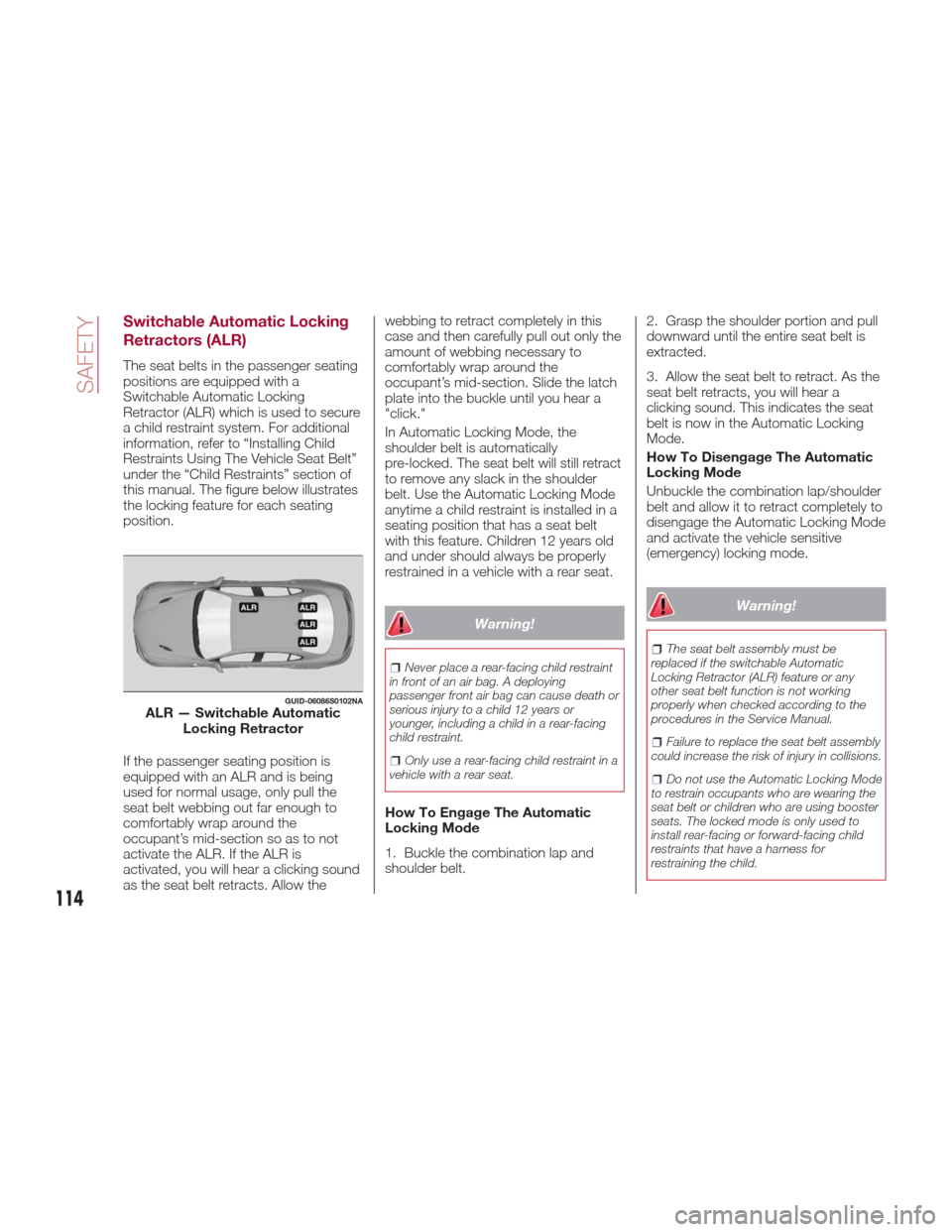
The seat belts in the passenger seating
positions are equipped with a
Switchable Automatic Locking
Retractor (ALR) which is used to secure
a child restraint system. For additional
information, refer to “Installing Child
Restraints Using The Vehicle Seat Belt”
under the “Child Restraints” section of
this manual. The figure below illustrates
the locking feature for each seating
position.
If the passenger seating position is
equipped with an ALR and is being
used for normal usage, only pull the
seat belt webbing out far enough to
comfortably wrap around the
occupant’s mid-section so as to not
activate the ALR. If the ALR is
activated, you will hear a clicking sound
as the seat belt retracts. Allow thewebbing to retract completely in this
case and then carefully pull out only the
amount of webbing necessary to
comfortably wrap around the
occupant’s mid-section. Slide the latch
plate into the buckle until you hear a
"click."
In Automatic Locking Mode, the
shoulder belt is automatically
pre-locked. The seat belt will still retract
to remove any slack in the shoulder
belt. Use the Automatic Locking Mode
anytime a child restraint is installed in a
seating position that has a seat belt
with this feature. Children 12 years old
and under should always be properly
restrained in a vehicle with a rear seat.
Warning!
Never place a rear-facing child restraint
in front of an air bag. A deploying
passenger front air bag can cause death or
serious injury to a child 12 years or
younger, including a child in a rear-facing
child restraint.
Only use a rear-facing child restraint in a
vehicle with a rear seat.
How To Engage The Automatic
Locking Mode
1. Buckle the combination lap and
shoulder belt. 2. Grasp the shoulder portion and pull
downward until the entire seat belt is
extracted.
3. Allow the seat belt to retract. As the
seat belt retracts, you will hear a
clicking sound. This indicates the seat
belt is now in the Automatic Locking
Mode.
How To Disengage The Automatic
Locking Mode
Unbuckle the combination lap/shoulder
belt and allow it to retract completely to
disengage the Automatic Locking Mode
and activate the vehicle sensitive
(emergency) locking mode.
Warning!
The seat belt assembly must be
replaced if the switchable Automatic
Locking Retractor (ALR) feature or any
other seat belt function is not working
properly when checked according to the
procedures in the Service Manual.
Failure to replace the seat belt assembly
could increase the risk of injury in collisions.
Do not use the Automatic Locking Mode
to restrain occupants who are wearing the
seat belt or children who are using booster
seats. The locked mode is only used to
install rear-facing or forward-facing child
restraints that have a harness for
restraining the child.
GUID-06086S0102NAALR — Switchable Automatic Locking Retractor
114
SAFETY
Page 121 of 268
Warning!
Do not use accessory seat covers or place
objects between you and the Side Air
Bags; the performance could be adversely
affected and/or objects could be pushed
into you, causing serious injury.
2. Supplemental Side Air Bag Inflatable
Curtains (SABICs): Located above the
side windows. The trim covering the
SABICs is labeled “SRS AIRBAG” or
“AIRBAG.”
SABICs may help reduce the risk of
head or other injuries to front and rear
seat outboard occupants in certain side
impacts and/or vehicle rollover events, in
addition to the injury reduction potential
provided by the seat belts and body
structure.
The SABICs deploy downward,
covering the side windows. An inflating
SABIC pushes the outside edge of the
trim out of the way and covers the
window. The SABICs inflate with
enough force to injure occupants if they
are not belted and seated properly, or if
items are positioned in the area where
the SABICs inflate. Children are at an
even greater risk of injury from a
deploying air bag.
Warning!
Do not stack luggage or other cargo up
high enough to block the deployment of the
SABICs. The trim covering above the side
windows where the SABIC and its
deployment path are located should remain
free from any obstructions.
In order for the SABICs to work as
intended, do not install any accessory
items in your vehicle which could alter the
roof. Do not add an aftermarket sunroof to
your vehicle. Do not add roof racks that
require permanent attachments (bolts or
screws) for installation on the vehicle roof.
Do not drill into the roof of the vehicle for
any reason.
The SABICs and SABs (Side Air Bags)
are designed to activate in certain side
impacts and certain rollover events. The
Occupant Restraint Controller (ORC)
determines whether the deployment of
the Side Air Bags in a particular side impact or rollover event is appropriate,
based on the severity and type of
collision. Vehicle damage by itself is not
a good indicator of whether or not Side
Air Bags should have deployed.
Side Air Bags are a supplement to the
seat belt restraint system. Side Air Bags
deploy in less time than it takes to blink
your eyes.
Warning!
Occupants, including children, who are
up against or very close to Side Air Bags
can be seriously injured or killed.
Occupants, including children, should never
lean on or sleep against the door, side
windows, or area where the side air bags
inflate, even if they are in an infant or child
restraint.
Seat belts (and child restraints where
appropriate) are necessary for your
protection in all collisions. They also help
keep you in position, away from an inflating
Side Air Bag. To get the best protection
from the Side Air Bags, occupants must
wear their seat belts properly and sit
upright with their backs against the seats.
Children must be properly restrained in a
child restraint or booster seat that is
appropriate for the size of the child.
06106S0005EMSupplemental Side Air Bag
Inflatable Curtain (SABIC) Label Location
119
Page 123 of 268
If you do have a collision which deploys
the air bags, any or all of the following
may occur:
The air bag material may sometimes
cause abrasions and/or skin reddening
to the occupants as the air bags deploy
and unfold. The abrasions are similar to
friction rope burns or those you might
get sliding along a carpet or gymnasium
floor. They are not caused by contact
with chemicals. They are not permanent
and normally heal quickly. However, if
you haven’t healed significantly within a
few days, or if you have any blistering,
see your doctor immediately.
As the air bags deflate, you may see
some smoke-like particles. The
particles are a normal by-product of the
process that generates the non-toxic
gas used for air bag inflation. These
airborne particles may irritate the skin,
eyes, nose, or throat. If you have skin or
eye irritation, rinse the area with cool
water. For nose or throat irritation, move
to fresh air. If the irritation continues,
see your doctor. If these particles settle
on your clothing, follow the garment
manufacturer’s instructions for cleaning.
Do not drive your vehicle after the air
bags have deployed. If you are involved
in another collision, the air bags will not
be in place to protect you.
Warning!
Deployed air bags and seat belt
pretensioners cannot protect you in
another collision. Have the air bags, seat
belt pretensioners, and the seat belt
retractor assemblies replaced by an
authorized dealer immediately. Also, have
the Occupant Restraint Controller System
serviced as well.
Note:
Air bag covers may not be obvious
in the interior trim, but they will open
during air bag deployment.
After any collision, the vehicle
should be taken to an authorized
dealer immediately.
Enhanced Accident Response
System
In the event of an impact, if the
communication network remains intact,
and the power remains intact,
depending on the nature of the event,
the ORC will determine whether to have
the Enhanced Accident Response
System perform the following functions:
Cut off fuel to the engine.
Flash hazard lights as long as the
battery has power or until the hazard
light button is pressed. The hazard lights can be deactivated by pressing
the hazard light button.
Turn on the interior lights, which
remain on as long as the battery has
power or for 15 minutes from the
intervention of the Enhanced Accident
Response System.
Unlock the power door locks.
Turn off the Fuel Pump Heater
(if equipped).
Turn off the HVAC Blower Motor.
Close the HVAC Circulation Door.
Enhanced Accident Response
System Reset Procedure
After the event occurs, when the
system is active, a message regarding
fuel cutoff is displayed. Turn the ignition
switch from ignition AVV/START or
ON/RUN to ignition STOP/OFF.
Carefully check the vehicle for fuel leaks
in the engine compartment and on the
ground near the engine compartment
and fuel tank before resetting the
system and starting the engine.
Depending on the nature of the event
the left and right turn signal lights,
located in the instrument panel, may
both be blinking and will continue to
blink. In order to move your vehicle to
the side of the road, you must follow
the system reset procedure.
121
Page 124 of 268
Customer Action Customer Will See
Note:
Each
step MUST BE held for at least
2 seconds
1. Turn ignition
STOP/OFF/LOCK.
(Turn Signal Must be
placed in Neutral
State).
2. Turn ignition
ON/RUN. Right turn light
BLINKS.
Left turn light is OFF.
3. Turn right turn
signal switch ON. Right turn light is ON
SOLID.
Left turn light
BLINKS.
4. Place turn signal
in neutral state. Right turn light is
OFF.
Left turn light
BLINKS.
5. Turn left turn
signal switch ON. Right turn light
BLINKS.
Left turn light is ON
SOLID.
6. Place turn signal
in neutral state. Right turn light
BLINKS.
Left turn light is OFF.
7. Turn right turn
signal switch ON. Right turn light is ON
SOLID.
Left turn light
BLINKS.
Customer Action Customer Will See
Note:
Each
step MUST BE held for at least
2 seconds
8. Place turn signal
in neutral state. Right turn light is
OFF.
Left turn light
BLINKS
9. Turn left turn
signal switch ON. Right turn light is ON
SOLID.
Left turn light is ON
SOLID.
10. Turn left turn
signal switch OFF.
(Turn Signal Switch
Must be placed in
Neutral State). Right turn light is
OFF.
Left turn light is OFF.
11. Turn ignition
STOP/OFF.
12. Turn ignition
ON/RUN. (Entire
sequence needs to
be completed within
one minute or
sequence will need
to be repeated). System is now reset
and the engine may
be started.
Turn hazard flashers
OFF (Manually)
If a reset procedure step is not
completed within 60 seconds, then the
turn signal lights will blink and the reset
procedure must be performed again in
order to be successful.
Maintaining Your Air Bag
System
Warning!
Modifications to any part of the air bag
system could cause it to fail when you
need it. You could be injured if the air bag
system is not there to protect you. Do not
modify the components or wiring, including
adding any kind of badges or stickers to
the steering wheel hub trim cover or the
upper right side of the instrument panel.
Do not modify the front bumper, vehicle
body structure, or add aftermarket side
steps or running boards.
It is dangerous to try to repair any part
of the air bag system yourself. Be sure to
tell anyone who works on your vehicle that
it has an air bag system.
Do not attempt to modify any part of
your air bag system. The air bag may
inflate accidentally or may not function
properly if modifications are made. Take
your vehicle to an authorized dealer for any
air bag system service. If your seat,
including your trim cover and cushion,
needs to be serviced in any way (including
removal or loosening/tightening of seat
attachment bolts), take the vehicle to your
authorized dealer. Only manufacturer
approved seat accessories may be used.
If it is necessary to modify the air bag
system for persons with disabilities,
contact your authorized dealer.
122
SAFETY
Page 131 of 268
Center Seat LATCH
Warning!
Do not install a child restraint in the
center position using the LATCH system.
This position is not approved for installing
child seats using the LATCH attachments.
You must use the seat belt and tether
anchor to install a child seat in the center
seating position.
Never use the same lower anchorage to
attach more than one child restraint. Please
refer to “Installing The LATCH-Compatible
Child Restraint System” for typical
installation instructions.
Always follow the directions of the child
restraint manufacturer when installing
your child restraint. Not all child restraint
systems will be installed as described
here.
To Install A LATCH-Compatible
Child Restraint
If the selected seating position has a
Switchable Automatic Locking
Retractor (ALR) seat belt, stow the seat
belt, following the instructions below.
See the section “Installing Child
Restraints Using The Vehicle Seat Belt”
to check what type of seat belt each
seating position has. 1. Loosen the adjusters on the lower
straps and on the tether strap of the
child seat so that you can more easily
attach the hooks or connectors to the
vehicle anchorages.
2. Place the child seat between the
lower anchorages for that seating
position. For some second row seats,
you may need to recline the seat and /
or raise the head restraint to get a
better fit. If the rear seat can be moved
forward and rearward in the vehicle, you
may wish to move it to its rear-most
position to make room for the child
seat. You may also move the front seat
forward to allow more room for the child
seat.
3. Attach the lower hooks or
connectors of the child restraint to the
lower anchorages in the selected
seating position.
4. If the child restraint has a tether
strap, connect it to the top tether
anchorage. See the section “Installing
Child Restraints Using The Top Tether
Anchorage” for directions to attach a
tether anchor.
5. Tighten all of the straps as you push
the child restraint rearward and
downward into the seat. Remove slack
in the straps according to the child
restraint manufacturer’s instructions.
6. Test that the child restraint is
installed tightly by pulling back and forth
on the child seat at the belt path. It
should not move more than 1 inch
(25.4 mm) in any direction.
How To Stow An Unused
Switchable-ALR (ALR) Seat Belt
When using the LATCH attaching
system to install a child restraint, stow
all ALR seat belts that are not being
used by other occupants or being used
to secure child restraints. An unused
belt could injure a child if they play with
it and accidentally lock the seat belt
retractor. Before installing a child
restraint using the LATCH system,
buckle the seat belt behind the child
restraint and out of the child’s reach. If
the buckled seat belt interferes with the
child restraint installation, instead of
buckling it behind the child restraint,
route the seat belt through the child
restraint belt path and then buckle it.
Do not lock the seat belt. Remind all
children in the vehicle that the seat belts
are not toys and that they should not
play with them.
129
Page 132 of 268
Warning!
Improper installation of a child restraint
to the LATCH anchorages can lead to
failure of the restraint. The child could be
badly injured or killed. Follow the child
restraint manufacturer’s directions exactly
when installing an infant or child restraint.
Child restraint anchorages are designed
to withstand only those loads imposed by
correctly-fitted child restraints. Under no
circumstances are they to be used for adult
seat belts, harnesses, or for attaching other
items or equipment to the vehicle.
Installing Child Restraints Using
The Vehicle Seat Belt
Child restraint systems are designed to
be secured in vehicle seats by lap belts
or the lap belt portion of a lap/shoulder
belt.
Warning!
Improper installation or failure to properly
secure a child restraint can lead to failure of
the restraint. The child could be badly
injured or killed.
Follow the child restraint manufacturer’s
directions exactly when installing an infant
or child restraint.
The seat belts in the passenger seating
positions are equipped with a
Switchable Automatic Locking
Retractor (ALR) that is designed to
keep the lap portion of the seat belt
tight around the child restraint so that it
is not necessary to use a locking clip.
The ALR retractor can be “switched”
into a locked mode by pulling all of the
webbing out of the retractor and then
letting the webbing retract back into the retractor. If it is locked, the ALR will
make a clicking noise while the
webbing is pulled back into the
retractor. Refer to the “Automatic
Locking Mode” description in
“Switchable Automatic Locking
Retractors (ALR)” under “Occupant
Restraint Systems” for additional
information on ALR.
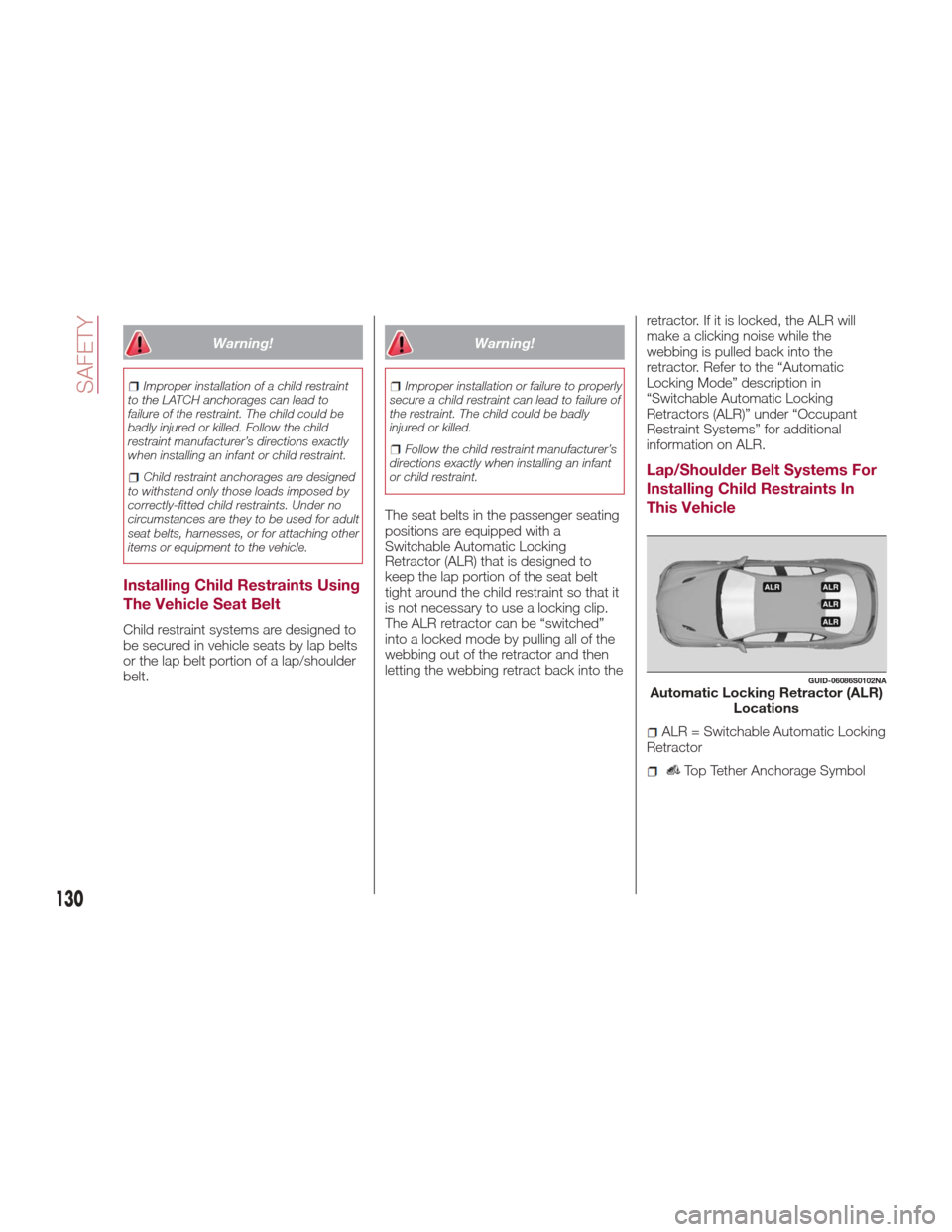
Lap/Shoulder Belt Systems For
Installing Child Restraints In
This Vehicle
GUID-06086S0102NAAutomatic Locking Retractor (ALR)
Locations
ALR = Switchable Automatic Locking
Retractor
Top Tether Anchorage Symbol
130
SAFETY