warning Alfa Romeo Giulia 2018 User Guide
[x] Cancel search | Manufacturer: ALFA ROMEO, Model Year: 2018, Model line: Giulia, Model: Alfa Romeo Giulia 2018Pages: 260, PDF Size: 6 MB
Page 23 of 260
Warning!
Do not leave children or animals inside
parked vehicles in hot weather. Interior heat
build-up may cause serious injury or death.
For personal security and safety in the
event of a collision, lock the vehicle doors as
you drive as well as when you park and leave
the vehicle.
Before exiting a vehicle, always shift the
automatic transmission into PARK, apply
the parking brake, turn the engine OFF,
remove the key fob from the vehicle and
lock your vehicle.
Never leave children alone in a vehicle, or
with access to an unlocked vehicle.
Allowing children to be in a vehicle
unattended is dangerous for a number of
reasons. A child or others could be seriously
or fatally injured. Children should be warned
not to touch the parking brake, brake pedal
or the gear selector.
Do not leave the key fob in or near the
vehicle, or in a location accessible to children.
A child could operate power windows, other
controls, or move the vehicle.
Caution!
An unlocked vehicle is an invitation. Always
remove the key from the ignition and lock all
of the doors when leaving the vehicle
unattended.
Locking/Unlocking Doors From The
Outside
When locking the doors from the outside
with the doors closed, push the lock
button on the key fob.
The door lock can be activated with all
doors locked and the trunk lid open. When
the lock button on the key fob is pushed,
all locks are activated, including the open
trunk lid. The trunk lid will be locked when
it is closed.
When unlocking the doors from the outside,
push the unlock button on the key fob.
Locking/Unlocking Doors From The
Outside In An Emergency
If
the battery is discharged or the key fob is
inoperable, you can lock or unlock the doors
from the outside by inserting the blade of
the emergency key, found inside the key
fob, into the door handle lock cylinder and
turn the emergency key as follows.
Lock — Turn the emergency key to the
right (clockwise)
Unlock — Turn the emergency key to
the left (counter clockwise)
Passive Entry
The Passive Entry system can identify
the presence of a key fob near the doors
and trunk lid. The system enables the doors and trunk
lid to be locked or unlocked without
pushing any button on the key fob.
The key fob is detected only after the
system recognizes the presence of a
hand on one of the front door handles. If
the detected key fob is valid, the doors
and the trunk lid are unlocked (refer to
the Information and Entertainment
System Owner’s Manual Supplement for
Passive Entry Settings).
Note:
The key fob may not be able to be
detected by the vehicle keyless-go
system if it is located next to a mobile
phone, laptop or other electronic device;
these devices may block the key fob’s
wireless signal and prevent the
keyless-go system from starting the
vehicle.
Grasping the handle of the driver's door
unlocks the driver's side door, or all doors
depending on the mode set using the
Information and Entertainment System
(refer to the Information and
Entertainment System Owner’s Manual
Supplement for Passive Entry Settings).
Note: If wearing gloves, or if it has rained
and the door handle is wet, the activation
sensitivity of the Passive Entry function
may be reduced, resulting in a longer
reaction time.
21
Page 27 of 260
2. Turn the manual release lock cylinder
clockwise for the right door locks or
counterclockwise for the left door locks.
3. Remove the key/screwdriver from the
manual release lock.
Proceed in one of the following ways to
realign the door lock device (only when
the battery charge has been restored):
Push the lock button on the electronic
key
Push the unlock button on the door
panel
Unlock driver’s door lock with the
emergency key
Operate the internal door handle
Note: For the rear doors, if the Child
Safety Locks are engaged, and the
previously described locking procedure is
carried out, operating the internal handle
will not open the door. Instead, it will only
realign the lock release device. To open
the door, the outside handle must be
used. The door central locking/unlocking
buttons are not deactivated when the
emergency lock is engaged.
SEATS
The front seats can be adjusted to ensure
maximum comfort for the occupants.
When adjusting the driver’s seat, keep
the shoulders resting firmly against the
backrest, and the wrists within reach of
the top of the steering wheel. The driver
must also be able to fully press the brake
pedal.
Warning!
It is dangerous to ride in a cargo area,
inside or outside of a vehicle. In a collision,
people riding in these areas are more likely
to be seriously injured or killed.
Do not allow people to ride in any area of
your vehicle that is not equipped with seats
and seat belts. In a collision, people riding in
these areas are more likely to be seriously
injured or killed.
Be sure everyone in your vehicle is in a
seat and using a seat belt properly.
Sparco Racing Seats — If Equipped
Forward/Rearward Adjustment
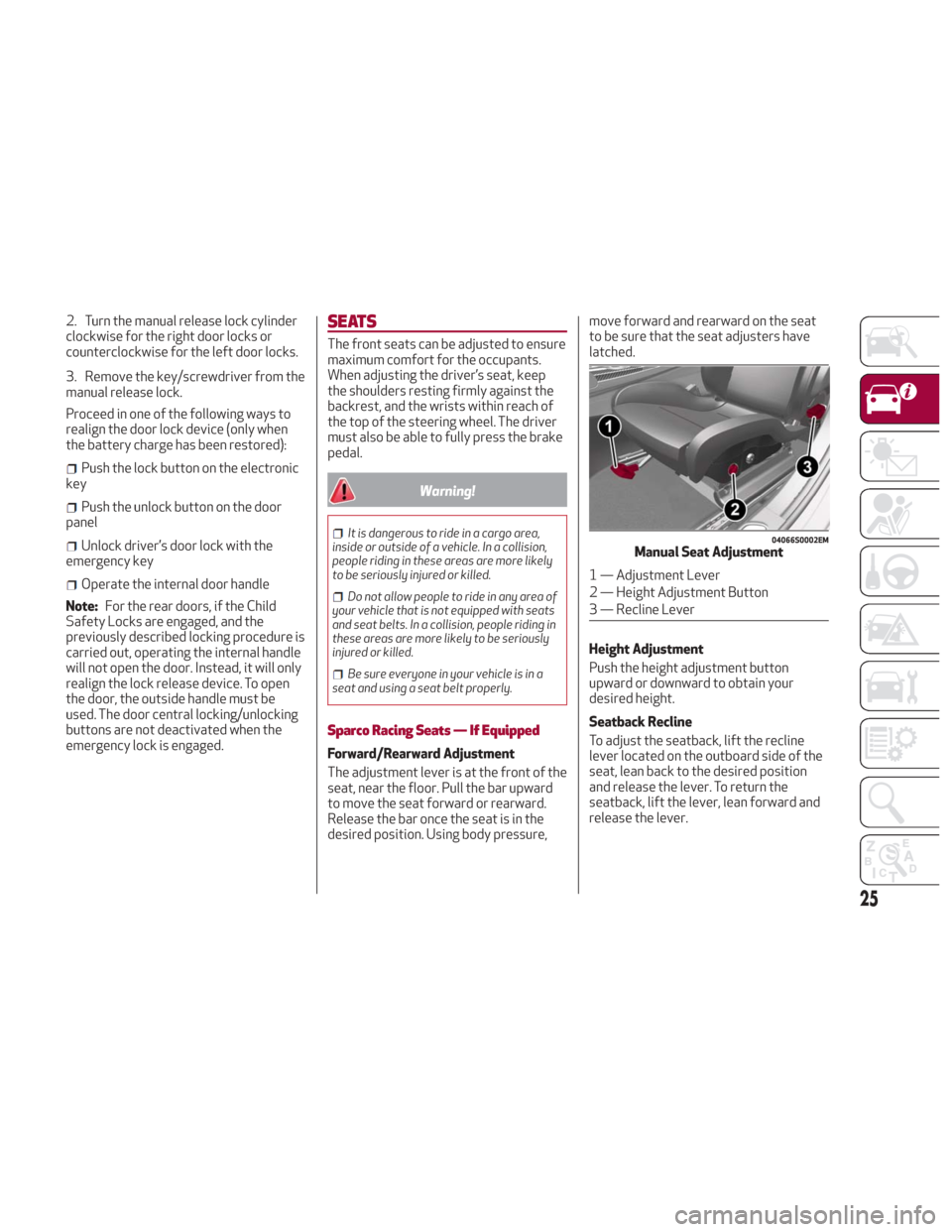
The adjustment lever is at the front of the
seat, near the floor. Pull the bar upward
to move the seat forward or rearward.
Release the bar once the seat is in the
desired position. Using body pressure, move forward and rearward on the seat
to be sure that the seat adjusters have
latched.
Height Adjustment
Push the height adjustment button
upward or downward to obtain your
desired height.
Seatback Recline
To adjust the seatback, lift the recline
lever located on the outboard side of the
seat, lean back to the desired position
and release the lever. To return the
seatback, lift the lever, lean forward and
release the lever.
04066S0002EMManual Seat Adjustment
1 — Adjustment Lever
2 — Height Adjustment Button
3 — Recline Lever
25
Page 29 of 260
Driver Memory Seat
Storing and recalling can be done with the
ignition in the ON mode, vehicle speed at
0 mph (0 km/h), and the driver’s side door
closed, or for three minutes after having
opened the driver's side door. An audible
chime is heard to confirm a memory
profile is set or recalled. To set a memory
profile, first adjust your seat (and power
mirror position if desired) until you are in
the desired position. Then, push the
memory button you want to assign the
set position to for 1.5 seconds. When a
new seat position is memorized, the
previously memorized position on the
same button is automatically
overwritten. Recalling a memorized
position can also be done for
approximately three minutes after the
doors are opened and for approximately
one minute after the engine is stopped.
To recall a memorized position, push the
assigned button briefly.
Warning!
Adjusting a seat while driving may be
dangerous. Moving a seat while driving
could result in loss of control which could
cause a collision and serious injury or death.
Seats should be adjusted before fastening
the seat belts and while the vehicle is parked.
Serious injury or death could result from a
poorly adjusted seat belt.
Do not ride with the seatback reclined so
that the shoulder belt is no longer resting
against your chest. In a collision you could
slide under the seat belt, which could result
in serious injury or death.
Heated Seats — If Equipped
Note: If your vehicle is equipped with
Sparco Racing Seats, they will not be
equipped with the heated seat feature.
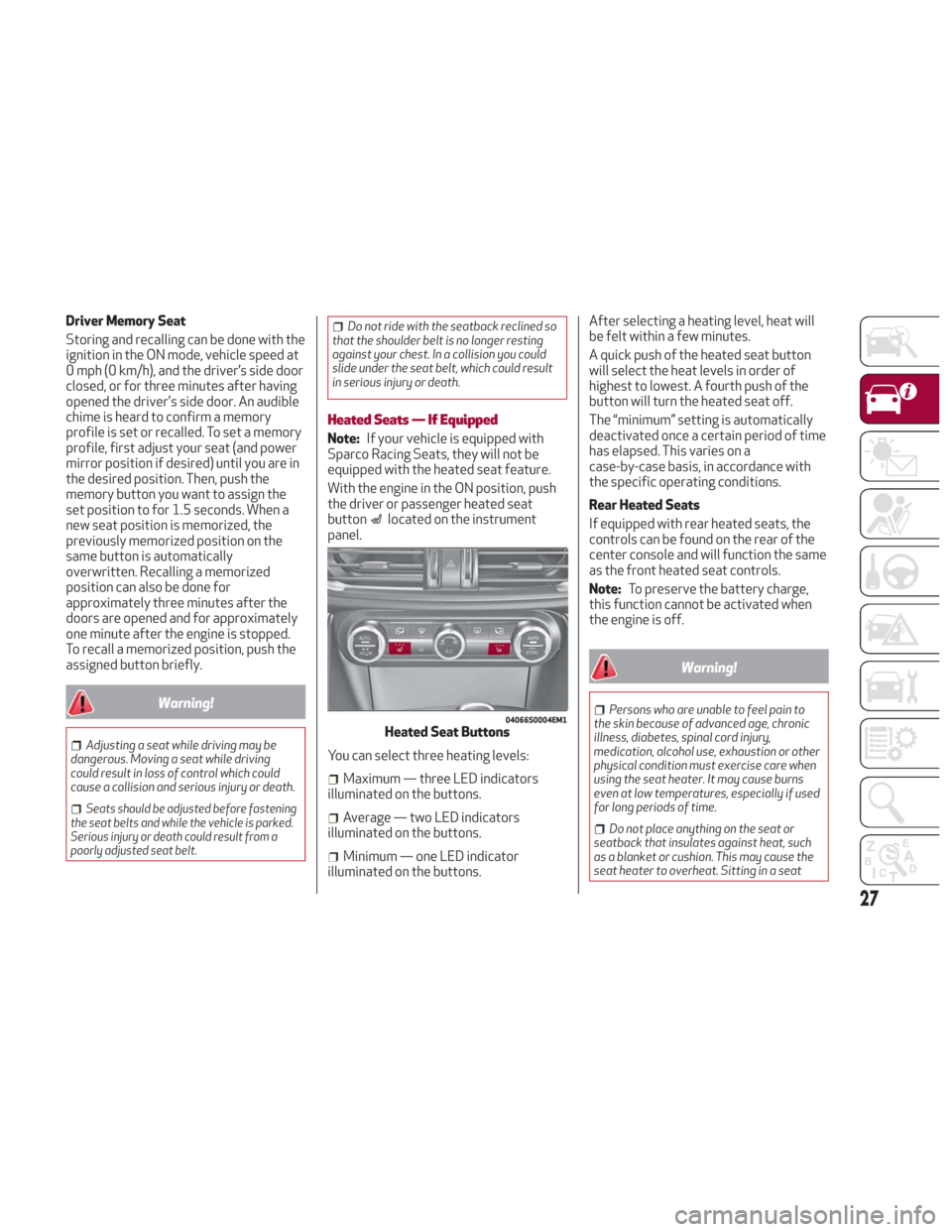
With the engine in the ON position, push
the driver or passenger heated seat
button
located on the instrument
panel.
You can select three heating levels:
Maximum — three LED indicators
illuminated on the buttons.
Average — two LED indicators
illuminated on the buttons.
Minimum — one LED indicator
illuminated on the buttons. After selecting a heating level, heat will
be felt within a few minutes.
A quick push of the heated seat button
will select the heat levels in order of
highest to lowest. A fourth push of the
button will turn the heated seat off.
The “minimum” setting is automatically
deactivated once a certain period of time
has elapsed. This varies on a
case-by-case basis, in accordance with
the specific operating conditions.
Rear Heated Seats
If equipped with rear heated seats, the
controls can be found on the rear of the
center console and will function the same
as the front heated seat controls.
Note:
To preserve the battery charge,
this function cannot be activated when
the engine is off.
Warning!
Persons who are unable to feel pain to
the skin because of advanced age, chronic
illness, diabetes, spinal cord injury,
medication, alcohol use, exhaustion or other
physical condition must exercise care when
using the seat heater. It may cause burns
even at low temperatures, especially if used
for long periods of time.
Do not place anything on the seat or
seatback that insulates against heat, such
as a blanket or cushion. This may cause the
seat heater to overheat. Sitting in a seat
04066S0004EM1Heated Seat Buttons
27
Page 30 of 260
that has been overheated could cause
serious burns due to the increased surface
temperature of the seat.
Rear Seats
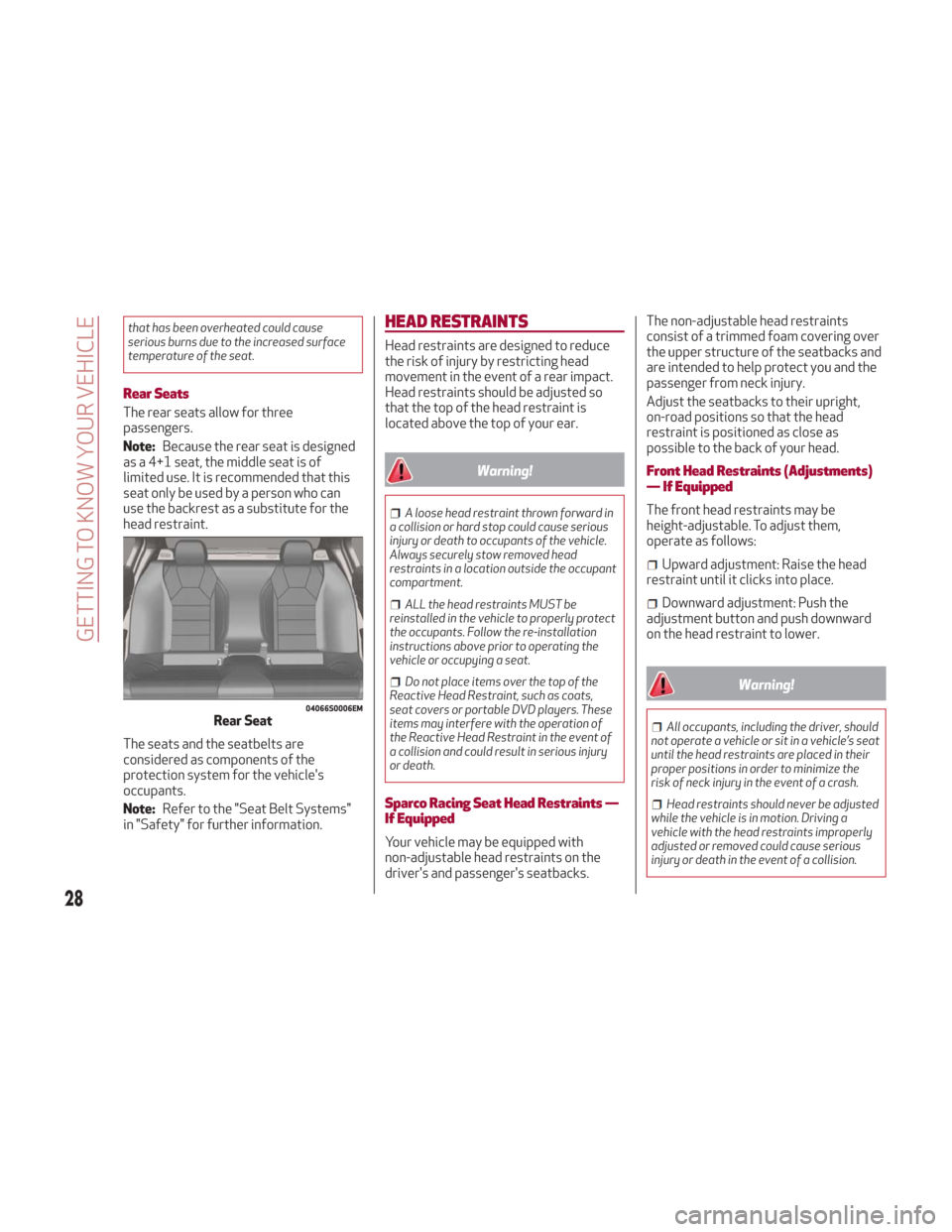
The rear seats allow for three
passengers.
Note:Because the rear seat is designed
as a 4+1 seat, the middle seat is of
limited use. It is recommended that this
seat only be used by a person who can
use the backrest as a substitute for the
head restraint.
The seats and the seatbelts are
considered as components of the
protection system for the vehicle's
occupants.
Note: Refer to the "Seat Belt Systems"
in "Safety" for further information.
HEAD RESTRAINTS
Head restraints are designed to reduce
the risk of injury by restricting head
movement in the event of a rear impact.
Head restraints should be adjusted so
that the top of the head restraint is
located above the top of your ear.
Warning!
A loose head restraint thrown forward in
a collision or hard stop could cause serious
injury or death to occupants of the vehicle.
Always securely stow removed head
restraints in a location outside the occupant
compartment.
ALL the head restraints MUST be
reinstalled in the vehicle to properly protect
the occupants. Follow the re-installation
instructions above prior to operating the
vehicle or occupying a seat.
Do not place items over the top of the
Reactive Head Restraint, such as coats,
seat covers or portable DVD players. These
items may interfere with the operation of
the Reactive Head Restraint in the event of
a collision and could result in serious injury
or death.
Sparco Racing Seat Head Restraints —
If Equipped
Your vehicle may be equipped with
non-adjustable head restraints on the
driver's and passenger's seatbacks. The non-adjustable head restraints
consist of a trimmed foam covering over
the upper structure of the seatbacks and
are intended to help protect you and the
passenger from neck injury.
Adjust the seatbacks to their upright,
on-road positions so that the head
restraint is positioned as close as
possible to the back of your head.
Front Head Restraints (Adjustments)
— If Equipped
The front head restraints may be
height-adjustable. To adjust them,
operate as follows:
Upward adjustment: Raise the head
restraint until it clicks into place.
Downward adjustment: Push the
adjustment button and push downward
on the head restraint to lower.
Warning!
All occupants, including the driver, should
not operate a vehicle or sit in a vehicle’s seat
until the head restraints are placed in their
proper positions in order to minimize the
risk of neck injury in the event of a crash.
Head restraints should never be adjusted
while the vehicle is in motion. Driving a
vehicle with the head restraints improperly
adjusted or removed could cause serious
injury or death in the event of a collision.
04066S0006EMRear Seat
28
GETTING TO KNOW YOUR VEHICLE
Page 31 of 260
Note:To allow maximum visibility for the
driver, if the head restraints are not in
use, lower the head restraint all the way.
Rear Head Restraints (Adjustments)
Warning!
All occupants, including the driver, should
not operate a vehicle or sit in a vehicle’s seat
until the head restraints are placed in their
proper positions in order to minimize the
risk of neck injury in the event of a crash.
Head restraints should never be adjusted
while the vehicle is in motion. Driving a
vehicle with the head restraints improperly
adjusted or removed could cause serious
injury or death in the event of a collision.
The height of the outboard head
restraints can be adjusted. The head
restraint of the center seat, if equipped,
can only be removed. The height cannot
be adjusted.
For upward adjustment, pull up on the
head restraint until it clicks into place.
For downward adjustment, push in the
adjustment button and lower the head
restraint while holding the button to the
desired height. Note:
To allow maximum visibility for the
driver, if the head restraints are not in
use, lower the head restraint all the way.Head Restraints (Removal)
To remove the head restraints, proceed
as follows:
1. Raise the head restraints to their
maximum height.
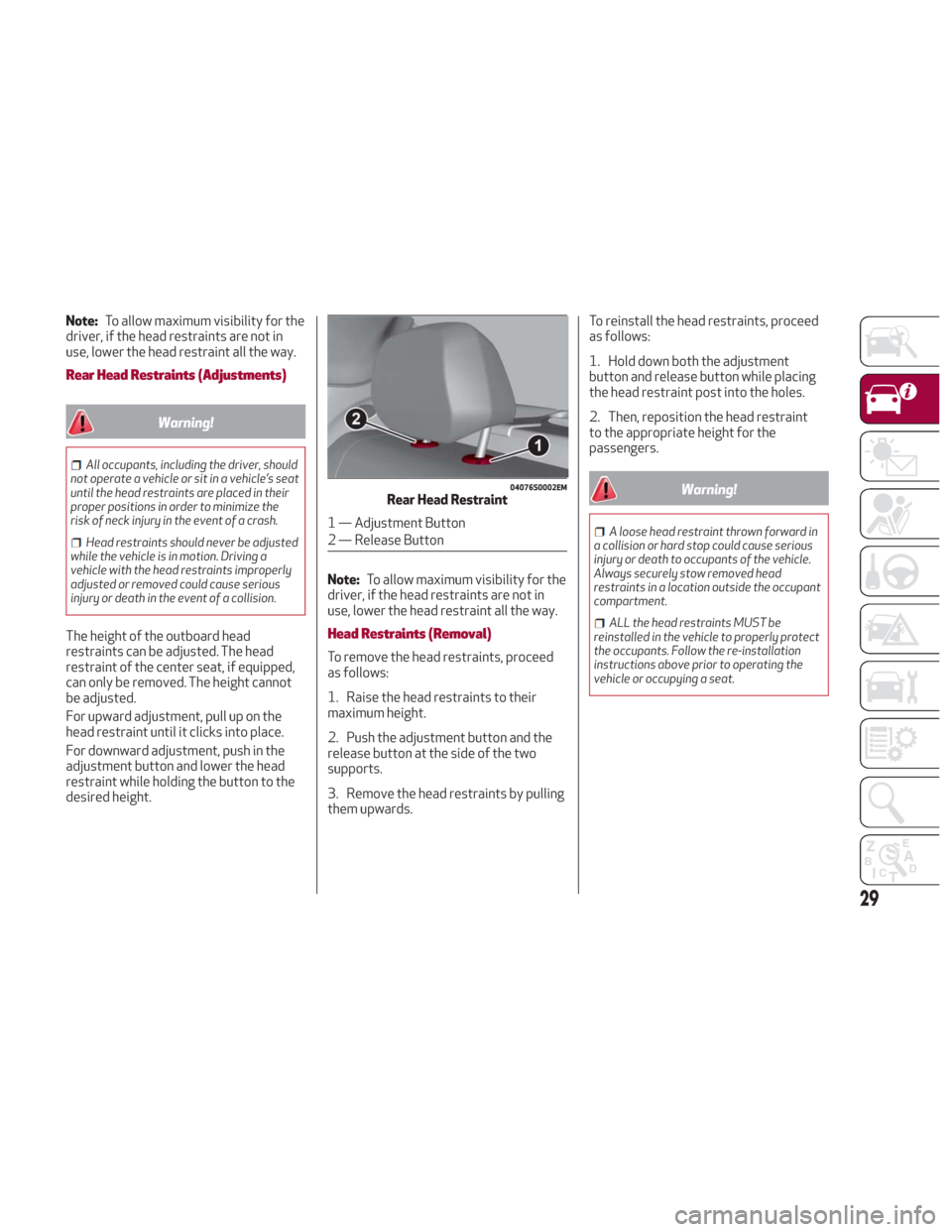
2. Push the adjustment button and the
release button at the side of the two
supports.
3. Remove the head restraints by pulling
them upwards. To reinstall the head restraints, proceed
as follows:
1. Hold down both the adjustment
button and release button while placing
the head restraint post into the holes.
2. Then, reposition the head restraint
to the appropriate height for the
passengers.
Warning!
A loose head restraint thrown forward in
a collision or hard stop could cause serious
injury or death to occupants of the vehicle.
Always securely stow removed head
restraints in a location outside the occupant
compartment.
ALL the head restraints MUST be
reinstalled in the vehicle to properly protect
the occupants. Follow the re-installation
instructions above prior to operating the
vehicle or occupying a seat.
04076S0002EMRear Head Restraint
1 — Adjustment Button
2 — Release Button
29
Page 32 of 260
STEERING WHEEL
Adjustments
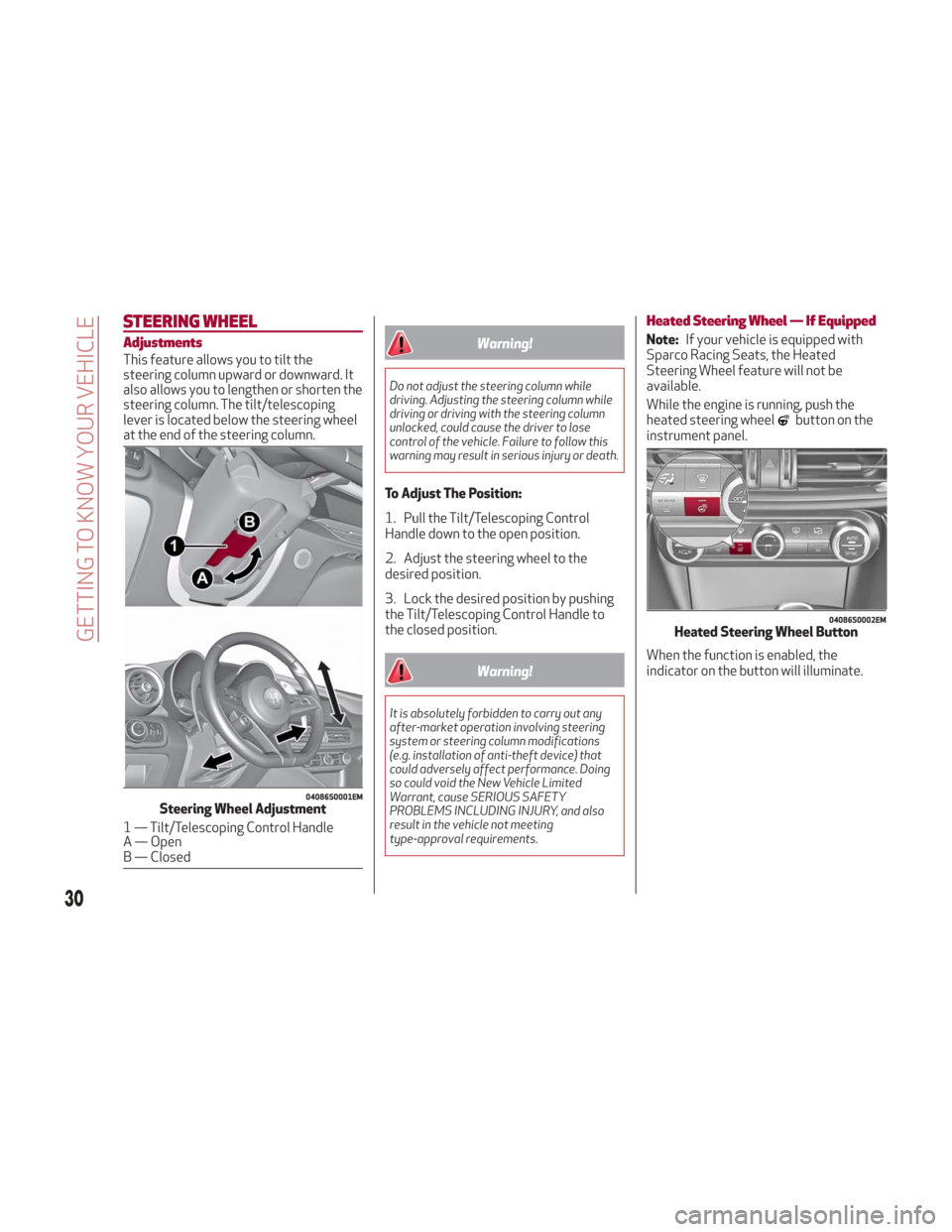
This feature allows you to tilt the
steering column upward or downward. It
also allows you to lengthen or shorten the
steering column. The tilt/telescoping
lever is located below the steering wheel
at the end of the steering column.
Warning!
Do not adjust the steering column while
driving. Adjusting the steering column while
driving or driving with the steering column
unlocked, could cause the driver to lose
control of the vehicle. Failure to follow this
warning may result in serious injury or death.
To Adjust The Position:
1. Pull the Tilt/Telescoping Control
Handle down to the open position.
2. Adjust the steering wheel to the
desired position.
3. Lock the desired position by pushing
the Tilt/Telescoping Control Handle to
the closed position.
Warning!
It is absolutely forbidden to carry out any
after-market operation involving steering
system or steering column modifications
(e.g. installation of anti-theft device) that
could adversely affect performance. Doing
so could void the New Vehicle Limited
Warrant, cause SERIOUS SAFETY
PROBLEMS INCLUDING INJURY, and also
result in the vehicle not meeting
type-approval requirements.
Heated Steering Wheel — If Equipped
Note:If your vehicle is equipped with
Sparco Racing Seats, the Heated
Steering Wheel feature will not be
available.
While the engine is running, push the
heated steering wheel
button on the
instrument panel.
When the function is enabled, the
indicator on the button will illuminate.
04086S0001EMSteering Wheel Adjustment
1 — Tilt/Telescoping Control Handle
A — Open
B — Closed
04086S0002EMHeated Steering Wheel Button
30
GETTING TO KNOW YOUR VEHICLE
Page 33 of 260
Warning!
Persons who are unable to feel pain to the
skin because of advanced age, chronic
illness, diabetes, spinal cord injury,
medication, alcohol use, exhaustion, or other
physical conditions must exercise care when
using the steering wheel heater. It may
cause burns even at low temperatures,
especially if used for long periods.
Do not place anything on the steering
wheel that insulates against heat, such as a
blanket or steering wheel covers of any type
and material. This may cause the steering
wheel heater to overheat.
MIRRORS
Electrochromic Mirror
This mirror automatically adjusts for
headlight glare from vehicles behind you.
The electrochromic mirror has a power
button to activate/deactivate the
automatic dimming/anti-glaring function.
When the vehicle is in REVERSE, the
automatic dimming feature is
deactivated.
Outside Power Mirrors
Power Adjustment
The power mirrors can be adjusted with
the ignition ON.
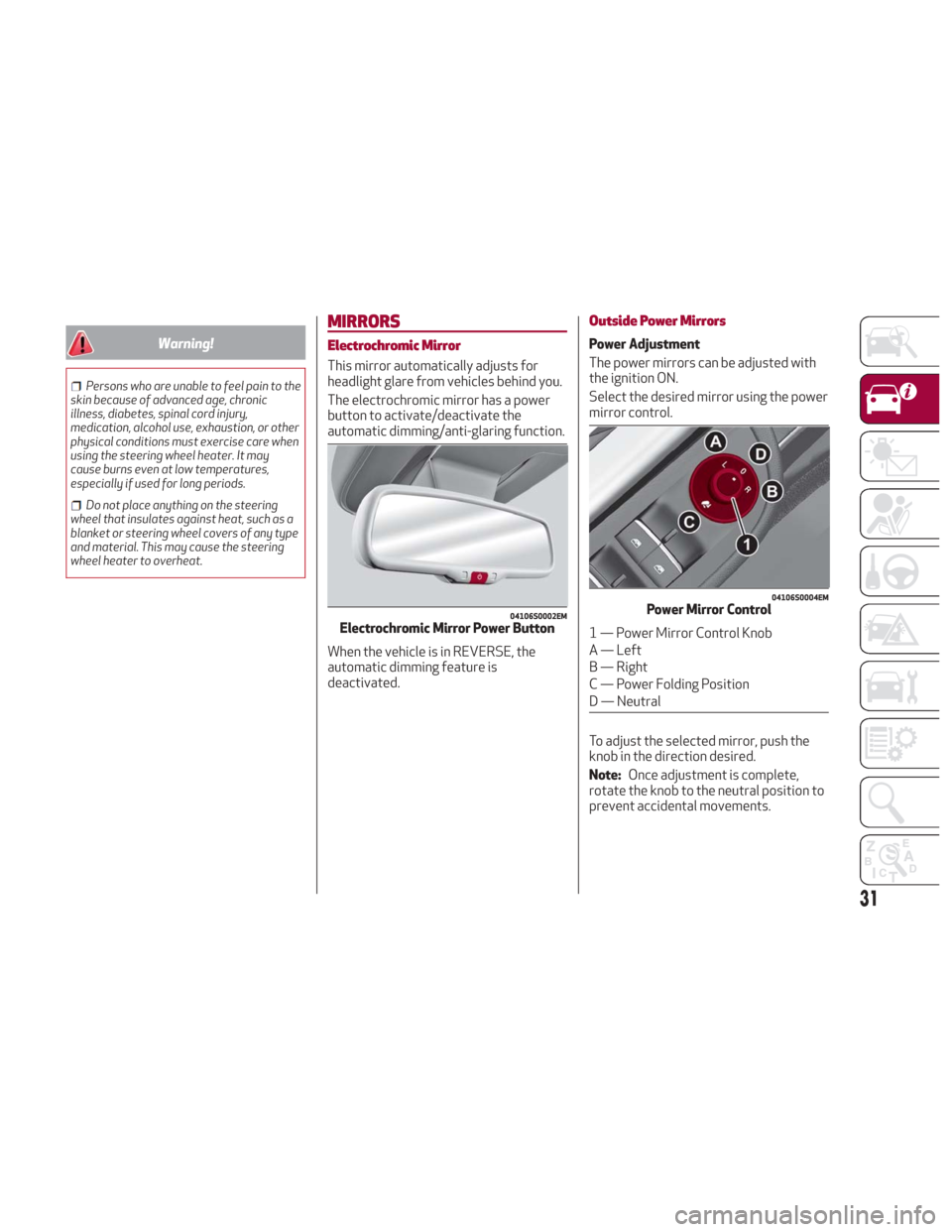
Select the desired mirror using the power
mirror control.
To adjust the selected mirror, push the
knob in the direction desired.
Note: Once adjustment is complete,
rotate the knob to the neutral position to
prevent accidental movements.
04106S0002EMElectrochromic Mirror Power Button
04106S0004EMPower Mirror Control
1 — Power Mirror Control Knob
A — Left
B — Right
C — Power Folding Position
D — Neutral
31
Page 34 of 260
Power Folding
With the power mirror control knob in the
neutral position, move it to the power
folding position. Move the knob again to
return the mirrors to the driving position.
If the power mirror control knob is moved
again during door mirror folding (from
closed to open position and vice versa),
the movement direction is reversed.
Automatic Activation
Activating the central door locking
system from outside the vehicle
automatically folds the mirrors. The
mirrors return to the driving position
when the vehicle is then unlocked.
If the door mirrors were folded using the
power mirror control knob, they can only
be returned to the driving position by
rotating the knob again.
Note:The power folding operation can
be enabled only when the vehicle speed is
lower than 31 mph (50 km/h). They can
only be manually controlled up to that
speed.
Automatic Dimming Mirrors
Like the electrochromic mirror, an
automatic dimming feature is also
available on the outside rear view mirrors
to prevent glare. The automatic dimming
button is the same for all rear view mirrors.
Warning!
Vehicles and other objects seen in an outside
convex mirror will look smaller and farther
away than they really are. Relying too much
on side convex mirrors could cause you to
collide with another vehicle or other object.
Use your inside mirror when judging the size
or distance of a vehicle seen in a side convex
mirror.
Heated Mirrors
Push the rear defrostbutton in the
climate controls to activate the heated
mirrors.
EXTERIOR LIGHTS
Headlight Switch
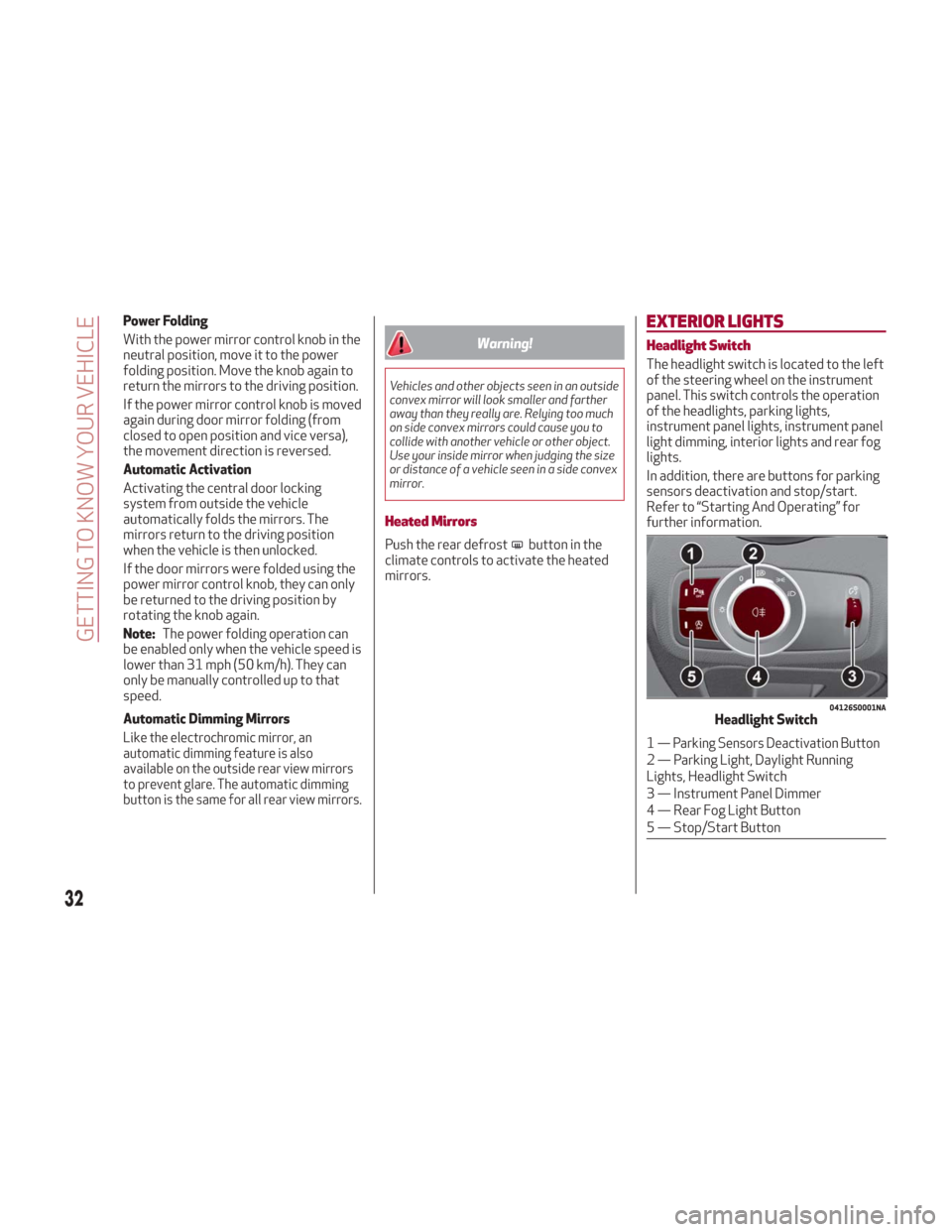
The headlight switch is located to the left
of the steering wheel on the instrument
panel. This switch controls the operation
of the headlights, parking lights,
instrument panel lights, instrument panel
light dimming, interior lights and rear fog
lights.
In addition, there are buttons for parking
sensors deactivation and stop/start.
Refer to “Starting And Operating” for
further information.
04126S0001NAHeadlight Switch
1— Parking Sensors Deactivation Button
2 — Parking Light, Daylight Running
Lights, Headlight Switch
3 — Instrument Panel Dimmer
4 — Rear Fog Light Button
5 — Stop/Start Button
32
GETTING TO KNOW YOUR VEHICLE
Page 35 of 260
The exterior lights can be activated only
when the ignition is in the ON position,
except for the parking lights. Refer to
"Parking Lights" in this section for more
information.
The instrument panel and the various
controls on the dashboard will be
illuminated when the exterior lights are
turned on.
Automatic Headlights
This system automatically turns the
headlights on or off according to ambient
light levels.
Function Activation
From the O (off) position, turn the light
switch to the
(AUTO) position.
Note: The function can only operate with
the ignition position cycled to ON.
Function Deactivation
To deactivate the function, turn the light
switch to a position other than the
(AUTO) position.
Daytime Running Lights (DRL)
With the ignition cycled to ON, and the
light switch turned to theposition, if
the dusk sensor detects sufficient
external light, the Daytime Running
Lights will turn on automatically while the
other lights remain off.
If the turn signals are operated, the
brightness of the corresponding Daytime
Running Lights will be decreased as long
as the turn signals are on. The DRL can be activated/deactivated
from the Information and Entertainment
System, by selecting the following
functions in sequence on the main MENU:
1. “Settings.”
2. “Lights.”
3. “Daytime Running Lights.”
Note:
The Daytime Running Lights
cannot be deactivated in Canadian
markets.
Rear Fog Light
The rear fog light switch is integrated
with the headlight switch.
Push the
button to turn the rear fog
lights on/off.
The rear fog lights turn on only when the
headlights or parking lights are turned on.
The lights can be turned off by pushing
the
button again or by turning the
headlight switch to the O (off) position.
When the engine is stopped with the rear
fog lights on, they will remain off the next
time the engine is started.
Parking Lights
With the ignition in the STOP position,
turn the headlight switch to the
position to turn the parking lights on.
All of the parking lights will turn on for
eight minutes, and opening the door
activates an audible warning. To leave only the lights on one side
(right/left) illuminated, you must move
the multifunction lever (located on the
left side of the steering wheel) to the side
that you want to remain on. With the
parking lights on, the
warning light on
the instrument panel will illuminate.
Note: Cycling the ignition to ON turns off
the parking lights, which were only
illuminated on one side.
Headlight Off Delay
The “Headlight Off Delay” function delays
the turning off of the headlights for a set
time when the ignition is cycled OFF.
The function can be activated from the
Information and Entertainment System
by selecting the following functions in
sequence on the main menu:
1. “Settings.”
2. “Lights.”
3. “Headlight Off Delay.”
The side lights and the headlights stay on
for a time that can be set between 30,
60, and 90 seconds.
Function Activation
With the headlights on, cycle the ignition
to STOP, the timer will then start.
Note: To activate this function, the
headlights must be deactivated within
two minutes after the ignition has been
cycled to STOP.
33
Page 36 of 260
Function Deactivation
This function is deactivated by turning on
the headlights, the side lights, or by
cycling the ignition to ON.
Adaptive Frontlight System
(AFS Function) — If Equipped
This is a system combined with Xenon
headlights (Bi-Xenon 35 W headlamp if
equipped) which directs the headlights
horizontally, and continuously and
automatically adapts them to the driving
conditions around bends or when
cornering.
The system directs the headlights to light
up the road in the best way, taking into
account the speed of the vehicle and the
bend or corner angle, as well as the speed
of steering.
The adaptive lights are automatically
activated when the vehicle is started.
High Beam Headlights
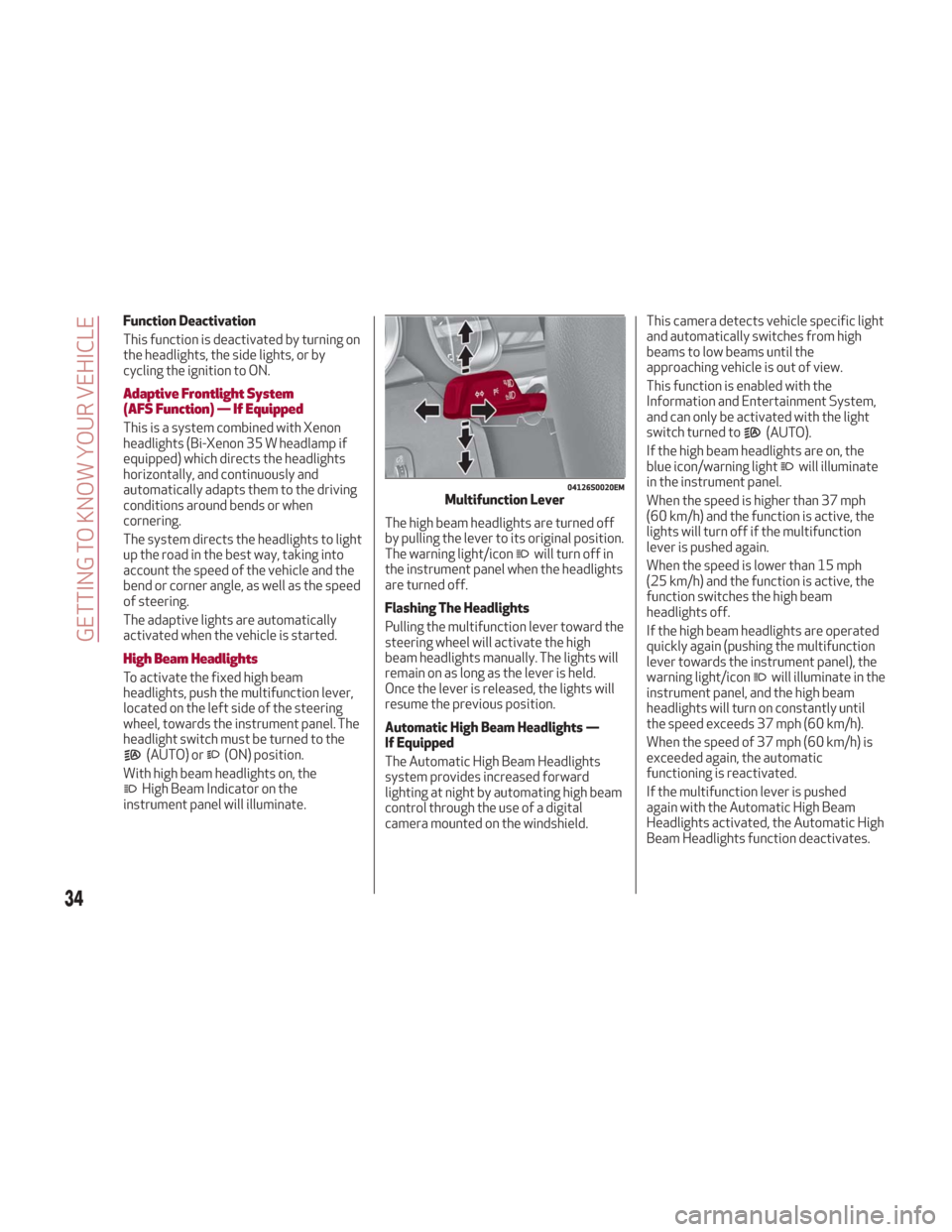
To activate the fixed high beam
headlights, push the multifunction lever,
located on the left side of the steering
wheel, towards the instrument panel. The
headlight switch must be turned to the
(AUTO) or(ON) position.
With high beam headlights on, the
High Beam Indicator on the
instrument panel will illuminate. The high beam headlights are turned off
by pulling the lever to its original position.
The warning light/icon
will turn off in
the instrument panel when the headlights
are turned off.
Flashing The Headlights
Pulling the multifunction lever toward the
steering wheel will activate the high
beam headlights manually. The lights will
remain on as long as the lever is held.
Once the lever is released, the lights will
resume the previous position.
Automatic High Beam Headlights —
If Equipped
The Automatic High Beam Headlights
system provides increased forward
lighting at night by automating high beam
control through the use of a digital
camera mounted on the windshield. This camera detects vehicle specific light
and automatically switches from high
beams to low beams until the
approaching vehicle is out of view.
This function is enabled with the
Information and Entertainment System,
and can only be activated with the light
switch turned to
(AUTO).
If the high beam headlights are on, the
blue icon/warning light
will illuminate
in the instrument panel.
When the speed is higher than 37 mph
(60 km/h) and the function is active, the
lights will turn off if the multifunction
lever is pushed again.
When the speed is lower than 15 mph
(25 km/h) and the function is active, the
function switches the high beam
headlights off.
If the high beam headlights are operated
quickly again (pushing the multifunction
lever towards the instrument panel), the
warning light/icon
will illuminate in the
instrument panel, and the high beam
headlights will turn on constantly until
the speed exceeds 37 mph (60 km/h).
When the speed of 37 mph (60 km/h) is
exceeded again, the automatic
functioning is reactivated.
If the multifunction lever is pushed
again with the Automatic High Beam
Headlights activated, the Automatic High
Beam Headlights function deactivates.
04126S0020EMMultifunction Lever
34
GETTING TO KNOW YOUR VEHICLE