warning Alfa Romeo Giulia 2018 Owner's Guide
[x] Cancel search | Manufacturer: ALFA ROMEO, Model Year: 2018, Model line: Giulia, Model: Alfa Romeo Giulia 2018Pages: 260, PDF Size: 6 MB
Page 41 of 260
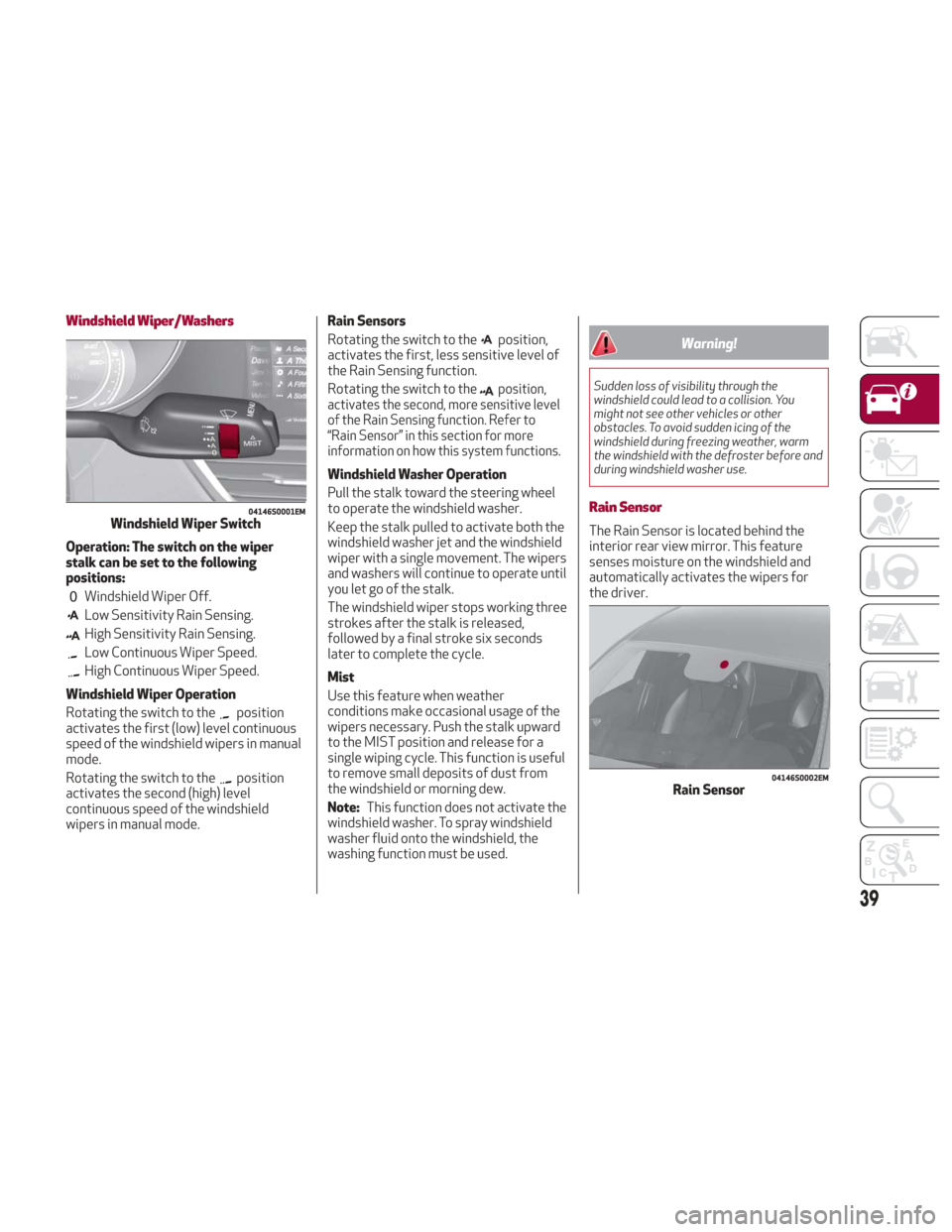
Windshield Wiper/Washers
Operation: The switch on the wiper
stalk can be set to the following
positions:
Windshield Wiper Off.
Low Sensitivity Rain Sensing.
High Sensitivity Rain Sensing.
Low Continuous Wiper Speed.
High Continuous Wiper Speed.
Windshield Wiper Operation
Rotating the switch to the
position
activates the first (low) level continuous
speed of the windshield wipers in manual
mode.
Rotating the switch to the
position
activates the second (high) level
continuous speed of the windshield
wipers in manual mode. Rain Sensors
Rotating the switch to the
position,
activates the first, less sensitive level of
the Rain Sensing function.
Rotating the switch to the
position,
activates the second, more sensitive level
of the Rain Sensing function. Refer to
“Rain Sensor” in this section for more
information on how this system functions.
Windshield Washer Operation
Pull the stalk toward the steering wheel
to operate the windshield washer.
Keep the stalk pulled to activate both the
windshield washer jet and the windshield
wiper with a single movement. The wipers
and washers will continue to operate until
you let go of the stalk.
The windshield wiper stops working three
strokes after the stalk is released,
followed by a final stroke six seconds
later to complete the cycle.
Mist
Use this feature when weather
conditions make occasional usage of the
wipers necessary. Push the stalk upward
to the MIST position and release for a
single wiping cycle. This function is useful
to remove small deposits of dust from
the windshield or morning dew.
Note: This function does not activate the
windshield washer. To spray windshield
washer fluid onto the windshield, the
washing function must be used.
Warning!
Sudden loss of visibility through the
windshield could lead to a collision. You
might not see other vehicles or other
obstacles. To avoid sudden icing of the
windshield during freezing weather, warm
the windshield with the defroster before and
during windshield washer use.
Rain Sensor
The Rain Sensor is located behind the
interior rear view mirror. This feature
senses moisture on the windshield and
automatically activates the wipers for
the driver.
04146S0001EMWindshield Wiper Switch
04146S0002EMRain Sensor
39
Page 51 of 260
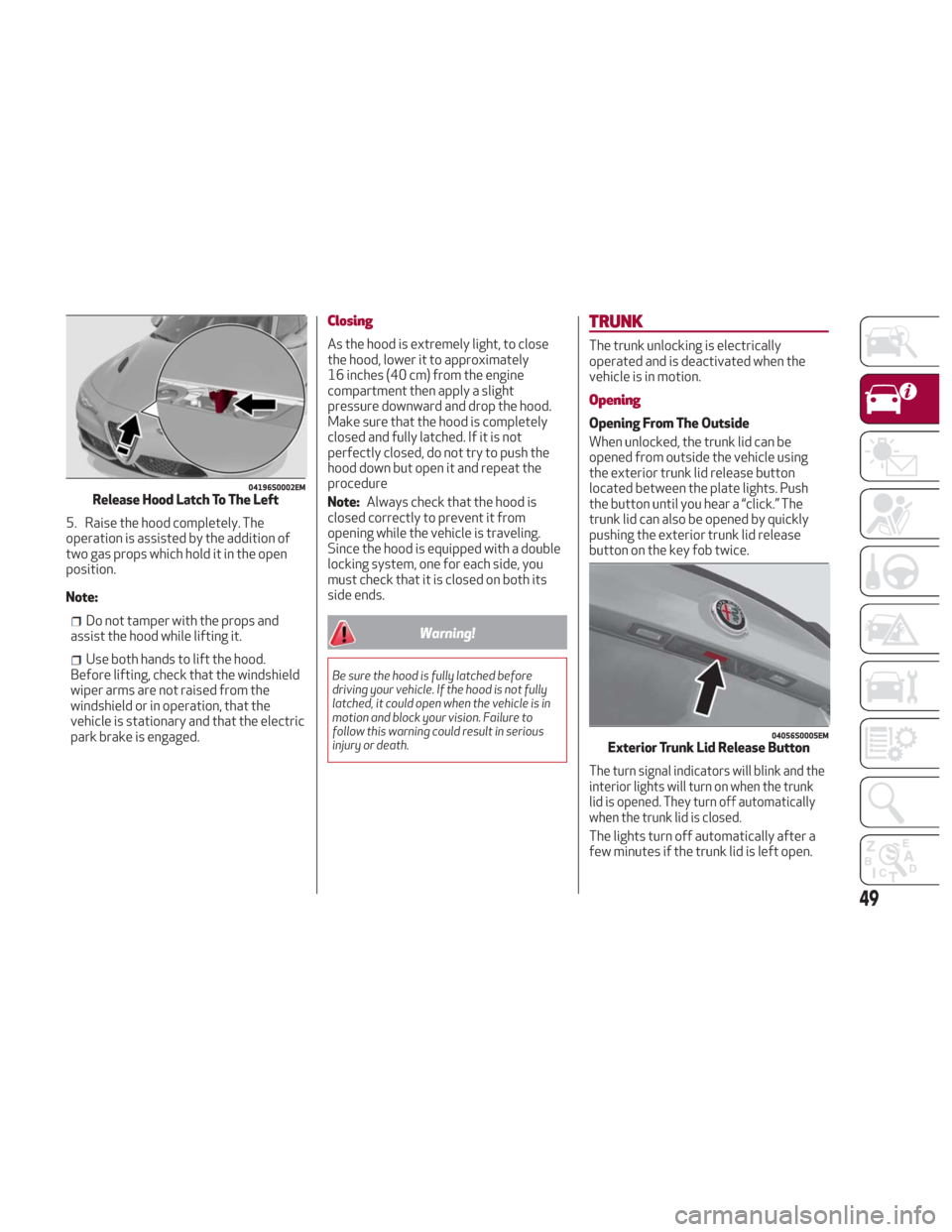
5. Raise the hood completely. The
operation is assisted by the addition of
two gas props which hold it in the open
position.
Note:
Do not tamper with the props and
assist the hood while lifting it.
Use both hands to lift the hood.
Before lifting, check that the windshield
wiper arms are not raised from the
windshield or in operation, that the
vehicle is stationary and that the electric
park brake is engaged.
Closing
As the hood is extremely light, to close
the hood, lower it to approximately
16 inches (40 cm) from the engine
compartment then apply a slight
pressure downward and drop the hood.
Make sure that the hood is completely
closed and fully latched. If it is not
perfectly closed, do not try to push the
hood down but open it and repeat the
procedure
Note: Always check that the hood is
closed correctly to prevent it from
opening while the vehicle is traveling.
Since the hood is equipped with a double
locking system, one for each side, you
must check that it is closed on both its
side ends.
Warning!
Be sure the hood is fully latched before
driving your vehicle. If the hood is not fully
latched, it could open when the vehicle is in
motion and block your vision. Failure to
follow this warning could result in serious
injury or death.
TRUNK
The trunk unlocking is electrically
operated and is deactivated when the
vehicle is in motion.
Opening
Opening From The Outside
When unlocked, the trunk lid can be
opened from outside the vehicle using
the exterior trunk lid release button
located between the plate lights. Push
the button until you hear a “click.” The
trunk lid can also be opened by quickly
pushing the exterior trunk lid release
button on the key fob twice.
The turn signal indicators will blink and the
interior lights will turn on when the trunk
lid is opened. They turn off automatically
when the trunk lid is closed.
The lights turn off automatically after a
few minutes if the trunk lid is left open.
04196S0002EMRelease Hood Latch To The Left
04056S0005EMExterior Trunk Lid Release Button
49
Page 54 of 260
Homelink
Description
Homelink is a fixed system installed on
the vehicle. It can sync up to three
different devices that activate garage
doors, gates, lighting systems, and home
or office alarm systems.
Programming
Warning!
Vehicle exhaust contains carbon
monoxide, a dangerous gas. Do not run your
vehicle in the garage while programming the
transceiver. Exhaust gas can cause serious
injury or death.
Your motorized door or gate will open
and close while you are programming the
universal transceiver. Do not program the
transceiver if people, pets or other objects
are in the path of the door or gate. Only use
this transceiver with a garage door opener
that has a “stop and reverse” feature as
required by Federal safety standards. This
includes most garage door opener models
manufactured after 1982. Do not use a
garage door opener without these safety
features. Call toll-free 1-800-355-3515 or,
on the Internet at HomeLink.com for safety
information or assistance.
Note: Without starting the engine,
activate the handbrake and place the
ignition in the ON position. The following operation will delete the
manufacture’s standard codes and does
not need to be repeated during the
subsequent button programming:
Push and hold the outer buttons
(1 and 3). After about ten seconds, the
lighted indicators will start to flash.
Release both buttons.
Note: Follow the steps below to begin
programming your remote control to one
of the HomeLink buttons:
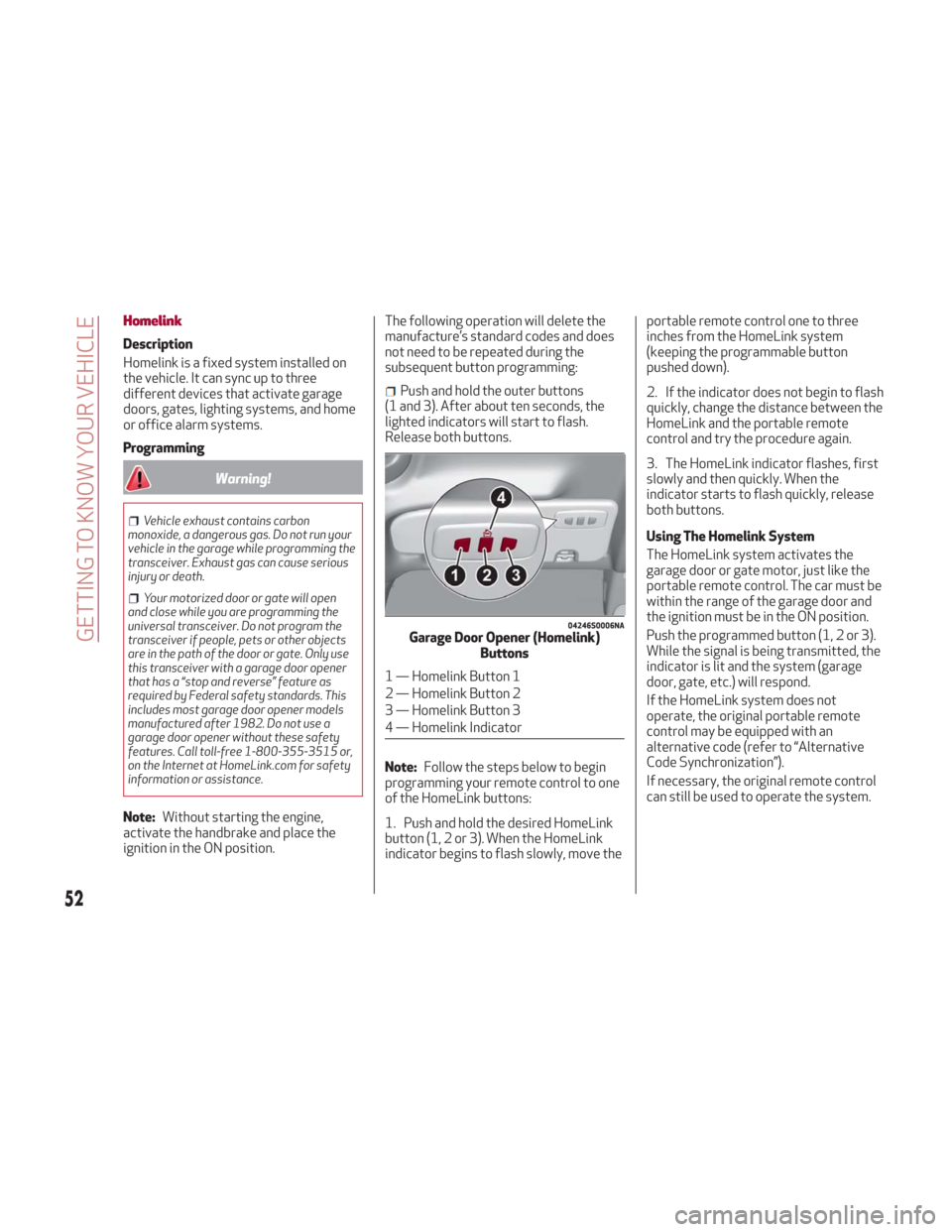
1. Push and hold the desired HomeLink
button (1, 2 or 3). When the HomeLink
indicator begins to flash slowly, move the portable remote control one to three
inches from the HomeLink system
(keeping the programmable button
pushed down).
2. If the indicator does not begin to flash
quickly, change the distance between the
HomeLink and the portable remote
control and try the procedure again.
3. The HomeLink indicator flashes, first
slowly and then quickly. When the
indicator starts to flash quickly, release
both buttons.
Using The Homelink System
The HomeLink system activates the
garage door or gate motor, just like the
portable remote control. The car must be
within the range of the garage door and
the ignition must be in the ON position.
Push the programmed button (1, 2 or 3).
While the signal is being transmitted, the
indicator is lit and the system (garage
door, gate, etc.) will respond.
If the HomeLink system does not
operate, the original portable remote
control may be equipped with an
alternative code (refer to “Alternative
Code Synchronization”).
If necessary, the original remote control
can still be used to operate the system.
04246S0006NAGarage Door Opener (Homelink)
Buttons
1 — Homelink Button 1
2 — Homelink Button 2
3 — Homelink Button 3
4 — Homelink Indicator
52
GETTING TO KNOW YOUR VEHICLE
Page 55 of 260
Alternative Code Synchronization
To check whether the garage door or gate
motor has an alternative code, proceed
as follows:
1. Read the garage door or gate motor
manufacturer manual.
2. The portable remote control seems to
have programmed to the HomeLink
system, but the garage door or gate can
be neither opened or closed.
3. Push the programmed button and
keep it pushed (1, 2 or 3). With an
alternative code system, the indicator
flashes briefly, and then remains off for
two seconds. This sequence is repeated
for 20 seconds.
Warning!
Vehicle exhaust contains carbon
monoxide, a dangerous gas. Do not run your
vehicle in the garage while programming the
transceiver. Exhaust gas can cause serious
injury or death.
Your motorized door or gate will open
and close while you are programming the
universal transceiver. Do not program the
transceiver if people, pets or other objects
are in the path of the door or gate. Only use
this transceiver with a garage door opener
that has a “stop and reverse” feature as
required by Federal safety standards. This
includes most garage door opener models
manufactured after 1982. Do not use a garage door opener without these safety
features. Call toll-free 1-800-355-3515 or,
on the Internet at HomeLink.com for safety
information or assistance.
Note:
To program Homelink using an
Alternative Code, the car must be within
range of the garage door. Activate the
handbrake and turn the ignition to ON,
without starting the engine.
Proceed as follows:
1. Locate the “Learn” or “Train” button on
the garage door or gate motor. The color
and position may vary depending on the
manufacturer (consult the garage door or
gate manual). Push the “Learn” or “Train”
button (this normally activates the
setting warning light).
2. Push the desired HomeLink button
(1, 2 or 3). When the HomeLink indicator
begins to flash slowly, move the portable
remote control one to three inches from
the HomeLink system (keeping the
programmable button pushed down).
3. Within 30 seconds, push the
programmed key (1, 2 or 3) and release it.
Push the programmed button a second
time and release it to conclude the
operation. For some motors, the
operation will probably have to be
repeated a third time to end the setting. The motor should now be capable of
recognizing the signal transmitted by
HomeLink and then open/close the door
or gate.
Programming A Single Key
It is possible to program another
original remote control on an already
programmed HomeLink key by canceling
the previously stored frequency.
Warning!
Vehicle exhaust contains carbon
monoxide, a dangerous gas. Do not run your
vehicle in the garage while programming the
transceiver. Exhaust gas can cause serious
injury or death.
Your motorized door or gate will open and
close while you are programming the
universal transceiver. Do not program the
transceiver if people, pets or other objects
are in the path of the door or gate. Only use
this transceiver with a garage door opener
that has a “stop and reverse” feature as
required by Federal safety standards. This
includes most garage door opener models
manufactured after 1982. Do not use a
garage door opener without these safety
features. Call toll-free 1-800-355-3515 or,
on the Internet at HomeLink.com for safety
information or assistance.
Note: Activate the handbrake and place
the ignition to ON without starting the
engine.
53
Page 56 of 260
Proceed as follows:
1. Push the desired HomeLink button
and keep it pushed (1, 2 or 3). Do not
release the button until the last
operation has been performed.
2. When the HomeLink indicator begins
to flash slowly, move the portable remote
control 1 to 3 inches from the system
(keeping the programmable button
pressed down).
If the indicator does not begin to flash
quickly, change the distance between the
HomeLink and the portable remote
control and try the procedure again.
The HomeLink indicator flashes, first
slowly and then quickly. When the
indicator starts to flash quickly, release
both buttons on the remote control.
The system previously programmed to
HomeLink has now been deleted and the
new system is ready to use. This does not
affect the other two HomeLink buttons in
any way.
Deleting Programmed Keys
It is recommended to delete HomeLink
programming before selling the car.
All three keys are deleted simultaneously.
Proceed as follows:
1. Push and hold the outer buttons
(1 and 3). After about ten seconds, the
indicator will start to flash.
2. Release both keys. Technical Information For After Sales
Service
If you are unable to set up HomeLink
successfully after following the above
instructions, contact After Sales Service
(HomeLink free hotline number
1-800-355-3515 ) with the following
information:
Vehicle make and model, including
manufacturing year and country of
purchase;
Make, model, age and frequency of use
of the original portable remote control
(if known).
General Information
The following regulatory statement
applies to all Radio Frequency (RF)
devices equipped in this vehicle:
This device complies with Part 15 of the
FCC Rules and with Industry Canada
license-exempt RSS standard(s).
Operation is subject to the following two
conditions:
1. This device may not cause harmful
interference, and
2. This device must accept any
interference received, including
interference that may cause undesired
operation.
Note:
Changes or modifications not
expressly approved by the party
responsible for compliance could void the
user’s authority to operate the equipment.
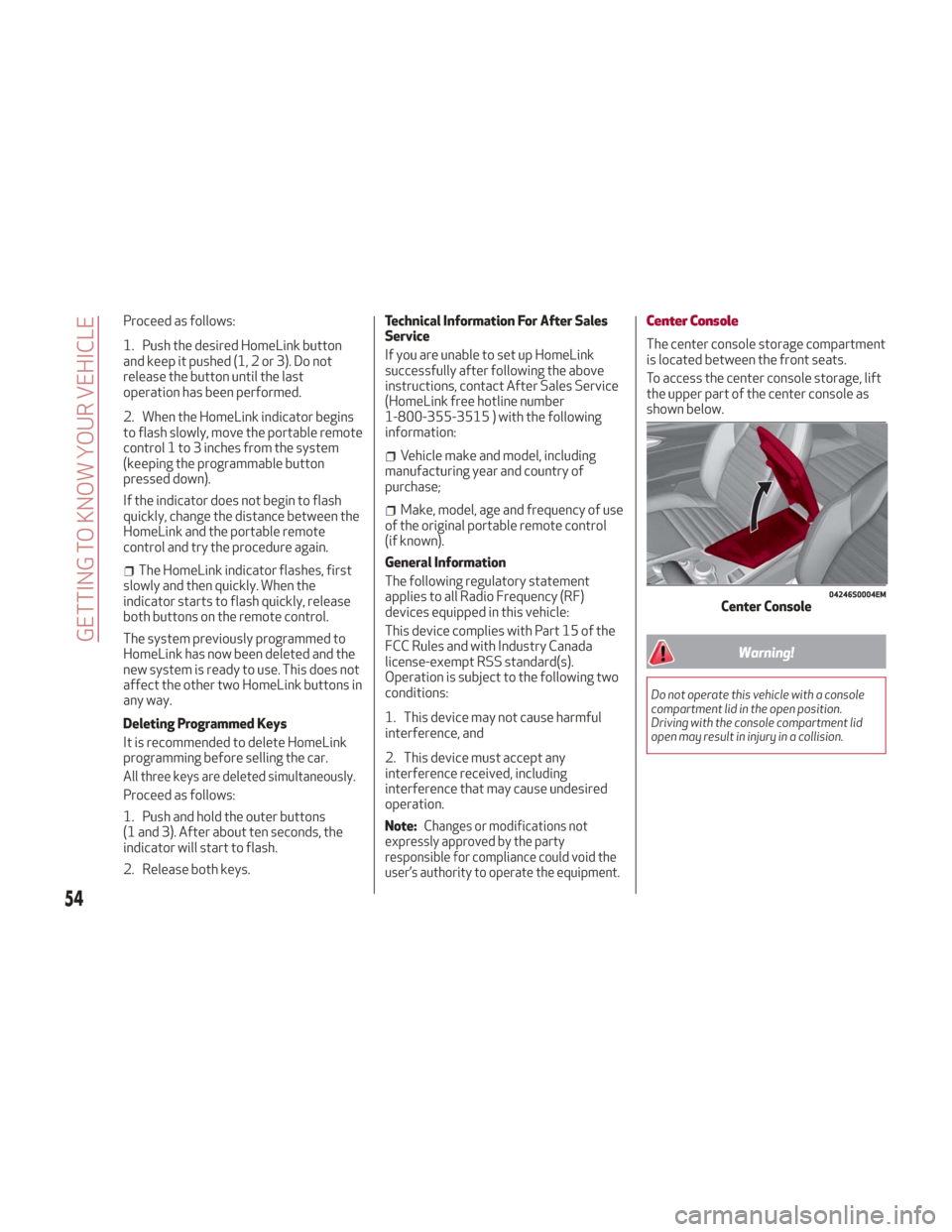
Center Console
The center console storage compartment
is located between the front seats.
To access the center console storage, lift
the upper part of the center console as
shown below.
Warning!
Do not operate this vehicle with a console
compartment lid in the open position.
Driving with the console compartment lid
open may result in injury in a collision.
04246S0004EMCenter Console
54
GETTING TO KNOW YOUR VEHICLE
Page 59 of 260
GETTING TO KNOW YOUR INSTRUMENT PANEL
This section gives you all the information
you need to understand and use
the instrument panel correctly.INSTRUMENT PANEL FEATURES . . .58
INSTRUMENT CLUSTER DISPLAY . .60
WARNING LIGHTS AND MESSAGES
ON THE INSTRUMENT PANEL.....65
ONBOARD DIAGNOSTIC SYSTEM . . .86
EMISSIONS INSPECTION AND
MAINTENANCE PROGRAMS ......86
57
Page 60 of 260
INSTRUMENT PANEL FEATURES
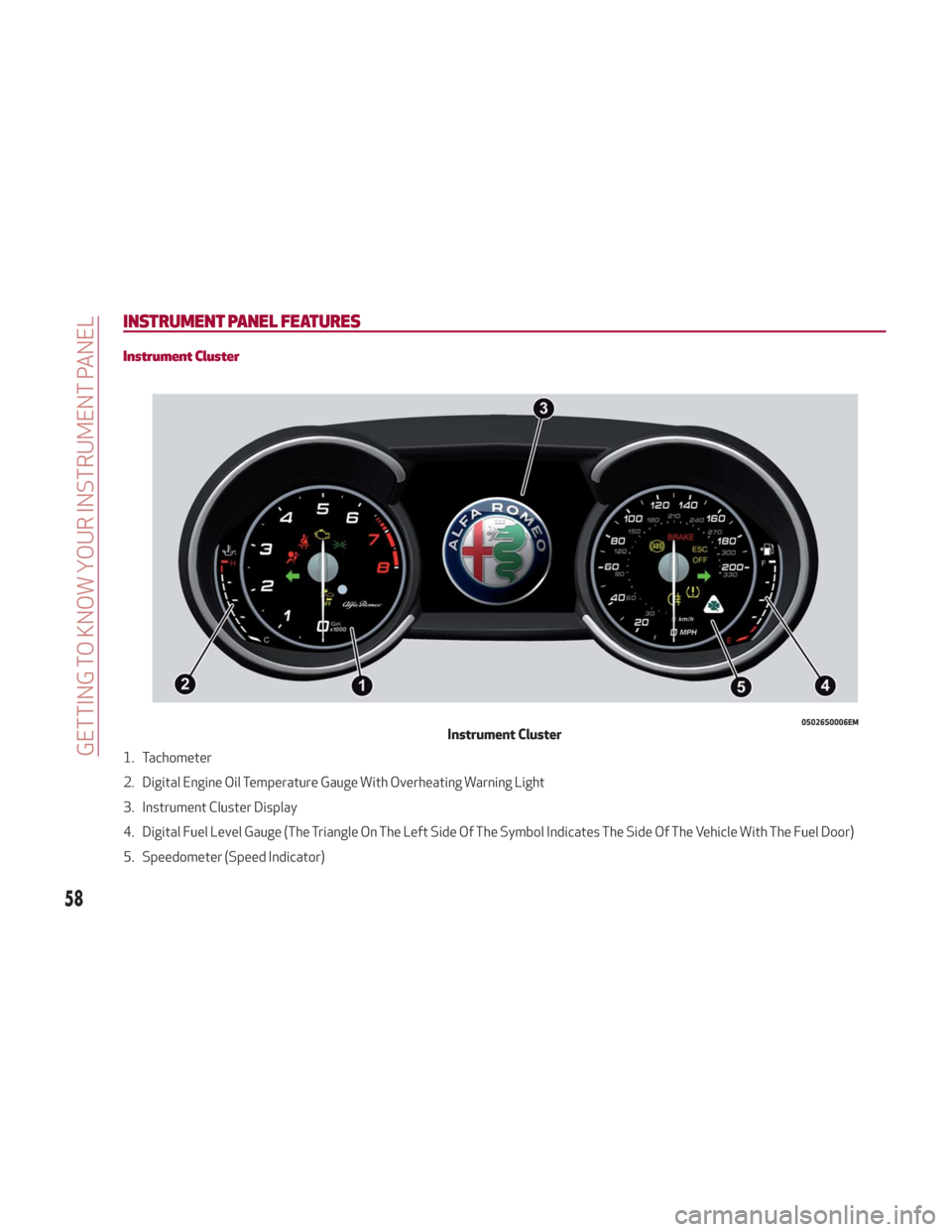
Instrument Cluster
1. Tachometer
2. Digital Engine Oil Temperature Gauge With Overheating Warning Light
3. Instrument Cluster Display
4. Digital Fuel Level Gauge (The Triangle On The Left Side Of The Symbol Indicates The Side Of The Vehicle With The Fuel Door)
5. Speedometer (Speed Indicator)
05026S0006EMInstrument Cluster
58
GETTING TO KNOW YOUR INSTRUMENT PANEL
Page 61 of 260
Tachometer
The Tachometer indicates the engine
Revolutions Per Minute (Giri).
Adjusting Instrument Panel Lighting
(Brightness Sensor)
Inside the Tachometer there is a light
sensor capable of detecting light and
adjusting the brightness of the
instrument panel and the Information
and Entertainment System display.
Engine Oil Temperature Gauge
The digital indicator monitors the
temperature of the engine oil and starts
supplying indications when the oil
temperature reaches approximately
122° F (50°C).
Under normal usage, the temperature
should remain around the middle of the
digital scale according to the working
conditions.
The
warning light will turn on to signal
the excessive increase of the engine oil
temperature.
In the event of excessive engine oil
temperature, stop the engine
immediately and contact an authorized
dealer.
Fuel Level Gauge
The digital fuel gauge monitors the
amount of fuel in the tank.
When the
warning light turns on, a
message is displayed, and a chime is
sound when 2.38 Gallons (9.0 L) of fuel
are left in the tank.
Note: If the low fuel warning light turns
on, refuel the vehicle at your nearest fuel
station.
Caution!
Do not travel with the fuel tank almost
empty: any gaps in fuel supply could damage
the catalytic converter.
Speedometer
The speedometer shows the vehicle
speed in miles per hour and/or kilometers
per hour (mph/km/h).
59
Page 62 of 260
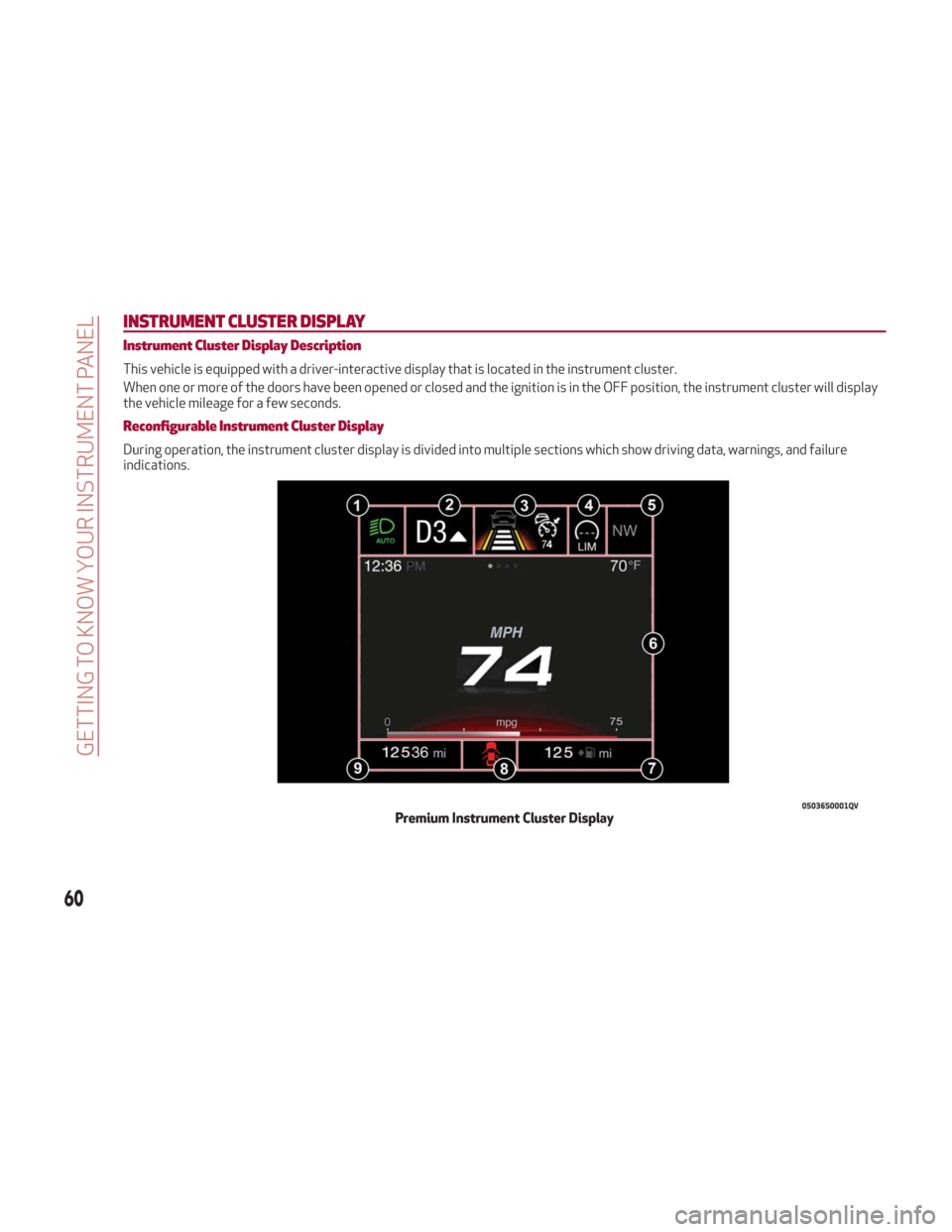
INSTRUMENT CLUSTER DISPLAY
Instrument Cluster Display Description
This vehicle is equipped with a driver-interactive display that is located in the instrument cluster.
When one or more of the doors have been opened or closed and the ignition is in the OFF position, the instrument cluster will display
the vehicle mileage for a few seconds.
Reconfigurable Instrument Cluster Display
During operation, the instrument cluster display is divided into multiple sections which show driving data, warnings, and failure
indications.
05036S0001QVPremium Instrument Cluster Display
60
GETTING TO KNOW YOUR INSTRUMENT PANEL
Page 63 of 260
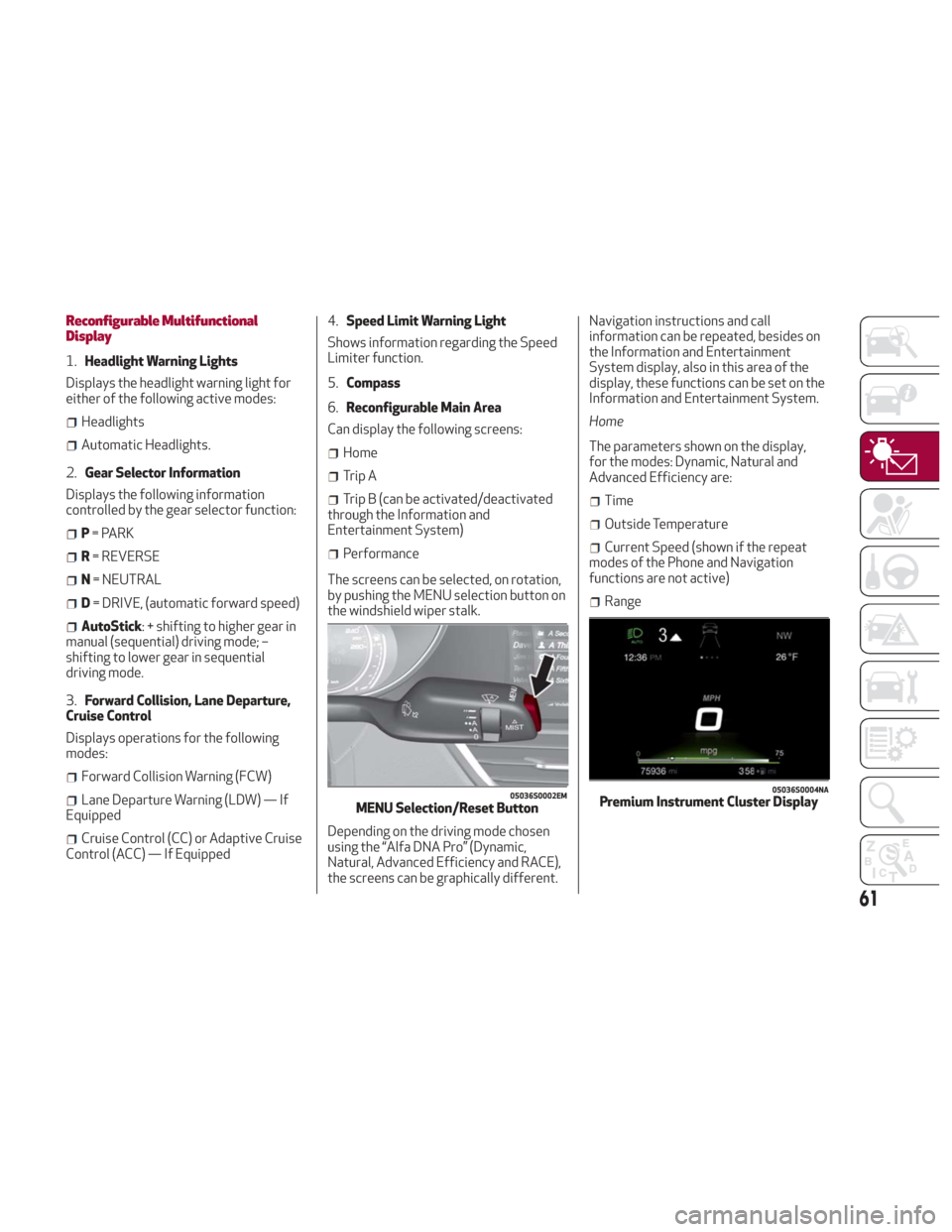
Reconfigurable Multifunctional
Display
1.Headlight Warning Lights
Displays the headlight warning light for
either of the following active modes:
Headlights
Automatic Headlights.
2. Gear Selector Information
Displays the following information
controlled by the gear selector function:
P = PARK
R = REVERSE
N = NEUTRAL
D= DRIVE, (automatic forward speed)
AutoStick: + shifting to higher gear in
manual (sequential) driving mode; –
shifting to lower gear in sequential
driving mode.
3. Forward Collision, Lane Departure,
Cruise Control
Displays operations for the following
modes:
Forward Collision Warning (FCW)
Lane Departure Warning (LDW) — If
Equipped
Cruise Control (CC) or Adaptive Cruise
Control (ACC) — If Equipped 4.
Speed Limit Warning Light
Shows information regarding the Speed
Limiter function.
5. Compass
6. Reconfigurable Main Area
Can display the following screens:
Home
Trip A
Trip B (can be activated/deactivated
through the Information and
Entertainment System)
Performance
The screens can be selected, on rotation,
by pushing the MENU selection button on
the windshield wiper stalk.
Depending on the driving mode chosen
using the “Alfa DNA Pro” (Dynamic,
Natural, Advanced Efficiency and RACE),
the screens can be graphically different. Navigation instructions and call
information can be repeated, besides on
the Information and Entertainment
System display, also in this area of the
display, these functions can be set on the
Information and Entertainment System.
Home
The parameters shown on the display,
for the modes: Dynamic, Natural and
Advanced Efficiency are:
Time
Outside Temperature
Current Speed (shown if the repeat
modes of the Phone and Navigation
functions are not active)
Range
05036S0002EMMENU Selection/Reset Button
05036S0004NAPremium Instrument Cluster Display
61