lock Alfa Romeo Giulia 2019 User Guide
[x] Cancel search | Manufacturer: ALFA ROMEO, Model Year: 2019, Model line: Giulia, Model: Alfa Romeo Giulia 2019Pages: 232, PDF Size: 4.87 MB
Page 25 of 232
10)Once you have released the adjustment
lever, always check that the seat is locked on
the guides by trying to move it back and
forth. If the seat is not locked into place, it
may unexpectedly slide and cause the driver
to lose control of the car.
11)Always make sure that all those on
board the car are seated and are wearing
their seat belts correctly.
12)Make sure the backrests are properly
secured at both sides to prevent them from
moving forward, in the event of sharp
braking, with possible impact with of the
passengers.
IMPORTANT
4)The fabric upholstery of the seats has
been designed to withstand long-term wear
deriving from normal use of the car. Some
precautions are however required. Avoid
prolonged and/or excessive rubbing against
clothing accessories such as metal buckles
and Velcro strips which, by applying a high
pressure on the fabric in a small area, could
cause it to break, thereby damaging the
upholstery.
5)Do not place any kind of items under the
electrically adjusted seats as they could
impede their movement or otherwise
damage the controls.
6)Before tilting the backrest, remove any
objects on the seat cushion.
HEADRESTS
ADJUSTMENTS
13)
They are height-adjustable: to adjust
them operate as follows.
Upward adjustment: raise the head
restraint until it clicks into place.
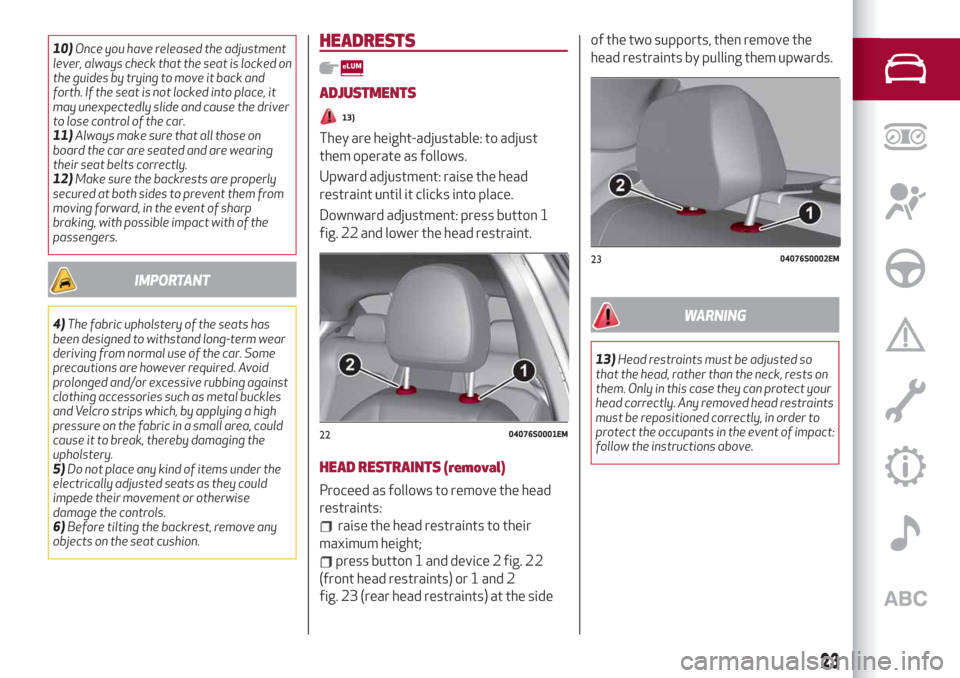
Downward adjustment: press button 1
fig. 22 and lower the head restraint.
HEAD RESTRAINTS (removal)
Proceed as follows to remove the head
restraints:
raise the head restraints to their
maximum height;
press button 1 and device 2 fig. 22
(front head restraints) or 1 and 2
fig. 23 (rear head restraints) at the sideof the two supports, then remove the
head restraints by pulling them upwards.
WARNING
13)Head restraints must be adjusted so
that the head, rather than the neck, rests on
them. Only in this case they can protect your
head correctly. Any removed head restraints
must be repositioned correctly, in order to
protect the occupants in the event of impact:
follow the instructions above.
2204076S0001EM
2304076S0002EM
23
Page 26 of 232
STEERING WHEEL
14) 15)
ADJUSTMENTS
The steering wheel can be adjusted both
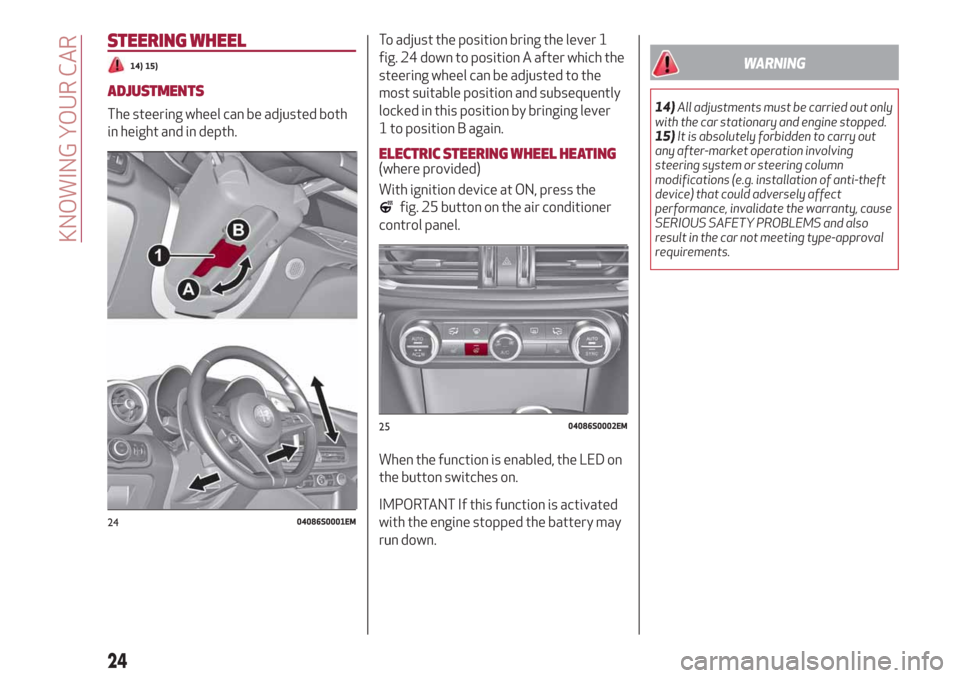
in height and in depth.To adjust the position bring the lever 1
fig. 24 down to position A after which the
steering wheel can be adjusted to the
most suitable position and subsequently
locked in this position by bringing lever
1 to position B again.
ELECTRIC STEERING WHEEL HEATING(where provided)
With ignition device at ON, press the
fig. 25 button on the air conditioner
control panel.
When the function is enabled, the LED on
the button switches on.
IMPORTANT If this function is activated
with the engine stopped the battery may
run down.
WARNING
14)All adjustments must be carried out only
with the car stationary and engine stopped.
15)It is absolutely forbidden to carry out
any after-market operation involving
steering system or steering column
modifications (e.g. installation of anti-theft
device) that could adversely affect
performance, invalidate the warranty, cause
SERIOUS SAFETY PROBLEMS and also
result in the car not meeting type-approval
requirements.
2404086S0001EM
2504086S0002EM
24
KNOWING YOUR CAR
Page 28 of 232
Electric folding
(where provided)
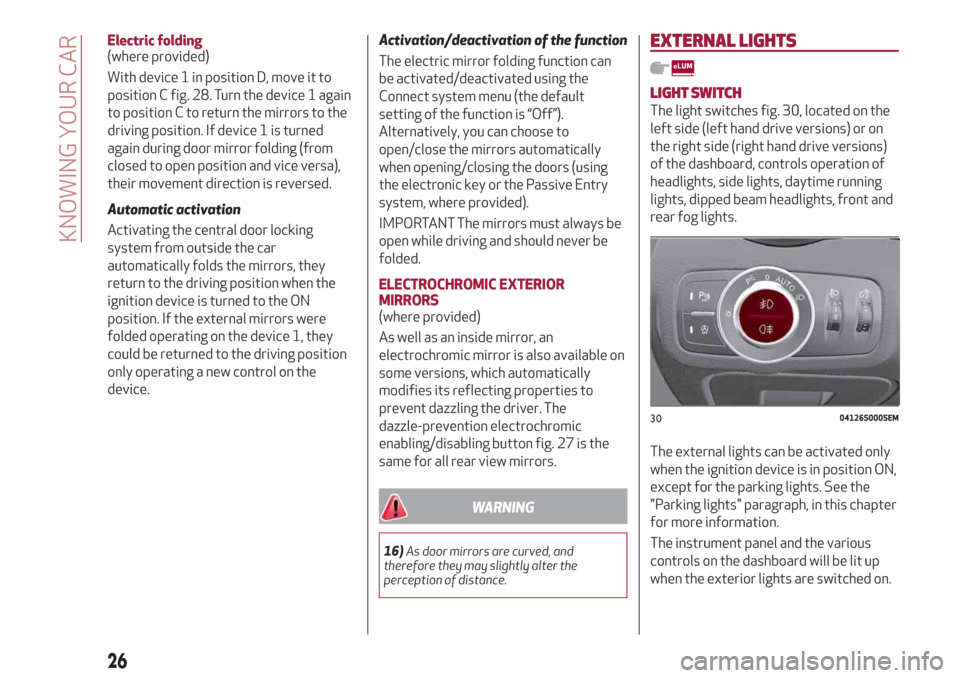
With device 1 in position D, move it to
position C fig. 28. Turn the device 1 again
to position C to return the mirrors to the
driving position. If device 1 is turned
again during door mirror folding (from
closed to open position and vice versa),
their movement direction is reversed.
Automatic activation
Activating the central door locking
system from outside the car
automatically folds the mirrors, they
return to the driving position when the
ignition device is turned to the ON
position. If the external mirrors were
folded operating on the device 1, they
could be returned to the driving position
only operating a new control on the
device.Activation/deactivation of the function
The electric mirror folding function can
be activated/deactivated using the
Connect system menu (the default
setting of the function is “Off”).
Alternatively, you can choose to
open/close the mirrors automatically
when opening/closing the doors (using
the electronic key or the Passive Entry
system, where provided).
IMPORTANT The mirrors must always be
open while driving and should never be
folded.
ELECTROCHROMIC EXTERIOR
MIRRORS
(where provided)
As well as an inside mirror, an
electrochromic mirror is also available on
some versions, which automatically
modifies its reflecting properties to
prevent dazzling the driver. The
dazzle-prevention electrochromic
enabling/disabling button fig. 27 is the
same for all rear view mirrors.
WARNING
16)As door mirrors are curved, and
therefore they may slightly alter the
perception of distance.
EXTERNAL LIGHTS
LIGHT SWITCH
The light switches fig. 30, located on the
left side (left hand drive versions) or on
the right side (right hand drive versions)
of the dashboard, controls operation of
headlights, side lights, daytime running
lights, dipped beam headlights, front and
rear fog lights.
The external lights can be activated only
when the ignition device is in position ON,
except for the parking lights. See the
"Parking lights" paragraph, in this chapter
for more information.
The instrument panel and the various
controls on the dashboard will be lit up
when the exterior lights are switched on.
3004126S0005EM
26
KNOWING YOUR CAR
Page 40 of 232
BONNET
OPENING
22) 23)
Proceed as follows:
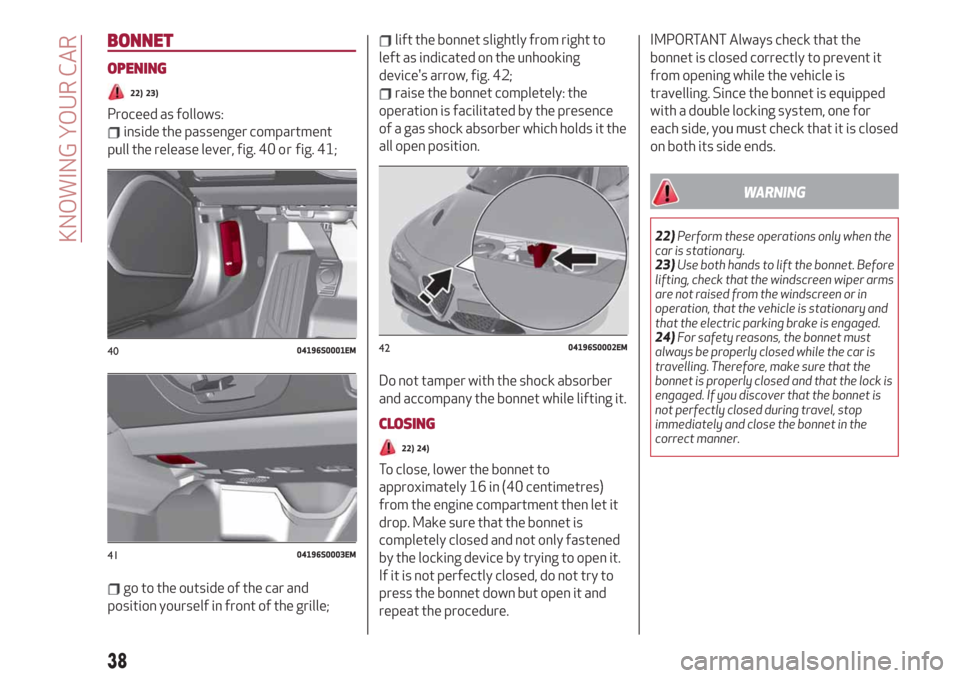
inside the passenger compartment
pull the release lever, fig. 40 or fig. 41;
go to the outside of the car and
position yourself in front of the grille;
lift the bonnet slightly from right to
left as indicated on the unhooking
device's arrow, fig. 42;
raise the bonnet completely: the
operation is facilitated by the presence
of a gas shock absorber which holds it the
all open position.
Do not tamper with the shock absorber
and accompany the bonnet while lifting it.
CLOSING
22) 24)
To close, lower the bonnet to
approximately 16 in (40 centimetres)
from the engine compartment then let it
drop. Make sure that the bonnet is
completely closed and not only fastened
by the locking device by trying to open it.
If it is not perfectly closed, do not try to
press the bonnet down but open it and
repeat the procedure.
IMPORTANT Always check that the
bonnet is closed correctly to prevent it
from opening while the vehicle is
travelling. Since the bonnet is equipped
with a double locking system, one for
each side, you must check that it is closed
on both its side ends.
WARNING
22)Perform these operations only when the
car is stationary.
23)Use both hands to lift the bonnet. Before
lifting, check that the windscreen wiper arms
are not raised from the windscreen or in
operation, that the vehicle is stationary and
that the electric parking brake is engaged.
24)For safety reasons, the bonnet must
always be properly closed while the car is
travelling. Therefore, make sure that the
bonnet is properly closed and that the lock is
engaged. If you discover that the bonnet is
not perfectly closed during travel, stop
immediately and close the bonnet in the
correct manner.
4004196S0001EM
4104196S0003EM
4204196S0002EM
38
KNOWING YOUR CAR
Page 41 of 232
TAILGATE
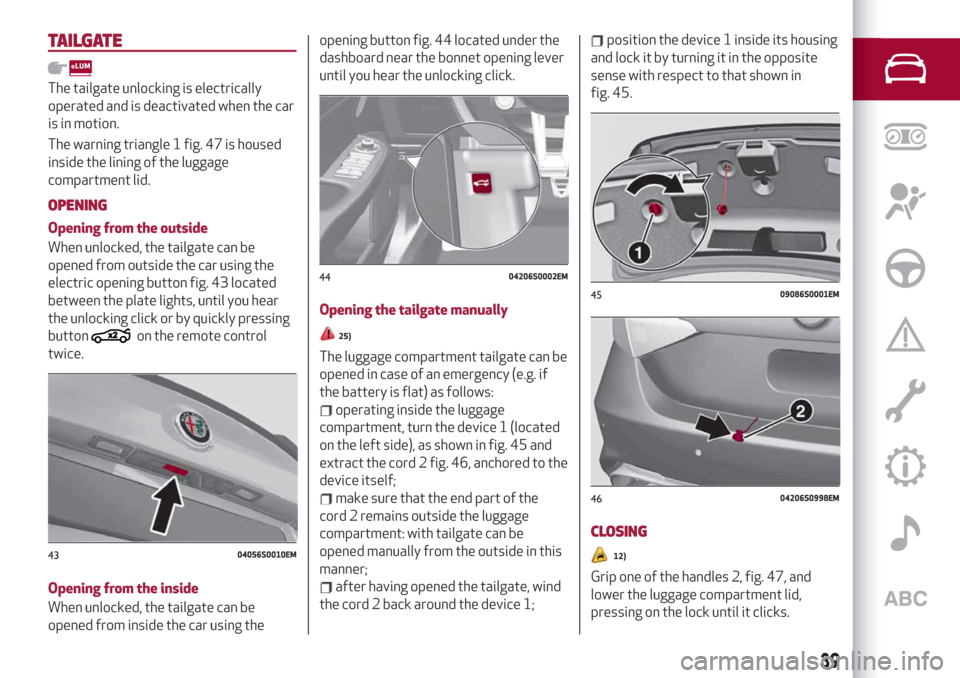
The tailgate unlocking is electrically
operated and is deactivated when the car
is in motion.
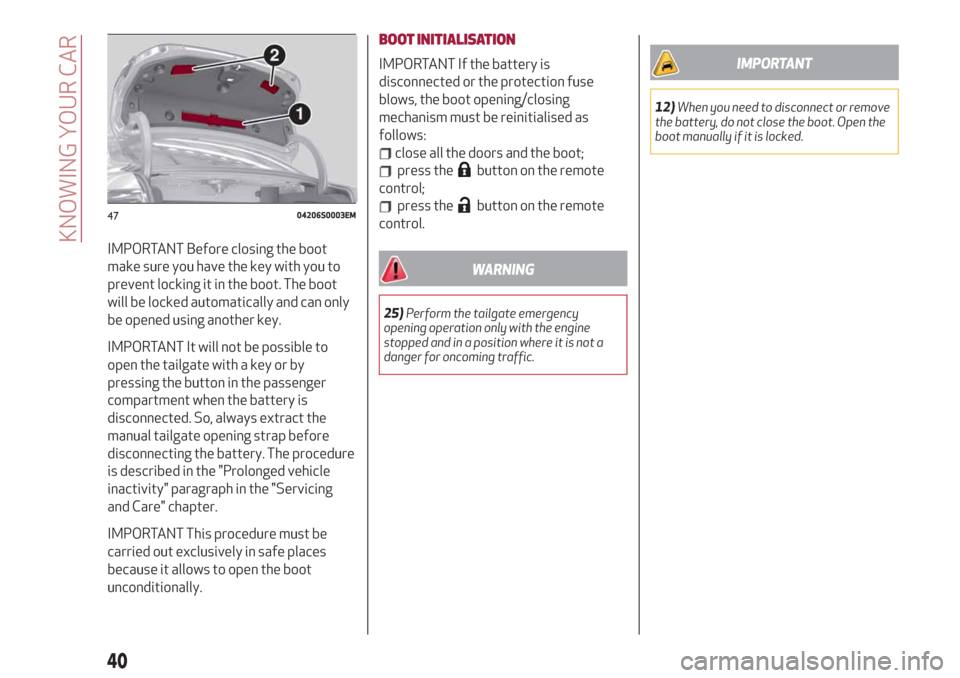
The warning triangle 1 fig. 47 is housed
inside the lining of the luggage
compartment lid.
OPENING
Opening from the outside
When unlocked, the tailgate can be
opened from outside the car using the
electric opening button fig. 43 located
between the plate lights, until you hear
the unlocking click or by quickly pressing
button
on the remote control
twice.
Opening from the inside
When unlocked, the tailgate can be
opened from inside the car using theopening button fig. 44 located under the
dashboard near the bonnet opening lever
until you hear the unlocking click.
Opening the tailgate manually25)
The luggage compartment tailgate can be
opened in case of an emergency (e.g. if
the battery is flat) as follows:
operating inside the luggage
compartment, turn the device 1 (located
on the left side), as shown in fig. 45 and
extract the cord 2 fig. 46, anchored to the
device itself;
make sure that the end part of the
cord 2 remains outside the luggage
compartment: with tailgate can be
opened manually from the outside in this
manner;
after having opened the tailgate, wind
the cord 2 back around the device 1;
position the device 1 inside its housing
and lock it by turning it in the opposite
sense with respect to that shown in
fig. 45.
CLOSING
12)
Grip one of the handles 2, fig. 47, and
lower the luggage compartment lid,
pressing on the lock until it clicks.
4304056S0010EM
4404206S0002EM
4509086S0001EM
4604206S0998EM
39
Page 42 of 232
IMPORTANT Before closing the boot
make sure you have the key with you to
prevent locking it in the boot. The boot
will be locked automatically and can only
be opened using another key.
IMPORTANT It will not be possible to
open the tailgate with a key or by
pressing the button in the passenger
compartment when the battery is
disconnected. So, always extract the
manual tailgate opening strap before
disconnecting the battery. The procedure
is described in the "Prolonged vehicle
inactivity" paragraph in the "Servicing
and Care" chapter.
IMPORTANT This procedure must be
carried out exclusively in safe places
because it allows to open the boot
unconditionally.BOOT INITIALISATION
IMPORTANT If the battery is
disconnected or the protection fuse
blows, the boot opening/closing
mechanism must be reinitialised as
follows:
close all the doors and the boot;
press thebutton on the remote
control;
press thebutton on the remote
control.
WARNING
25)Perform the tailgate emergency
opening operation only with the engine
stopped and in a position where it is not a
danger for oncoming traffic.
IMPORTANT
12)When you need to disconnect or remove
the battery, do not close the boot. Open the
boot manually if it is locked.
4704206S0003EM
40
KNOWING YOUR CAR
Page 51 of 232
PARAMETERS SET BY USER
A series of user-programmable functions
can be set using the Connect system.
The basic settings only are described:
Units & Language
Time and Date
Control panel
To access the list with the
aforementioned items, proceed as
follows: from the main menu, activated
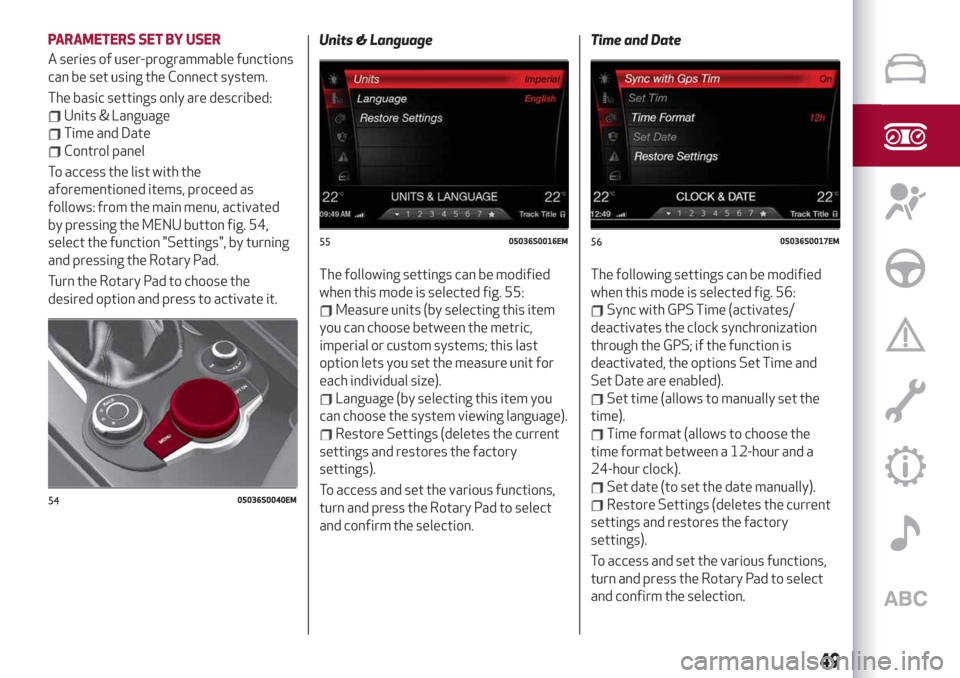
by pressing the MENU button fig. 54,
select the function "Settings", by turning
and pressing the Rotary Pad.
Turn the Rotary Pad to choose the
desired option and press to activate it.Units & Language
The following settings can be modified
when this mode is selected fig. 55:
Measure units (by selecting this item
you can choose between the metric,
imperial or custom systems; this last
option lets you set the measure unit for
each individual size).
Language (by selecting this item you
can choose the system viewing language).
Restore Settings (deletes the current
settings and restores the factory
settings).
To access and set the various functions,
turn and press the Rotary Pad to select
and confirm the selection.Time and Date
The following settings can be modified
when this mode is selected fig. 56:
Sync with GPS Time (activates/
deactivates the clock synchronization
through the GPS; if the function is
deactivated, the options Set Time and
Set Date are enabled).
Set time (allows to manually set the
time).
Time format (allows to choose the
time format between a 12-hour and a
24-hour clock).
Set date (to set the date manually).
Restore Settings (deletes the current
settings and restores the factory
settings).
To access and set the various functions,
turn and press the Rotary Pad to select
and confirm the selection.5405036S0040EM
5505036S0016EM5605036S0017EM
49
Page 54 of 232
WARNING LIGHTS ON INSTRUMENT PANEL
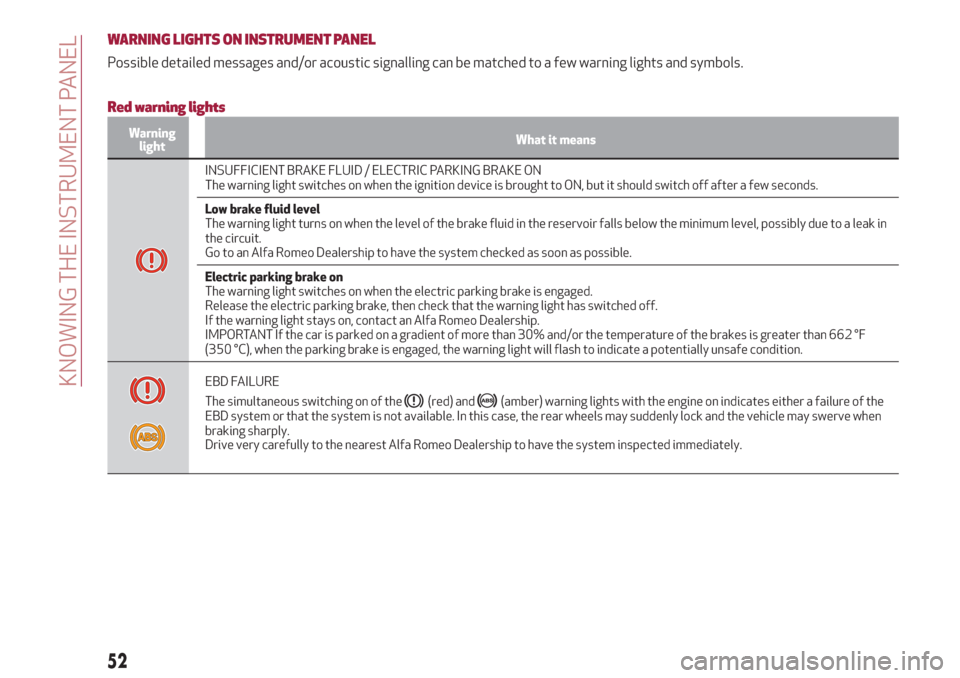
Possible detailed messages and/or acoustic signalling can be matched to a few warning lights and symbols.
Red warning lights
Warning
lightWhat it means
INSUFFICIENT BRAKE FLUID / ELECTRIC PARKING BRAKE ON
The warning light switches on when the ignition device is brought to ON, but it should switch off after a few seconds.
Low brake fluid level
The warning light turns on when the level of the brake fluid in the reservoir falls below the minimum level, possibly due to a leak in
the circuit.
Go to an Alfa Romeo Dealership to have the system checked as soon as possible.
Electric parking brake on
The warning light switches on when the electric parking brake is engaged.
Release the electric parking brake, then check that the warning light has switched off.
If the warning light stays on, contact an Alfa Romeo Dealership.
IMPORTANT If the car is parked on a gradient of more than 30% and/or the temperature of the brakes is greater than 662 °F
(350 °C), when the parking brake is engaged, the warning light will flash to indicate a potentially unsafe condition.
EBD FAILURE
The simultaneous switching on of the
(red) and(amber) warning lights with the engine on indicates either a failure of the
EBD system or that the system is not available. In this case, the rear wheels may suddenly lock and the vehicle may swerve when
braking sharply.
Drive very carefully to the nearest Alfa Romeo Dealership to have the system inspected immediately.
52
KNOWING THE INSTRUMENT PANEL
Page 69 of 232
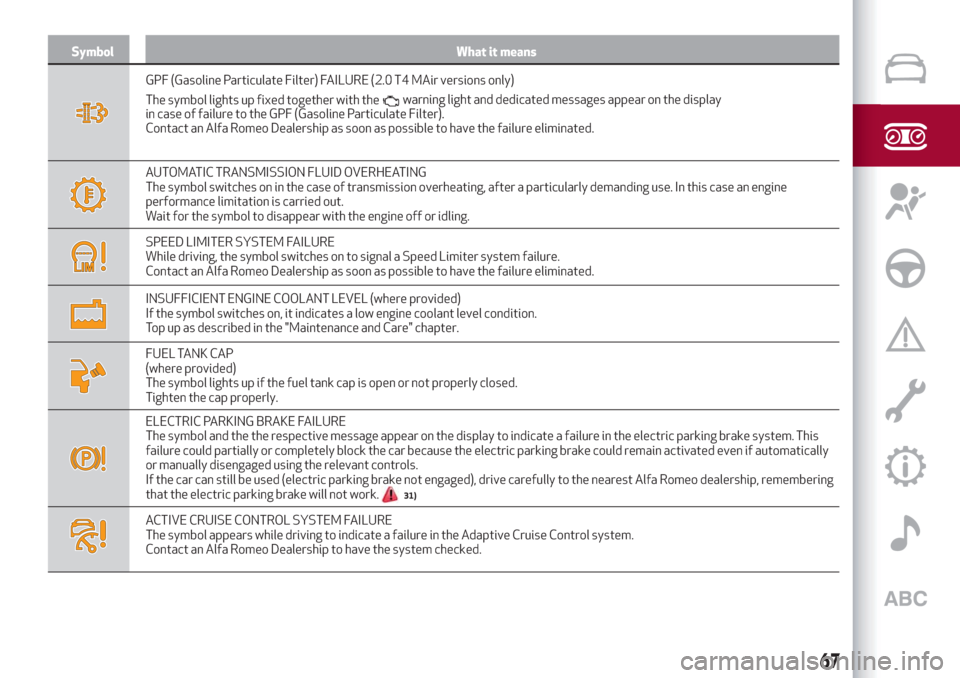
Symbol What it means
GPF (Gasoline Particulate Filter) FAILURE (2.0 T4 MAir versions only)
The symbol lights up fixed together with the
in case of failure to the GPF (Gasoline Particulate Filter).
Contact an Alfa Romeo Dealership as soon as possible to have the failure eliminated.
AUTOMATIC TRANSMISSION FLUID OVERHEATING
The symbol switches on in the case of transmission overheating, after a particularly demanding use. In this case an engine
performance limitation is carried out.
Wait for the symbol to disappear with the engine off or idling.
SPEED LIMITER SYSTEM FAILURE
While driving, the symbol switches on to signal a Speed Limiter system failure.
Contact an Alfa Romeo Dealership as soon as possible to have the failure eliminated.
INSUFFICIENT ENGINE COOLANT LEVEL (where provided)
If the symbol switches on, it indicates a low engine coolant level condition.
Top up as described in the "Maintenance and Care" chapter.
FUEL TANK CAP
(where provided)
The symbol lights up if the fuel tank cap is open or not properly closed.
Tighten the cap properly.
ELECTRIC PARKING BRAKE FAILURE
The symbol and the the respective message appear on the display to indicate a failure in the electric parking brake system. This
failure could partially or completely block the car because the electric parking brake could remain activated even if automatically
or manually disengaged using the relevant controls.
If the car can still be used (electric parking brake not engaged), drive carefully to the nearest Alfa Romeo dealership, remembering
that the electric parking brake will not work.
31)
ACTIVE CRUISE CONTROL SYSTEM FAILURE
The symbol appears while driving to indicate a failure in the Adaptive Cruise Control system.
Contact an Alfa Romeo Dealership to have the system checked.
67
warning light and dedicated messages appear on the display
Page 70 of 232
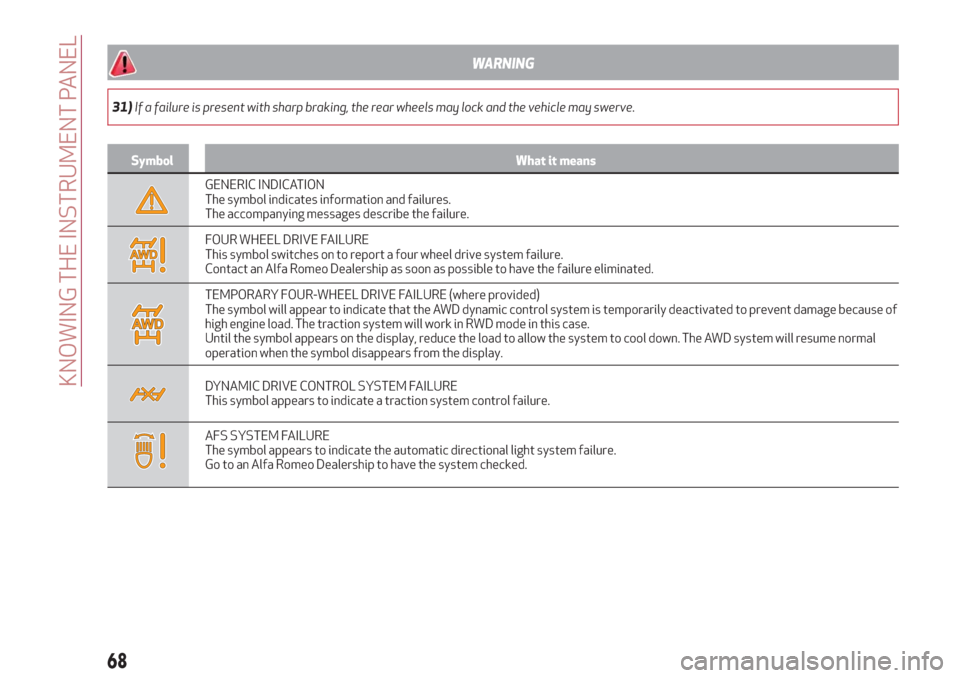
WARNING
31)If a failure is present with sharp braking, the rear wheels may lock and the vehicle may swerve.
Symbol What it means
GENERIC INDICATION
The symbol indicates information and failures.
The accompanying messages describe the failure.
FOUR WHEEL DRIVE FAILURE
This symbol switches on to report a four wheel drive system failure.
Contact an Alfa Romeo Dealership as soon as possible to have the failure eliminated.
TEMPORARY FOUR-WHEEL DRIVE FAILURE (where provided)
The symbol will appear to indicate that the AWD dynamic control system is temporarily deactivated to prevent damage because of
high engine load. The traction system will work in RWD mode in this case.
Until the symbol appears on the display, reduce the load to allow the system to cool down. The AWD system will resume normal
operation when the symbol disappears from the display.
DYNAMIC DRIVE CONTROL SYSTEM FAILURE
This symbol appears to indicate a traction system control failure.
AFS SYSTEM FAILURE
The symbol appears to indicate the automatic directional light system failure.
Go to an Alfa Romeo Dealership to have the system checked.
68
KNOWING THE INSTRUMENT PANEL