lock Alfa Romeo Giulia 2019 Owner's Guide
[x] Cancel search | Manufacturer: ALFA ROMEO, Model Year: 2019, Model line: Giulia, Model: Alfa Romeo Giulia 2019Pages: 232, PDF Size: 4.87 MB
Page 74 of 232
ACTIVE SAFETYSYSTEMS
The vehicle may be equipped with the
following active safety devices:
ABS (Anti-Lock Brakes);
DTC (Drive Train Control);
ESC (Electronic Stability Control);
TC (Traction Control);
PBA (Panic Brake Assist);
HSA (Hill Start Assist);
AST (Alfa™ Steering Torque);
ATV (Alfa™ Active Torque Vectoring).
For the operation of the systems, see the
following pages.
ABS (Anti-lock Braking System)
This system, which is an integral part of
the braking system, prevents one or more
wheels from locking and slipping in all
road surface conditions, irrespective of
the intensity of the braking action,
ensuring that the vehicle can be
controlled even during emergency
braking and optimising stopping
distances.
The system intervenes during braking
when the wheels are about to lock,
typically in emergency braking or
low-grip conditions, when locking may be
more frequent.
The system also improves control and
stability of the vehicle when braking on a
surface where the grip of the left and
right wheels varies, or on corners.The Electronic Braking Force Distribution
(EBD) system completes the system
allowing the brake force to be distributed
between the front and rear wheels.
System intervention
The ABS equipped on this vehicle is
provided with the "Brake by wire"
(Integrated Brake System - IBS) function.
With this system, the brake pedal
command given by pressing the brake
pedal is not transmitted hydraulically but
electronically, therefore, the light
pulsation that could be felt on the pedal
with the traditional system is no longer
perceptible.33) 34) 35) 36) 37) 38)
DTC (Drive Train Control)SYSTEM(where provided)
Some versions of this vehicle are
equipped with an automatically
activated/deactivated four-wheel drive
system (AWD), which offers an optimal
drive for countless driving conditions and
road surfaces. The system reduces the
slipping of the tyres to a minimum,
automatically redistributing the torque
to the front and rear wheels, as needed.
To maximize fuel savings, the car with
AWD automatically passes to rear-wheel
drive (RWD) when the road and
environmental conditions are such that
they would not cause the tyres to slip.When the road and environmental
conditions require better traction, the
vehicle automatically goes to AWD mode.
39)
IMPORTANT If the system failure symbol
switches on, after starting the engine or
while driving, it means that the AWD
system is not working properly. If the
warning message activates frequently, it
is recommended to carry out the
maintenance operations.
40)
ESC (Electronic Stability Control)
SYSTEM
The ESC system improves the directional
control and stability of the car in various
driving conditions.
The ESC system corrects the car’s
understeer and oversteer, distributing
the brake force on the appropriate
wheels. The torque supplied by the
engine can also be reduced in order to
maintain control of the vehicle.
The ESC system uses sensors installed
on the car to determine the trajectory
that the driver intends to follow and
compares it with the car’s effective
trajectory. When the real trajectory
deviates from the desired trajectory, the
ESC system intervenes to counter the
vehicle’s understeer or oversteer.
Oversteer: occurs when the car is
72
SAFETY
Page 75 of 232
turning more than it should according to
the angle of the steering wheel.
Understeer: occurs when the vehicle is
turning less than it should according to
the angle of the steering wheel.
System intervention
The intervention of the system is
indicated by the flashing of the ESC
warning light on the instrument panel, to
inform the driver that the vehicle
stability and grip are critical.
41) 42) 43) 44) 45)
TC (Traction Control)SYSTEM
The system automatically operates in the
event of slipping, loss of grip on wet
roads (aquaplaning) and acceleration on
slippery, snowy or icy roads, etc. on one
or both drive wheels. Depending on the
slipping conditions, two different control
systems are activated:
if the slipping involves both drive
wheels, the system intervenes, reducing
the power transmitted by the engine;
if the slipping only involves one of the
drive wheels, the BLD (Brake Limited
Differential) function is activated,
automatically braking the wheel which is
slipping (the behaviour of a self-locking
differential is simulated). This will
increase the engine torque transferred to
the wheel which isn't slipping.System intervention
The intervention of the system is
indicated by the flashing of the ESC
warning light on the instrument panel, to
inform the driver that the vehicle
stability and grip are critical.
46) 47) 48) 49) 50)
PBA (Panic Brake Assist)SYSTEM
The PBA system is designed to improve
the vehicle’s braking capacity during
emergency braking.
The system detects emergency braking
by monitoring the speed and force with
which the brake pedal is pressed, and
consequently applies the optimal brake
pressure. This can reduce the braking
distance: the PBA system therefore
complements the ABS.
Maximum assistance from the PBA
system is obtained by pressing the brake
pedal very quickly. In addition, the brake
pedal should be pressed continuously
during braking, avoiding intermittent
presses, to get the most out of the
system. Do not reduce pressure on the
brake pedal until braking is no longer
necessary.
The PBA system is deactivated when the
brake pedal is released.
51) 52) 53)
HSA (Hill Start Assist)SYSTEM
This is an integral part of the ESC system
and facilitates starting on slopes,
activating automatically in the following
cases:
uphill: vehicle stationary on a road
with a gradient higher than 5%, engine
running, brake pressed and transmission
in neutral or gear other than reverse
engaged;
downhill: vehicle stationary on a road
with a gradient higher than 5%, engine
running, brake pressed and reverse gear
engaged.
When setting off, the ESC system control
unit maintains the braking pressure on
the wheels until the engine torque
necessary for starting is reached, or in
any case for a maximum of 2 seconds,
allowing your right foot to be moved
easily from the brake pedal to the
accelerator.
When two seconds have elapsed, without
starting, the system is automatically
deactivated, gradually releasing the
braking pressure. During this release
stage it is possible to hear a typical
mechanical brake release noise,
indicating the imminent movement of the
car.
54) 55)
73
Page 80 of 232
In the event of an imminent collision the
system intervenes by automatically
braking the car to prevent the impact or
reduce its effects.
The system provides the driver with
acoustic and visual signals through
specific messages on the instrument
panel display.
The acoustic and visual signals before the
system cuts in depend on the car speed.
No acoustic/visual signal is generated at
speeds slower than 30 km/h.
Acoustic/visual signal is generated at
speeds faster than 30 km/h, instead.
The system may lightly brake to warn the
driver if a possible frontal accident is
detected (limited braking). Signals and
limited braking are intended to allow the
driver to react promptly, in order to
prevent or reduce the effects of a
potential accident.
In situations with the risk of collision, if
the system detects no intervention by
the driver, it provides automatic braking
to help slow the car and mitigate the
potential frontal accident (automatic
braking). If intervention by the driver on
the brake pedal is detected but not
deemed sufficient, the system may
intervene in order to improve the
reaction of the braking system, therefore
reducing vehicle speed further
(additional assistance in braking stage).The system will intervene automatically
in case of imminent collision or impact
against a pedestrian crossing the road
(speed under 31 mph (50 km/h)).
IMPORTANT For safety reasons, when
the car has stopped, the brake callipers
may remain blocked for about 2 seconds.
Make sure you press the brake pedal if
the vehicle moves slightly forwards.
Engagement/disengagement
The Forward Collision Warning system
can be deactivated (and then reactivated)
via the Connect system. To access the
function, on the main menu select the
following items in sequence: "Settings",
"Safety", "Forward Collision Warning" and
"Status".
The system can be deactivated even with
the ignition device ON.
IMPORTANT The system status can be
changed with vehicle at a standstill only.
Activation/deactivation
The Forward Collision Warning system is
activated whenever the engine is started
regardless of the Connect system
setting.
After deactivation, the system will not
warn the driver about a possible collision
with the vehicle ahead, regardless of the
setting selected with the Connect
system.
IMPORTANT Each time the engine is
started, the system is activated
regardless of where was when it was
previously switched off.
This function is not active at a speed
lower than 4.3 mph (7 km/h) or higher
than 124 mph (200 km/h).
The system is active when:
each time the engine is started;
is active (ON) in the Connect system;
the ignition device is at ON;
- the vehicle speed is between 4.3 and
124 mph (7 and 200 km/h);
the front seat belts are fastened;
the "Alfa DNA™ Pro" selector is not in
RACE position (where present).
Changing the system sensitivity
The sensitivity of the system can be
changed through the Connect system
menu, choosing from one of the following
three options: "Near", "Med" or "Far". See
the description in the Connect system
supplement for how to change the
settings.
The default option is "Med". With this
setting, the system warns the driver of a
possible collision with the vehicle in front
when that vehicle is at a standard
distance, between that of the other two
settings.
With the system sensitivity set to "Far",
the system will warn the driver of a
possible accident with the vehicle in front
78
SAFETY
Page 81 of 232
when that vehicle is at a greater distance,
thus providing the possibility of acting on
the brakes more lightly and gradually.
This setting provides the drivers with the
maximum possible reaction time to
prevent a potential accident.
With the option set to "Near", the system
will warn the driver of a possible accident
with the vehicle in front when that vehicle
is close. This setting offers the driver a
lower reaction time compared to the
"Med" and "Far" settings, in the event of a
potential accident, but permits more
dynamic driving of the car.
The system sensitivity setting is kept in
the memory when the engine is switched
off.
System limited operation warning
If the dedicated message is displayed, a
condition limiting the system operation
may have occurred. The possible reasons
of this limitation are something blocking
the camera view or a fault.
In this condition it will still be possible to
drive the car normally, but automatic
braking will not be available in the event
of an impending collision.
If an obstruction is signalled, clean the
area of the windscreen indicated in
fig. 61.
When the conditions limiting the system
functions end, this will go back to normaland complete operation. Should the fault
persist, contact an Alfa Romeo
Dealership.
System failure warning
If the system switches off and a
dedicated message is shown on the
display, it means that there is a fault on
the system.
In this case, it is still possible to drive the
car, but you are advised to contact an
Alfa Romeo Dealership as soon as
possible.
Radar warning not available
If conditions are such that the radar
cannot detect obstacles correctly, the
system is deactivated and a dedicated
message appears on the display. This
generally occurs in the event of poor
visibility, such as when it is snowing or
raining heavily.
The system can also be temporarily
dimmed due to obstructions such as mud,
dirt or ice on the bumper. In such cases, a
dedicated message will be shown on the
display and the system will be
deactivated. This message can
sometimes appear in conditions of high
reflectivity (e.g. tunnels with reflective
tiles or ice or snow). When the conditions
limiting the system functions end, this
will go back to normal and complete
operation.In certain particular cases, this dedicated
message could be displayed when the
radar is not detecting any vehicles or
objects within its view range.
If atmospheric conditions are not the real
reason behind this message, check if the
sensor is dirty. It could be necessary to
clean or remove any obstructions in the
area shown in fig. 60.
If the message appears often, even in the
absence of atmospheric conditions such
as snow, rain, mud or other obstructions,
contact an Alfa Romeo Dealership for a
sensor alignment check.
In the absence of visible obstructions,
cleaning the radar surface, by manually
removing the decorative cover trim,
could be required. Have this operation
performed at an Alfa Romeo Dealership.
IMPORTANT It is recommended that you
do not install devices, accessories or
aerodynamic attachments in front of the
sensor or darken it in any way, as this can
compromise the correct functioning of
the system.
79
Page 87 of 232
27)Do not tamper with nor carry out any
intervention on the radar sensor or on the
camera on the windscreen. In the event of a
sensor failure, contact an Alfa Romeo
Dealership.
28)Do not wash with high-pressure jets in
the bumper lower area: in particular do not
operate on the system's electrical connector.
29)Be careful in the case of repairs and new
paintings in the area around the sensor
(panel covering the sensor on the left side of
the bumper). In the event of a frontal impact
the sensor may automatically deactivate
and display a warning to indicate that the
sensor needs to be repaired. Even without a
malfunction warning, deactivate the system
operation if you think that the position of the
radar sensor has changed (e.g. due to
low-speed frontal impact as during parking
manoeuvres). In these cases, go to an Alfa
Romeo Dealership to have the radar sensor
realigned or replaced.
30)When towing a trailer, a vehicle or during
loading manoeuvres on a vehicle transporter
(or in vehicle for transport), the system must
be deactivated via the Connect system.
31)The Tire Repair Kit, provided with the
vehicle, is compatible with the TPMS
sensors. Using sealants different from that
in the original kit may compromise its
operation. If sealants not equivalent with the
original ones are used, it is recommended to
have the TPMS sensor operation checked by
a qualified repair centre.OCCUPANT PROTECTION
SYSTEMS
Some of the most important safety
equipment of the vehicle comprise the
following protection systems:
seat belts;
SBA (Seat Belt Alert) System;
head restraints;
child restraint systems;
Front airbags and side bags.
Read the information given the following
pages with the utmost care. It is of
fundamental importance that the
protection systems are used in the
correct way to guarantee the maximum
possible safety level for the driver and
the passengers.
For the description of the head restraint
adjustment see the "Head restraints"
paragraph in the "Knowing your vehicle"
chapter.
SEAT BELTS
All the seatbelts have three anchoring
points each with its own retractor.
The retractor mechanism operates
locking the belt in the event of sharp
braking or strong deceleration due to an
impact. This allows the belt strap to slide
freely and to adapt to the body of the
occupant. In the event of an accident, the
belt will lock reducing the risk of impact
inside the passenger compartment and
of being projected outside the vehicle.
The driver is responsible for respecting,
and ensuring that all the other occupants
of the vehicle also respect, the local laws
in force in relation to the use of the seat
belts.
Always fasten the seat belts before
setting off.
USING THE SEAT BELTS
The seat belt should be worn keeping the
chest straight and rested against the
backrest.
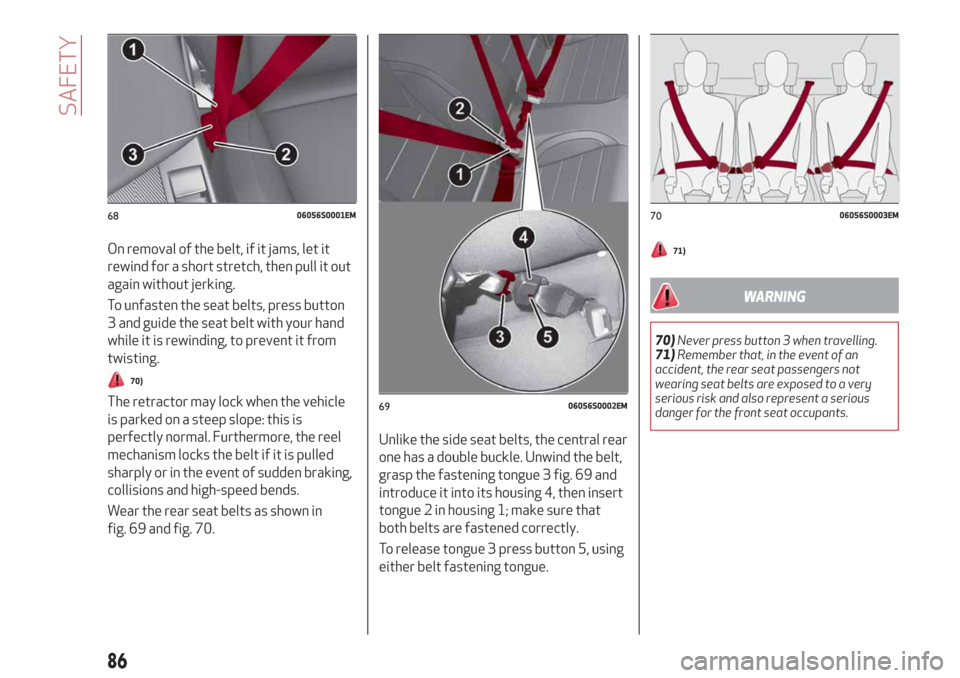
To fasten the seat belts, hold the tongue
1 fig. 68 and insert it into the buckle 2,
until it clicks into place.
85
Page 88 of 232
On removal of the belt, if it jams, let it
rewind for a short stretch, then pull it out
again without jerking.
To unfasten the seat belts, press button
3 and guide the seat belt with your hand
while it is rewinding, to prevent it from
twisting.
70)
The retractor may lock when the vehicle
is parked on a steep slope: this is
perfectly normal. Furthermore, the reel
mechanism locks the belt if it is pulled
sharply or in the event of sudden braking,
collisions and high-speed bends.
Wear the rear seat belts as shown in
fig. 69 and fig. 70.Unlike the side seat belts, the central rear
one has a double buckle. Unwind the belt,
grasp the fastening tongue 3 fig. 69 and
introduce it into its housing 4, then insert
tongue 2 in housing 1; make sure that
both belts are fastened correctly.
To release tongue 3 press button 5, using
either belt fastening tongue.
71)
WARNING
70)Never press button 3 when travelling.
71)Remember that, in the event of an
accident, the rear seat passengers not
wearing seat belts are exposed to a very
serious risk and also represent a serious
danger for the front seat occupants.
6806056S0001EM
6906056S0002EM
7006056S0003EM
86
SAFETY
Page 113 of 232
IMPORTANT
33)We recommend that during the initial
period, or during the first 1600 km
(1000 miles), you do not drive to full car
performance (e.g. excessive acceleration,
long journeys at top speed, sharp braking,
etc.).
34)When the engine stopped never leave
the ignition device in the ON position to
prevent useless current draw from draining
the battery.
35)Warning light
will flash after starting
or during prolonged cranking to indicate a
fault with the glow plug heating system. If
the engine starts, the vehicle can be regularly
used, but an Alfa Romeo Dealership must be
contacted as soon as possible.
36)A quick burst on the accelerator before
turning off the engine serves absolutely no
practical purpose; it wastes fuel and is
damaging for the engine.
PARKING THE VEHICLE
106) 107) 108)
IMPORTANT In addition to parking the
vehicle with the parking brake always
engaged, the wheel steered, chocks or
stones positioned in front of the wheels
(when on a steep slope), you must always
engage:
Manual transmission:
Engage 1stgear if the car is parked
uphill or reverse gear if the car is parked
downhill.
Automatic transmission:
engage P (Park) mode;
always take the key with you when
leaving the vehicle.
IMPORTANT Always engage the electric
parking brake before leaving the vehicle.
ELECTRIC PARKING BRAKE
The car is equipped with electric parking
brake to guarantee better use and
optimal performance compared to a
manually operated parking brake.
The electric parking brake features a
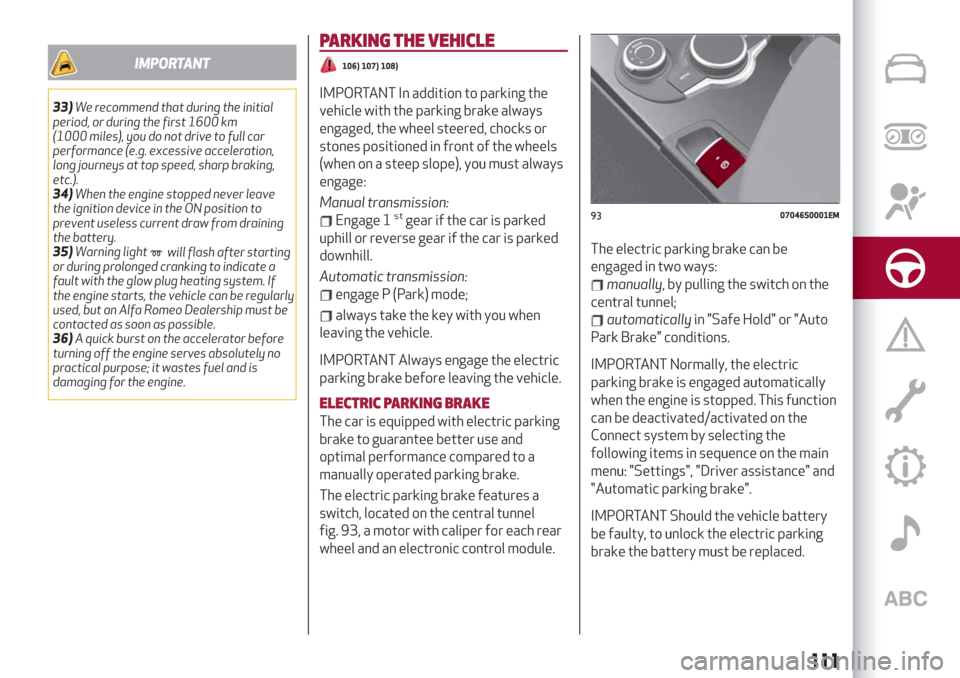
switch, located on the central tunnel
fig. 93, a motor with caliper for each rear
wheel and an electronic control module.The electric parking brake can be
engaged in two ways:
manually, by pulling the switch on the
central tunnel;
automaticallyin "Safe Hold" or "Auto
Park Brake" conditions.
IMPORTANT Normally, the electric
parking brake is engaged automatically
when the engine is stopped. This function
can be deactivated/activated on the
Connect system by selecting the
following items in sequence on the main
menu: "Settings", "Driver assistance" and
"Automatic parking brake".
IMPORTANT Should the vehicle battery
be faulty, to unlock the electric parking
brake the battery must be replaced.
9307046S0001EM
111
Page 115 of 232
carbon-ceramic discs, before using “Drive
Away Release” mode and moving the
vehicle, it is necessary to buckle the seat
belts or manually release the electric
handbrake to prevent damage to the
carbon-ceramic discs themselves.
"Safe Hold": if the vehicle speed is
lower than 2 mph (3 km/h), on vehicles
with automatic transmission, the gear
lever is not in P (Park) position and the
driver's intention of leaving the vehicle is
detected, the electric parking brake will
automatically engage to hold the vehicle
in safety conditions;
"Auto Park Brake": if the vehicle speed
is below 2 mph (3 km/h), the electric
parking break will automatically engage
when the gear lever is in P (Park) position.
The LED on the switch located on the
central tunnel fig. 93 switches on
together with the warning light
on
the instrument panel when the parking
brake is engaged and applied to the
wheels. Each automatic parking brake
engagement can be cancelled by pressing
the switch on the central tunnel and at
the same time moving the gear lever for
the transmission to position P (Park).
SAFE HOLD
It is a safety function that automatically
engages the electric parking brake in the
event of a dangerous condition for the
car.
If:
the car speed is below 2 mph (3 km/h);
on cars with automatic transmission, a
transmission operating mode different
from P (Park) is activated;
the driver's seat belt is not fastened;
the driver side door is open;
no attempts to apply pressure on the
brake pedal have been detected;
the car is parked on roads which
gradient higher than 4%;
the electric parking brake engages
automatically to prevent car movement.
The Safe Hold function can be
temporarily disabled by pressing the
switch located on the central tunnel and
the brake pedal at the same time, with
the vehicle stationary and the driver side
door open.
Once disabled, the function will activate
again when the vehicle speed reaches
18 mph (20 km/h) or the ignition device is
moved to STOP and then to ON.
WARNING
106)In the case of parking manoeuvres on
roads on a gradient, the front wheels must
be steered towards the pavement (when
parking downhill), or in the opposite
direction if the vehicle is parked uphill. Block
the wheels with a wedge or a stone if the car
is parked on a steep slope.
107)Never leave children alone in an
unattended vehicle; make sure that when
you move away from the vehicle, you have
the key with you.
108)The electric parking brake must
always be engaged when leaving the vehicle.
113
Page 128 of 232
“STOP AND GO” STRATEGY
The “Stop and Go” operating strategy
allows you to maintain a safe distance
from the vehicle ahead until the car has
completely stopped. It will also restart
the car automatically if the vehicle ahead
moves off within two seconds, otherwise
it is necessary to press the accelerator
pedal or the RES button to restart.
DEACTIVATION
The device is deactivated and the set
speed is cancelled if:
if thebutton on the Active Cruise
Control is pressed (with the device
enabled or paused);
the ignition device is in the STOP
position;
RACE mode is activated.
The device is cancelled (the set speed
and distance are stored):
when the device is paused (see the
“Activating / Deactivating Active Cruise
Control” paragraph);
when the conditions shown in the
“Setting the desired speed” paragraph
occur;
SYSTEM LIMITED OPERATION
WARNING
If the dedicated message is shown on the
display, a condition limiting the system
operation may have occurred.
The possible reasons of this limitationare something blocking the camera view
or a fault. If an obstruction is signalled,
clean the area of the windscreen
indicated in fig. 102 and check that the
message has disappeared.
When the conditions limiting the system
functions end, this will go back to normal
and complete operation.
Should the fault persist, contact an Alfa
Romeo Dealership.
PRECAUTIONS WHILE DRIVING
The device may not work correctly in
some driving conditions (see below): the
driver must control the car at all times.
Towing a trailer
Use of the device is not recommended
while towing a trailer.
VEHICLE not aligned
The device may not detect a vehicle
travelling on the same lane but which is
not aligned along the same direction of
travel or a vehicle which is cutting in from
a side lane. Sufficient distance from the
vehicles ahead may not be guaranteed in
these cases.
The non-aligned vehicle can weave in and
out of the driving direction causing the
vehicle to brake or accelerate
unexpectedly.Steering and bends
When cornering with the device set, it
could limit speed and acceleration to
guarantee vehicle stability even if no
vehicles are detected ahead. When
leaving the bend, the device resets the
previously set speed.
IMPORTANT In case of narrow curves,
the performance of the device could be
limited. In this case, it is advisable to
deactivate the device. Moreover,
remember that the device only limits the
speed DURING a bend and not BEFORE
it, so always take great care.
Using the device on gradient
When driving on roads with variable
gradient, the device may not detect the
presence of a vehicle on the lane. Device
performance could be limited according
to speed, load, traffic conditions and
gradient steepness.
Lane change
The device may not detect the presence
of a vehicle until it is fully in your lane. In
this case, sufficient distance from the
vehicle which is changing lane may not be
guaranteed: it is advisable to pay the
utmost attention at all times and be
always ready to press the brakes if
needed.
126
STARTING AND DRIVING
Page 135 of 232
REFUELLING PROCEDURE
The fuel flap is unlocked when the central
door locking system is released, while it
is automatically locked when the central
locking system is applied.
Opening the flap
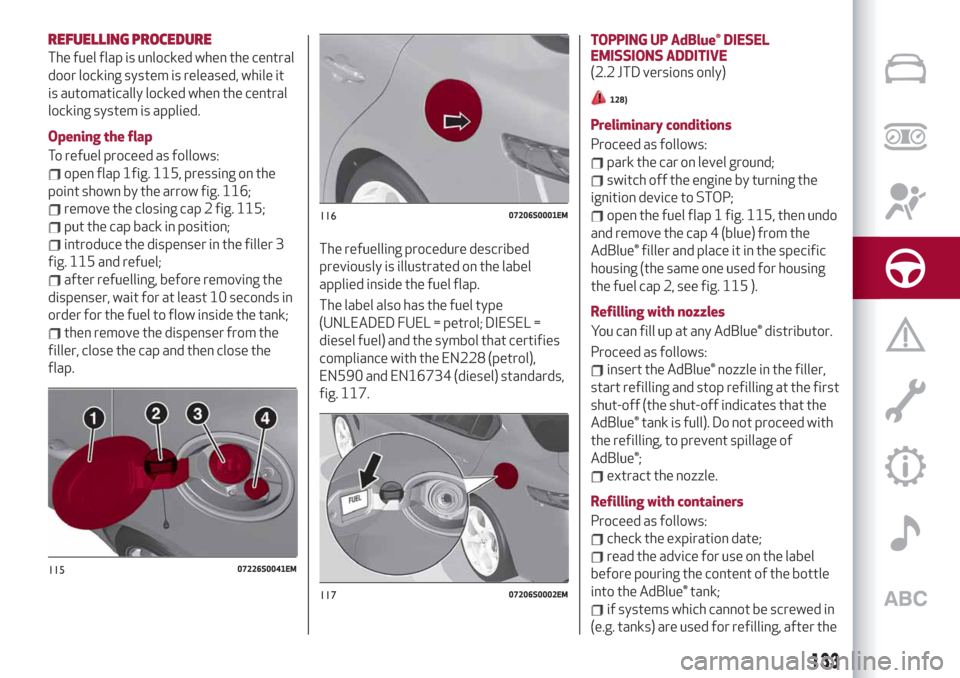
To refuel proceed as follows:
open flap 1fig. 115, pressing on the
point shown by the arrow fig. 116;
remove the closing cap 2 fig. 115;
put the cap back in position;
introduce the dispenser in the filler 3
fig. 115 and refuel;
after refuelling, before removing the
dispenser, wait for at least 10 seconds in
order for the fuel to flow inside the tank;
then remove the dispenser from the
filler, close the cap and then close the
flap.The refuelling procedure described
previously is illustrated on the label
applied inside the fuel flap.
The label also has the fuel type
(UNLEADED FUEL = petrol; DIESEL =
diesel fuel) and the symbol that certifies
compliance with the EN228 (petrol),
EN590 and EN16734 (diesel) standards,
fig. 117.TOPPING UP AdBlue® DIESEL
EMISSIONS ADDITIVE
(2.2 JTD versions only)
128)
Preliminary conditions
Proceed as follows:
park the car on level ground;
switch off the engine by turning the
ignition device to STOP;
open the fuel flap 1 fig. 115, then undo
and remove the cap 4 (blue) from the
AdBlue® filler and place it in the specific
housing (the same one used for housing
the fuel cap 2, see fig. 115 ).
Refilling with nozzles
You can fill up at any AdBlue® distributor.
Proceed as follows:
insert the AdBlue® nozzle in the filler,
start refilling and stop refilling at the first
shut-off (the shut-off indicates that the
AdBlue® tank is full). Do not proceed with
the refilling, to prevent spillage of
AdBlue®;
extract the nozzle.
Refilling with containers
Proceed as follows:
check the expiration date;
read the advice for use on the label
before pouring the content of the bottle
into the AdBlue® tank;
if systems which cannot be screwed in
(e.g. tanks) are used for refilling, after the
11507226S0041EM
11607206S0001EM
11707206S0002EM
133