ESP Alfa Romeo Giulia 2019 Owner's Guide
[x] Cancel search | Manufacturer: ALFA ROMEO, Model Year: 2019, Model line: Giulia, Model: Alfa Romeo Giulia 2019Pages: 232, PDF Size: 4.87 MB
Page 112 of 232
STARTING THE ENGINE
STARTING THE ENGINE
Before starting the engine, adjust the
seat, the interior rear view mirrors, the
door mirrors and fasten the seat belt
correctly.
Never press the accelerator pedal for
starting the engine.
If necessary, messages indicating the
starting procedure can be shown on the
display.
103) 104) 105)
33) 34) 35)
Versions with manual gearbox
Proceed as follows:
engage the parking brake and set the
gear in neutral, on diesel versions turn the
ignition switch to ON, the
symbol will
appear on the instrument panel: wait until
it goes off;
fully depress the clutch pedal, without
touching the accelerator;
briefly press the ignition button;
if the engine doesn't start within a few
seconds, you need to repeat the
procedure.
if the problem persists, contact an Alfa
Romeo Dealership.Versions with automatic transmission
Proceed as follows:
engage the electric parking brake and
set the gear lever to P (Park) or N
(Neutral),
fully depress the brake pedal without
touching the accelerator;
briefly press the ignition button;
if the engine doesn't start within a few
seconds, you need to repeat the
procedure.
if the problem persists, contact an Alfa
Romeo Dealership.
ENGINE STARTING FAILURE
Starting the engine with electronic key
battery (Keyless Start) run down or flat
If the ignition device does not respond
when the relevant button is pressed the
electronic key battery might be run down
or flat. Therefore, the system does not
detect the presence of the electronic key
on board the car and displays a dedicated
message.
In this case, follow the instructions in
paragraph "Starting with flat key battery"
in the "Knowing your car" chapter and
start the engine normally.
STOPPING THE ENGINE
36)
To stop the engine, proceed as follows:
park the car in a position that is not
dangerous for oncoming traffic;
engage a gear (versions with manual
gearbox) or activate P (Park) mode
(versions with automatic transmission);
with engine idling, press the start
button.
Cars with electronic key (Keyless Start)
If the car speed is above 5 mph (8 km/h),
it is still possible to stop the engine if a
gear operating mode other than P (Park)
is selected. To switch off the engine in
this situation, hold down the ignition
device button for a while or press it
3 times in a row within a few seconds.
WARNING
103)It is dangerous to run the engine in
enclosed areas. The engine takes in oxygen
and releases carbon dioxide, carbon
monoxide and other toxic gases.
104)The electro-hydraulic braking system
is not active until the engine starts running.
So, the brake pedal travel will be longer than
normal. This does not indicate a fault.
105)Do not start the engine by pushing,
towing or driving downhill. These
manoeuvres may damage the catalytic
converter.
110
STARTING AND DRIVING
Page 114 of 232
Engaging the parking brake manually
Briefly pull the switch located on the
central tunnel to manually engage the
electric parking brake when the car is
stationary.
Noise may be heard from the rear part of
the car when engaging the electric
parking brake.
A slight movement of the brake pedal
may be detected when engaging the
electric parking brake with the brake
pedal pressed.
With the electric parking brake engaged,
the warning light
on the instrument
panel and the LED on the switch
fig. 93 turn on.
IMPORTANT With the Electronic Parking
Brake failure warning light on, some
functions of the electric parking brake
are deactivated. In this case the driver is
responsible for brake activation and
vehicle parking in complete safety
conditions.
If, under exceptional circumstances, the
use of the brake is required with the
vehicle in motion, keep the switch on the
central tunnel pulled as long as the brake
action is necessary.
The
warning light may switch on with
the hydraulic system temporarily
unavailable; in this case braking is
controlled by the motors.The brake lights (stop) will also
automatically switch on in the same way
as for normal braking with the use of the
brake pedal.
Release the switch on the central tunnel
to stop the braking action with the car in
motion.
If, through this procedure, the vehicle is
braked until a speed below 2 mph
(3 km/h) is reached and the switch is kept
pulled, the parking brake will definitively
engage.
IMPORTANT Driving the vehicle with the
electric parking brake engaged, or using
it several times to slow down the vehicle,
may cause severe damage to the braking
system.
Releasing the electric parking brake
manually
In order to manually release the parking
brake, the ignition device should be at ON
position. Moreover, you need to press the
brake pedal, then press the switch on the
central tunnel briefly.
Noise may be heard from the rear of the
vehicle and a slight movement of the
brake pedal may be detected during
disengagement.
After disengaging the electric parking
brake, the
warning light on the
instrument panel and the LED on the
fig. 93 switch turn off.If the
warning light on the instrument
panel remains on with the electric parking
brake disengaged, this indicates a fault:
in this case contact an Alfa Romeo
Dealership.
IMPORTANT Never use gear position P
(Park) instead of the electric parking
brake. Always engage the electric
parking brake when parking the vehicle to
prevent injury or damage caused by the
unexpected movement of the vehicle.
OPERATING THE ELECTRIC PARKING
BRAKE
The electric parking brake can operate in
the following ways:
"Dynamic driving way": this way is
activated by pulling the switch
continuously while driving;
"Static engagement and release
mode": with the car stationary, the
electric parking brake can be activated
by pulling the switch on the central tunnel
once. On the other hand, press the switch
and the brake pedal at the same time to
disengage the brake;
"Drive Away Release": (where
provided) the electric parking brake will
automatically disengage with the driver
side seat belt fastened and the detection
of an action performed by the driver to
move the car (forward gear or reverse
gear);
NOTE If the vehicle is equipped with
112
STARTING AND DRIVING
Page 117 of 232
The positions diagram is illustrated on
the top of the lever.
The letter corresponding to the selected
mode lights up and can be seen on the
instrument panel display.
To select one of the operating modes,
move the lever forwards or backwards
and press the brake pedal at the same
time.
To engage R (Reverse) mode, press the
pedal and the button 3 fig. 96 in
combination.
To pass from P (Park) mode directly to D
(Drive) mode, in addition to pressing the
brake pedal, it is also necessary to press
button 3.
To pass from R (Reverse) mode directly
to D (Drive) mode and vice versa, in
addition to pressing the brake pedal, it is
necessary to press button 3.
The P (Parking) mode can be enabled
pushing the P (Parking) 2 button fig. 95.It is not possible to select N (Neutral)
mode from P (Park) mode.
P (Park) mode is automatically activated
if the following conditions are met
simultaneously:
D (Drive) or R (Reverse) mode is active;
the car’s speed is close to 0;
the brake pedal is released;
the driver’s seat belt is not fastened;
the driver’s door is open.
If using the gear shift in "sequential"
mode. you can activate it by moving the
lever from D (Drive) to the left and then
forward towards the - symbol or back
towards the + symbol and the gear is
shifted.
To exit position P (Park), or to pass from
position N (Neutral) to position D (Drive)
or R (Reverse) when the vehicle is
stopped or is moving at a low speed, the
brake pedal must also be pressed.
IMPORTANT DO NOT accelerate while
shifting from position P (or N) to another
position.
IMPORTANT After selecting a gear, wait
a few seconds before accelerating. This
precaution is particularly important with
a cold engine.
AutoStick - Manual (sequential)
shifting mode
In the case of frequent gearshifting (e.g.
for sport driving, when the vehicle is
driven with a heavy load, on slopes, with
strong headwind or when towing heavy
trailers), it is recommended to use the
Autostick (sequential shifting) mode to
select and keep a lower fixed ratio.
In this condition, using the lowest gear
improves the car performance,
preventing overheating.
It is possible to shift from position D
(Drive) to the sequential mode regardless
of vehicle speed.
Activation
Starting from D (Drive) mode, to activate
the sequential drive mode, move the
lever to the left (– and + indication of the
trim). The gear engaged will be shown on
the display.
Gearshifting is made by moving the gear
lever forwards, towards symbol – or
backwards, towards symbol +.
9607076S0005EM
115
Page 119 of 232
112)Do not shift the gear lever to N
(Neutral) and do not stop the engine when
driving on a downhill road. This type of
driving is dangerous and reduces the
possibility of intervening in the case of
variation of the road traffic or surface. You
risk losing control of your vehicle and
causing accidents.
IMPORTANT
38)Before selecting P (Park) mode, bring the
ignition device to position ON and press the
brake pedal. Otherwise, the gear lever may
get damaged.
39)Engage reverse only with the car
stationary, engine at idling speed and
accelerator fully released.
"ALFA DNA™"SYSTEM
"ALFA DNA™"SYSTEM
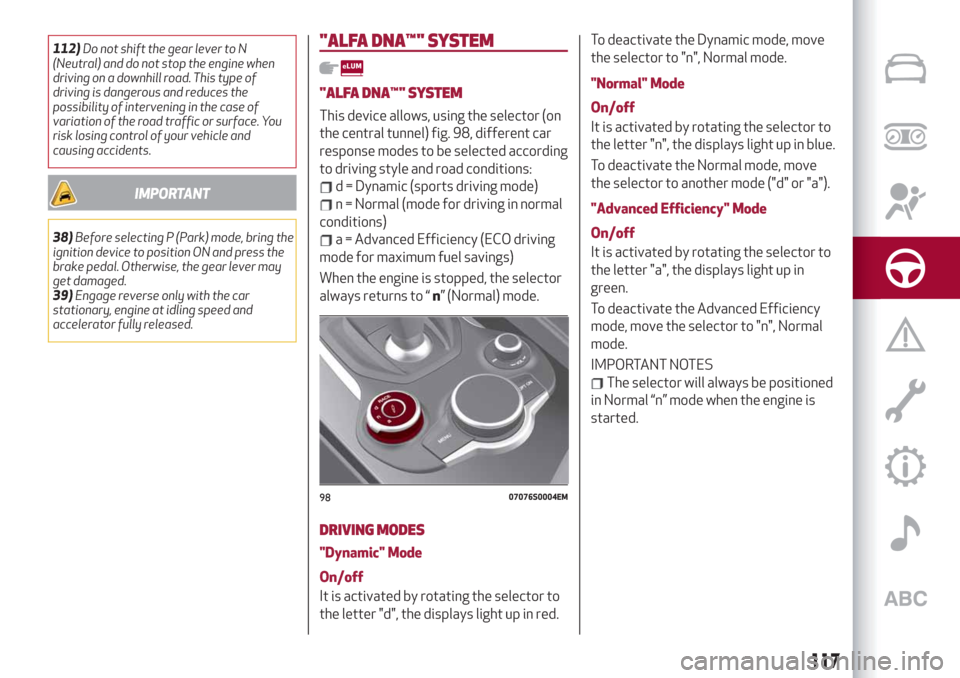
This device allows, using the selector (on
the central tunnel) fig. 98, different car
response modes to be selected according
to driving style and road conditions:
d = Dynamic (sports driving mode)
n = Normal (mode for driving in normal
conditions)
a = Advanced Efficiency (ECO driving
mode for maximum fuel savings)
When the engine is stopped, the selector
always returns to “n” (Normal) mode.
DRIVING MODES
"Dynamic" Mode
On/off
It is activated by rotating the selector to
the letter "d", the displays light up in red.To deactivate the Dynamic mode, move
the selector to "n", Normal mode.
"Normal" Mode
On/off
It is activated by rotating the selector to
the letter "n", the displays light up in blue.
To deactivate the Normal mode, move
the selector to another mode ("d" or "a").
"Advanced Efficiency" Mode
On/off
It is activated by rotating the selector to
the letter "a", the displays light up in
green.
To deactivate the Advanced Efficiency
mode, move the selector to "n", Normal
mode.
IMPORTANT NOTES
The selector will always be positioned
in Normal “n” mode when the engine is
started.
9807076S0004EM
117
Page 124 of 232
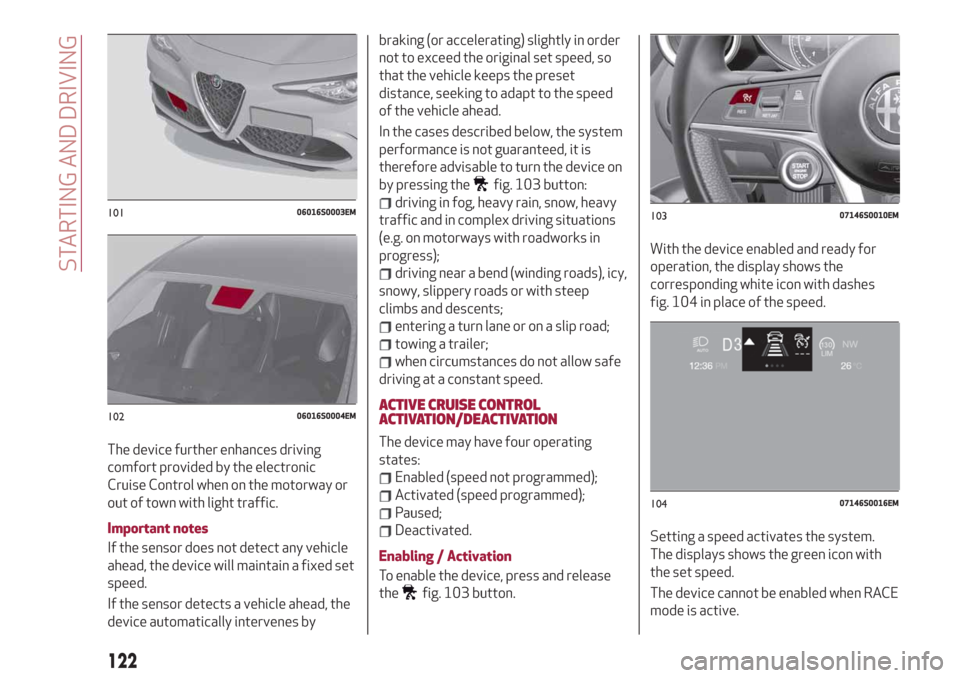
The device further enhances driving
comfort provided by the electronic
Cruise Control when on the motorway or
out of town with light traffic.
Important notes
If the sensor does not detect any vehicle
ahead, the device will maintain a fixed set
speed.
If the sensor detects a vehicle ahead, the
device automatically intervenes bybraking (or accelerating) slightly in order
not to exceed the original set speed, so
that the vehicle keeps the preset
distance, seeking to adapt to the speed
of the vehicle ahead.
In the cases described below, the system
performance is not guaranteed, it is
therefore advisable to turn the device on
by pressing the
fig. 103 button:
driving in fog, heavy rain, snow, heavy
traffic and in complex driving situations
(e.g. on motorways with roadworks in
progress);
driving near a bend (winding roads), icy,
snowy, slippery roads or with steep
climbs and descents;
entering a turn lane or on a slip road;
towing a trailer;
when circumstances do not allow safe
driving at a constant speed.
ACTIVE CRUISE CONTROL
ACTIVATION/DEACTIVATION
The device may have four operating
states:
Enabled (speed not programmed);
Activated (speed programmed);
Paused;
Deactivated.
Enabling / Activation
To enable the device, press and release
the
fig. 103 button.With the device enabled and ready for
operation, the display shows the
corresponding white icon with dashes
fig. 104 in place of the speed.
Setting a speed activates the system.
The displays shows the green icon with
the set speed.
The device cannot be enabled when RACE
mode is active.
10106016S0003EM
10206016S0004EM
10307146S0010EM
10407146S0016EM
122
STARTING AND DRIVING
Page 127 of 232
of the vehicle. Failure to comply with
these precautions may cause serious
accidents and fatal injuries.
SETTING THE DISTANCE BETWEEN
VEHICLES
The distance between your vehicle and
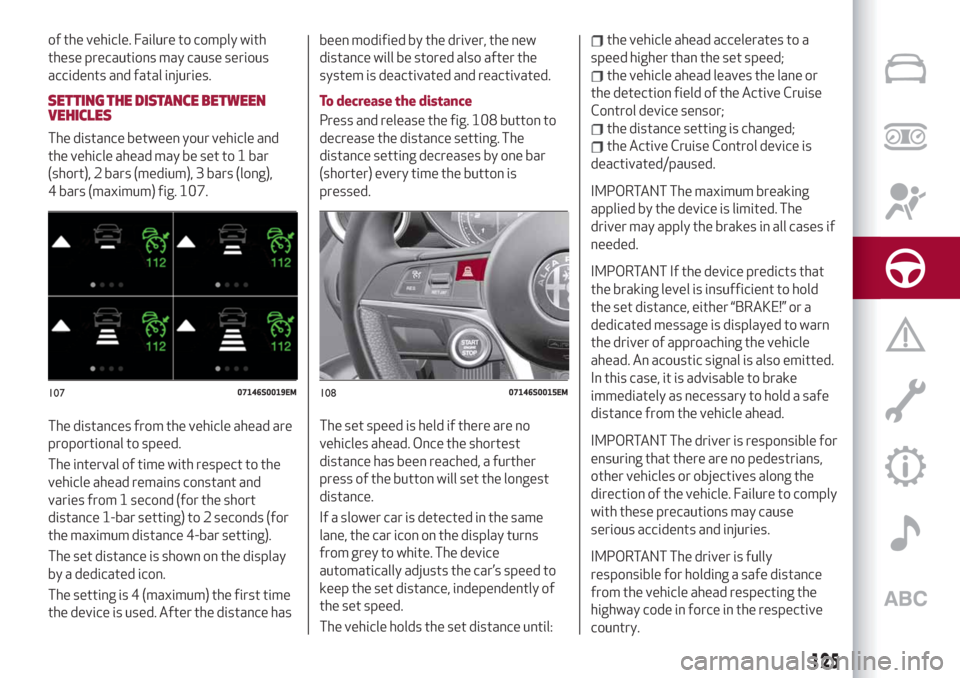
the vehicle ahead may be set to 1 bar
(short), 2 bars (medium), 3 bars (long),
4 bars (maximum) fig. 107.
The distances from the vehicle ahead are
proportional to speed.
The interval of time with respect to the
vehicle ahead remains constant and
varies from 1 second (for the short
distance 1-bar setting) to 2 seconds (for
the maximum distance 4-bar setting).
The set distance is shown on the display
by a dedicated icon.
The setting is 4 (maximum) the first time
the device is used. After the distance hasbeen modified by the driver, the new
distance will be stored also after the
system is deactivated and reactivated.
To decrease the distance
Press and release the fig. 108 button to
decrease the distance setting. The
distance setting decreases by one bar
(shorter) every time the button is
pressed.
The set speed is held if there are no
vehicles ahead. Once the shortest
distance has been reached, a further
press of the button will set the longest
distance.
If a slower car is detected in the same
lane, the car icon on the display turns
from grey to white. The device
automatically adjusts the car’s speed to
keep the set distance, independently of
the set speed.
The vehicle holds the set distance until:
the vehicle ahead accelerates to a
speed higher than the set speed;
the vehicle ahead leaves the lane or
the detection field of the Active Cruise
Control device sensor;
the distance setting is changed;
the Active Cruise Control device is
deactivated/paused.
IMPORTANT The maximum breaking
applied by the device is limited. The
driver may apply the brakes in all cases if
needed.
IMPORTANT If the device predicts that
the braking level is insufficient to hold
the set distance, either “BRAKE!” or a
dedicated message is displayed to warn
the driver of approaching the vehicle
ahead. An acoustic signal is also emitted.
In this case, it is advisable to brake
immediately as necessary to hold a safe
distance from the vehicle ahead.
IMPORTANT The driver is responsible for
ensuring that there are no pedestrians,
other vehicles or objectives along the
direction of the vehicle. Failure to comply
with these precautions may cause
serious accidents and injuries.
IMPORTANT The driver is fully
responsible for holding a safe distance
from the vehicle ahead respecting the
highway code in force in the respective
country.
10707146S0019EM10807146S0015EM
125
Page 129 of 232
Small cars
Some narrow cars (e.g. bicycles and
motorcycles) travelling near the outer
edges of the lane or which enter the lane
from kerbside are not detected until they
are fully in the lane.
Sufficient distance from the cars ahead
may not be guaranteed in these cases.
Stationary objects and vehicles
The device cannot detect the presence of
stationary vehicles or objects. For
example, the device will not operate if
the vehicle ahead leaves the lane and a
vehicle ahead of that one is standing on
the lane. Pay the utmost attention at all
times and be always ready to press the
brakes if needed.
Objects and cars moving in opposite or
crosswise direction
The device cannot detect the presence of
objects or vehicles travelling in opposite
or at right-angles and consequently will
not be operated.
WARNING
117)Pay the utmost attention while driving
at all times and be always ready to press the
brakes if needed.118)The system is an aid for the driver, who
must always pay full attention while driving.
The responsibility always rests with the
driver, who must take into account the
traffic conditions in order to drive in
complete safety. The driver must always
maintain a safe distance from the vehicle in
front.
119)The device is not activated in presence
of pedestrians, oncoming vehicles in the
opposite direction of travel or moving in the
crosswise direction and stationary objects
(e.g. a vehicle standing in a queue or a broken
down vehicle).
120)The device cannot take account of
road, traffic and weather conditions, and
conditions of poor visibility (e.g. fog).
121)The device does not always fully
recognise complex driving conditions that
could cause it to determine the safe distance
to be held incorrectly or not at all.
122)The device cannot apply the maximum
braking force: the car will not be stopped
completely.
IMPORTANT
41)The system may have limited or absent
operation due to weather conditions such as:
heavy rain, hail, thick fog, heavy snow.
42)The section of the bumper before the
sensor must not be covered with adhesives,
auxiliary headlights or any other object.
43)Operation can be adversely affected by
any structural change made to the vehicle,
such as a modification to the front geometry,
tyre change, or a heavier load than the
standard load of the vehicle.44)Incorrect repairs made on the front part
of the vehicle (e.g. bumper, chassis) may alter
the position of the radar sensor, and
adversely affect its operation. Go to an Alfa
Romeo Dealership for any operation of this
type.
45)Do not tamper with nor carry out any
intervention on the radar sensor or on the
camera on the windscreen. In the event of a
sensor failure, contact an Alfa Romeo
Dealership.
46)Do not wash with high-pressure jets in
the bumper lower area: in particular do not
operate on the system's electrical connector.
47)Be careful in the case of repairs and new
paintings in the area around the sensor
(panel covering the sensor on the left side of
the bumper). In the event of a frontal impact
the sensor may automatically deactivate
and display a warning to indicate that the
sensor needs to be repaired. Even without a
malfunction warning, deactivate the system
operation if you think that the position of the
radar sensor has changed (e.g. due to
low-speed frontal impact as during parking
manoeuvres). In these cases, go to an Alfa
Romeo Dealership to have the radar sensor
realigned or replaced.
127
Page 131 of 232
the sensor may detect a non-existent
obstacle ("echo interference") due to
mechanical interference, for example
when washing the vehicle, in rain (strong
wind), hail;
the signals sent by the sensor can also
be altered by the presence of ultrasonic
systems (e.g. pneumatic brake systems
of trucks or pneumatic drills) near the
vehicle;
parking assistance system
performance can also be influenced by
the position of the sensors, for example
due to a change in the ride setting
(caused by wear to the shock absorbers,
suspension), or by changing tyres,
overloading the vehicle or carrying out
specific tuning operations that require
the vehicle to be lowered;
the presence of a tow hook without
trailer, which may interfere with the
correct operation of the parking sensors.
Before using the Park Sensors system, it
is recommended to remove the
removable tow hook ball assembly and
the relevant attachment from the car
when the latter is not used for towing
operations. Failure to comply with this
prescription may cause personal injuries
or damage to vehicles or obstacles since,
when the continuous acoustic signal is
emitted, the tow hook ball is already in a
position that is much closer to the
obstacle than the rear bumper. If youwish to leave the tow hook fitted without
towing a trailer, it is advisable to contact
an Alfa Romeo Dealership for the Park
Sensors system update operations
because the tow hook could be detected
as an obstacle by the central sensors.
the presence of adhesives on the
sensors. Therefore, take care not to place
stickers on the sensors.
WARNING
123)Parking and other potentially
dangerous manoeuvres are, however,
always the driver’s responsibility. When
performing these operations, always make
sure that there are no other people
(especially children) or animals on the route
you want to take. The parking sensors are an
aid for the driver, but the driver must never
allow their attention to lapse during
potentially dangerous manoeuvres, even
those executed at low speeds.
IMPORTANT
48)The sensors must be clean of mud, dirt,
snow or ice in order for the system to
operate correctly. Be careful not to scratch
or damage the sensors while cleaning them.
Avoid using dry, rough or hard cloths. The
sensors should be washed using clean water
with the addition of car shampoo if
necessary. When using special washing
equipment such as high pressure jets or
steam cleaning, clean the sensors very
quickly keeping the jet more than 10 cm
away.
49)Have interventions on the bumper in the
area of the sensors carried out only by an
Alfa Romeo Dealership. Interventions on the
bumper that are not carried out properly
may compromise the operation of the
parking sensors.
50)Only have the bumpers repainted or any
retouches to the paintwork in the area of the
sensors carried out by an Alfa Romeo
Dealership. Incorrect paint application could
affect the operation of the parking sensors.
129
Page 134 of 232
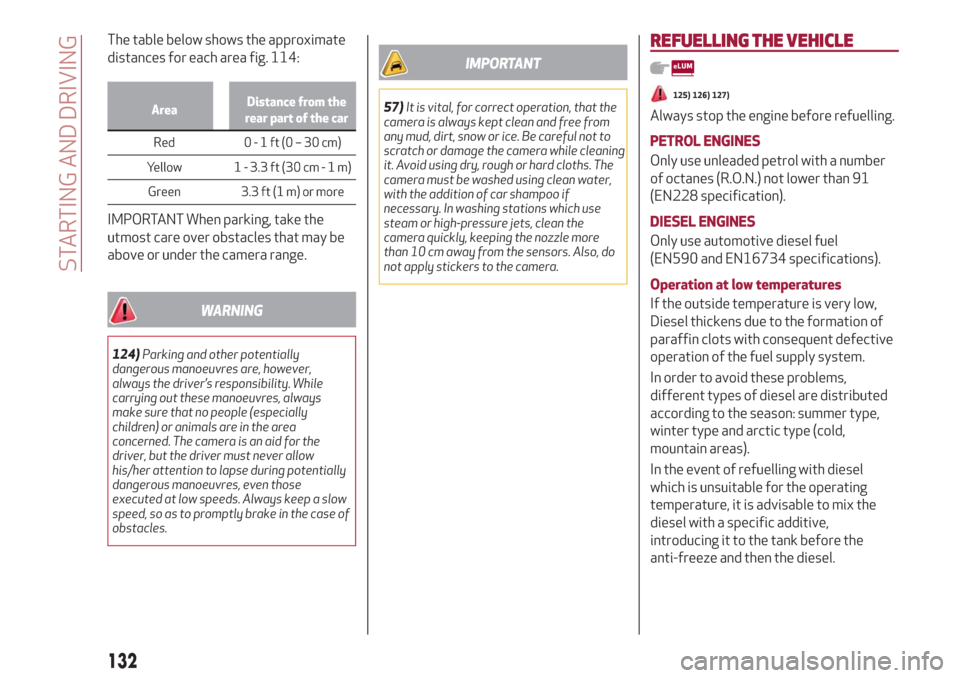
The table below shows the approximate
distances for each area fig. 114:
AreaDistance from the
rear part of the car
Red 0-1ft(0–30cm)
Y
ellow 1 - 3.3 ft (30 cm-1m)
Green 3.3 ft (1 m) or more
IMPORTANT When parking, take the
utmost care over obstacles that may be
above or under the camera range.
WARNING
124)Parking and other potentially
dangerous manoeuvres are, however,
always the driver’s responsibility. While
carrying out these manoeuvres, always
make sure that no people (especially
children) or animals are in the area
concerned. The camera is an aid for the
driver, but the driver must never allow
his/her attention to lapse during potentially
dangerous manoeuvres, even those
executed at low speeds. Always keep a slow
speed, so as to promptly brake in the case of
obstacles.
IMPORTANT
57)It is vital, for correct operation, that the
camera is always kept clean and free from
any mud, dirt, snow or ice. Be careful not to
scratch or damage the camera while cleaning
it. Avoid using dry, rough or hard cloths. The
camera must be washed using clean water,
with the addition of car shampoo if
necessary. In washing stations which use
steam or high-pressure jets, clean the
camera quickly, keeping the nozzle more
than 10 cm away from the sensors. Also, do
not apply stickers to the camera.
REFUELLING THE VEHICLE
125) 126) 127)
Always stop the engine before refuelling.
PETROL ENGINES
Only use unleaded petrol with a number
of octanes (R.O.N.) not lower than 91
(EN228 specification).
DIESEL ENGINES
Only use automotive diesel fuel
(EN590 and EN16734 specifications).
Operation at low temperatures
If the outside temperature is very low,
Diesel thickens due to the formation of
paraffin clots with consequent defective
operation of the fuel supply system.
In order to avoid these problems,
different types of diesel are distributed
according to the season: summer type,
winter type and arctic type (cold,
mountain areas).
In the event of refuelling with diesel
which is unsuitable for the operating
temperature, it is advisable to mix the
diesel with a specific additive,
introducing it to the tank before the
anti-freeze and then the diesel.
132
STARTING AND DRIVING
Page 142 of 232
HAZARD WARNING LIGHTS
CONTROL
58)
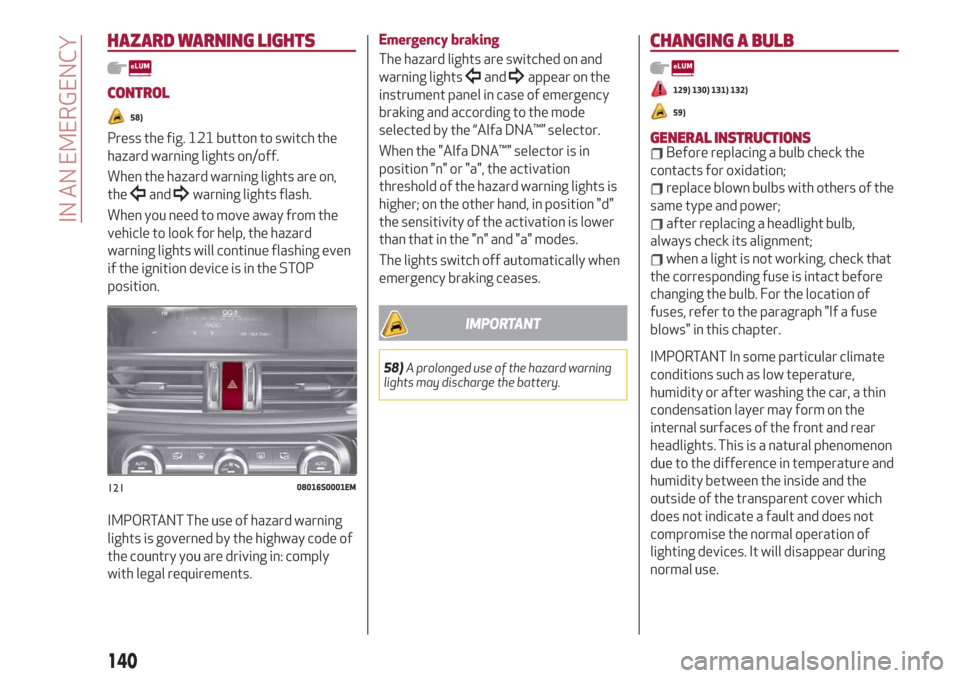
Press the fig. 121 button to switch the
hazard warning lights on/off.
When the hazard warning lights are on,
the
andwarning lights flash.
When you need to move away from the
vehicle to look for help, the hazard
warning lights will continue flashing even
if the ignition device is in the STOP
position.
IMPORTANT The use of hazard warning
lights is governed by the highway code of
the country you are driving in: comply
with legal requirements.
Emergency braking
The hazard lights are switched on and
warning lights
andappear on the
instrument panel in case of emergency
braking and according to the mode
selected by the “Alfa DNA™” selector.
When the "Alfa DNA™" selector is in
position "n" or "a", the activation
threshold of the hazard warning lights is
higher; on the other hand, in position "d"
the sensitivity of the activation is lower
than that in the "n" and "a" modes.
The lights switch off automatically when
emergency braking ceases.
IMPORTANT
58)A prolonged use of the hazard warning
lights may discharge the battery.
CHANGING A BULB
129) 130) 131) 132)
59)
GENERAL INSTRUCTIONSBefore replacing a bulb check the
contacts for oxidation;
replace blown bulbs with others of the
same type and power;
after replacing a headlight bulb,
always check its alignment;
when a light is not working, check that
the corresponding fuse is intact before
changing the bulb. For the location of
fuses, refer to the paragraph "If a fuse
blows" in this chapter.
IMPORTANT In some particular climate
conditions such as low teperature,
humidity or after washing the car, a thin
condensation layer may form on the
internal surfaces of the front and rear
headlights. This is a natural phenomenon
due to the difference in temperature and
humidity between the inside and the
outside of the transparent cover which
does not indicate a fault and does not
compromise the normal operation of
lighting devices. It will disappear during
normal use.
12108016S0001EM
140
IN AN EMERGENCY