head Alfa Romeo Giulia 2019 Owner's Guide
[x] Cancel search | Manufacturer: ALFA ROMEO, Model Year: 2019, Model line: Giulia, Model: Alfa Romeo Giulia 2019Pages: 232, PDF Size: 4.87 MB
Page 96 of 232
INSTALLING AN ISOFIX CHILD CARSEAT
84) 85) 86) 87) 88)
The rear side seats of the vehicle are
equipped with ISOFIX attachments, for
fitting child restraint systems quickly,
simply and safely.
The ISOFIX system lets you install the
ISOFIX child restraining system without
using the car seat belts but connecting
them directly to the carseat with three
anchors in the car.
Traditional child restraint systems can be
fitted alongside ISOFIX child restraint
systems on different seats in the same
vehicle.
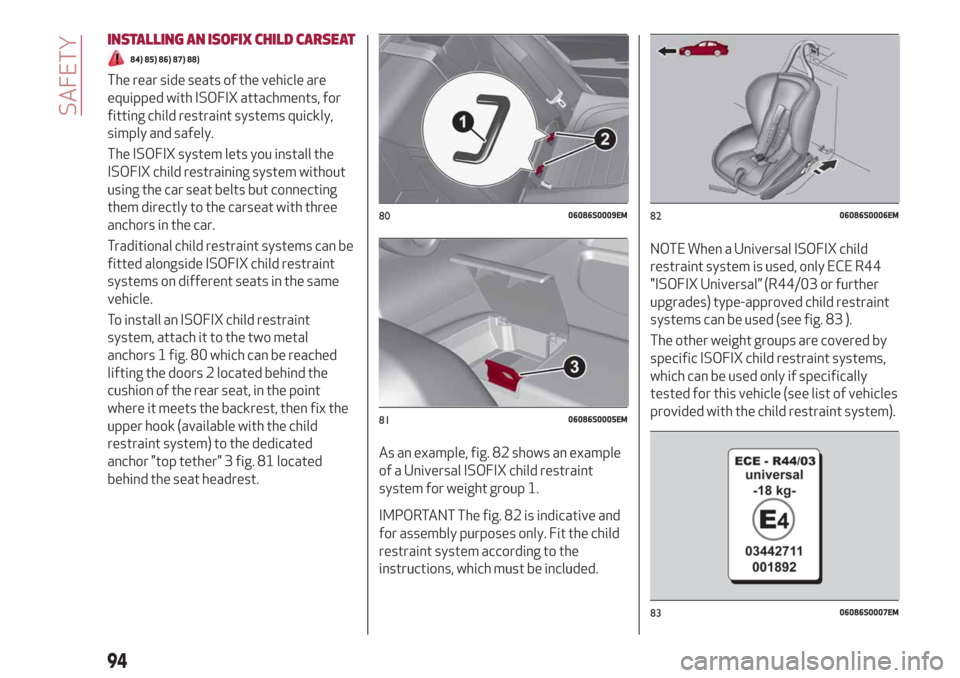
To install an ISOFIX child restraint
system, attach it to the two metal
anchors 1 fig. 80 which can be reached
lifting the doors 2 located behind the
cushion of the rear seat, in the point
where it meets the backrest, then fix the
upper hook (available with the child
restraint system) to the dedicated
anchor "top tether" 3 fig. 81 located
behind the seat headrest.As an example, fig. 82 shows an example
of a Universal ISOFIX child restraint
system for weight group 1.
IMPORTANT The fig. 82 is indicative and
for assembly purposes only. Fit the child
restraint system according to the
instructions, which must be included.
NOTE When a Universal ISOFIX child
restraint system is used, only ECE R44
"ISOFIX Universal” (R44/03 or further
upgrades) type-approved child restraint
systems can be used (see fig. 83 ).
The other weight groups are covered by
specific ISOFIX child restraint systems,
which can be used only if specifically
tested for this vehicle (see list of vehicles
provided with the child restraint system).
8006086S0009EM
8106086S0005EM
8206086S0006EM
8306086S0007EM
94
SAFETY
Page 103 of 232
Main recommendations to carry
children safely
Install the child restraint systems on
the rear seat, which is the most protected
position in the event of an impact.
Keep children in rearward facing child
restraint systems for as long as possible,
until 3–4 years old if possible.
The rear head restraint or the front
passenger head restraint can be lifted if
needed to install a child restraint system.
The head restraint must always be
present in the vehicle and fitted if the
seat is used by an adult passenger or a
child sitting in a restraint system without
backrest (refer to the procedure
described in ‘’Head restraint’’ paragraph,
‘’Knowing your vehicle’’ chapter).
If the front passenger airbag has been
deactivated, always check that the
warning light on the courtesy light is on
continuously to make sure that it is
effectively deactivated.
Carefully follow the instructions
supplied with the child restraint system.
Keep the instructions in the vehicle along
with the other documents and this
handbook. Do not use second-hand child
seats without instructions.
Only one child is to be strapped into
each restraint system; never carry two
children using one child restraint system.
Always check that the seat belts do
not rest on the child’s neck.
Always check that the seat belt is well
fastened by pulling on it.
While travelling, do not let the child sit
incorrectly or unfasten the belts.
Never allow a child to put the belt's
diagonal section under an arm or behind
their back.
Never carry children on your lap, even
newborns. No-one can hold a child in the
case of a crash.
In the event of an accident, replace the
child restraint system with a new one.
WARNING
76)SEVERE DANGER When a front
passenger airbag is fitted, do not install
rearward facing child restraint systems on
the front passenger seat. Deployment of the
airbag in an accident could cause fatal
injuries to the child regardless of the
severity of the collision. It is advisable to
always carry children in a child restraint
system on the rear seat, which is the most
protected position in the event of a collision.
77)On the sun visor there is a label with
suitable symbols reminding the user that it is
compulsory to deactivate the airbag if a
rearward facing child restraint system is
fitted. Always comply with the instructions
on the passenger side sun visor (see the
"Supplementary Restraint System (SRS) -
Airbag" paragraph).78)Should it be necessary to carry a child on
the passenger side front seat in a rear facing
child restraint system, the passenger side
front airbag and side bag must be
deactivated through the Connect system
main menu (see the Supplementary
Restraint System (SRS) - Airbag"
paragraph), verifying deactivation by
checking whether the
OFFLED has
illuminated on the front ceiling light. Move
the passenger's seat as far back as possible
to avoid contact between the child seat and
the dashboard.
79)Do not move the front or rear seat if a
child is seated on it or on the dedicated child
restraint system
80)Incorrect fitting of the child restraint
system may result in an inefficient
protection system. In the event of an
accident the child restraint system may
become loose and the child may be injured,
even fatally. When fitting a restraint system
for newborns or children, strictly comply
with the instructions provided by the
Manufacturer.
81)When the child restraint system is not
used, secure it with the seat belt or with the
ISOFIX anchorages, or remove it from the
vehicle. Do not leave it unsecured inside the
passenger compartment. In this way, in the
case of sudden braking or an accident, it will
not cause injuries to the occupants.
82)After installing a child restraint system,
do not move the seat: always remove the
child restraint system before making any
adjustment.
101
Page 104 of 232
83)Always make sure that the chest section
of the seat belt does not pass under the
arms or behind the back of the child. In the
event of an accident the seat belt will not be
able to secure the child, with the risk of
injury, including fatal injury. Therefore the
child must always wear the seat belt
correctly.
84)Do not use the same lower anchorage to
install more than one child restraint system.
85)If a Universal ISOFIX child seat is not
fixed to all three anchorages, the child seat
will not be able to protect the child correctly.
In a crash, the child could be seriously or
fatally injured.
86)Fit the child restraint system when the
car is stationary. The child restraint system
is correctly fixed to the brackets when you
hear the click. Follow the instructions for
assembly, disassembly and positioning that
the Manufacturer must supply with the child
restraint system.
87)If the vehicle was involved in an accident
of a certain severity, have the ISOFIX
anchorages and the child restraint system
replaced.
88)If the vehicle was involved in an accident
of a certain severity, have both the child
restraint system and the seat belt it was
attached to replaced.SUPPLEMENTARY RESTRAINT
SYSTEM (SRS) - AIRBAG
The vehicle is equipped with:
front driver airbag;
front passenger airbag;
driver and passenger front side bags
for pelvis, chest and shoulder protection
(Side bags);
side bags for head protection of front
seat passengers and rear side seat
passengers (window bag).
The location of the airbags on the vehicle
is marked by the word "AIRBAG" in the
middle of the steering wheel below the
Alfa Romeo emblem, on the dashboard,
on the side trim or on a label placed next
to the airbag deployment area.
FRONT AIRBAGS
The front (driver and passenger) airbags
protect the front seat occupants in the
event of head-on crashes of medium-high
severity, by placing the cushion between
the occupant and the steering wheel or
dashboard.
Therefore non-activation of airbags in
other types of collisions (side impacts,
rear shunts, roll-overs, etc.) does not
indicate a system malfunction.
Driver and passenger front airbags are
not a replacement of but complementary
to the seat belts, which should always be
worn, as specified by law in Europe and
most non-European countries.
In the event of impact, those not wearing
a seat belt are projected forwards and
may come into contact with the bag
which is still inflating. The protection
offered by the bag is compromised in
these circumstances.
Front airbags may not activate in the
following situations:
frontal impacts against highly
deformable objects not involving the
front surface of the vehicle (e.g. wing
collision against guard rail, etc.);
vehicle wedging under other vehicles
or protective barriers (e.g. trucks or
guard rails).
102
SAFETY
Page 108 of 232
SIDE AIRBAGS
To help increase occupants protection in
the event of side impact collisions, the
vehicle is equipped with front side bags
and window bags.
Side bag
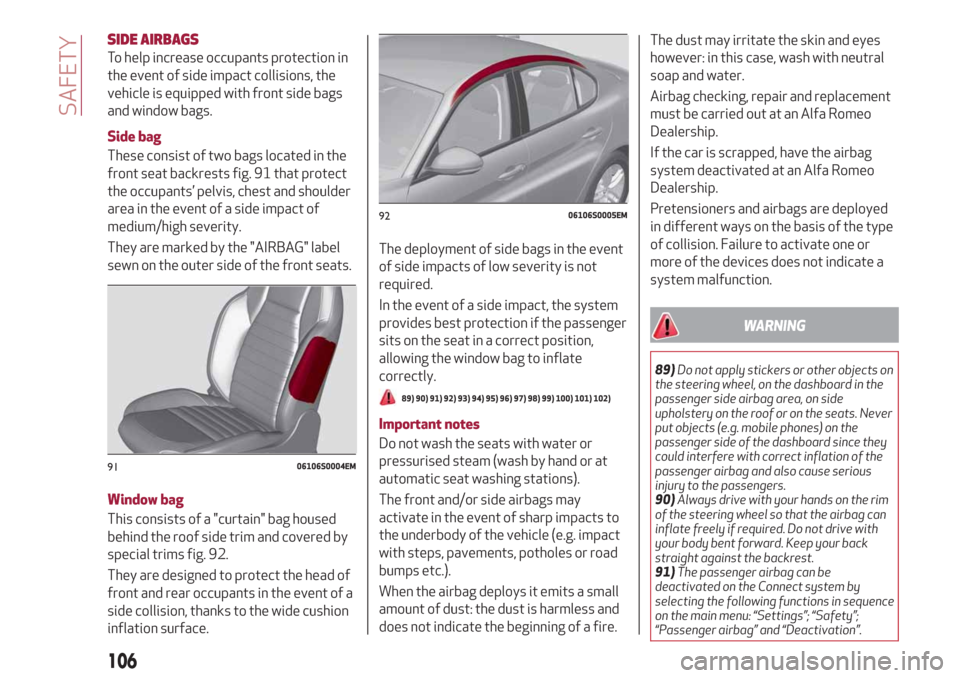
These consist of two bags located in the
front seat backrests fig. 91 that protect
the occupants’ pelvis, chest and shoulder
area in the event of a side impact of
medium/high severity.
They are marked by the "AIRBAG" label
sewn on the outer side of the front seats.
Window bag
This consists of a "curtain" bag housed
behind the roof side trim and covered by
special trims fig. 92.
They are designed to protect the head of
front and rear occupants in the event of a
side collision, thanks to the wide cushion
inflation surface.The deployment of side bags in the event
of side impacts of low severity is not
required.
In the event of a side impact, the system
provides best protection if the passenger
sits on the seat in a correct position,
allowing the window bag to inflate
correctly.
89) 90) 91) 92) 93) 94) 95) 96) 97) 98) 99) 100) 101) 102)
Important notes
Do not wash the seats with water or
pressurised steam (wash by hand or at
automatic seat washing stations).
The front and/or side airbags may
activate in the event of sharp impacts to
the underbody of the vehicle (e.g. impact
with steps, pavements, potholes or road
bumps etc.).
When the airbag deploys it emits a small
amount of dust: the dust is harmless and
does not indicate the beginning of a fire.The dust may irritate the skin and eyes
however: in this case, wash with neutral
soap and water.
Airbag checking, repair and replacement
must be carried out at an Alfa Romeo
Dealership.
If the car is scrapped, have the airbag
system deactivated at an Alfa Romeo
Dealership.
Pretensioners and airbags are deployed
in different ways on the basis of the type
of collision. Failure to activate one or
more of the devices does not indicate a
system malfunction.
WARNING
89)Do not apply stickers or other objects on
the steering wheel, on the dashboard in the
passenger side airbag area, on side
upholstery on the roof or on the seats. Never
put objects (e.g. mobile phones) on the
passenger side of the dashboard since they
could interfere with correct inflation of the
passenger airbag and also cause serious
injury to the passengers.
90)Always drive with your hands on the rim
of the steering wheel so that the airbag can
inflate freely if required. Do not drive with
your body bent forward. Keep your back
straight against the backrest.
91)The passenger airbag can be
deactivated on the Connect system by
selecting the following functions in sequence
on the main menu: “Settings”; “Safety”;
“Passenger airbag” and “Deactivation”.
9106106S0004EM
9206106S0005EM
106
SAFETY
Page 109 of 232
92)Do not affix rigid objects to the garment
hooks or support handles.
93)Do not rest your head, arms or elbows on
the door, windows or the area in which the
Window bag is located to avoid possible
injury during airbag inflation.
94)Never lean your head, arms or elbows
out of the window.
95)If, when the ignition device is turned to
ON, the
warning light does not switch on
or stays on whilst driving, a fault may have
occurred in the restraint systems. In this
case the airbags or pretensioners may not
be deployed in an impact or, in a lower
number of cases, they may be deployed
accidentally. Before continuing, contact an
Alfa Romeo Dealership immediately to have
the system checked.
96)In case of a LED
OFFfailure (located
on the front courtesy light), thewarning
light appears on the instrument panel.
97)On cars with side bags, do not cover the
front seat backrests with extra covers.
98)Do not travel carrying objects in your
lap, in front of your chest or between your
lips (pipe, pencils, etc.): they could cause
severe injury if the airbag is deployed.
99)If the car has been subject to theft,
attempted theft, vandalism, or flooding,
have the airbag system inspected at an Alfa
Romeo Dealership.
100)Malfunction of the airbag failure
warning light is indicated by the activation
of an airbag failure icon and a dedicated
message on the instrument panel display.
The pyrotechnic charges are not disabled.
Before continuing, contact an Alfa Romeo
Dealership immediately to have the system
checked.101)The airbag deployment threshold is
higher than that of the pretensioners. For
collisions in the range between the two
thresholds, it is normal for only the
pretensioners to be activated.
102)The airbag does not replace seat belts
but increases their efficiency. Because front
airbags are not deployed for low-speed
crashes, side collisions, rear-end shunts or
rollovers, occupants are protected, in
addition to any side bags, only by their seat
belts, which must therefore always be
fastened.
107
Page 117 of 232
The positions diagram is illustrated on
the top of the lever.
The letter corresponding to the selected
mode lights up and can be seen on the
instrument panel display.
To select one of the operating modes,
move the lever forwards or backwards
and press the brake pedal at the same
time.
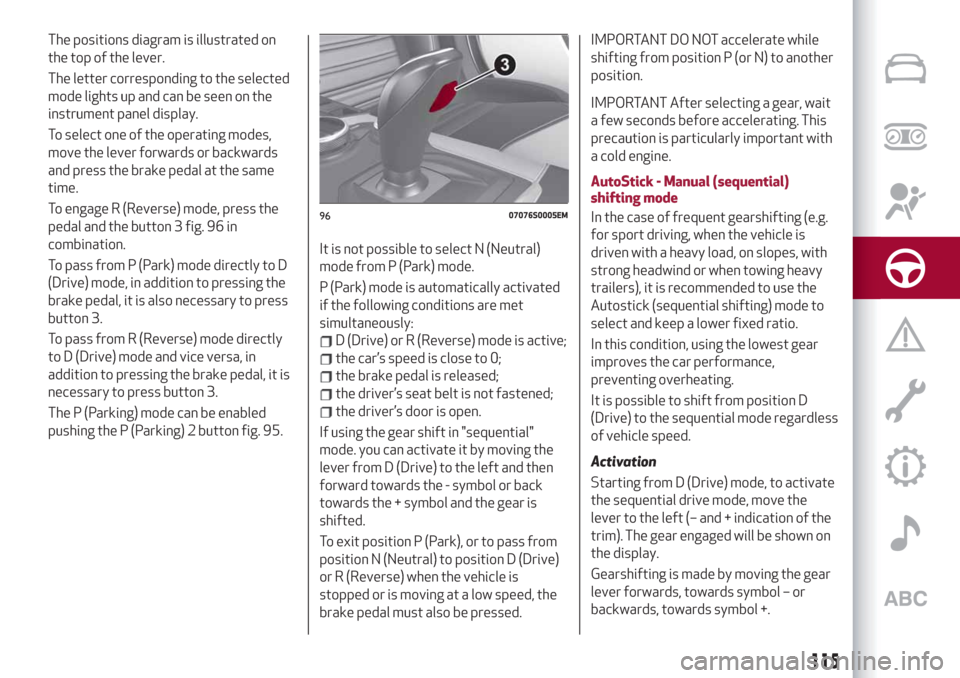
To engage R (Reverse) mode, press the
pedal and the button 3 fig. 96 in
combination.
To pass from P (Park) mode directly to D
(Drive) mode, in addition to pressing the
brake pedal, it is also necessary to press
button 3.
To pass from R (Reverse) mode directly
to D (Drive) mode and vice versa, in
addition to pressing the brake pedal, it is
necessary to press button 3.
The P (Parking) mode can be enabled
pushing the P (Parking) 2 button fig. 95.It is not possible to select N (Neutral)
mode from P (Park) mode.
P (Park) mode is automatically activated
if the following conditions are met
simultaneously:
D (Drive) or R (Reverse) mode is active;
the car’s speed is close to 0;
the brake pedal is released;
the driver’s seat belt is not fastened;
the driver’s door is open.
If using the gear shift in "sequential"
mode. you can activate it by moving the
lever from D (Drive) to the left and then
forward towards the - symbol or back
towards the + symbol and the gear is
shifted.
To exit position P (Park), or to pass from
position N (Neutral) to position D (Drive)
or R (Reverse) when the vehicle is
stopped or is moving at a low speed, the
brake pedal must also be pressed.
IMPORTANT DO NOT accelerate while
shifting from position P (or N) to another
position.
IMPORTANT After selecting a gear, wait
a few seconds before accelerating. This
precaution is particularly important with
a cold engine.
AutoStick - Manual (sequential)
shifting mode
In the case of frequent gearshifting (e.g.
for sport driving, when the vehicle is
driven with a heavy load, on slopes, with
strong headwind or when towing heavy
trailers), it is recommended to use the
Autostick (sequential shifting) mode to
select and keep a lower fixed ratio.
In this condition, using the lowest gear
improves the car performance,
preventing overheating.
It is possible to shift from position D
(Drive) to the sequential mode regardless
of vehicle speed.
Activation
Starting from D (Drive) mode, to activate
the sequential drive mode, move the
lever to the left (– and + indication of the
trim). The gear engaged will be shown on
the display.
Gearshifting is made by moving the gear
lever forwards, towards symbol – or
backwards, towards symbol +.
9607076S0005EM
115
Page 123 of 232
RECALLING THE SPEED
For versions with automatic transmission
operating in D mode (Drive - automatic),
press and release the RES
fig. 100 button to recall the previously
set speed.
For versions with manual gearbox or
automatic transmission in Autostick
(sequential) mode, before recalling the
previously set speed you should
accelerate until getting close to it, then
press and release the RES button.
DEACTIVATING THE DEVICE
Lightly pressing the brake pedal
deactivates the Cruise Control without
deleting the stored speed.
The Cruise Control may be deactivated
also by applying the electric parking
brake or when the braking system is
operated (e.g. operation of the ESC
system).
The stored speed is deleted in the
following cases:
pressing the on/off button or
switching off the engine;
if there is a malfunction in the Cruise
Control.
DEACTIVATING THE DEVICE
The Cruise Control is deactivated by
pressing the activation/deactivation
button or bringing the ignition device to
the STOP position.
WARNING
114)When travelling with the device active,
never move the gear lever to neutral.
115)In case of a malfunction or failure of
the device, contact an Alfa Romeo
Dealership.
116)The Cruise Control can be dangerous if
the system cannot keep a constant speed. In
specific conditions speed may be excessive,
resulting in the risk of losing control of the
vehicle and causing accidents. Do not use the
device in heavy traffic or on winding, icy,
snowy or slippery roads.
ACTIVE CRUISE CONTROL
(where provided)
117) 118) 119) 120) 121) 122)
41) 42) 43) 44) 45) 46) 47)
The Active Cruise Control (ACC) is a
driver assist device which combines the
Cruise Control functions with one for
controlling the distance from the vehicle
ahead.
The device allows to hold the vehicle at
the desired speed without needing to
press the accelerator. It also allows to
hold a given distance from the vehicle
ahead (the distance can be set by the
driver).
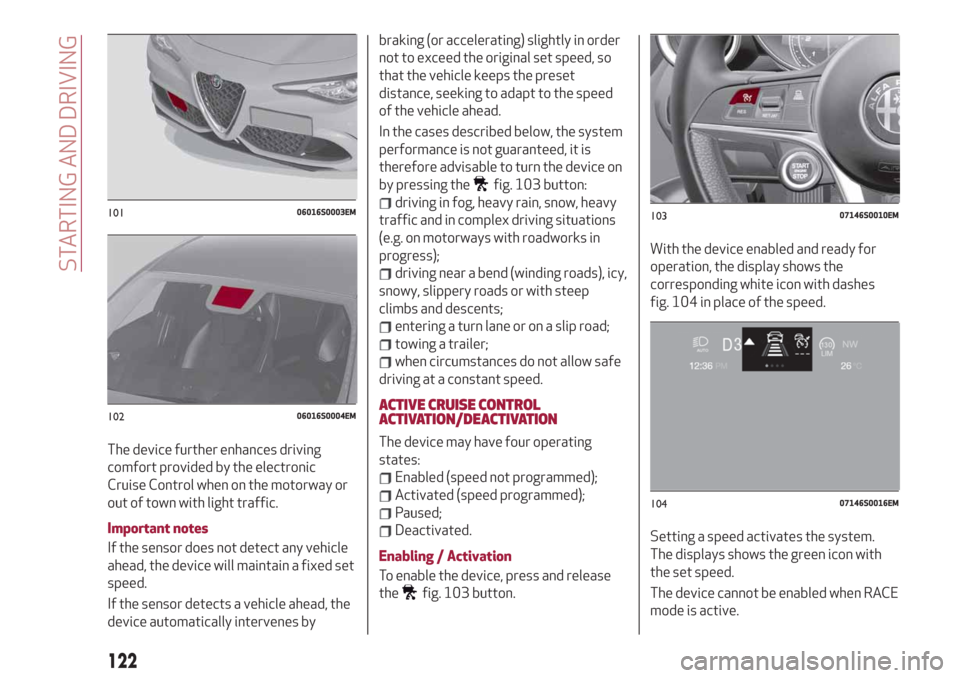
The Active Cruise Control (ACC) uses a
radar sensor, located behind the front
bumper fig. 101 and a camera, located in
the middle area of the windscreen
fig. 102, to detect the presence of a
vehicle close ahead.
121
Page 124 of 232
The device further enhances driving
comfort provided by the electronic
Cruise Control when on the motorway or
out of town with light traffic.
Important notes
If the sensor does not detect any vehicle
ahead, the device will maintain a fixed set
speed.
If the sensor detects a vehicle ahead, the
device automatically intervenes bybraking (or accelerating) slightly in order
not to exceed the original set speed, so
that the vehicle keeps the preset
distance, seeking to adapt to the speed
of the vehicle ahead.
In the cases described below, the system
performance is not guaranteed, it is
therefore advisable to turn the device on
by pressing the
fig. 103 button:
driving in fog, heavy rain, snow, heavy
traffic and in complex driving situations
(e.g. on motorways with roadworks in
progress);
driving near a bend (winding roads), icy,
snowy, slippery roads or with steep
climbs and descents;
entering a turn lane or on a slip road;
towing a trailer;
when circumstances do not allow safe
driving at a constant speed.
ACTIVE CRUISE CONTROL
ACTIVATION/DEACTIVATION
The device may have four operating
states:
Enabled (speed not programmed);
Activated (speed programmed);
Paused;
Deactivated.
Enabling / Activation
To enable the device, press and release
the
fig. 103 button.With the device enabled and ready for
operation, the display shows the
corresponding white icon with dashes
fig. 104 in place of the speed.
Setting a speed activates the system.
The displays shows the green icon with
the set speed.
The device cannot be enabled when RACE
mode is active.
10106016S0003EM
10206016S0004EM
10307146S0010EM
10407146S0016EM
122
STARTING AND DRIVING
Page 125 of 232
IMPORTANT It is dangerous to leave the
device activated when it is not used.
There is a risk of inadvertently activating
it and losing control of the vehicle due to
unexpected excessive speed.
Pausing / Deactivating
With the device enabled (speed not set),
press the
button.
With the device activated (speed set),
press the
button to enter the Paused
state. The display shows the white icon
with the speed in brackets. Press the
button again to deactivate the device
completely.
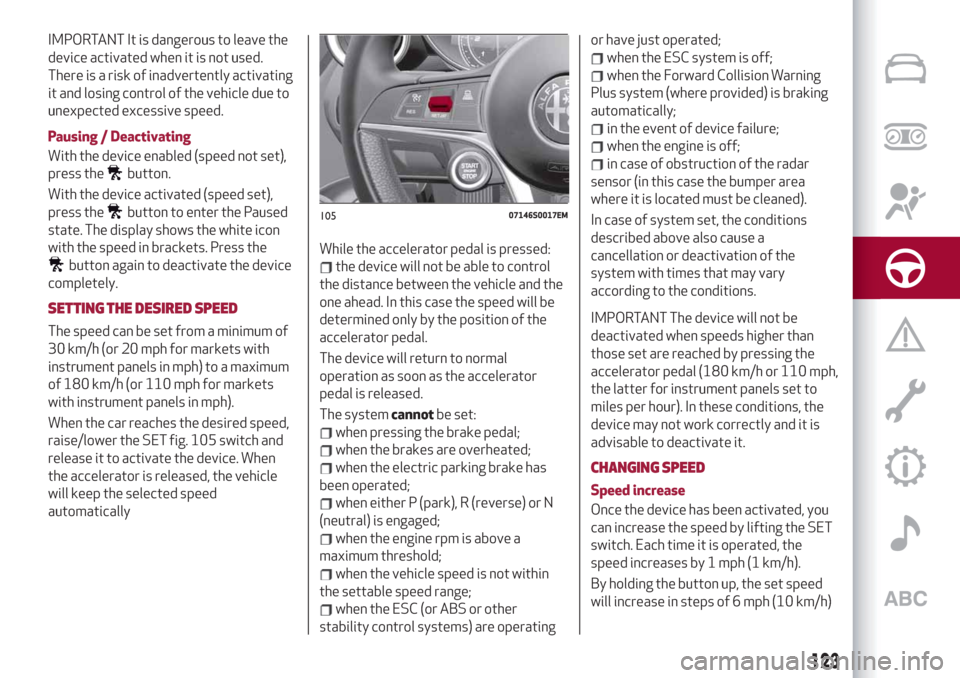
SETTING THE DESIRED SPEED
The speed can be set from a minimum of
30 km/h (or 20 mph for markets with
instrument panels in mph) to a maximum
of 180 km/h (or 110 mph for markets
with instrument panels in mph).
When the car reaches the desired speed,
raise/lower the SET fig. 105 switch and
release it to activate the device. When
the accelerator is released, the vehicle
will keep the selected speed
automaticallyWhile the accelerator pedal is pressed:
the device will not be able to control
the distance between the vehicle and the
one ahead. In this case the speed will be
determined only by the position of the
accelerator pedal.
The device will return to normal
operation as soon as the accelerator
pedal is released.
The systemcannotbe set:
when pressing the brake pedal;
when the brakes are overheated;
when the electric parking brake has
been operated;
when either P (park), R (reverse) or N
(neutral) is engaged;
when the engine rpm is above a
maximum threshold;
when the vehicle speed is not within
the settable speed range;
when the ESC (or ABS or other
stability control systems) are operatingor have just operated;
when the ESC system is off;
when the Forward Collision Warning
Plus system (where provided) is braking
automatically;
in the event of device failure;
when the engine is off;
in case of obstruction of the radar
sensor (in this case the bumper area
where it is located must be cleaned).
In case of system set, the conditions
described above also cause a
cancellation or deactivation of the
system with times that may vary
according to the conditions.
IMPORTANT The device will not be
deactivated when speeds higher than
those set are reached by pressing the
accelerator pedal (180 km/h or 110 mph,
the latter for instrument panels set to
miles per hour). In these conditions, the
device may not work correctly and it is
advisable to deactivate it.
CHANGING SPEED
Speed increase
Once the device has been activated, you
can increase the speed by lifting the SET
switch. Each time it is operated, the
speed increases by 1 mph (1 km/h).
By holding the button up, the set speed
will increase in steps of 6 mph (10 km/h)
10507146S0017EM
123
Page 126 of 232
until the button is released, then the new
speed will be stored.
Decreasing speed
Once the device has been activated, you
can decrease the speed by lowering the
SET switch. Each time it is operated, the
speed decreases by 1 mph (1 km/h).
By holding the button down, the set
speed will decrease in steps of 6 mph
(10 km/h) until the button is released,
then the new speed will be stored.
IMPORTANT Moving the SET switch
allows you to adjust the speed according
to the selected unit of measurement
("metric" or "imperial") set on the
Connect system (see dedicated
supplement).
Important notes
By keeping the accelerator pedal
depressed, the car can continue to
accelerate beyond the set speed. In this
case, use the SET switch to set the speed
to the vehicle’s current speed.
When the SET button is pressed to
reduce the speed, the braking system
intervenes automatically if the engine
brake does not slow the car down
sufficiently to reach the set speed. The
device holds the set speed uphill and
downhill; however a slight variation is
entirely normal, particularly on slight
gradients.The automatic transmission could change
to a lower gears when driving downhill or
when accelerating. This is normal and
necessary to maintain the set speed.
The device is switched off while driving if
the brakes overheat.
ACCELERATING WHEN OVERTAKING
When driving with the device active and
following a vehicle, the device provides
additional acceleration to facilitate
overtaking, when travelling over a given
speed and switches on the left direction
indicator (of the right indicator for
right-hand drive versions).
In left-hand traffic, the overtaking assist
function is only active when the left-hand
lane is used for overtaking the vehicle
ahead (the opposite activation logic is
used in right-hand traffic countries).
The device detects the direction of
traffic automatically when the vehicle
passes from left-hand traffic to
right-hand traffic. In this case, the
overtaking assist function is only active
when the reference vehicle is overtaken
on the right. The additional acceleration
is activated when the driver uses the
right direction indicator.
In this condition, the device no longer
provides the overtaking assist function
on the left-hand side until it determinesthat the vehicle has returned to left-hand
traffic conditions.
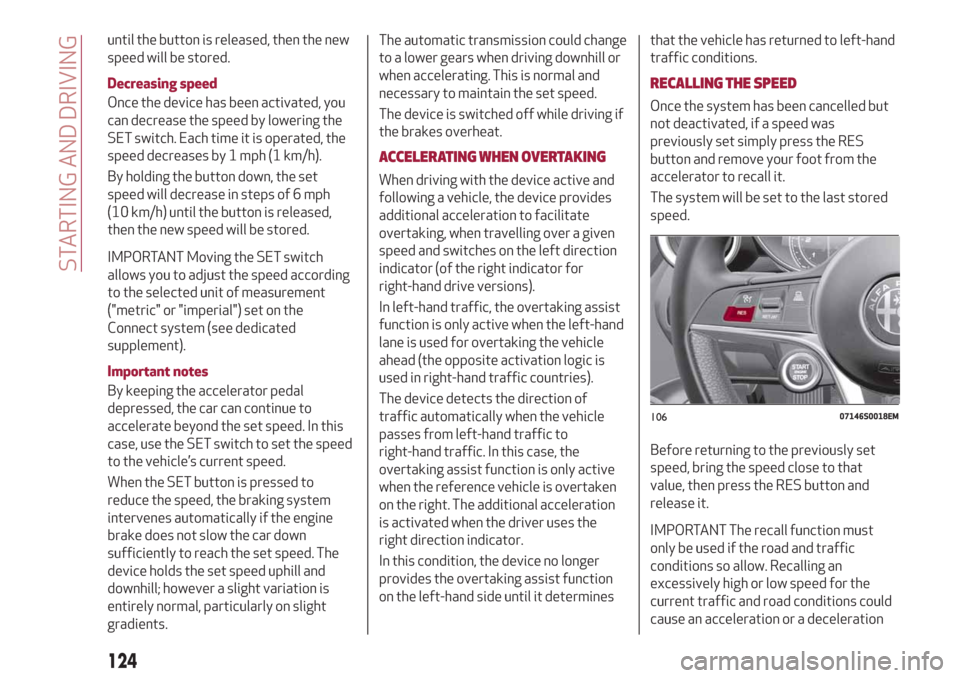
RECALLING THE SPEED
Once the system has been cancelled but
not deactivated, if a speed was
previously set simply press the RES
button and remove your foot from the
accelerator to recall it.
The system will be set to the last stored
speed.
Before returning to the previously set
speed, bring the speed close to that
value, then press the RES button and
release it.
IMPORTANT The recall function must
only be used if the road and traffic
conditions so allow. Recalling an
excessively high or low speed for the
current traffic and road conditions could
cause an acceleration or a deceleration
10607146S0018EM
124
STARTING AND DRIVING