cruise control Alfa Romeo Giulia 2019 Owner's Manual
[x] Cancel search | Manufacturer: ALFA ROMEO, Model Year: 2019, Model line: Giulia, Model: Alfa Romeo Giulia 2019Pages: 232, PDF Size: 4.87 MB
Page 48 of 232
DISPLAY
DESCRIPTION
The vehicle can be equipped with a 3.5" or 7" TFT Display.
RECONFIGURABLE TFT DISPLAY
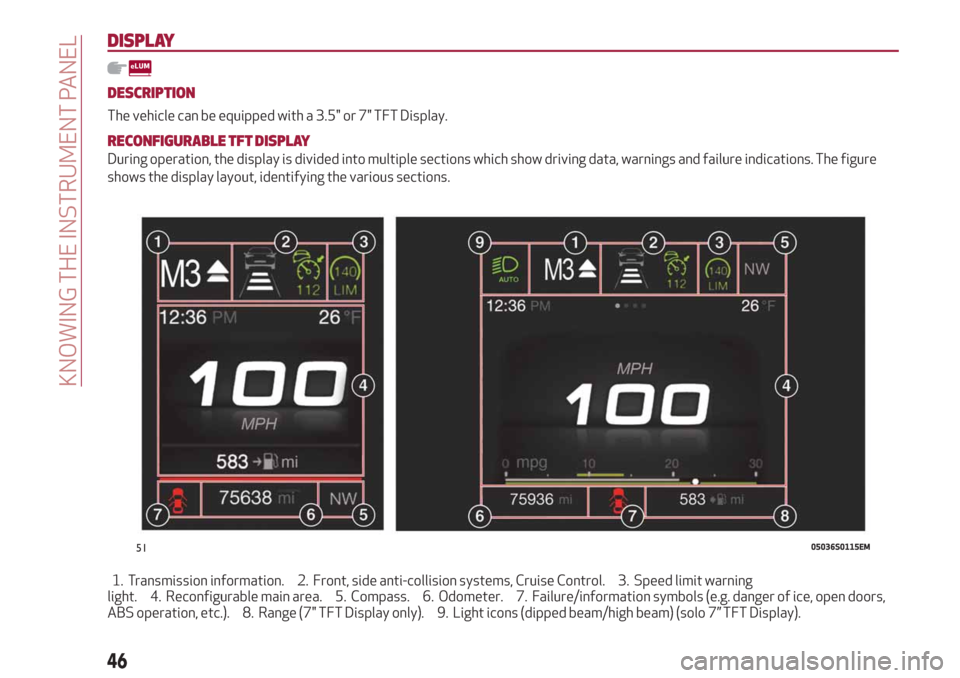
During operation, the display is divided into multiple sections which show driving data, warnings and failure indications. The figure
shows the display layout, identifying the various sections.
1. Transmission information. 2. Front, side anti-collision systems, Cruise Control. 3. Speed limit warning
light. 4. Reconfigurable main area. 5. Compass. 6. Odometer. 7. Failure/information symbols (e.g. danger of ice, open doors,
ABS operation, etc.). 8. Range (7" TFT Display only). 9. Light icons (dipped beam/high beam) (solo 7” TFT Display).
5105036S0115EM
46
KNOWING THE INSTRUMENT PANEL
Page 49 of 232
1 Gearbox Information
Automatic transmission
Displays the following information
regarding the gearbox operation:
transmission operating mode (M, P, R,
N, D). In D mode, when changing gear
using the steering wheel lever (where
present), or manually M, it also show the
gear engaged with a number. In M mode,
it also shows when to shift gear up or
down by displaying an arrow.
Manual transmission
Displays the following information
regarding the gearbox operation:
the engaged gear (1, 2, 3, 4, 5, 6, N or
R) and shows when to shift gear up or
down by displaying an arrow.
2 Front, side anti-collision systems,
Cruise Control
Displays the operation the following
modes:
Forward Collision Warning (FCW);
Lane Departure Warning (LDW);
Cruise Control (CC) or Active Cruise
Control (ACC) (where provided).
For further information, see relevant
paragraphs.
3 Speed limit warning light
Shows information regarding the Speed
Limiter function.
For further information, see relevant
paragraph.4 Reconfigurable main area
Can display the following screens:
Home.
Trip A.
Trip B (can be activated/deactivated
on the Connect system).
Performance.
The screens can be selected, on rotation,
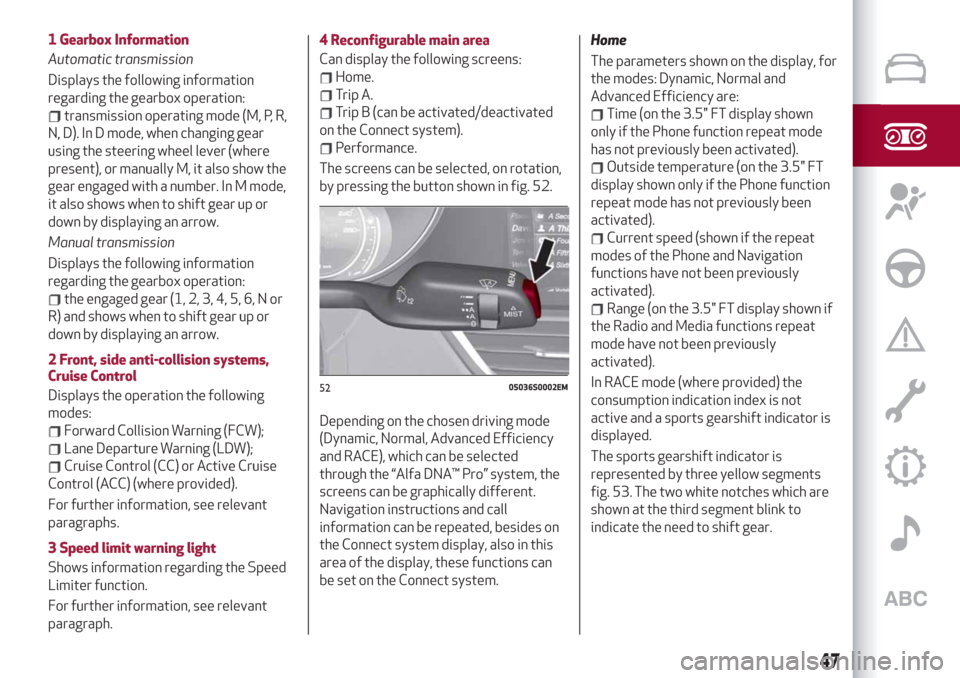
by pressing the button shown in fig. 52.
Depending on the chosen driving mode
(Dynamic, Normal, Advanced Efficiency
and RACE), which can be selected
through the “Alfa DNA™ Pro” system, the
screens can be graphically different.
Navigation instructions and call
information can be repeated, besides on
the Connect system display, also in this
area of the display, these functions can
be set on the Connect system.Home
The parameters shown on the display, for
the modes: Dynamic, Normal and
Advanced Efficiency are:
Time (on the 3.5" FT display shown
only if the Phone function repeat mode
has not previously been activated).
Outside temperature (on the 3.5" FT
display shown only if the Phone function
repeat mode has not previously been
activated).
Current speed (shown if the repeat
modes of the Phone and Navigation
functions have not been previously
activated).
Range (on the 3.5" FT display shown if
the Radio and Media functions repeat
mode have not been previously
activated).
In RACE mode (where provided) the
consumption indication index is not
active and a sports gearshift indicator is
displayed.
The sports gearshift indicator is
represented by three yellow segments
fig. 53. The two white notches which are
shown at the third segment blink to
indicate the need to shift gear.
5205036S0002EM
47
Page 69 of 232
Symbol What it means
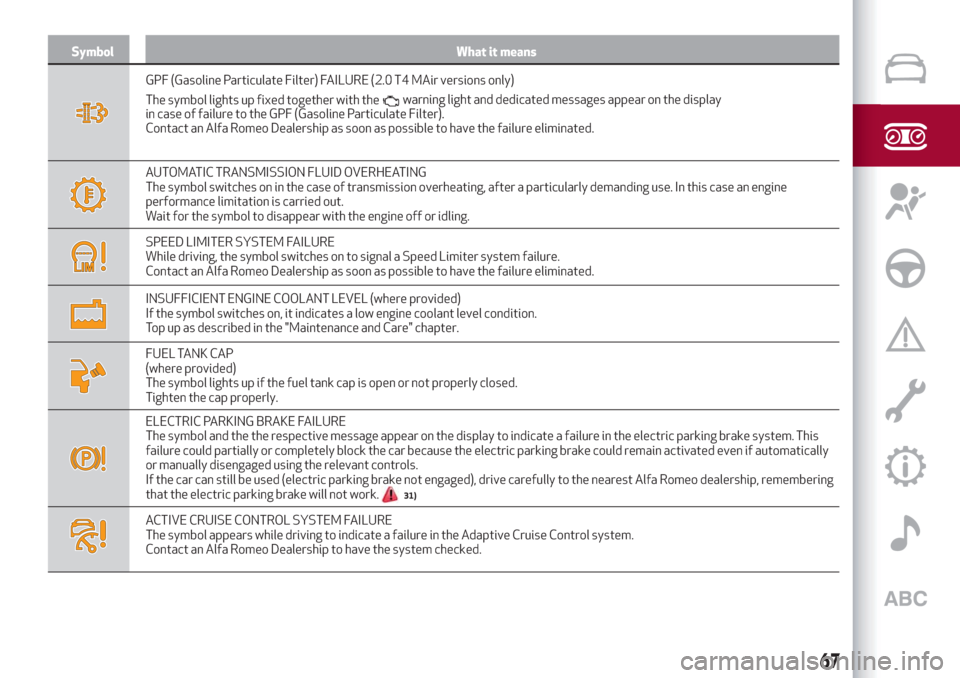
GPF (Gasoline Particulate Filter) FAILURE (2.0 T4 MAir versions only)
The symbol lights up fixed together with the
in case of failure to the GPF (Gasoline Particulate Filter).
Contact an Alfa Romeo Dealership as soon as possible to have the failure eliminated.
AUTOMATIC TRANSMISSION FLUID OVERHEATING
The symbol switches on in the case of transmission overheating, after a particularly demanding use. In this case an engine
performance limitation is carried out.
Wait for the symbol to disappear with the engine off or idling.
SPEED LIMITER SYSTEM FAILURE
While driving, the symbol switches on to signal a Speed Limiter system failure.
Contact an Alfa Romeo Dealership as soon as possible to have the failure eliminated.
INSUFFICIENT ENGINE COOLANT LEVEL (where provided)
If the symbol switches on, it indicates a low engine coolant level condition.
Top up as described in the "Maintenance and Care" chapter.
FUEL TANK CAP
(where provided)
The symbol lights up if the fuel tank cap is open or not properly closed.
Tighten the cap properly.
ELECTRIC PARKING BRAKE FAILURE
The symbol and the the respective message appear on the display to indicate a failure in the electric parking brake system. This
failure could partially or completely block the car because the electric parking brake could remain activated even if automatically
or manually disengaged using the relevant controls.
If the car can still be used (electric parking brake not engaged), drive carefully to the nearest Alfa Romeo dealership, remembering
that the electric parking brake will not work.
31)
ACTIVE CRUISE CONTROL SYSTEM FAILURE
The symbol appears while driving to indicate a failure in the Adaptive Cruise Control system.
Contact an Alfa Romeo Dealership to have the system checked.
67
warning light and dedicated messages appear on the display
Page 72 of 232
Green symbols
Symbol What it means
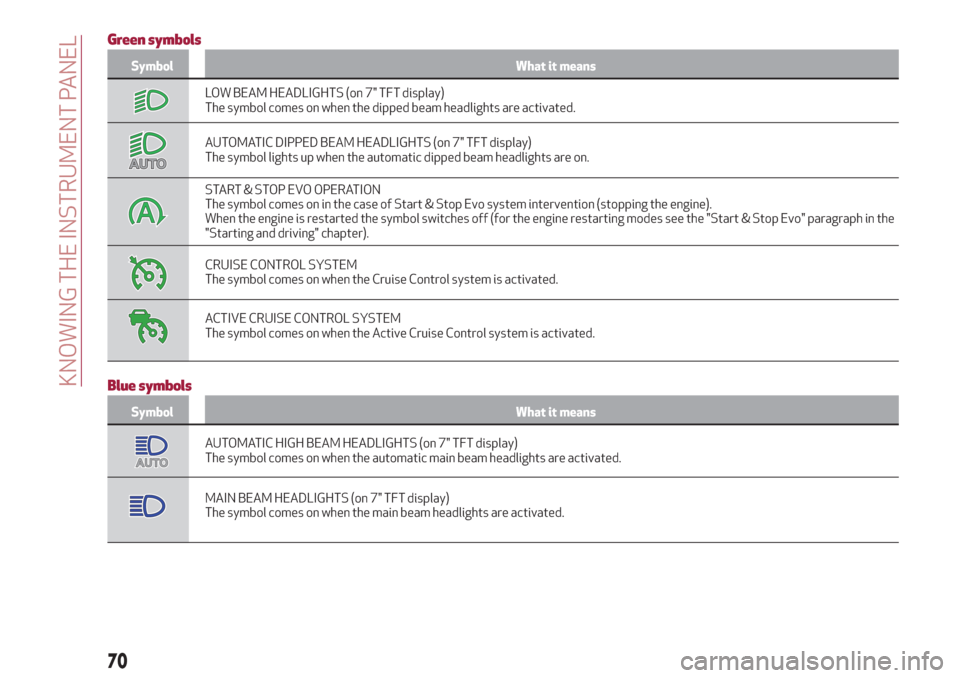
LOW BEAM HEADLIGHTS (on 7" TFT display)
The symbol comes on when the dipped beam headlights are activated.
AUTOMATIC DIPPED BEAM HEADLIGHTS (on 7" TFT display)
The symbol lights up when the automatic dipped beam headlights are on.
START & STOP EVO OPERATION
The symbol comes on in the case of Start & Stop Evo system intervention (stopping the engine).
When the engine is restarted the symbol switches off (for the engine restarting modes see the "Start & Stop Evo" paragraph in the
"Starting and driving" chapter).
CRUISE CONTROL SYSTEM
The symbol comes on when the Cruise Control system is activated.
ACTIVE CRUISE CONTROL SYSTEM
The symbol comes on when the Active Cruise Control system is activated.
Blue symbols
Symbol What it means
AUTOMATIC HIGH BEAM HEADLIGHTS (on 7" TFT display)
The symbol comes on when the automatic main beam headlights are activated.
MAIN BEAM HEADLIGHTS (on 7" TFT display)
The symbol comes on when the main beam headlights are activated.
70
KNOWING THE INSTRUMENT PANEL
Page 111 of 232
Let’s get to the core of the vehicle: seeing how you can exploit all
of its potential to the full. We’ll look at how to drive it safely in any
situation, so that it can be a welcome companion, with our comfort
and our wallets in mind.
STARTING AND DRIVING
STARTING THE ENGINE..........................110
PARKING THE VEHICLE..........................111
MANUAL GEARBOX............................114
AUTOMATIC TRANSMISSION . .....................114
"ALFA DNA™" SYSTEM..........................117
START&STOPEVO............................118
SPEED LIMITER..............................119
CRUISE CONTROL.............................120
ACTIVE CRUISE CONTROL........................121
PARK SENSORS SYSTEM........................128
LANE DEPARTURE WARNING (LDW) SYSTEM............130
REAR BACK-UP CAMERA / DYNAMIC GRIDLINES . ........131
REFUELLING THE VEHICLE . . .....................132
AdBlue® (UREA) ADDITIVE FOR DIESEL EMISSIONS........136
SUGGESTIONS FOR DRIVING......................136
TOWING TRAILERS............................138
Page 122 of 232
CRUISE CONTROL
This is an electronically controlled driving
assistance device that allows the desired
car speed to be maintained, without
having to press the accelerator pedal.
This device can be used at a speed above
25 mph (40 km/h) on long stretches of
dry, straight roads with few variations
(e.g. motorways).
It is therefore not recommended to use
this device on extra-urban roads with
traffic. Do not use the device in town.
Travelling downhill, the system could
brake the car to keep the set speed
unvaried.
ACTIVATING THE DEVICE
114) 115) 116)
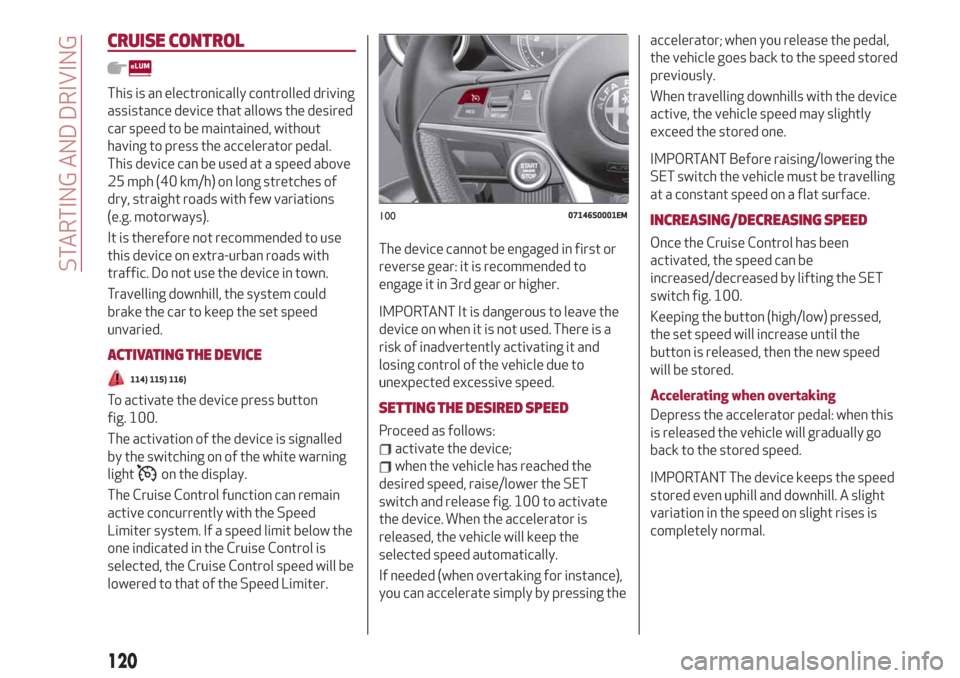
To activate the device press button
fig. 100.
The activation of the device is signalled
by the switching on of the white warning
light
on the display.
The Cruise Control function can remain
active concurrently with the Speed
Limiter system. If a speed limit below the
one indicated in the Cruise Control is
selected, the Cruise Control speed will be
lowered to that of the Speed Limiter.The device cannot be engaged in first or
reverse gear: it is recommended to
engage it in 3rd gear or higher.
IMPORTANT It is dangerous to leave the
device on when it is not used. There is a
risk of inadvertently activating it and
losing control of the vehicle due to
unexpected excessive speed.
SETTING THE DESIRED SPEED
Proceed as follows:
activate the device;
when the vehicle has reached the
desired speed, raise/lower the SET
switch and release fig. 100 to activate
the device. When the accelerator is
released, the vehicle will keep the
selected speed automatically.
If needed (when overtaking for instance),
you can accelerate simply by pressing theaccelerator; when you release the pedal,
the vehicle goes back to the speed stored
previously.
When travelling downhills with the device
active, the vehicle speed may slightly
exceed the stored one.
IMPORTANT Before raising/lowering the
SET switch the vehicle must be travelling
at a constant speed on a flat surface.
INCREASING/DECREASING SPEED
Once the Cruise Control has been
activated, the speed can be
increased/decreased by lifting the SET
switch fig. 100.
Keeping the button (high/low) pressed,
the set speed will increase until the
button is released, then the new speed
will be stored.
Accelerating when overtaking
Depress the accelerator pedal: when this
is released the vehicle will gradually go
back to the stored speed.
IMPORTANT The device keeps the speed
stored even uphill and downhill. A slight
variation in the speed on slight rises is
completely normal.
10007146S0001EM
120
STARTING AND DRIVING
Page 123 of 232
RECALLING THE SPEED
For versions with automatic transmission
operating in D mode (Drive - automatic),
press and release the RES
fig. 100 button to recall the previously
set speed.
For versions with manual gearbox or
automatic transmission in Autostick
(sequential) mode, before recalling the
previously set speed you should
accelerate until getting close to it, then
press and release the RES button.
DEACTIVATING THE DEVICE
Lightly pressing the brake pedal
deactivates the Cruise Control without
deleting the stored speed.
The Cruise Control may be deactivated
also by applying the electric parking
brake or when the braking system is
operated (e.g. operation of the ESC
system).
The stored speed is deleted in the
following cases:
pressing the on/off button or
switching off the engine;
if there is a malfunction in the Cruise
Control.
DEACTIVATING THE DEVICE
The Cruise Control is deactivated by
pressing the activation/deactivation
button or bringing the ignition device to
the STOP position.
WARNING
114)When travelling with the device active,
never move the gear lever to neutral.
115)In case of a malfunction or failure of
the device, contact an Alfa Romeo
Dealership.
116)The Cruise Control can be dangerous if
the system cannot keep a constant speed. In
specific conditions speed may be excessive,
resulting in the risk of losing control of the
vehicle and causing accidents. Do not use the
device in heavy traffic or on winding, icy,
snowy or slippery roads.
ACTIVE CRUISE CONTROL
(where provided)
117) 118) 119) 120) 121) 122)
41) 42) 43) 44) 45) 46) 47)
The Active Cruise Control (ACC) is a
driver assist device which combines the
Cruise Control functions with one for
controlling the distance from the vehicle
ahead.
The device allows to hold the vehicle at
the desired speed without needing to
press the accelerator. It also allows to
hold a given distance from the vehicle
ahead (the distance can be set by the
driver).
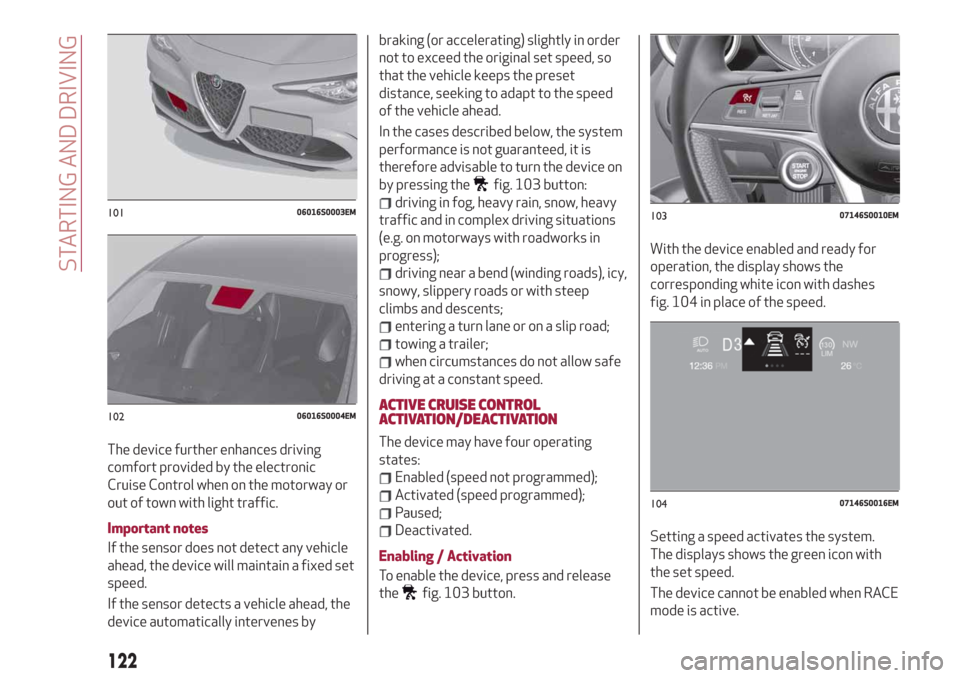
The Active Cruise Control (ACC) uses a
radar sensor, located behind the front
bumper fig. 101 and a camera, located in
the middle area of the windscreen
fig. 102, to detect the presence of a
vehicle close ahead.
121
Page 124 of 232
The device further enhances driving
comfort provided by the electronic
Cruise Control when on the motorway or
out of town with light traffic.
Important notes
If the sensor does not detect any vehicle
ahead, the device will maintain a fixed set
speed.
If the sensor detects a vehicle ahead, the
device automatically intervenes bybraking (or accelerating) slightly in order
not to exceed the original set speed, so
that the vehicle keeps the preset
distance, seeking to adapt to the speed
of the vehicle ahead.
In the cases described below, the system
performance is not guaranteed, it is
therefore advisable to turn the device on
by pressing the
fig. 103 button:
driving in fog, heavy rain, snow, heavy
traffic and in complex driving situations
(e.g. on motorways with roadworks in
progress);
driving near a bend (winding roads), icy,
snowy, slippery roads or with steep
climbs and descents;
entering a turn lane or on a slip road;
towing a trailer;
when circumstances do not allow safe
driving at a constant speed.
ACTIVE CRUISE CONTROL
ACTIVATION/DEACTIVATION
The device may have four operating
states:
Enabled (speed not programmed);
Activated (speed programmed);
Paused;
Deactivated.
Enabling / Activation
To enable the device, press and release
the
fig. 103 button.With the device enabled and ready for
operation, the display shows the
corresponding white icon with dashes
fig. 104 in place of the speed.
Setting a speed activates the system.
The displays shows the green icon with
the set speed.
The device cannot be enabled when RACE
mode is active.
10106016S0003EM
10206016S0004EM
10307146S0010EM
10407146S0016EM
122
STARTING AND DRIVING
Page 127 of 232
of the vehicle. Failure to comply with
these precautions may cause serious
accidents and fatal injuries.
SETTING THE DISTANCE BETWEEN
VEHICLES
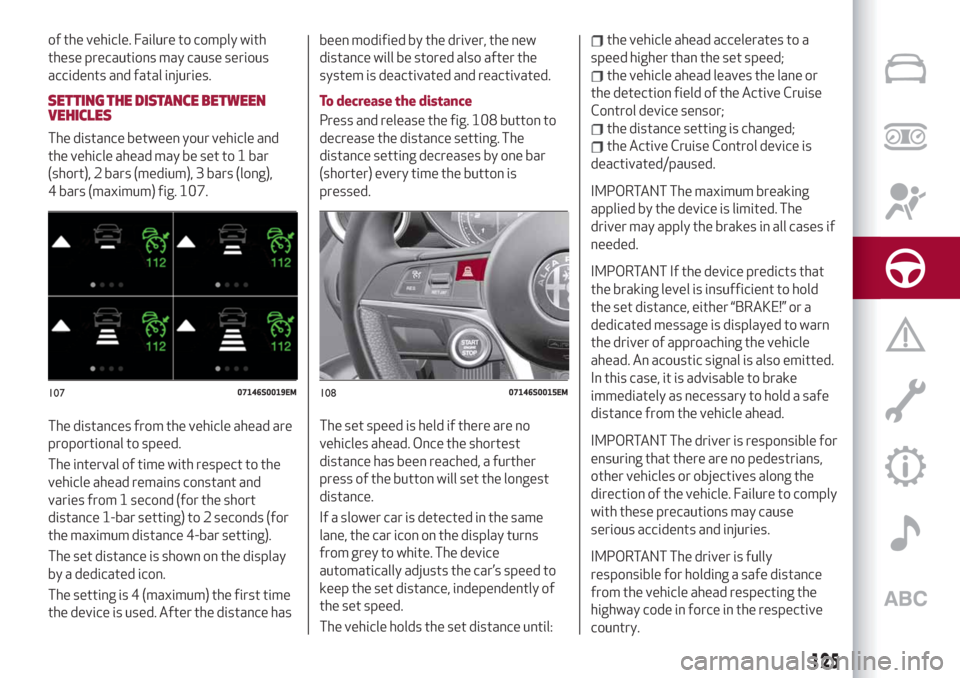
The distance between your vehicle and
the vehicle ahead may be set to 1 bar
(short), 2 bars (medium), 3 bars (long),
4 bars (maximum) fig. 107.
The distances from the vehicle ahead are
proportional to speed.
The interval of time with respect to the
vehicle ahead remains constant and
varies from 1 second (for the short
distance 1-bar setting) to 2 seconds (for
the maximum distance 4-bar setting).
The set distance is shown on the display
by a dedicated icon.
The setting is 4 (maximum) the first time
the device is used. After the distance hasbeen modified by the driver, the new
distance will be stored also after the
system is deactivated and reactivated.
To decrease the distance
Press and release the fig. 108 button to
decrease the distance setting. The
distance setting decreases by one bar
(shorter) every time the button is
pressed.
The set speed is held if there are no
vehicles ahead. Once the shortest
distance has been reached, a further
press of the button will set the longest
distance.
If a slower car is detected in the same
lane, the car icon on the display turns
from grey to white. The device
automatically adjusts the car’s speed to
keep the set distance, independently of
the set speed.
The vehicle holds the set distance until:
the vehicle ahead accelerates to a
speed higher than the set speed;
the vehicle ahead leaves the lane or
the detection field of the Active Cruise
Control device sensor;
the distance setting is changed;
the Active Cruise Control device is
deactivated/paused.
IMPORTANT The maximum breaking
applied by the device is limited. The
driver may apply the brakes in all cases if
needed.
IMPORTANT If the device predicts that
the braking level is insufficient to hold
the set distance, either “BRAKE!” or a
dedicated message is displayed to warn
the driver of approaching the vehicle
ahead. An acoustic signal is also emitted.
In this case, it is advisable to brake
immediately as necessary to hold a safe
distance from the vehicle ahead.
IMPORTANT The driver is responsible for
ensuring that there are no pedestrians,
other vehicles or objectives along the
direction of the vehicle. Failure to comply
with these precautions may cause
serious accidents and injuries.
IMPORTANT The driver is fully
responsible for holding a safe distance
from the vehicle ahead respecting the
highway code in force in the respective
country.
10707146S0019EM10807146S0015EM
125
Page 128 of 232
“STOP AND GO” STRATEGY
The “Stop and Go” operating strategy
allows you to maintain a safe distance
from the vehicle ahead until the car has
completely stopped. It will also restart
the car automatically if the vehicle ahead
moves off within two seconds, otherwise
it is necessary to press the accelerator
pedal or the RES button to restart.
DEACTIVATION
The device is deactivated and the set
speed is cancelled if:
if thebutton on the Active Cruise
Control is pressed (with the device
enabled or paused);
the ignition device is in the STOP
position;
RACE mode is activated.
The device is cancelled (the set speed
and distance are stored):
when the device is paused (see the
“Activating / Deactivating Active Cruise
Control” paragraph);
when the conditions shown in the
“Setting the desired speed” paragraph
occur;
SYSTEM LIMITED OPERATION
WARNING
If the dedicated message is shown on the
display, a condition limiting the system
operation may have occurred.
The possible reasons of this limitationare something blocking the camera view
or a fault. If an obstruction is signalled,
clean the area of the windscreen
indicated in fig. 102 and check that the
message has disappeared.
When the conditions limiting the system
functions end, this will go back to normal
and complete operation.
Should the fault persist, contact an Alfa
Romeo Dealership.
PRECAUTIONS WHILE DRIVING
The device may not work correctly in
some driving conditions (see below): the
driver must control the car at all times.
Towing a trailer
Use of the device is not recommended
while towing a trailer.
VEHICLE not aligned
The device may not detect a vehicle
travelling on the same lane but which is
not aligned along the same direction of
travel or a vehicle which is cutting in from
a side lane. Sufficient distance from the
vehicles ahead may not be guaranteed in
these cases.
The non-aligned vehicle can weave in and
out of the driving direction causing the
vehicle to brake or accelerate
unexpectedly.Steering and bends
When cornering with the device set, it
could limit speed and acceleration to
guarantee vehicle stability even if no
vehicles are detected ahead. When
leaving the bend, the device resets the
previously set speed.
IMPORTANT In case of narrow curves,
the performance of the device could be
limited. In this case, it is advisable to
deactivate the device. Moreover,
remember that the device only limits the
speed DURING a bend and not BEFORE
it, so always take great care.
Using the device on gradient
When driving on roads with variable
gradient, the device may not detect the
presence of a vehicle on the lane. Device
performance could be limited according
to speed, load, traffic conditions and
gradient steepness.
Lane change
The device may not detect the presence
of a vehicle until it is fully in your lane. In
this case, sufficient distance from the
vehicle which is changing lane may not be
guaranteed: it is advisable to pay the
utmost attention at all times and be
always ready to press the brakes if
needed.
126
STARTING AND DRIVING