warning light ALFA ROMEO GIULIA 2021 Service Manual
[x] Cancel search | Manufacturer: ALFA ROMEO, Model Year: 2021, Model line: GIULIA, Model: ALFA ROMEO GIULIA 2021Pages: 284, PDF Size: 8.87 MB
Page 125 of 284
123
(Continued)
TRAFFIC SIGN RECOGNITION
(TSR) SYSTEM — IF EQUIPPED
The Traffic Sign Recognition (TSR) system
uses a camera mounted on the windshield to
detect recognizable road signs such as:
Speed limits
Signs indicating the end of the situations
indicated above
If the camera does not detect valid speed
limits, the radio system navigation system may
suggest unregulated speed limits.
The system always checks the traffic signs
indicating the current speed limit signs. The
system is able to recognize and display up to
two different road signs in the instrument
cluster display.
Depending on the unit of measurement (km or
mph) set through the “Unit of Measurement”
menu in the radio system, the TSR system will
automatically show the indication of the road
sign in the unit of measurements selected in
the instrument cluster display.
To Activate/Deactivate
The TSR System can be activated/deactivated
in the radio system in the “Driver Assistance”
menu. The system activation is signaled by
road signs shown on the instrument cluster
display.
NOTE:
By selecting “Blinking”, the driver can acti
-
vate a warning to display when the speed
exceeds the limit indicated by the TSR
System. The speed road sign on the instru -
ment cluster display will blink until the
vehicle speed drops below the displayed
limit.
Selecting “Offset” will set the speed at
which “Blinking” is activated up to a
maximum of 6 mph (10 km/h) above the
limit detected by the system.
If no speed limit signs are found, the system
will revert to the speed limit signs that are
stored in the NAV system.
Indications On The Display
The system status can always be viewed
through the instrument cluster display.
The instrument cluster display shows only the
speed limit indications and consists of the
following steps:
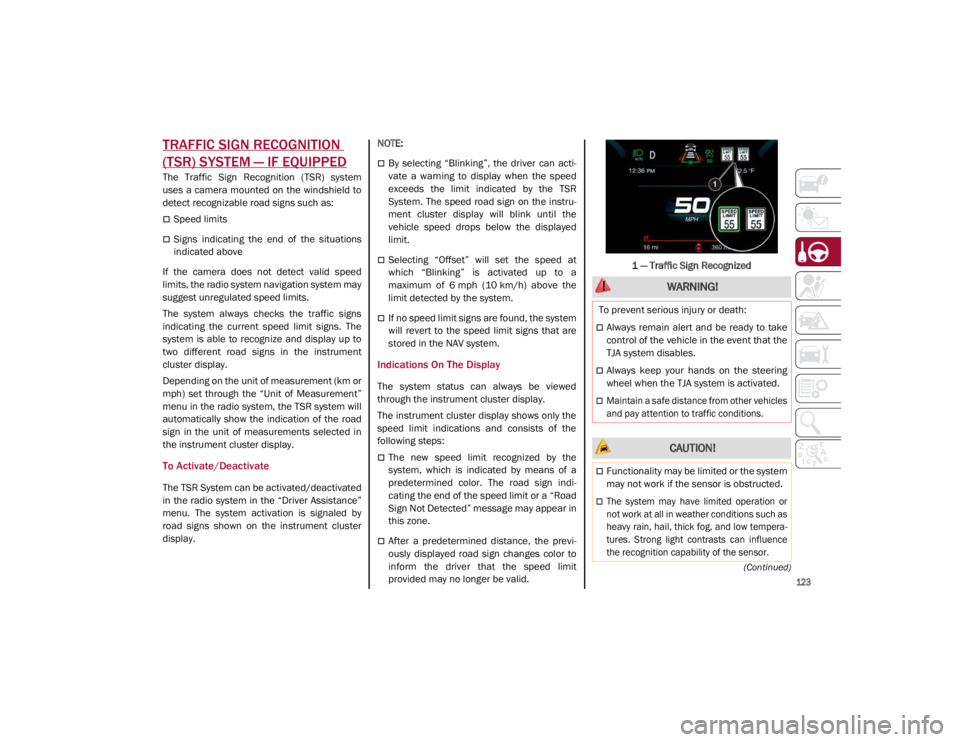
The new speed limit recognized by the
system, which is indicated by means of a
predetermined color. The road sign indi -
cating the end of the speed limit or a “Road
Sign Not Detected” message may appear in
this zone.
After a predetermined distance, the previ -
ously displayed road sign changes color to
inform the driver that the speed limit
provided may no longer be valid. 1 — Traffic Sign Recognized
WARNING!
To prevent serious injury or death:
Always remain alert and be ready to take
control of the vehicle in the event that the
TJA system disables.
Always keep your hands on the steering
wheel when the TJA system is activated.
Maintain a safe distance from other vehicles
and pay attention to traffic conditions.
CAUTION!
Functionality may be limited or the system
may not work if the sensor is obstructed.
The system may have limited operation or
not work at all in weather conditions such as
heavy rain, hail, thick fog, and low tempera
-
tures. Strong light contrasts can influence
the recognition capability of the sensor.
21_GA_OM_EN_USC_t.book Page 123
Page 129 of 284
127
If several obstacles are detected simultane-
ously in the front and rear area, the display will
show all of them, regardless of the area in
which they were detected.
It is not possible to exit from the display screen
while the vehicle is in REVERSE.
Acoustic Signal
In the presence of an obstacle at the front or
the rear of the vehicle, an acoustic signal with
variable frequency will sound:
The acoustic signal increases in frequency
as the distance between the vehicle and the
obstacle decreases.
The acoustic signal becomes continuous
when the distance between the vehicle and
the obstacle is less than 11 inches (30 cm),
and stops if the distance increases.
The acoustic signal is constant if the
distance between the vehicle and the
obstacle is unchanged.
NOTE:
If the sensors detect several front and rear
obstacles, the closest obstacle is considered.
An intermittent signal will sound if the obsta -
cles are at the same distance (front and rear).
When the system emits an acoustic signal, the
volume of the radio system, if activated, is
automatically lowered.
An acoustic signal will not sound if the vehicle
is in PARK.
Enabling And Disabling ParkSense
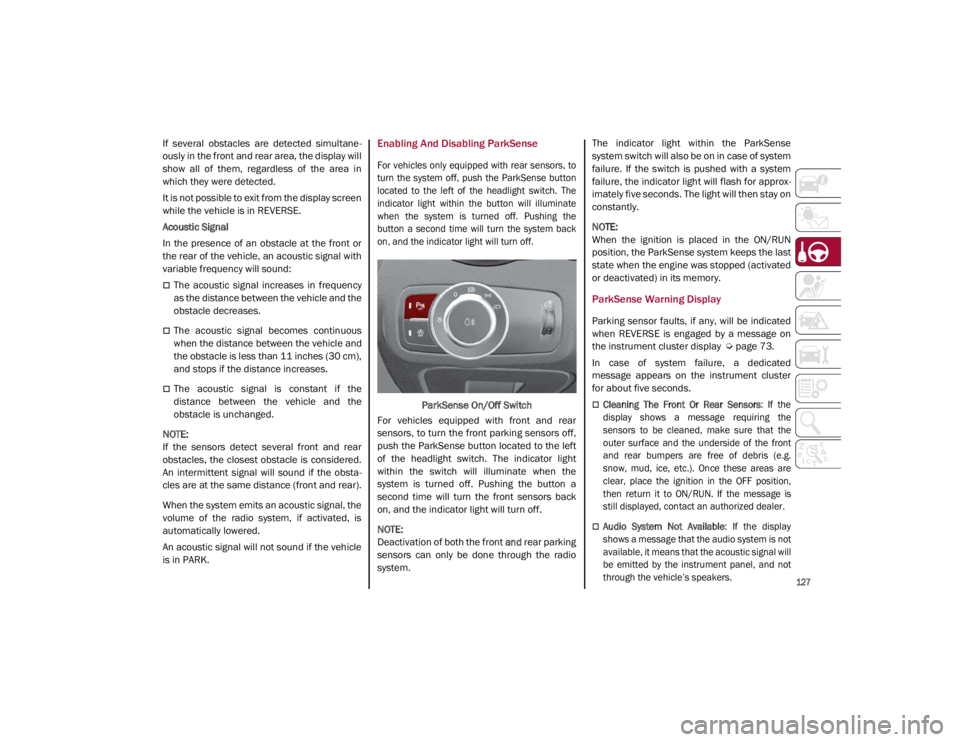
For vehicles only equipped with rear sensors, to
turn the system off, push the ParkSense button
located to the left of the headlight switch. The
indicator light within the button will illuminate
when the system is turned off. Pushing the
button a second time will turn the system back
on, and the indicator light will turn off.
ParkSense On/Off Switch
For vehicles equipped with front and rear
sensors, to turn the front parking sensors off,
push the ParkSense button located to the left
of the headlight switch. The indicator light
within the switch will illuminate when the
system is turned off. Pushing the button a
second time will turn the front sensors back
on, and the indicator light will turn off.
NOTE:
Deactivation of both the front and rear parking
sensors can only be done through the radio
system. The indicator light within the ParkSense
system switch will also be on in case of system
failure. If the switch is pushed with a system
failure, the indicator light will flash for approx
-
imately five seconds. The light will then stay on
constantly.
NOTE:
When the ignition is placed in the ON/RUN
position, the ParkSense system keeps the last
state when the engine was stopped (activated
or deactivated) in its memory.
ParkSense Warning Display
Parking sensor faults, if any, will be indicated
when REVERSE is engaged by a message on
the instrument cluster display
Ú
page 73.
In case of system failure, a dedicated
message appears on the instrument cluster
for about five seconds.
Cleaning The Front Or Rear Sensors : If the
display shows a message requiring the
sensors to be cleaned, make sure that the
outer surface and the underside of the front
and rear bumpers are free of debris (e.g.
snow, mud, ice, etc.). Once these areas are
clear, place the ignition in the OFF position,
then return it to ON/RUN. If the message is
still displayed, contact an authorized dealer.
Audio System Not Available : If the display
shows a message that the audio system is not
available, it means that the acoustic signal will
be emitted by the instrument panel, and not
through the vehicle’s speakers.
21_GA_OM_EN_USC_t.book Page 127
Page 130 of 284

STARTING AND OPERATING
128
(Continued)
ParkSense System Usage Precautions
NOTE:
Some conditions may influence the perfor-
mance of the ParkSense system:
Reduced sensor sensitivity could be due to
the presence of ice, snow, mud, or thick
paint on the surface of the sensor.
The sensors may detect a false obstacle
(echo interference) due to mechanical inter -
ference, for example when washing the
vehicle or in extreme weather.
The signals sent by the sensors can be
altered by the presence of ultrasonic
systems (e.g. pneumatic brake systems of
trucks or pneumatic drills) near the vehicle.
System performance can be influenced by
the position of the sensors. For example,
due to a change in the ride setting (caused
by wear to the shock absorbers or suspen -
sion), by changing tires, overloading the
vehicle or operations that require the
vehicle to be lowered.
Be sure not to place bumper stickers or
other adhesives over the sensors as this will
affect system performance.
LANE DEPARTURE WARNING
(LDW) SYSTEM — IF EQUIPPED
Lane Departure Warning Operation
The Lane Departure Warning system uses a
forward looking camera located on the wind -
shield to detect lane markings and measure
vehicle position within the lane boundaries.
When one or both lane limits are detected and
the vehicle passes over one without an acti -
vated turn signal, the system emits a visual as
well as an audible signal.
If the vehicle continues to go beyond the line
of the lane without any intervention from the
driver, the surpassed line will light up on the
display (left or right) to urge the driver to bring
the vehicle back into the limits of the lane.
CAUTION!
Projecting loads on the roof of the vehicle
may interfere with the correct operation of
the camera. Before starting, make sure
the load is correctly positioned in order to
not cover the camera operating range.
Do not cover the operating range of the
camera with stickers or other objects.
Do not tamper with nor operate on the
camera. Do not close the openings in the
aesthetic cover located under the interior
rearview mirror. In the event of a failure of
the camera, contact an authorized dealer.
The camera may have limited or absent
operation due to weather conditions such
as: heavy rain, hail, thick fog, heavy snow,
formation of ice layers on the windshield.
Camera operation may also be compro -
mised by the presence of dust, condensa -
tion, dirt or ice on the windshield, by traffic
conditions (e.g. vehicles that are driving
not aligned with yours, vehicle driving in a
transverse or opposite way on the same
lane, bend with a small radius of curva -
ture), by road surface conditions and by
driving conditions (e.g. off-road driving).
Make sure the windshield is always clean.
Use specific detergents and clean cloths
to avoid scratching the windshield. The
camera operation may also be limited or
absent in some driving, traffic and road
surface conditions.
If the windshield must be replaced due to
scratches, chipping or breakage, contact
exclusively your authorized dealer. Do not
replace the windshield on your own. It is
advisable to replace the windshield if it is
damaged in the area of the camera.
CAUTION! (Continued)
21_GA_OM_EN_USC_t.book Page 128
Page 132 of 284
STARTING AND OPERATING
130
The system operates in the same way, but
mirrored, in the event of exiting the right lane
when only the right lane marking has been
detected.
Left Lane Departure — Both Lanes Detected
When the system is active, both lane lines on
the display illuminate in white to indicate that
both of the lane markings have been detected.
When lane markings are detected, the system
is ready to provide indications in case the
driver unintentionally leaves the lane (turn
signal not activated).
As the Lane Departure Warning system
detects the lane markings while the vehicle is
in motion, it will adjust the display accordingly
(from white to yellow and vice versa, and
increase their thickness).
If a lane line is crossed, the driver is alerted by
an audible signal as well as the visual indica-
tion in the instrument cluster. The signal is
emitted through the speakers on the side of
the lane marking which is being crossed (e.g.
if the vehicle is exceeding the left line of the
lane, the audible signal will come from the
speakers on the left of the vehicle).
Limited Operation Warning
If a message appears on the display, a condi -
tion limiting the Lane Departure Warning
system operation may have occurred. This
could be an obstruction of the camera view, or
a fault in the system. If an obstruction is detected, clean the area of
the windshield by the interior rearview mirror.
Although the vehicle can still be driven in
normal conditions, the system may not func
-
tion properly.
When the conditions limiting the system are
corrected, it will go back to normal operation.
Should a fault persist, contact an authorized
dealer.
System Failure Warning
If the system turns off and the warning light
appears on the display, it means that there is
a system fault.
In this case, it is still possible to drive the
vehicle, but you are advised to contact an
authorized dealer as soon as possible.
Changing Lane Departure Warning Status
The system's sensitivity can be set through the
radio system. Sensitivity “High” or “Low” can
be selected.
To access the function, from the main menu
select the following in order:
1. “Settings”
2. “Driver Assistance”
3. “Lane Departure Warning”
4. “Sensitivity”
LANE KEEPING ASSIST (LKA)
SYSTEM — IF EQUIPPED
The Lane Keeping Assist (LKA) system uses a
camera located on the windshield to detect
the lane markings and calculate the position
of the vehicle within such markings, in order to
make sure that the vehicle remains inside the
lane. This is an active system that will apply
torque to the steering wheel if it senses that
the vehicle is drifting out of the lane.
When one or both lane markings are detected
and the vehicle passes over one without a turn
signal being applied, the system will apply torque
to the steering wheel and a visual signal will be
displayed in the instrument cluster display. An
audible signal may also sound.
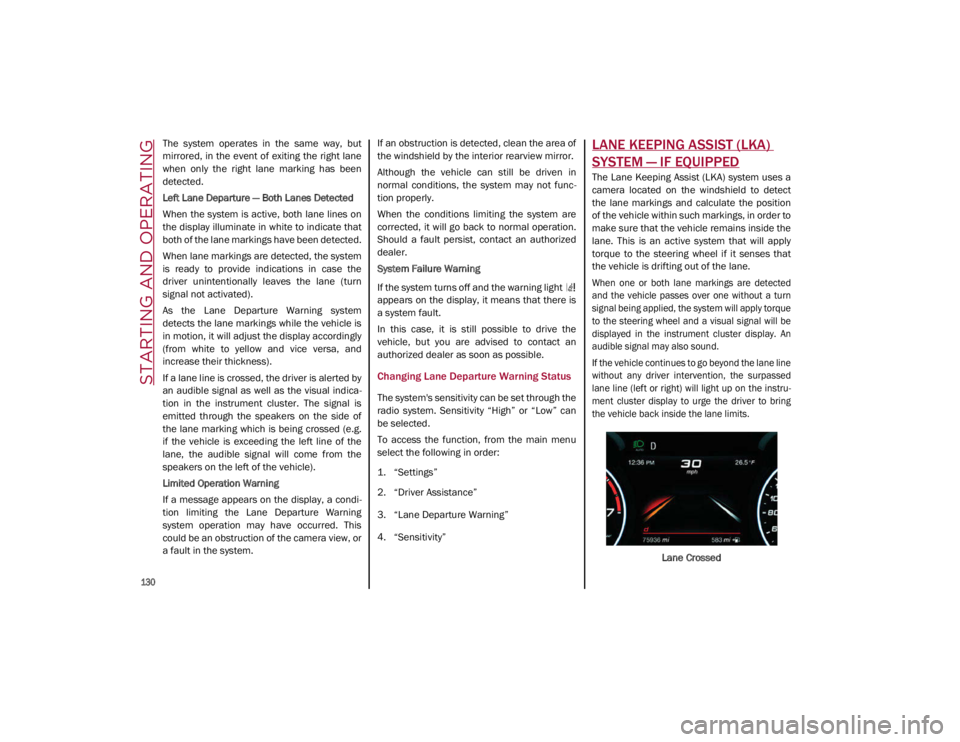
If the vehicle continues to go beyond the lane line
without any driver intervention, the surpassed
lane line (left or right) will light up on the instru -
ment cluster display to urge the driver to bring
the vehicle back inside the lane limits.
Lane Crossed
21_GA_OM_EN_USC_t.book Page 130
Page 133 of 284
131
Turning Lane Keeping Assist On Or Off
The system is activated/deactivated by pressing
the button at the end of the multifunction lever.
Each time the engine is started, the system main-
tains the operating mode that was selected when
it was previously turned off.
Activation/Deactivation Button
Activation Conditions
Once the activation button is pushed, the
system becomes active only if the following
conditions are met:
The car speed is higher than 37 mph
(60 km/h). (The system is deactivated at
speeds equal to or higher than 110 mph
(180 km/h))
The lane limit lines are visible at least on
one side
There are suitable visibility conditions
The road is straight or with wide radius
bends
A suitable distance is kept from the vehicle
in front
The turn signal (to indicate leaving the lane)
is not active
Lane Keeping Assist Warning Message
The Lane Keeping Assist system also advises
the driver when the car changes lanes by
showing symbols and messages on the instru -
ment cluster display.
The message at the top of the display remains
active only until the main reconfigurable area
of the display is activated by pressing the TRIP
button located on the end of the windshield
wiper lever
Ú
page 68.
After activating the main reconfigurable area,
the Lane Keeping Assist system messages will
be shown in the instrument cluster display.
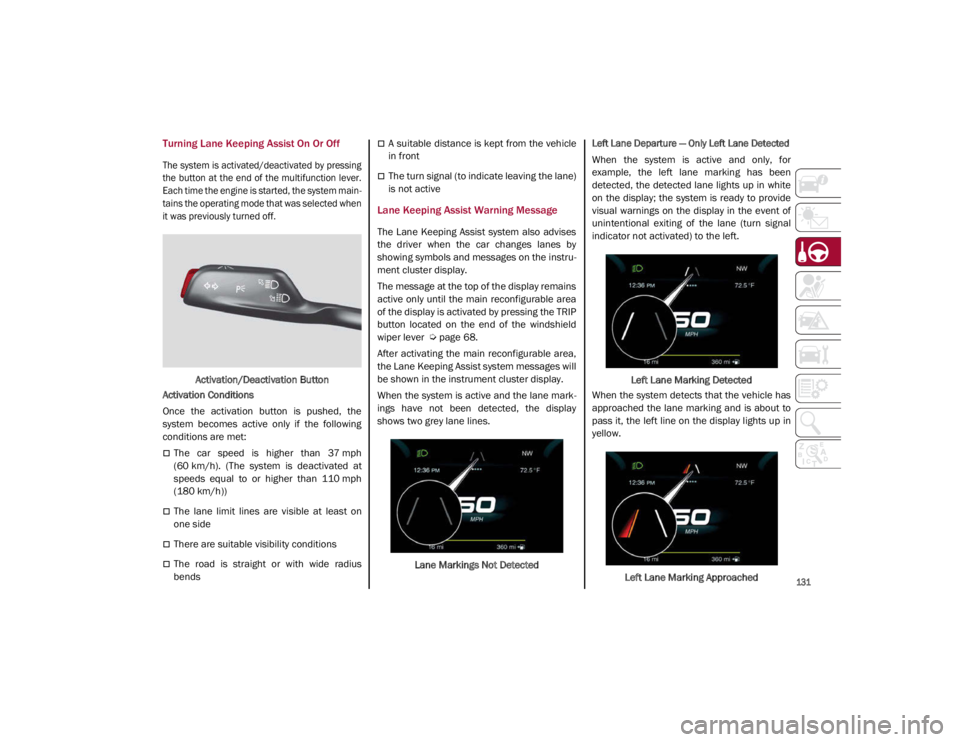
When the system is active and the lane mark -
ings have not been detected, the display
shows two grey lane lines.
Lane Markings Not Detected
Left Lane Departure — Only Left Lane Detected
When the system is active and only, for
example, the left lane marking has been
detected, the detected lane lights up in white
on the display; the system is ready to provide
visual warnings on the display in the event of
unintentional exiting of the lane (turn signal
indicator not activated) to the left.
Left Lane Marking Detected
When the system detects that the vehicle has
approached the lane marking and is about to
pass it, the left line on the display lights up in
yellow.
Left Lane Marking Approached
21_GA_OM_EN_USC_t.book Page 131
Page 143 of 284
141
(Continued)
This very important section describes the
safety systems that your vehicle may be
equipped with, and provides instructions on
how to use them correctly.
ACTIVE SAFETY SYSTEMS
The vehicle may be equipped with the
following active safety devices:
Anti-Lock Brake System (ABS)
Active Torque Vectoring (ATV)
Dynamic Steering Torque (DST)
Drive Train Control (DTC)
Electronic Stability Control (ESC)
Hill Start Assist (HSA)
Panic Brake Assist (PBA)
Traction Control System (TCS)
For the operation of the systems, see the
following pages.
Anti-Lock Brake System (ABS)
An integral part of the braking system, the ABS
prevents one or more wheels from locking and
slipping in all road surface conditions, regard -
less of the intensity of the braking action. The
system ensures that the vehicle can be
controlled even during emergency braking,
allowing the driver to optimize stopping
distances. The system intervenes during braking when
the wheels are about to lock, typically in emer
-
gency braking or low-grip conditions where
locking may be more frequent.
The system also improves control and stability
of the vehicle when braking on a surface
where the grip of the left and right wheels
varies, such as in a corner.
The Electronic Braking Force Distribution
(EBD) system works with the ABS, allowing the
brake force to be distributed between the front
and rear wheels.
System Intervention
The ABS equipped on this vehicle is provided
with the "Brake-by-wire" (Integrated Brake
System — IBS) function. With this system, the
command given by pressing the brake pedal is
not transmitted hydraulically, but electrically.
Therefore, the light pulsation that is felt on the
pedal with the traditional system is no longer
noticeable.
WARNING!
The ABS contains sophisticated electronic
equipment that may be susceptible to
interference caused by improperly
installed or high output radio transmitting
equipment. This interference can cause
possible loss of anti-lock braking capa -
bility. Installation of such equipment
should be performed by qualified profes -
sionals.
Pumping of the Anti-Lock Brakes will
diminish their effectiveness and may lead
to a collision. Pumping makes the stop -
ping distance longer. Just press firmly on
your brake pedal when you need to slow
down or stop.
The ABS cannot prevent the natural laws
of physics from acting on the vehicle, nor
can it increase braking or steering effi -
ciency beyond that afforded by the condi -
tion of the vehicle brakes and tires or the
traction afforded.
The ABS cannot prevent collisions,
including those resulting from excessive
speed in turns, following another vehicle
too closely, or hydroplaning.
The capabilities of an ABS equipped
vehicle must never be exploited in a reck -
less or dangerous manner that could jeop -
ardize the user’s safety or the safety of
others.
WARNING! (Continued)
21_GA_OM_EN_USC_t.book Page 141
Page 144 of 284

SAFETY
142
Active Torque Vectoring (ATV) — If Equipped
The dynamic drive control is used to optimize
and balance the drive torque between the
wheels of the same axles. The ATV system
improves the grip in turns, sending more drive
torque to the external wheel.
Given that, in a turn, the external wheels of the
car travel more than the internal ones and
therefore turn faster, sending a higher thrust
to the external rear wheel allows for the car to
be more stable and to not suffer an "under-
steer" condition. Understeer occurs when the
vehicle is turning less than appropriate for the
steering wheel position.
Dynamic Steering Torque (DST)
DST uses the integration of the Electronic
Stability Control (ESC) system with the electric
power steering to increase the safety level of
the whole vehicle.
In critical situations (braking on surfaces with
different grip conditions), the ESC system
controls the steering through the DST function
to implement an additional torque contribu-
tion on the steering wheel in order to suggest
the most correct maneuver to the driver.
The coordinated action of the brakes and
steering increases the sensation of safety and
control of the vehicle.
NOTE:
The DST feature is only meant to help the driver
realize the correct course of action through small
torques on the steering wheel, which means the
effectiveness of the DST feature is highly depen
-
dent on the driver’s sensitivity and overall reac -
tion to the applied torque. It is very important to
realize that this feature will not steer the vehicle,
meaning the driver is still responsible for
steering the vehicle.
Drive Train Control (DTC) System — If
Equipped
Some models of this vehicle are equipped with
an All-Wheel Drive (AWD) system, which offers
an optimal drive for countless driving condi -
tions and road surfaces. The system reduces
the slipping of the tires to a minimum, auto -
matically redistributing the torque to the front
and rear wheels as needed.
To maximize fuel savings, the vehicle with
AWD automatically passes to Rear-Wheel
Drive (RWD) when the road and environmental
conditions are such that they wouldn't cause
the tires to slip. When the road and environ -
mental conditions require better traction, the
vehicle automatically goes to AWD mode.
NOTE:
If the system failure symbol switches on, after
starting the engine or while driving, it means
that the AWD system is not working properly. If
the warning message activates frequently, it is
recommended to carry out the maintenance
operations.
Electronic Stability Control (ESC)
The ESC system improves the directional
control and stability of the vehicle in various
driving conditions.
The ESC system corrects the vehicle’s under -
steer and oversteer, distributing the brake
force on the appropriate wheels. The torque
supplied by the engine can also be reduced in
order to maintain control of the vehicle.
Oversteer occurs when the vehicle is
turning more than it should according to the
angle of the steering wheel.
Understeer occurs when the vehicle is
turning less than it should according to the
angle of the steering wheel.
The ESC system uses sensors installed on the
vehicle to determine the path that the driver
intends to follow and compares it with the
vehicle’s effective path. When the real path
deviates from the desired path, the ESC
system intervenes to counteract the above
conditions.
System Intervention
The intervention of the system is indicated by
the flashing of the ESC warning light on the
instrument panel, to inform the driver that the
vehicle stability and grip are critical.
21_GA_OM_EN_USC_t.book Page 142
Page 145 of 284
143
Hill Start Assist (HSA)
This is an integral part of the ESC system and
facilitates starting on slopes, activating auto-
matically in the following cases:
Uphill: vehicle stationary on a road with a
gradient higher than 5%, engine running,
brake pressed and transmission in
NEUTRAL (N) or gear other than REVERSE
(R) engaged.
Downhill: vehicle stationary on a road with a
gradient higher than 5%, engine running,
brake pressed and REVERSE gear engaged.
When starting to move forward from a
complete stop, the ESC system control unit
maintains the braking pressure on the wheels
until the engine torque necessary for starting
is reached, or in any case for a maximum of
two seconds, allowing your right foot to be
moved easily from the brake pedal to the
accelerator.
The system will automatically deactivate after
two seconds without starting, gradually
releasing the braking pressure. During this
release stage, it is possible to hear a typical
mechanical brake release noise, indicating
the imminent movement of the vehicle.
Panic Brake Assist (PBA)
The PBA system is designed to improve the
vehicle’s braking capacity during emergency
braking.
The system detects emergency braking by
monitoring the speed and force with which the
brake pedal is pressed, and consequently
applies the optimal brake pressure. This can
reduce the braking distance: the PBA system
therefore complements the ABS.
WARNING!
Electronic Stability Control (ESC) cannot
prevent the natural laws of physics from
acting on the vehicle, nor can it increase
the traction afforded by prevailing road
conditions. ESC cannot prevent accidents,
including those resulting from excessive
speed in turns, driving on very slippery
surfaces, or hydroplaning. ESC also
cannot prevent accidents resulting from
loss of vehicle control due to inappro -
priate driver input for the conditions. Only
a safe, attentive, and skillful driver can
prevent accidents. The capabilities of an
ESC equipped vehicle must never be
exploited in a reckless or dangerous
manner which could jeopardize the user’s
safety or the safety of others.
Vehicle modifications, or failure to prop -
erly maintain your vehicle, may change
the handling characteristics of your
vehicle, and may negatively affect the
performance of the ESC system. Changes
to the steering system, suspension,
braking system, tire type and size or wheel
size may adversely affect ESC perfor-
mance. Improperly inflated and unevenly
worn tires may also degrade ESC perfor -
mance. Any vehicle modification or poor
vehicle maintenance that reduces the
effectiveness of the ESC system can
increase the risk of loss of vehicle control,
vehicle rollover, personal injury and death.
WARNING!
There may be situations where the Hill Start
Assist (HSA) will not activate and slight
rolling may occur, such as on minor hills or
with a loaded vehicle, or while pulling a
trailer. HSA is not a substitute for active
driving involvement. It is always the driver’s
responsibility to be attentive to distance to
other vehicles, people, and objects, and
most importantly brake operation to ensure
safe operation of the vehicle under all road
conditions. Your complete attention is
always required while driving to maintain
safe control of your vehicle. Failure to follow
these warnings can result in a collision or
serious personal injury.
21_GA_OM_EN_USC_t.book Page 143
Page 146 of 284
SAFETY
144
Maximum assistance from the PBA system is
obtained by pressing the brake pedal very
quickly. In addition, the brake pedal should be
pressed continuously during braking, avoiding
intermittent presses, to get the most out of the
system. Do not reduce pressure on the brake
pedal until braking is no longer necessary.
The PBA system is deactivated when the brake
pedal is released.
Traction Control System (TCS)
The TCS automatically operates in the event of
slipping, loss of grip on wet roads (hydro-
planing), and acceleration on one or both drive
wheels on roads that are slippery, snowy, icy, etc. Depending on the slipping conditions, two
different control systems are activated:
If the slipping involves both drive wheels,
the system intervenes, reducing the power
transmitted by the engine.
If the slipping only involves one of the drive
wheels, the Brake Limited Differential (BLD)
function is activated, automatically braking
the wheel which is slipping (the behavior of
a self-locking differential is simulated). This
will increase the engine torque transferred
to the wheel which isn't slipping.
System Intervention
The intervention of the system is indicated by
the flashing of the ESC warning light on the
instrument panel, to inform the driver that the
vehicle stability and grip are critical.
AUXILIARY DRIVING SYSTEMS
The following auxiliary driving systems are
available in this vehicle:
Forward Collision Warning (FCW)
Tire Pressure Monitoring System (TPMS)
Driver Attention Assist (DAA) The vehicle may also be fitted with the
following driving assistance systems:
Blind Spot Monitoring (BSM) — If Equipped
Lane Departure Warning (LDW)
Lane Keeping Assist (LKA)
Highway Assist System (HAS)
Traffic Jam Assist (TJA)
Adaptive Cruise Control (ACC)
Intelligent Speed Control (ISC)
Traffic Sign Recognition (TSR)
For the operation of the LDW, LKA, HAS, TJA,
ACC, ISC, or TSR systems, see
Ú
page 86.
NOTE:
When driving on two-way roads where there is
no lane dividing center line (e.g. on unpaved
roads), the use of the Active Blind Spot Assist
(ABSA), HAS, TJA, and LKA systems is strongly
discouraged as the system could detect the
entire road as single-lane dividing lines.
NOTE:
The driving assistance systems are designed
to aid in driving the car. The driver must always
maintain a sufficient level of attention to the
traffic and road conditions and control the
trajectory of the car.
WARNING!
The Panic Brake Assist (PBA) cannot
prevent the natural laws of physics from
acting on the vehicle, nor can it increase
the traction afforded by prevailing road
conditions. PBA cannot prevent collisions,
including those resulting from excessive
speed in turns, driving on very slippery
surfaces, or hydroplaning. The capabilities
of a PBA-equipped vehicle must never be
exploited in a reckless or dangerous
manner, which could jeopardize the user's
safety or the safety of others.
21_GA_OM_EN_USC_t.book Page 144
Page 147 of 284

145
Blind Spot Monitoring (BSM) System — If
Equipped
The BSM system uses two radar sensors,
located in the rear fascia/bumper (one on
each side), to detect the presence of other
vehicles in the rear side blind spots of your
vehicle.Rear Sensor Location
The system warns the driver about the pres -
ence of other vehicles in the detection area by
illuminating the BSM Warning Light located
within the door mirror on the side in which the
other vehicle was detected. If equipped, an
audible chime will also be heard to alert the
driver (if option is selected within the radio
system). BSM Indicator Light
When the engine is started, the warning light
illuminates briefly to signal the driver that the
system is active.
Sensors
The sensors are activated when any forward
gear is engaged at a speed higher than
approximately 6 mph (10 km/h) or when
REVERSE is engaged.
The sensors are temporarily deactivated when
the vehicle is stationary or the vehicle is in
PARK.
The detection area of the system covers
approximately one lane on both sides of the
vehicle.
This area begins from the door mirror and
extends for approximately 19 ft (6 m) towards
the rear part of the vehicle. When the sensors are active, the system moni
-
tors the detection areas on both sides of the
vehicle and warns the driver about the
possible presence of vehicles in these areas.
While driving, the system monitors the detec -
tion zone to check whether it is necessary to
send a signal to the driver on both sides. The
system monitors this detection zone in three
different situations:
When you are being overtaken by a vehicle.
When you are overtaking a vehicle.
When a vehicle approaches from the side.
NOTE:
The system does not alert the driver of the
presence of fixed objects (e.g. safety
barriers, poles, walls, etc.). However, in
some circumstances, the system may acti -
vate in the presence of these objects. This is
normal and does not indicate a system
malfunction.
The system does not alert the driver about
the presence of vehicles coming from the
opposite direction, in the adjacent lanes.
If a trailer is hitched to the car, the system
automatically deactivates.
21_GA_OM_EN_USC_t.book Page 145