brakes ALFA ROMEO GIULIA 2021 Owners Manual
[x] Cancel search | Manufacturer: ALFA ROMEO, Model Year: 2021, Model line: GIULIA, Model: ALFA ROMEO GIULIA 2021Pages: 284, PDF Size: 8.87 MB
Page 3 of 284

1
Dear Customer,
We would like to congratulate and thank you for choosing Alfa Romeo.
We have written this Owner’s Manual to help you get to know all of the features of your vehicle and use it in the best possible way. Please take the
necessary time to familiarize yourself with all the dynamic features of your vehicle.
Here you will find important information and warnings regarding the use of your vehicle, and how to achieve the best performance from the
technical features of your Alfa Romeo.
You are advised to read through the Owner’s Manual before taking it on the road for the first time. It is important to become familiar with the
controls of your vehicle, especially with sections concerning the brakes, handling, transmission, and vehicle behavior on different road surfaces.
This Owner’s Manual also provides a description of special features and tips, as well as essential information for the safe driving, care, and
maintenance of your Alfa Romeo over time.
We are sure that these will help you to get in touch with and appreciate both your new vehicle and the service provided by the people at Alfa Romeo.
For questions or comments pertaining to your vehicle, please contact:
Alfa Romeo Customer Care Center:
P.O. Box 21–8004 Auburn Hills, MI
48321–8004
Phone: 1-844-Alfa-USA
(1-844-253-2872)
Alfa Romeo Customer Care (Canada):
P.O. Box 1621
Windsor, Ontario N9A 4H6
Phone: 1-877-230-0563 (English)
Phone: 1-877-515-9112 (French)
21_GA_OM_EN_USC_t.book Page 1
Page 5 of 284
3
Accessories Purchased By The Owner
If you decide to install electrical accessories that require a permanent electrical supply (e.g. radio, satellite anti-theft system, etc.) or accessories that in
any case drain the electrical supply after purchasing the vehicle, contact an authorized dealer. Dealer personnel will check whether the vehicle's electrical
system is able to withstand the load required or whether it needs to be integrated with a more powerful battery.
NOTE:
Use caution when adding additional spoilers, alloy wheel rims, or non-standard wheel hubs: they could reduce the ventilation of the brakes and affect
efficiency under sharp and repeated braking, or on long descents. Make sure that nothing obstructs the pedals (mats, etc.).
FCA US LLC shall not be liable for damage caused by the installation of accessories either not supplied or recommended by FCA US LLC and/or not
installed in compliance with the provided instructions.
Installing Electrical/Electronic Devices
FCA US LLC authorizes the installation of transceivers provided that installation is carried out at a specialized center, in compliance with
manufacturer's specifications.
NOTE:
Local authorities may not allow the vehicle on the road if devices that modify the features of the vehicle have been installed. This also may void
the warranty in relation to faults caused by the change either directly or indirectly related to it.
FCA US LLC shall not be liable for damage caused by the installation of accessories either not supplied or recommended by FCA US LLC and/or not
installed in compliance with the provided instructions.
WARNING!
Any change or alteration of the vehicle might seriously affect its safety and road handling, thus causing accidents, in which the occupants could
even be fatally injured.
21_GA_OM_EN_USC_t.book Page 3
Page 14 of 284

12
Exhaust System ...................................220
Engine Cooling System ........................ 220
Braking System ....................................222
Automatic Transmission ......................222
Replacing The Battery ......................... 223
FUSES ..................................................223
BULB REPLACEMENT ..........................228
TIRES ...................................................... 234
Tire Safety Information ....................... 234
Tires — General Information ...............241
Spare Tires — If Equipped .................. 246
Wheel And Wheel Trim Care ...............246
Tire Types ............................................. 247
Snow Traction Devices ........................ 248
Tire Rotation Recommendations ........249
DEPARTMENT OF TRANSPORTATION
UNIFORM TIRE QUALITY GRADES ........ 250
Treadwear ............................................ 250
Traction Grades ...................................250
Temperature Grades ...........................250
STORING THE VEHICLE ........................ 250
BODYWORK ........................................... 252
Protection Against Atmospheric
Agents ................................................... 252 Corrosion Warranty .............................. 252
Preserving The Bodywork ....................252
INTERIORS ............................................. 253
Seats And Fabric Parts ........................ 253
Leather Seats....................................... 254
Plastic And Coated Parts .....................254
Alcantara Parts — If Equipped.............254
Genuine Leather Surfaces —
If Equipped ...........................................254 Carbon Fiber Parts ............................... 254
TECHNICAL SPECIFICATIONS
VEHICLE IDENTIFICATION
NUMBER (VIN)........................................ 255
Vehicle Identification Number (VIN)
Plate ..................................................... 255
ENGINE ................................................... 256
POWER SUPPLY ..................................... 257
TRANSMISSION...................................... 258 BRAKES .................................................. 258SUSPENSION.......................................... 259
STEERING SYSTEM ................................ 259
DIMENSIONS — 2.0L ENGINE ............... 260
DIMENSIONS — 2.9L Engine ................. 261
WEIGHTS — 2.0L ENGINE ...................... 262
WEIGHTS — 2.9L ENGINE ...................... 262
FUEL REQUIREMENTS ........................... 263
Reformulated Gasoline ...................... 263
Gasoline/Oxygenate Blends ............... 263
CNG And LP Fuel System
Modifications ....................................... 263 Methylcyclopentadienyl Manganese
Tricarbonyl (MMT) In Gasoline ............ 263 Materials Added To Fuel ..................... 264
Fuel System Cautions ......................... 264
FLUID CAPACITIES.................................. 265
2.0L Engine.......................................... 265
2.9L V6 Engine .................................... 266
ENGINE FLUIDS AND LUBRICANTS ....... 267CHASSIS FLUIDS AND LUBRICANTS ..... 268
PERFORMANCE — 2.0L ENGINE ........... 269
PERFORMANCE — 2.9L ENGINE ........... 269 CUSTOMER ASSISTANCE
SUGGESTIONS FOR OBTAINING SERVICE
FOR YOUR VEHICLE .............................. 270
Prepare For The Appointment ............ 270
Prepare A List ...................................... 270
Be Reasonable With Requests........... 270
IF YOU NEED ASSISTANCE ................... 270
Alfa Romeo Customer Center............. 270
Alfa Romeo Customer Care
(Canada) .............................................. 270 Customer Assistance For The Hearing
Or Speech Impaired (TDD/TTY) .......... 271 Service Contract ................................. 271
WARRANTY INFORMATION .................. 272
REPORTING SAFETY DEFECTS ............. 272
In The 50 United States And
Washington, D.C. ................................. 272 In Canada ............................................ 272
PUBLICATION ORDER FORMS .............. 272General Information .............................. 273
21_GA_OM_EN_USC_t.book Page 12
Page 77 of 284
75
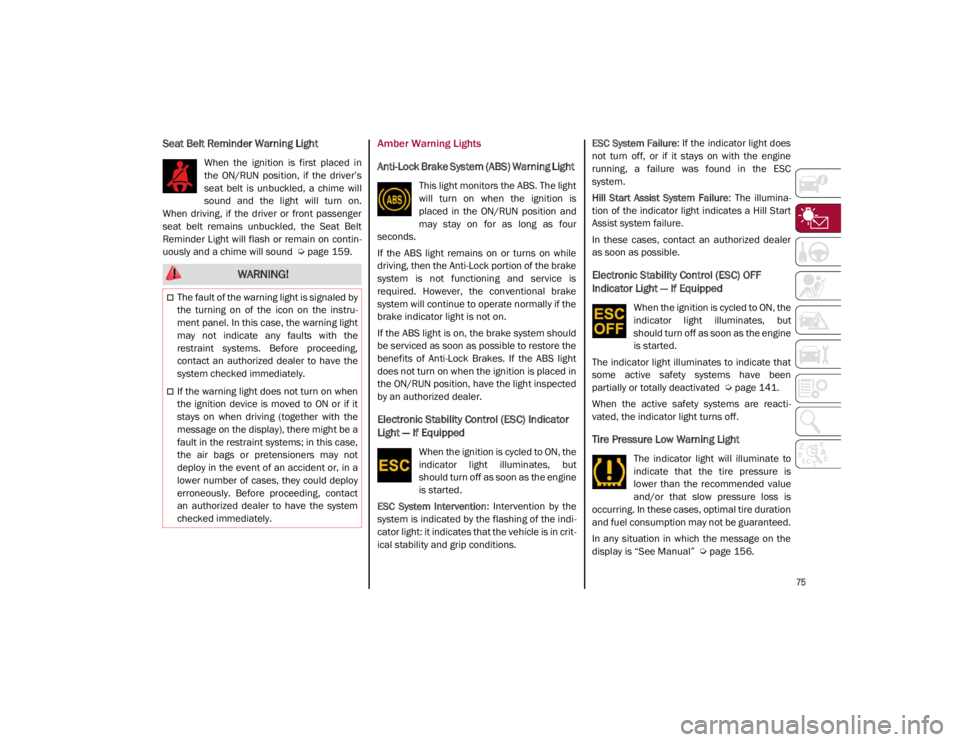
Seat Belt Reminder Warning Light
When the ignition is first placed in
the ON/RUN position, if the driver’s
seat belt is unbuckled, a chime will
sound and the light will turn on.
When driving, if the driver or front passenger
seat belt remains unbuckled, the Seat Belt
Reminder Light will flash or remain on contin -
uously and a chime will sound
Ú
page 159.
Amber Warning Lights
Anti-Lock Brake System (ABS) Warning Light
This light monitors the ABS. The light
will turn on when the ignition is
placed in the ON/RUN position and
may stay on for as long as four
seconds.
If the ABS light remains on or turns on while
driving, then the Anti-Lock portion of the brake
system is not functioning and service is
required. However, the conventional brake
system will continue to operate normally if the
brake indicator light is not on.
If the ABS light is on, the brake system should
be serviced as soon as possible to restore the
benefits of Anti-Lock Brakes. If the ABS light
does not turn on when the ignition is placed in
the ON/RUN position, have the light inspected
by an authorized dealer.
Electronic Stability Control (ESC) Indicator
Light — If Equipped
When the ignition is cycled to ON, the
indicator light illuminates, but
should turn off as soon as the engine
is started.
ESC System Intervention : Intervention by the
system is indicated by the flashing of the indi -
cator light: it indicates that the vehicle is in crit -
ical stability and grip conditions. ESC System Failure
: If the indicator light does
not turn off, or if it stays on with the engine
running, a failure was found in the ESC
system.
Hill Start Assist System Failure : The illumina-
tion of the indicator light indicates a Hill Start
Assist system failure.
In these cases, contact an authorized dealer
as soon as possible.
Electronic Stability Control (ESC) OFF
Indicator Light — If Equipped
When the ignition is cycled to ON, the
indicator light illuminates, but
should turn off as soon as the engine
is started.
The indicator light illuminates to indicate that
some active safety systems have been
partially or totally deactivated
Ú
page 141.
When the active safety systems are reacti -
vated, the indicator light turns off.
Tire Pressure Low Warning Light
The indicator light will illuminate to
indicate that the tire pressure is
lower than the recommended value
and/or that slow pressure loss is
occurring. In these cases, optimal tire duration
and fuel consumption may not be guaranteed.
In any situation in which the message on the
display is “See Manual”
Ú
page 156.
WARNING!
The fault of the warning light is signaled by
the turning on of the icon on the instru -
ment panel. In this case, the warning light
may not indicate any faults with the
restraint systems. Before proceeding,
contact an authorized dealer to have the
system checked immediately.
If the warning light does not turn on when
the ignition device is moved to ON or if it
stays on when driving (together with the
message on the display), there might be a
fault in the restraint systems; in this case,
the air bags or pretensioners may not
deploy in the event of an accident or, in a
lower number of cases, they could deploy
erroneously. Before proceeding, contact
an authorized dealer to have the system
checked immediately.
21_GA_OM_EN_USC_t.book Page 75
Page 99 of 284

97
Automatic Transmission Limp Home Mode
Transmission function is monitored electroni-
cally for abnormal conditions. If a condition is
detected that could result in transmission
damage, Transmission Limp Home Mode is
activated.
In this condition, the transmission stays in
FOURTH gear, regardless of the selected gear.
Positions PARK (P), REVERSE (R) and
NEUTRAL (N) still work.
The symbol might light up in the instrument
cluster.
Temporary failure
In the event of a momentary problem, the
transmission can be reset to regain all forward
gears by performing the following steps:
1. Stop the vehicle.
2. Shift the transmission into PARK (P), if possible. If not, shift the transmission to
NEUTRAL (N).
3. Push and hold the ignition until the engine turns off.
4. Wait for about 10 seconds, then restart the engine.
5. Shift into the desired gear range. If the problem is no longer detected, the trans -
mission will return to normal operation.
NOTE:
Even if the transmission can be reset, we
recommend that you visit an authorized dealer
at your earliest possible convenience. An
authorized dealer has diagnostic equipment to
determine if the problem could reoccur. If the
transmission cannot be reset, service is
required at an authorized dealer.
Brake/Transmission Shift Interlock (BTSI)
System
This vehicle is equipped with a BTSI system
that holds the gear selector in PARK (P) unless
the brakes are applied.
This system prevents you from moving the
gear selector from position PARK (P) unless
the brakes are applied.
To shift the transmission out of PARK (P), the
ignition must be placed in the ON/RUN mode
(engine running or not) and the brake pedal
must be pressed.
Brake/Transmission Shift Interlock Disabling
Only if strictly necessary (e.g. pushing the
vehicle, conveyor vehicle washing systems)
inhibit the automatic activation of PARK (P)
mode when stopping the engine, or proceed
as described below:
1. Vehicle at a standstill.
2. NEUTRAL (N) mode activated.
3. Push the ignition button for at least three
seconds. The automatic parking brake engagement
function when the engine is stopped can also
be deactivated on the Information and Enter
-
tainment system by selecting the following
functions on the main menu: “Settings”,
“Driver Assistance” and “Automatic Parking
Brake”.
Important Notes
Failure to comply with what is reported below
may damage the transmission:
Shift into PARK (P) mode only with the
vehicle at a standstill.
Select REVERSE (R) mode, or pass from
REVERSE to another mode only with the
vehicle at a standstill and engine idling.
Do not change between PARK (P), REVERSE
(R), NEUTRAL (N) or DRIVE (D) modes with
engine running at a speed above idling.
Before activating any transmission oper -
ating mode, fully press the brake pedal.
NOTE:
The unexpected movement of the vehicle can
injure the occupants or people nearby. Do not
leave the vehicle with the engine running:
before getting out of the passenger compart -
ment always engage the Electric Park Brake,
select the PARK (P) mode and stop the engine.
21_GA_OM_EN_USC_t.book Page 97
Page 103 of 284
101
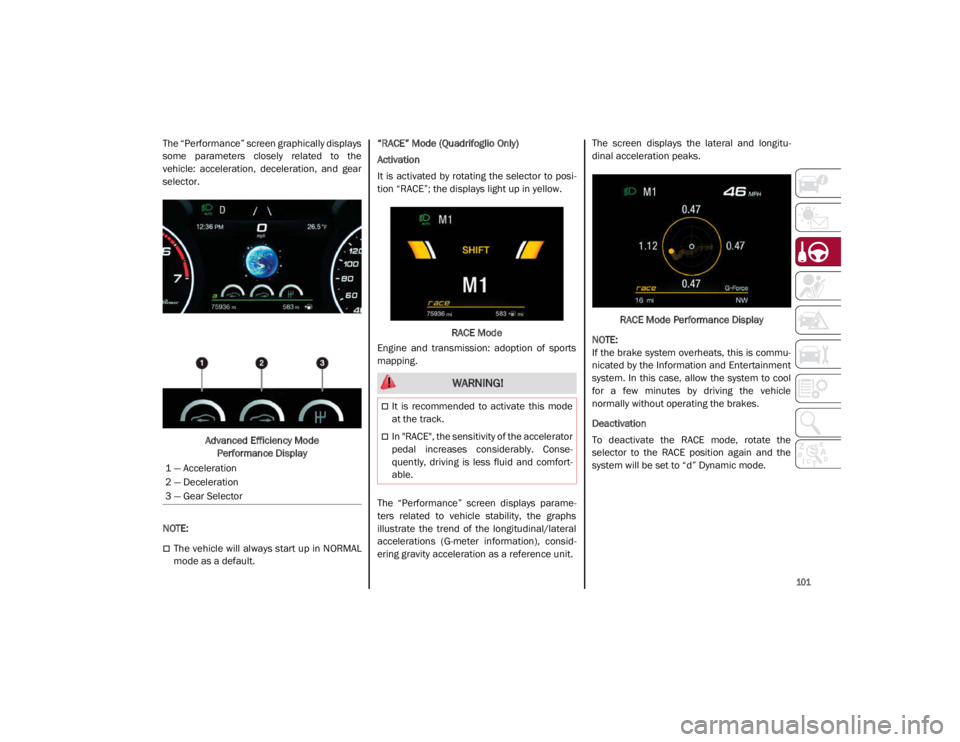
The “Performance” screen graphically displays
some parameters closely related to the
vehicle: acceleration, deceleration, and gear
selector.Advanced Efficiency Mode Performance Display
NOTE:
The vehicle will always start up in NORMAL
mode as a default. “RACE” Mode (Quadrifoglio Only)
Activation
It is activated by rotating the selector to posi
-
tion “RACE”; the displays light up in yellow.
RACE Mode
Engine and transmission: adoption of sports
mapping.
The “Performance” screen displays parame -
ters related to vehicle stability, the graphs
illustrate the trend of the longitudinal/lateral
accelerations (G-meter information), consid -
ering gravity acceleration as a reference unit. The screen displays the lateral and longitu
-
dinal acceleration peaks.
RACE Mode Performance Display
NOTE:
If the brake system overheats, this is commu -
nicated by the Information and Entertainment
system. In this case, allow the system to cool
for a few minutes by driving the vehicle
normally without operating the brakes.
Deactivation
To deactivate the RACE mode, rotate the
selector to the RACE position again and the
system will be set to “d” Dynamic mode.
1 — Acceleration
2 — Deceleration
3 — Gear Selector
WARNING!
It is recommended to activate this mode
at the track.
In "RACE", the sensitivity of the accelerator
pedal increases considerably. Conse -
quently, driving is less fluid and comfort -
able.
21_GA_OM_EN_USC_t.book Page 101
Page 111 of 284
109
Activating Adaptive Cruise Control (ACC)
The minimum set speed for the ACC system is
19 mph (30 km/h) and the maximum is110 mph (180 km/h).
The system cannot be activated:
When pressing the brake pedal.
When the brakes are overheated.
When the Electric Park Brake has been
operated.
When either PARK, REVERSE or NEUTRAL is
engaged.
When the engine RPM is above a maximum
threshold.
When the vehicle speed is not within the
operational speed range.
When the Electronic Stability Control (ESC)
(or Anti-Lock Brake System (ABS) or other
stability control systems) are operating or
have just operated.
When the ESC system is off.
When the Forward Collision Warning system
(if equipped) is braking automatically.
In the event of a system failure.
When the engine is off.
In case of obstruction of the radar sensor (in
this case the bumper area where it is
located must be cleaned).
If the system is set, the conditions described
above also cause a cancellation or deactiva -
tion of the system. These situations may vary
according to the conditions.
NOTE:
The system will not be deactivated when
speeds higher than those set are reached by
pressing the accelerator pedal above
110 mph (180 km/h). In these situations, the system may not work correctly and it is recom -
mended to deactivate it.
To Activate/Deactivate
The system has four operating states:
Enabled (speed not set)
Activated (speed set)
Paused
Deactivated
•
Does not always fully recognize
complex driving conditions, which can
result in wrong or missing distance
warnings.
• Will bring the vehicle to a complete
stop while following a vehicle ahead
and hold the vehicle for approximately
two minutes in the stop position. If the
vehicle ahead does not start moving
within two minutes, the parking brake
will be activated and the ACC sys t
em
will be canceled.
You should switch off the ACC system:
When driving in fog, heavy rain, heavy
snow, sleet, heavy traffic, and complex
driving situations (i.e., in highway
construction zones).
When entering a turn lane or highway off
ramp; when driving on roads that are
winding, icy, snow-covered, slippery, or
have steep uphill or downhill slopes.
When circumstances do not allow safe
driving at a constant speed.
WARNING! (Continued)
21_GA_OM_EN_USC_t.book Page 109
Page 113 of 284
111
NOTE:
Moving the RES/SET switch downward
allows you to adjust the speed according to
the selected unit of measurement ("U.S." or
"Metric") set on the radio system. Refer to
the Information and Entertainment System
Owner’s Manual Supplement for further
information.
When the unit of measurement is set to
Metric, pushing and holding the RES/SET
switch will adjust the speed in 10 km/h
increments.
By keeping the accelerator pedal pressed,
the vehicle can continue to accelerate
beyond the set speed. In this case, use the
RES/SET switch to set the speed to the
vehicle’s current speed.
When you push the RES/SET button to
reduce the speed, the braking system inter-
venes automatically if the engine brake
does not slow the vehicle down sufficiently
to reach the set speed. The device holds the
set speed uphill and downhill; however a
slight variation is entirely normal, particu -
larly on slight inclines.
The transmission could shift to a lower gear
when driving downhill, or when acceler -
ating. This is normal and necessary to main -
tain the set speed.
The system will disable while driving if the
brakes overheat.
To Resume
Once the system has been canceled but not
deactivated, to resume a previously set speed,
simply push the RES/SET switch upward and
remove your foot from the accelerator to recall it.
The system will be set to the last stored speed.
Setting The Distance Between Vehicles
The distance between your vehicle and the
vehicle ahead may be set to one bar (short),
two bars (medium), three bars (long), or four
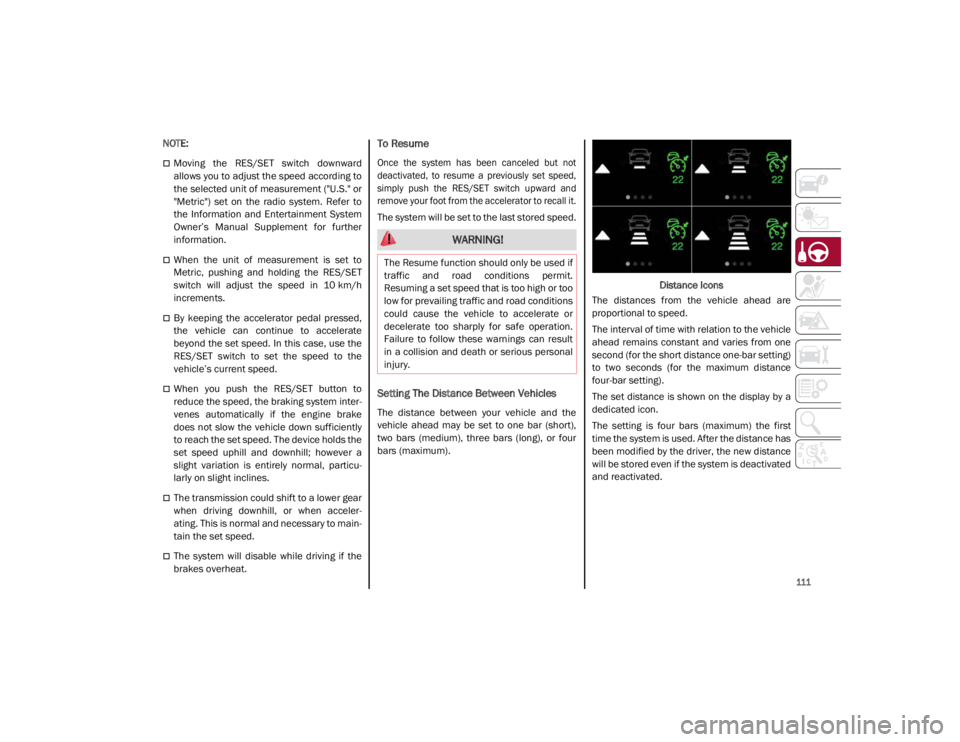
bars (maximum). Distance Icons
The distances from the vehicle ahead are
proportional to speed.
The interval of time with relation to the vehicle
ahead remains constant and varies from one
second (for the short distance one-bar setting)
to two seconds (for the maximum distance
four-bar setting).
The set distance is shown on the display by a
dedicated icon.
The setting is four bars (maximum) the first
time the system is used. After the distance has
been modified by the driver, the new distance
will be stored even if the system is deactivated
and reactivated.
WARNING!
The Resume function should only be used if
traffic and road conditions permit.
Resuming a set speed that is too high or too
low for prevailing traffic and road conditions
could cause the vehicle to accelerate or
decelerate too sharply for safe operation.
Failure to follow these warnings can result
in a collision and death or serious personal
injury.
21_GA_OM_EN_USC_t.book Page 111
Page 114 of 284
STARTING AND OPERATING
112
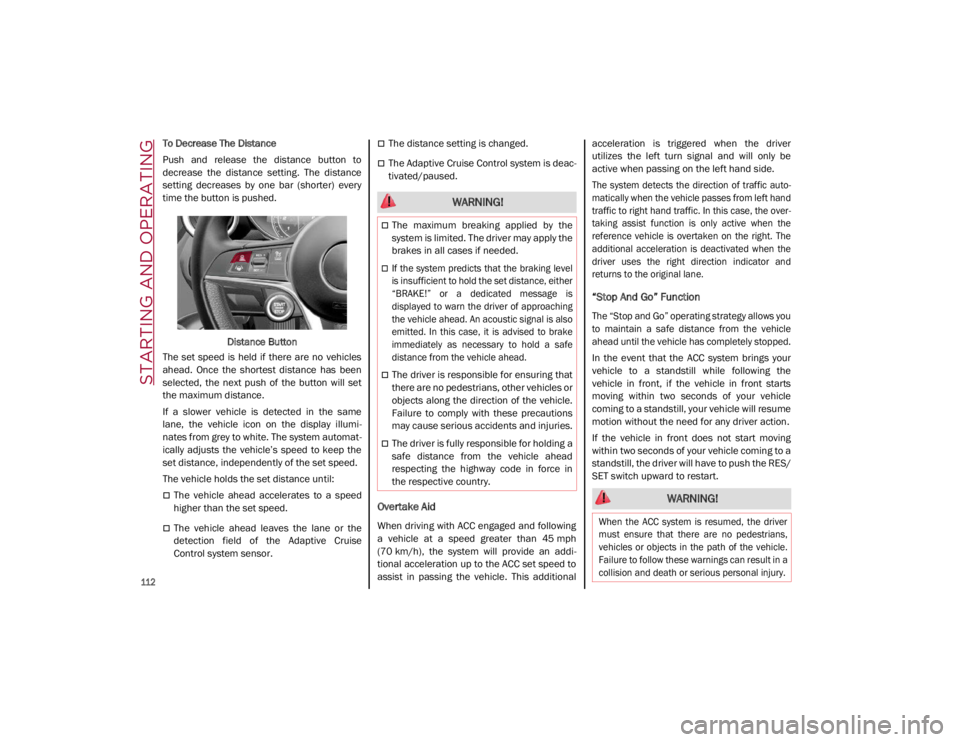
To Decrease The Distance
Push and release the distance button to
decrease the distance setting. The distance
setting decreases by one bar (shorter) every
time the button is pushed.Distance Button
The set speed is held if there are no vehicles
ahead. Once the shortest distance has been
selected, the next push of the button will set
the maximum distance.
If a slower vehicle is detected in the same
lane, the vehicle icon on the display illumi -
nates from grey to white. The system automat -
ically adjusts the vehicle’s speed to keep the
set distance, independently of the set speed.
The vehicle holds the set distance until:
The vehicle ahead accelerates to a speed
higher than the set speed.
The vehicle ahead leaves the lane or the
detection field of the Adaptive Cruise
Control system sensor.
The distance setting is changed.
The Adaptive Cruise Control system is deac -
tivated/paused.
Overtake Aid
When driving with ACC engaged and following
a vehicle at a speed greater than 45 mph
(70 km/h), the system will provide an addi -
tional acceleration up to the ACC set speed to
assist in passing the vehicle. This additional acceleration is triggered when the driver
utilizes the left turn signal and will only be
active when passing on the left hand side.
The system detects the direction of traffic auto
-
matically when the vehicle passes from left hand
traffic to right hand traffic. In this case, the over -
taking assist function is only active when the
reference vehicle is overtaken on the right. The
additional acceleration is deactivated when the
driver uses the right direction indicator and
returns to the original lane.
“Stop And Go” Function
The “Stop and Go” operating strategy allows you
to maintain a safe distance from the vehicle
ahead until the vehicle has completely stopped.
In the event that the ACC system brings your
vehicle to a standstill while following the
vehicle in front, if the vehicle in front starts
moving within two seconds of your vehicle
coming to a standstill, your vehicle will resume
motion without the need for any driver action.
If the vehicle in front does not start moving
within two seconds of your vehicle coming to a
standstill, the driver will have to push the RES/
SET switch upward to restart.
WARNING!
The maximum breaking applied by the
system is limited. The driver may apply the
brakes in all cases if needed.
If the system predicts that the braking level
is insufficient to hold the set distance, either
“BRAKE!” or a dedicated message is
displayed to warn the driver of approaching
the vehicle ahead. An acoustic signal is also
emitted. In this case, it is advised to brake
immediately as necessary to hold a safe
distance from the vehicle ahead.
The driver is responsible for ensuring that
there are no pedestrians, other vehicles or
objects along the direction of the vehicle.
Failure to comply with these precautions
may cause serious accidents and injuries.
The driver is fully responsible for holding a
safe distance from the vehicle ahead
respecting the highway code in force in
the respective country.
WARNING!
When the ACC system is resumed, the driver
must ensure that there are no pedestrians,
vehicles or objects in the path of the vehicle.
Failure to follow these warnings can result in a
collision and death or serious personal injury.
21_GA_OM_EN_USC_t.book Page 112
Page 115 of 284
113
Deactivation
The system is deactivated and the set speed is
canceled if:
The on/off button is pushed (when the
system is on or paused).
The ignition is placed in the OFF position
RACE mode is activated (Quadrifoglio
models)
The system is canceled (the set speed and
distance are stored):
When the system is paused
Ú
page 109
When the conditions shown in the “Acti -
vating Adaptive Cruise Control (ACC)”
section occur
Ú
page 109
Limited Operation Warning
If the dedicated message is shown on the
display, a condition limiting the Adaptive
Cruise Control operation may have occurred.
This could be due to an obstruction of the
vehicle’s sensor or camera. It could also be
due to a fault in the system. If an obstruction
is detected, clean the area of the windshield
opposite the interior rearview mirror, where
the camera is located, as well as the area of
the front bumper where the sensor is located.
Then check that the message has disap -
peared. When the conditions limiting the system func
-
tions end, normal operation will resume.
Should the fault persist, contact an authorized
dealer.
Precautions While Driving With ACC
In certain driving situations, ACC may have
detection issues. In these cases, ACC may
brake late or unexpectedly. The driver needs
to stay alert and may need to intervene. The
following are examples of these types of situa -
tions:
Offset Driving
ACC may not detect a vehicle in the same lane
that is offset from your direct line of travel, or
a vehicle merging in from a side lane. There
may not be sufficient distance to the vehicle
ahead. The offset vehicle may move in and out
of the line of travel, which can cause your
vehicle to brake or accelerate unexpectedly.
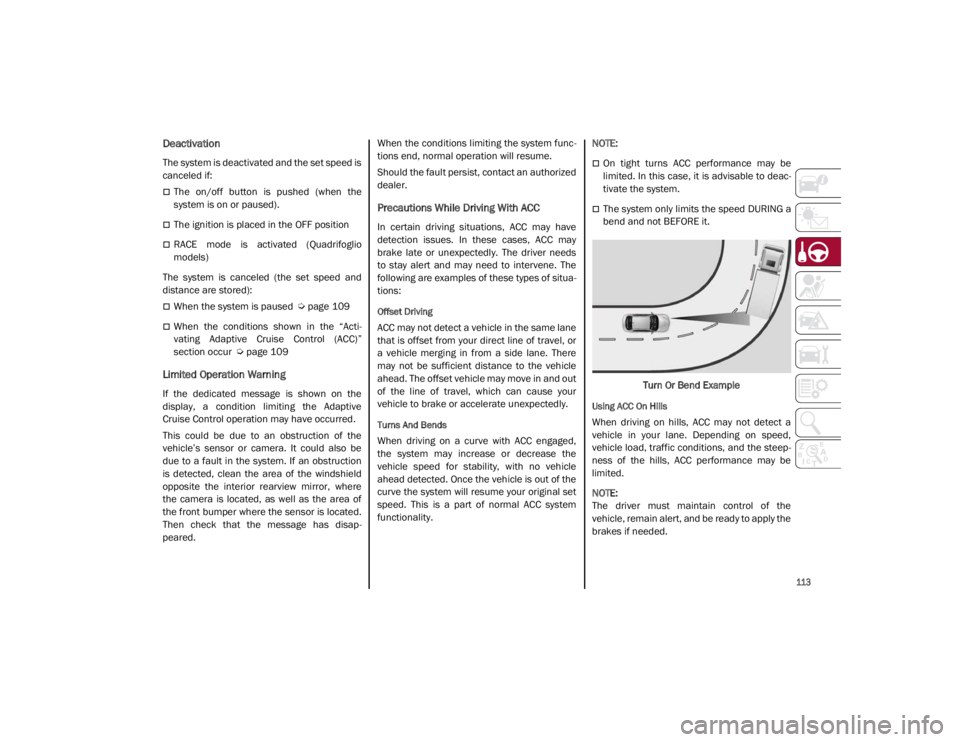
Turns And Bends
When driving on a curve with ACC engaged,
the system may increase or decrease the
vehicle speed for stability, with no vehicle
ahead detected. Once the vehicle is out of the
curve the system will resume your original set
speed. This is a part of normal ACC system
functionality.
NOTE:
On tight turns ACC performance may be
limited. In this case, it is advisable to deac
-
tivate the system.
The system only limits the speed DURING a
bend and not BEFORE it.
Turn Or Bend Example
Using ACC On Hills
When driving on hills, ACC may not detect a
vehicle in your lane. Depending on speed,
vehicle load, traffic conditions, and the steep -
ness of the hills, ACC performance may be
limited.
NOTE:
The driver must maintain control of the
vehicle, remain alert, and be ready to apply the
brakes if needed.
21_GA_OM_EN_USC_t.book Page 113