cruise control ALFA ROMEO GIULIA 2021 Owners Manual
[x] Cancel search | Manufacturer: ALFA ROMEO, Model Year: 2021, Model line: GIULIA, Model: ALFA ROMEO GIULIA 2021Pages: 284, PDF Size: 8.87 MB
Page 12 of 284

10
AUTOMATIC TRANSMISSION....................92
Display .................................................... 93
Gear Selector ......................................... 94
Transmission Operating Modes ............ 94
Automatic Transmission Limp Home
Mode....................................................... 97 Brake/Transmission Shift
Interlock (BTSI) System ......................... 97 Important Notes ..................................... 97
ALFA DNA / PRO SELECTOR ....................99
Alfa DNA System .................................... 99
Driving Modes ........................................ 99
ALFA ACTIVE SUSPENSION (AAS) —
IF EQUIPPED .......................................... 102STOP/START SYSTEM ........................... 102
Stop/Start System ............................... 102
Operating Mode ...................................102
System Manual Activation/
Deactivation .........................................103 Possible Reasons The Engine Does
Not Autostop ........................................103 Engine Restarting Conditions .............103
Safety Functions ..................................103
Irregular Operation .............................. 104
Vehicle Inactivity ..................................104
SPEED LIMITER ..................................... 104
Description ...........................................104
Activation..............................................104
Speed Limit Programming...................105
Exceeding The Programmed Speed ... 105
Programmed Speed Icon Flashing .....105
Deactivation .........................................105
CRUISE CONTROL SYSTEMS ................. 105
Cruise Control — If Equipped .............. 105
Adaptive Cruise Control (ACC) —
If Equipped ........................................... 107
HIGHWAY ASSIST SYSTEM (HAS) —
IF EQUIPPED........................................... 115
To Activate/Deactivate........................ 116
Operation ............................................. 116
Indications On The Display ................. 117
System Status...................................... 117
Limited System Availability/
Operation ............................................. 118
TRAFFIC JAM ASSIST (TJA) SYSTEM —
IF EQUIPPED........................................... 119
To Activate/Deactivate........................ 119
Operation ............................................. 120
Indications On The Display ................. 121
System Status...................................... 121
Limited System Availability/
Operation ............................................. 122
TRAFFIC SIGN RECOGNITION (TSR)
SYSTEM — IF EQUIPPED ........................ 123
To Activate/Deactivate........................ 123
Indications On The Display ................. 123
INTELLIGENT SPEED CONTROL (ISC)
SYSTEM — IF EQUIPPED ........................ 124
To Activate/Deactivate........................ 124
Indications On The Display ................. 124
Acceptance/Rejection Of The
Suggested Speed ................................ 125
PARKSENSE FRONT/REAR PARK ASSIST
SYSTEM — IF EQUIPPED ........................ 125
ParkSense Sensors ............................. 126
ParkSense Display............................... 126 Enabling And Disabling ParkSense .... 127
ParkSense Warning Display ............... 127
ParkSense System Usage
Precautions ......................................... 128
LANE DEPARTURE WARNING (LDW)
SYSTEM — IF EQUIPPED........................ 128
Lane Departure Warning
Operation ............................................. 128 Turning Lane Departure Warning On
Or Off .................................................... 129 Lane Departure Warning Message .... 129
Changing Lane Departure Warning
Status................................................... 130
LANE KEEPING ASSIST (LKA) SYSTEM —
IF EQUIPPED .......................................... 130
Turning Lane Keeping Assist On
Or Off .................................................... 131 Lane Keeping Assist Warning
Message .............................................. 131
REAR BACK UP CAMERA / DYNAMIC
GRIDLINES ............................................. 134 REFUELING THE VEHICLE ..................... 135
Refueling The Vehicle ......................... 135
Refueling Procedure .......................... 135
VEHICLE LOADING ................................ 136
Certification Label ............................... 136
TRAILER TOWING .................................. 138 SUGGESTIONS FOR DRIVING ............... 138
Saving Fuel .......................................... 138
Driving Style......................................... 138
Conditions Of Use................................ 138
Transporting Passengers .................... 139
Transporting Animals .......................... 139
Exhaust Gas......................................... 139
Performance — Quadrifoglio............... 139
21_GA_OM_EN_USC_t.book Page 10
Page 17 of 284
15
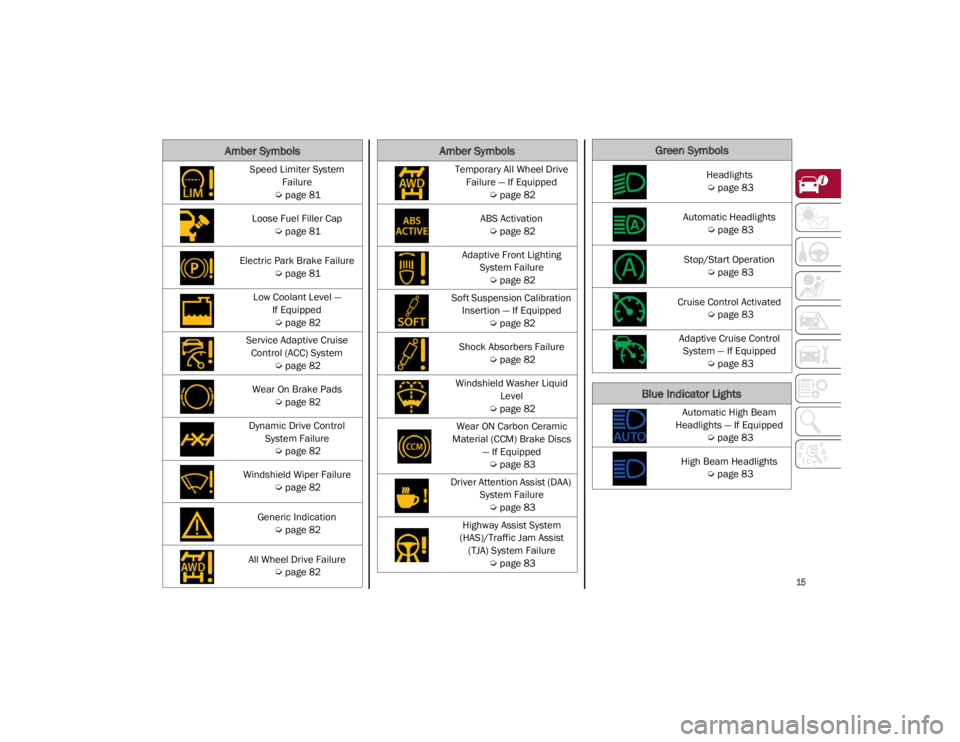
Speed Limiter System Failure
Ú
page 81
Loose Fuel Filler Cap
Ú
page 81
Electric Park Brake Failure
Ú
page 81
Low Coolant Level — If Equipped
Ú
page 82
Service Adaptive Cruise Control (ACC) System
Ú
page 82
Wear On Brake Pads
Ú
page 82
Dynamic Drive Control System Failure
Ú
page 82
Windshield Wiper Failure
Ú
page 82
Generic Indication
Ú
page 82
All Wheel Drive Failure
Ú
page 82
Amber Symbols
Temporary All Wheel Drive
Failure — If Equipped
Ú
page 82
ABS Activation
Ú
page 82
Adaptive Front Lighting System Failure
Ú
page 82
Soft Suspension Calibration Insertion — If Equipped
Ú
page 82
Shock Absorbers Failure
Ú
page 82
Windshield Washer Liquid Level
Ú
page 82
Wear ON Carbon Ceramic
Material (CCM) Brake Discs — If Equipped
Ú
page 83
Driver Attention Assist (DAA) System Failure
Ú
page 83
Highway Assist System
(HAS)/Traffic Jam Assist (TJA) System Failure
Ú
page 83
Amber SymbolsGreen Symbols
Headlights
Ú
page 83
Automatic Headlights
Ú
page 83
Stop/Start Operation
Ú
page 83
Cruise Control Activated
Ú
page 83
Adaptive Cruise Control System — If Equipped
Ú
page 83
Blue Indicator Lights
Automatic High Beam
Headlights — If Equipped
Ú
page 83
High Beam Headlights
Ú
page 83
21_GA_OM_EN_USC_t.book Page 15
Page 70 of 284
GETTING TO KNOW YOUR INSTRUMENT PANEL
68
The Engine Oil Temperature warning light
will turn on to signal the excessive increase of
the engine oil temperature.
In the event of excessive engine oil tempera-
ture, stop the engine immediately and contact
an authorized dealer.
Fuel Level Gauge
The digital fuel gauge monitors the amount of
fuel in the tank.
When the Fuel Level warning light turns on,
a message is displayed, and a chime will
sound when 2.3 Gallons (9.0 L) of fuel are left
in the tank.
Proceeding further, the second white notch
will go off and the last one will become red,
together with the indication "E" present at the
bottom of the tank.
Fuel Level Gauge
NOTE:
If the low fuel warning light turns on, refuel the
vehicle at your nearest fuel station.
Speedometer
The speedometer shows the vehicle speed in
miles per hour and/or kilometers per hour
(mph/km/h).
INSTRUMENT CLUSTER
DISPLAY
Instrument Cluster Display Description
This vehicle is equipped with a driver interac
-
tive display that is located in the instrument
cluster.
When one or more of the doors have been
opened or closed and the ignition is in the OFF
position, the instrument cluster will display the
vehicle mileage for a few seconds.
Reconfigurable Instrument Cluster Display
During operation, the instrument cluster
display is divided into multiple sections which
show driving data, warnings and failure indica -
tions.
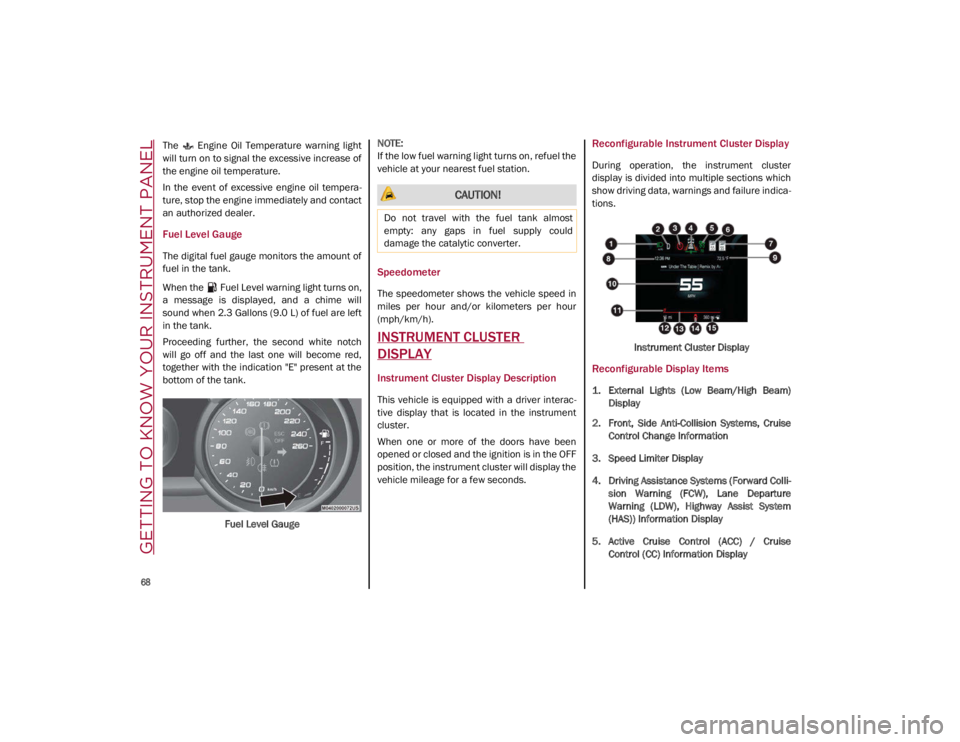
Instrument Cluster Display
Reconfigurable Display Items
1. External Lights (Low Beam/High Beam)Display
2. Front, Side Anti-Collision Systems, Cruise Control Change Information
3. Speed Limiter Display
4. Driving Assistance Systems (Forward Colli -
sion Warning (FCW), Lane Departure
Warning (LDW), Highway Assist System
(HAS)) Information Display
5. Active Cruise Control (ACC) / Cruise Control (CC) Information Display
CAUTION!
Do not travel with the fuel tank almost
empty: any gaps in fuel supply could
damage the catalytic converter.
21_GA_OM_EN_USC_t.book Page 68
Page 84 of 284
GETTING TO KNOW YOUR INSTRUMENT PANEL
82
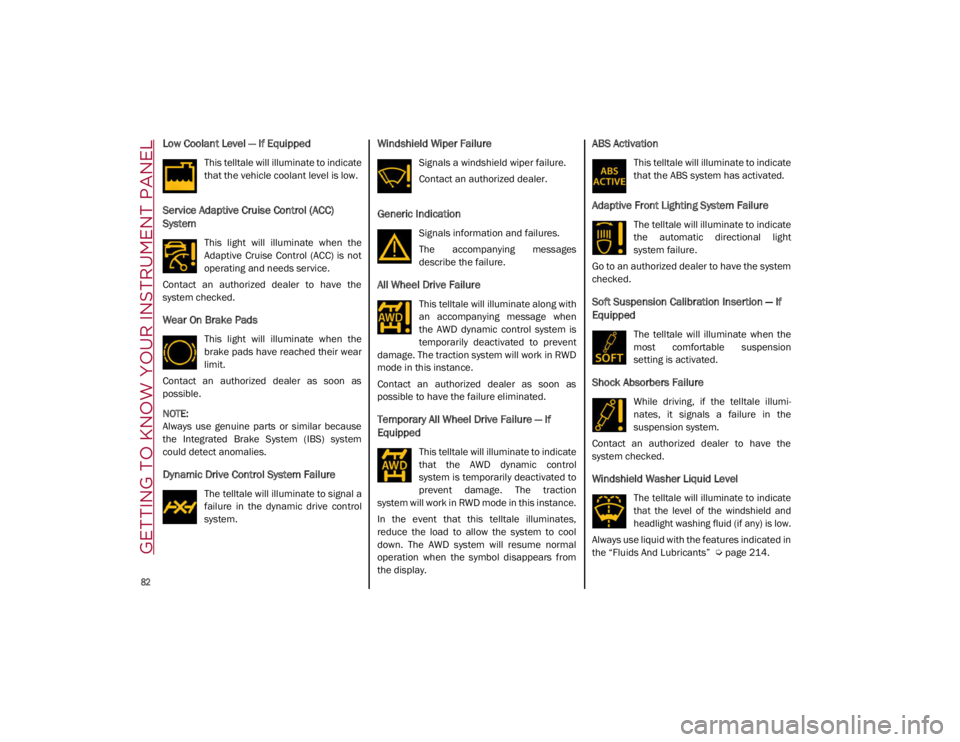
Low Coolant Level — If Equipped
This telltale will illuminate to indicate
that the vehicle coolant level is low.
Service Adaptive Cruise Control (ACC)
System
This light will illuminate when the
Adaptive Cruise Control (ACC) is not
operating and needs service.
Contact an authorized dealer to have the
system checked.
Wear On Brake Pads
This light will illuminate when the
brake pads have reached their wear
limit.
Contact an authorized dealer as soon as
possible.
NOTE:
Always use genuine parts or similar because
the Integrated Brake System (IBS) system
could detect anomalies.
Dynamic Drive Control System Failure
The telltale will illuminate to signal a
failure in the dynamic drive control
system.
Windshield Wiper Failure
Signals a windshield wiper failure.
Contact an authorized dealer.
Generic Indication
Signals information and failures.
The accompanying messages
describe the failure.
All Wheel Drive Failure
This telltale will illuminate along with
an accompanying message when
the AWD dynamic control system is
temporarily deactivated to prevent
damage. The traction system will work in RWD
mode in this instance.
Contact an authorized dealer as soon as
possible to have the failure eliminated.
Temporary All Wheel Drive Failure — If
Equipped
This telltale will illuminate to indicate
that the AWD dynamic control
system is temporarily deactivated to
prevent damage. The traction
system will work in RWD mode in this instance.
In the event that this telltale illuminates,
reduce the load to allow the system to cool
down. The AWD system will resume normal
operation when the symbol disappears from
the display.
ABS Activation
This telltale will illuminate to indicate
that the ABS system has activated.
Adaptive Front Lighting System Failure
The telltale will illuminate to indicate
the automatic directional light
system failure.
Go to an authorized dealer to have the system
checked.
Soft Suspension Calibration Insertion — If
Equipped
The telltale will illuminate when the
most comfortable suspension
setting is activated.
Shock Absorbers Failure
While driving, if the telltale illumi -
nates, it signals a failure in the
suspension system.
Contact an authorized dealer to have the
system checked.
Windshield Washer Liquid Level
The telltale will illuminate to indicate
that the level of the windshield and
headlight washing fluid (if any) is low.
Always use liquid with the features indicated in
the “Fluids And Lubricants”
Ú
page 214.
21_GA_OM_EN_USC_t.book Page 82
Page 85 of 284
83
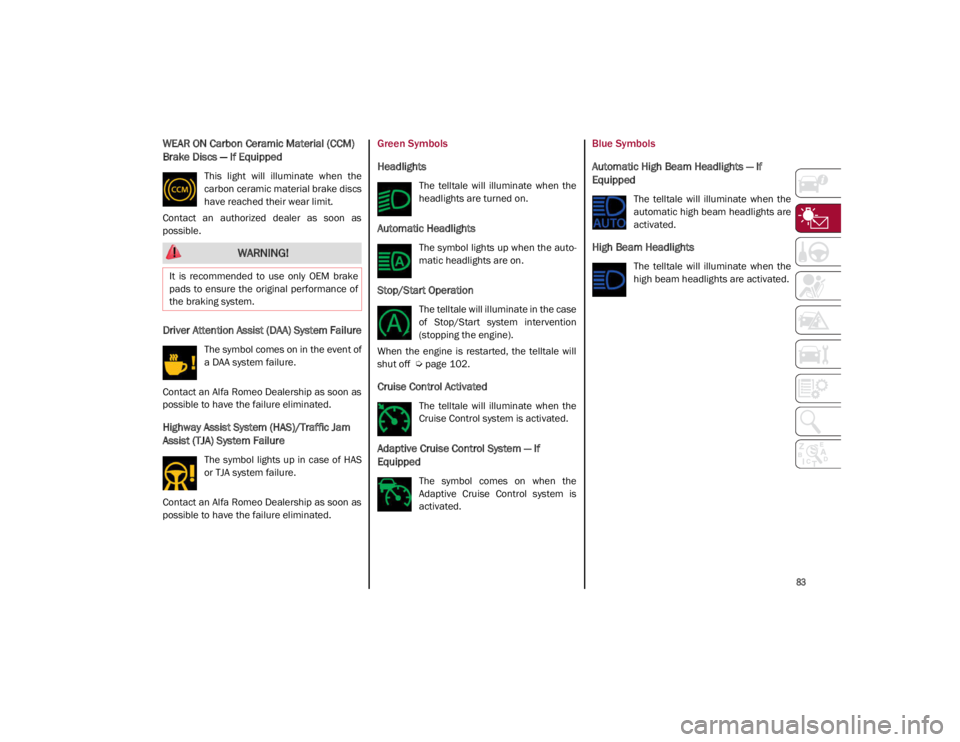
WEAR ON Carbon Ceramic Material (CCM)
Brake Discs — If Equipped
This light will illuminate when the
carbon ceramic material brake discs
have reached their wear limit.
Contact an authorized dealer as soon as
possible.
Driver Attention Assist (DAA) System Failure
The symbol comes on in the event of
a DAA system failure.
Contact an Alfa Romeo Dealership as soon as
possible to have the failure eliminated.
Highway Assist System (HAS)/Traffic Jam
Assist (TJA) System Failure
The symbol lights up in case of HAS
or TJA system failure.
Contact an Alfa Romeo Dealership as soon as
possible to have the failure eliminated.
Green Symbols
Headlights
The telltale will illuminate when the
headlights are turned on.
Automatic Headlights
The symbol lights up when the auto -
matic headlights are on.
Stop/Start Operation
The telltale will illuminate in the case
of Stop/Start system intervention
(stopping the engine).
When the engine is restarted, the telltale will
shut off
Ú
page 102.
Cruise Control Activated
The telltale will illuminate when the
Cruise Control system is activated.
Adaptive Cruise Control System — If
Equipped
The symbol comes on when the
Adaptive Cruise Control system is
activated.
Blue Symbols
Automatic High Beam Headlights — If
Equipped
The telltale will illuminate when the
automatic high beam headlights are
activated.
High Beam Headlights
The telltale will illuminate when the
high beam headlights are activated.
WARNING!
It is recommended to use only OEM brake
pads to ensure the original performance of
the braking system.
21_GA_OM_EN_USC_t.book Page 83
Page 106 of 284
STARTING AND OPERATING
104
Irregular Operation
In the event of malfunction, the Stop/Start
system is deactivated.
For further information on failure indications
Ú
page 73.
Vehicle Inactivity
In the event of vehicle inactivity (or if the battery
is replaced), special attention must be paid to
the disconnection of the battery power supply.
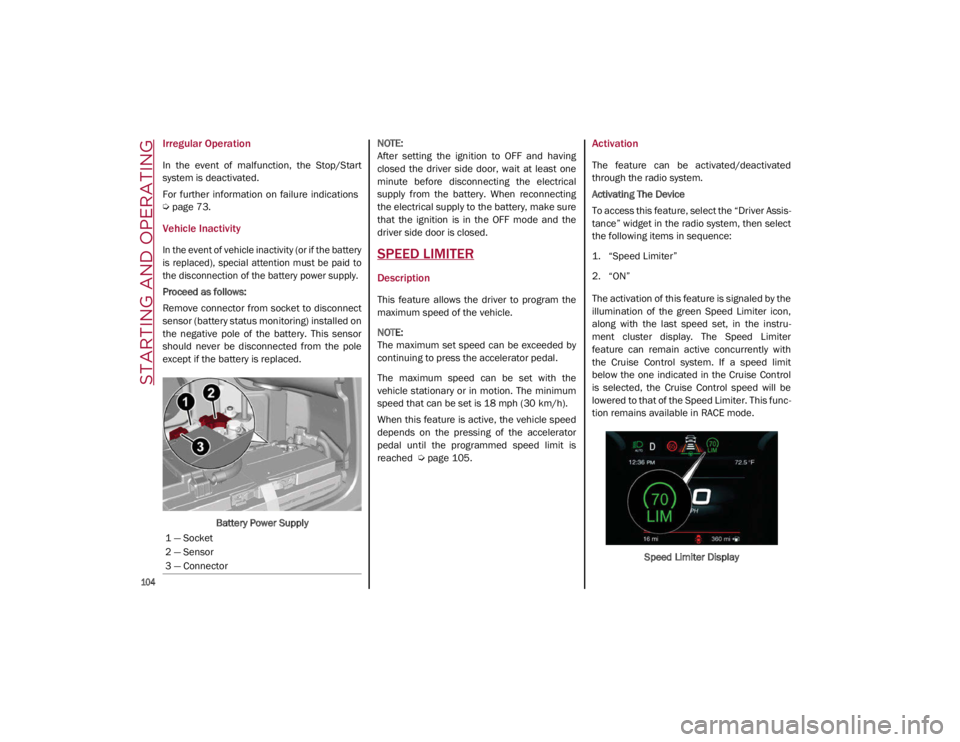
Proceed as follows:
Remove connector from socket to disconnect
sensor (battery status monitoring) installed on
the negative pole of the battery. This sensor
should never be disconnected from the pole
except if the battery is replaced.
Battery Power Supply
NOTE:
After setting the ignition to OFF and having
closed the driver side door, wait at least one
minute before disconnecting the electrical
supply from the battery. When reconnecting
the electrical supply to the battery, make sure
that the ignition is in the OFF mode and the
driver side door is closed.SPEED LIMITER
Description
This feature allows the driver to program the
maximum speed of the vehicle.
NOTE:
The maximum set speed can be exceeded by
continuing to press the accelerator pedal.
The maximum speed can be set with the
vehicle stationary or in motion. The minimum
speed that can be set is 18 mph (30 km/h).
When this feature is active, the vehicle speed
depends on the pressing of the accelerator
pedal until the programmed speed limit is
reached
Ú
page 105.
Activation
The feature can be activated/deactivated
through the radio system.
Activating The Device
To access this feature, select the “Driver Assis -
tance” widget in the radio system, then select
the following items in sequence:
1. “Speed Limiter”
2. “ON”
The activation of this feature is signaled by the
illumination of the green Speed Limiter icon,
along with the last speed set, in the instru -
ment cluster display. The Speed Limiter
feature can remain active concurrently with
the Cruise Control system. If a speed limit
below the one indicated in the Cruise Control
is selected, the Cruise Control speed will be
lowered to that of the Speed Limiter. This func -
tion remains available in RACE mode.
Speed Limiter Display
1 — Socket
2 — Sensor
3 — Connector
21_GA_OM_EN_USC_t.book Page 104
Page 107 of 284
105
Speed Limit Programming
The speed limit can be programmed through
the radio system.
To access the function on the main menu,
select the following items in sequence:
1. “Driver Assistance”
2. “Speed Limiter - Set Speed”
By turning the Rotary Pad, the speed increases
by 5 mph (8 km/h), from a minimum of
18 mph (30 km/h) to a maximum of 112 mph
(180 km/h).
Exceeding The Programmed Speed
By fully pressing the accelerator pedal, the
programmed speed can be exceeded even
with the device active (e.g. in the event of over-
taking).
The device is disabled until the speed drops
below the set limit, after which it reactivates
automatically.
Programmed Speed Icon Flashing
The programmed speed will flash in the
following scenarios:
When the accelerator pedal has been fully
pressed and the vehicle has exceeded the
programmed speed.
Activating the system after setting a limit
below the effective speed of the vehicle.
In the event of overtake acceleration.
Deactivation
The feature can be activated/deactivated
through the radio system.
Deactivating The Device
To access this feature, select the “Driver Assis -
tance” widget in the radio system, then select
the following items in sequence:
1. “Speed Limiter”
2. “OFF”
Automatic Deactivation Of The Device
The device deactivates automatically in the
event of fault in the system. In this case,
contact an authorized dealer.
Temporary Signal Loss
When the device loses the signal, the white
symbol without the speed indication illumi -
nates on the display.
System Failure
If there is a system failure, the amber symbol
illuminates on the display.
CRUISE CONTROL SYSTEMS
Cruise Control — If Equipped
When engaged, the Cruise Control takes over
accelerator operations at speeds greater than
20 mph (32 km/h). Cruise Control On/Off Switch
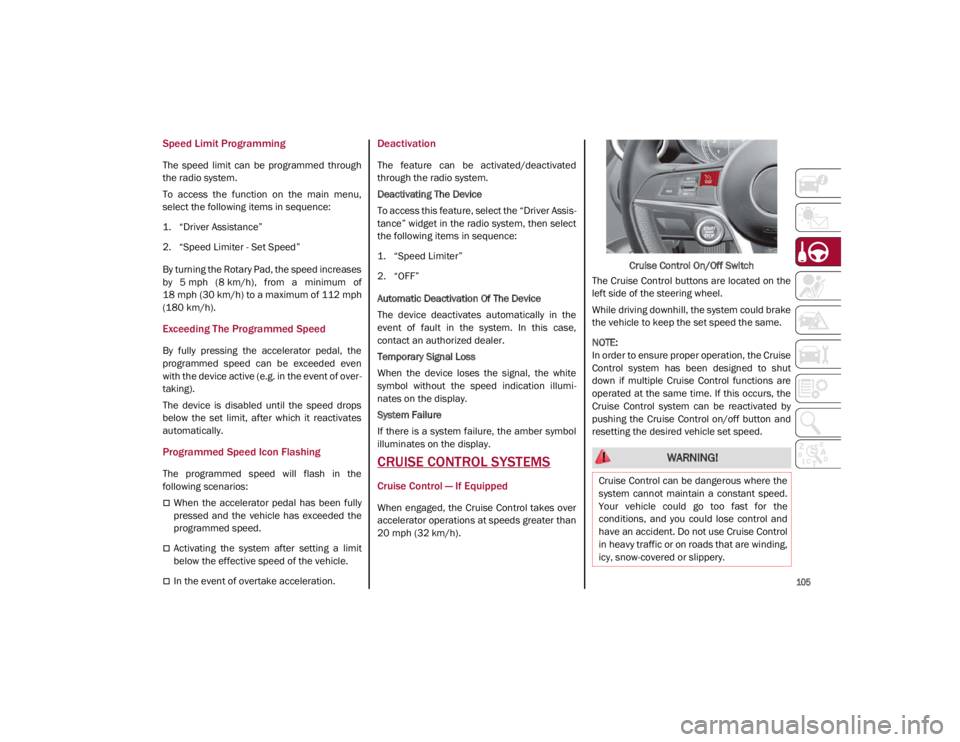
The Cruise Control buttons are located on the
left side of the steering wheel.
While driving downhill, the system could brake
the vehicle to keep the set speed the same.
NOTE:
In order to ensure proper operation, the Cruise
Control system has been designed to shut
down if multiple Cruise Control functions are
operated at the same time. If this occurs, the
Cruise Control system can be reactivated by
pushing the Cruise Control on/off button and
resetting the desired vehicle set speed.
WARNING!
Cruise Control can be dangerous where the
system cannot maintain a constant speed.
Your vehicle could go too fast for the
conditions, and you could lose control and
have an accident. Do not use Cruise Control
in heavy traffic or on roads that are winding,
icy, snow-covered or slippery.
21_GA_OM_EN_USC_t.book Page 105
Page 108 of 284
STARTING AND OPERATING
106
To Activate
To activate the Cruise Control system, push
the on/off button location on the left side of
the steering wheel.
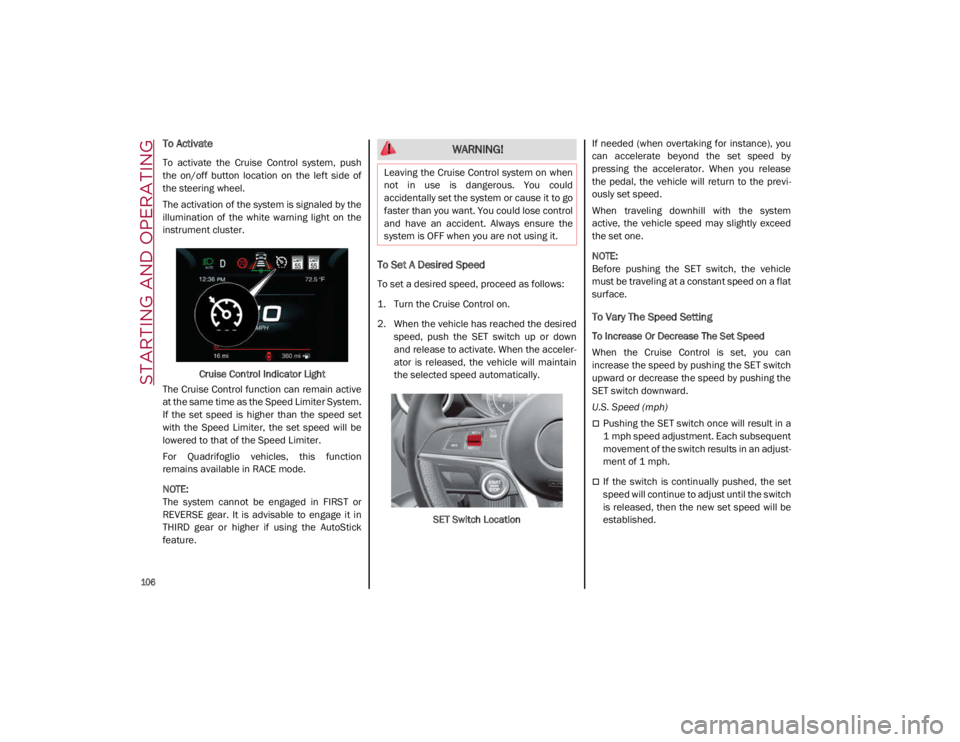
The activation of the system is signaled by the
illumination of the white warning light on the
instrument cluster.Cruise Control Indicator Light
The Cruise Control function can remain active
at the same time as the Speed Limiter System.
If the set speed is higher than the speed set
with the Speed Limiter, the set speed will be
lowered to that of the Speed Limiter.
For Quadrifoglio vehicles, this function
remains available in RACE mode.
NOTE:
The system cannot be engaged in FIRST or
REVERSE gear. It is advisable to engage it in
THIRD gear or higher if using the AutoStick
feature.
To Set A Desired Speed
To set a desired speed, proceed as follows:
1. Turn the Cruise Control on.
2. When the vehicle has reached the desired speed, push the SET switch up or down
and release to activate. When the acceler -
ator is released, the vehicle will maintain
the selected speed automatically.
SET Switch Location If needed (when overtaking for instance), you
can accelerate beyond the set speed by
pressing the accelerator. When you release
the pedal, the vehicle will return to the previ
-
ously set speed.
When traveling downhill with the system
active, the vehicle speed may slightly exceed
the set one.
NOTE:
Before pushing the SET switch, the vehicle
must be traveling at a constant speed on a flat
surface.
To Vary The Speed Setting
To Increase Or Decrease The Set Speed
When the Cruise Control is set, you can
increase the speed by pushing the SET switch
upward or decrease the speed by pushing the
SET switch downward.
U.S. Speed (mph)
Pushing the SET switch once will result in a
1 mph speed adjustment. Each subsequent
movement of the switch results in an adjust -
ment of 1 mph.
If the switch is continually pushed, the set
speed will continue to adjust until the switch
is released, then the new set speed will be
established.
WARNING!
Leaving the Cruise Control system on when
not in use is dangerous. You could
accidentally set the system or cause it to go
faster than you want. You could lose control
and have an accident. Always ensure the
system is OFF when you are not using it.
21_GA_OM_EN_USC_t.book Page 106
Page 109 of 284
107
Metric Speed (km/h)
Pushing the SET switch once will result in a
1 km/h speed adjustment. Each subse -
quent movement of the switch results in an
adjustment of 1 km/h.
If the switch is continually pushed, the set
speed will continue to adjust until the switch
is released, then the new set speed will be
established.
NOTE:
Moving the SET switch allows for adjusting of
the speed according to the selected unit of
measurement set on the radio system. Refer
to the Information and Entertainment System
Owner’s Manual for more information.
To Accelerate For Passing
Press the accelerator as you would normally.
When the pedal is released, the vehicle will
return to the set speed.
Using Cruise Control On Hills
The transmission may downshift on hills to
maintain the vehicle set speed.
NOTE:
The Cruise Control system maintains speed up
and down hills. A slight speed change on
moderate hills is normal.
On steep hills, a greater speed loss or gain
may occur so it may be preferable to drive
without Cruise Control.
To Resume Speed
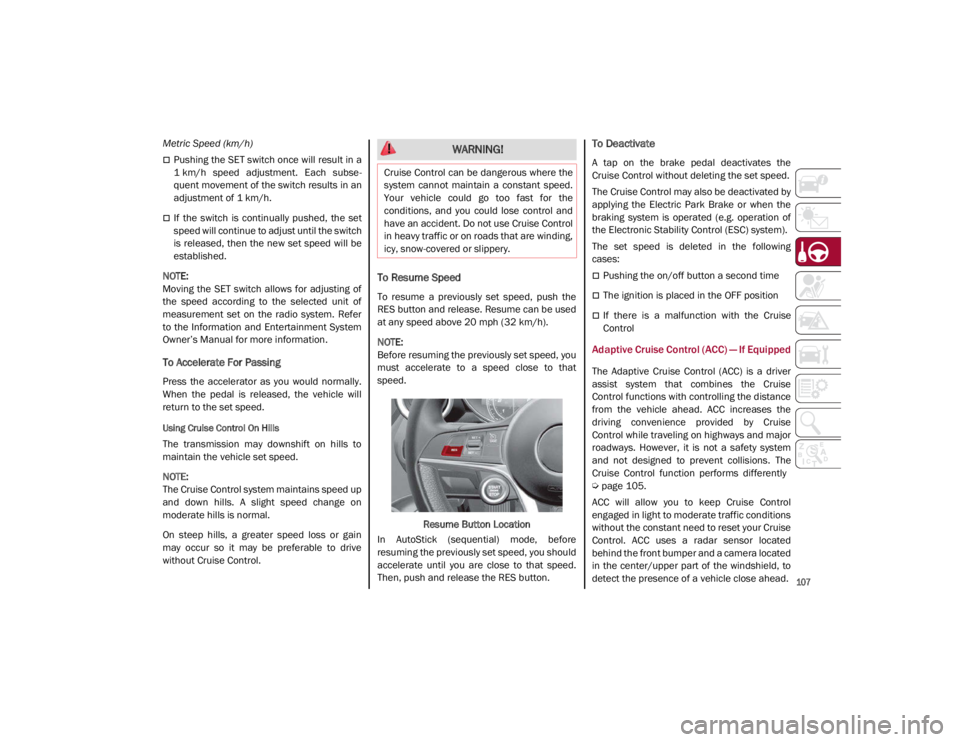
To resume a previously set speed, push the
RES button and release. Resume can be used
at any speed above 20 mph (32 km/h).
NOTE:
Before resuming the previously set speed, you
must accelerate to a speed close to that
speed.
Resume Button Location
In AutoStick (sequential) mode, before
resuming the previously set speed, you should
accelerate until you are close to that speed.
Then, push and release the RES button.
To Deactivate
A tap on the brake pedal deactivates the
Cruise Control without deleting the set speed.
The Cruise Control may also be deactivated by
applying the Electric Park Brake or when the
braking system is operated (e.g. operation of
the Electronic Stability Control (ESC) system).
The set speed is deleted in the following
cases:
Pushing the on/off button a second time
The ignition is placed in the OFF position
If there is a malfunction with the Cruise
Control
Adaptive Cruise Control (ACC) — If Equipped
The Adaptive Cruise Control (ACC) is a driver
assist system that combines the Cruise
Control functions with controlling the distance
from the vehicle ahead. ACC increases the
driving convenience provided by Cruise
Control while traveling on highways and major
roadways. However, it is not a safety system
and not designed to prevent collisions. The
Cruise Control function performs differently
Ú
page 105.
ACC will allow you to keep Cruise Control
engaged in light to moderate traffic conditions
without the constant need to reset your Cruise
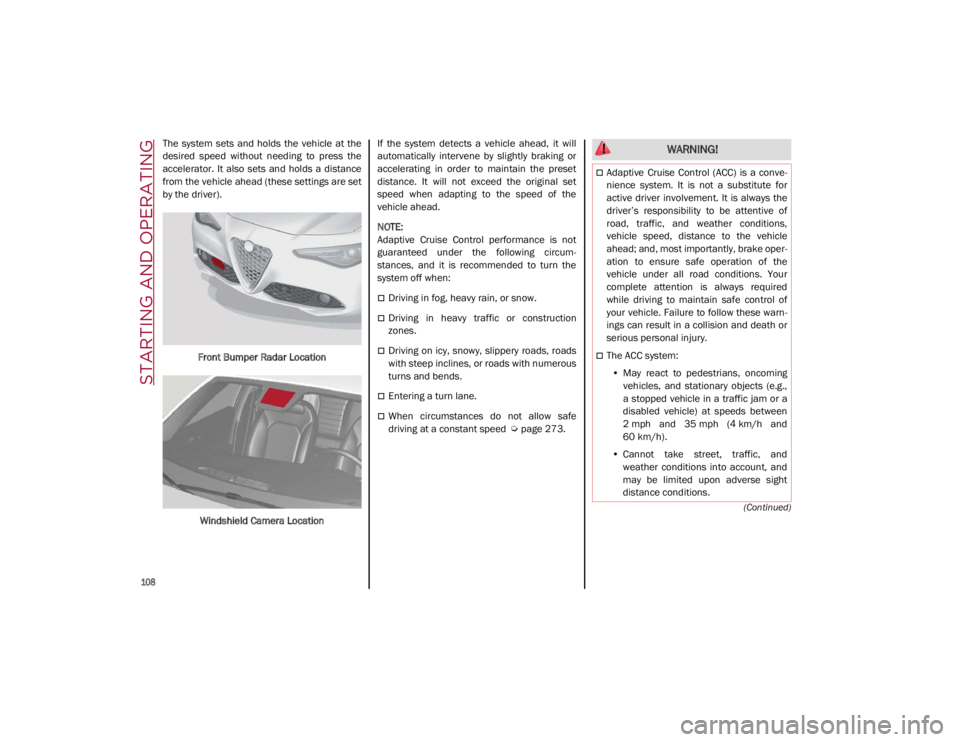
Control. ACC uses a radar sensor located
behind the front bumper and a camera located
in the center/upper part of the windshield, to
detect the presence of a vehicle close ahead.
WARNING!
Cruise Control can be dangerous where the
system cannot maintain a constant speed.
Your vehicle could go too fast for the
conditions, and you could lose control and
have an accident. Do not use Cruise Control
in heavy traffic or on roads that are winding,
icy, snow-covered or slippery.
21_GA_OM_EN_USC_t.book Page 107
Page 110 of 284
STARTING AND OPERATING
108
(Continued)
The system sets and holds the vehicle at the
desired speed without needing to press the
accelerator. It also sets and holds a distance
from the vehicle ahead (these settings are set
by the driver).Front Bumper Radar Location
Windshield Camera Location If the system detects a vehicle ahead, it will
automatically intervene by slightly braking or
accelerating in order to maintain the preset
distance. It will not exceed the original set
speed when adapting to the speed of the
vehicle ahead.
NOTE:
Adaptive Cruise Control performance is not
guaranteed under the following circum
-
stances, and it is recommended to turn the
system off when:
Driving in fog, heavy rain, or snow.
Driving in heavy traffic or construction
zones.
Driving on icy, snowy, slippery roads, roads
with steep inclines, or roads with numerous
turns and bends.
Entering a turn lane.
When circumstances do not allow safe
driving at a constant speed
Ú
page 273.
WARNING!
Adaptive Cruise Control (ACC) is a conve -
nience system. It is not a substitute for
active driver involvement. It is always the
driver’s responsibility to be attentive of
road, traffic, and weather conditions,
vehicle speed, distance to the vehicle
ahead; and, most importantly, brake oper -
ation to ensure safe operation of the
vehicle under all road conditions. Your
complete attention is always required
while driving to maintain safe control of
your vehicle. Failure to follow these warn -
ings can result in a collision and death or
serious personal injury.
The ACC system:
• May react to pedestrians, oncoming
vehicles, and stationary objects (e.g.,
a stopped vehicle in a traffic jam or a
disabled vehicle) at speeds between
2 mph and 35 mph (4 km/h and
60 km/h).
• Cannot take street, traffic, and
weather conditions into account, and
may be limited upon adverse sight
distance conditions.
21_GA_OM_EN_USC_t.book Page 108