ECO mode ALFA ROMEO GIULIA 2022 Owner's Manual
[x] Cancel search | Manufacturer: ALFA ROMEO, Model Year: 2022, Model line: GIULIA, Model: ALFA ROMEO GIULIA 2022Pages: 248, PDF Size: 9.71 MB
Page 102 of 248
STARTING AND OPERATING
100
(Continued)
However, it is not a safety system and not
designed to prevent collisions. The Cruise Control
function performs differently
Ú
page 98.
ACC will allow you to keep Cruise Control engaged
in light to moderate traffic conditions without the
constant need to reset your Cruise Control. ACC
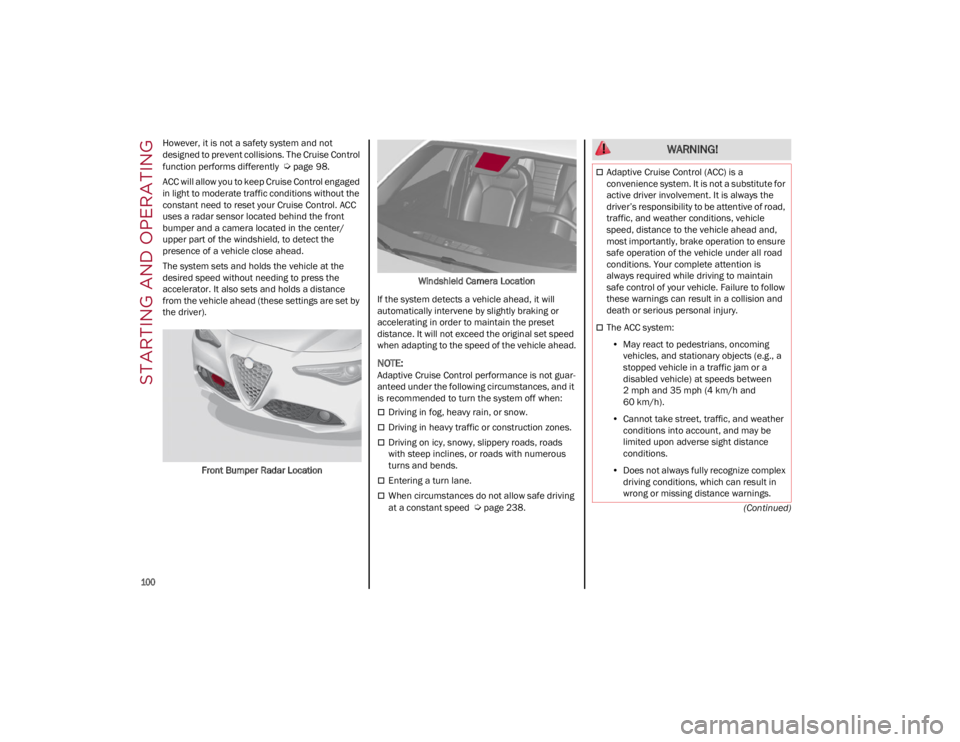
uses a radar sensor located behind the front
bumper and a camera located in the center/
upper part of the windshield, to detect the
presence of a vehicle close ahead.
The system sets and holds the vehicle at the
desired speed without needing to press the
accelerator. It also sets and holds a distance
from the vehicle ahead (these settings are set by
the driver).
Front Bumper Radar Location Windshield Camera Location
If the system detects a vehicle ahead, it will
automatically intervene by slightly braking or
accelerating in order to maintain the preset
distance. It will not exceed the original set speed
when adapting to the speed of the vehicle ahead.
NOTE:
Adaptive Cruise Control performance is not guar -
anteed under the following circumstances, and it
is recommended to turn the system off when:
Driving in fog, heavy rain, or snow.
Driving in heavy traffic or construction zones.
Driving on icy, snowy, slippery roads, roads
with steep inclines, or roads with numerous
turns and bends.
Entering a turn lane.
When circumstances do not allow safe driving
at a constant speed
Ú
page 238.
WARNING!
Adaptive Cruise Control (ACC) is a
convenience system. It is not a substitute for
active driver involvement. It is always the
driver’s responsibility to be attentive of road,
traffic, and weather conditions, vehicle
speed, distance to the vehicle ahead and,
most importantly, brake operation to ensure
safe operation of the vehicle under all road
conditions. Your complete attention is
always required while driving to maintain
safe control of your vehicle. Failure to follow
these warnings can result in a collision and
death or serious personal injury.
The ACC system:
• May react to pedestrians, oncoming
vehicles, and stationary objects (e.g., a stopped vehicle in a traffic jam or a disabled vehicle) at speeds between 2 mph and 35 mph (4 km/h and
60 km/h).
• Cannot take street, traffic, and weather
conditions into account, and may be limited upon adverse sight distanceconditions.
• Does not always fully recognize complex
driving conditions, which can re sult in
wro n
g or missing distance warnings.
22_GA_OM_EN_USC_t.book Page 100
Page 106 of 248
STARTING AND OPERATING
104
Overtake Aid
When driving with ACC engaged and following a
vehicle at a speed greater than 45 mph
(70 km/h), the system will provide an additional
acceleration up to the ACC set speed to assist in
passing the vehicle. This additional acceleration
is triggered when the driver utilizes the left turn
signal and will only be active when passing on the
left hand side.
The system detects the direction of traffic
automatically when the vehicle passes from left
hand traffic to right hand traffic. In this case, the
overtaking assist function is only active when the
reference vehicle is overtaken on the right. The
additional acceleration is deactivated when the
driver uses the right direction indicator and
returns to the original lane.
“Stop And Go” Function
The “Stop and Go” operating strategy allows you
to maintain a safe distance from the vehicle
ahead until the vehicle has completely stopped.
In the event that the ACC system brings your
vehicle to a standstill while following the vehicle
in front, if the vehicle in front starts moving within
two seconds of your vehicle coming to a
standstill, your vehicle will resume motion
without the need for any driver action.
If the vehicle in front does not start moving within
two seconds of your vehicle coming to a standstill, the driver will have to push the RES/
SET switch upward to restart.
Deactivation
The system is deactivated and the set speed is
canceled if:
The on/off button is pushed (when the system
is on or paused)
The ignition is placed in the OFF position
RACE mode is activated (Quadrifoglio models)
The system is canceled (the set speed and
distance are stored):
When the system is paused
Ú
page 101
When the conditions shown in the “Activating
Adaptive Cruise Control (ACC)” section occur
Ú
page 101
Limited Operation Warning
If the dedicated message is shown on the display,
a condition limiting the Adaptive Cruise Control
operation may have occurred.
This could be due to an obstruction of the
vehicle’s sensor or camera. It could also be due
to a fault in the system. If an obstruction is
detected, clean the area of the windshield
opposite the interior rearview mirror, where the
camera is located, as well as the area of the front bumper where the sensor is located. Then check
that the message has disappeared.
When the conditions limiting the system
functions end, normal operation will resume.
Should the fault persist, contact an authorized
dealer.
Precautions While Driving With ACC
In certain driving situations, ACC may have
detection issues. In these cases, ACC may brake
late or unexpectedly. The driver needs to stay
alert and may need to intervene. The following
are examples of these types of situations:
Offset Driving
ACC may not detect a vehicle in the same lane
that is offset from your direct line of travel, or a
vehicle merging in from a side lane. There may
not be sufficient distance to the vehicle ahead.
The offset vehicle may move in and out of the line
of travel, which can cause your vehicle to brake or
accelerate unexpectedly.
Turns And Bends
When driving on a curve with ACC engaged, the
system may increase or decrease the vehicle
speed for stability, with no vehicle ahead
detected. Once the vehicle is out of the curve the
system will resume your original set speed. This is
a part of normal ACC system functionality.
NOTE:
On tight turns ACC performance may be
limited. In this case, it is advisable to
deactivate the system.
The system only limits the speed DURING a
bend and not BEFORE it.
The driver is fully responsible for holding a
safe distance from the vehicle ahead
respecting the highway code in force in the
respective country.
WARNING!
WARNING!
When the ACC system is resumed, the driver
must ensure that there are no pedestrians,
vehicles or objects in the path of the vehicle.
Failure to follow these warnings can result in a
collision and death or serious personal injury.
22_GA_OM_EN_USC_t.book Page 104
Page 118 of 248
STARTING AND OPERATING
116
PARKSENSE DISPLAY
The driver can select the type of warning they
would like to be displayed through the radio
system. To access the function on the main
menu, select in the following order:
1. Driver Assistance
2. ParkSense
3. Mode
4. Sound and Display
Visual Indications
The system indicates the presence of an obstacle
by displaying a single red arc in the detected
area, in relation to the distance of the object and
the position of the vehicle.
If the obstacle is detected in the front or rear
central area, a single red arc will be displayed as
the obstacle approaches, first constant, then
flashing, in addition to an acoustic signal.
If the obstacle is detected in the front or rear left
and/or right area, a single red flashing arc will be
shown in the corresponding area on the display
and the system will emit an acoustic signal, either
at frequent intervals or constantly.
In general, the vehicle is closer to the obstacle
when a single red flashing arc is shown on the
display and the acoustic signal becomes
continuous.
If several obstacles are detected simultaneously
in the front and rear area, the display will show all
of them, regardless of the area in which they were
detected.It is not possible to exit from the display screen
while the vehicle is in REVERSE.
Acoustic Signal
In the presence of an obstacle at the front or the
rear of the vehicle, an acoustic signal with
variable frequency will sound:
The acoustic signal increases in frequency as
the distance between the vehicle and the
obstacle decreases.
The acoustic signal becomes continuous when
the distance between the vehicle and the
obstacle is less than 11 inches (30 cm), and
stops if the distance increases.
The acoustic signal is constant if the distance
between the vehicle and the obstacle is
unchanged.
NOTE:
If the sensors detect several front and rear obsta
-
cles, the closest obstacle is considered. An inter -
mittent signal will sound if the obstacles are at
the same distance (front and rear).
When the system emits an acoustic signal, the
volume of the radio system, if activated, is
automatically lowered.
An acoustic signal will not sound if the vehicle is
in PARK.
ENABLING AND DISABLING PARKSENSE
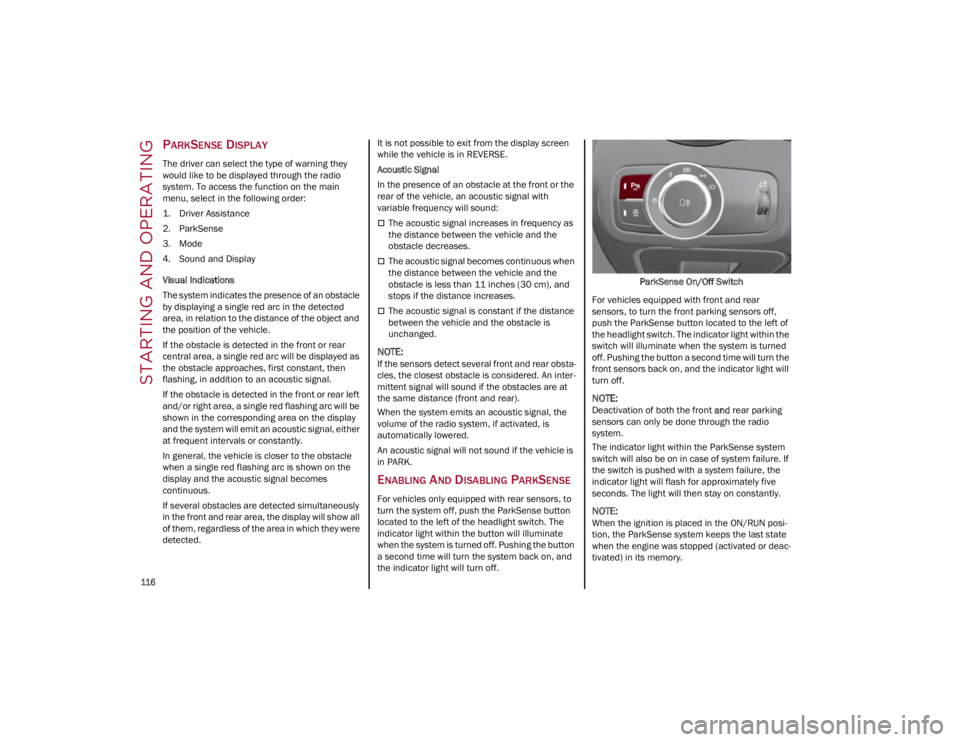
For vehicles only equipped with rear sensors, to
turn the system off, push the ParkSense button
located to the left of the headlight switch. The
indicator light within the button will illuminate
when the system is turned off. Pushing the button
a second time will turn the system back on, and
the indicator light will turn off. ParkSense On/Off Switch
For vehicles equipped with front and rear
sensors, to turn the front parking sensors off,
push the ParkSense button located to the left of
the headlight switch. The indicator light within the
switch will illuminate when the system is turned
off. Pushing the button a second time will turn the
front sensors back on, and the indicator light will
turn off.
NOTE:
Deactivation of both the front and rear parking
sensors can only be done through the radio
system.
The indicator light within the ParkSense system
switch will also be on in case of system failure. If
the switch is pushed with a system failure, the
indicator light will flash for approximately five
seconds. The light will then stay on constantly.
NOTE:
When the ignition is placed in the ON/RUN posi -
tion, the ParkSense system keeps the last state
when the engine was stopped (activated or deac -
tivated) in its memory.
22_GA_OM_EN_USC_t.book Page 116
Page 122 of 248
STARTING AND OPERATING
120
TURNING LANE KEEPING ASSIST ON OR
O
FF
The system is activated/deactivated by pressing
the button at the end of the multifunction lever.
Each time the engine is started, the system
maintains the operating mode that was selected
when it was previously turned off.
Activation/Deactivation Button
Activation Conditions
Once the activation button is pushed, the system
becomes active only if the following conditions
are met:
The car speed is higher than 37 mph (60 km/h).
(The system is deactivated at speeds equal to or
higher than 110 mph (180 km/h))
The lane limit lines are visible at least on one
side
There are suitable visibility conditions
The road is straight or with wide radius bends
A suitable distance is kept from the vehicle in
front
The turn signal (to indicate leaving the lane) is
not active
LANE KEEPING ASSIST WARNING
M
ESSAGE
The Lane Keeping Assist system also advises the
driver when the car changes lanes by showing
symbols and messages on the instrument cluster
display.
The message at the top of the display remains
active only until the main reconfigurable area of
the display is activated by pressing the TRIP
button located on the end of the windshield wiper
lever
Ú
page 66.
After activating the main reconfigurable area, the
Lane Keeping Assist system messages will be
shown in the instrument cluster display.
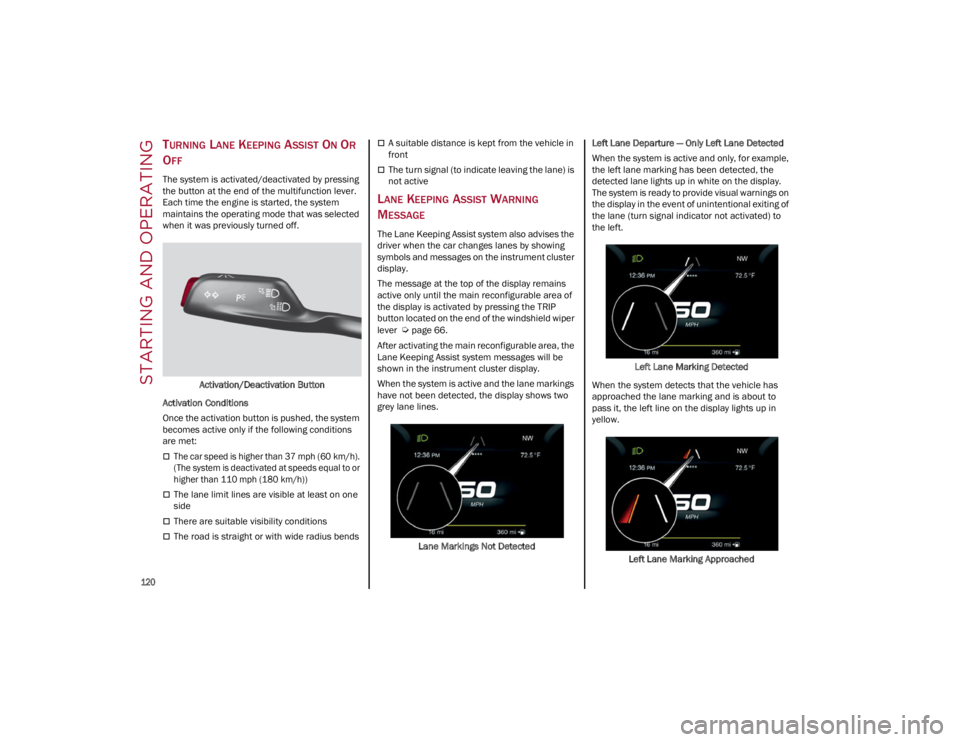
When the system is active and the lane markings
have not been detected, the display shows two
grey lane lines.
Lane Markings Not Detected Left Lane Departure — Only Left Lane Detected
When the system is active and only, for example,
the left lane marking has been detected, the
detected lane lights up in white on the display.
The system is ready to provide visual warnings on
the display in the event of unintentional exiting of
the lane (turn signal indicator not activated) to
the left.
Left Lane Marking Detected
When the system detects that the vehicle has
approached the lane marking and is about to
pass it, the left line on the display lights up in
yellow.
Left Lane Marking Approached
22_GA_OM_EN_USC_t.book Page 120
Page 129 of 248

127
TRANSPORTING ANIMALS
The intervention of the airbags may be dangerous
for an animal on the front seat. It is therefore
advised to arrange animals on the rear seat
inside dedicated cages restrained by the
vehicle’s seat belts.
Keep in mind that, in the event of a sudden
braking or an accident, an inadequately
restrained animal may be projected within the
passenger compartment, risking injury to the
animal itself and the other occupants of the
vehicle.
EXHAUST GAS
Exhaust emissions are very dangerous, and may
be lethal. They contain carbon monoxide, a
colorless, odorless gas which can cause fainting
and poisoning if inhaled.
To avoid inhaling carbon monoxide, take the
following measures:
Do not keep the engine running in closed
spaces.
If, for some reason (e.g. transporting bulky
loads), it is necessary to drive with the trunk
open, close all the windows and run the
climate control fan at maximum speed. DO
NOT activate air recirculation mode.
Should it be necessary to stay in the stationary
vehicle with engine running, adjust the
ventilation/heating system and operate the
fan in such a way that outside air will enter the
passenger compartment. Activate the
maximum fan speed.Maintenance of the exhaust system provides the
best protection against leaks of carbon monoxide
into the passenger compartment.
Should an unusual noise from the exhaust
system or the presence of exhaust gas in the
passenger compartment be identified, or if the
underbody or rear section of the vehicle is
damaged, have the entire exhaust system and
bodywork areas checked to identify any
components which are broken, damaged, worn or
have moved from their correct fitting position. If
any of these things occur, contact an authorized
dealer.
Open welding or loose connections may permit
exhaust gas to enter the passenger
compartment.
Check the exhaust system each time the vehicle
is raised for lubrication or oil change operations.
Replace the components if necessary, contact an
authorized dealer.
PERFORMANCE — QUADRIFOGLIO
This vehicle is equipped with an engine capable
of delivering exceptionally fast acceleration and
speed:
Peak power: 505 HP at 6500 RPM.
Peak torque: 443 ft-lb at 2500–5000 RPM.
Top speed: 191 mph (307 km/h).
Acceleration from 0 to 60 mph (0 to 100 km/h):
3.8 seconds.
For safe driving, it is essential, particularly during
the first days of use, to get to know the car by
driving carefully and gradually discovering its
performance. Brakes
The car braking system may be available with four
carbon-ceramic material brake discs, one on
each wheel.
In order to guarantee the maximum braking
capacity for the first use, Alfa Romeo performs a
“run-in” procedure for discs and pads directly at
the factory.
The use of carbon-ceramic material brake discs
guarantees braking features (better
deceleration/pedal load ratio, braking distances,
fading resistance) proportional to the dynamic
features of the car in addition to considerably
decreasing the unsprung component weight.
The materials used and the structural features of
the system could generate unusual noises which
have absolutely no adverse effect on correct
operation and reliability of the braking system.
Greater pressure may need to be applied to the
brake pedal the first time to keep the same
braking capacities in presence of condensation
or salt on the braking surfaces, for example after
washing or if the car is not used for a long time.
NOTE:
Given the high technological level of this system,
any servicing on it must be performed by an
authorized dealer which exclusively has the skills
needed for the repair and maintenance opera
-
tions.
In case of intensive, high-performance use of the
car, have the efficiency of the carbon-ceramic
material braking system inspected as shown on
the Maintenance Plan at an authorized dealer.
22_GA_OM_EN_USC_t.book Page 127
Page 130 of 248

STARTING AND OPERATING
128
Driving On Race Tracks
Before driving on a track using a racing style, it is
necessary to:
Attend a race track driving course.
Check all liquid levels in the engine
compartment.
Have the car inspected at an authorized
dealer.
Remember that the car was not designed to be
driven exclusively on the race track and that this
use increases stress and component wear.
NOTE:
Quadrifoglio front brakes are equipped with NAO
type pads (Non-Asbestos Organic). These pads
are NOT suitable for high thermal loads (for
example track use). If you want to use vehicle on
a track it is recommended to use the optional
CCM Brakes (Carbon Ceramic Brake disc). Preheating The Carbon Ceramic Material Brake
Discs (If Equipped)
The brake discs must be warmed up to make
them fully efficient. You are advised to perform
the following procedure to achieve optimal
efficiency:
Brake nine times from 80 mph to 18 mph
(130 km/h to 30 km/h) with deceleration
equal to 0.7g (the longitudinal acceleration
value is shown on the instrument panel display
by setting RACE mode and selecting the
“Performance” page) with 20 second intervals
between brake applications; keep the car at a
speed comprised between 37 mph and
62 mph (60 km/h and 100 km/h) and do not
brake for 4 minutes to allow the brakes to cool
down.
Brake three times from 124 mph to 18 mph
(200 km/h to 30 km/h) with deceleration
equal to 1.1g (ABS operation) with 30 second
intervals between brake applications; keep the
car at a speed comprised between 37 mph
and 62 mph (60 km/h and 100 km/h) and do not brake for 5 minutes to allow the brakes to
cool down.
22_GA_OM_EN_USC_t.book Page 128
Page 132 of 248
SAFETY
130
DYNAMIC STEERING TORQUE (DST)
DST uses the integration of the Electronic
Stability Control (ESC) system with the electric
power steering to increase the safety level of the
whole vehicle.
In critical situations (braking on surfaces with
different grip conditions), the ESC system
controls the steering through the DST function to
implement an additional torque contribution on
the steering wheel in order to suggest the most
correct maneuver to the driver.
The coordinated action of the brakes and
steering increases the sensation of safety and
control of the vehicle.
NOTE:
The DST feature is only meant to help the driver
realize the correct course of action through small
torques on the steering wheel, which means the
effectiveness of the DST feature is highly depen-
dent on the driver’s sensitivity and overall reac -
tion to the applied torque. It is very important to
realize that this feature will not steer the vehicle,
meaning the driver is still responsible for steering
the vehicle.
DRIVE TRAIN CONTROL (DTC) SYSTEM —
I
F EQUIPPED
Some models of this vehicle are equipped with an
All-Wheel Drive (AWD) system, which offers an
optimal drive for countless driving conditions and
road surfaces. The system reduces the slipping of
the tires to a minimum, automatically
redistributing the torque to the front and rear
wheels as needed. To maximize fuel savings, the vehicle with AWD
automatically passes to Rear-Wheel Drive (RWD)
when the road and environmental conditions are
such that they wouldn't cause the tires to slip.
When the road and environmental conditions
require better traction, the vehicle automatically
goes to AWD mode.
NOTE:
If the system failure symbol switches on, after
starting the engine or while driving, it means that
the AWD system is not working properly. If the
warning message activates frequently, it is
recommended to carry out the maintenance
operations.
ELECTRONIC STABILITY CONTROL (ESC)
The ESC system improves the directional control
and stability of the vehicle in various driving
conditions.
The ESC system corrects the vehicle’s understeer
and oversteer, distributing the brake force on the
appropriate wheels. The torque supplied by the
engine can also be reduced in order to maintain
control of the vehicle.
Oversteer
occurs when the vehicle is turning
more than it should according to the angle of
the steering wheel.
Understeer occurs when the vehicle is turning
less than it should according to the angle of
the steering wheel.
The ESC system uses sensors installed on the
vehicle to determine the path that the driver
intends to follow and compares it with the
vehicle’s effective path. When the real path
deviates from the desired path, the ESC system
intervenes to counteract the above conditions. System Intervention
The intervention of the system is indicated by the
flashing of the ESC Warning Light on the
instrument panel, to inform the driver that the
vehicle stability and grip are critical.
WARNING!
Electronic Stability Control (ESC) cannot
prevent the natural laws of physics from
acting on the vehicle, nor can it increase the
traction afforded by prevailing road
conditions. ESC cannot prevent accidents,
including those resulting from excessive
speed in turns, driving on very slippery
surfaces, or hydroplaning. ESC also cannot
prevent accidents resulting from loss of
vehicle control due to inappropriate driver
input for the conditions. Only a safe, attentive,
and skillful driver can prevent accidents. The
capabilities of an ESC equipped vehicle must
never be exploited in a reckless or dangerous
manner which could jeopardize the user’s
safety or the safety of others.
Vehicle modifications, or failure to properly
maintain your vehicle, may change the
handling characteristics of your vehicle, and
may negatively affect the performance of the
ESC system. Changes to the steering system,
suspension, braking system, tire type and
size or wheel size may adversely affect ESC
performance. Improperly inflated and
unevenly worn tires may also degrade ESC
performance. Any vehicle modification or
poor vehicle maintenance that reduces the
effectiveness of the ESC system can
increase the risk of loss of vehicle control,
vehicle rollover, personal injury and death.
22_GA_OM_EN_USC_t.book Page 130
Page 135 of 248
133
While driving, the system monitors the detection
zone to check whether it is necessary to send a
signal to the driver on both sides. The system
monitors this detection zone in three different
situations:
When you are being overtaken by a vehicle.
When you are overtaking a vehicle.
When a vehicle approaches from the side.
NOTE:
The system does not alert the driver of the
presence of fixed objects (e.g. safety barriers,
poles, walls, etc.). However, in some circum-
stances, the system may activate in the
presence of these objects. This is normal and
does not indicate a system malfunction.
The system does not alert the driver about the
presence of vehicles coming from the opposite
direction, in the adjacent lanes.
If a trailer is hitched to the car, the system
automatically deactivates. Rear View
The system detects vehicles coming from the rear
part of your vehicle on both sides and entering
the rear detection area with a difference in speed
of less than 25 mph (40 km/h) in relation to your
vehicle.
Overtaking Vehicles
If another vehicle is overtaken slowly, with a
difference in speed of less than 15 mph (25 km/h)
and the vehicle stays in the blind spot for approxi
-
mately 1.5 seconds, the warning light on the door
mirror of the corresponding side illuminates.
If the difference in speed between the two
vehicles is greater than 15 mph (25 km/h), the
warning light does not illuminate
Ú
page 238.
Rear Cross Path Detection (RCP) System
The RCP system assists the driver during reverse
maneuvers in the case of reduced visibility.
The RCP system monitors the rear detection
areas on both sides of the vehicle to detect
objects moving toward the sides of the vehicle,
with a minimum speed between 1 mph (1 km/h)
and 2 mph (3 km/h) and objects moving at a
maximum speed of 21 mph (35 km/h), in areas such as parking lots.
The system activation is signaled to the driver by
an audible warning.
NOTE:
If the sensors are covered by objects or
vehicles, the system may not work as intended.
For the system to operate correctly, the rear
fascia/bumper area where the radar sensors
are located must stay free from snow, ice and
dirt gathered from the road surface.
Do not cover the rear fascia/bumper area
where the radar sensors are located with any
object (e.g. adhesives, bike rack, etc.).
Operating Mode
The system may be activated/deactivated via the
radio system. To access the function, select the
following items on the main menu in sequence:
1. “Settings”
2. “Passive Safety”
3. “Blind Spot Alert”
“Blind Spot Alert”, “Visual” Mode
When the system is enabled, the warning light
within the door mirror on the side of the detected
object illuminates.
The visual warning on the mirror will blink if the
driver activates the turn signals, indicating a lane
change.
The warning light will be constant if the driver
stays in the same lane.
WARNING!
The Blind Spot Monitoring system is only an
aid to help detect objects in the blind spot
zones. The BSM system is not designed to
detect pedestrians, bicyclists, or animals.
Even if your vehicle is equipped with the BSM
system, always check your vehicle’s mirrors,
glance over your shoulder, and use your turn
signal before changing lanes. Failure to do so
can result in serious injury or death.
WARNING!
Rear Cross Path Detection (RCP) is not a back
up aid system. It is intended to be used to help
a driver detect an oncoming vehicle in a park -
ing lot situation. Drivers must be careful when
backing up, even when using RCP. Always
check carefully behind your vehicle, look
behind you, and be sure to check for pedestri -
ans, animals, other vehicles, obstructions, and
blind spots before backing up. Failure to do so
can result in serious injury or death.
22_GA_OM_EN_USC_t.book Page 133
Page 139 of 248
137
System Intervention
Using information from the front camera, the
system implements two operating logics:
The first operating logic takes the driving style
into account, observing the road and detecting
to what extent the driver can continue driving
with few lane crossing events.
The second operating logic measures the time
spent behind the wheel with the vehicle speed
above 40 mph (60 km/h) and below 110 mph
(180 km/h). If the “Standard” option is
selected, in these conditions, the “Dozy Driver”
message may appear after three hours of
driving. If the “Early” option is selected and
these conditions occur, the “Dozy Driver”
message will be displayed after two hours of
driving.
NOTE:
If the conditions described above are not
detected continuously during the entire driving
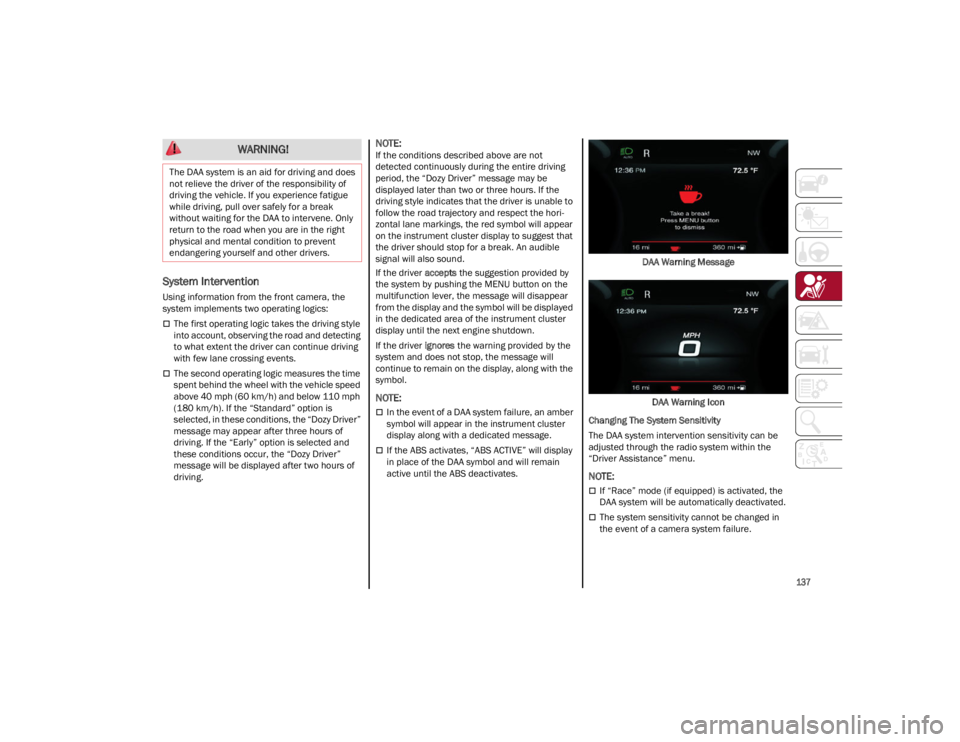
period, the “Dozy Driver” message may be
displayed later than two or three hours. If the
driving style indicates that the driver is unable to
follow the road trajectory and respect the hori-
zontal lane markings, the red symbol will appear
on the instrument cluster display to suggest that
the driver should stop for a break. An audible
signal will also sound.
If the driver accepts the suggestion provided by
the system by pushing the MENU button on the
multifunction lever, the message will disappear
from the display and the symbol will be displayed
in the dedicated area of the instrument cluster
display until the next engine shutdown.
If the driver ignores the warning provided by the
system and does not stop, the message will
continue to remain on the display, along with the
symbol.
NOTE:
In the event of a DAA system failure, an amber
symbol will appear in the instrument cluster
display along with a dedicated message.
If the ABS activates, “ABS ACTIVE” will display
in place of the DAA symbol and will remain
active until the ABS deactivates. DAA Warning Message
DAA Warning Icon
Changing The System Sensitivity
The DAA system intervention sensitivity can be
adjusted through the radio system within the
“Driver Assistance” menu.
NOTE:
If “Race” mode (if equipped) is activated, the
DAA system will be automatically deactivated.
The system sensitivity cannot be changed in
the event of a camera system failure.
WARNING!
The DAA system is an aid for driving and does
not relieve the driver of the responsibility of
driving the vehicle. If you experience fatigue
while driving, pull over safely for a break
without waiting for the DAA to intervene. Only
return to the road when you are in the right
physical and mental condition to prevent
endangering yourself and other drivers.
22_GA_OM_EN_USC_t.book Page 137
Page 140 of 248
SAFETY
138
FORWARD COLLISION WARNING (FCW)
S
YSTEM
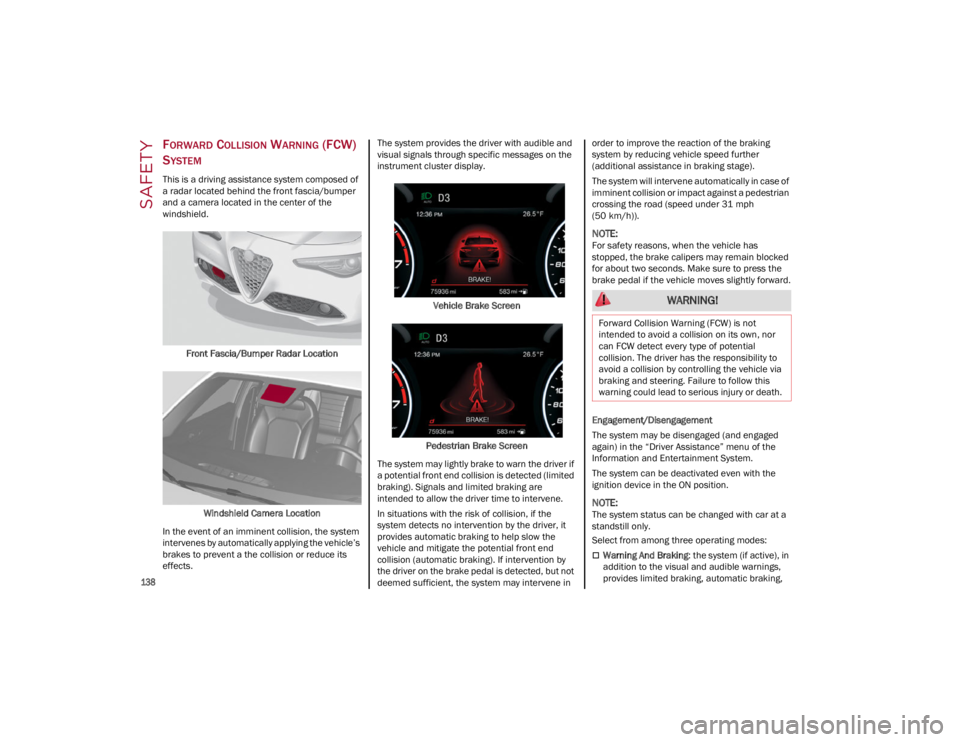
This is a driving assistance system composed of
a radar located behind the front fascia/bumper
and a camera located in the center of the
windshield.
Front Fascia/Bumper Radar Location
Windshield Camera Location
In the event of an imminent collision, the system
intervenes by automatically applying the vehicle’s
brakes to prevent a the collision or reduce its
effects. The system provides the driver with audible and
visual signals through specific messages on the
instrument cluster display.
Vehicle Brake Screen
Pedestrian Brake Screen
The system may lightly brake to warn the driver if
a potential front end collision is detected (limited
braking). Signals and limited braking are
intended to allow the driver time to intervene.
In situations with the risk of collision, if the
system detects no intervention by the driver, it
provides automatic braking to help slow the
vehicle and mitigate the potential front end
collision (automatic braking). If intervention by
the driver on the brake pedal is detected, but not
deemed sufficient, the system may intervene in order to improve the reaction of the braking
system by reducing vehicle speed further
(additional assistance in braking stage).
The system will intervene automatically in case of
imminent collision or impact against a pedestrian
crossing the road (speed under 31 mph
(50 km/h)).
NOTE:
For safety reasons, when the vehicle has
stopped, the brake calipers may remain blocked
for about two seconds. Make sure to press the
brake pedal if the vehicle moves slightly forward.
Engagement/Disengagement
The system may be disengaged (and engaged
again) in the “Driver Assistance” menu of the
Information and Entertainment System.
The system can be deactivated even with the
ignition device in the ON position.
NOTE:
The system status can be changed with car at a
standstill only.
Select from among three operating modes:
Warning And Braking
: the system (if active), in
addition to the visual and audible warnings,
provides limited braking, automatic braking,
WARNING!
Forward Collision Warning (FCW) is not
intended to avoid a collision on its own, nor
can FCW detect every type of potential
collision. The driver has the responsibility to
avoid a collision by controlling the vehicle via
braking and steering. Failure to follow this
warning could lead to serious injury or death.
22_GA_OM_EN_USC_t.book Page 138